The PPT Productivity Alternative That Does More
PPT Productivity covers shortcuts. Deckary covers shortcuts, charts, icons, and AI — on both Mac and Windows, at a lower price.
TL;DR: PPT Productivity excels at deep keyboard shortcut customization with 800+ commands and McKinsey presets but is Windows-only, has no charts or AI, and starts at $179/year. Deckary offers shortcuts plus waterfall charts, Mekko charts, AI slides, and Mac support at $120-180/year. Choose PPT Productivity if you need 800+ customizable shortcuts on Windows and don't need charts. Choose Deckary if you want shortcuts, charts, icons, and AI in one tool — especially on Mac.
14-day free trial. No credit card required.
Our users work at companies like
Deckary helps consulting & industry firms to build better presentations








Shortcuts-only vs all-in-one
PPT Productivity focuses on keyboard shortcuts. Deckary gives you shortcuts plus charts, AI slides, and Mac support.
PPT Productivity approach
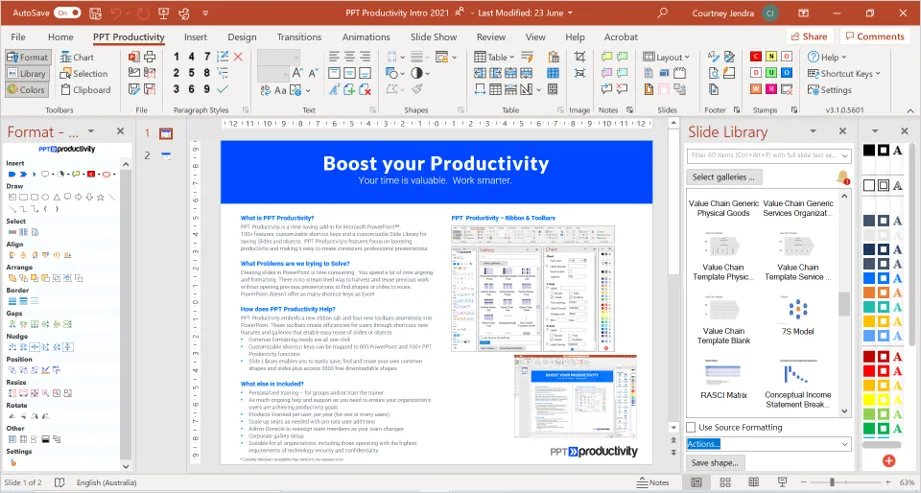
- Windows-only — no Mac support
- Shortcuts and formatting tools only
- No charting capabilities
- No AI slide generation or text rewriting
Deckary approach
- Works on both Mac and Windows
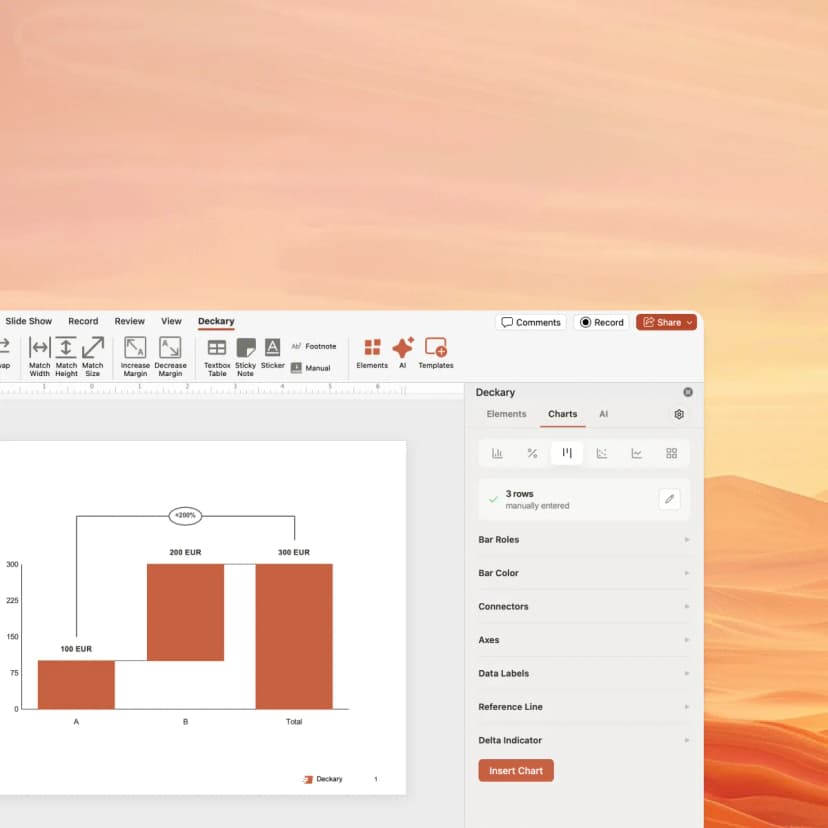
- Shortcuts plus waterfall, Mekko, Gantt charts
- AI Slide Builder for consulting slides
- 2,000+ icons and Excel-linked charts
How Deckary compares to PPT Productivity
Shortcuts + charts + AI vs. shortcuts alone
| Feature | Deckary | PPT Productivity |
|---|---|---|
| Shortcuts & Productivity | ||
| Alignment shortcuts | ||
| Distribution shortcuts | ||
| 800+ customizable commands | ||
| Shortcut search popup | ||
| McKinsey Marvin presets | ||
| Agenda wizard | ||
| Charting | ||
| Waterfall charts | ||
| Mekko (Marimekko) charts | ||
| Gantt charts | ||
| Excel linking | ||
| Harvey Balls | ||
| AI & Platform | ||
| AI Slide Builder | ||
| AI text polish | ||
| 1000+ icons & flags | 2000+ shapes | |
| Mac support | ||
| Windows support | ||
Feature comparison based on publicly available information as of March 2026. Verify current features at PPT Productivity.
With user, you save $-1/yr vs PPT Productivity — and get charts, AI slides & Mac support
*Based on PPT Productivity list price as of March 2026. Verify current pricing at pptproductivity.com.
Pricing comparison
Transparent pricing vs PPT Productivity's approach
| Deckary | PPT Productivity | |
|---|---|---|
| Free tier | 14-day free trial | Yes |
| Starting price | $15/month or $120/year | $179/yr |
| Premium tier | $19/month or $180/year | Custom |
| Enterprise | From $29/seat/month | Custom |
*PPT Productivity: Annual subscription. Three tiers: Basic (20 features), Mid (40 features), Full (200+ features). Lower tiers exclude Format, Slide Library, and Color toolbars.
Pricing accurate as of March 2026. Competitor pricing may change — verify at pptproductivity.com.
What consultants say
Professionals who chose Deckary over PPT Productivity
I used to rely on a separate shortcuts tool, but Deckary gave me charts and AI too. One tool instead of two.
Daniel
Strategy Consultant
I needed Mac-native PowerPoint shortcuts. Deckary runs natively on both platforms, with charts included.
Sarah
Management Consultant
I only used about 15 shortcuts regularly. Deckary covers those plus waterfall charts. Better value at half the price.
Marcus
Senior Associate
The AI Slide Builder was the dealbreaker. I hadn't seen anything like it elsewhere. Describe a problem, get a slide.
Priya
Engagement Manager
I needed Mekko charts for market sizing decks. My old shortcut tool couldn't create charts. Deckary solved it.
Thomas
Corporate Strategist
$120/year vs $179/year — and I get more features. The math was obvious.
Rachel
Freelance Consultant
Why consultants choose Deckary over PPT Productivity
Shortcuts are just the start — get charts, AI, and Mac support too
All the charting features you need
Create consulting-grade charts in minutes, not hours
Waterfall Charts
Create bridge charts with automatic totals, subtotals, and connecting lines. PPT Productivity has no chart creation capability.
Mekko Charts
Build Marimekko charts for market sizing and share-of-wallet analysis. Variable-width bars show both size and composition.
Gantt Charts
Project timelines with task bars, milestones, dependencies, and swimlanes. Link to Excel for dynamic updates.
Excel Linking
Charts link directly to Excel. Update your data, and the chart updates automatically. No manual re-work.
The honest comparison
PPT Productivity is a well-built shortcut tool with genuine depth. It was created by BCG and Accenture alumni who understand consulting workflows, and the ability to customize shortcuts for 800+ PowerPoint commands is unmatched. The McKinsey Marvin presets and shortcut search popup are unique features no competitor offers.
Where PPT Productivity wins: Deep shortcut customization for 800+ commands. McKinsey Marvin preset shortcut profiles. Shortcut search popup. Agenda wizard with automatic updates. 2000+ downloadable shapes. Established since 2017 with strong user reviews.
Where Deckary wins: Waterfall, Mekko, and Gantt charts — PPT Productivity has none. AI Slide Builder for generating consulting slides from text. Native Mac support without workarounds. Lower price ($120-180/year vs $179+/year). 2,000+ searchable icons inside PowerPoint. Excel-linked charts with automatic updates.
The bottom line: PPT Productivity is built for one thing — making PowerPoint shortcuts better — and does it well. Deckary covers shortcuts plus charts, AI, and icons. If keyboard shortcuts across 800+ commands is genuinely your top priority and you're on Windows, PPT Productivity delivers. If you want shortcuts alongside consulting charts and AI, Deckary offers more for less.
Choose PPT Productivity if you:
- • Windows-only consultants who need deep shortcut customization across 800+ commands
- • Teams using preconfigured McKinsey Marvin shortcut profiles
- • Users who need a shortcut search popup to find commands quickly
- • Professionals who prioritize formatting tools over charting
- • Firms that need agenda wizard and table formatting automation
Choose Deckary if you:
- • Mac users — no native macOS support
- • Consultants who need waterfall, Mekko, or Gantt charts
- • Teams adopting AI-assisted presentation workflows
- • Users who want shortcuts and charts in a single tool
- • Budget-conscious individuals — full plan starts at $179/year
Switching from PPT Productivity
What transfers seamlessly
- Existing PowerPoint files work immediately
- No data migration needed — Deckary is additive
- Both add-ins can run simultaneously on Windows
What needs adjustment
- •Different shortcut key assignments (Deckary uses Ctrl+Alt combinations)
- •No shortcut search popup in Deckary — focused shortcut set instead
- •New charting and AI workflows to learn
Our recommendation: Install Deckary alongside PPT Productivity during your 14-day trial. Use the trial for charts and AI slides, and test the alignment shortcuts. Keep PPT Productivity if you rely on its deep shortcut customization.
Ready to try shortcuts + charts + AI?
Deckary gives you the alignment shortcuts you need, plus waterfall charts, Mekko charts, AI slides, and 2,000+ icons — on both Mac and Windows.
Frequently Asked Questions
Common questions about PPT Productivity vs Deckary