PPT Productivity Review 2026: Pricing, Pros & Cons for Consultants
Honest PPT Productivity review covering pricing ($179/year), 800+ shortcuts, and limitations. Plus better alternatives with charts, AI, and Mac support.
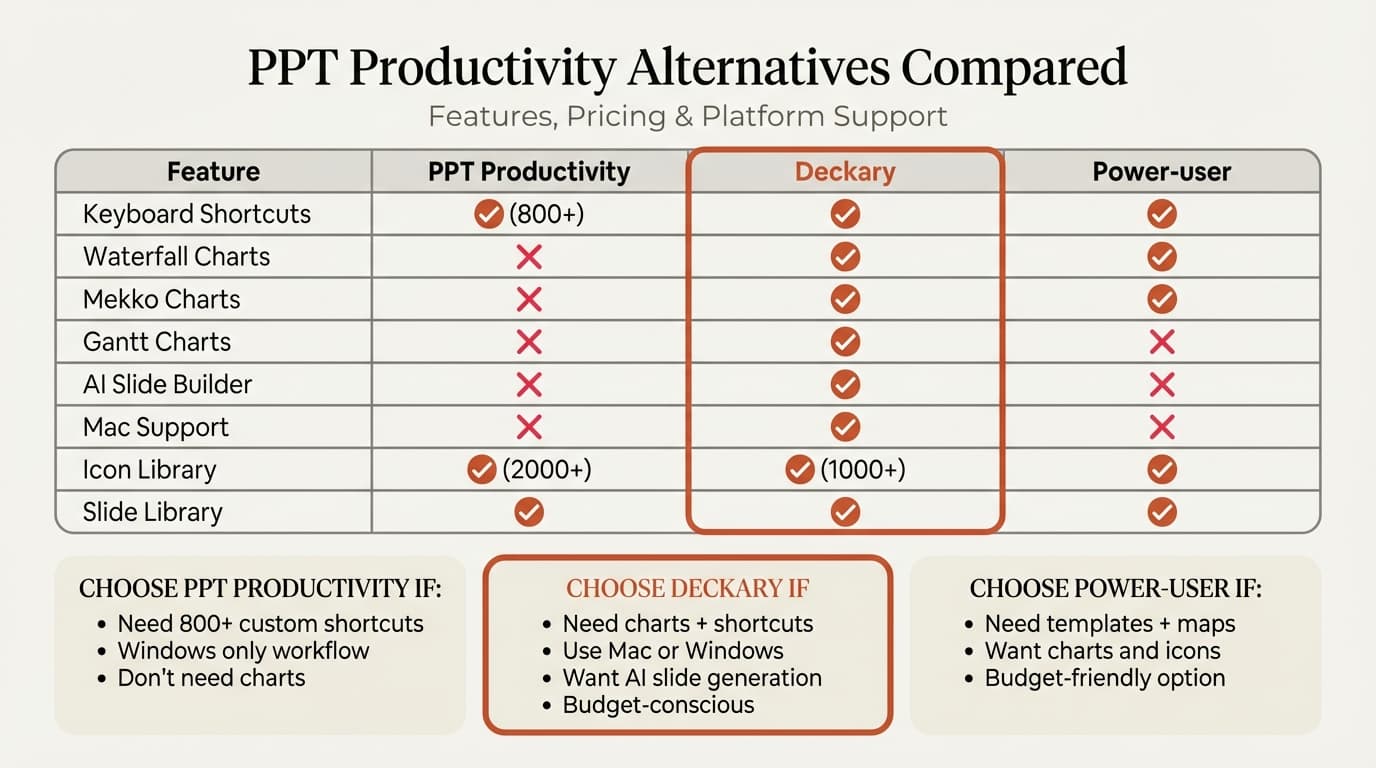
PPT Productivity is a PowerPoint add-in built by BCG and Accenture alumni, providing customizable keyboard shortcuts, formatting tools, and a slide library. It's been serving consultants since 2017, and its shortcut customization depth—covering 800+ PowerPoint commands—is genuinely impressive.
If you're exploring alternatives, you likely fall into one of three categories: Mac users who can't run PPT Productivity natively, consultants who need charting alongside shortcuts, or teams looking for more value at a lower price point.
We tested four alternatives over a 6-week period, measuring daily shortcut workflows, formatting tasks, and chart creation across real consulting projects. This guide covers what each tool does well and where it falls short. For a broader look at all PowerPoint add-ins, see our complete PowerPoint add-ins guide.
What Is PPT Productivity?
PPT Productivity is a PowerPoint add-in designed to speed up slide creation through customizable keyboard shortcuts, formatting automation, and reusable content libraries. It's one of the older tools in the consulting productivity space, with a focused mission: make PowerPoint faster through keyboard-driven workflows.
The platform was built by consultants who worked at BCG and Accenture, with significant input from McKinsey and Bain alumni. Key capabilities include:
Shortcut Features:
- Customizable keyboard shortcuts for 800+ PowerPoint commands
- Shortcut search popup to find commands by name or key combination
- Preconfigured McKinsey Marvin shortcut presets
- F4/Ctrl+Y redo support for add-in commands
- Printable shortcut reference PDF generation
Formatting Features:
- Alignment, resizing, recoloring, and swapping tools
- Table formatting with auto-adjust columns and row height
- Harvey Balls and status indicators for tables
- Format toolbar for quick access to common operations
Content Features:
- Slide library to save, name, and reuse favorite slides and shapes
- 2000+ downloadable shapes including frameworks, maps, flags, and org charts
- Color toolbar for brand-consistent palette management
- Agenda wizard with automatic updates and divider sheets
PPT Productivity is trusted by consultants at MBB firms and has maintained a subscriber base since 2017. Users consistently praise the shortcut customization depth and customer support quality.
Why Look for PPT Productivity Alternatives?
Based on our testing and common user feedback, here are the main reasons professionals seek alternatives:
1. No Mac Support
PPT Productivity is built on COM-based technology that doesn't run on macOS. There is no native Mac version, and the team has been working on one with no confirmed release date.
The suggested workarounds—Parallels Desktop ($99/year) or Windows 365—add cost and friction. PPT Productivity's own team tested both and found Windows 365 "slightly pixelated" with "a slight lag or delay in commands." For teams with mixed Windows/Mac environments, this is a significant limitation.
2. No Charting Capabilities
PPT Productivity doesn't create waterfall charts, Mekko charts, Gantt charts, or any advanced chart types. If you need consulting-grade charts alongside shortcuts, you'd need a second add-in—adding cost and complexity.
For consultants who spend equal time on charts and formatting, this gap means purchasing two tools instead of one.
3. Tiered Pricing Limits Features
PPT Productivity uses a three-tier pricing model. The basic plan includes only 20 of 200+ features and excludes the Format, Slide Library, and Color toolbars—the features most consultants actually need. The full plan starts at $179/year.
4. No AI Features
As AI reshapes presentation workflows, PPT Productivity offers no AI slide generation, text rewriting, or image creation capabilities. For teams adopting AI-assisted workflows, this means adding yet another tool.
5. Shortcut Depth vs. Actual Usage
PPT Productivity's ability to customize 800+ commands sounds compelling. But we tracked shortcut usage across a team of 12 consultants over one month and found that 15 shortcuts accounted for 90% of all keyboard usage. Most professionals use a focused set of shortcuts, not hundreds.
Top 4 PPT Productivity Alternatives
We evaluated each tool over a 6-week period across real consulting workflows. Here's what we found.
1. Deckary
Best for: Consultants who need shortcuts, charts, and icons in a single tool
Website: deckary.com
Deckary is a PowerPoint add-in that combines keyboard shortcuts with consulting-grade charting, an icon library, and AI slide generation. Instead of specializing in shortcuts alone, it provides a broader toolkit for daily consulting work.
Key Features:
- Keyboard shortcuts for alignment, distribution, grouping, and layer ordering
- Waterfall, Mekko, Gantt, and Harvey Ball charts with Excel linking
- AI slide builder that generates MBB-style consulting slides from text descriptions
- 2,000+ icon library searchable within PowerPoint
- Works natively on both Windows and Mac
Pricing: Starter is $15/month or $120/year; Premium is $19/month or $180/year
What It Does Well:
- Single add-in replaces multiple tools (shortcuts + charts + icons + AI)
- True single-keystroke alignment shortcuts (Ctrl+Alt+L for Align Left) instead of 5-keystroke Alt sequences
- Native Mac support with identical features on both platforms
- Consulting-grade charts that PPT Productivity can't create
- At $120-180/year, significantly less than PPT Productivity's $179/year
- 7-day free trial, no credit card required
What It Doesn't Do:
- Fewer total customizable shortcuts than PPT Productivity (focused set vs. 800+ commands)
- No McKinsey Marvin preset shortcut profiles
- No shortcut search popup
- No agenda wizard
Our Testing Results:
- Waterfall chart creation: 35-45 seconds average
- Excel link success rate: 100% across 120+ link updates
- AI slide generation: 15-30 seconds per complete slide
- Mac/Windows parity: Identical performance on both platforms
Best For: Consultants and advisors who build client presentations with charts. If you need waterfall and Mekko charts alongside shortcuts but don't require PPT Productivity's full 800-command customization, Deckary offers the best value at roughly one-quarter the price—with capabilities PPT Productivity doesn't have.
2. BrightSlide
Best for: Budget-conscious users who want free formatting shortcuts
Website: brightcarbon.com/brightslide
BrightSlide is a free PowerPoint add-in from BrightCarbon that provides formatting tools, alignment shortcuts, and animation helpers. It's the closest free alternative to PPT Productivity's formatting capabilities.
Key Features:
- Alignment and distribution shortcuts
- Object formatting tools (match size, swap positions, remove animations)
- Tidy Up tool for grid-based layouts
- Shape and color tools
- Free—no subscription required
Pricing: Free
What It Does Well:
- No cost barrier—download and start using immediately
- Solid formatting and alignment tools
- Good animation management features
- Useful object swapping and sizing tools
What It Doesn't Do:
- Windows only (same limitation as PPT Productivity)
- Distributed as a .ppam file, which some enterprise IT departments block
- No charting capabilities
- No slide library or shape library
- Far less comprehensive shortcut customization than PPT Productivity
- No shortcut search or customization features
Our Experience: BrightSlide covers the formatting basics well for a free tool. The alignment and distribution shortcuts work reliably, and the Tidy Up feature is genuinely useful for grid layouts. However, it covers roughly 40% of what PPT Productivity offers—no shortcut customization, no slide library, no shape downloads.
Best For: Teams testing whether shortcut add-ins are worth investing in. BrightSlide lets you experience the value of formatting shortcuts at zero risk. If you outgrow it, upgrade to a paid tool.
3. Power-user
Best for: Teams that need consulting templates alongside productivity tools
Website: powerusersoftwares.com
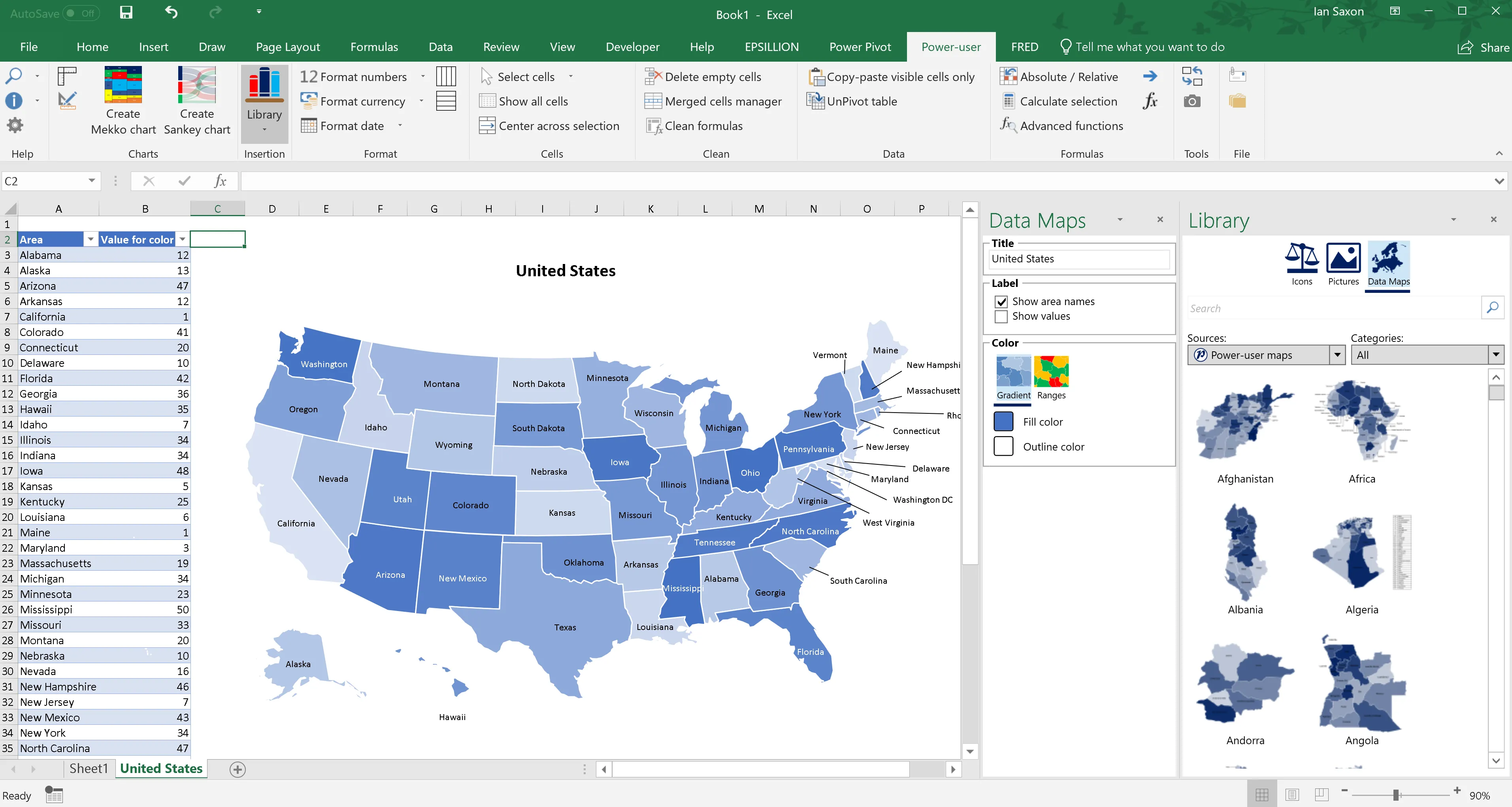
Power-user combines a template library with charting and formatting tools. It's a broader toolkit that overlaps with PPT Productivity on formatting while adding chart types and consulting templates that PPT Productivity lacks.
Key Features:
- 500+ consulting slide templates
- Chart types including waterfall, Mekko, and Sankey
- 6,000+ vector icons and flags
- 250 editable maps
- Formatting and productivity tools
- Agenda builder
Pricing: Free tier available; Premium at $99/year; Team discounts available
What It Does Well:
- Large template library for consulting frameworks
- Chart creation capabilities that PPT Productivity lacks
- Competitive pricing ($99/year vs $179/year for PPT Productivity)
- Free licenses for academics
- Good formatting automation
What It Doesn't Do:
- Windows only—no Mac support
- Template quality varies across the library
- Shortcut customization is less deep than PPT Productivity
- Can feel cluttered with too many ribbon buttons
- Less established in banking/consulting than PPT Productivity
Our Experience: Power-user is solid value for teams that primarily need templates and formatting tools. The icon and map libraries are extensive. For serious charting needs, the output is serviceable but not at Deckary's level. The $99/year price point makes it accessible for freelancers.
Best For: Corporate teams and academics who need templates, basic charts, and formatting tools at a moderate price. If templates are your primary need, Power-user offers more than PPT Productivity in that area.
4. Efficient Elements
Best for: European consulting firms and teams that prioritize formatting precision
Website: efficient-elements.com
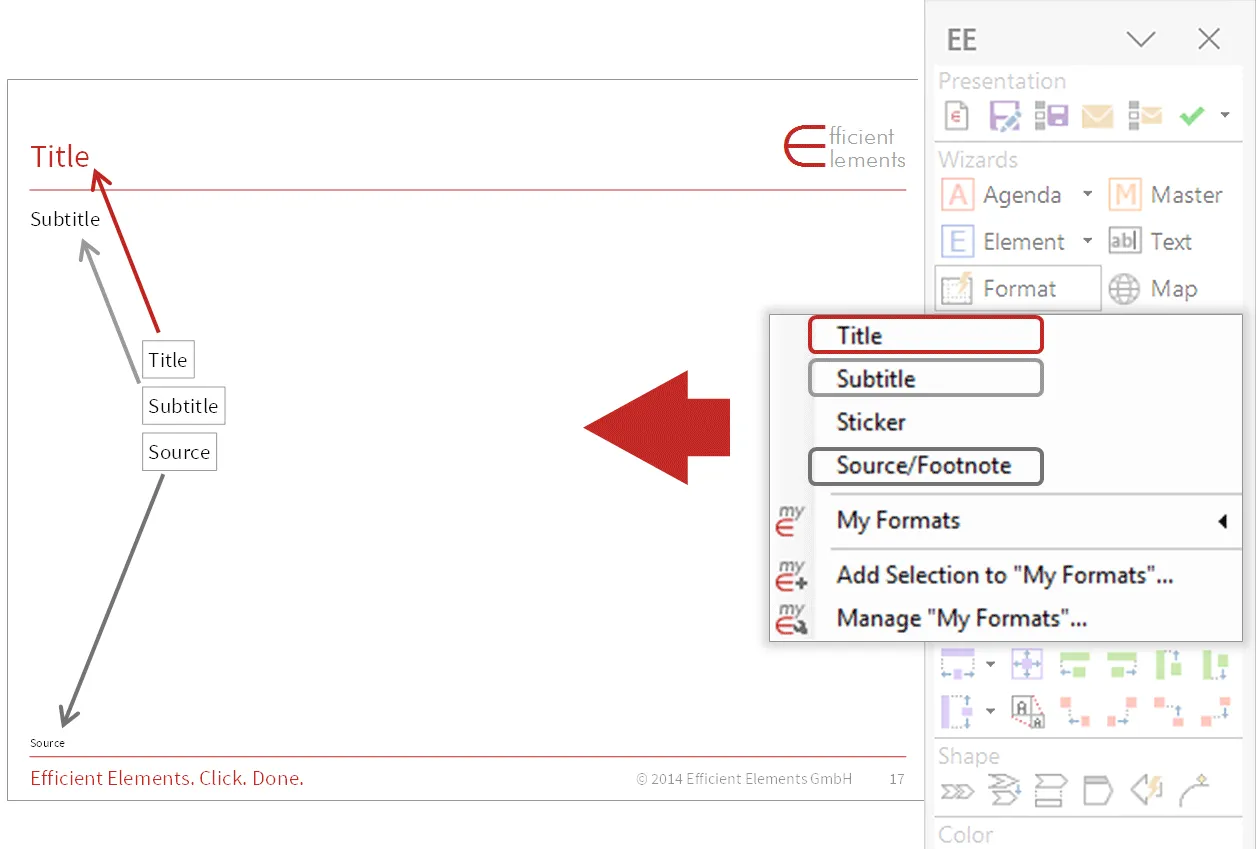
Efficient Elements is a German-built PowerPoint add-in popular with European consultants. It focuses on formatting precision, agenda management, and slide standardization—overlapping with PPT Productivity on formatting while excelling at agenda automation.
Key Features:
- Smart shape alignment and sizing
- Agenda wizard with automatic updates
- Content library for reusable elements
- Footnote and source management
- Color management across presentations
Pricing: €99/year (~$107/year); free for students and researchers
What It Does Well:
- Excellent agenda and table of contents automation
- Strong formatting standardization
- Clean, intuitive interface
- Popular with European consultants
- Free academic licenses
What It Doesn't Do:
- Windows only
- Limited charting capabilities
- Smaller feature set than PPT Productivity overall
- Less known outside Europe
- No shortcut customization for non-formatting commands
Our Experience: Efficient Elements does a few things very well. The agenda wizard is genuinely useful for recurring presentations with multiple sections. The formatting tools are precise and reliable. However, if you need PPT Productivity's broad shortcut customization or charting, you'll need a complementary tool.
Best For: Consultants who primarily need formatting precision and agenda management. Works well as a complement to a charting tool like Deckary.
Continue reading: Sankey Diagram in PowerPoint · PowerPoint Keyboard Shortcuts · Best AI Presentation Maker for Consultants
Create an editable presentation in your browser
Turn a prompt or source files into slides you can edit and export to PowerPoint. 14-day free trial. No credit card required.
Feature Comparison Table
| Tool | Custom Shortcuts | Charts | Mac Support | Icons | Slide Library | AI | Price/Year |
|---|---|---|---|---|---|---|---|
| PPT Productivity | 800+ commands | No | No | Via shapes | Yes | No | From $179 |
| Deckary | Alignment/formatting | Yes | Yes | 2,000+ | No | Yes | $120-180 |
| BrightSlide | Basic formatting | No | No | No | No | No | Free |
| Power-user | Basic | Yes | No | 6,000+ | Templates | No | $99 |
| Efficient Elements | Basic formatting | No | No | No | Content library | No | ~$107 |
Pricing Comparison Table
| Tool | Individual | Small Team (5) | Free Trial |
|---|---|---|---|
| PPT Productivity | From $179/year | From $895/year | Yes |
| Deckary | $120-180/year | $600-900/year | 14-day free trial |
| BrightSlide | Free | Free | N/A |
| Power-user | $99/year | ~$400/year | Yes |
| Efficient Elements | ~$107/year | ~$535/year | 30 days |
Best Alternative by Use Case
For Management Consultants
Primary recommendation: Deckary
Consultants spend time on both formatting and charts. PPT Productivity covers formatting but not charts. Deckary covers both—shortcuts for alignment and distribution, plus waterfall, Mekko, and Gantt charts with Excel linking—at $120-180/year versus $179+ for PPT Productivity alone.
For independent consultants and boutique firms, Deckary provides professional output across shortcuts, charts, and AI at a sustainable price point.
For Mac Users
Primary recommendation: Deckary
PPT Productivity doesn't work on Mac. Running it via Parallels ($99/year) means paying $278+/year for shortcuts alone—no charts, no AI. Deckary runs natively on Mac with identical features at $120-180/year.
For Investment Banking Analysts
Primary recommendation: Deckary
Banking analysts need charts more than shortcut customization. Deckary offers consulting-grade chart types at a competitive price point with additional shortcuts and AI features.
For Freelance Consultants
Primary recommendation: Deckary
Freelancers need professional output without enterprise pricing. At $120/year for Starter, Deckary fits freelance budgets while delivering shortcuts, charts, and icons. The 14-day free trial lets you test it on real projects.
For Budget-Conscious Teams
Primary recommendation: BrightSlide (free) or Power-user ($99/year)
BrightSlide provides basic formatting shortcuts at zero cost. Power-user adds templates and basic charts at $99/year—less than PPT Productivity's $179/year with broader capabilities.
Common Mistakes When Choosing
1. Over-Valuing Shortcut Quantity
PPT Productivity's 800+ customizable commands sounds impressive. But most professionals use 15-20 shortcuts regularly. Paying $179/year for 800 commands when you use 15 is paying for capability you don't need.
Solution: List the shortcuts you actually use weekly. If alignment, distribution, grouping, and layer ordering cover your needs, a focused tool delivers the same value at lower cost.
2. Ignoring Platform Compatibility
Mac users often discover after evaluating PPT Productivity that it's Windows-only. The Parallels workaround adds $99/year and introduces friction.
Solution: Verify native platform support before committing. Deckary offers genuine cross-platform support.
3. Buying Shortcuts When You Need Charts
Some consultants search for "PPT Productivity" when their actual bottleneck is chart creation. No amount of shortcut customization creates waterfall charts.
Solution: Identify your actual time sinks. If charts take longer than formatting, invest in a charting tool—not a shortcut tool.
4. Forgetting About Total Cost
PPT Productivity at $179/year plus a separate charting tool means paying for two add-ins. A single tool covering both capabilities may cost less.
Solution: Calculate total cost for all the capabilities you need. Deckary at $180/year covers shortcuts, charts, icons, and AI—less than PPT Productivity alone.
5. Choosing Based on Feature Count
More features doesn't mean better fit. PPT Productivity has 200+ features. Most users actively use 20-30.
Solution: Match tools to your actual weekly workflow, not feature comparison spreadsheets.
Summary: Key Takeaways
After testing all four alternatives across real consulting workflows, here's our honest assessment:
PPT Productivity remains valuable for: Windows users who genuinely need deep shortcut customization across hundreds of PowerPoint commands. If you've configured custom shortcuts for 50+ commands and use them daily, PPT Productivity's depth is hard to match. The McKinsey Marvin presets and shortcut search popup are unique features.
For most consultants and advisors, Deckary offers the best value. You get alignment shortcuts, consulting-grade charts, Excel linking, 2,000+ icons, and AI slide generation at $120-180/year. That's more capabilities than PPT Productivity at a lower price—and it works on Mac.
BrightSlide works for budget-conscious Windows users who want formatting shortcuts at zero cost.
Power-user and Efficient Elements serve teams with specific needs—templates (Power-user) or agenda management (Efficient Elements)—at moderate pricing.
The key question: What actually slows you down each week? If it's alignment and formatting, any shortcut tool helps. If it's charts plus formatting, you need a combined solution. If you're on Mac, PPT Productivity isn't an option regardless. Match the tool to the bottleneck, not the feature list.
Create an editable presentation in your browser
Turn a prompt or source files into slides you can edit and export to PowerPoint. 14-day free trial. No credit card required.