PowerPoint Add-ins for Consultants: The Complete 2026 Guide
Side-by-side comparison of 20+ PowerPoint add-ins for consulting. Charts, AI, productivity, and icons ranked by features, pricing, and Mac support.
The gap between what native PowerPoint offers and what consulting work demands has created a thriving add-in ecosystem, with names like think-cell, Deckary, Mekko Graphics, and Power-user among the available options. Building waterfall charts manually takes 12+ minutes. Alignment requires 4-5 clicks per operation. Formatting consistency across 50-slide decks requires constant vigilance.
The right combination of add-ins reduces chart creation to under a minute, provides single-keystroke alignment, and can generate entire slides from text descriptions using AI. But with dozens of options ranging from free to $500/year across multiple categories, choosing the right tools matters.
After evaluating 25+ PowerPoint add-ins over 12 months using real consulting workflows, we created this comprehensive guide to help you navigate the landscape in 2026.
Key Takeaways:
- For charting: Deckary ($120-180/year) offers consulting-grade chart types (waterfall, Mekko, Gantt) with Excel linking
- For AI generation: ChatGPT, Claude, Grok, Copilot, and Deckary now work inside PowerPoint; Deckary is the specialist option for consulting charts and production
- For productivity: Keyboard shortcuts from Deckary or PPT Productivity save 15-30 minutes per deck
- For Mac users: Deckary, Efficient Elements, and Zebra BI offer full Mac support
- All-in-one: Deckary combines charting, AI, productivity, and icons in one tool at $120-180/year
What Are PowerPoint Add-ins?
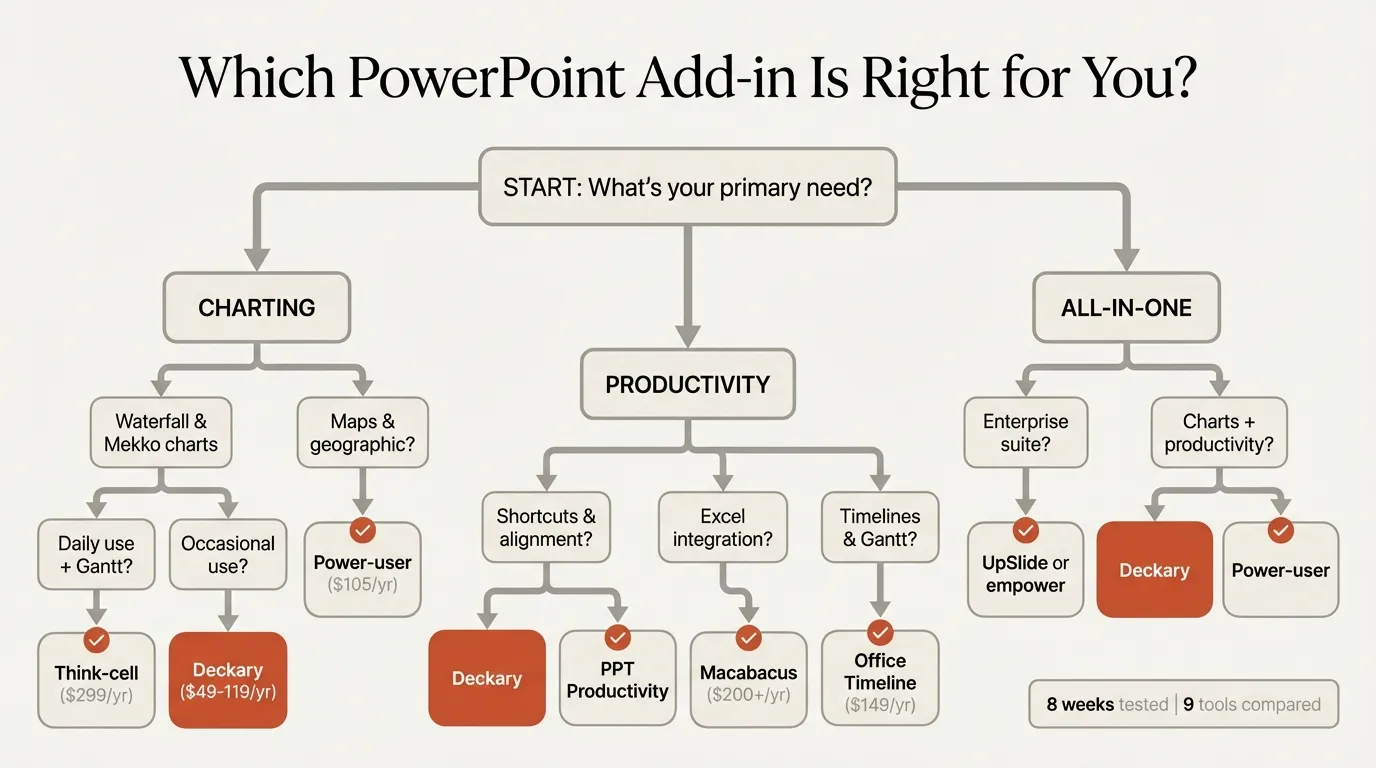
PowerPoint add-ins are software extensions that add functionality beyond what Microsoft includes natively. They integrate directly into PowerPoint, appearing in the ribbon or taskpane, and extend capabilities for charting, formatting, AI generation, and productivity.
Add-ins fall into two technical categories:
| Technology | Platform | Capability Level | Examples |
|---|---|---|---|
| VSTO/COM | Windows only | Full Office integration | UpSlide, Macabacus |
| Web/Native | Mac + Windows | Modern, cross-platform | Deckary, Zebra BI |
Understanding this distinction matters because VSTO add-ins cannot run on Mac regardless of marketing claims about "Office add-in" compatibility.
For consultants, add-ins solve specific problems that native PowerPoint handles poorly: creating consulting-grade charts, maintaining formatting consistency, speeding up repetitive tasks, and now generating content with AI.
Why Consultants Need Add-ins
Native PowerPoint improved significantly with Microsoft 365, but it still lacks capabilities essential for consulting work:
Charting limitations: Native waterfall charts arrived in 2016 but lack automatic bridges, subtotals, and the precise formatting control consultants need. Mekko (Marimekko) charts remain impossible without add-ins or complex workarounds.
Productivity gaps: Aligning objects requires navigating through Format > Align > Align Left (4-5 clicks). Consultants repeat this hundreds of times per deck. Professional tools reduce this to single keystrokes.
Generic AI integration: Microsoft Copilot, ChatGPT, Claude, and Grok now bring general AI into PowerPoint. That helps with drafts and rewrites, but consulting-specific AI tools still matter when you need Pyramid Principle structure, action titles, and specialized chart workflows.
Template inflexibility: Native PowerPoint applies master slides but can't intelligently adapt content to consulting frameworks like MECE structures or issue trees.
Add-ins address these gaps. Early charting add-ins pioneered automated consulting charts. Productivity tools like PPT Productivity added MBB-style shortcuts. Now tools like Deckary combine multiple categories into unified solutions.
Categories of PowerPoint Add-ins
The add-in market has evolved into four distinct categories, each addressing different consulting needs. Understanding what each category offers helps you choose the right combination for your workflow.
Charting Add-ins
Charting add-ins create professional visualizations that native PowerPoint handles poorly or cannot produce at all.
Key capabilities:
- Waterfall charts with automatic bridges, subtotals, and connectors
- Mekko (Marimekko) charts for market sizing and share analysis
- Gantt charts with dependencies and milestones
- Excel linking that survives file edits and moves
- Advanced formatting (CAGR lines, delta indicators, reference lines)
Primary tools: Deckary, Mekko Graphics, Zebra BI, Power-user
Charting add-ins save the most time on data-heavy deliverables. A waterfall chart that takes 12+ minutes manually takes under 60 seconds with proper tools.
AI Presentation Add-ins
AI add-ins generate slides from text descriptions, transforming how presentations get created.
Key capabilities:
- Generate complete slides from text prompts
- Apply consulting structures (Pyramid Principle, MECE)
- Create supporting charts from data
- Polish and rewrite existing content
- Generate images for visual elements
Primary tools: Deckary AI, ChatGPT for PowerPoint, Claude for PowerPoint, Grok for PowerPoint, Microsoft Copilot, Plus AI, Gamma, Beautiful.ai
The critical distinction: some AI tools work inside PowerPoint (Deckary, ChatGPT, Claude, Grok, Copilot, Plus AI), while others require creating presentations externally then exporting (Gamma, Beautiful.ai, Tome, Presentations.AI). Export workflows can require formatting cleanup.
Productivity Add-ins
Productivity add-ins speed up repetitive tasks that consultants perform hundreds of times per presentation.
Key capabilities:
- Single-keystroke alignment and distribution
- Quick formatting tools
- Slide library management
- Agenda automation
- Proofing and consistency checks
Primary tools: Deckary, PPT Productivity, Efficient Elements, empower Suite
These tools save 15-30 minutes per deck on pure formatting tasks, adding up to hours weekly for heavy PowerPoint users.
Icon and Visual Asset Add-ins
Icon add-ins provide professional visual elements without leaving PowerPoint.
Key capabilities:
- Searchable icon libraries
- Vector formats that scale cleanly
- Consistent visual style across decks
- Direct insertion into slides
Primary tools: Deckary (2,000+ icons), Power-user (7,000+ icons), Flaticon add-in
Icons improve slide clarity and professional appearance. Having them directly in PowerPoint eliminates the alt-tab workflow of searching external sites.
Top PowerPoint Add-ins Compared
Based on 12 months of testing across real consulting workflows, here are the top 10 add-ins consultants should consider:
| Rank | Tool | Primary Category | Price/Year | Mac Support | Best For |
|---|---|---|---|---|---|
| 1 | Deckary | All-in-one | $120-180 | Yes | Charting + AI + productivity |
| 2 | Gamma | AI Generation | $96-180 | Web-based | Standalone presentations |
| 3 | PPT Productivity | Productivity | $179 | Yes | MBB toolbar experience |
| 4 | Beautiful.ai | AI + Design | $144-480 | Web-based | Design-focused teams |
| 5 | Power-user | Charts + Icons | $105 | No | Budget charting with maps |
| 6 | Macabacus | Financial modeling | $200+ | No | Investment banking |
| 7 | Mekko Graphics | Charting | $399 | Limited | Mekko specialists |
| 8 | Plus AI | AI Generation | $120-480 | Yes | Google Slides + PPT |
| 9 | Microsoft Copilot | AI Generation | $216-360 | Yes | Microsoft 365 enterprises |
| 10 | Zebra BI | Data visualization | $300+ | Yes | Power BI + PowerPoint |
| 11 | ChatGPT for PowerPoint | AI Generation | Plan/credits vary | Yes | General AI drafting |
| 12 | Claude for PowerPoint | AI Generation | Paid Claude plan | Yes | Long-context restructuring |
| 13 | Grok for PowerPoint | AI Generation | Eligible Grok plan | Yes | Current research decks |
Detailed Comparison by Category
Charting capabilities:
| Tool | Waterfall | Mekko | Gantt | Excel Linking |
|---|---|---|---|---|
| Deckary | Excellent | Excellent | Yes | Yes |
| Power-user | Good | Good | Limited | Yes |
| Mekko Graphics | Good | Excellent | No | Yes |
| Native PowerPoint | Manual workaround | No | No | Fragile |
AI generation quality:
| Tool | Works in PowerPoint | Consulting Structure | Export Cleanup (in our testing) |
|---|---|---|---|
| Deckary | Native | MBB-style | Minimal |
| ChatGPT for PowerPoint | Native | General-purpose | Varies by prompt |
| Claude for PowerPoint | Native | Strong restructuring | Varies by prompt |
| Grok for PowerPoint | Native | Research-heavy drafts | Varies by prompt |
| Microsoft Copilot | Native | General-purpose | Significant reformatting |
| Plus AI | Native | General-purpose | Minimal |
| Gamma | Export | Modern/creative | Varies |
| Beautiful.ai | Export | Design-focused | Moderate |
Continue reading: Harvey Balls in PowerPoint · How to Align Objects in PowerPoint · Best AI Presentation Maker for Consultants
Create professional charts in PowerPoint
Build native waterfall, Mekko, Gantt, and business charts without manual formatting. 14-day free trial. No credit card required.
AI Presentation Tools Review
AI presentation tools transformed the market in 2025-2026. The landscape now includes both standalone platforms and PowerPoint-native solutions.
PowerPoint-Native AI Tools
These tools generate slides directly inside PowerPoint, eliminating export friction:
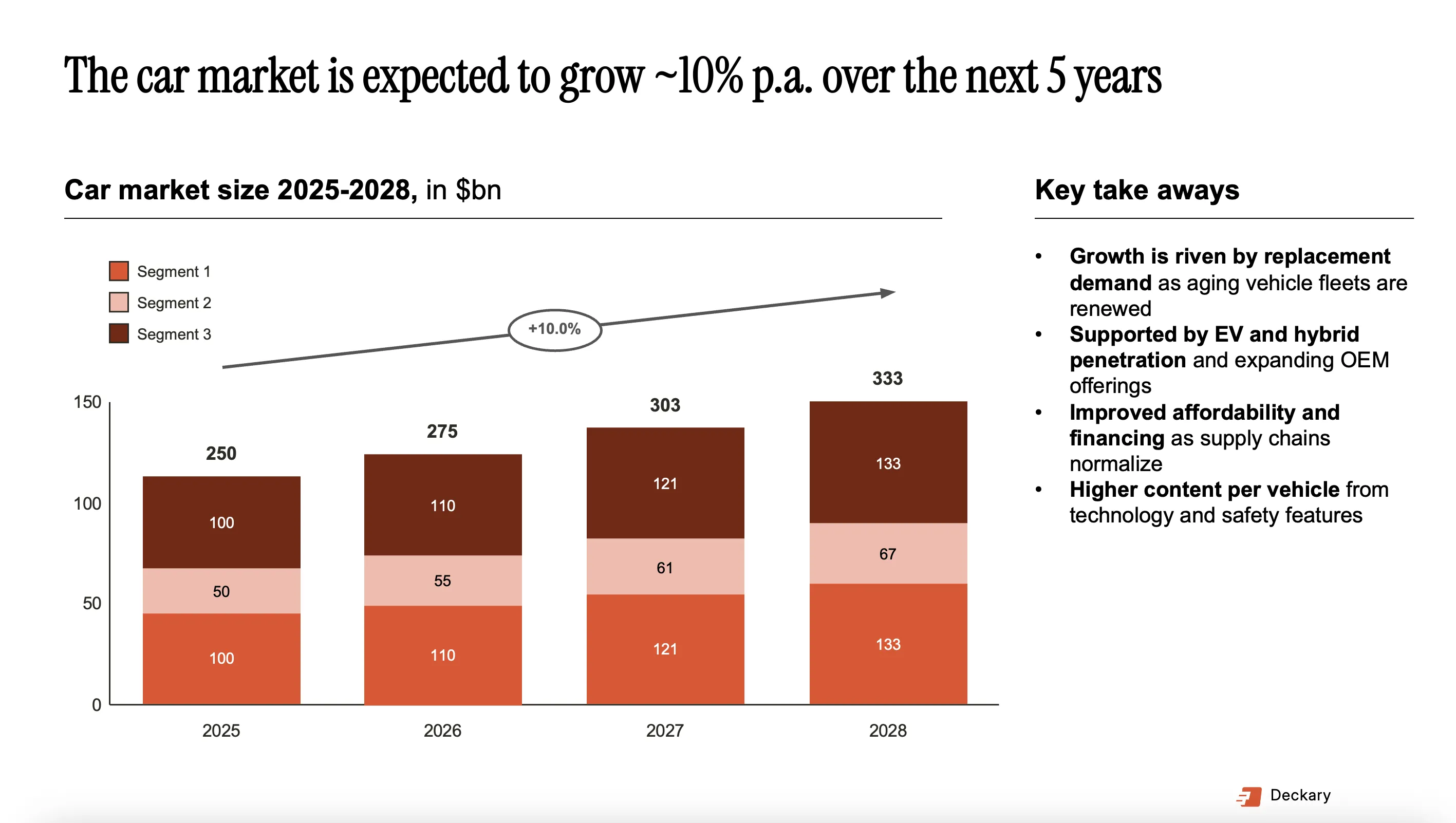
Deckary works as a PowerPoint add-in with AI that understands consulting conventions. Prompts generate MBB-style slides with action titles, structured arguments, and optional charts. No export, no cleanup, no credit calculations.
Our testing results:
- Generation time: 30-60 seconds per slide
- Consulting structure accuracy: High (Pyramid Principle alignment)
- Export required: None
- Formatting cleanup: Minimal
Microsoft Copilot integrates into PowerPoint for Microsoft 365 subscribers. It generates slides from prompts but produces generic business content that requires significant reformatting to meet consulting standards.
Our testing results:
- Generation time: 20-40 seconds per slide
- Consulting structure accuracy: General-purpose (not consulting-specific)
- Export required: None
- Formatting cleanup: Significant reformatting needed in our experience
ChatGPT for PowerPoint is OpenAI's official PowerPoint add-in. It is strong for general drafting, rewriting, summarizing, and turning notes or source documents into editable slides. For consultants, its limitation is that it does not provide dedicated waterfall, Mekko, Gantt, icon, or shortcut workflows.
Claude for PowerPoint is strongest for long-context reasoning and deck restructuring. It is useful when a long report, transcript, or existing deck needs to become a clearer storyline. It is still a general AI assistant rather than a consulting production toolkit.
Grok for PowerPoint is xAI's PowerPoint add-in. Its strongest angle is current web and X context for research-heavy decks, market updates, and summaries. Like ChatGPT and Claude, it helps with drafts and narrative work but not specialist consulting chart production.
Standalone AI Platforms
These tools create impressive presentations but require export to PowerPoint:
Gamma dominates the AI presentation space with 70 million users. The card-based format looks modern and generates quickly. PowerPoint exports require cleanup.
Beautiful.ai emphasizes automated design with Smart Slides that adjust layouts automatically. Cleaner exports than Gamma but still requires adjustment.
Plus AI works natively in Google Slides with decent PowerPoint support. Good for Google Workspace organizations.
Additional AI tools we evaluated:
- SlidesAI - Budget option for Google Slides
- GenPPT - Research-heavy presentations
- Genspark - Quick generation
- Twistly - Document conversion
AI Tools Comparison
| Tool | Platform | PowerPoint Integration | Consulting Features | Monthly Cost |
|---|---|---|---|---|
| Deckary | Add-in | Native | Yes | $4-10 |
| ChatGPT for PowerPoint | Add-in | Native | Limited | Plan/credits vary |
| Claude for PowerPoint | Add-in | Native | Limited | Paid Claude plan |
| Grok for PowerPoint | Add-in | Native | Limited | Eligible Grok plan |
| Copilot | Native | Native | Limited | $18-30 |
| Plus AI | Add-in | Native | Limited | $10-40 |
| Gamma | Web | Export | No | $8-18 |
| Beautiful.ai | Web | Export | No | $12-40 |
For a comprehensive comparison, see our guide to the best AI presentation makers.
Mac-Compatible Add-ins
Most PowerPoint add-ins don't work on Mac. VSTO (Visual Studio Tools for Office), the technology behind many enterprise tools, requires Windows. This leaves Mac users with limited options.
Full Mac Support
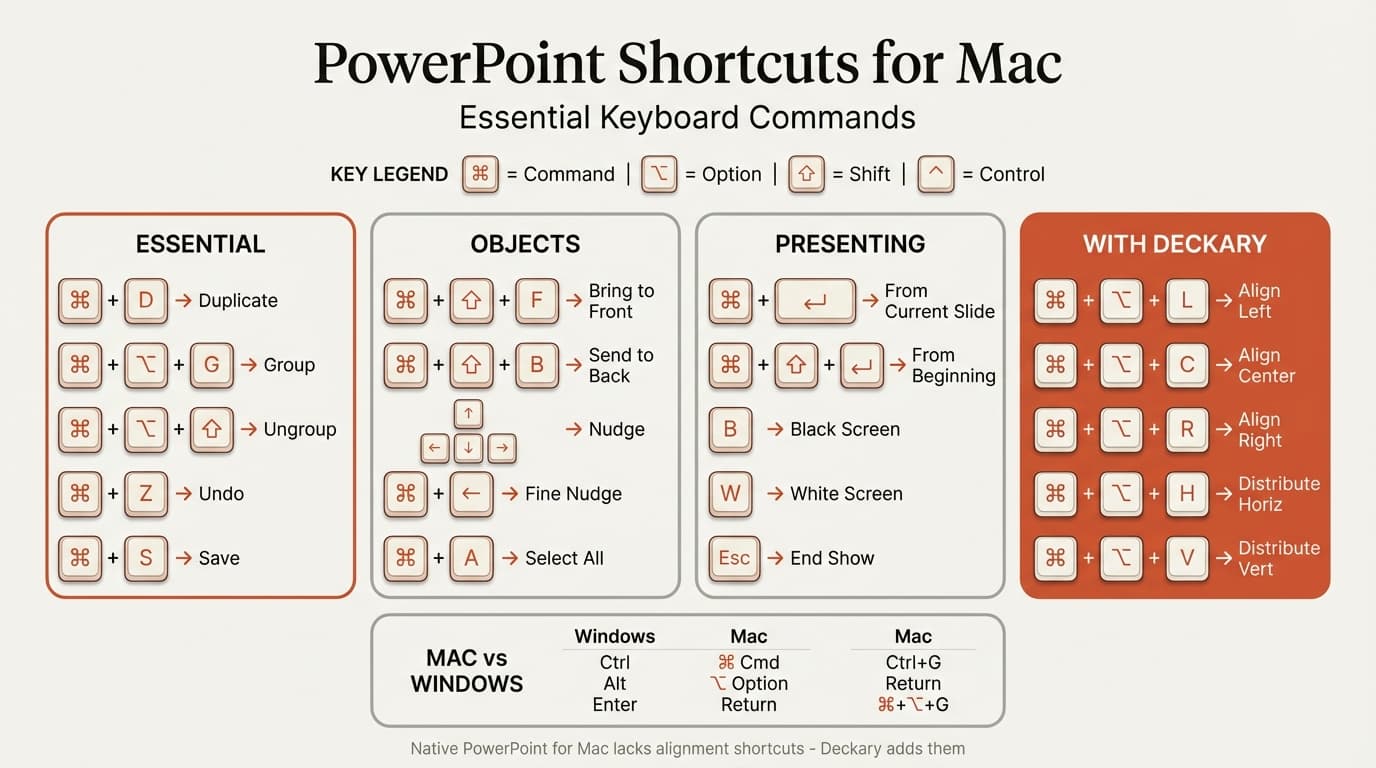
These tools work identically on Mac and Windows:
| Tool | Technology | Mac Limitations |
|---|---|---|
| Deckary | Native + Web | None |
| Zebra BI | Web Add-in | None |
| Efficient Elements | Native | Reduced features on Mac |
Deckary was built cross-platform from day one, treating Mac and Windows equally.
Partial or No Mac Support
| Tool | Mac Status | Workaround |
|---|---|---|
| empower Suite | Most features | Chart creation Windows-only (full Mac support expected Q2 2026) |
| Power-user | None | VM with Windows |
| UpSlide | None | VM with Windows |
| Macabacus | None | VM with Windows or Lite version |
| Office Timeline | Web only | Desktop is Windows-only |
For Mac consultants, Deckary offers the best combination of features and value. See our complete Mac add-ins guide for detailed compatibility testing.
How to Evaluate PowerPoint Add-ins
Choosing the right add-in requires matching tool capabilities to your actual workflow, not feature lists.
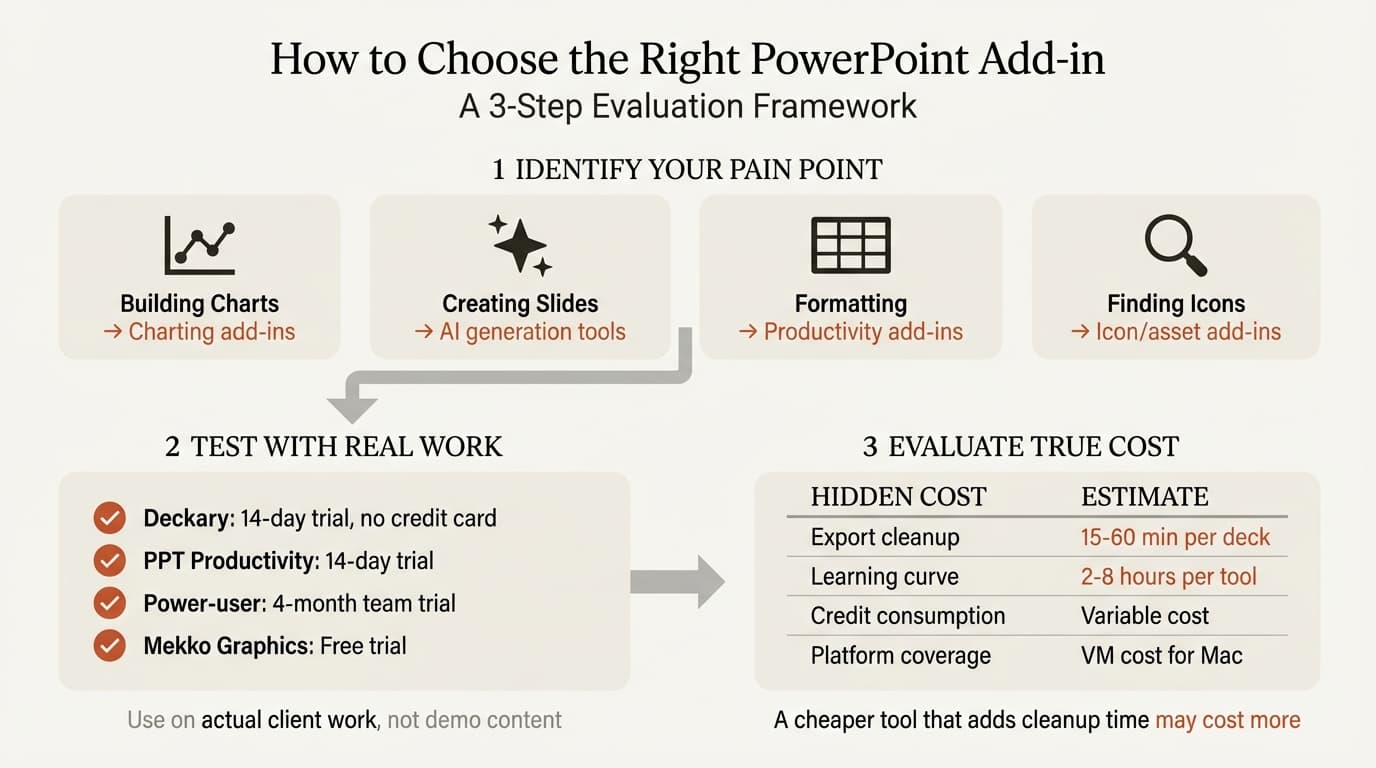
Step 1: Identify Your Primary Pain Point
What takes the most time in your PowerPoint workflow?
| Pain Point | Primary Tool Category |
|---|---|
| Building waterfall/Mekko charts | Charting add-ins |
| Creating slides from scratch | AI generation tools |
| Formatting and alignment | Productivity add-ins |
| Finding and inserting icons | Icon/asset add-ins |
Start with one category rather than trying to solve everything at once.
Step 2: Test with Real Work
Most tools offer free trials. Use them on actual client work, not demo content:
- Deckary: 14-day free trial, no credit card required
- PPT Productivity: 7-day trial
- Power-user: 4-month team trial
- Mekko Graphics: Free trial available
Create a real deliverable with each tool and measure total time. Include any export cleanup or formatting adjustment time.
Step 3: Evaluate True Cost
Consider all costs, not just license fees:
| Cost Factor | Hidden Expense |
|---|---|
| Export cleanup time | 15-60 min per deck for web-based tools |
| Learning curve | 2-8 hours per tool to become proficient |
| Credit consumption | Variable cost for heavy iteration |
| Platform coverage | VM cost for Windows-only tools on Mac |
A cheaper tool that adds cleanup time may cost more than an expensive tool that works seamlessly.
Step 4: Check Platform Requirements
Before purchasing:
- Verify Mac support if applicable
- Confirm your Office version compatibility
- Check if VBA must be enabled (IT policy may restrict)
- Verify single sign-on works with your identity provider
Step 5: Consider Stacking
Many consultants use multiple add-ins together:
- Deckary or Mekko Graphics for charting
- PPT Productivity for additional shortcuts
- Icon add-in for visual elements
Deckary combines these categories, potentially replacing 2-3 separate tools.
Getting Started: Recommendations by Role
Based on our testing, here are specific recommendations for different consulting roles:
Strategy Consultants
Best setup: Deckary Premium ($180/year)
Strategy work requires waterfall charts for financial bridges, Mekko charts for market sizing, and fast formatting for high-volume slide creation. Deckary covers all three plus AI slide generation for drafting.
Alternative: Deckary Premium ($180/year) + PPT Productivity ($179/year) = $298/year for maximum coverage
Investment Bankers
Best setup: Deckary Premium ($180/year) + Macabacus ($200+/year)
IB work demands complex financial charting and Excel modeling integration. Deckary handles charts with Excel linking; Macabacus handles Excel workflows and financial model auditing.
Mac banker alternative: Deckary (for charting and productivity features Macabacus lacks on Mac)
Freelance Consultants
Best setup: Deckary Starter ($15/month or $120/year)
Budget matters when you're paying out of pocket. Deckary's starter tier includes waterfall and Mekko charts. Monthly billing keeps costs flexible.
Corporate Strategy Teams
Best setup: Deckary Premium ($180/year/user)
Corporate teams need consulting-grade outputs without enterprise tool complexity. Deckary's simple deployment (no IT configuration required) and flat-rate pricing work well for corporate environments.
Startup Founders
Best setup: Deckary Starter ($120/year) + Gamma (free tier)
Pitch decks benefit from AI generation. Use Deckary for PowerPoint-native work and data slides; use Gamma's free tier for initial ideation and web-shared versions.
Enterprise Deployment Considerations
For organizations deploying add-ins across teams, additional factors matter:
IT and Security
| Factor | Questions to Ask |
|---|---|
| Data handling | Where does data go? Is it processed locally or cloud? |
| SSO support | Does it integrate with Azure AD/Okta? |
| Compliance | SOC 2 certification? GDPR compliance? |
| Deployment | MSI installer? Microsoft AppSource? Manual? |
Licensing Models
| Model | Best For |
|---|---|
| Per-seat annual | Stable team size, budget predictability |
| Enterprise site license | Large organizations (100+ users) |
| Concurrent licensing | Teams with part-time users |
| Lifetime per-seat | Long-term cost reduction |
Change Management
Add-ins require adoption to deliver value:
- Plan 2-4 hours of training per tool
- Identify power users as internal champions
- Create firm-specific slide templates leveraging tool features
- Track actual usage to measure ROI (our free calculators can help quantify savings)
The Future of PowerPoint Add-ins
The add-in landscape continues evolving:
AI integration is accelerating. Every major tool now includes or plans AI features. The distinction between "charting tools" and "AI tools" is blurring.
Platform consolidation is happening. Deckary combining charting, AI, productivity, and icons in one tool reflects a trend toward unified solutions rather than single-purpose add-ins.
Mac support is improving. Microsoft's modern add-in platform enables cross-platform development, though VSTO tools remain Windows-locked.
Pricing pressure is increasing. All-in-one tools like Deckary at $120-180/year are raising the bar for what consultants expect from their add-in investments.
Summary: Which Add-ins Should You Use?
After 12 months of testing, here's our framework for choosing PowerPoint add-ins:
If You Want One Tool (Best Value)
Deckary ($120-180/year) combines charting (waterfall, Mekko, Gantt), AI slide generation, keyboard shortcuts, and 2,000+ icons. It works on both Mac and Windows and covers 90% of what most consultants need.
If Charting Is Your Primary Need
Deckary ($120-180/year) covers waterfall, Mekko, and Gantt charts with Excel linking. Mekko Graphics ($399/year) is an alternative for teams focused on Mekko chart variants, with additional slide tools on Windows.
If You Need AI Slide Generation
Deckary for PowerPoint-native generation with consulting structure. ChatGPT for PowerPoint for a general OpenAI assistant inside the deck. Claude for PowerPoint for long-context restructuring. Grok for PowerPoint for current research decks. Gamma for standalone web presentations. Budget for export cleanup time with web-based tools.
If You're on Mac
Deckary offers full Mac support with charting, AI, and productivity features. See our Mac add-ins guide for complete compatibility details.
If You're Comparing Specific Tools
Use our detailed comparisons:
- Templafy alternatives
- Macabacus alternatives
- Mekko Graphics review
- ChatGPT for PowerPoint guide
- Grok for PowerPoint guide
- ChatGPT vs Claude vs Grok vs Copilot for PowerPoint
- Best AI presentation makers
The best approach: take free trials of your top 2-3 choices and test with real client work. The right add-in setup pays for itself within weeks through time savings. The wrong setup creates friction that negates any theoretical benefits.
Related Guides
- 9 Best PowerPoint Add-ins for Consultants - Detailed individual tool reviews
- PowerPoint Productivity Add-ins - Shortcuts and formatting tools
- Best AI Presentation Makers 2026 - Complete AI tool comparison
- PowerPoint Add-ins for Mac - Mac compatibility guide
Create professional charts in PowerPoint
Build native waterfall, Mekko, Gantt, and business charts without manual formatting. 14-day free trial. No credit card required.