PowerPoint Productivity Add-ins: 9 Tools That Save Hours
Discover the best PowerPoint productivity add-ins for consultants. Compare tools including Deckary, UpSlide, and Power-user with features, pricing, and honest recommendations.
- Bob · Former McKinsey and Deloitte consultant with 6 years of experience
- August 29, 2025
- 13 min read
Pricing and feature information was accurate at the time of publication. Competitor products change frequently — verify current details on each provider's website.
PowerPoint productivity add-ins solve a simple problem: native PowerPoint is inefficient. Alignment takes 4-5 clicks per operation. Waterfall charts require manual drawing. Formatting consistency requires constant vigilance. These tasks eat hours every week for anyone building presentations regularly.
The right add-in can reduce a 12-minute chart build to under 60 seconds, or cut alignment time from 5 clicks to 1 keystroke. But with options — think-cell, Deckary, Power-user, PPT Productivity, and many more — ranging from free to $500/year, choosing the right tool matters.
This guide compares 9 PowerPoint productivity add-ins that save real time. We tested each one over 8 weeks of consulting work, measuring actual time savings across charting, alignment, and formatting workflows—not marketing claims. For a broader overview covering AI, charting, and productivity tools together, see our complete guide to PowerPoint add-ins for consultants.
What Makes a PowerPoint Productivity Add-in Valuable?
A productivity add-in should do at least one of these things exceptionally well:
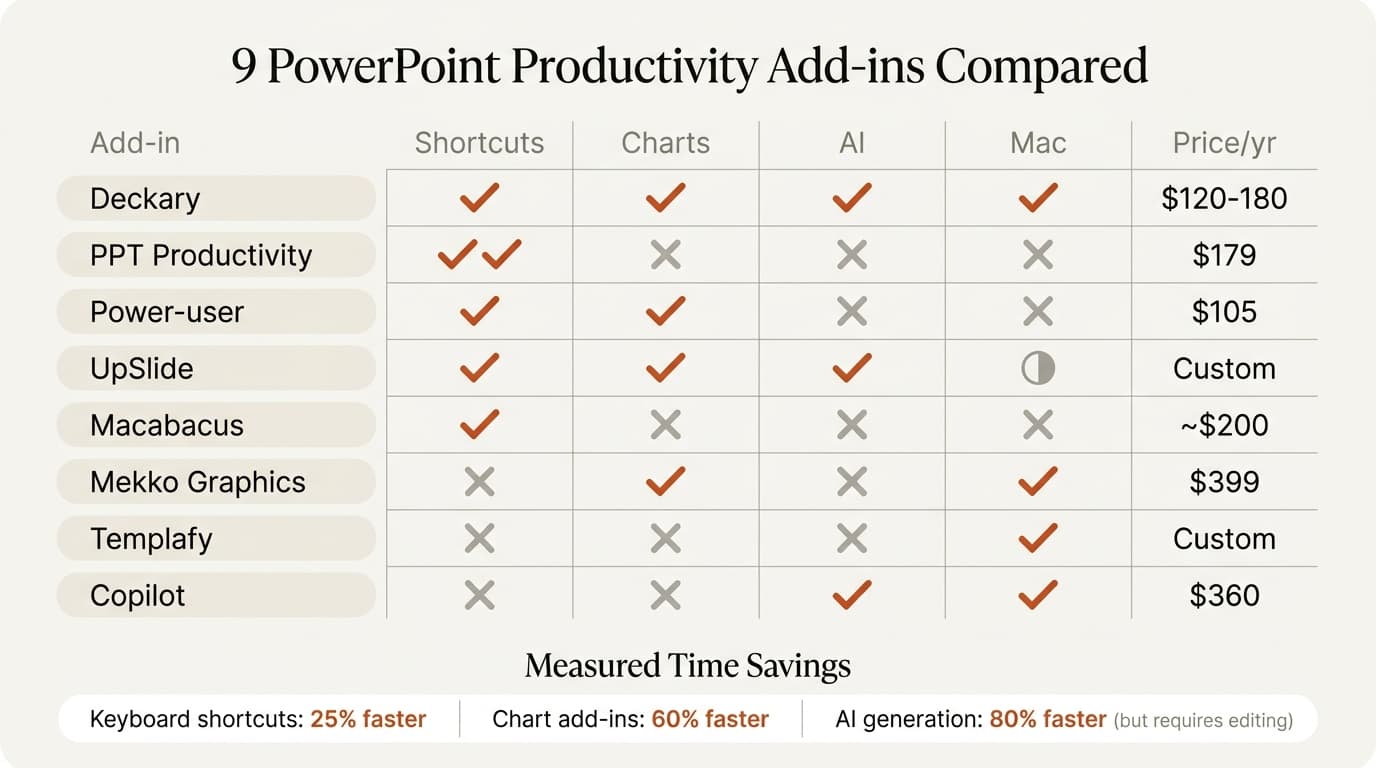
| Category | What It Does | Time Saved |
|---|---|---|
| Keyboard shortcuts | One-keystroke alignment, distribution, formatting | 5-15 min/deck |
| Charting automation | Waterfall, Mekko, and Gantt charts from data | 10-30 min/chart |
| Excel linking | Charts update automatically from spreadsheets | 5-20 min/update |
| Formatting tools | Consistent fonts, colors, spacing | 5-10 min/deck |
| Content libraries | Reuse slides, icons, and templates | 10-30 min/deck |
The best tools combine multiple categories. The worst tools do one thing poorly and charge premium prices.
The 9 Best PowerPoint Productivity Add-ins
1. Deckary
Best for: Consultants who need charts AND productivity features at a reasonable price
Price: Starter is $15/month or $120/year; Premium is $19/month or $180/year
Website: deckary.com
Deckary combines consulting-grade charting with everyday productivity tools—the combination most consultants actually need. It's built specifically for strategy consulting workflows.
Productivity Features:
- True keyboard shortcuts for alignment (Ctrl+Alt+L for Align Left)—not five-keystroke Alt sequences
- Distribution shortcuts that actually work
- Quick formatting tools for consistent styling
- 2,000+ professional icons searchable directly in PowerPoint
Charting Features:
- Waterfall charts with automatic bridges and totals
- Mekko (Marimekko) charts for market sizing
- Gantt charts with milestones
- 100% stacked bar charts for composition analysis
- Excel linking for automatic chart updates
- CAGR lines and delta indicators
What it does well:
- Consulting-grade charts at an accessible price point
- Productivity shortcuts you'll use on every slide
- Works identically on Windows and Mac
- 5-minute setup, no configuration required
What it doesn't do:
- Automatic agenda slides
- Enterprise deployment management
Our testing results:
- Waterfall chart creation: 42 seconds average
- Alignment operations: 0.6 seconds vs 4.2 seconds without shortcuts
- Time saved per 50-slide deck: 15-20 minutes on formatting alone
Best for: Strategy consultants, freelancers, small consulting teams, ex-MBB consultants who need charts and shortcuts without enterprise pricing.
2. UpSlide
Best for: Enterprise finance teams with standardized document workflows
Price: Contact for pricing (enterprise licensing)
Website: upslide.com
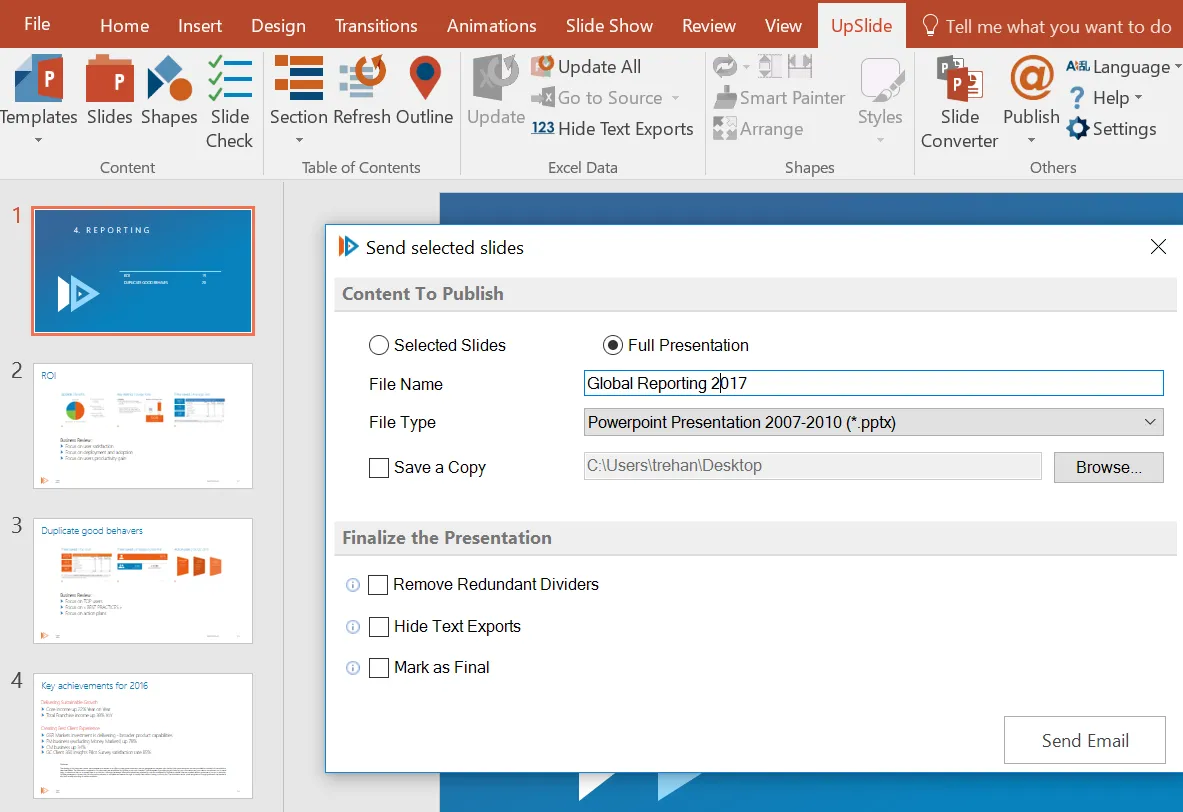
UpSlide is used by firms like KPMG, Rothschild, and Apollo. It's designed for finance teams that need to automate document creation across Excel, PowerPoint, and Word.
Productivity Features:
- Excel-PowerPoint linking that survives file moves and renames
- Centralized content library accessible offline
- Slide Check for brand guideline audits
- Track Changes in PowerPoint like Word
- AI tools for translation and text refinement
Charting Features:
- Excel-linked charts with reliable updates
- Waterfall, Mekko, and Gantt charts (Excel-based)
- Financial modeling chart support
What it does well:
- Enterprise-grade document automation
- 65+ features spanning the entire Office suite
- Claims significant time savings per user
What it doesn't do:
- Work on Mac (Windows only)
- Affordable pricing for individuals or small teams
- Quick setup (requires IT deployment)
Best for: Enterprise finance teams, M&A advisory, firms with standardized document workflows.
3. Templafy
Best for: Large enterprises needing brand compliance and document automation
Price: Contact for pricing (enterprise only)
Website: templafy.com
Templafy focuses on enterprise document creation with brand governance. It's used by 800+ enterprise customers for centralized template and asset management.
Productivity Features:
- Brand-compliant templates accessible across all Office apps
- Dynamic content insertion based on user context
- Automated document generation
- Centralized asset library for images, icons, and slides
- Email signature management
Charting Features:
- Limited native charting
- Focus on template and content management rather than data visualization
What it does well:
- Enterprise-wide brand consistency
- Integration with 70+ business applications
- Automatic content suggestions based on context
What it doesn't do:
- Advanced charting (waterfall, Mekko)
- Individual or small team pricing
- Quick implementation (requires enterprise onboarding)
Best for: Large enterprises prioritizing brand compliance over charting capabilities.
4. BrightSlide (PPTX Tools)
Best for: Consultants who want free productivity tools with basic functionality
Price: Free
Website: brightcarbon.com/brightslide
BrightSlide (formerly PPTX Tools) is a free add-in from BrightCarbon, a presentation design agency. It provides basic productivity tools without the premium price tag.
Productivity Features:
- Quick alignment and distribution tools
- Shape and text formatting shortcuts
- Object selection tools
- Find and replace across slides
- Slide sorter with visual filtering
Charting Features:
- No advanced charting capabilities
- Works with native PowerPoint charts only
What it does well:
- Completely free with no limitations
- Easy to install and use immediately
- Covers basic productivity needs
What it doesn't do:
- Waterfall or Mekko charts
- Excel linking
- Mac support (Windows only)
Best for: Budget-conscious users who need basic productivity tools without charting.
5. SlideProof
Best for: Teams that need presentation quality control and consistency checks
Price: $99-199/year
Website: slideproof.com
SlideProof focuses on presentation quality assurance—catching errors, inconsistencies, and formatting issues before you present.
Productivity Features:
- Automated spell and grammar checking
- Formatting consistency detection
- Font and color standardization
- Bullet point alignment verification
- Missing image detection
Charting Features:
- No charting capabilities
- Focused purely on quality control
What it does well:
- Catches errors human reviewers miss
- Enforces brand standards automatically
- Reduces embarrassing presentation mistakes
What it doesn't do:
- Create charts or visualizations
- Speed up slide creation (focuses on review)
- Replace the need for charting tools
Best for: Teams where presentation quality is critical and errors have consequences.
6. Power-user
Best for: Consultants who need charts, maps, and templates in one package
Price: $8.75/month (~$105/year), free for academics
Website: powerusersoftwares.com
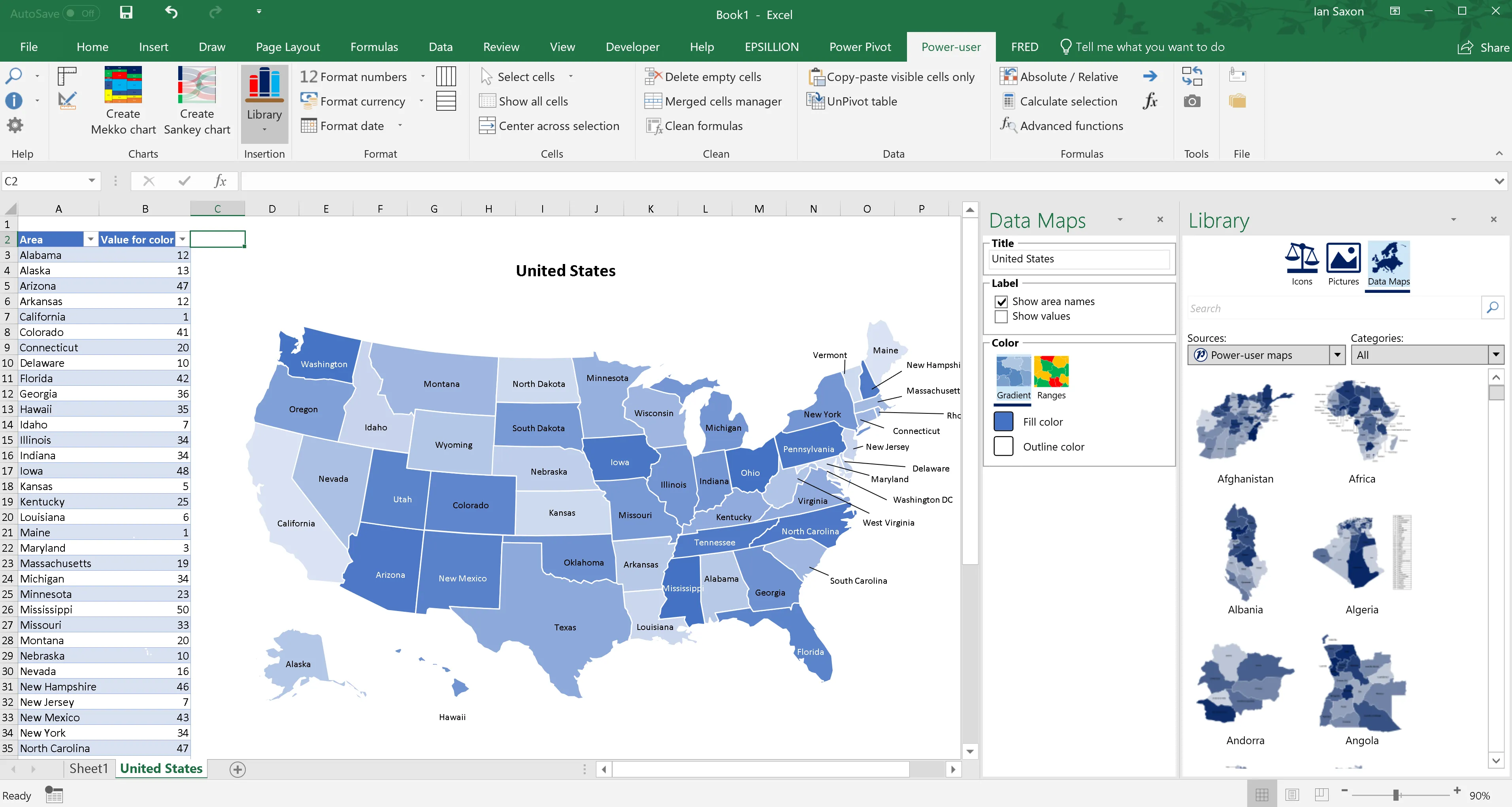
Power-user bundles charts, maps, templates, icons, and productivity tools into a single add-in at an accessible price point.
Productivity Features:
- 850+ PowerPoint templates
- 7,000+ vector icons
- Data tables with Excel linking
- AI translation and text tools
Charting Features:
- 110+ chart types including waterfall, Mekko, and Sankey
- 350 editable maps with data visualization
- Excel linking for automatic updates
- Geographic data visualization
What it does well:
- Professional-grade charting at an accessible price
- Maps that no other tool offers
- Free for students and academics
What it doesn't do:
- Provide the deepest functionality in any single area
Our testing results:
- Chart quality competitive with premium tools for most business charts
- Map feature valuable for market entry and geographic analysis
- Template library reduced blank-slide starts significantly
Best for: Consultants who need a broad toolkit, users who work with geographic data, budget-conscious teams.
7. PPT Productivity
Best for: Ex-MBB consultants who miss their firm's internal tools
Price: $179/year
Website: pptproductivity.com
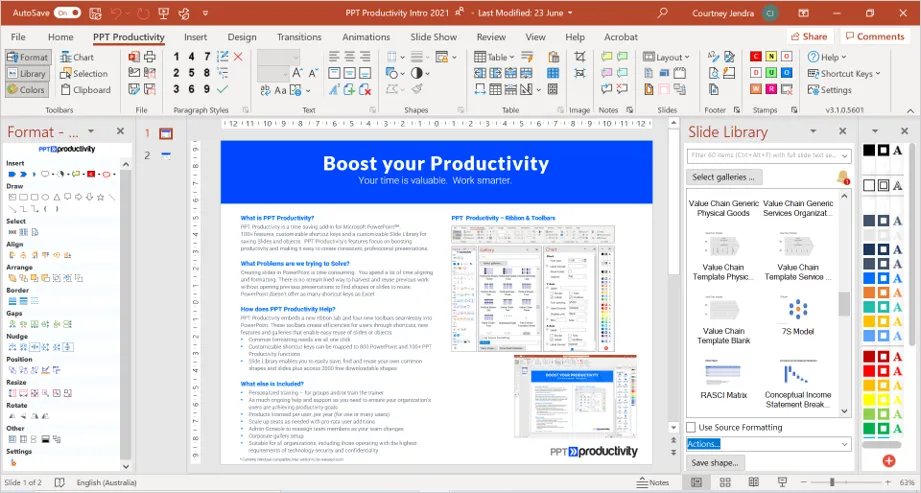
PPT Productivity was built by BCG and Accenture alumni—the same people who created internal consulting toolbars. It's designed to replicate the experience of having firm-grade tools.
Productivity Features:
- 100+ custom keyboard shortcuts including McKinsey-style shortcuts
- Slide library for storing and reusing content
- Agenda wizard for structured agendas
- Color toolbar for managing brand colors
- Proofing tools for catching consistency errors
Charting Features:
- Limited charting (basic charts only)
- Focus on productivity over visualization
What it does well:
- Closest thing to MBB internal tools available commercially
- Keyboard shortcuts match what you used at top firms
- Built by someone who wrote BCG's original macros
What it doesn't do:
- Advanced charting (waterfall, Mekko)
- Compete on price for basic needs
Our testing results:
- Alignment operations: 0.8 seconds vs 4.2 seconds with menus
- Time saved per 50-slide deck: ~10 minutes on formatting
Best for: Ex-MBB consultants, strategy consulting firms, users who want the full consulting toolbar experience.
8. Macabacus
Best for: Investment bankers and private equity professionals
Price: $200+/year (volume discounts for enterprise)
Website: macabacus.com
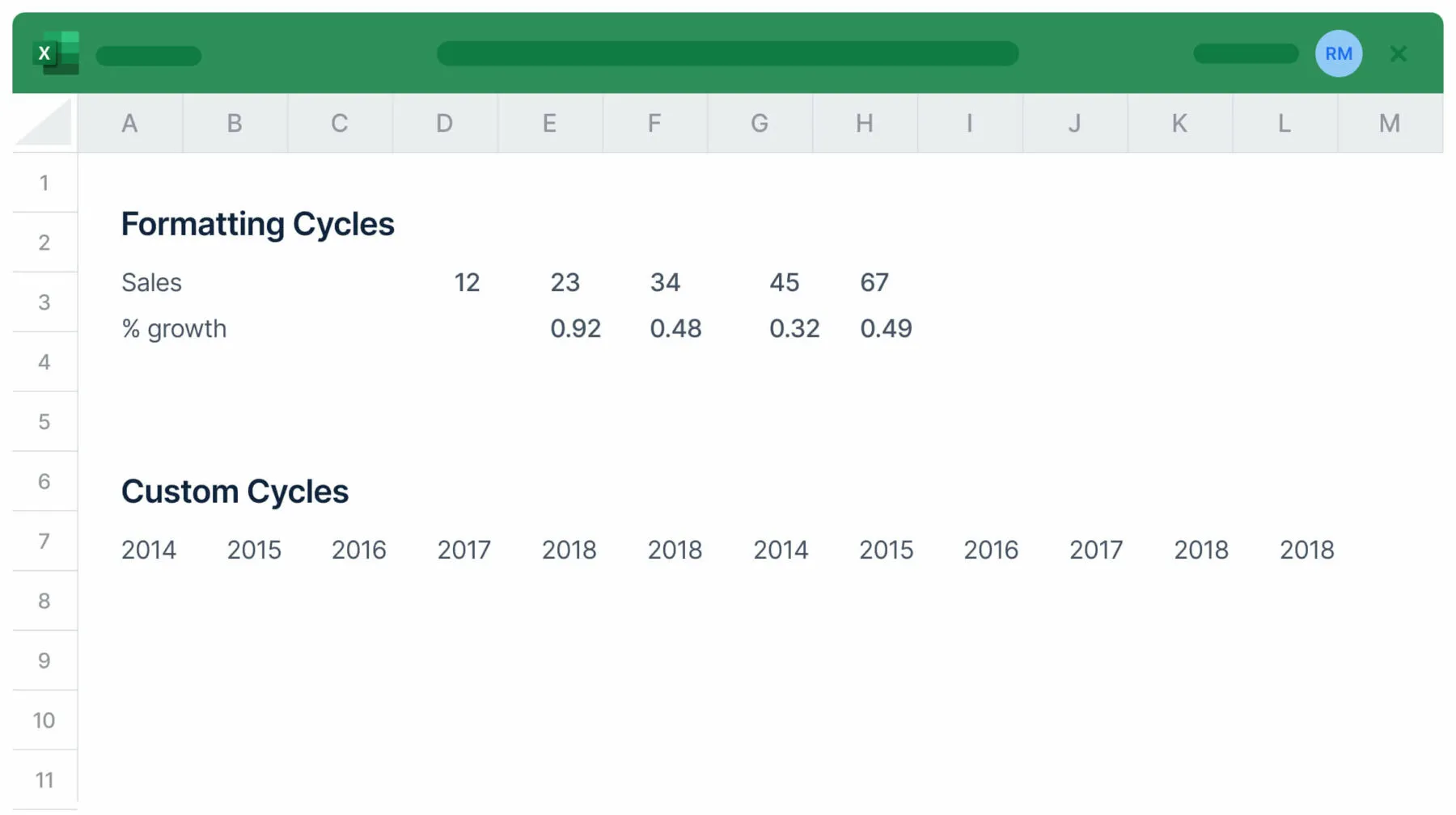
Macabacus is built specifically for financial services—investment banking, private equity, venture capital, and FP&A. It spans Excel, PowerPoint, and Word.
Productivity Features:
- 100+ Excel shortcuts for financial modeling
- Model auditing with 50+ formula checks
- Shared libraries for brand consistency
Charting Features:
- Waterfall charts and financial visualizations
- Excel-PowerPoint linking that doesn't break
- Financial modeling chart support
What it does well:
- Excel and PowerPoint integration for finance
- Most reliable Excel linking we tested
- 3+ hours saved per week for typical users
What it doesn't do:
- Work on Mac (Windows only)
- Serve non-financial use cases well
Best for: Investment bankers, PE/VC professionals, FP&A teams, anyone who builds financial models in Excel.
9. Office Timeline
Best for: Project managers who present timelines and Gantt charts regularly
Price: $108-249/year
Website: officetimeline.com
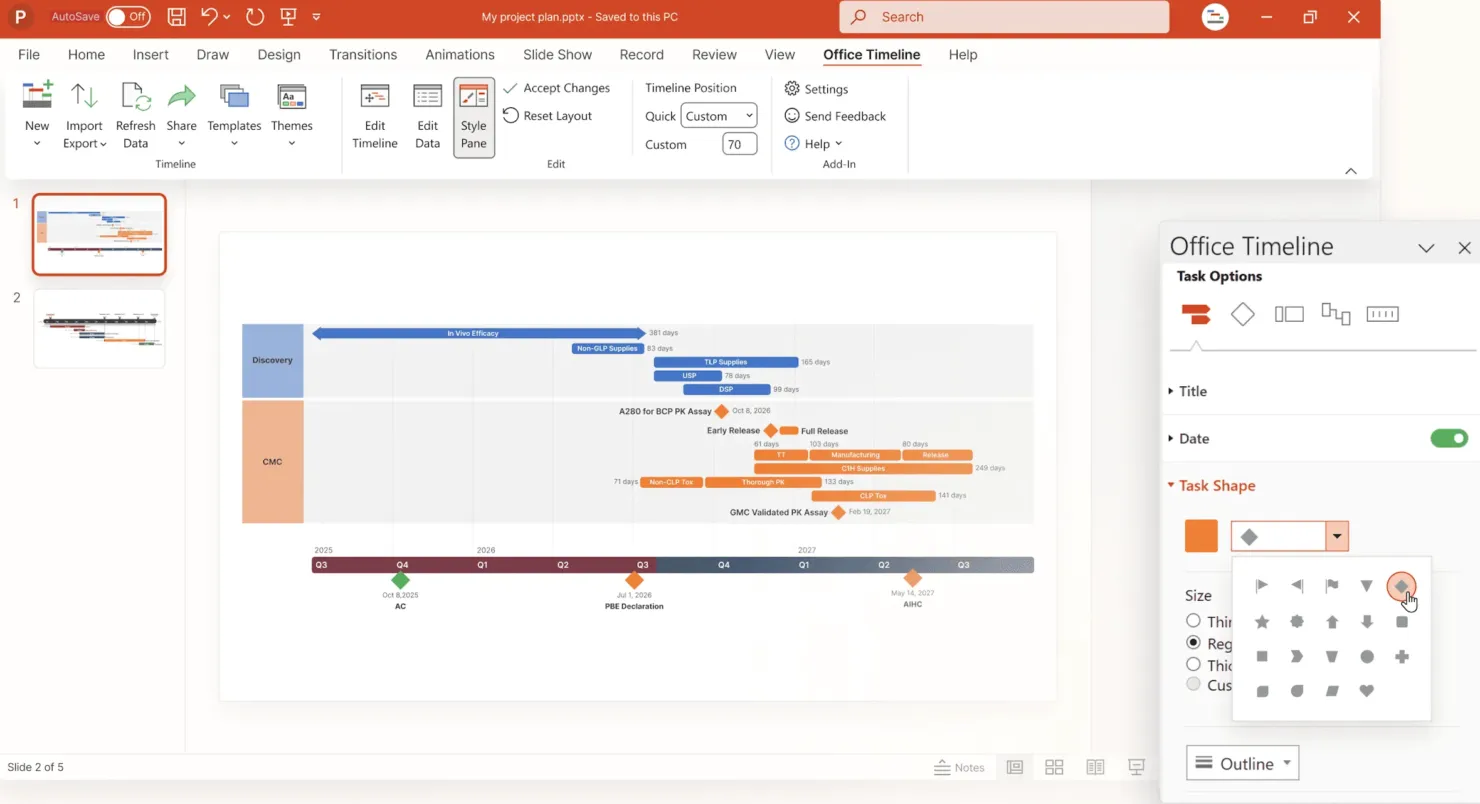
Office Timeline is specialized: it does one thing—timelines and Gantt charts—and does it well.
Productivity Features:
- Limited general productivity features
- Focused entirely on timeline creation
Charting Features:
- Gantt chart automation in minutes
- Swimlane diagrams for multi-track projects
- Roadmap visualizations
- Imports from MS Project, Smartsheet, Jira, Excel
- Dependency and critical path visualization
What it does well:
- Best-in-class Gantt charts
- Integrates with project management tools
- Handles complex project schedules
What it doesn't do:
- General productivity features
- Other chart types (waterfall, Mekko)
- Work on Mac (desktop version Windows only)
Best for: Project managers, implementation consultants, anyone who regularly presents project timelines.
Continue reading: How to Make a Gantt Chart in PowerPoint (Free Template) · PowerPoint Tips and Tricks · Appendix Slide PowerPoint
Comparison Table: All 9 Add-ins
| Tool | Price/Year | Charting | Productivity | Mac | Best For |
|---|---|---|---|---|---|
| Deckary | $120-180 | Excellent | Excellent | Yes | Charts + productivity |
| UpSlide | Enterprise | Good | Excellent | No | Enterprise finance |
| Templafy | Enterprise | Limited | Good | Yes | Brand compliance |
| BrightSlide | Free | None | Good | No | Budget users |
| SlideProof | $99-199 | None | Good | Yes | Quality control |
| Power-user | $105 | Very Good | Good | Yes | All-in-one toolkit |
| PPT Productivity | $179 | Limited | Excellent | Yes | Ex-MBB consultants |
| Macabacus | $200+ | Good | Good | No | Investment banking |
| Office Timeline | $108-249 | Gantt only | Limited | No | Project managers |
Which Add-in Should You Choose?
Use this decision guide based on your primary need:
"I need waterfall and Mekko charts"
Choose Deckary if you want charts and productivity tools included at a great price. Choose Power-user if you also need maps and templates.
"I need faster alignment and formatting"
Choose Deckary if you also need charts and Mac support. Choose PPT Productivity if you want the full MBB toolbar experience. Choose BrightSlide if you need a free option (Windows only).
"I need Excel-linked charts"
Choose Deckary for reliable linking at an accessible price. Choose Macabacus if you're in investment banking.
"I'm on a budget"
Choose Deckary Starter at $120/year for charts + productivity. Choose Power-user at $105/year for the broadest feature set. Choose BrightSlide for free basic productivity (Windows only).
"I use Mac"
Choose Deckary or Power-user—both work on Mac. Avoid UpSlide, Macabacus, BrightSlide, and Office Timeline (Windows only).
"I need enterprise deployment"
Choose UpSlide or Templafy for enterprise document management. Choose empower Suite for all-in-one consolidation (Express available for 1-50 users).
The ROI of Productivity Add-ins
Let's do the math. If you bill at $200/hour (typical for consultants) and save 5 hours per month:
| Scenario | Monthly Savings | Annual Value | Tool Cost | ROI |
|---|---|---|---|---|
| Conservative (3 hrs/mo) | $600 | $7,200 | $50-300 | 24x-144x |
| Moderate (5 hrs/mo) | $1,000 | $12,000 | $50-300 | 40x-240x |
| Heavy user (10 hrs/mo) | $2,000 | $24,000 | $50-300 | 80x-480x |
Even at the most expensive tools ($300/year), you break even after saving just 1.5 hours per year. Most users save that in the first week.
How We Tested These Tools
We evaluated each add-in over 8 weeks using real consulting workflows:
- Charts built: 15+ waterfall and Mekko charts per tool
- Decks formatted: 50+ presentations with each tool
- Operations timed: 100+ alignment, distribution, and formatting tasks
- Platforms tested: Windows 11 and macOS Sonoma
- User profiles: Tested with both experienced consultants and new users
Every recommendation is based on hands-on usage, not feature lists or marketing claims.
The Honest Recommendation
After testing all 9 tools, here's what we'd recommend for most consultants:
If you need charts and productivity: Start with Deckary at $120-180/year. You get waterfall charts, Mekko charts, Excel linking, AND productivity shortcuts—the combination most consultants actually need. Add PPT Productivity if you want the full consulting toolbar.
If you're Windows-only and need everything: Power-user at $105/year offers the broadest feature set including maps that no other tool provides.
If you just need free basics: BrightSlide covers basic productivity on Windows. But you'll eventually want charting capabilities.
The worst decision? Spending hours each week on manual formatting because you didn't invest $120-300 in tools that pay for themselves in the first month.
Try Before You Buy
Most tools offer free trials. Test with your actual workflow:
- Deckary — 14-day free trial, no credit card required
- PPT Productivity — 7-day free trial
- Power-user — 4-month free trial for teams
- BrightSlide — Free, no trial needed
Build a real presentation with each tool. Time yourself. The right choice depends on your specific workflow—not feature lists.