Decktopus Review 2026: AI Features, Pricing & PowerPoint Comparison
Honest Decktopus review covering pricing ($180-420/year), AI presentation features, export limitations, and whether consultants should choose Decktopus or PowerPoint-native alternatives.
Decktopus markets itself as an AI-powered presentation maker that generates fully designed, branded presentations from simple prompts or outlines. At $180-420/year (annual billing), it positions as a fast, design-first alternative to PowerPoint for teams and professionals who value speed over design control.
But for consultants and business professionals who deliver client-ready presentations with specialized charts and editable PowerPoint files, Decktopus's limited customization, generic templates, and export formatting issues create friction that adds hours to presentation development.
After testing Decktopus against 40+ consulting presentations over two months—strategy decks, board materials, due diligence reports, and client deliverables—the pattern became clear: Decktopus excels at internal quick slideshows and routine updates, but falls short of the precision, charting capabilities, and workflow efficiency consultants need for high-stakes client work.
This review covers what Decktopus actually does well, where it struggles with business presentation workflows, honest pricing comparisons, and which alternatives deliver better value for data-driven professionals. For a full comparison of presentation tools, see our best presentation software roundup.
What Decktopus Actually Does
Decktopus is a web-based AI presentation platform built for rapid slide creation. You provide a prompt or upload a document, and the AI generates a complete presentation with slides, layouts, images, and speaker notes.
Core Features
AI Presentation Generation:
- AI-generated outlines from text prompts
- Slide content creation (titles, bullets, layouts)
- AI-generated images from descriptions
- Auto-generated speaker notes and scripts
- Transforms Word docs or PDFs into presentations
- 100 AI credits on free plan, 750 credits on Pro, 1,000 on Business
Templates and Customization:
- Pre-designed templates for various presentation types
- Drag-and-drop editor for layout adjustments
- Auto branding with custom colors, fonts, and logos
- Limited design flexibility—templates lack true differentiation
- Basic rather than bespoke designs
Multimedia Elements:
- Upload and embed videos (YouTube, Vimeo, custom)
- Video trimming and audio level adjustment
- Embed forms, GIFs, and interactive Q&A
- Image effects (blur, brightness, crop, background removal)
- No text or image animations—all slide elements appear simultaneously
Collaboration Features:
- Real-time team collaboration on Business and Enterprise plans
- User permissions for view, edit, and share access
- Project approval workflows (Enterprise only)
- Shared brand assets across teams
Export Options:
- PDF (static document)
- PowerPoint PPTX (editable file with formatting limitations)
- Live web link for sharing without downloads
Analytics:
- Track presentation views and engagement
- Form response tracking (Business plan)
- Webhook integration for data capture
PowerPoint Integration
Decktopus supports PowerPoint PPTX export, which is critical for professionals who deliver editable .pptx files to clients.
However, users report formatting losses with complex layouts, and the platform intentionally does not support animations—all elements appear at once rather than with entrance, emphasis, or exit effects.
Decktopus Pricing
| Plan | Monthly | Annual | Best For |
|---|---|---|---|
| Free | Free | Free | Testing platform, 100 AI credits |
| Pro | $14.99/month | $14.99/month ($180/year) | Individuals, 750 AI credits |
| Business | $34.99/user/month | $34.99/month ($420/year) | Teams, 1,000 credits per user |
| Enterprise | Custom | Custom | Large organizations |
What's Included:
Free:
- 100 AI credits
- Limited templates
- Decktopus branding on exports
- Basic features
Pro ($180/year):
- 750 AI credits (creates ~25 AI presentations)
- Remove Decktopus logo
- Full template library
- Folder organization
- Analytics
- Single user
Business ($420/year per user):
- 1,000 AI credits per user
- All Pro features
- Team collaboration tools
- Custom domain connection
- Form response tracking
- Brand customization (colors, fonts)
- Footer notes and logos
- Webhook integration
- Team management
Enterprise (Custom):
- Custom AI credit allocation
- Advanced security features
- Project approval workflows
- Dedicated account manager
- Custom training and onboarding
Special Pricing:
- Students: 50% off all plans with code SUPPORTEDUCATION (~$90/year for Pro)
Refund Policy: No refunds on monthly or annual subscriptions—unused months are not eligible for refunds.
Decktopus vs Alternatives: Price Comparison
| Tool | Annual Cost | Works in PowerPoint | Consulting Charts | AI Slides | Animations |
|---|---|---|---|---|---|
| Decktopus Pro | $180/year | Export only | No | Yes | No |
| Decktopus Business | $420/year | Export only | No | Yes | No |
| Deckary Premium | $180/year | Native add-in | Waterfall, Mekko, Gantt | Yes | Full support |
| Microsoft Copilot | $360/year | Native | Basic | Yes | Full support |
| Gamma Pro | $216/year | Export only | Basic | Yes | Limited |
At $180-420/year, Decktopus costs more than PowerPoint-native alternatives while lacking specialized business charting capabilities and animation support.
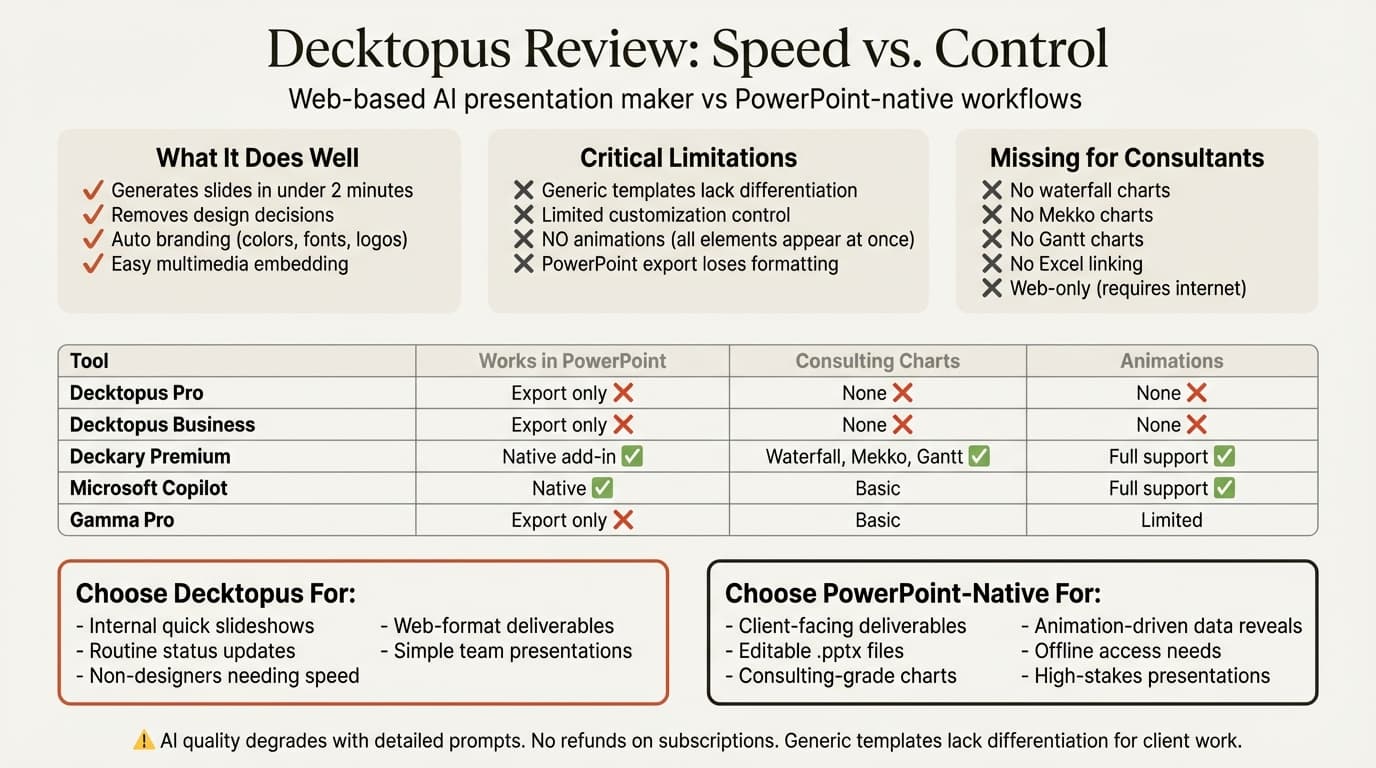
Decktopus Pros: What It Does Well
Based on user reviews from Capterra (63 reviews, 4.6/5 average) and testing across presentation types:
1. Speed for Simple Presentations
Decktopus generates complete presentations in under 2 minutes from a text prompt. For internal status updates, team meetings, and routine slideshows where design quality matters less than speed, this delivers clear value.
Users report saving "at least 2 hours every week" on basic presentation creation.
2. Removes Design Decisions
The platform makes layout, color, and formatting decisions automatically. For non-designers who find PowerPoint's blank canvas intimidating, Decktopus provides pre-designed templates that require only content input.
3. Ease of Use
The interface is straightforward: enter prompt, generate slides, make minor edits, export. Users praise the platform for letting them "focus on content rather than design."
4. Brand Consistency
The auto-branding feature applies custom colors, fonts, and logos across presentations—useful for teams creating multiple decks that need visual consistency.
5. Multimedia Embedding
Embed videos, forms, and interactive elements directly into slides. For presentations that need lead capture forms or audience surveys, this saves integration steps.
6. Web Sharing Without Downloads
Share presentations via web link—viewers access slides in browser without downloading files. For marketing decks or sales materials where controlling the viewing experience matters, this is convenient.
Continue reading: Bubble Chart in PowerPoint · PowerPoint to Word · Best AI Presentation Maker for Consultants
Create an editable presentation in your browser
Turn a prompt or source files into slides you can edit and export to PowerPoint. 10 free AI prompts. No credit card required.
Decktopus Cons: Where It Falls Short
Based on critical user reviews and testing against consulting presentation workflows:
1. Generic Templates Lack Differentiation
Decktopus produces generic output with templates that frequently lack true differentiation. The design quality reads as "automated"—polished enough for internal meetings but not distinctive enough for client-facing work where presentation quality signals professionalism.
For high-stakes communications like board presentations or investor pitches, users report that Decktopus usually falls short compared to manual design.
2. Limited Customization (Critical for Consultants)
This is the dealbreaker for professionals who need precise control over slide layouts.
Decktopus has design flexibility restrictions and struggles with highly technical layouts or custom infographics. While templates are modern and customizable, they're less flexible for specialized presentations.
For consulting decks that require precise alignment, custom diagrams, or specific formatting standards, Decktopus's automation becomes a constraint rather than an asset.
3. PowerPoint Export Formatting Losses
While Decktopus exports to PPTX, users report formatting issues with complex layouts—potentially problematic for teamwork and client deliverables.
The platform also lacks robust high-fidelity PowerPoint exports, meaning slides that look polished in Decktopus may require reformatting when opened in PowerPoint.
4. No Animation Support
Decktopus has NO text or image animations—all slide elements appear simultaneously. There are no entrance animations, emphasis effects, or exit transitions.
For presentations that guide viewers through complex data step-by-step or use animation to control information flow, this is a non-starter. Financial analyses that reveal numbers sequentially, waterfall charts that build segment by segment, or process flows that animate step-by-step cannot be created in Decktopus.
5. No Consulting-Grade Charts
Decktopus offers basic charts only—bar, line, pie, and area. It lacks the specialized charting capabilities business professionals rely on:
- No waterfall charts for financial bridges
- No Mekko charts for market segmentation
- No Gantt charts for project timelines
- No Excel linking with automatic updates
- No CAGR lines, delta indicators, or reference lines
- Manual data entry only (no CSV import with chart generation)
6. AI Quality Degrades with Detailed Prompts
Users report that "the AI functionality is problematic—the more descriptive the input, the worse the output gets, making it unusable even as an aid to get started."
This counterintuitive pattern means Decktopus works best with vague prompts but struggles when given the specific context and data that would produce actually useful slides.
7. Requires Constant Internet Connection
Decktopus is web-only with limited offline capabilities. While you can export presentations for offline viewing, creation and editing require a stable internet connection.
For consultants working on planes, from client sites with restricted internet, or in locations with unreliable connectivity, this creates workflow disruption. PowerPoint works offline by default.
8. Limited Creative Control
Decktopus's focus on automation limits creative control. For professionals who need full design flexibility—custom infographics, precise diagram layouts, specialized visual frameworks—PowerPoint's manual controls deliver better results despite requiring more time.
9. No Refunds
The platform offers no refunds on monthly or annual subscriptions. If you purchase an annual plan and realize the limitations don't fit your workflow, you cannot recover unused months.
Who Decktopus Is Actually For
Choose Decktopus if:
- You create internal presentations where speed matters more than design precision
- Your presentations are routine status updates, team meetings, or simple pitches
- You prioritize automation over creative control
- You're a non-designer intimidated by PowerPoint's blank canvas
- Your presentations stay in PDF or web format rather than editable .pptx files
- You don't need animations or specialized business charts
- You work primarily online and don't need offline access
- Your audience is internal teams rather than external clients
Skip Decktopus if:
- You deliver editable PowerPoint files to clients (export formatting issues break workflows)
- You need consulting-grade charts with Excel linking and automatic updates
- You work in PowerPoint daily and want tools that integrate natively
- Your presentations require animations to guide viewers through complex data
- You need custom layouts, specialized diagrams, or precise design control
- You travel frequently and need offline creation capabilities
- You present to clients, boards, or investors where design quality signals professionalism
- High-stakes communications require differentiation from generic templates
Decktopus vs PowerPoint Alternatives for Consultants
For consultants who need business presentations—not quick internal updates—here are the actual alternatives:
1. Deckary
Best for: Consultants who need AI slides plus consulting-grade charts inside PowerPoint
Website: deckary.com
Deckary works inside PowerPoint as a native add-in—no export steps, no formatting loss, no web dependency, no animation limitations.
AI Slide Builder:
Describe your business problem, attach CSV data if needed, and Deckary generates slides directly in your working document:
- 2-column or 3-column layouts based on content structure
- Action-oriented titles following Pyramid Principle
- Bullet points with proper hierarchy
- Charts generated from your data (bar, waterfall, Mekko, Gantt)
- Icons matched to each section from 2,000+ library
- Your theme colors applied automatically
Charting capabilities Decktopus lacks:
- Waterfall charts with automatic connectors and delta indicators
- Mekko charts for market sizing and competitive segmentation
- Gantt charts for project timelines with milestone tracking
- Excel linking with automatic updates when source data changes
- CAGR lines, reference lines, target markers
- One-click chart generation from CSV files
Animation support: Full PowerPoint animation capabilities—entrance, emphasis, exit effects, and motion paths.
Workflow advantage: Work in PowerPoint directly. No export step means no formatting loss, no animation conversion, no offline limitations.
Pricing: Starter is $15/month or $120/year; Premium is $19/month or $180/year
Versus Decktopus Pro at $180/year or Business at $420/year, Deckary costs less while solving the PowerPoint-native workflow problem consultants actually face.
Best for: Consultants, investment bankers, corporate strategists, and professionals who deliver slide presentations to clients in editable .pptx format.
2. Microsoft Copilot for PowerPoint
Best for: Organizations already paying for Microsoft 365 Copilot
Microsoft's native AI works inside PowerPoint without export steps or format conversions.
Pricing: $30/user/month ($360/year) on top of M365 license
Strengths: Deepest PowerPoint integration, works offline, enterprise security, full animation support
Weaknesses: Expensive, generic output quality, no consulting charts like waterfall or Mekko
For a detailed comparison, see our Copilot for PowerPoint review.
3. Gamma
Best for: Modern web presentations without PowerPoint constraints
Website: gamma.app
Gamma creates card-based presentations that look less like traditional slides and more like interactive web pages.
Pricing: Free tier available, $8-18/month ($96-216/year) for paid plans
Strengths: Modern aesthetic, fast generation, lower price than Decktopus Business plan
Weaknesses: Export to PowerPoint loses formatting, no consulting charts, different paradigm from traditional slides
For a full review, see Gamma vs alternatives.
4. Canva
Best for: Design versatility across presentations and other formats
Website: canva.com
Canva handles presentations alongside 250+ design formats—broader than Decktopus's presentation-only focus.
Pricing: $120/year (Canva Pro), $300/year (Canva for Teams per user)
Strengths: Superior brand recognition, massive template library, familiar interface, more design control than Decktopus
Weaknesses: Web-based requires export, no consulting-specific charts, can be expensive for large teams
Decktopus vs Canva: Both are web-based platforms, but Canva costs $120/year versus Decktopus's $180-420/year. Canva offers more design flexibility and broader format support; Decktopus specializes in AI-generated presentations.
Comparison Table: Decktopus vs Presentation Tools
| Feature | Decktopus | Deckary | Copilot | Canva | Gamma |
|---|---|---|---|---|---|
| Works in PowerPoint | Export only | Native add-in | Native | Export only | Export only |
| AI slide generation | Yes | Yes | Yes | Limited | Yes |
| Export quality | Formatting losses | N/A (native) | N/A (native) | Formatting issues | Formatting issues |
| Offline access | Limited (view only) | Yes (full) | Yes (full) | No | No |
| Animation support | None | Full PowerPoint | Full PowerPoint | Limited | Limited |
| Waterfall charts | No | Advanced + Excel link | No | No | No |
| Mekko charts | No | Advanced + Excel link | No | No | No |
| Gantt charts | No | Advanced | No | No | No |
| Design customization | Limited (templates) | Full PowerPoint | Full PowerPoint | High | Medium |
| Price (annual) | $180-420/year | $120-180/year | $360/year | $120/year | $96-216/year |
The critical distinction: Decktopus prioritizes speed via automation. Deckary and Copilot integrate natively with PowerPoint. Canva and Gamma offer modern web-first experiences with broader design control than Decktopus.
How We Tested
We evaluated Decktopus across 40+ consulting presentations over two months—strategy decks, board materials, client deliverables, and internal status updates. Testing included AI output quality, PowerPoint export fidelity, chart capabilities, and workflow efficiency against Deckary, Microsoft Copilot, Canva, and Gamma.
We measured time from initial prompt to client-ready slide, including export steps, reformatting work, and required manual cleanup.
The Honest Assessment
Decktopus is a fast AI presentation maker with straightforward interface and automated design decisions. Users rate it 4.6/5 on Capterra, praising speed and ease of use for routine presentations.
But for consultants who deliver editable PowerPoint files with specialized charts and need design precision for client-facing work, Decktopus's limitations create friction:
- Generic templates lack differentiation for high-stakes presentations
- Limited customization restricts creative control and specialized layouts
- PowerPoint export loses formatting with complex designs
- No animation support eliminates step-by-step data reveals
- No consulting charts (waterfall, Mekko, Gantt) or Excel linking
- AI quality degrades with detailed prompts (counterintuitive)
- Web-only platform requires constant internet connection
- $180-420/year costs more than PowerPoint-native alternatives
- No refunds on subscriptions
For teams creating internal quick slideshows and routine updates where speed matters more than design precision, Decktopus delivers clear value. The AI generates complete presentations in under 2 minutes.
For consultants, investment bankers, and business professionals who work in PowerPoint daily and deliver .pptx files to clients with specialized charts and animations, Deckary solves the actual workflow problem at lower cost. PowerPoint-native AI, consulting charts, Excel linking, full animation support, and offline access—without the export friction, formatting losses, or creative control limitations that web-based platforms require.
The best test: try both workflows. Decktopus offers a free plan with 100 AI credits. Deckary offers a 14-day free trial without credit card. See which workflow matches your actual deliverables and audience expectations.
Related Guides
- Best Presentation Software — Complete tool comparison
- Best AI Presentation Makers — AI-focused platforms
- Copilot PowerPoint Review — Microsoft's native AI
- Gamma Review — Web-based card presentation platform
- Google Slides vs PowerPoint — Platform comparison
Sources:
- Decktopus 2026 Pricing, Features, Reviews - GetApp
- Decktopus Software Pricing & Alternatives - Capterra
- Decktopus Pricing
- Decktopus Reviews 2026 - Capterra
- Decktopus AI Review 2025: Pros, Cons & Alternatives - SlidePeak
- Decktopus AI - AI-Powered Presentation Generator - Siteefy
- Decktopus AI: Reviews, Features, Pricing - Max Productive
- Decktopus vs PowerPoint Comparison - Skywork AI
- Decktopus Review: Features, Pros, Cons - 10web
Create an editable presentation in your browser
Turn a prompt or source files into slides you can edit and export to PowerPoint. 10 free AI prompts. No credit card required.