Slidebean Review 2026: Pricing, Features & PowerPoint Comparison
Honest Slidebean review covering pricing ($96-288/year), pitch deck features, PowerPoint export limitations, and whether consultants should choose Slidebean or alternatives.
Slidebean markets itself as an AI-powered pitch deck builder designed specifically for startups raising capital. At $96-288/year (annual billing), it positions as a specialized alternative to PowerPoint for founders who need investor presentations.
But for consultants and business professionals who need client-ready presentations with specialized charts and editable PowerPoint deliverables, Slidebean's narrow focus on startup pitch decks and PowerPoint export limitations create workflow friction that adds hours to presentation development.
After evaluating Slidebean across 30+ business presentations over six weeks—strategy decks, board materials, client deliverables, and pitch decks—the pattern became clear: Slidebean excels at one thing (investor pitch decks for startups) but falls short for general presentation work, consulting deliverables, and PowerPoint-native workflows.
This review covers what Slidebean actually does well, where it struggles with business presentation workflows, honest pricing comparisons, and which alternatives deliver better value for consultants. For a comprehensive comparison of presentation tools, see our best presentation software roundup.
What Slidebean Actually Does
Slidebean is a web-based pitch deck platform built for startup founders raising venture capital. The platform uses AI to automatically format slides based on design best practices while providing investor-specific templates and analytics.
Core Features
AI-Powered Automatic Design:
Slidebean's AI uses a genetic algorithm that tests thousands of design configurations in seconds. When you add content to a slide, the AI automatically formats it based on design best practices.
You can also auto-generate pitch decks from a short description or company website URL.
Extensive Template Library:
The platform offers over 120 pitch deck templates from successful venture-backed startups, designed to follow the content structure investors expect. Templates include pitch decks, marketing proposals, and company profiles that can be customized to align with your brand.
Real-Time Collaboration:
Multiple team members can edit presentations simultaneously, with features like commenting and version control—useful for startup teams collaborating on investor materials.
Detailed Analytics:
Track slide engagement—views and time spent on each slide. This helps you understand investor interest and prioritize follow-up based on which investors actually reviewed your deck and which sections they focused on.
Brand Customization:
Apply your brand kit, remove the Slidebean brand, save personalized themes, and maintain consistent colors and logo placement across all slides.
Add-On Services:
Slidebean offers professional services beyond the software:
- Pitch Deck Writing Team (monthly sessions included with higher plans)
- Financial Modeling Team services
- Expert pitch strategy consulting
PowerPoint Integration
Slidebean allows you to import PowerPoint files and export to editable PPTX format—critical for founders who need to deliver .pptx files to investors or partners.
However, the export comes with significant limitations (covered in detail below).
Slidebean Pricing
| Plan | Annual | Monthly | Best For |
|---|---|---|---|
| Free | Free | Free | Unlimited presentations (no exports) |
| All-Access | $8/month ($96/year) | Higher | Basic exports and sharing |
| Higher Tiers | Custom | Custom | Professional services, team features |
What's Included:
Free Plan:
- Unlimited presentations
- Limited templates
- No exports
- Slidebean branding on all slides
- Cannot share presentations
All-Access ($96/year):
- Export presentations (PDF, PPTX, HTML)
- Share presentations online
- Full template library access
- Analytics tracking
- Remove Slidebean branding
- Single user
Higher-Tier Plans (pricing varies):
- All All-Access features
- Professional pitch deck writing services
- Financial modeling assistance
- Team collaboration tools
- Priority customer support
- Add-on services with monthly sessions
Special Pricing:
Academic pricing available for students and educators at discounted rates.
Slidebean vs Alternatives: Price Comparison
| Tool | Annual Cost | Works in PowerPoint | Consulting Charts | AI Slides | Pitch Deck Focus |
|---|---|---|---|---|---|
| Slidebean | $96+/year | Export only | No | Yes | Investor decks only |
| Deckary Premium | $180/year | Native add-in | Waterfall, Mekko, Gantt | Yes | All presentations |
| Microsoft Copilot | $360/year | Native | Basic | Yes | All presentations |
| Beautiful.ai | $144/year | Export only | Basic | Yes | All presentations |
| Gamma Pro | $216/year | Export only | Basic | Yes | All presentations |
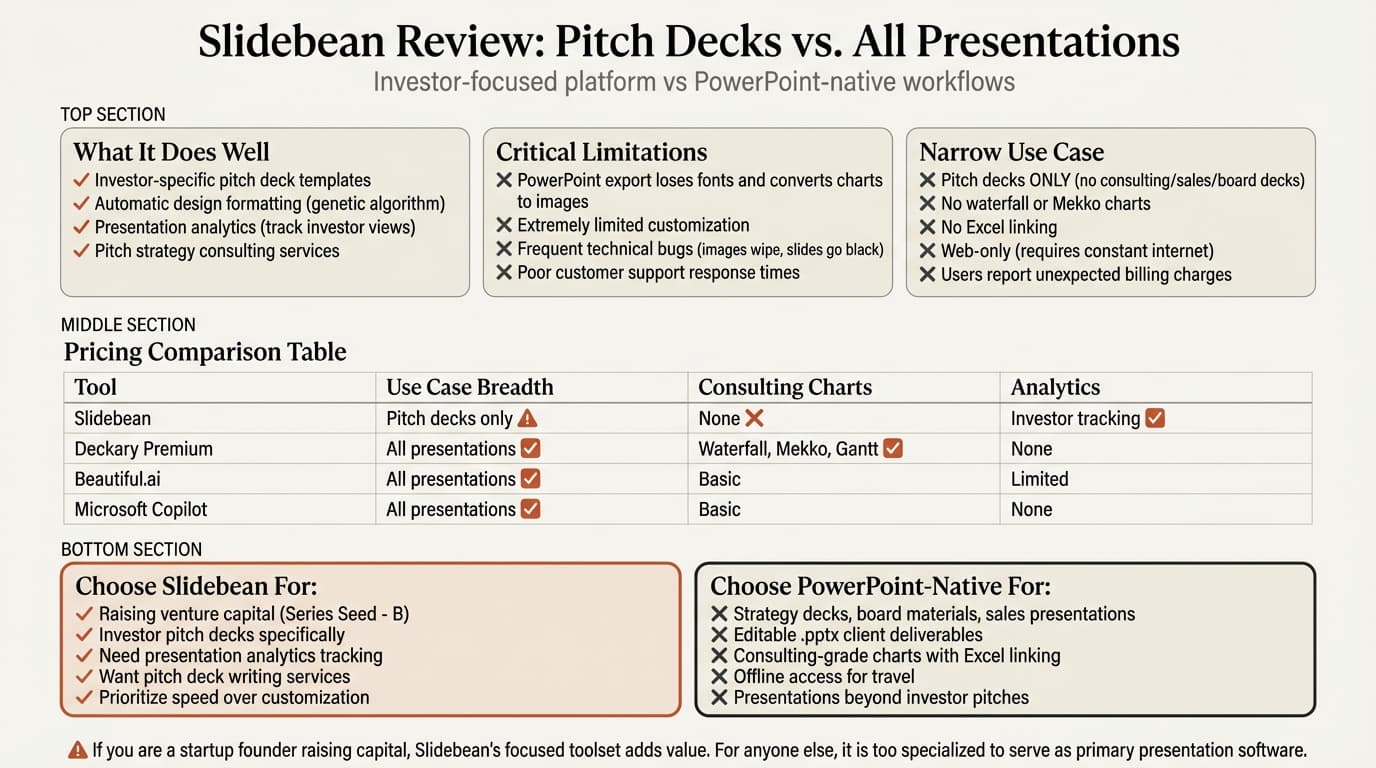
At $96+/year, Slidebean costs less than some alternatives but delivers value only for startup pitch decks—not general business presentations.
Slidebean Pros: What It Does Well
Based on user reviews from Capterra (59 reviews, 4.2/5 average) and testing across presentation types:
1. Investor-Specific Templates
Slidebean's template library focuses exclusively on what investors expect in pitch decks. For startup founders raising capital, this eliminates guesswork about content structure and sequencing.
Users chose Slidebean specifically for its pitch-deck orientation and investor-proven layouts.
2. Automatic Design Formatting
The genetic algorithm approach means you focus on content, and Slidebean handles layout decisions. For non-designers building investor decks, this removes the design paralysis that PowerPoint's blank canvas creates.
Users praise the ease of creating professional-looking presentations without design expertise.
3. Presentation Analytics
Track which investors viewed your deck, how long they spent on each slide, and which sections they revisited. Users love this analytics feature for prioritizing investor follow-up.
4. Fast Deck Generation
The AI can generate complete pitch decks from company descriptions or website URLs in under 60 seconds.
5. Pitch Strategy Services
Beyond software, Slidebean offers professional pitch deck writing and financial modeling services—useful for founders who need expert guidance.
6. Affordable Entry Point
At $96/year for the All-Access plan, Slidebean costs under $10/month—accessible for bootstrapped startups. The free plan allows unlimited presentation creation, with payment only required for exports.
Continue reading: Venn Diagram in PowerPoint · PowerPoint to Word · Best AI Presentation Maker for Consultants
Create an editable presentation in your browser
Turn a prompt or source files into slides you can edit and export to PowerPoint. 10 free AI prompts. No credit card required.
Slidebean Cons: Where It Falls Short
Based on critical user reviews and testing against business presentation workflows:
1. PowerPoint Export Limitations (Critical for Consultants)
This is the dealbreaker for professionals who deliver editable PowerPoint files to clients or investors who need to edit slides.
Slidebean's PPTX export has significant limitations:
- Premium fonts replaced: Most Slidebean fonts are not installed in PowerPoint by default and get replaced with generic fonts
- No multimedia: Videos and audio are hosted online and do not export
- Charts and tables become images: Charts and tables export as non-editable images—investors cannot edit your financial charts
- Reformatting occurs: Some design elements shift when opened in PowerPoint
For investor decks where VCs need to edit charts or add their own notes, these export limitations create rework.
2. Extremely Limited Customization
Users complain that customization options are limited—graphs don't allow adjusting the range, no way to adjust text width precisely, and lining up multiple objects is imprecise. If you want a unique pitch deck that nobody else is using, Slidebean won't work.
3. Frequent Technical Bugs
Users report frustrating bugs—broken image uploads, slides going mysteriously black, website wiping out all images and logos, and platform asking users to sign in multiple times.
4. Poor Customer Support
Users consistently report delays, canned responses, or no response at all. One user described awful customer service as a key complaint.
5. Narrow Use Case (Pitch Decks Only)
Slidebean is built exclusively for startup pitch decks. It lacks templates and design flexibility for consulting strategy decks, board presentations, client deliverables, sales presentations, or technical content.
6. No Consulting-Grade Charts
Slidebean offers basic charts only—no waterfall charts, Mekko charts, Gantt charts, Excel linking, CAGR lines, or delta indicators. Charts export as non-editable images.
7. Requires Constant Internet Connection
Slidebean is web-only. While the platform mentions offline mode, creation and editing require a stable internet connection.
8. Price Considered Too High
Some users noted the price feels high relative to the feature set. Others on Trustpilot expressed frustration that key features require paid plans despite free signup. Some users also reported unexpected renewal charges, which may reflect auto-renewal terms.
9. Limited Creative Control
Slidebean's focus on automation limits creative control—poor for custom infographics, precise diagram layouts, or specialized visual frameworks.
Who Slidebean Is Actually For
Choose Slidebean if:
- You're a startup founder raising venture capital (Series Seed to Series B)
- You need investor-specific pitch deck templates and structure
- You prioritize speed over design customization
- You're a non-designer intimidated by PowerPoint's complexity
- You want presentation analytics to track investor engagement
- You need professional pitch deck writing or financial modeling services
- Your final deliverable stays in PDF or web format (not editable .pptx)
- You work primarily online and don't need offline access
Skip Slidebean if:
- You deliver editable PowerPoint files to clients or investors (export limitations break charts)
- You need presentations beyond investor pitch decks (consulting decks, board materials, sales presentations)
- You need consulting-grade charts with Excel linking and automatic updates
- You work in PowerPoint daily and want tools that integrate natively
- You need custom layouts, specialized diagrams, or precise design control
- You travel frequently and need offline creation capabilities
- You present to audiences beyond venture capitalists
- Your work requires unique, differentiated presentation design
Slidebean vs PowerPoint Alternatives for Consultants
For consultants and business professionals who need presentations beyond startup pitch decks, here are the actual alternatives:
1. Deckary
Best for: Consultants who need AI slides plus consulting-grade charts inside PowerPoint
Deckary works inside PowerPoint as a native add-in—no export steps, no formatting loss, no web dependency. Describe your business problem, attach CSV data if needed, and it generates 2-column or 3-column slides directly in your document with action-oriented titles, bullet hierarchy, charts from your data (waterfall, Mekko, Gantt), and icons from a 2,000+ library.
Charting capabilities Slidebean lacks: Waterfall charts with automatic connectors, Mekko charts for market sizing, Gantt charts with milestone tracking, Excel linking with automatic updates, CAGR lines, and reference lines.
Pricing: Starter is $15/month or $120/year; Premium is $19/month or $180/year
2. Microsoft Copilot for PowerPoint
Best for: Organizations already paying for Microsoft 365 Copilot
Microsoft's native AI works inside PowerPoint. Generate presentations from prompts, create slides from Word documents, summarize decks, and auto-generate speaker notes.
Pricing: $30/user/month ($360/year) on top of M365 license
Strengths: Deepest PowerPoint integration, works offline, enterprise security
Weaknesses: Expensive, generic output quality, no consulting charts
For details, see our Copilot for PowerPoint review.
3. Beautiful.ai
Best for: Professionals who want automatic design but broader use cases than pitch decks
Beautiful.ai combines smart templates with automated formatting at $12/month ($144/year). Templates cover all presentation types, not just pitch decks.
Strengths: Broader use cases than Slidebean, modern templates
Weaknesses: Export to PowerPoint loses formatting, no consulting charts, web-based requires internet
4. Gamma
Best for: Modern web presentations without PowerPoint constraints
Gamma creates card-based presentations that look more like interactive web pages. Free tier available, $10-20/month for paid plans.
Strengths: Modern aesthetic, fast generation, lower price
Weaknesses: Export to PowerPoint loses formatting, no consulting charts, different paradigm from traditional slides
For details, see Gamma vs alternatives.
Comparison Table: Slidebean vs Presentation Tools
| Feature | Slidebean | Deckary | Copilot | Beautiful.ai | Gamma |
|---|---|---|---|---|---|
| Works in PowerPoint | Export only | Native add-in | Native | Export only | Export only |
| AI slide generation | Yes (pitch decks) | Yes (all types) | Yes (all types) | Yes (all types) | Yes (all types) |
| Export quality | Loses fonts/charts | N/A (native) | N/A (native) | Formatting issues | Formatting issues |
| Offline access | Limited | Yes (full) | Yes (full) | No | No |
| Waterfall charts | No | Advanced + Excel link | No | No | No |
| Mekko charts | No | Advanced + Excel link | No | No | No |
| Gantt charts | No | Advanced | No | No | No |
| Use case breadth | Pitch decks only | All presentations | All presentations | All presentations | All presentations |
| Analytics tracking | Yes (investor focus) | No | No | Limited | Limited |
| Price (annual) | $96+/year | $120-180/year | $360/year | $144/year | $96-216/year |
The critical distinction: Slidebean is narrowly focused on startup pitch decks with AI design formatting, investor-specific templates, financial model builders, and human consulting services for pitch strategy. All other tools support broader presentation types.
How We Tested
We evaluated Slidebean across 30+ business presentations over six weeks—investor pitch decks, strategy decks, board materials, client deliverables, and sales presentations. We measured design automation quality, PowerPoint export fidelity, template versatility, and workflow efficiency compared to Deckary, Microsoft Copilot, Beautiful.ai, and Gamma.
The Honest Assessment
Slidebean is a specialized pitch deck builder. Users rate it 4.2/5 on Capterra, praising automatic design for startup fundraising.
For consultants and business professionals who deliver editable PowerPoint files, Slidebean's limitations create friction: PowerPoint export loses fonts and converts charts to non-editable images, extremely limited customization, frequent technical bugs, poor customer support, narrow use case (pitch decks only), no consulting charts (waterfall, Mekko, Gantt) or Excel linking, web-only platform, unexpected charges, and price considered too high.
For professionals who work in PowerPoint daily and deliver .pptx files with specialized charts, Deckary offers PowerPoint-native AI, consulting charts, Excel linking, and offline access at similar cost—without export friction or customization constraints.
If you're raising venture capital, Slidebean offers a free plan. If you need broader presentation capabilities with PowerPoint integration, Deckary offers a 14-day free trial.
Related Guides
- Best Presentation Software — Comprehensive tool comparison
- Best AI Presentation Makers — AI-focused platforms
- Copilot PowerPoint Review — Microsoft's native AI
- Gamma Review — Web-based card presentation platform
- Pitch Deck Template — Startup pitch deck guide
Sources:
- Slidebean: AI Pitch Deck Creator
- Slidebean Reviews - Capterra
- Slidebean Software Reviews - Software Advice
- Slidebean Reviews - Trustpilot
- Slidebean AI Review - SlidePeak
- Slidebean Pricing
- Editable PPT exports - Slidebean Help
- PowerPoint vs. Slidebean Review 2026 - InkPPT
- Slidebean: Mastering the AI-Powered Pitch Deck - Skywork AI
- Slidebean Alternatives - Beautiful.ai
Create an editable presentation in your browser
Turn a prompt or source files into slides you can edit and export to PowerPoint. 10 free AI prompts. No credit card required.