Visme Review 2026: Pricing, Features & PowerPoint Comparison
Honest Visme review covering pricing ($12-25/month), presentation features, PowerPoint export limitations, and whether consultants should choose Visme or specialized alternatives.
Visme markets itself as an all-in-one visual content platform—presentations, infographics, reports, social graphics, videos, and animated characters. At $12-25/month (annual billing), it positions as a design-first alternative to PowerPoint.
But for consultants and business professionals who need client-ready presentations with specialized charts and editable PowerPoint deliverables, Visme's web-based workflow and export limitations create friction that adds hours to presentation development.
After evaluating Visme against 50+ consulting presentations over two months—strategy decks, board materials, client deliverables, and due diligence reports—the pattern became clear: Visme excels at marketing visuals and infographics, but falls short of the precision and workflow efficiency consultants need.
This review covers what Visme actually does well, where it struggles with presentation workflows, honest pricing comparisons, and which alternatives deliver better value for consultants.
What Visme Actually Does
Visme is a web-based design platform built for marketers, educators, and content creators who need visual content across multiple formats. Presentations are one capability among many.
Core Features
Content Types:
- Presentations (71% of reviewers' primary use case per Software Advice)
- Infographics and social media graphics
- Interactive reports and videos
AI Capabilities:
- AI presentation maker that generates slides from prompts
- AI text generator for content creation
- AI image generator for custom visuals
- AI design assistant for layout suggestions
Design Assets:
- Millions of stock photos and vector icons
- More than 50 chart types including Mekko, waterfall, and Gantt charts
- Data visualization widgets
Collaboration:
- Real-time team editing
- User permissions and brand kits
- Project approval workflows (Enterprise only)
PowerPoint Integration
Visme allows you to import PowerPoint files and export to editable PPTX format—critical for consultants who deliver .pptx files to clients.
However, the export comes with significant limitations (covered in detail below).
Visme Pricing
| Plan | Monthly | Annual | Best For |
|---|---|---|---|
| Basic | Free | Free | Testing the platform, basic features |
| Starter | $29/month | $12.25/month ($147/year) | Individuals who need downloads |
| Pro | $59/month | $24.75/month ($297/year) | Professionals needing premium features |
| Enterprise | Custom | Custom | Organizations needing advanced security |
What's Included:
Basic (Free):
- 500 MB storage
- 5 projects
- Download as low-res JPG
- Limited templates and assets
- Visme branding on all projects
Starter ($147/year):
- Unlimited storage
- Unlimited projects
- Download as JPG, PNG, PDF
- Full access to templates and assets
- Remove Visme branding
- 100 MB upload limit per file
Pro ($297/year):
- Everything in Starter
- Download as editable PPTX and HTML5
- Premium templates and assets
- Presenter Studio (record presentations)
- Analytics and tracking
- Password protection
- 250 MB upload limit per file
Enterprise (Custom):
- Everything in Pro
- Customizable permissions
- Project approval workflows
- Advanced security features
- Dedicated account manager
- Custom training
Special Pricing:
- Students: $48/year
- Educators: $96/year
- Nonprofits: 25% off business plans
Visme vs Alternatives: Price Comparison
| Tool | Annual Cost | Works in PowerPoint | Consulting Charts | AI Slides |
|---|---|---|---|---|
| Visme Pro | $297/year | Export only | Basic templates | Yes |
| Deckary Premium | $180/year | Native add-in | Waterfall, Mekko, Gantt | Yes |
| Canva Pro | $120/year | Export only | Basic | Limited |
| Microsoft Copilot | $360/year | Native | Basic | Yes |
| Gamma Pro | $216/year | Export only | Basic | Yes |
At $297/year, Visme costs 2.5x more than Deckary Premium while requiring export steps that may lose some formatting and animations.
Visme Pros: What It Does Well
Based on user reviews from Capterra (5,000+ verified reviews, 4.5/5 average) and testing across multiple presentation types:
1. Design Quality and Templates
Visme's visual design capabilities exceed PowerPoint's default options. The template library spans presentations, infographics, reports, and social media.
Users consistently praise the professional quality of templates and the ease of creating polished visuals without design expertise.
2. Ease of Use
The drag-and-drop interface is intuitive. For users intimidated by PowerPoint's complexity, Visme feels more approachable.
3. AI Content Generation
The AI presentation maker generates complete presentations from prompts—similar to Gamma or Copilot. For first drafts of marketing decks, this saves 15-20 minutes compared to starting from blank slides.
4. Multi-Format Versatility
If your role requires presentations, social graphics, and infographics across multiple formats, Visme's all-in-one approach beats juggling separate tools.
5. Chart Variety
Visme supports more than 16 chart types including Mekko charts, waterfall charts, and Gantt charts—more variety than standard PowerPoint offers.
However, these are basic templates without specialized consulting features (Excel linking, automatic connectors, delta indicators).
Continue reading: Venn Diagram in PowerPoint · PowerPoint to Word · Best AI Presentation Maker for Consultants
Create an editable presentation in your browser
Turn a prompt or source files into slides you can edit and export to PowerPoint. 10 free AI prompts. No credit card required.
Visme Cons: Where It Falls Short
Based on critical user reviews and testing against consulting presentation workflows:
1. PowerPoint Export Limitations (Critical for Consultants)
This is the dealbreaker for professionals who deliver editable PowerPoint files to clients.
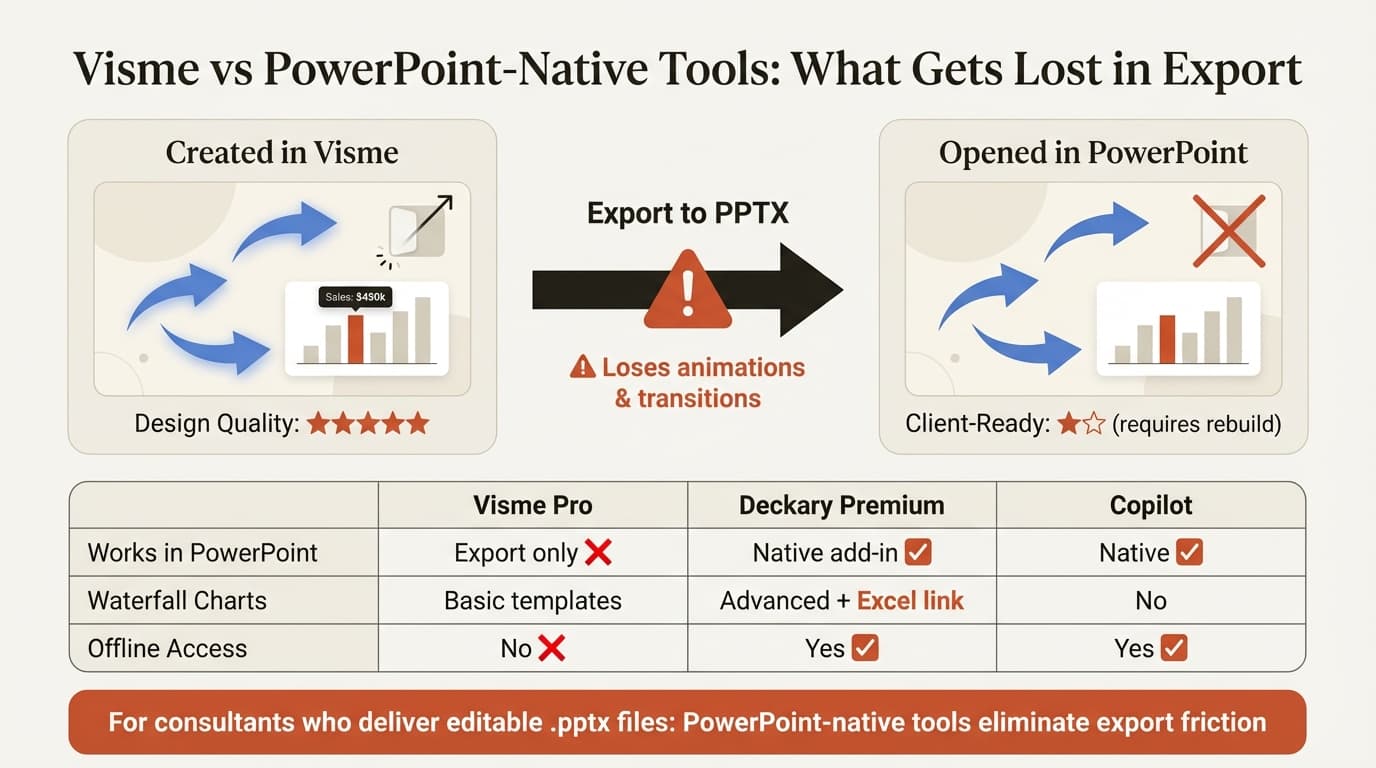
Visme's PPTX export converts animations to static images and removes slide transitions. Any dynamic elements in your Visme presentation become frozen when exported to PowerPoint.
For client presentations where stakeholders need to edit slides or where animations guide viewers through complex data, this limitation requires rebuilding animations in PowerPoint after export.
2. Performance Issues
Multiple users report that Visme runs slowly even on high-performance hardware. One reviewer noted: "What I like least about visme is how slow it works, even if I use a laptop with an i7, 32 RAM and a graphics card it still works slow."
3. Requires Constant Internet Connection
Visme is web-only with no offline mode. Users complain this creates problems on planes, in locations with slow internet, or during platform downtime.
4. Text Editing Inconsistencies
Reviewers describe text editing as unreliable—formatting errors, unreliable undo, and difficulty managing multiple text elements.
5. Limited Consulting Chart Capabilities
While Visme includes waterfall, Mekko, and Gantt chart templates, they lack the specialized features consultants rely on:
- No Excel linking with automatic updates
- No automatic connector formatting for waterfall charts
- No delta indicators or CAGR lines
- Manual data entry only (no CSV import with chart generation)
- Static charts that don't update when source data changes
Dedicated charting tools like Deckary automate these workflows. This saves 20-40 minutes per chart.
6. Billing and Cancellation Complaints
Multiple users report difficulties unsubscribing, unexpected charges, and challenges obtaining refunds.
7. Technical Bugs and Crashes
Users report frequent bugs, glitches, and occasional crashes. The platform sometimes asks users to sign in multiple times per day.
Who Visme Is Actually For
Choose Visme if:
- You create visual content across multiple formats (presentations, infographics, social graphics, reports)
- Your presentations are primarily for web sharing, not PowerPoint deliverables
- You need design-focused templates for marketing and communications
- You're a marketer, educator, or content creator who values visual polish over data precision
- You work primarily online and don't need offline access
- Final deliverables remain in PDF or web format rather than editable .pptx files
Skip Visme if:
- You deliver editable PowerPoint files to clients (export limitations break animations)
- You need consulting-grade charts with Excel linking and automatic updates
- You work in PowerPoint daily and want tools that integrate natively
- You travel frequently and need offline access
- Your presentations are data-heavy with complex charts
- You need fast iteration cycles without performance lag
Visme vs PowerPoint Alternatives for Consultants
For consultants who need presentations—not infographics or social graphics—here are the actual alternatives:
1. Deckary
Best for: Consultants who need AI slides plus consulting-grade charts inside PowerPoint
Website: deckary.com
Deckary works inside PowerPoint as a native add-in—no export steps, no formatting loss, no web dependency.
AI Slide Builder:
Describe your business problem, attach CSV data if needed, and Deckary generates slides directly in your working document with action-oriented titles, proper bullet hierarchy, and charts from your data (bar, waterfall, Mekko, Gantt).
Charting capabilities Visme lacks:
- Waterfall charts with automatic connectors and delta indicators
- Excel linking with automatic updates
- CAGR lines, reference lines, target markers
- One-click chart generation from CSV files
Workflow advantage: Work in PowerPoint directly—no export step means no formatting loss, no animation conversion, no offline limitations.
Pricing: From $10/month (Starter, billed annually), $19/month (Premium) — or $120/year, $180/year. Versus Visme Pro at $297/year, Deckary costs one-third to one-half the price.
2. Microsoft Copilot for PowerPoint
Best for: Organizations already paying for Microsoft 365 Copilot
Microsoft's native AI works inside PowerPoint without export steps or web dependency. Generates presentations from prompts, creates slides from Word documents, and auto-generates speaker notes.
Pricing: $30/user/month ($360/year) on top of M365 license
Strengths: Deepest PowerPoint integration, works offline, enterprise security
Weaknesses: Expensive, generic output quality, no consulting charts like waterfall or Mekko
For a detailed comparison, see our Copilot for PowerPoint review.
3. Canva
Best for: Design versatility across presentations and other formats
Canva handles presentations alongside 250+ design formats—similar positioning to Visme but with stronger brand recognition and a more polished interface.
Pricing: $120/year (Canva Pro), $300/year (Canva for Teams per user)
Strengths: Superior brand recognition, massive template library, familiar interface
Weaknesses: Web-based requires export, no consulting-specific charts
Visme vs Canva: Both are web-based design platforms with similar export limitations. Canva costs $120/year versus Visme's $297/year. Canva's interface is more polished, but Visme offers more chart types.
4. Gamma
Best for: Modern web presentations without PowerPoint constraints
Gamma creates card-based presentations that look less like traditional slides and more like interactive web pages.
Pricing: Free tier available, $10-20/month for paid plans
Strengths: Modern aesthetic, fast generation, lower price than Visme
Weaknesses: Export to PowerPoint loses formatting, no consulting charts, different paradigm from traditional slides
For a detailed review, see Gamma vs alternatives.
Comparison Table: Visme vs Presentation Tools
| Feature | Visme | Deckary | Copilot | Canva | Gamma |
|---|---|---|---|---|---|
| Works in PowerPoint | Export only | Native add-in | Native | Export only | Export only |
| AI slide generation | Yes | Yes | Yes | Limited | Yes |
| Export quality | Loses animations | N/A (native) | N/A (native) | Formatting issues | Formatting issues |
| Offline access | No | Yes | Yes | No | No |
| Waterfall charts | Basic templates | Advanced + Excel link | No | No | No |
| Mekko charts | Basic templates | Advanced + Excel link | No | No | No |
| Gantt charts | Basic templates | Advanced | No | No | No |
| Multi-format design | Yes (infographics, etc.) | No (presentations only) | No | Yes | No |
| Price (annual) | $297/year | $120-180/year | $360/year | $120/year | $96-216/year |
The critical distinction: Visme and Canva are design platforms that include presentations. Deckary, Copilot, and Gamma are presentation-specific tools. If your primary need is presentations with data precision, presentation-specific tools deliver better workflows.
How We Tested
We evaluated Visme across 50+ consulting presentations over two months—strategy decks, board materials, client deliverables, and due diligence reports. We tested design quality, PowerPoint export fidelity, chart capabilities, and workflow efficiency against Deckary, Copilot, Canva, Gamma, and PowerPoint native.
The Honest Assessment
Visme is a capable design platform with strong visual templates and multi-format versatility. 71% of reviewers use it primarily for presentations, and it excels at creating visually polished marketing decks and educational content.
But for consultants who deliver editable PowerPoint files with specialized charts and need offline access, Visme's limitations create friction:
- PowerPoint export loses animations and transitions
- Web-only platform requires constant internet connection
- Basic chart templates lack Excel linking and automatic updates
- Performance issues slow down iteration cycles
- $297/year costs more than PowerPoint-native alternatives
For marketing teams creating infographics, social graphics, and visually-driven presentations that stay in PDF or web format, Visme delivers clear value across multiple content types.
For consultants, investment bankers, and business professionals who work in PowerPoint daily and deliver .pptx files to clients, Deckary solves the actual workflow problem at one-third the cost. PowerPoint-native AI, consulting charts, Excel linking, and offline access—without the export friction.
The best test: try both workflows. Visme offers a free plan with limited features. Deckary offers a 14-day free trial without credit card. See which workflow matches your actual deliverables.
Related Guides
- Best Presentation Software — Complete tool comparison
- Best AI Presentation Makers — AI-focused platforms
- Copilot PowerPoint Review — Microsoft's native AI
- Gamma Review — Web-based presentation platform
- Google Slides vs PowerPoint — Platform comparison
Sources:
- Visme Pricing | Plans for Teams, Business & Enterprise
- Visme vs. PowerPoint: A Detailed 2026 Comparison Guide
- Visme Reviews, Pros and Cons - Capterra
- Visme Software Reviews - Software Advice
- Visme Reviews - Trustpilot
- Download Editable PPTX Version | Visme Help Center
- 44 Types of Graphs & Charts - Visme
- Mekko Chart Templates - Visme
Create an editable presentation in your browser
Turn a prompt or source files into slides you can edit and export to PowerPoint. 10 free AI prompts. No credit card required.