


Build and edit PowerPoint slides with AI
Turn a brief into native slides, revise an existing deck, and keep charts, tables, and text editable. Work inside PowerPoint or create a deck in your browser.
14-day free trial. No credit card required.
Our users work at companies like
Deckary helps consulting & industry firms to build better presentations








Build directly in PowerPoint
Open Deckary in the presentation you are already working on. Ask the agent to create a slide or make a targeted change, then keep working with the native PowerPoint file.
Work in the open deck
Create a new slide or change a specific slide in the presentation already on screen.
Use native slide elements
Build business charts and structured layouts without flattening the slide into an image.
Continue editing in PowerPoint
Keep text, shapes, charts, and tables editable for the next review round.
Starting without an existing deck? Use the AI Slide Builder to build an editable PPTX from a brief and source files.
Or build the deck in your browser
Start with a brief, shape the story with Deckary AI, and refine every chart, title, and layout in the browser. Export to editable PowerPoint when it is ready.
Three ways to edit
Deckary AI pane
Build or revise slides with the built-in agent.
MCP server
Connect any MCP-compatible AI agent to your deck.
Manual editor
Fine-tune every element directly on the canvas.

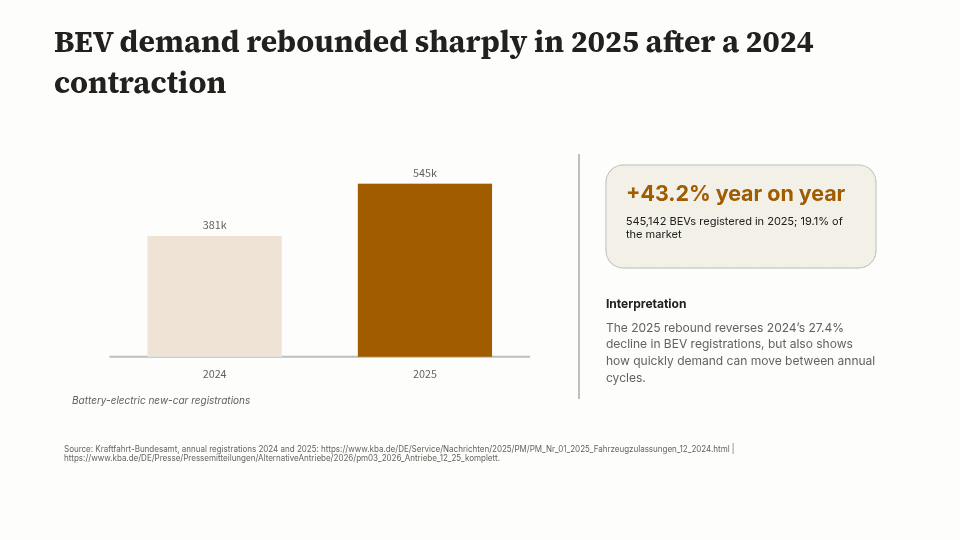
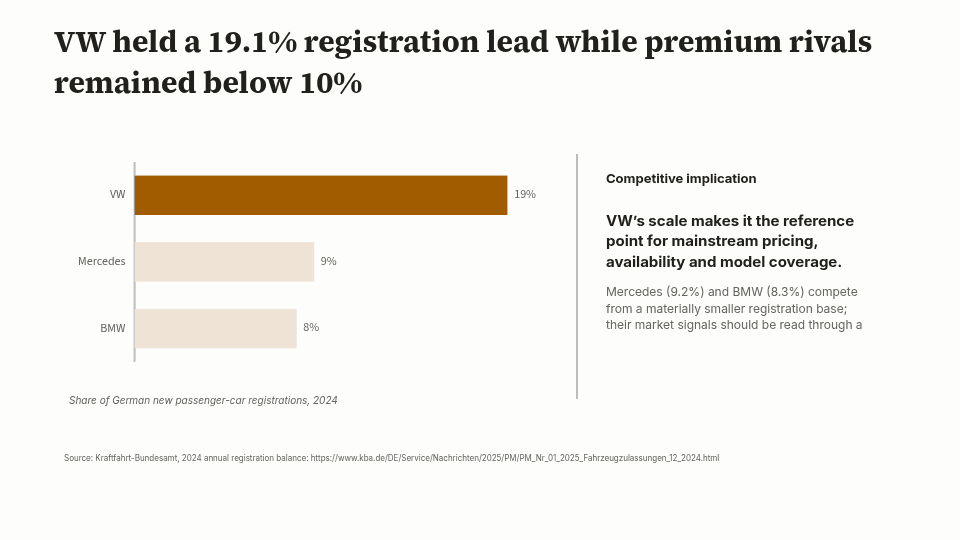
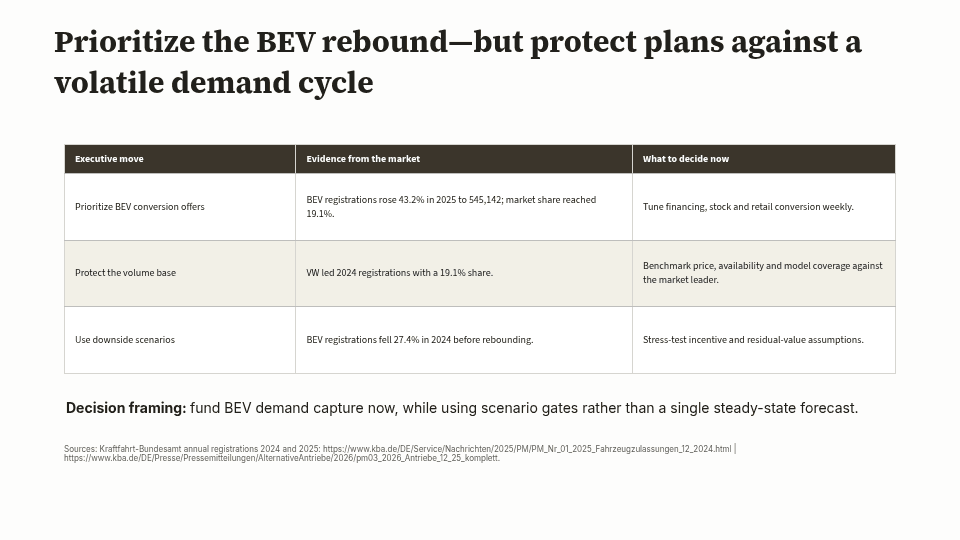
Start with the material you already have
For a quarterly review, ask for an executive summary, a plan-versus-actual chart, risks, and decisions. After the draft, ask to change one slide or update a metric. Review the source figures before sharing.
Download a filled QBR presentation to see a practical report structure, or follow the PDF-to-PowerPoint workflow to build from a source report.
The QBR download is an illustrative template. Generated decks vary with your sources and instructions. 14-day free trial. No credit card required. Continued AI use requires a paid plan.
Business charts.
Control every detail.
Build editable waterfall, bar, and Mekko charts. Refine the data, formatting, and annotations with AI or by hand.
Revenue bridge
Revenue, $m
 Deckary
Waterfall
Like having a consultant build your slides
Describe a business problem in plain language. AI analyzes the context and builds a complete slide with the right structure, data visualization, and formatting.
- Smart layouts — AI picks the right structure for your content
- Attach data any way — CSV, PDF, or just paste it
- Web research built in — AI finds data and cites sources
- Your theme colors, applied instantly
Edit any slide with AI
Select any slide and tell AI what to change. It rewrites text, restructures layouts, edits tables, and formats everything — directly inside PowerPoint.
Rewrite
Rewrite text in consulting tone with bold and structure
Reduce
Cut bullets, trim fluff, keep meaning
Edit tables
Restructure and reformat table content
Custom
Write your own editing instructions
Prompt-to-deck generator
Creates a first draft from a prompt
- Generates a presentation in one pass
- Applies a theme and slide layouts
- Editing and export options vary by product
Deckary presentation agent
Supports targeted revisions through delivery
- Works from source material and the decision you need to support
- Builds a structured narrative with business visuals
- Accepts targeted feedback and revises specific slides
- Delivers editable work in the browser or PowerPoint
Frequently asked questions
Everything you need to know about AI Slide Builder and AI editing features
Ready to build slides faster?
Try Deckary's AI Slide Builder free. Generate new slides or edit existing ones with AI. 14-day free trial. No credit card required.
Complete guide
Related articles
Related features