Build and edit PowerPoint slides with AI
Use Deckary's PowerPoint AI agent to create a new slide, revise an existing slide, or build a sourced multi-slide presentation.
Last verified: 2026-09-09
Deckary's PowerPoint AI agent can create one native slide at a time, patch an existing slide, or replace a slide when a full redesign is needed. The agent chooses the content and layout; the add-in validates the complete slide plan, commits it to PowerPoint, reads it back, and reviews the rendered result.
Open the slide builder
- Open the presentation and select the slide that matters to your request.
- Choose Deckary → AI and sign in if prompted.
- Check the slide indicator in the pane, then describe the outcome in the message box. Name a slide explicitly when the task should target a particular one.
- Send the request and let the run finish before making simultaneous edits to its target objects.
The screenshots below were captured in the PowerPoint add-in with the Deckary ribbon tab selected.
Create a new slide
Describe the decision the slide should support, the intended audience, and the evidence to use. If the presentation already has a suitable layout, Deckary can use its native placeholders and theme. A concrete prompt produces a more useful first draft than a request such as “make a good slide.”
Add a market-entry recommendation after the current slide. Use the attached
research, lead with the recommendation, compare the three options, and cite
the sources in a compact footer.
New slides can contain text, shapes, connectors, tables, media, and supported native charts. Deckary uses one complete slide-authoring transaction so invalid content or geometry can be rejected before any part of the slide is written.
Edit an existing slide
For a targeted revision, identify the slide and the outcome rather than describing mouse actions. Deckary first reads the current slide, then uses current object handles to update, add, or remove the required elements.
Examples:
- “Shorten the title and make the recommendation explicit.”
- “Update this chart from the latest values and keep its position.”
- “Replace the right-hand text with three evidence-backed implications.”
- “Fix the overlap without changing the slide's content.”
If PowerPoint changes after the agent reads it, Deckary requires fresh state before applying the write. That prevents an edit planned for one version from landing on another.
Walkthrough: revise only a title
For a small edit, state the exact change and the content that must remain. This example uses a slide with an Excel-linked chart:
On slide 2, change only the title to “Q4 revenue exceeds target”.
Keep the linked chart, its data, position, formatting, subtitle,
and footer unchanged.
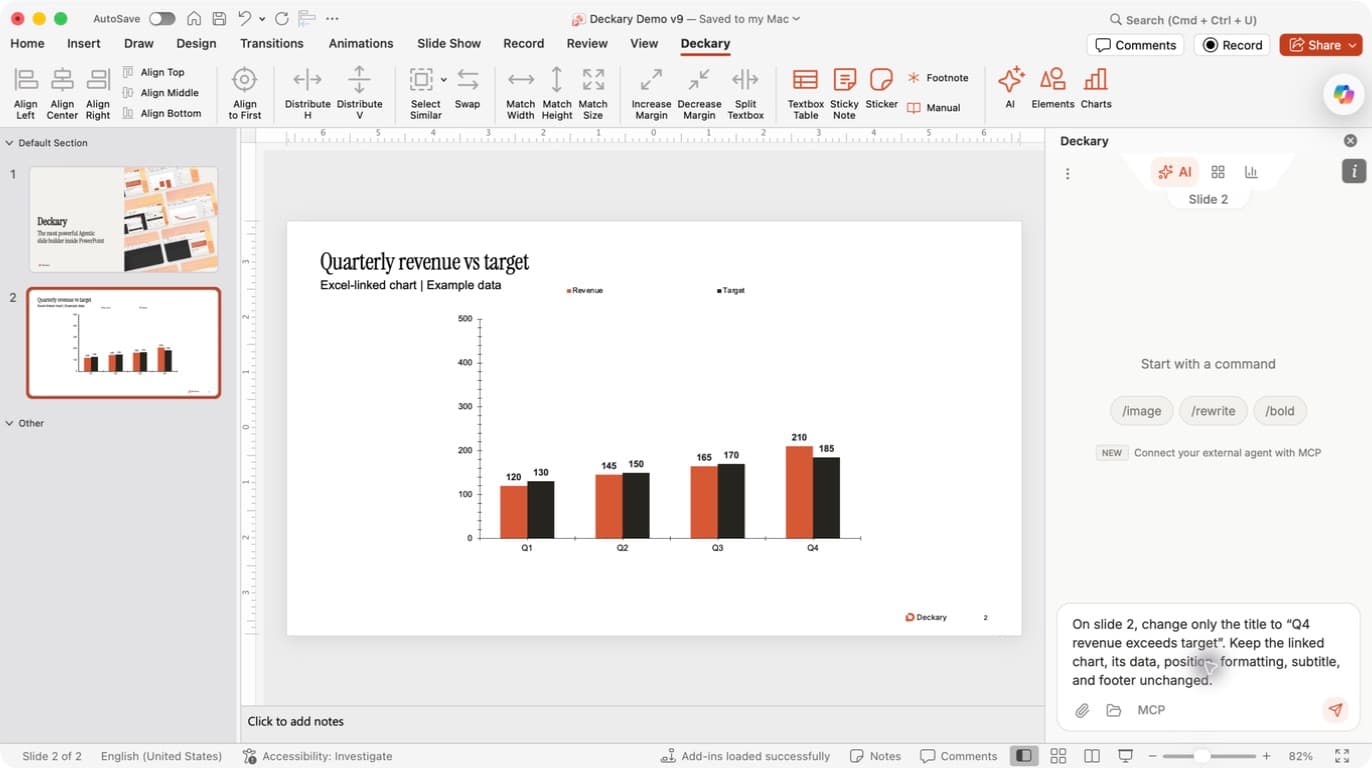
Check the target: the pane shows Slide 2, and the request names slide 2. The old title is visible on the canvas so you can compare it with the result. The preservation instructions make clear that this is a title edit, not a chart refresh or redesign.
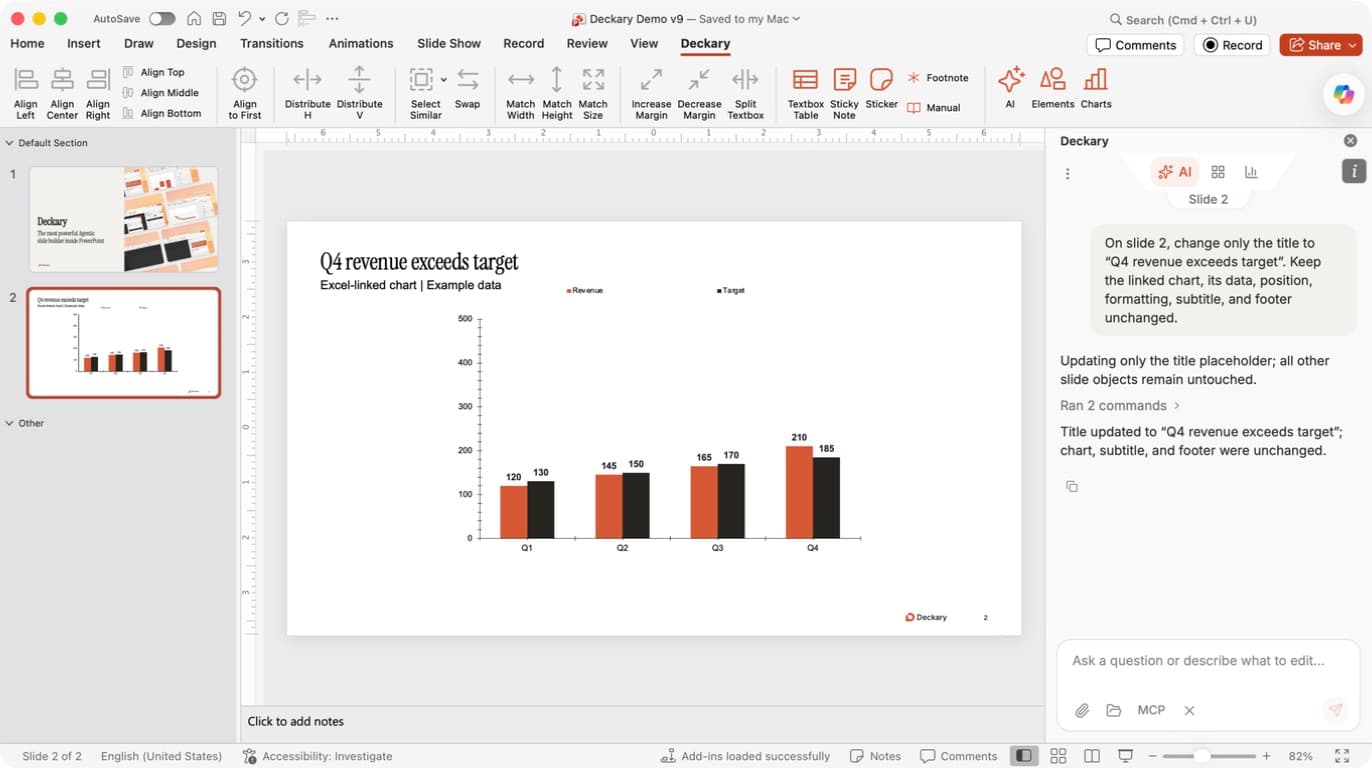
Check the result: the title has changed, and the chart still shows Q4 Revenue 210 and Target 185. The subtitle and footer remain visible. Compare the slide with the request, read any reported limitations, and save after review. A Ran … commands row can be expanded for more detail about the actions.
If the result needs adjustment, send a specific follow-up, such as “Make the title shorter while keeping its meaning.” If an operation fails or reports partial completion, inspect the current slide before asking for a retry.
Build several slides
For a multi-slide request, Deckary authors slides sequentially. Each slide is committed and reviewed before work moves to the next slide. The agent can reuse the same approved sources across the run while still reading the current presentation state between changes.
This sequence matters because PowerPoint assigns live slide and shape identities during a commit. The next step works from those actual identities rather than assumptions made before the file changed.
Use sources and citations
Attached documents and current-run web research form the source authority for factual claims. A web citation must match a source observed during the active run; the authoring layer will not accept an invented URL. Source references can be rendered as a footer when the slide needs visible attribution.
What the agent verifies
After a successful write, Deckary reads the committed slide state and uses PowerPoint's renderer to inspect the output. Structural checks cover the objects that were created or changed. Visual review checks the actual slide pixels for issues such as clipping, overlap, poor hierarchy, or unreadable density.
The result remains a PowerPoint slide. You can continue editing it manually after the agent finishes.
See Native PowerPoint charts for chart behavior or MCP documentation if the reasoning agent should run in an external MCP client.