Audit formulas in Excel with AI
Run a bounded Excel formula audit for errors, hardcoded constants, external references, volatile functions, and inconsistent formula patterns.
Last verified: 2026-09-09
Find formula errors and suspicious patterns without changing your workbook. Start with a named worksheet and a small range, review the findings, then decide which cells to inspect or correct.
The screenshots use an example worksheet named Audit Demo. Its Q3 margin deliberately divides by zero, and one forecast formula has been replaced with the value 999. All screenshots were captured in Excel with the Deckary ribbon tab selected.
1. Open the AI pane and choose an audit range
- Open the workbook you want to check and sign in to Deckary.
- Choose Deckary → AI. You can also use the AI tab inside the pane.
- Select the relevant block, or name its worksheet and address explicitly in your request.
- Ask for findings and suggested fixes, and say whether the agent may edit.
For the example, enter:
Audit 'Audit Demo'!A1:E6 for formula errors, inconsistent formulas,
hardcoded constants, and formulas replaced by values. Report exact cells
and suggested fixes in short bullets. Do not edit the workbook.
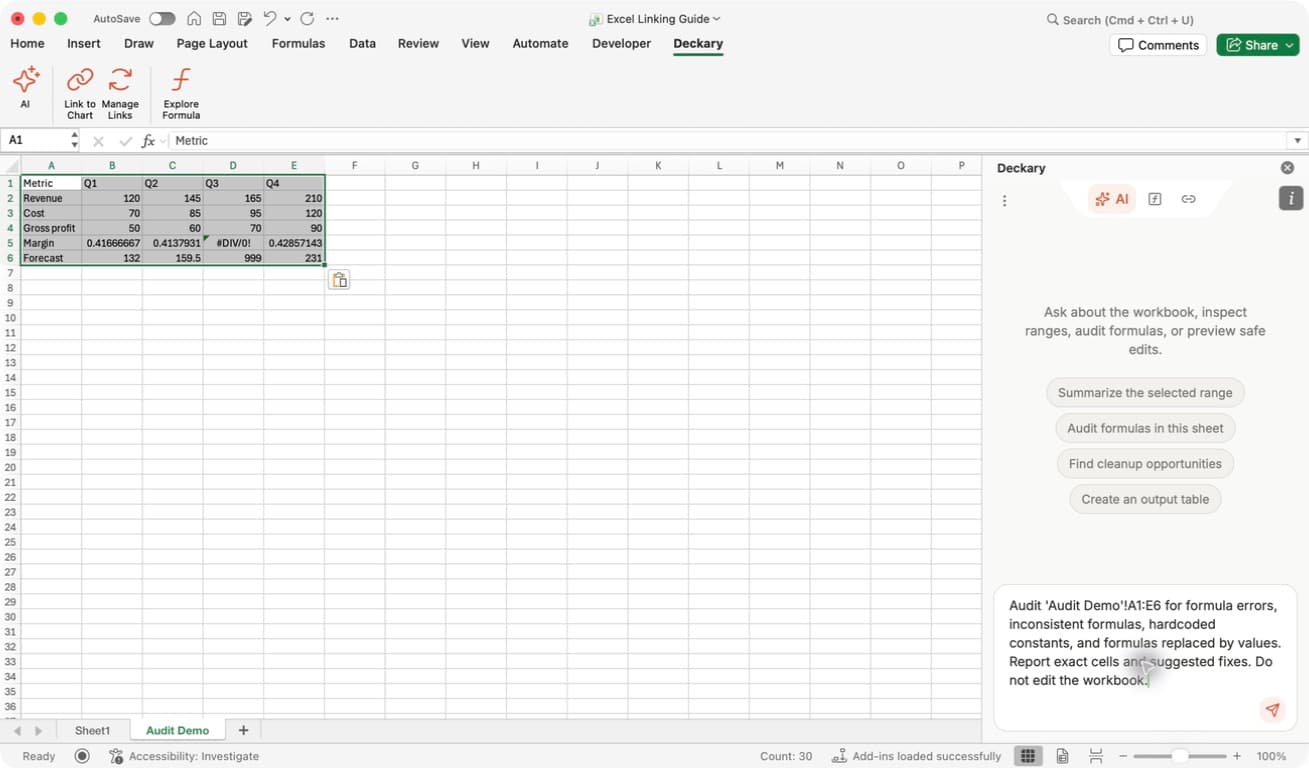
Check the scope: the request names both Audit Demo and A1:E6. The worksheet shows the deliberate #DIV/0! error and the forecast value 999. Do not edit the workbook keeps this first step focused on findings.
The Audit formulas in this sheet starter is another way to begin. For large sheets, enter an explicit range instead. Each formula-audit request accepts at most 20,000 cells. Split larger workbooks into logical blocks such as assumptions, revenue, or operating costs.
2. Read findings in context
Wait for the response, then compare its cell addresses with the worksheet. If a long table is difficult to read in the pane, ask for a short bullet summary or widen the pane by dragging its left edge.
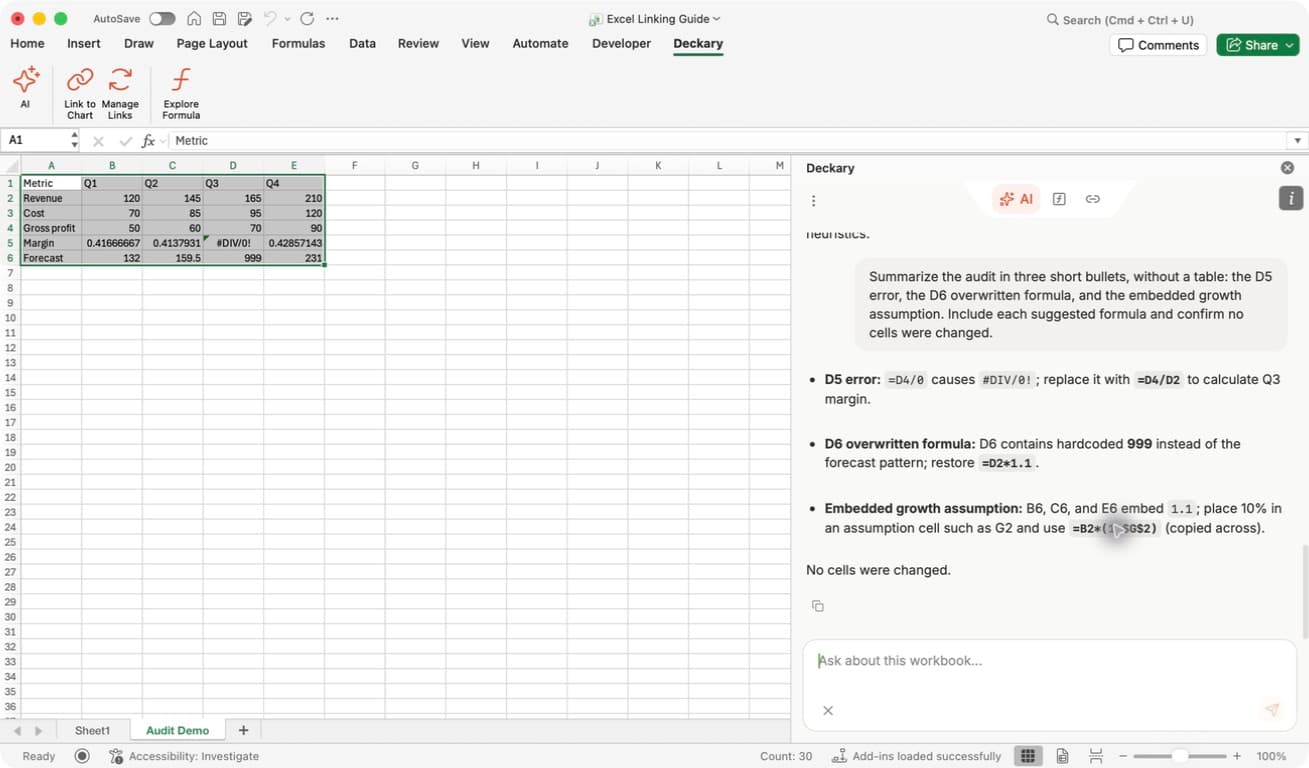
Three different findings: D5 contains =D4/0, which produces an error. D6 contains the literal 999 where its neighbors use formulas. The repeated 1.1 in the forecast formulas is an embedded growth assumption; it may be intentional, but moving it to a labeled input makes future changes easier.
In this example, the suggested corrections are =D4/D2 for Q3 margin and =D2*1.1 for Q3 forecast revenue. Those suggestions depend on the row's intended business logic; they are not universal fixes for every error or hardcoded value.
No cells were changed: an audit result is a report, not a completed repair. Check the workbook after a separate correction request.
What the audit can detect
| Finding | What to review |
|---|---|
| Formula error | A cell currently evaluates to an Excel error such as #DIV/0! or #REF!. Check the inputs and formula before masking the error. |
| Hardcoded constants | A formula embeds a numeric assumption. Decide whether it belongs in a labeled input cell. |
| External workbook reference | A formula refers to another workbook. Confirm that the dependency is intentional and available. |
| Volatile function | A formula uses a function such as NOW, TODAY, OFFSET, or INDIRECT. Review whether repeated recalculation is needed. |
| Inconsistent formula pattern | A relative formula structure differs from nearby formulas. Check whether the cell has a different intended role. |
| Mixed formulas and literal values | A row contains both formulas and constants. Look for overwritten formulas, but allow intentional labels and inputs. |
Pattern checks compare relative formula structure, so a copied formula can move across columns without automatically becoming inconsistent. These checks are still heuristics: a table with different metrics in adjacent rows can produce warnings that do not need a change. The example audit recognized that the gross-profit formulas were correct despite some automated pattern warnings.
The audit returns at most 50 issue details per request. If the results are truncated, split the range and audit each part. A clean scan does not prove that assumptions, business logic, or every dependency in the workbook are correct.
3. Trace a flagged formula visually
Use Explore Formula when you want to see where one cell gets its inputs. This is the Formula Tracer workflow, separate from the AI range audit.
- Select the flagged cell, such as
D5. You can enter the address in Excel's Name Box and press Enter. - Choose Deckary → Explore Formula, or the Formula tab in the pane.
- Read the selected address, its result, and the formula at the top.
- Use Depends on for direct inputs and Used by for cells that directly reference the selected cell.
- Choose Trace on a dependency to expand the next level. Use its selection control or a colored formula reference to navigate to that range.
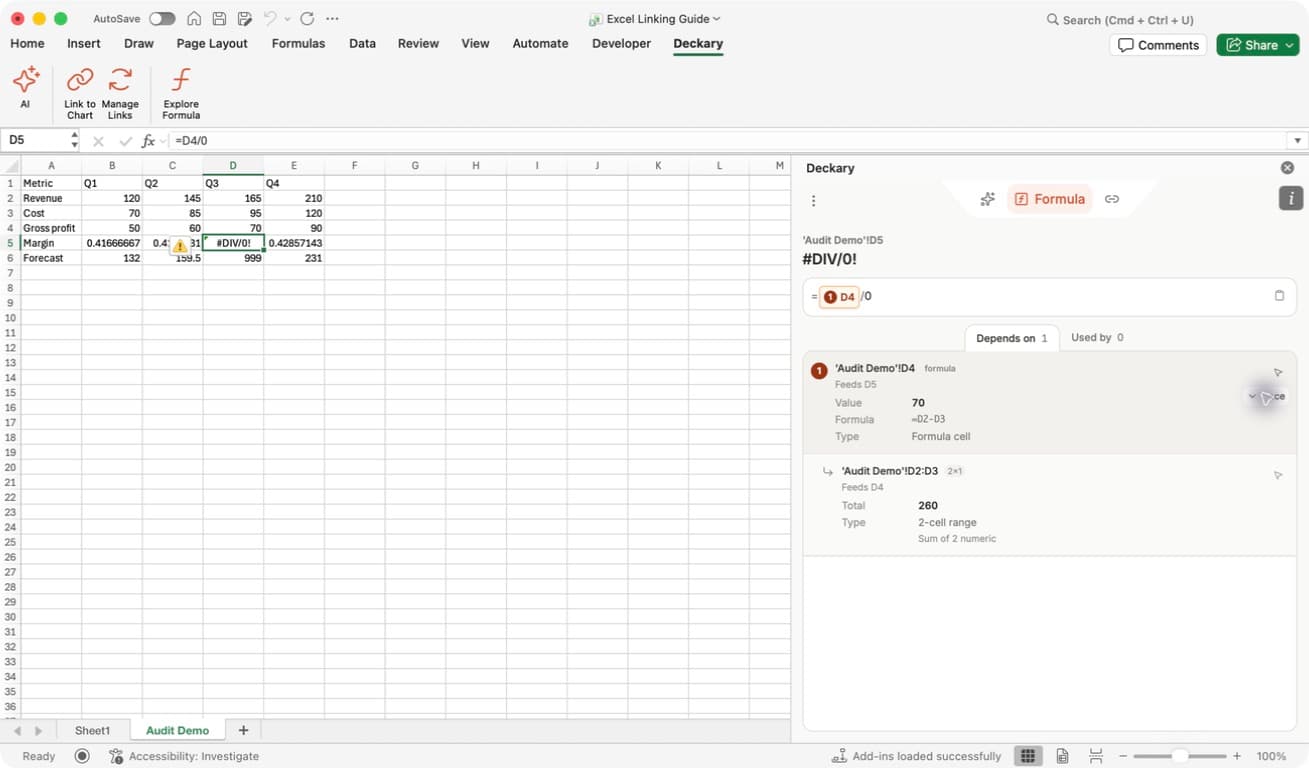
Follow the dependency: D5 depends on D4, whose value is 70 and formula is =D2-D3. Expanding Trace reveals D2:D3. The zero divisor remains visible in =D4/0, so you can see why the selected cell fails.
Read aggregates carefully: the expanded two-cell range shows 260, the sum of its values, not the result of subtracting them. Use the formula and individual input cells to understand the calculation.
If dependency tracing is unavailable in your Excel version or reports an error, do not interpret that as “no dependencies.” You can still ask the AI agent to read and explain the specific formula. The Formula Tracer page describes the visual tool.
4. Correct selected cells and check again
Once you agree with the proposed logic, request a narrowly scoped edit:
On 'Audit Demo', replace only D5 with =D4/D2 and D6 with =D2*1.1.
Keep all other values and formulas unchanged. Read back both formulas
and their results after the change.
Review any overwrite prompt before continuing. If your saved setting blocks destructive edits, a chat reply alone may not enable the write. The Excel AI workflow shows the decision and a new-worksheet alternative.
After a successful repair, verify the formula text and the calculated result. For this example, Q3 margin should be about 42.42%, and Q3 forecast revenue should be 181.5. Run the bounded audit again to check for remaining findings, then save the workbook.
Troubleshooting
| Problem | Next step |
|---|---|
| The wrong area was audited | Repeat the request with an explicit worksheet name and range. Quote sheet names containing spaces, such as 'Audit Demo'!A1:E6. |
| Too many warnings | Audit a smaller block with similar formulas and explain the role of its rows and columns. |
| A warning is intentional | Keep the formula and document the assumption or exception; do not change every flagged cell automatically. |
| The pane reports an error or incomplete scan | Resolve it or reduce the range before treating the audit as complete. |
| A suggested fix did not change Excel | Check for a pending approval or blocked-edit message, then verify the actual cell formula. |
For broader workbook work, see Use the AI agent in Excel.