Get started with the Deckary Excel AI agent
Install the Deckary Office add-in, open it in Excel, and give the AI agent a bounded first workbook task.
Last verified: 2026-09-09
Install the Deckary Office add-in from Microsoft AppSource, open it from Excel's Add-ins menu, and sign in. The add-in detects that Excel is the active host and opens the Excel experience. Start with a bounded task and keep the target workbook open while the agent works.
Install and open Deckary
- Use Deckary's Office add-in install page to open the Microsoft installation flow, or search for Deckary in Excel's Add-ins menu.
- Add Deckary to Office.
- Open the workbook you want to work on.
- Launch Deckary from Home → Add-ins and sign in.
- Choose Deckary → AI, or select AI in the Deckary pane.
The same add-in supports PowerPoint, Excel, and Word. Its available tools depend on the host application, so Excel workbook tools only appear while Deckary is running in Excel.
Give the first instruction
Name the worksheet and range when they are known. Explain the business meaning of the output, not only the formatting operation.
On Assumptions, review B4:G18. Identify missing inputs, preserve existing
formulas, and add a short note to any hardcoded assumption that needs an owner.
Ask before replacing non-empty cells.
The agent reads the current selection and workbook structure before it edits. If the request leaves a material choice unresolved, it can ask for clarification during the run.
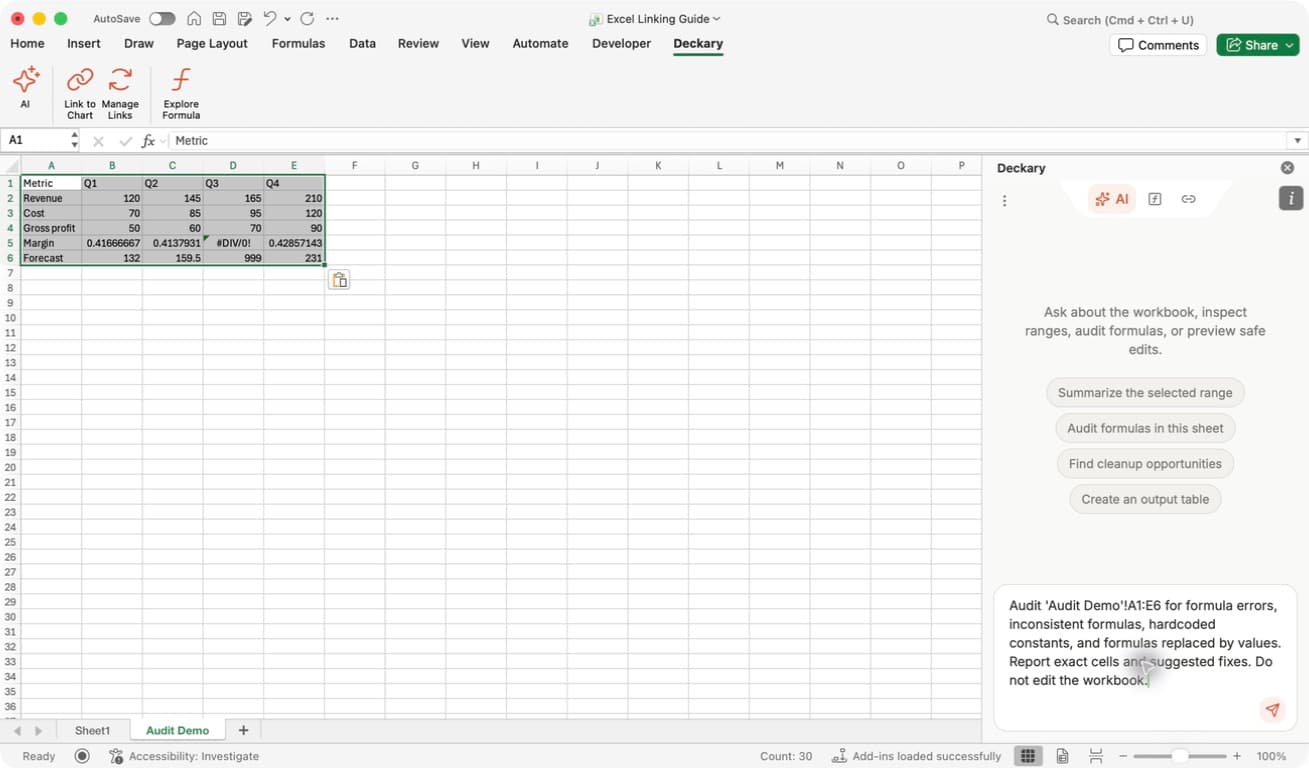
Find your starting point: AI is on the left of the Deckary ribbon. Enter a request in the message box at the bottom of the pane, then send it with the arrow button. The example names its range and requests no edits; the formula-auditing walkthrough shows its findings.
Review a proposed overwrite
Deckary protects non-empty cells from accidental replacement. If a write needs approval, review the worksheet, range, and described change before allowing the overwrite. Check whether the prompt asks about this edit or a saved preference for future destructive edits. Keeping destructive edits blocked can prevent a later overwrite even if you approve it in chat; see the illustrated Excel AI workflow.
After a mutation, the agent observes the returned workbook state in a later reasoning step before it can finish the run. A committed write with incomplete readback is reported as such; it is not presented as fully verified.
Continue with Use the Excel AI agent, Audit formulas, or Build a financial model.