Use the AI agent in Excel
Use Deckary's Excel AI agent to inspect workbook context, write native cells and formulas, and verify the resulting ranges.
Last verified: 2026-10-06
Use Deckary's AI pane to inspect workbook data, create native formulas and tables, and check the resulting cells. Give it the worksheet, range, desired calculation, and any content to preserve.
1. Open the workbook and describe the task
- Open the workbook you want to work on and sign in to Deckary.
- Choose Deckary → AI or select AI inside the Deckary pane.
- Select relevant cells when helpful, and name exact input and output ranges in your request.
- Send the request and keep the workbook open while the agent works.
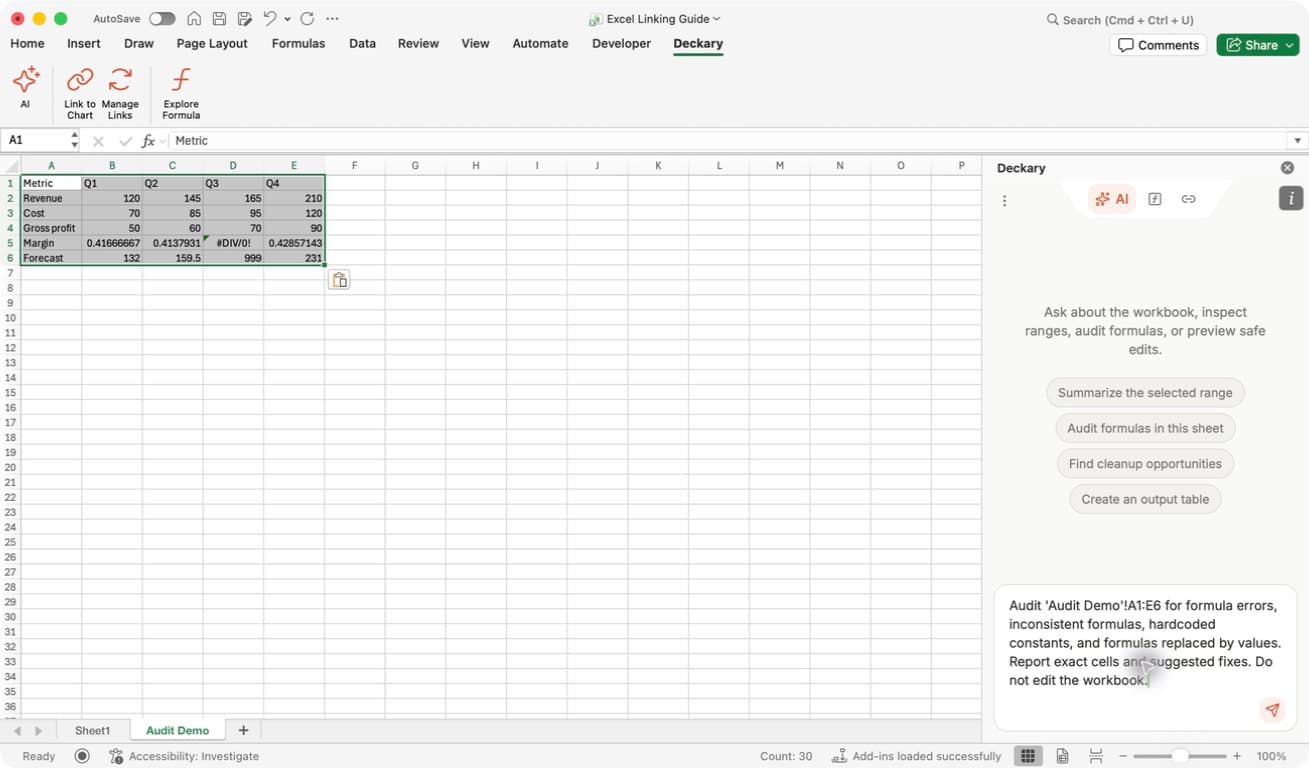
Start with a clear boundary: the screenshot's request names one worksheet and range and asks for a read-only audit. For an editing task, name the output cells and describe the intended formula or result just as explicitly.
The starter buttons can summarize a selection, audit formulas, find cleanup opportunities, or create an output table. You do not need to know tool names to use them.
2. Inspect before making a change
Deckary can read the current selection, worksheet summaries, explicit ranges, formula text, number formats, notes, and bounded style information. A selection preview can cover only part of a large range, so use an explicit address when the whole block matters.
For example:
Read 'Audit Demo'!A1:E6. Explain how gross profit and margin are
calculated, identify formula errors, and do not edit any cells.
Check the agent's interpretation before asking it to write. A read-only request is useful when you are unfamiliar with a workbook or need to confirm where a calculation belongs.
3. Request formulas and formatting
Describe the calculation, the target cells, and what must stay unchanged:
On Forecast, calculate monthly gross profit in row 24 from revenue in
row 18 minus cost of sales in row 21, through column N. Preserve the
number format. Read back the result cells and formula text.
The agent can write values and formulas, fill patterns across ranges, add cell notes, apply styles and number formats, insert or delete rows and columns, add tables, charts, and defined names, and create, rename, color, move, or delete worksheets. It can also request a guarded Office JavaScript operation when a task needs a capability outside its standard tools.
Keep requests focused enough to review. For a larger model, build inputs, calculations, and outputs in stages rather than requesting an unexplained replacement of the whole workbook.
4. Review overwrite protection
When a write would replace non-empty cells or delete workbook content, read the named worksheet and cells before making a decision.
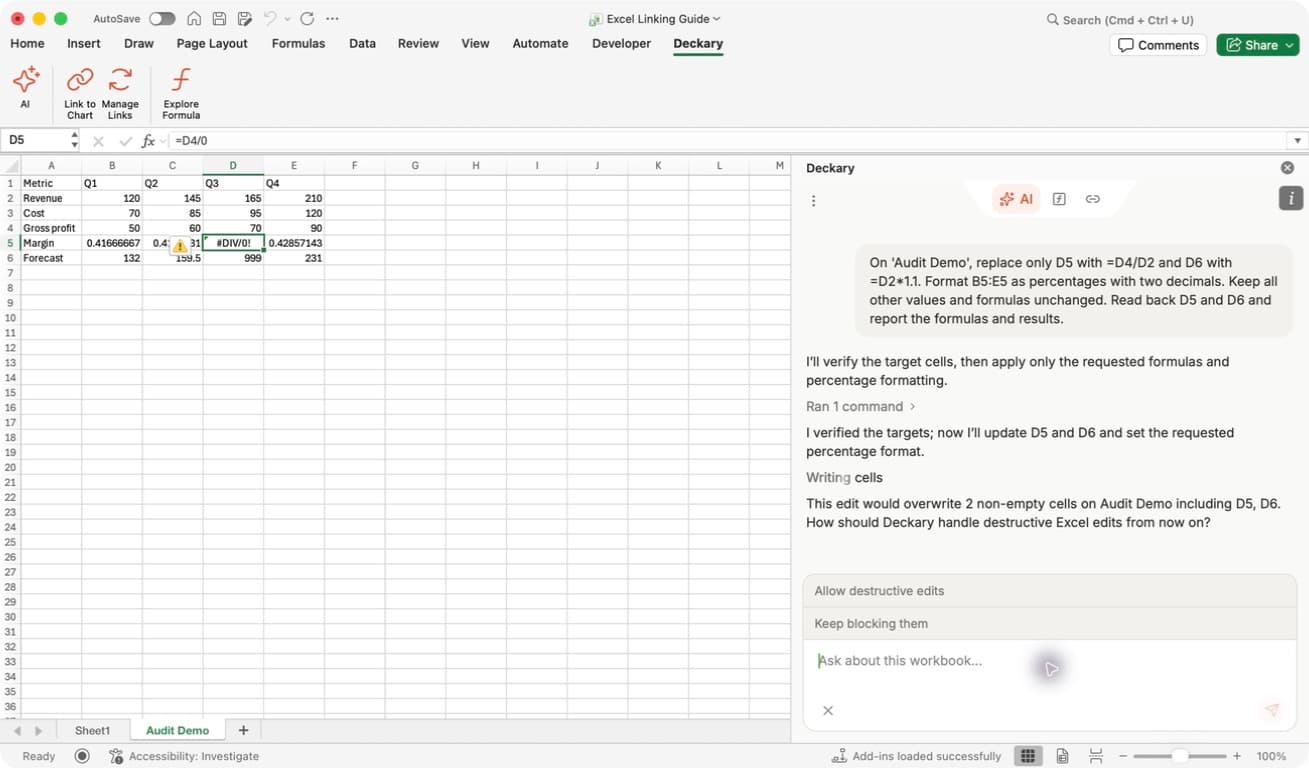
Read the decision's scope: the illustrated prompt says from now on and offers Allow destructive edits or Keep blocking them. This is a saved editing preference, not merely confirmation of one formula. Do not enable it just because you want to inspect a proposed fix.
In the recorded example, keeping destructive edits blocked preserved the original cells. A later chat approval to replace D5 and D6 still did not make the write succeed. When you see a blocked-edit message, check the actual workbook rather than assuming an approval reply completed the task.
If you want to retain the originals, ask Deckary to write the revised calculation into a new worksheet or unused range. If you choose to allow overwrites, review the intended targets and continue following any additional prompts; changes to the target state can require the agent to inspect it again.
5. Create a separate output worksheet
Name the new sheet, its inputs, calculation rules, and formatting. For example:
Create a new Forecast Demo sheet. Use four quarters, revenue of
120, 145, 165, 210 and costs of 70, 85, 95, 120. Add formula rows for
gross profit and margin, plus a labeled 10% illustrative growth input
and a forecast row that references it. Leave existing sheets unchanged.
Read back the formulas and results.
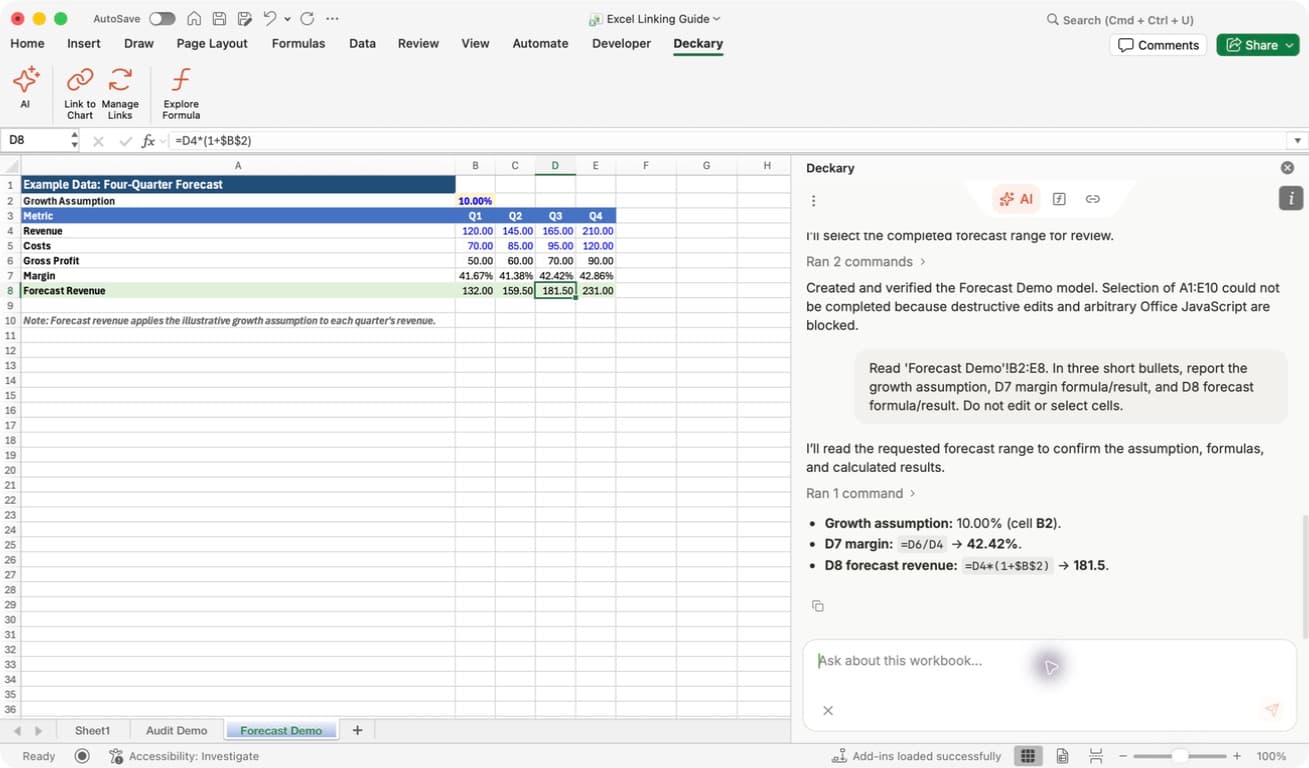
Verify in Excel: the selected forecast cell exposes its formula in the formula bar, while the pane reports the checked values. The output is on its own Forecast Demo tab; the original Audit Demo and Sheet1 tabs remain available.
This creates editable Excel cells and formulas. It does not require a separate export or a picture of a spreadsheet. See Financial modeling for a worked example and the checks to perform on the output.
6. Verify and save
Wait for the agent's final response and check whether it reports success, a pending approval, or an incomplete operation. Expand a Ran … commands row when you need more detail about the work performed.
Then check the workbook itself:
- Confirm the output worksheet and addresses.
- Inspect representative formula cells in Excel's formula bar.
- Compare calculated results with the intended logic and source values.
- Check number formats and any cells that should have been preserved.
- Save the workbook after review.
Deckary reads back supported writes before reporting completion. If a write committed but verification failed, it should report the partial result; inspect the cells before retrying so you do not duplicate work. A completed run does not independently validate your business assumptions.
For formula-specific investigation, use Audit formulas.