Build a financial model in Excel with AI
Use Deckary's Excel AI agent to build a driver-based financial model with native formulas, assumptions, formatting, and readback.
Last verified: 2026-09-09
Build an Excel model with separate inputs, native formulas, readable formatting, and a final check of the cells. Start on a new worksheet when you want to preserve the original data.
Define the model before you build
Tell the agent:
- The forecast period and frequency.
- The currency or units, number scale, and sign convention.
- Which historical ranges or supplied values to use.
- The assumptions and calculation rules.
- The required outputs and where they should go.
- Whether existing cells may be replaced.
If you are not sure about the structure, ask the agent to inspect the workbook and propose it before writing. Treat any invented demonstration inputs as examples, not validated business assumptions.
1. Create a small driver-based example
Open Deckary → AI in Excel. This example uses four quarters of illustrative revenue and costs and a shared growth input. It creates a new Forecast Demo worksheet:
Create a new Forecast Demo sheet. In B3:E3 use Q1–Q4. Put revenue
120,145,165,210 in row 4 and costs 70,85,95,120 in row 5. Add gross
profit in row 6 and margin in row 7 using formulas. Put a labeled
10% example growth assumption in B2. Row 8 should forecast each
quarter's revenue using $B$2. Format clearly; preserve existing sheets.
Read back formulas and results.
The growth assumption applies separately to each quarter's source revenue; this is not a compounded quarter-to-quarter forecast. State that distinction when your real model requires a different calculation.
2. Inspect the native worksheet
Wait for the agent to finish, then select a calculated cell and read its formula in Excel's formula bar.
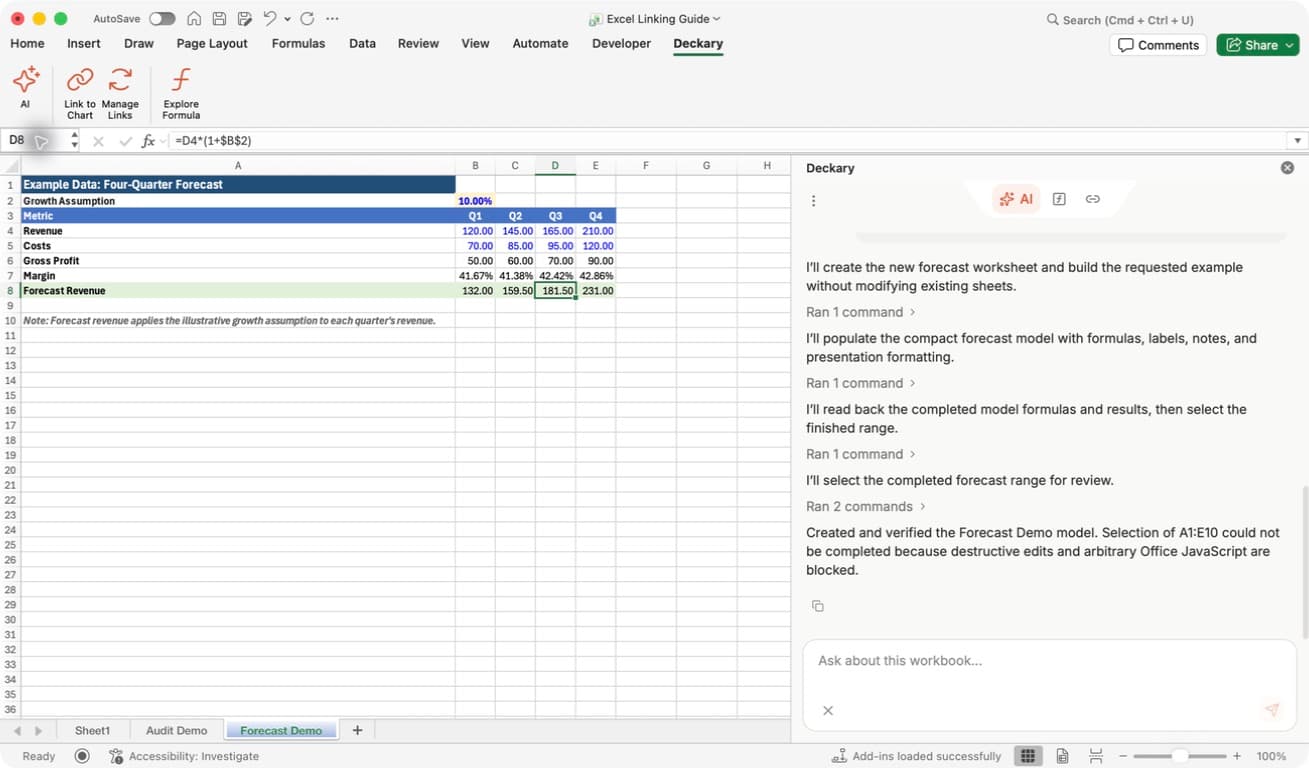
Separate inputs from calculations: B2 holds 10.00%, rows 4 and 5 hold the example source values, and rows 6–8 contain formulas. The selected D8 cell shows 181.50; its formula is =D4*(1+$B$2). The dollar signs keep every forecast column tied to the same assumption cell.
Read completion messages literally: in this recorded run, the model was created and verified, but a final attempt to select the range was blocked. The worksheet was still present. We selected D8 manually in Excel rather than rerunning the creation request. Distinguish a failed navigation step from a failed write.
3. Ask for formula and result readback
Use a short follow-up that checks the critical outputs:
Read 'Forecast Demo'!B2:E8. Report the growth assumption, D7 margin
formula/result, and D8 forecast formula/result. Do not edit or select cells.
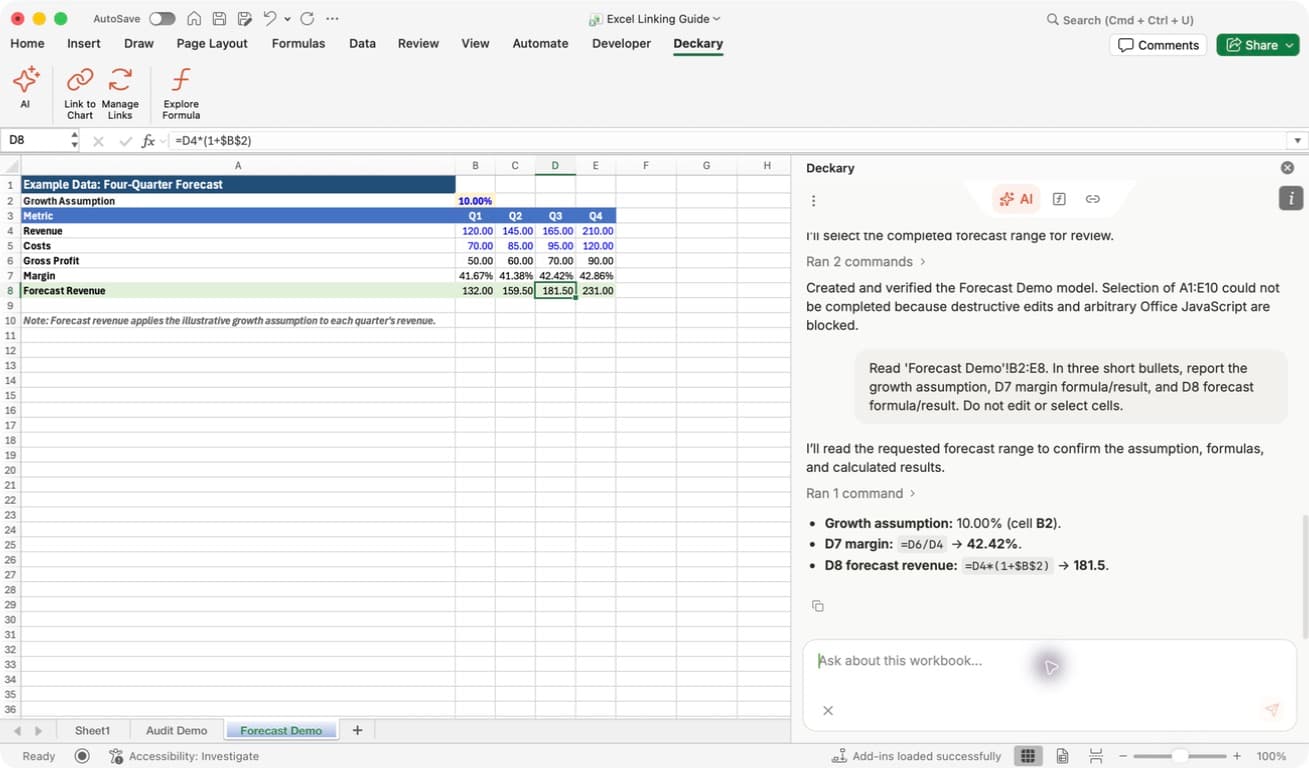
Check representative formulas: Q3 gross profit is 165 − 95 = 70; Q3 margin is =D6/D4, about 42.42%; Q3 forecast revenue is =D4*(1+$B$2), 181.50 at 10% growth. Check both formula text and results. A hardcoded value can match today's result while failing to respond to a future input change.
4. Test the assumptions
Change one input in a review copy or a clearly identified example, then check the dependent outputs. For this model, changing growth from 10% to 15% should change Q3 forecast revenue from 181.50 to 189.75, while leaving historical revenue, costs, gross profit, and margin unchanged.
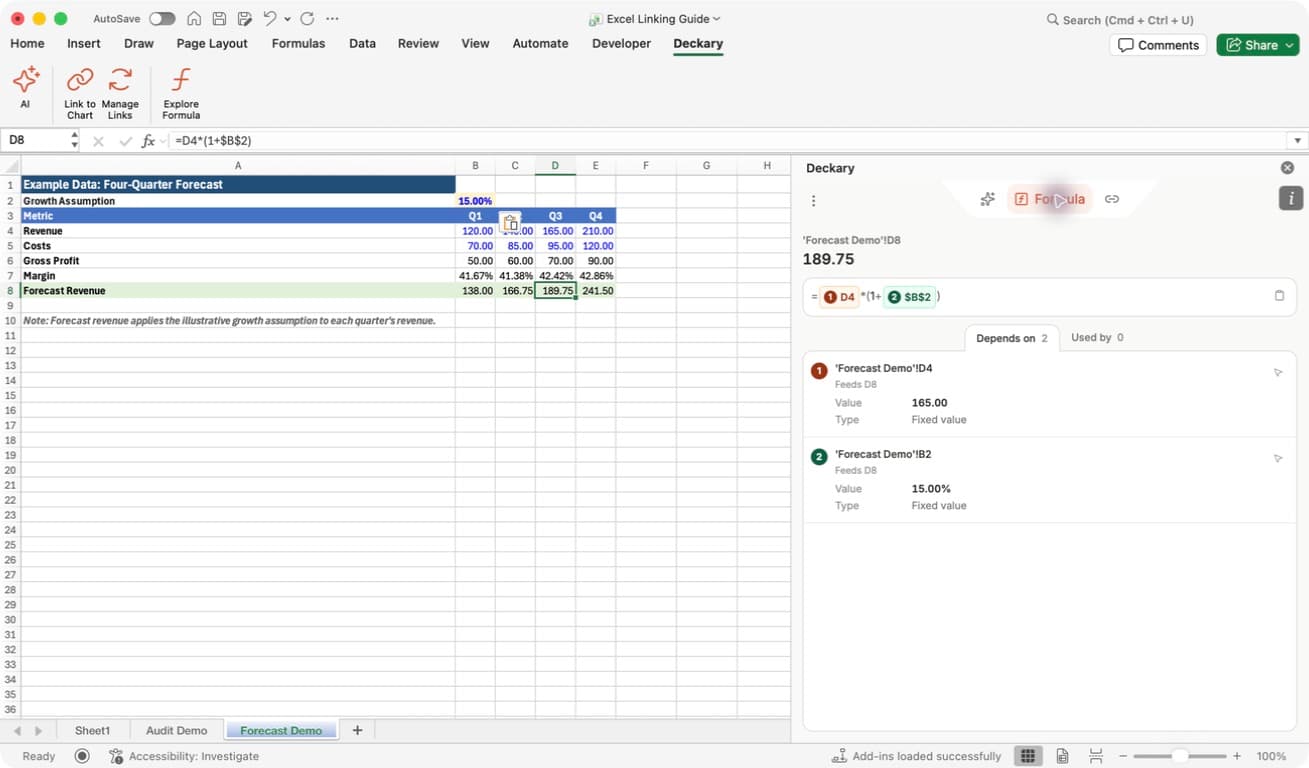
Confirm propagation: Depends on shows source revenue D4 = 165.00 and the shared input B2 = 15.00%. The selected forecast cell is now 189.75. This screenshot was captured after changing the input in Excel; the formula itself stayed =D4*(1+$B$2). Restore the original input after a temporary test.
For a real model, also check zero and negative values where relevant, period alignment, units, scenario references, and whether totals reconcile. Run a bounded formula audit on the calculation block and review its findings in context.
Extend the model in stages
Once the small schedule behaves as intended:
- Add labeled assumptions with units and notes.
- Extend calculations across the required periods using formulas.
- Read back representative formulas and results, including the first and last periods.
- Audit each logical calculation block.
- Add summary outputs after the core schedule is checked.
- Save the workbook and retain the original source data.
For a larger request, specify the inputs and intended logic rather than only asking for a model type:
Build a monthly 24-month SaaS revenue schedule from the assumptions
on Inputs. Separate new and existing customer revenue, show churn
explicitly, and reference labeled assumptions from the forecast formulas.
Ask before overwriting non-empty cells.
Review financial assumptions and business logic yourself. Formula readback and automated audits help find mechanical problems but do not establish that the forecast is suitable for a business decision.
For overwrite decisions and incomplete operations, see Use the AI agent in Excel. The AI Excel Agent product page covers plans and positioning.