Consulting Presentations: The MBB Guide to Professional Slides
Master consulting presentation methodology from McKinsey, BCG, and Bain. Learn pyramid principle, MECE framework, action titles, and MBB slide standards.
Consulting presentations operate by different rules than typical corporate decks. When a McKinsey, BCG, or Bain partner delivers a recommendation, every slide follows a systematic methodology designed for one purpose: getting time-constrained executives to understand, agree, and act.
These aren't aesthetic preferences. They're communication principles refined over decades of presenting to boards, C-suites, and private equity partners who make million-dollar decisions based on 50-page decks they might flip through in ten minutes. The same principles apply regardless of whether you use think-cell, Deckary, Power-user, or native PowerPoint to build your slides.
This guide covers the complete methodology behind MBB-quality presentations: the thinking frameworks, structural rules, slide types, and practical techniques that separate professional deliverables from amateur decks.
Key Takeaways:
- Pyramid Principle: Lead with conclusions, support with evidence. Executives want your answer first.
- MECE Structure: Ensure arguments don't overlap and cover all ground. No gaps, no redundancy.
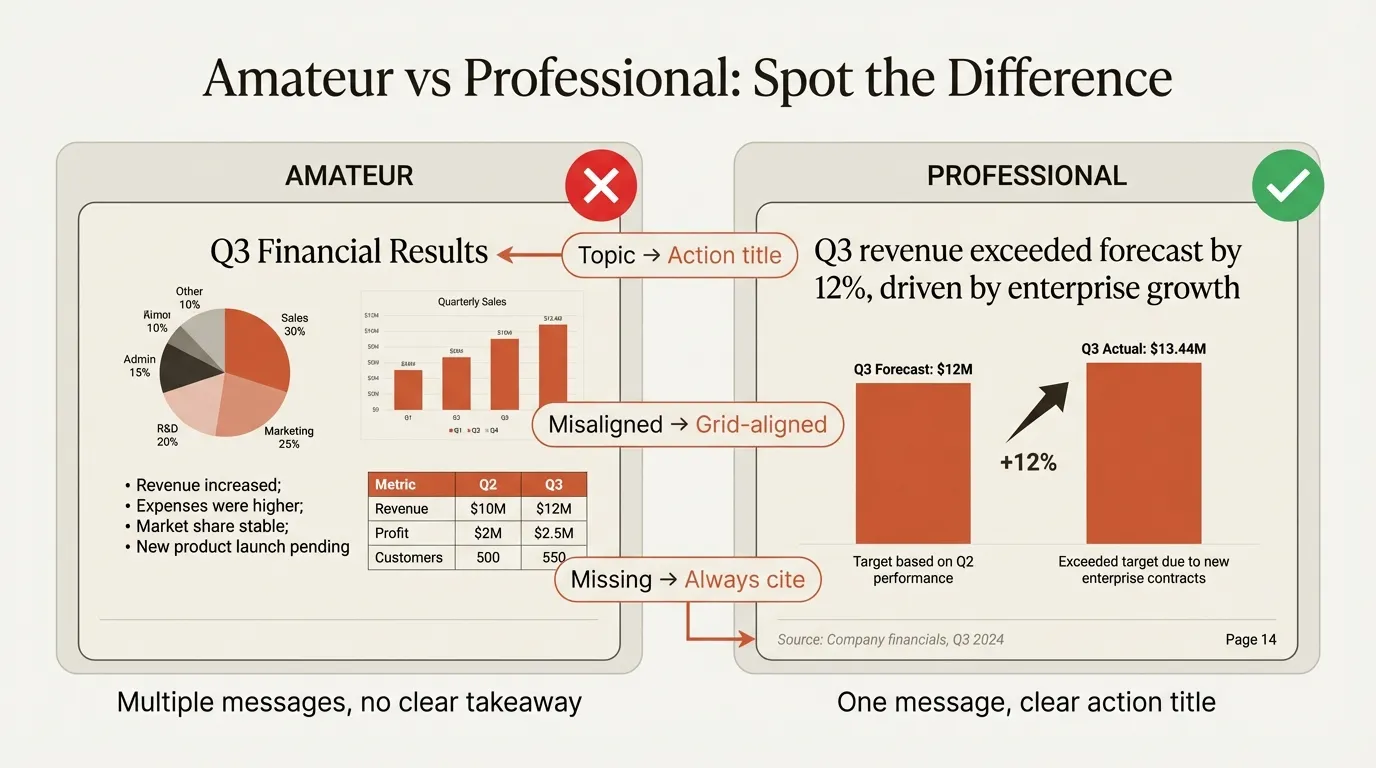
- Action Titles: Every slide title states a conclusion, not a topic. Readers should understand your argument from titles alone.
- One Message Per Slide: Each slide communicates exactly one insight. If you have two points, you need two slides.
- Source Everything: Data without sources loses credibility. Cite every number.
Turn the structure into an editable report
An action title should tell the reader what to conclude. “Q3 performance” labels a topic; “Revenue is 4% below plan after two delayed launches” states a finding. Below it, compare $2.4m actual revenue with the $2.5m plan, explain the timing difference, and finish with the decision. These are illustrative figures.
Use the QBR PowerPoint deck for a business review, the board report deck for governance discussion, or the progress report deck for a project update. Each includes a free filled example and blank editable version. For a custom presentation from your own material, use the AI slide builder.
What Makes Consulting Presentations Different?
Before diving into specific techniques, understand why consulting slides look and function differently from typical business presentations.
The Purpose Is Different
Most corporate slides serve as visual aids during a live presentation. The speaker talks, the audience listens, the slides provide supporting imagery. Without the presenter, the slides are incomplete.
Consulting slides serve as standalone documents. A managing partner might flip through your 80-page deck in ten minutes, reading only the titles. A board member might receive the PDF on a Friday night and read it before Monday's meeting. The slides must communicate completely on their own.
This fundamental difference drives every other distinction in consulting slide standards.
The Structure Is Inverted
Corporate presentations often build to a conclusion. You start with background, walk through analysis, and reveal your recommendation at the end. This feels natural because it mirrors how you did the work.
Consulting presentations flip this entirely. The first slides state your recommendation. Everything that follows exists to support and prove that recommendation.
Why? Time. A CEO might have fifteen minutes between meetings. If your conclusion is on slide 45, they'll never see it. If it's on slide 2, they can engage immediately and decide whether to drill into detail.
The Audience Is Different
Consulting decks are built for senior executives who:
- Process information quickly under time pressure
- Make decisions based on incomplete data
- Value clarity over comprehensiveness
- Expect to be able to skim and still understand
- Will challenge your logic and data sources
Every formatting choice, from action titles to source citations, serves these constraints.
The Pyramid Principle: Foundation of Consulting Communication
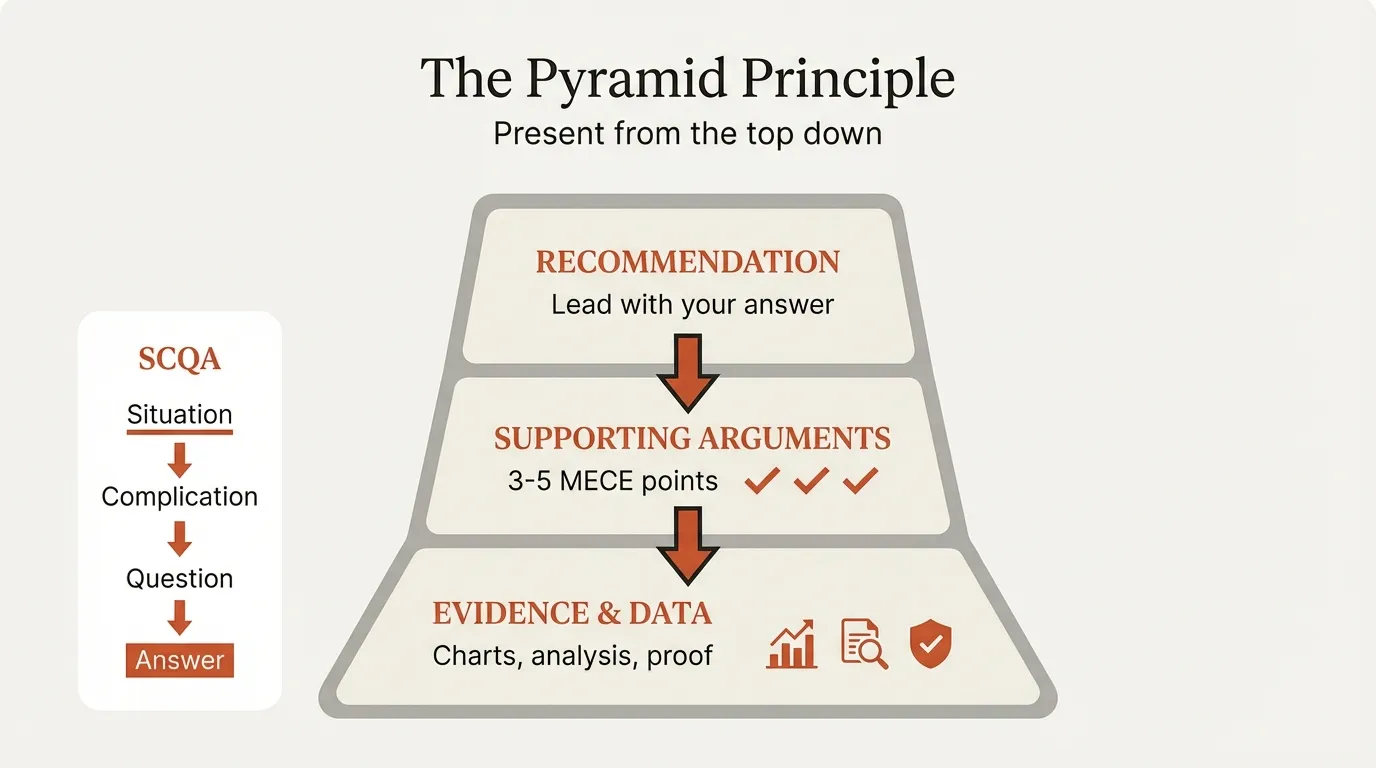
The Pyramid Principle is the communication framework that defines how consultants structure arguments. Developed by Barbara Minto during her time at McKinsey in the 1960s, it inverts how most people naturally communicate.
The Core Concept
You think from the bottom up, but you present from the top down.
When you analyze a problem, you gather data, run analyses, and gradually build toward a conclusion. That's how thinking works. But that's not how you should communicate.
Instead, you flip the structure:
| Level | Contains | Example |
|---|---|---|
| Top | Your recommendation | "We should enter the German market" |
| Middle | Supporting arguments | "The market is growing, we have capability, ROI is positive" |
| Bottom | Data and evidence | Market research, capability assessment, financial model |
You lead with the answer. Then you support it.
The SCQA Framework
For structuring the opening of presentations, consultants use SCQA: Situation, Complication, Question, Answer.
- Situation: Establish shared context. "Acme Corp has grown 15% annually for five years."
- Complication: What has changed? "Growth markets are saturating."
- Question: What must we address? "How do we sustain growth?"
- Answer: Your recommendation. "Enter the German market."
This framework appears in executive summary slides, where the SCR structure (Situation, Complication, Resolution) distills your entire argument into one page.
Why This Works
Executives don't want to follow your analytical journey. They want your destination.
Research shows people can only hold about four chunks of information in working memory at any given time. By the time you finish building up to your conclusion, they've forgotten your setup.
The Pyramid Principle respects your audience's cognitive load. It says: "Here's what I recommend. Here's why. Here's the evidence. Ask me anything."
The MECE Framework: Structuring Analysis Without Gaps
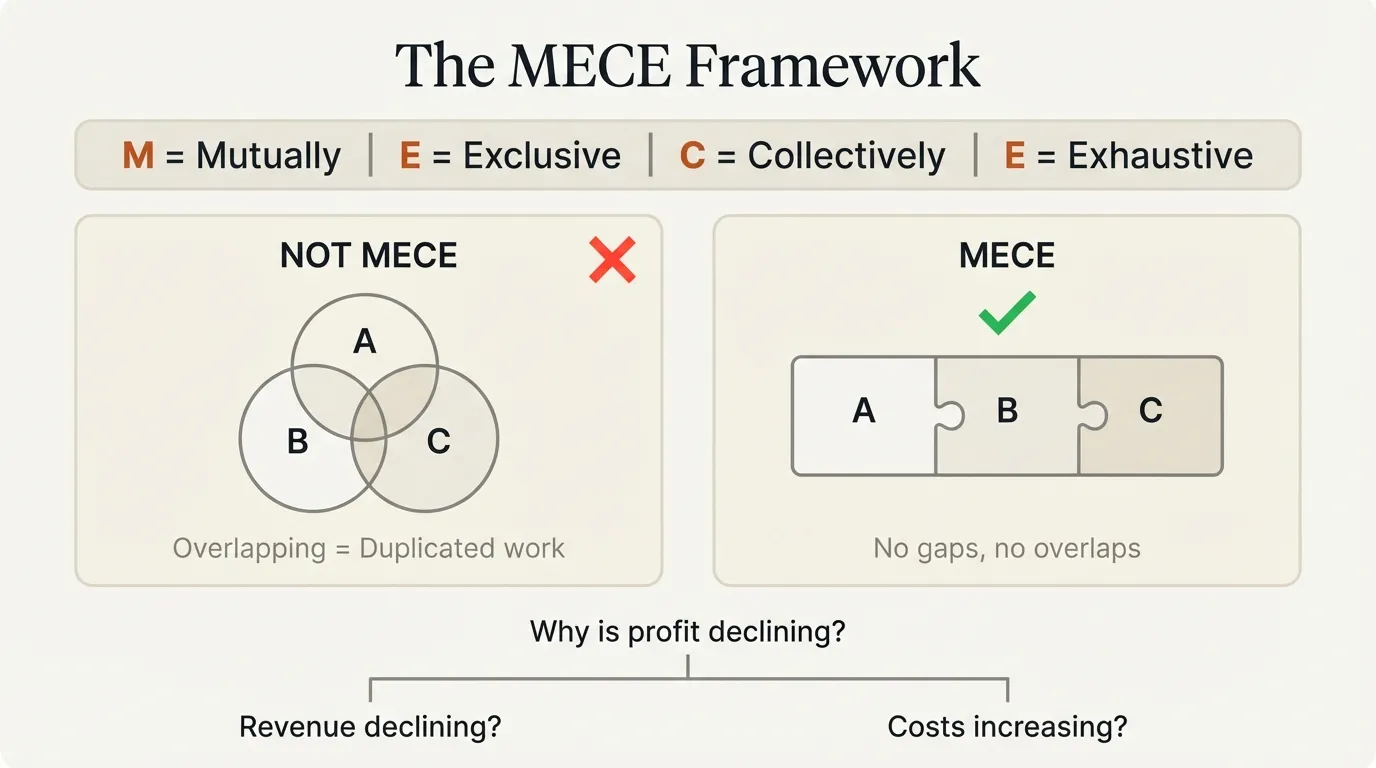
MECE stands for Mutually Exclusive, Collectively Exhaustive. It's the logical test that validates your consulting structures.
What MECE Means
Mutually Exclusive: Categories don't overlap. Each item fits in exactly one bucket.
Collectively Exhaustive: All possibilities are covered. Nothing is missing.
| Component | Test Question | Red Flag |
|---|---|---|
| Mutually Exclusive | Can any item fit in two buckets? | Overlap means duplicated work |
| Collectively Exhaustive | Is anything missing from our categories? | Gaps mean missed insights |
Applying MECE to Presentations
MECE structures appear throughout consulting presentations:
Slide organization: Your presentation sections should be MECE. If you're covering revenue opportunities, categories like "Pricing," "Volume," and "Mix" are MECE because they don't overlap and together explain all revenue changes.
Argument structure: When supporting a recommendation with three key points, those points should be MECE. They shouldn't repeat the same logic in different words, and together they should address all relevant concerns.
Analysis frameworks: Tools like issue trees break down problems into MECE branches, ensuring comprehensive analysis without duplicated effort.
Common MECE Violations
| Violation | Example | Fix |
|---|---|---|
| Overlap | "Cost reduction" and "Efficiency improvement" | Choose one framing or define clear boundaries |
| Gap | "US" and "Europe" when APAC exists | Add missing category or explicitly scope out |
| Vague boundaries | "Short-term" and "Medium-term" without dates | Define specific timeframes |
Continue reading: Problem Solving Frameworks · Bar Charts in PowerPoint · Startup Pitch Deck
Create an editable presentation in your browser
Turn a prompt or source files into slides you can edit and export to PowerPoint. 14-day free trial. No credit card required.
Slide Anatomy: Titles, Proof Points, and Sources
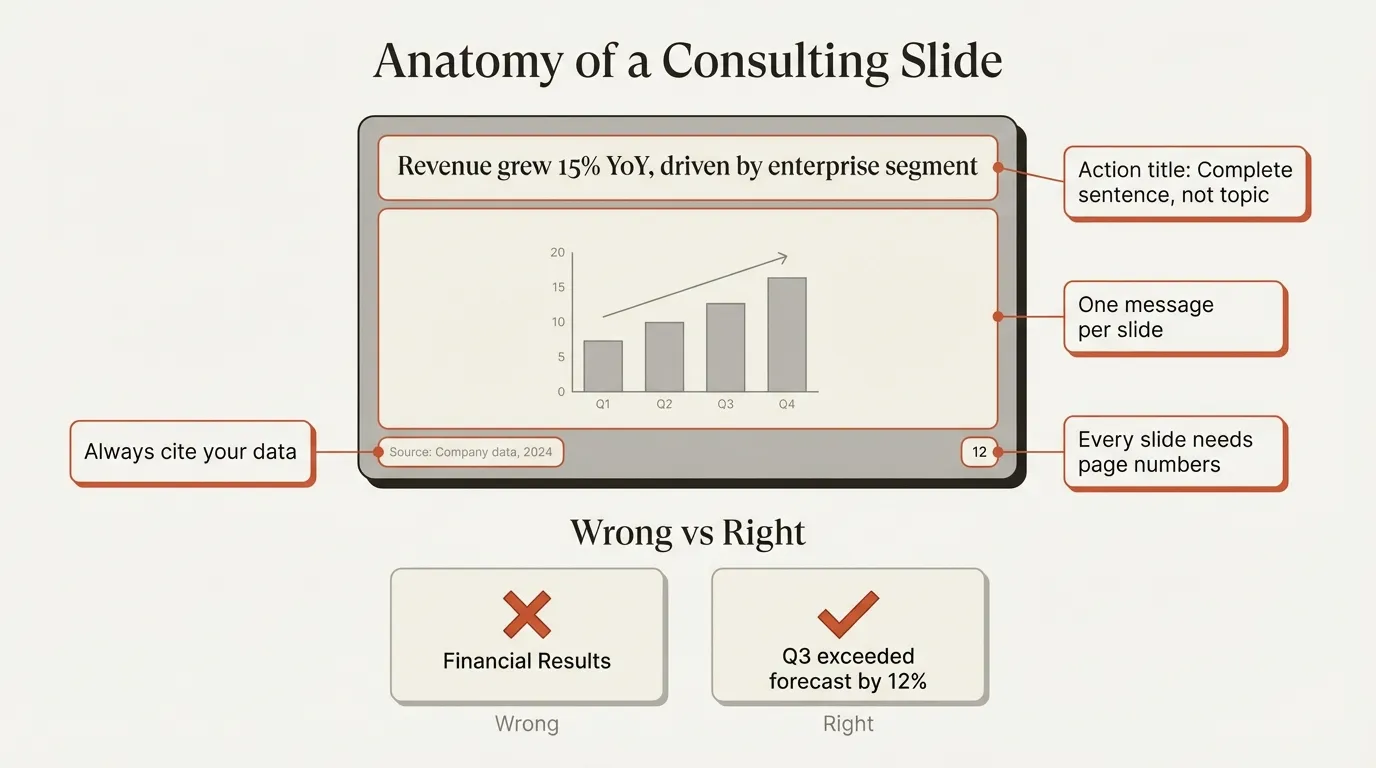
Every consulting slide follows a consistent anatomy that enables rapid comprehension.
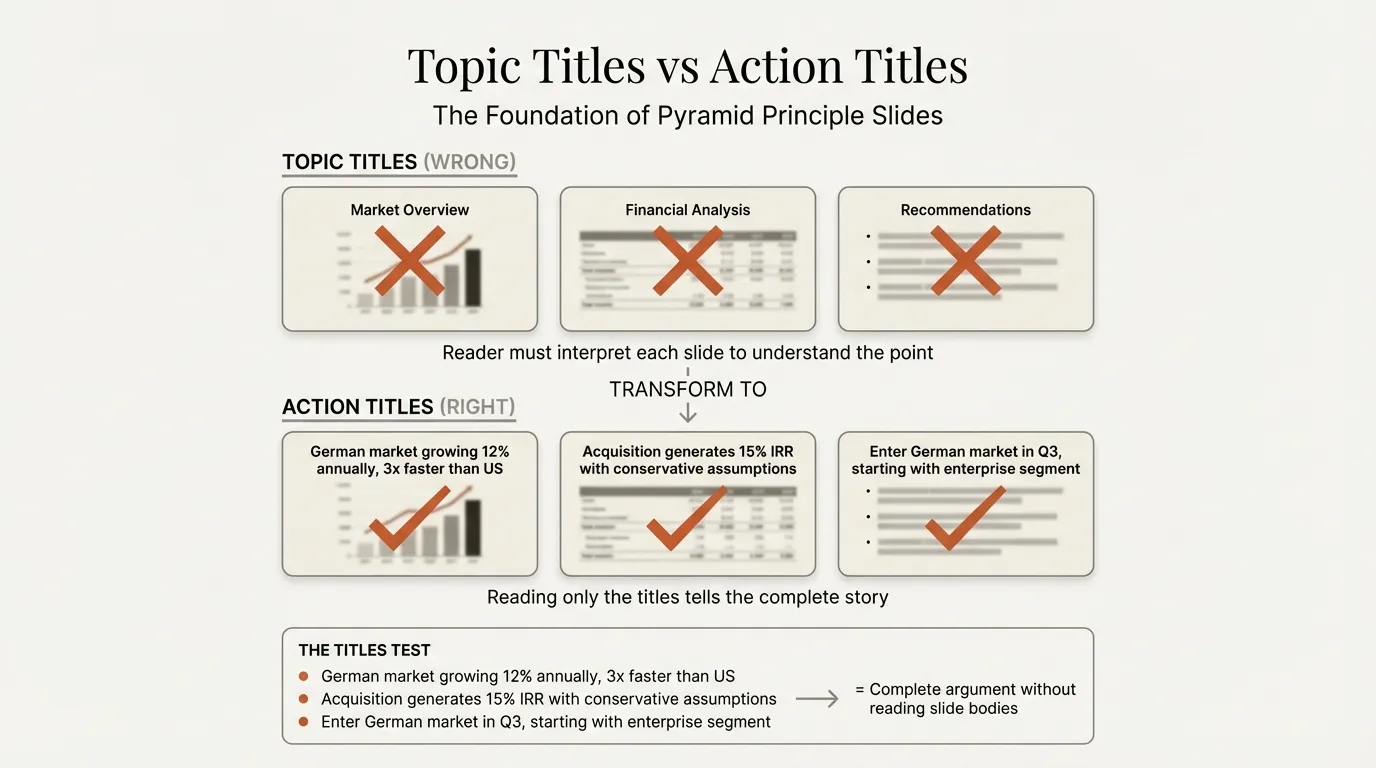
Action Titles: The Most Important Rule
An action title states the slide's key takeaway as a complete sentence. It tells the reader what to conclude, not what the slide is about.
| Topic Title (Wrong) | Action Title (Right) |
|---|---|
| Market Overview | German market growing 12% annually, 3x faster than US |
| Competitive Analysis | We outperform competitors on 4 of 6 key purchase criteria |
| Financial Projections | Acquisition generates 15% IRR with conservative assumptions |
Why action titles matter: A partner can flip through a 50-slide deck, read only the titles, and understand your complete argument. If any title is a topic rather than a conclusion, the chain breaks.
The rules:
- Must be a complete sentence with a verb
- Should be 15 words or fewer
- Never exceed two lines
- Must pass the "so what" test
For detailed guidance on building consulting quality slides, action titles are the non-negotiable foundation.
Body Content: Proof Points
The slide body exists to prove the action title. Everything on the slide should directly support the claim in your headline.
Structure options:
- Bullet points: 3-5 bullets with data that proves your title
- Charts: Visual evidence with the action title as the interpretation
- Tables: Structured comparisons that make the title conclusion obvious
The "so what" test: Point to any element on your slide and ask "so what?" If you can't connect it directly to your action title, it shouldn't be there.
For a detailed breakdown of how to apply these principles to data-heavy slides, see our guide on how to present data effectively in PowerPoint.
Source Citations
Every data point needs a source. This isn't optional at MBB firms.
Where to cite:
- Bottom of the slide in smaller font (8-9pt)
- Below charts or data tables
- In footnotes for specific claims
What to include:
- Source name (e.g., "Gartner," "Company annual report")
- Date or year
- Specific methodology notes if relevant
Why it matters: Clients pay $500K+ for strategy engagements. When they see unsourced data, they question whether your analysis is equally sloppy. Sources build credibility.
Executive Summaries: The Most Important Slide
The executive summary slide is the most important slide in any consulting presentation. Many senior executives will read only this single slide before making a decision.
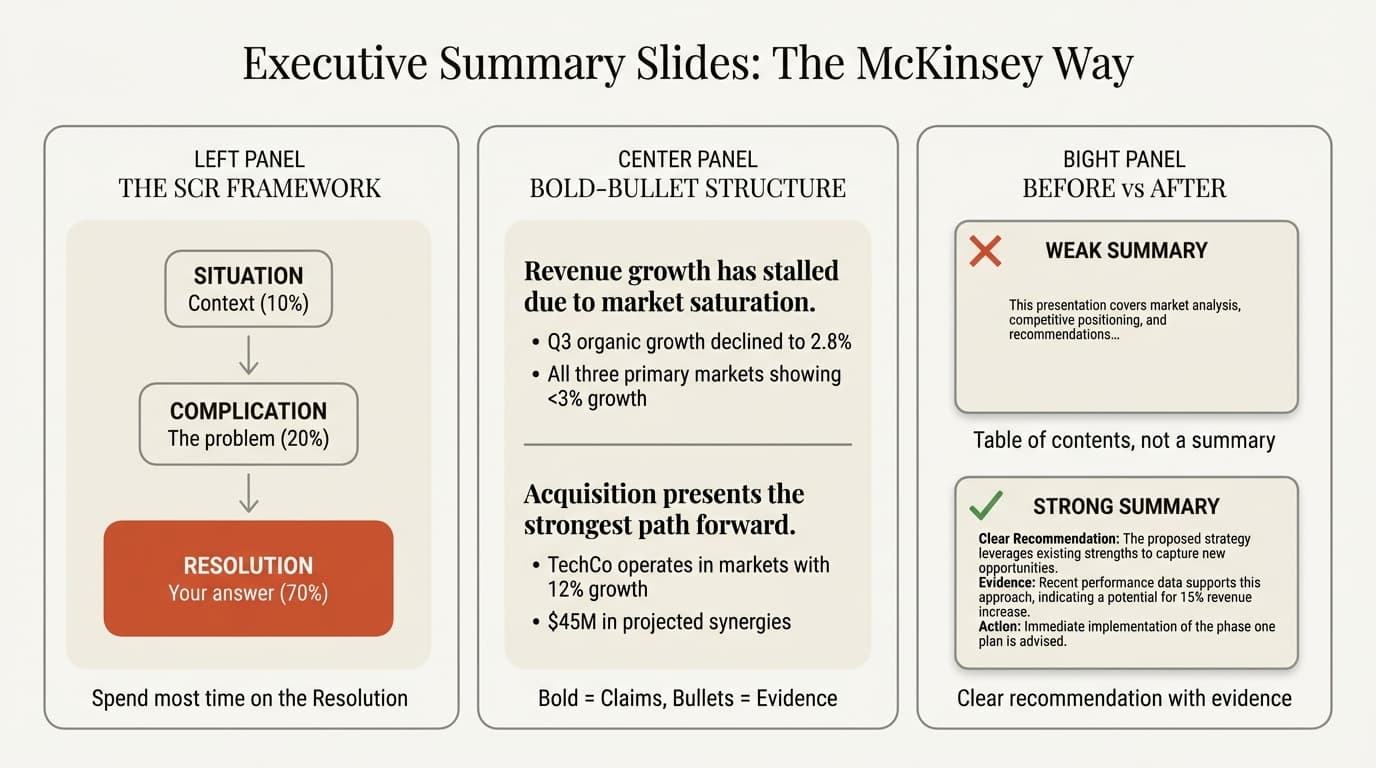
The SCR Framework
Executive summaries follow the Situation-Complication-Resolution (SCR) structure, with Resolution taking 60-70% of the content.
Situation (10-15%): One to two sentences establishing context. Your audience likely knows this already; you're confirming shared understanding.
Complication (15-20%): What has changed that makes the status quo untenable. This creates tension and justifies why action is needed now.
Resolution (60-70%): Your recommendation and key supporting arguments. This is what executives care about most.
The Bold-Bullet Format
The standard consulting format for executive summaries:
Bold sentence states a key claim.
- Indented bullet provides supporting evidence
- Another bullet with specific data
Second bold sentence states another claim.
- Supporting evidence continues
This format allows executives to skim the bold text alone and understand your complete argument without reading the details.
What Makes It Stand Alone
An effective executive summary answers:
- What's the situation?
- What's the problem?
- What should we do about it?
- Why will it work?
- What are the key risks or considerations?
If your executive summary doesn't answer these questions on a single slide, it needs revision.
One-Pagers: Distilling Complexity
A one-pager is the ultimate test of clear thinking. If you can't explain it in one page, you don't understand it well enough. For decision-specific briefs, use an executive one-pager template; for recurring project governance, use a project progress report.
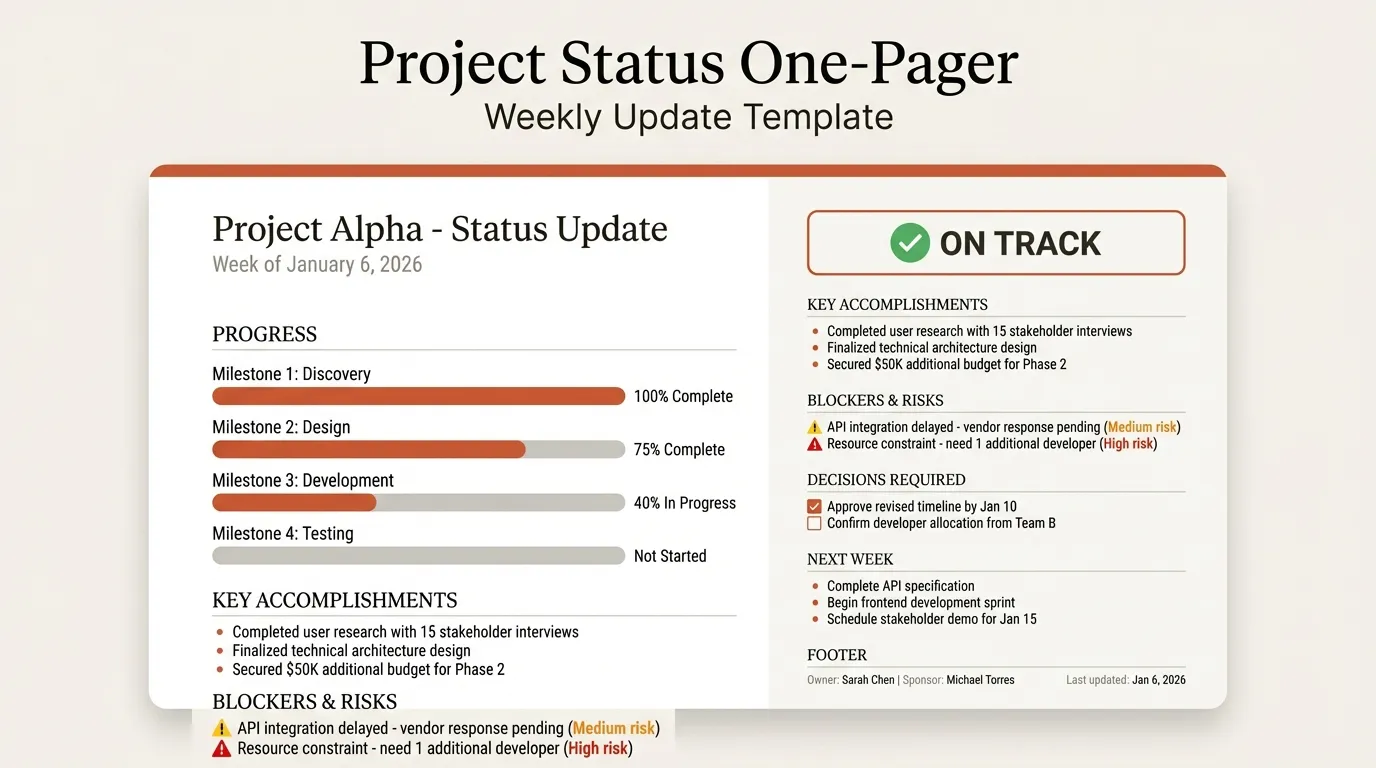
Types of One-Pagers
| Type | Purpose | Key Elements |
|---|---|---|
| Executive Summary | Summarize a longer document | SCR structure, bold-bullet format |
| Project Status | Update stakeholders on progress | RAG status, milestones, blockers |
| Business Case | Justify an investment or decision | Problem, solution, ROI, risks |
| Investment Memo | Summarize an opportunity | Market, company, thesis, terms |
The Constraint Is the Feature
Senior executives spend an average of 23 hours per week in meetings. They don't have time to read 50-page reports.
One-pagers work because they force you to identify what truly matters and cut everything else. If you struggle to fit your content on one page, that's a sign you haven't made hard decisions about priorities.
Structure for Impact
Every one-pager needs:
- Clear headline: States the key message or recommendation
- 3-5 main points: With supporting data
- Visual hierarchy: Guides the reader's eye
- Call to action: What decision or action you're requesting
MBB Style Comparison: McKinsey, BCG, and Bain
While all three top consulting firms share core principles, their presentation styles have distinct characteristics.
McKinsey Style
Characteristics:
- Text-heavy slides with comprehensive written arguments
- Structured bullet points that could stand alone as a document
- Detailed exhibit notes explaining methodology
- More formal, thorough approach
When to use: Board presentations, regulatory contexts, situations requiring detailed documentation.
BCG Style
Characteristics:
- Visual and chart-driven, following "smart simplicity"
- Minimal supporting text; charts speak for themselves
- Bold callouts highlighting key data points
- More aggressive data visualization
When to use: Time-constrained executives, visual learners, situations where data tells the story.
Bain Style
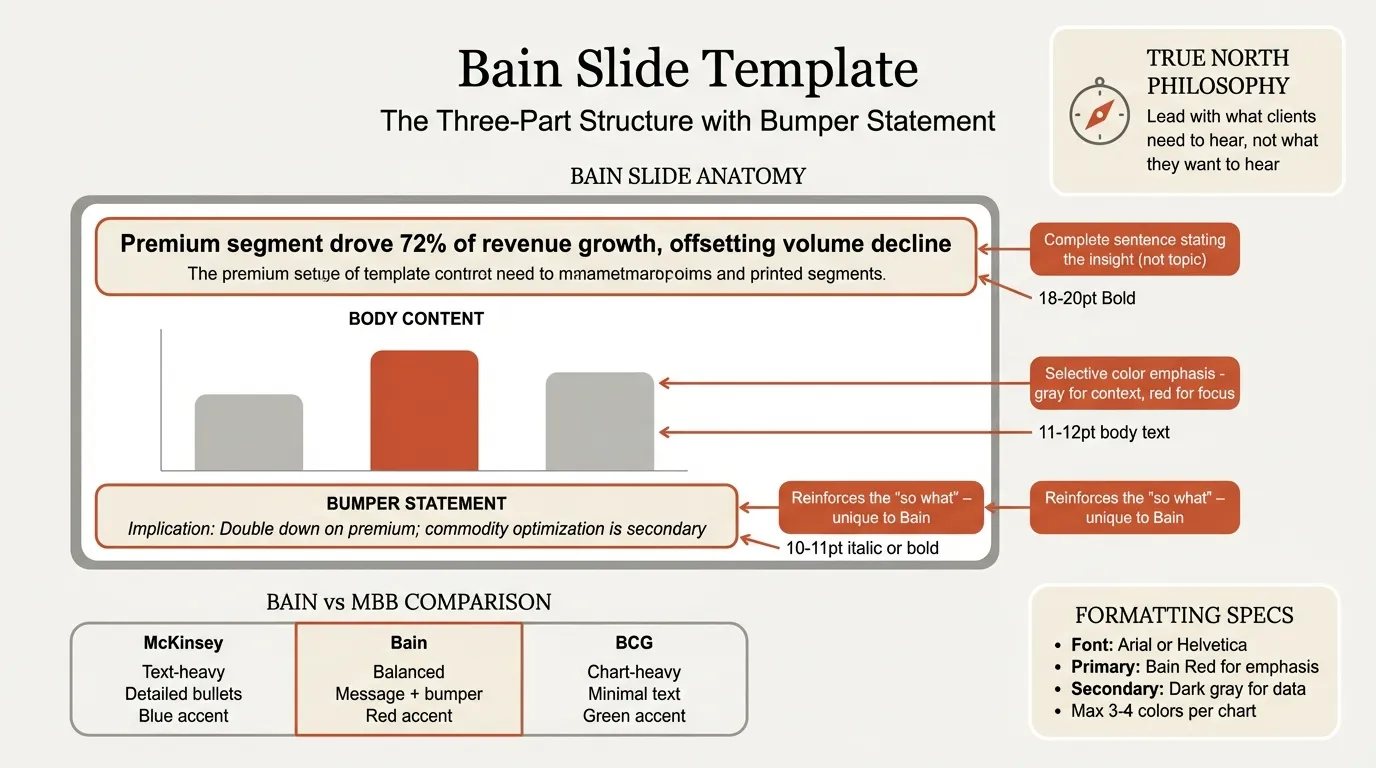
Characteristics:
- Balance between McKinsey's text and BCG's visuals
- Strong use of structured frameworks
- Clear hierarchical organization
- Practical, implementation-focused tone
When to use: Transformation programs, operational contexts, situations requiring both analysis and action planning.
The Common Thread
All three firms share:
- Action titles on every slide
- Pyramid principle structure
- MECE logical organization
- Source citations
- One message per slide
The differences are stylistic preferences, not fundamental methodology.
Project Status Updates: Communicating Progress
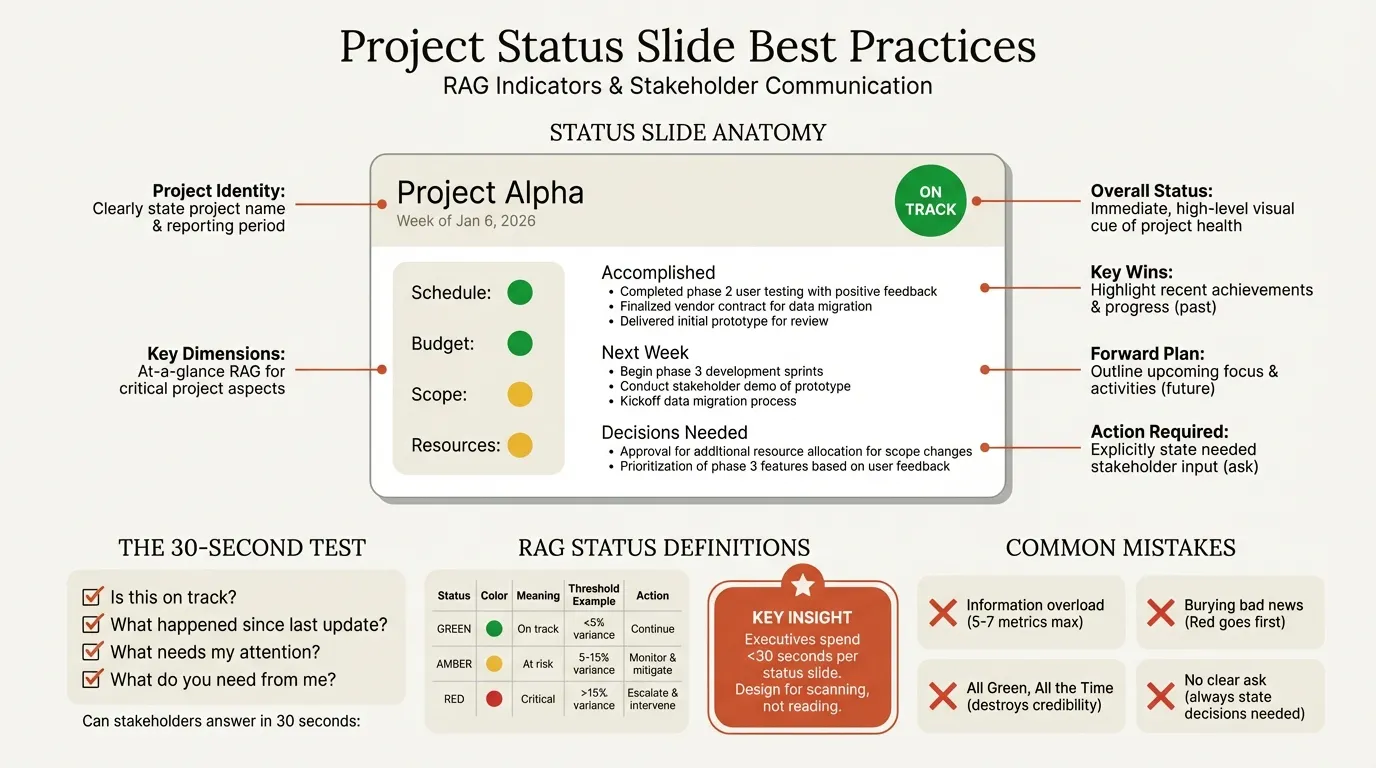
Project status slides answer five questions stakeholders actually ask: Is this on track? What happened? What's coming? What do I need to know? What do you need from me?
RAG Status Indicators
| Color | Meaning | When to Use |
|---|---|---|
| Green | On track | All metrics within tolerance |
| Amber | At risk | Issues identified, mitigation underway |
| Red | Off track | Critical issues requiring immediate action |
The key principle: never surprise stakeholders. If something is moving from Green to Amber, flag it before it becomes Red.
Essential Elements
An effective status slide includes:
- Overall project health indicator
- Key metrics (budget, timeline, scope)
- Recent accomplishments (2-3 items)
- Upcoming milestones (2-3 items)
- Risks and issues requiring attention
- Decisions or support needed
Presenting Bad News
Be transparent and proactive. Show the issue clearly, explain the root cause briefly, present your mitigation plan, and specify what decisions you need. Executives respect candor over spin. Never hide problems; they always surface eventually, and late disclosure destroys trust.
For ongoing projects, roadmap slides complement status updates by showing the strategic timeline and phase progression.
Market Sizing Slides: Quantifying Opportunity
Market sizing appears in strategy presentations, investor decks, and M&A analyses. The methodology matters as much as the number.
TAM, SAM, SOM Framework
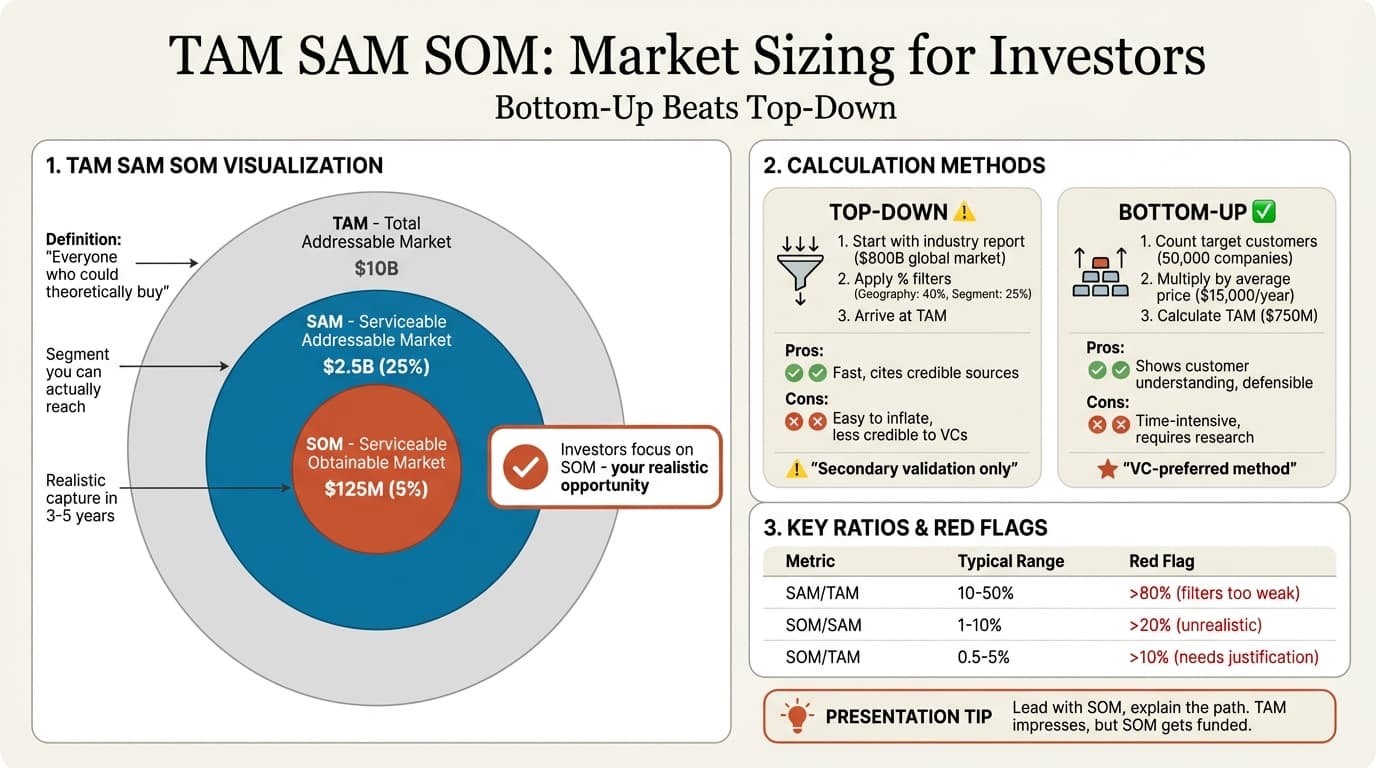
The TAM SAM SOM framework structures market opportunity analysis:
| Metric | Definition | Calculation Approach |
|---|---|---|
| TAM | Total Addressable Market | Maximum theoretical opportunity |
| SAM | Serviceable Addressable Market | What you can actually reach |
| SOM | Serviceable Obtainable Market | What you'll realistically capture |
Bottom-Up vs. Top-Down
Top-down: Start with industry reports and narrow using percentages. Faster but less credible.
Bottom-up: Start with customer counts and prices, build to total. More work but defensible.
Best practice: Use both methods and reconcile. If they differ by more than 2x, investigate your assumptions.
Credibility Markers
What builds credibility:
- Multiple data sources that triangulate
- Clear methodology explanation
- Conservative assumptions clearly stated
- Primary research or customer interviews
What kills credibility:
- Single analyst report as sole source
- Inflated TAM with vague filters to SAM
- No explanation of assumptions
- Numbers that seem too convenient
Building Slides Faster: Tools and Techniques
Understanding methodology is essential, but efficiency matters when you're building 50 slides for a Monday deadline.
Master Keyboard Shortcuts
The consultants who build decks fastest know shortcuts instinctively:
- Ctrl+D: Duplicate objects or slides
- Ctrl+G / Ctrl+Shift+G: Group and ungroup
- Ctrl+Shift+C / V: Copy and paste formatting
PowerPoint lacks native alignment shortcuts, which is why consultants use add-ins that provide single-keystroke alignment.
Use Templates with Consulting Layouts
Pre-built templates with:
- Properly sized action title areas
- Consistent font hierarchy
- Source citation footers
- Common chart layouts
Templates ensure consistency and save the time spent formatting each slide from scratch. Browse Deckary's slide library for 140+ consulting-grade layouts across market analysis, recommendations, and project management. For template selection by use case, see consulting slide templates; for the specific McKinsey-style build process, see McKinsey-style slides.
Link Charts to Excel
For data-heavy presentations, linking charts to Excel means:
- Updates automatically when data changes
- Consistent formatting across all charts
- Easier version control
- Less manual error
Consulting-grade chart tools like Deckary provide Excel linking for waterfall charts, Mekko charts, and Gantt charts.
AI-Powered Slide Generation
AI tools can now generate consulting-quality slides from text descriptions. Instead of starting with a blank slide, describe what you need: "Create a two-column slide showing our three strategic priorities with supporting data points."
The AI handles structure and formatting while you focus on content and logic. This is particularly valuable for:
- First drafts that establish structure
- Standard slide types (status updates, summaries)
- Converting analysis into presentation format
For a step-by-step framework on building polished slides quickly using shortcuts and structured workflows, see our guide on how to make professional slides fast. For a detailed comparison of AI tools, see our best AI presentation makers roundup.
Summary: The Consulting Presentation Checklist
Building MBB-quality presentations requires systematic attention to methodology. Use this checklist before finalizing any deck:
Structure Check
- Does the presentation lead with conclusions (Pyramid Principle)?
- Is the argument organization MECE (no gaps, no overlaps)?
- Does the executive summary stand alone?
- Can someone understand your argument from titles alone?
Slide-Level Check
- Does every slide have an action title (complete sentence)?
- Does each slide communicate exactly one message?
- Does every element support the action title?
- Are all data points sourced?
Formatting Check
- Are fonts consistent throughout?
- Are charts properly labeled and titled?
- Is alignment precise and consistent?
- Are source citations present on every data slide?
Audience Check
- Would an executive understand this in 30 seconds per slide?
- Are conclusions specific and actionable?
- Is the "so what" clear for every data point?
- Are next steps or decisions clearly stated?
Consulting presentations aren't about making slides look impressive. They're about communicating with the clarity and precision that time-constrained executives require. Master these principles, and your recommendations will land.
Create an editable presentation in your browser
Turn a prompt or source files into slides you can edit and export to PowerPoint. 14-day free trial. No credit card required.