Executive Summary Slides: How to Write Like McKinsey
Write executive summary slides like McKinsey with SCR, bold-bullet structure, consulting examples, one-pager links, and editable PowerPoint template options.
- Bob · Former McKinsey and Deloitte consultant with 6 years of experience
- August 22, 2025
- 13 min read
The executive summary slide is the most important slide in any consulting presentation. Many senior executives will read only this single slide before making a decision—or deciding whether to keep reading at all.
Situation-Complication-Resolution (SCR) is a useful structure for an executive summary. Give the recommendation enough space to make the proposed action clear. Bold sentences state key claims; indented bullets provide supporting evidence. The format exists so executives can skim the bold text alone and understand the complete argument.
This guide covers how to write executive summary slides that command attention—the SCR framework, bold-bullet structure, design principles, and common mistakes that undermine otherwise strong presentations. For a broader overview of MBB presentation methodology, see our Consulting Presentations Guide.
A finished one-slide recommendation
This fictional example keeps the decision, evidence, and owner together:
| Part of the slide | Example content | Why it belongs |
|---|---|---|
| Recommendation headline | Approve a six-week onboarding team to recover delayed launches | Names the action and purpose |
| Context | Two enterprise launches moved into the next quarter | Explains the change |
| Evidence | Revenue was $2.4m against a $2.5m plan, 4% below target | Gives the scale and comparison |
| Action | Assign two implementation specialists; target 14-day onboarding from 21 days | States a measurable goal |
| Decision and owner | Sponsor approves staffing; Operations reports weekly progress | Makes accountability explicit |
Use the free executive summary slide template to adapt the layout in PowerPoint. For a direct free PowerPoint download, the board report pack includes an executive-summary slide in both its filled and blank decks. Use fewer words on a projected slide than in a written pre-read.
Executive Summary Slide: Quick Answer
An executive summary slide is a one-slide version of your whole recommendation. In McKinsey-style and consulting decks, it uses Situation-Complication-Resolution, puts the recommendation near the top, supports it with bold-bullet evidence, and stands alone for executives who may never read the full deck.
| Executive Summary Format | Best For | Related Guide |
|---|---|---|
| SCR slide | Strategy recommendation decks | Consulting presentations |
| RSC slide | Fast operational updates | Progress reports |
| One-pager | Pre-read or board memo | One-pager template |
| Business case summary | Funding decisions | Business case examples |
Adapt the layout: Use the free Executive Summary PowerPoint Template, or download the free board report pack for a complete editable example.
What Is an Executive Summary Slide?
An executive summary slide is the first content slide in a presentation that communicates the complete storyline of your deck in one page. It answers three questions:
- What's the situation?
- What's the problem?
- What should we do about it?
| What It Is | What It Isn't |
|---|---|
| A complete argument in one slide | A table of contents |
| The recommendation with supporting logic | A teaser for what's coming |
| Designed to stand alone | Dependent on other slides |
| Written for the busiest person in the room | Written for completeness |
The executive summary exists because senior executives don't have time to read 50 slides. Many will only read this one slide before making a decision—or deciding whether to keep reading at all.
The SCR Framework: McKinsey's Storytelling Structure
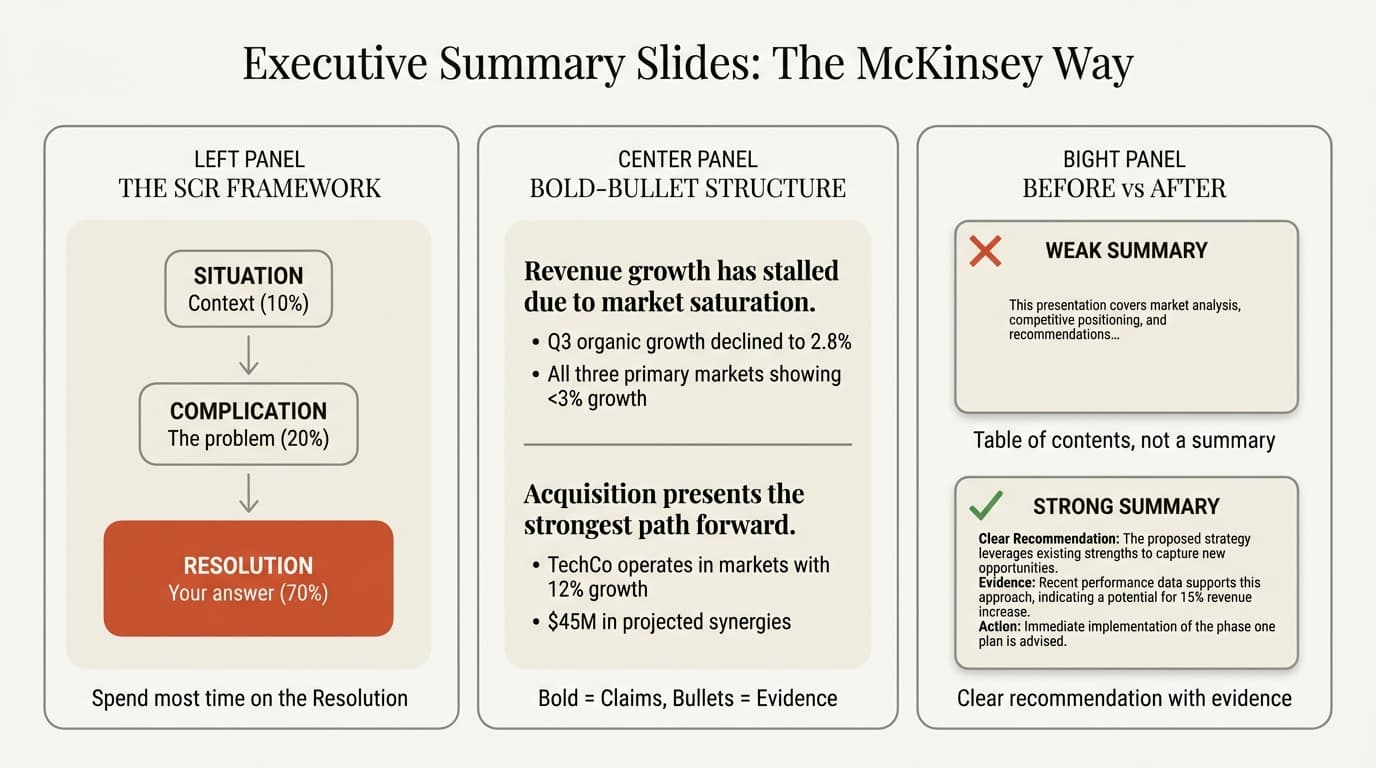
The Situation-Complication-Resolution (SCR) framework is the standard structure for executive summaries at top consulting firms. Developed at McKinsey, it provides a logical flow that makes complex arguments easy to follow.
Situation
The Situation establishes context—what the reader needs to know before understanding the problem.
Keep it brief. One to two sentences maximum. Your audience likely knows the context already; you're just confirming shared understanding.
Example:
"Acme Corp has grown revenue 15% annually for five years through geographic expansion, reaching $2.4B in 2024."
Common mistake: Spending too much time on background. Executives get impatient with extended context-setting. Get to the complication quickly.
Complication
The Complication identifies what has changed—why we need to act now.
This is where you create tension. Something has shifted that makes the status quo untenable. Without a complication, there's no reason to listen to your resolution.
Example:
"However, expansion opportunities are exhausted in current markets, and organic growth has stalled at 3% for two consecutive quarters."
The complication should feel urgent. If the problem can wait, the decision can wait—and your recommendation loses priority.
Resolution
The Resolution is your recommendation—what the organization should do.
This is where you spend most of your real estate. In consulting presentations, the Resolution section should account for 60-70% of your executive summary. Executives care more about solutions than problems.
Example:
"We recommend pursuing inorganic growth through acquisition of TechCo ($180M), which would add $400M in addressable market and restore double-digit growth within 18 months."
SCR vs. RSC: When to Flip the Order
Sometimes you should lead with the Resolution (RSC structure) instead of building to it.
| Use SCR When | Use RSC When |
|---|---|
| Audience is skeptical or needs convincing | Audience already agrees with the direction |
| Recommendation is controversial | Recommendation is expected |
| You need to build the case before revealing the answer | Speed matters more than persuasion |
For board presentations where you're proposing a major strategic shift, SCR builds the case before revealing your recommendation. For operational updates where leadership expects a status report, RSC gets to the point faster.
Continue reading: Business Case Template · Timeline Slides in PowerPoint · Competitive Landscape Slide
The Bold-Bullet Structure
The bold-bullet structure is the formatting standard for executive summaries at BCG, McKinsey, and Bain.
How It Works
Bold sentences state your key claims or takeaways.
- Bullet points provide supporting evidence, usually with data
- Each bullet reinforces the bold statement above it
- Evidence grounds your claims in facts, not opinions
Why It Works
The structure is designed for skimmability. Executives can read only the bold sentences and understand your complete argument. The bullets are there if they want proof—but they shouldn't need to read them to follow your logic.
Test: Read only your bold sentences in sequence. Do they tell a coherent story? If not, rewrite until they do. We learned this the hard way after a partner read our bold text and said, "I learned nothing. What's the answer?" Four rewrites later, we started testing bold-text coherence before showing anyone.
Example: Bold-Bullet in Practice
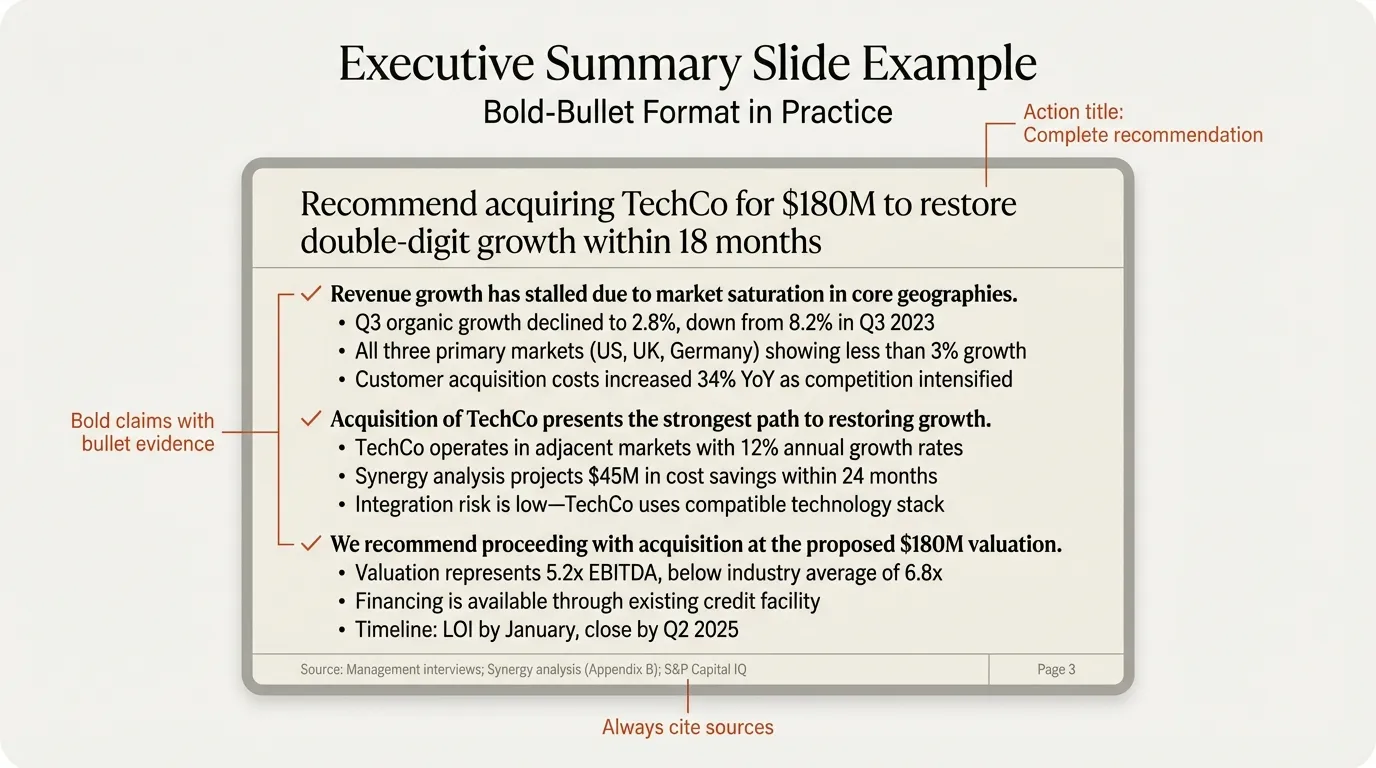
Here's how an executive summary section looks using this format:
Revenue growth has stalled due to market saturation in core geographies.
- Q3 organic growth declined to 2.8%, down from 8.2% in Q3 2023
- All three primary markets (US, UK, Germany) showing less than 3% growth
- Customer acquisition costs increased 34% YoY as competition intensified
Acquisition of TechCo presents the strongest path to restoring growth.
- TechCo operates in adjacent markets with 12% annual growth rates
- Synergy analysis projects $45M in cost savings within 24 months
- Integration risk is low—TechCo uses compatible technology stack
We recommend proceeding with acquisition at the proposed $180M valuation.
- Valuation represents 5.2x EBITDA, below industry average of 6.8x
- Financing is available through existing credit facility
- Timeline: LOI by January, close by Q2 2025
Notice how reading only the bold sentences tells the complete story: growth stalled → acquisition is the answer → here's what to do next.
Designing Your Executive Summary Slide
Visual design matters as much as content. A cluttered executive summary undermines your credibility before anyone reads a word.
Layout Principles
One column or two columns—not three. Two columns work well when you have distinct sections (e.g., Situation/Complication on the left, Resolution on the right). One column works for a linear narrative.
Leave white space. If your slide looks like a Wikipedia article, executives will skip it. Paragraphs slow people down. Bullet points guide the eye.
Consistent margins. Your executive summary should align with every other slide in the deck. Use PowerPoint guides to ensure elements don't shift.
Visual Hierarchy
Title: Action title stating the recommendation (largest text) Bold statements: Second-largest, clearly distinct from bullets Bullets: Smaller, indented, supporting role Source line: Smallest, bottom of slide
The hierarchy should be obvious at a glance. If someone squints at your slide from across the room, they should be able to identify where the key message lives.
Color and Emphasis
- Use your accent color sparingly—only for the most critical data points
- Avoid highlighting more than 2-3 items on the entire slide
- If everything is emphasized, nothing is emphasized
What Not to Include
| Leave Out | Why |
|---|---|
| Charts and graphs | Executive summary is text-based; charts go in the body |
| Detailed methodology | Nobody cares how you got the answer on this slide |
| Caveats and disclaimers | Address concerns in the body or appendix |
| More than 3-4 key points | If you have more, you haven't prioritized |
The body of your deck exists to provide evidence and handle objections. Your executive summary exists to state the answer clearly.
Common Executive Summary Mistakes
These errors undermine otherwise strong presentations.
Mistake 1: Writing a Table of Contents
Wrong approach:
"This presentation covers market analysis, competitive positioning, financial projections, and strategic recommendations."
Why it fails: This tells executives what topics you'll discuss, not what you've concluded. They have to read 50 more slides to find out what you actually think.
Fix: State your conclusions, not your agenda. "We recommend X because of Y, supported by Z."
Mistake 2: Burying the Recommendation
Wrong approach: Three paragraphs of context before finally revealing what you think the company should do—at the bottom of the slide, in smaller font.
Why it fails: Executives often stop reading before they reach your recommendation. Senior stakeholders are short on time. Put the answer where they'll see it.
Fix: If using RSC structure, lead with the recommendation. If using SCR, keep Situation and Complication to 20% of the slide.
Mistake 3: Too Much Detail
Wrong approach: Cramming every finding from your analysis into the executive summary because "it's all important."
Why it fails: If your summary exceeds one slide, you haven't made decisions about what matters most. An executive summary that's too long isn't a summary—it's a report.
Fix: Ruthlessly cut. Include only what's essential to understand and approve your recommendation. Everything else goes in the body.
Mistake 4: Vague Language
Wrong approach:
"We should consider exploring potential opportunities in adjacent markets."
Why it fails: "Consider exploring potential opportunities" is consultant-speak for "we don't have a real recommendation." Executives can't act on vague suggestions.
Fix: Be specific. "We recommend acquiring TechCo for $180M to enter the adjacent market by Q2 2025."
Mistake 5: No Supporting Evidence
Wrong approach: Making claims without data.
"The acquisition will create significant value for shareholders."
Why it fails: No claim should be made without evidence—that includes your executive summary. Unsupported assertions invite skepticism.
Fix: Ground every claim. "The acquisition will create $45M in annual synergies (validated by integration team) and $120M in new revenue (based on TechCo's current pipeline)."
Mistake 6: Writing It First
Wrong approach: Drafting the executive summary before completing your analysis.
Why it fails: Your executive summary should reflect your conclusions, which you can't know until you've done the work. Writing it first often leads to mismatches between your summary and your findings.
Fix: Write the executive summary last. Once you know what you've concluded, summarize it. We used to draft summaries in week one to "get alignment"—then spent week four scrambling when our findings didn't match. Now we write them in the final 48 hours, never before.
Executive Summary Template
Here's the structure we use for most executive summaries:
Action Title
One sentence stating the core recommendation (this is the slide title, not body text)
Situation (1-2 sentences)
Brief context establishing shared understanding
Complication (1-2 sentences)
What has changed; why action is needed now
Resolution (60-70% of the slide)
First key point of your recommendation.
- Supporting evidence with data
- Additional proof point
Second key point of your recommendation.
- Supporting evidence with data
- Additional proof point
Third key point (if needed).
- Supporting evidence with data
Next Steps (optional, 1-2 lines)
Specific actions, owners, and timeline
Real-World Applications
Executive summaries serve different purposes depending on context. Here's how to adapt.
Board Presentations
Boards make governance decisions. Your executive summary should:
- Lead with strategic impact and risk implications
- Include financial projections at a high level
- State what decision you're asking for
- Identify who's accountable for execution
Sample structure:
Situation → Complication → Recommendation → Financial Impact → Decision Required
Strategy Recommendations
Strategy presentations propose new directions. Your executive summary should:
- Quantify the opportunity clearly
- Address the "why now" question
- Provide a clear path forward with milestones
- Acknowledge key risks and mitigations
Operational Updates
Status updates inform rather than persuade. Your executive summary should:
- Lead with the bottom line (on track / off track)
- Highlight exceptions and variances
- State what decisions are needed (if any)
- Keep it shorter than strategic presentations
Executive Summary Checklist
Before presenting, verify:
Structure
- Follows SCR or RSC structure
- Resolution accounts for 60%+ of the content
- Situation and Complication are brief
- Can be understood without reading the body slides
Content
- States a clear, specific recommendation
- Every claim has supporting evidence
- Bold sentences tell a coherent story when read alone
- No more than 3-4 key points
Format
- Fits on one slide (300-500 words max)
- Uses bold-bullet structure consistently
- Clear visual hierarchy
- Adequate white space
- Consistent with rest of deck formatting
Audience
- Written for the most senior person in the room
- Addresses their likely questions and concerns
- Includes clear next steps or call to action
Summary
The executive summary is the most important slide in your deck. Senior executives may read only this slide before making a decision—or deciding whether to keep reading.
Key principles:
- Use the SCR framework: Situation → Complication → Resolution
- Spend most of your space on the Resolution: Executives want answers, not problems
- Apply the bold-bullet structure: Bold sentences for claims, bullets for evidence
- Design for skimmability: The bold text alone should tell the complete story
- Keep it to one slide: 300-500 words maximum
- Write it last: Summarize conclusions, don't predict them
- Be specific: Vague recommendations invite rejection
The executive summary isn't where you show all your work. It's where you prove you understand what leadership needs to know—and nothing more.
For pre-built executive summary layouts, browse Deckary's slide library or use the AI Slide Builder to generate consulting-grade summary slides from a text description.