Appendix Slide PowerPoint: When to Use and How to Format
Appendix slide PowerPoint guide covering when to use appendix slides, formatting best practices, organization strategies, and navigation techniques for professional presentations.
The appendix is where detailed analysis lives after the story ends. In consulting presentations, board decks, and investor pitches, the main narrative must stay focused on key messages and recommendations. Supporting evidence—detailed financials, technical methodologies, alternative scenarios—belongs in the appendix, accessible during Q&A but separated from the core storyline.
At McKinsey, BCG, and Bain, appendix slides follow one rule: keep the main deck crisp by moving supporting details out of the narrative flow. This is not about hiding information—it is about respecting the audience's time. Executives need the answer first, the supporting data second, and only when they ask for it.
After reviewing appendix structures across 150+ strategy presentations, board decks, and due diligence reports, we have identified when to use appendix slides, how to organize them for rapid navigation, and the formatting standards that separate professional appendices from amateur information dumps.
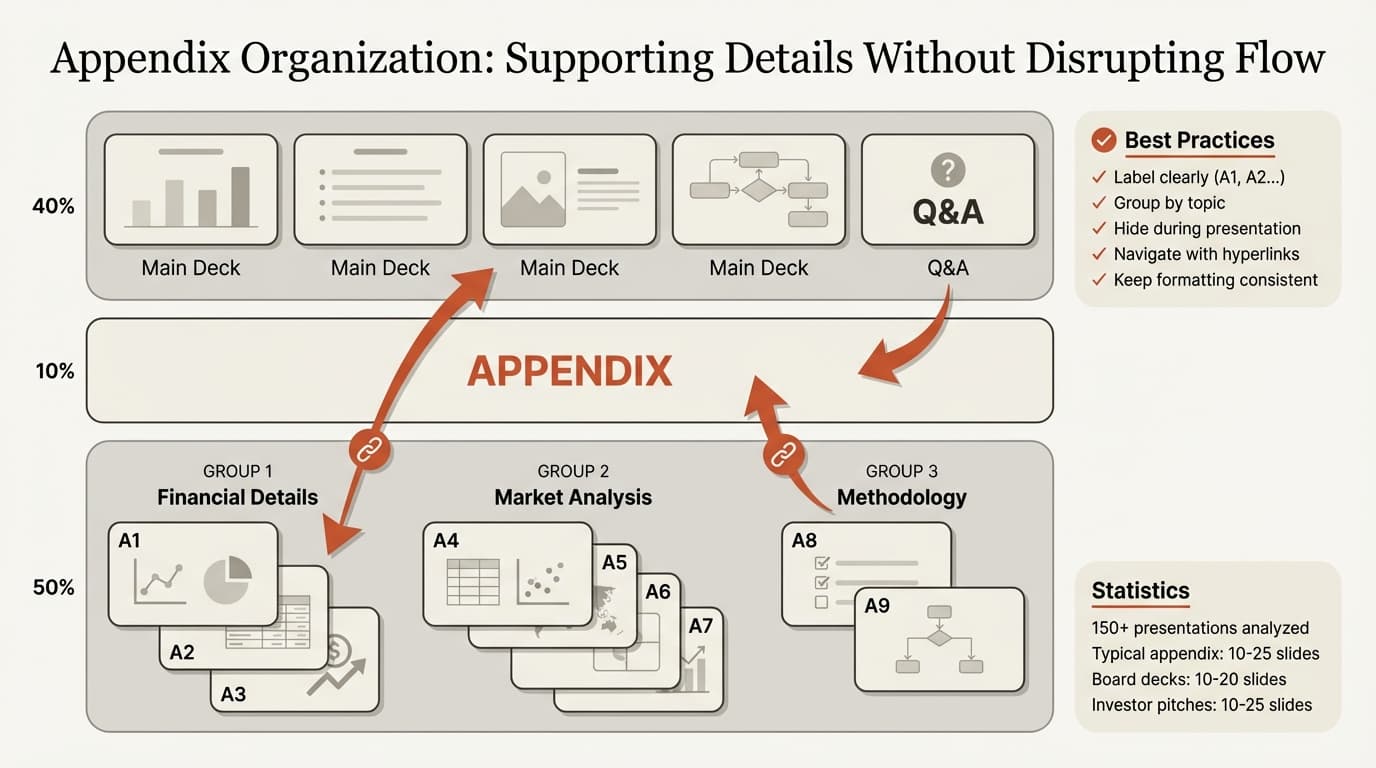
What Is an Appendix Slide in PowerPoint
An appendix slide is supplementary content placed at the end of a presentation. It contains information that supports your main points but is not essential for understanding the core message, according to Adobe's presentation appendix guide.
The appendix serves three functions:
1. Supporting detailed questions. When executives or investors ask for specifics—"What were Q3 margins by region?" or "How did you calculate market size?"—you navigate to the relevant appendix slide rather than scrambling to recall numbers.
2. Maintaining narrative focus. Complex data and extensive evidence can be relegated to the appendix to avoid overwhelming the audience, as noted by Capitaly's pitch deck appendix guide. This keeps your main presentation focused on insights and recommendations, not data tables.
3. Demonstrating rigor. A well-organized appendix signals thorough analysis. Even if the audience never views it, knowing the supporting evidence exists builds confidence in your conclusions.
| Presentation Type | Typical Appendix Size | Primary Purpose |
|---|---|---|
| Board presentation | 10-20 slides | Detailed financials, variance analysis |
| Client deliverable | 15-30 slides | Methodology, detailed findings, alternatives |
| Investor pitch | 10-25 slides | Market sizing, competitive analysis, financials |
| Internal strategy review | 5-15 slides | Supporting data, alternative scenarios |
| Sales presentation | 5-10 slides | Case studies, pricing details, technical specs |
When to Use Appendix Slides
Not every presentation needs an appendix. Use one when you have supporting material that strengthens your case but would disrupt the main narrative if included in the core deck.
Supporting Complex Information
If your financial projections are too intricate for the main deck, place them in the appendix so you can address investor questions without cluttering your primary presentation, according to Pitch Guide's appendix best practices.
Examples:
- Detailed revenue build-ups showing assumptions by customer segment, pricing tier, and geography
- Multi-year cash flow models with sensitivity analysis
- Technical methodology explaining statistical models or analytical approaches
- Detailed competitive analysis with feature-by-feature comparisons
At McKinsey, appendices typically include supporting documentation that goes beyond the main storyline while keeping essential analysis out of the way, as described in McKinsey presentation structure guides.
During Q&A Sessions
The appendix section can be invaluable during the Q&A session, allowing you to provide thorough answers to investor questions without cluttering your main presentation, according to SlideModel's appendix guide.
Common Q&A topics that appendix slides address:
- "How did you arrive at that market size estimate?"
- "What happens if churn increases by 5%?"
- "Can you break down costs by department?"
- "What were the results from the pilot program?"
- "How does this compare to the alternative approach we discussed?"
Providing Backup for Anticipated Questions
In client presentations and board meetings, experienced presenters anticipate likely questions and prepare appendix slides in advance. This prevents the awkward pause when an executive asks for specifics you do not have readily available.
Appendix content by presentation type:
| Context | Likely Appendix Content |
|---|---|
| Market entry strategy | Detailed country selection criteria, regulatory analysis, competitive positioning by market segment |
| Cost reduction program | Detailed cost breakdowns by department, implementation timeline with milestones, risk mitigation plans |
| Investment recommendation | Detailed financial model, comparable transaction analysis, management team backgrounds |
| Product launch plan | Detailed go-to-market timeline, pricing sensitivity analysis, competitive response scenarios |
What Not to Include
Do not use the appendix as a dumping ground for:
- Unpolished analysis that you did not have time to refine
- Content you hope to sneak past the audience
- Information that directly supports your core recommendation (this belongs in the main deck)
- Redundant charts that restate points already covered
- Generic reference material unrelated to your specific analysis
If you cannot articulate why a slide is in the appendix, it probably should not be there.
How to Format Appendix Slides
Appendix slides should follow the same design principles as your main presentation while being clearly labeled and easy to navigate.
Labeling and Organization
Each appendix slide should be clearly labeled (e.g., Appendix A, Appendix B, etc.), according to Adobe's formatting guidance. This makes them easily identifiable during Q&A.
Standard labeling formats:
Option 1: Alphabetical with descriptive titles
Appendix A: Market Sizing Methodology
Appendix B: Revenue Model Assumptions
Appendix C: Competitive Feature Comparison
Option 2: Numerical within topic sections
Appendix 1.1: Q4 Revenue by Segment
Appendix 1.2: Q4 Margin Analysis
Appendix 2.1: Customer Acquisition Cost Trends
Appendix 2.2: Retention Analysis by Cohort
Option 3: Topic-based headers
Appendix — Financial Details: Revenue Build-up
Appendix — Financial Details: Cost Structure
Appendix — Market Analysis: TAM/SAM/SOM Breakdown
The best approach depends on appendix size. For under 10 slides, use simple alphabetical labels. For 10-30 slides, group by topic with numerical sub-labels.
Design Consistency
Ensure the appendix follows the same design and formatting principles as the main presentation to maintain professionalism, according to Expert Slides' appendix guide. The colors should match; fonts should be uniform.
Consistency checklist:
- Same slide template (headers, footers, logo placement)
- Same color palette and brand guidelines
- Same font family and sizes
- Same chart formatting (bar colors, axis labels, gridlines)
- Same iconography and visual style
Avoid creating a visual disconnect where the appendix feels like it was copied from a different presentation.
Title Slide for Appendix Section
Include a divider slide marking the start of the appendix. This creates a clear boundary between your core narrative and supporting material.
Appendix divider slide format:
[Large centered text]
Appendix

[Optional subtitle]
Supporting Analysis and Detailed Data
Keep it minimal. The divider exists to signal transition, not to add content.
Readability Standards
Format the text size and font so that it is legible and not too small for the audience to read, according to SlideModel's formatting advice.
Minimum readability standards:
- Title text: 24pt minimum
- Body text: 14pt minimum (18pt preferred)
- Chart labels: 12pt minimum
- Table text: 12pt minimum
- Footnotes: 10pt minimum
Test by projecting on a screen from 10 feet away. If you cannot read it comfortably, increase the font size or simplify the content.
Continue reading: Best Tools for Creating Business Case Presentations in PowerPoint · How to Make a Gantt Chart in PowerPoint (Free Template) · Investment Banking Pitch Book
Use consulting-grade layouts in PowerPoint
Start from structured business slides and customize them in your own deck. 10 free AI prompts. No credit card required.
Organizing Appendix Content
A well-organized appendix allows rapid navigation during live Q&A. Group related content logically and use consistent formatting within sections.
Grouping by Topic
Organize appendix slides by topic rather than chronologically. This makes it easier to find relevant slides when questions arise.
Example topic groupings:
For a market entry strategy:
- Market Sizing and Opportunity
- Competitive Landscape
- Go-to-Market Approach
- Financial Projections
- Implementation Timeline
- Risk Assessment
For an investment recommendation:
- Company Overview and Background
- Market Analysis and Positioning
- Financial Model and Assumptions
- Comparable Transactions
- Management and Organization
- Transaction Structure
Table of Contents
For appendices over 15 slides, include a table of contents immediately after the appendix divider slide. This functions as a navigation map during Q&A.
Appendix table of contents format:
| Section | Slide Numbers |
|---|---|
| Market Sizing Methodology | A1-A3 |
| Financial Model Details | A4-A8 |
| Competitive Analysis | A9-A12 |
| Implementation Timeline | A13-A15 |
For guidance on table of contents formatting, see our PowerPoint table of contents guide.
Hyperlinks for Navigation
Use hyperlinks to link your appendix slides to the main slides so you can navigate quickly between them, according to Adobe's navigation guidance. This helps you jump to and from important information and references.
How to add hyperlinks in PowerPoint:
- Select the text or object to link from (e.g., "See Appendix A for details")
- Right-click and choose "Hyperlink" or press Ctrl+K (Cmd+K on Mac)
- Select "Place in This Document"
- Choose the target appendix slide
- Click OK
Pro tip: Add a "Return to Main Deck" hyperlink at the bottom of each appendix slide. This allows you to navigate back to the main presentation instantly rather than manually advancing through slides.
Presentation Strategy for Appendix Slides
Appendix slides exist to support discussion, not to extend your core presentation. Handle them strategically.
Hide Appendix Slides During Main Presentation
PowerPoint allows you to hide slides, so you can use the same file to give your presentation without worrying about distracting your audience with the appendix, according to Adobe's presentation strategy.
How to hide slides:
- In Slide Sorter view, select appendix slides
- Right-click and choose "Hide Slide"
- Hidden slides show with a diagonal line through the slide number
- During presentation, PowerPoint skips hidden slides automatically
- You can still navigate to hidden slides manually by typing the slide number
This approach keeps your appendix accessible without forcing you to manually skip slides or maintain separate files.
Reference Appendix During Main Presentation
When covering a point that has supporting detail in the appendix, reference it verbally but do not navigate there unless asked.
Reference language:
- "For those interested in the detailed methodology, see Appendix A after the presentation."
- "We have a full competitive feature comparison in the appendix if questions arise."
- "The detailed revenue build-up is in Appendix C."
This signals that you have done the detailed work without derailing the narrative.
Navigate Efficiently During Q&A
When a question arises that the appendix addresses, navigate directly to the relevant slide rather than advancing slide-by-slide.
Navigation shortcuts:
- Type the slide number and press Enter (e.g., type "45" to jump to slide 45)
- Use hyperlinks embedded in main slides
- Use the "See all slides" view (grid icon in presentation mode) to click directly
Fumbling through dozens of slides to find the right chart undermines the professionalism that a well-prepared appendix is meant to signal.
Common Appendix Mistakes
These errors appear frequently in presentations we review.
| Mistake | Why It Fails | Fix |
|---|---|---|
| Including critical evidence in appendix | If the data supports your core recommendation, it belongs in the main deck | Move essential supporting evidence to the main narrative; relegate only supplementary details to appendix |
| Poor labeling | Unlabeled slides or vague titles ("Additional Data") make navigation impossible | Use clear, descriptive labels: "Appendix A: Market Sizing Methodology" |
| Inconsistent formatting | Appendix slides that look different from the main deck appear unprofessional | Apply the same template, fonts, colors, and design standards throughout |
| Too much detail per slide | Dense tables with 8pt font are unreadable when projected | Simplify charts, increase font sizes, break complex tables across multiple slides |
| No clear organization | Random order makes it hard to find relevant slides during Q&A | Group by topic, add table of contents for large appendices |
| Including unpolished work | Rough analysis or incomplete charts signal lack of rigor | Only include finished, presentation-quality slides |
Appendix Content Examples by Context
Board Presentation Appendix
Board presentations typically include financial details, variance analysis, and operational metrics that support the executive summary.
Common appendix content:
- Monthly revenue and margin trends by business unit
- Detailed variance analysis (actual vs budget, actual vs prior year)
- Customer acquisition and retention metrics by segment
- Operational KPIs with historical trends
- Capital expenditure details
- Risk register with mitigation plans
Investor Pitch Appendix
Investor pitches need market sizing methodology, competitive positioning details, and financial model assumptions that back up the main narrative.
Common appendix content:
- TAM/SAM/SOM calculation methodology (see our TAM SAM SOM calculator)
- Detailed competitive feature matrix
- Customer case studies and testimonials
- Unit economics by customer segment
- Financial model assumptions and sensitivities
- Management team backgrounds and advisors
- Cap table and funding history
For investor pitch structure, see our pitch deck template guide.
Client Deliverable Appendix
Consulting presentations include detailed analysis, alternative scenarios, and methodology that demonstrate analytical rigor.
Common appendix content:
- Detailed methodology and analytical approach
- Data sources and interview lists
- Alternative scenarios and sensitivity analysis
- Detailed implementation timeline with dependencies
- Risk assessment matrix
- Benchmark data and industry comparisons
Sales Presentation Appendix
Sales presentations include case studies, technical specifications, and pricing details that support the value proposition.
Common appendix content:
- Customer case studies with ROI metrics
- Detailed product feature specifications
- Pricing tiers and volume discounts
- Implementation timeline and milestones
- Security and compliance certifications
- Integration capabilities and API documentation
Tools for Creating Professional Appendices
| Tool | Best For | Price | Key Feature |
|---|---|---|---|
| Deckary | Consulting-style presentations | $120-180/yr | Quick slide formatting and alignment |
| PowerPoint Slide Sorter | Organizing and hiding slides | Built-in | Drag-and-drop reordering |
| PPT Productivity | Batch moving slides to appendix | Varies | One-click "send to appendix" |
For rapid appendix formatting and alignment, Deckary provides keyboard shortcuts that ensure consistent spacing and layout across all slides.
Summary
The appendix keeps your main presentation focused while providing detailed supporting evidence when needed. It demonstrates analytical rigor without overwhelming the core narrative.
Key principles:
- Use appendix slides strategically: Include supporting data, detailed methodologies, alternative scenarios, and backup charts that address anticipated questions—but never critical evidence that belongs in the main deck.
- Label clearly: Use descriptive labels (Appendix A, Appendix B) organized by topic. For large appendices, group by section with numerical sub-labels.
- Maintain design consistency: Apply the same template, fonts, colors, and formatting standards as the main presentation.
- Organize logically: Group related content by topic, add a table of contents for appendices over 15 slides, and use hyperlinks for rapid navigation.
- Hide during main presentation: Use PowerPoint's hide slide feature to keep appendix accessible without extending your core narrative.
- Navigate efficiently during Q&A: Use slide numbers, hyperlinks, or grid view to jump directly to relevant appendix slides rather than advancing manually.
- Keep content presentation-ready: Only include finished, polished slides. The appendix is not a dumping ground for rough analysis.
The best appendices are the ones you never show—but when an executive asks a detailed question, you navigate instantly to a well-formatted slide with the exact answer. For ready-to-use appendix templates and consistent formatting tools, explore Deckary's slide library or build custom appendix slides with the AI Slide Builder.
Sources
- Adobe — Get the Most Out of a Presentation Appendix
- Capitaly — Appendix Slides in the Pitch Deck
- Pitch Guide — Maximize Start Pitch Deck Appendix Slides
- SlideModel — McKinsey Presentation Structure
- SlideModel — Appendix Slide in Presentations
- Expert Slides — Understanding Appendices: How to Create and Utilize PowerPoint Appendix Slide
Related Guides
Use consulting-grade layouts in PowerPoint
Start from structured business slides and customize them in your own deck. 10 free AI prompts. No credit card required.