Consulting Slide Standards: The Unwritten Rules MBB Consultants Follow
The slide rules McKinsey, BCG, and Bain actually follow. Action titles, one-message-per-slide, formatting, and structural standards explained.
- Bob · Former McKinsey and Deloitte consultant with 6 years of experience
- August 14, 2025
- 10 min read
Consulting slide standards—action titles, one message per slide, consistent formatting, source citations—separate professional deliverables from amateur presentations. Partners at MBB and Big 4 firms reject decks that violate these norms, regardless of the underlying analysis quality.
These standards exist because executives don't have time to decode slides. A managing director might flip through a 50-page deck in five minutes, reading only the titles. If those titles don't tell the story, the recommendation gets lost.
This guide covers the specific standards used at top consulting firms: typography rules, the action title requirement, alignment grids, and the common mistakes that trigger revision requests. For a comprehensive overview of MBB presentation methodology, see our Consulting Presentations Guide.
Why Slide Standards Matter
At McKinsey, BCG, and Bain, slide quality isn't about aesthetics. It's about credibility.
Clients pay $500K+ for a strategy engagement. When they see misaligned text, inconsistent formatting, or vague headlines, they question whether the thinking behind the slides is equally sloppy. A Harvard Business Review study found that simplified, well-structured visuals improve audience comprehension by 41%.
The standards also serve a practical purpose: executives don't have time to decode your slides. A managing director might flip through a 50-page deck in five minutes, reading only the titles. If those titles don't tell the story, your recommendation gets lost.
The Core Structural Rules
Rule 1: Action Titles, Not Topic Titles
This is the most important rule and the one most people get wrong.
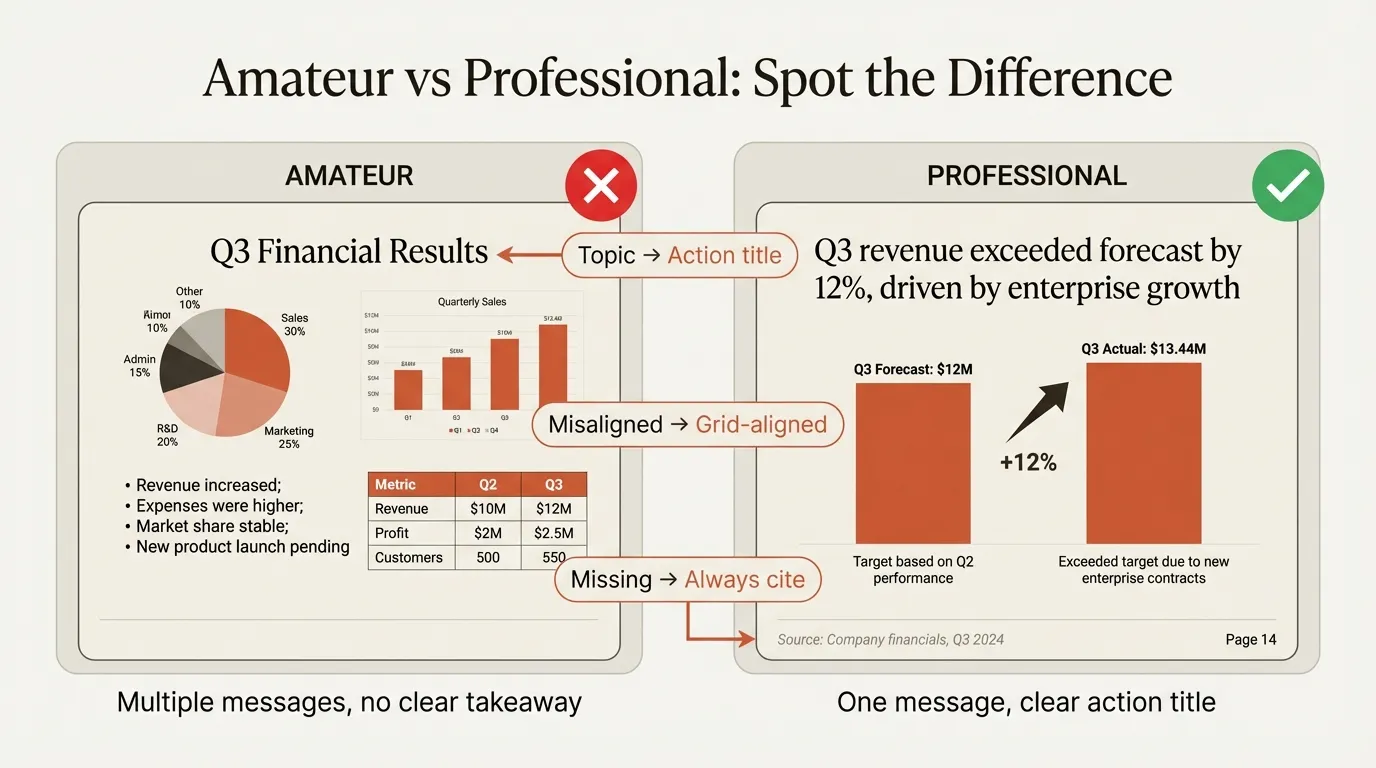
An action title states the slide's key takeaway as a complete sentence. It tells the reader what to conclude, not what the slide is about.
| Topic Title (Wrong) | Action Title (Right) |
|---|---|
| Market Overview | German market growing 12% annually, 3x faster than US |
| Competitive Analysis | We outperform competitors on 4 of 6 key purchase criteria |
| Financial Projections | Acquisition generates 15% IRR with conservative assumptions |
| Customer Feedback | NPS declined 20 points after pricing change |
The term "action title" was coined by BCG consultants in the 1990s. The concept is simple: the title actively tells the reader the takeaway. They shouldn't have to interpret the slide body to understand your point.
Action title rules:
- Maximum 15 words
- Never exceed two lines
- Use active voice ("Revenue grew" not "Revenue was grown")
- Be specific and quantitative when possible
- State a conclusion, not a process
Test: Can someone understand your argument by reading only the slide titles? If not, your action titles need work. Consultants call this the "titles test" or "flipping through the deck."
Rule 2: One Message Per Slide
Each slide should communicate exactly one insight. That insight is stated in the action title and supported—not complicated—by the slide body.
If you're recommending international expansion, you can't have one slide showing both market size and potential partners. You need:
- Slide 1: "Target market growing at X%, representing $Y opportunity"
- Slide 2: "Three partnership candidates identified with combined revenue of $Z"
When you try to cram multiple messages into one slide:
- The action title becomes vague or compound
- The visual hierarchy breaks down
- Readers don't know where to focus
- Your argument becomes harder to follow
If you find yourself writing "and" in your action title, you probably need two slides.
Rule 3: Pyramid Structure Within Each Slide
The Pyramid Principle applies at the slide level, not just the deck level.
Slide structure:
- Action title (top of pyramid): The key takeaway
- Supporting arguments (middle): 2-4 key points that support the title
- Evidence (bottom): Data, charts, or details that prove the supporting arguments
Everything on the slide should answer one question: "Why should I believe the action title?"
If data or text doesn't directly support the title, cut it. Consulting slides are not the place to show all the interesting analysis you did. They're the place to prove your point.
Continue reading: Business Case Template · Box Plot in PowerPoint · Venture Capital Pitch Deck
Formatting Standards
Formatting consistency signals professionalism. When formatting is inconsistent, readers notice—and it undermines your credibility before they even read your content.
Fonts
- Limit to two fonts maximum: One for titles, one for body text
- McKinsey standard: Arial for body, Georgia for titles
- BCG/Bain: Similar sans-serif fonts (Helvetica, Calibri)
- Minimum body text size: If your audience can't read it from the back of the room, it's too small
- Never vary font size for the same element type—all action titles should be identical size across all slides
Alignment
- Use PowerPoint guides to ensure consistent margins on every slide
- Titles should not move when you flip through the deck
- Left-align body text for readability (center-align only for short headlines)
- Align all elements to a grid—misalignment is immediately visible and looks careless
Colors
- Limit your palette to 3-4 colors maximum
- Use accent colors strategically to highlight key data points, not for decoration
- Create hierarchy with color—primary points in brand color, secondary in gray
- Ensure high contrast between text and background
- Be consistent—if positive numbers are green on slide 5, they should be green on slide 50
White Space
- Don't fill every inch of the slide
- Margins matter—leave breathing room around all edges
- Separate visual elements with adequate spacing
- When in doubt, remove content rather than cramming it in
Slide Anatomy: The Standard Components
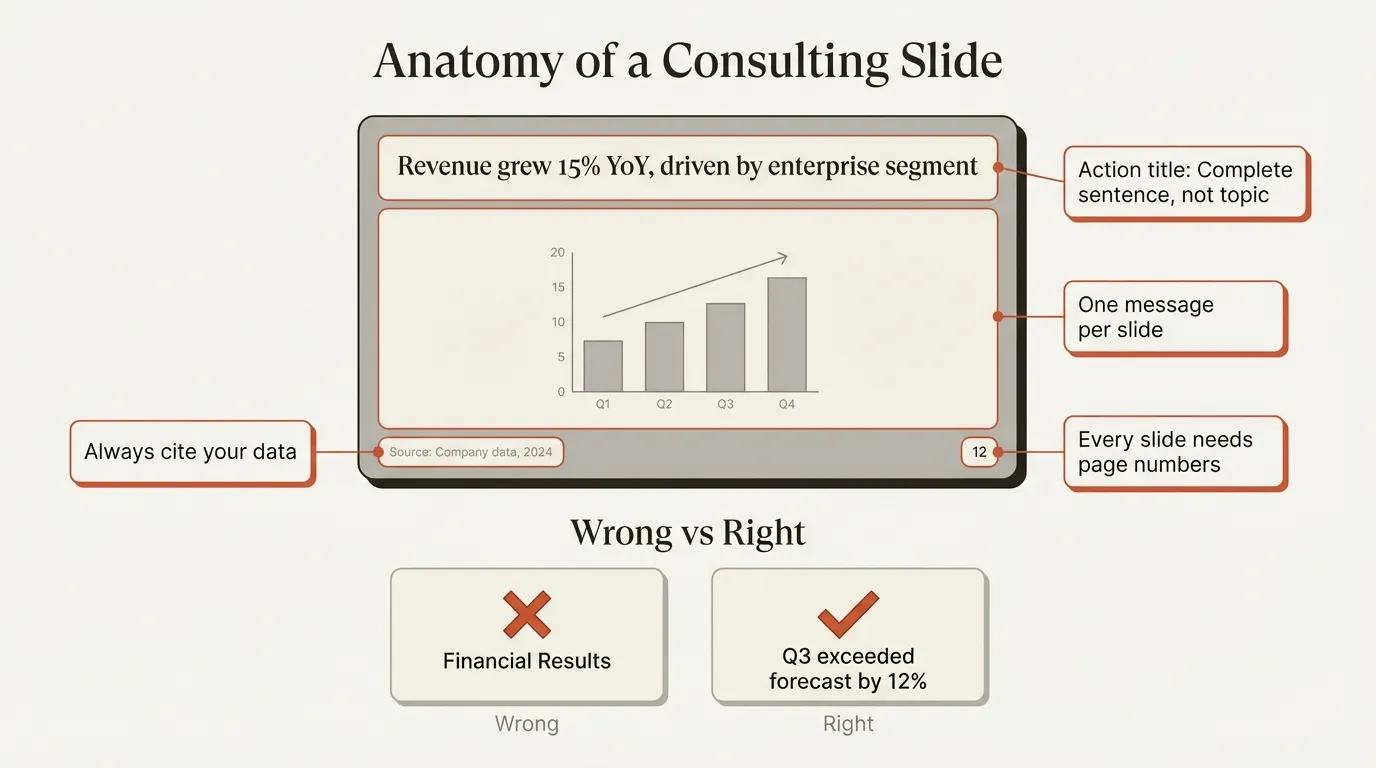
A professional consulting slide has consistent components in consistent positions.
Header Section
- Action title: 1-2 lines, top of slide, largest text on the page
- Subtitle (optional): Additional context, smaller font, often used by McKinsey
BCG's newer templates removed subtitles entirely to maximize action title impact.
Body Section
- Single exhibit or content block that supports the action title
- Charts, tables, or structured text—not paragraphs
- Clear visual hierarchy so readers know where to look first
Footer Section
- Source line: Where the data came from (required for any quantitative claim)
- Page number: Always include it
- Date/confidentiality (optional): Depending on firm and client requirements
Source formatting example: "Source: Company annual reports (2022-2024); McKinsey analysis"
Never present data without a source. Unsourced numbers destroy credibility.
Common Mistakes and Fixes
Mistake 1: Topic Titles
Problem: "Q3 Financial Results" Fix: "Q3 revenue exceeded forecast by 12%, driven by enterprise segment"
Topic titles force readers to interpret the slide. Action titles tell them what to conclude.
Mistake 2: Multiple Messages
Problem: One slide covering market size, growth rate, competitive dynamics, and entry barriers Fix: Four slides, each with one message
If you can't state your message in one sentence, you have multiple messages.
Mistake 3: Shrinking Fonts to Fit
Problem: Reducing title font to squeeze in a longer headline Fix: Simplify the message or split into multiple slides
Font size should never vary within element types. If content doesn't fit, the problem is the content, not the formatting.
Mistake 4: Missing Sources
Problem: "Market growing at 15% CAGR" with no source Fix: "Market growing at 15% CAGR (Source: Gartner, 2024)"
Every data point needs attribution. Executives will ask "where did this come from?"
Mistake 5: Decorative Elements
Problem: Clip art, stock photos, fancy transitions, 3D charts Fix: Remove them entirely
Consulting slides are not marketing materials. Decoration distracts from the message. If an element doesn't support the action title, delete it.
Mistake 6: Inconsistent Formatting
Problem: 14pt titles on slide 3, 16pt on slide 7; different bullet styles throughout Fix: Use a master template and never deviate
Readers notice inconsistency subconsciously. It signals carelessness.
Building a Deck: The Ghost Deck Method
Top consultants don't open PowerPoint first. They start with a "ghost deck"—a structural outline that maps the argument before any design work begins.
Ghost deck process:
- Write your recommendation in one sentence
- List 3-5 supporting arguments (these become section headers)
- Under each argument, write the action titles for slides that support it
- Review the titles alone—do they tell a coherent story?
- Only then open PowerPoint and build the slides
This approach prevents the common trap of building slides before you've structured your argument. It's easier to rearrange titles in a Word doc than to rebuild slides in PowerPoint.
Time allocation:
- 40% on ghost deck and story structure
- 30% on analysis and content
- 30% on slide design and formatting
Most people invert this. They spend 80% in PowerPoint, then wonder why the story doesn't flow.
Firm-Specific Differences
While the core principles are universal, firms have subtle style differences.
| Element | McKinsey | BCG | Bain |
|---|---|---|---|
| Title style | Often includes subtitle | Subtitle-free, maximized action title | Clean, minimal |
| Visual density | Text-heavy, structured | More chart-heavy, visual | Balanced |
| Color palette | Blue-heavy | Green accent | Red accent |
| Exhibit style | Detailed annotations | Bold callouts on key data | Clean with selective emphasis |
These differences are minor. The structural principles—action titles, one message per slide, consistent formatting—are identical across all three firms.
The 60-Second Rule
McKinsey trains consultants to present each slide in 60 seconds or less.
This forces discipline:
- If you can't explain the slide in 60 seconds, it's too complex
- If you need to read every word aloud, there's too much text
- If the audience can't grasp the point quickly, the action title isn't clear enough
The 60-second rule is a design constraint, not a presentation tip. Build slides that can be absorbed in under a minute, and your deck will be dramatically more effective.
Checklist: Before You Present
Run through this checklist before finalizing any deck:
Structure
- Every slide has an action title (complete sentence, max 2 lines)
- Each slide communicates exactly one message
- Reading only the titles tells the complete story
- Deck follows pyramid structure (recommendation first, then support)
Formatting
- Fonts are consistent throughout (max 2 font families)
- Title position doesn't shift when flipping through slides
- Colors are limited and used consistently
- Adequate white space on every slide
Credibility
- Every data point has a source
- Page numbers on all slides
- No decorative elements (clip art, stock photos, 3D effects)
- All text is readable at presentation distance
Story
- Executive summary captures the full argument
- Supporting sections build logically to the conclusion
- Appendix contains backup for anticipated questions
Summary
Consulting slide standards aren't arbitrary rules. They're the result of decades of refinement by firms whose entire business depends on communicating complex ideas clearly.
The core principles:
- Action titles: State the takeaway, not the topic
- One message per slide: If you have two points, make two slides
- Pyramid structure: Everything supports the action title
- Consistent formatting: Fonts, colors, alignment—never vary
- Source everything: No data without attribution
- 60-second rule: If it takes longer to explain, simplify
These standards apply whether you're at McKinsey, a boutique firm, or an internal strategy team. For tools that enforce consulting standards automatically, Deckary offers alignment shortcuts, consulting-grade charts, and a slide library with 140+ pre-formatted layouts. Master them, and your slides will command the credibility they deserve.