One-Pager Templates for Consulting & Strategy: The Complete Guide
One-pager template guide for consulting, executive summaries, project updates, business cases, and investment memos with structures and examples.
- Bob · Former McKinsey and Deloitte consultant with 6 years of experience
- September 21, 2025
- 18 min read
A one-pager is a single-page document that distills complex information into its essential elements—a format that forces brutal prioritization where every word must earn its place. In consulting, one-pagers are used for executive summaries, project updates, business cases, and investment memos.
At McKinsey, BCG, and Bain, the ability to distill complex analysis into a single page is considered the ultimate test of clear thinking. If you can't explain it in one page, you don't understand it well enough. The one-pager isn't a summary of your work—it is the work. Everything else is supporting evidence for those who want to dig deeper.
This guide covers how to create one-pager templates that communicate with that same clarity—the structure, formatting, and content hierarchy that work for executive summaries, project status updates, business cases, and investment memos. For a complete guide to MBB-style consulting presentations, see our Consulting Presentations Guide.
A finished one-slide recommendation
This fictional example keeps the decision, evidence, and owner together:
| Part of the slide | Example content | Why it belongs |
|---|---|---|
| Recommendation headline | Approve a six-week onboarding team to recover delayed launches | Names the action and purpose |
| Context | Two enterprise launches moved into the next quarter | Explains the change |
| Evidence | Revenue was $2.4m against a $2.5m plan, 4% below target | Gives the scale and comparison |
| Action | Assign two implementation specialists; target 14-day onboarding from 21 days | States a measurable goal |
| Decision and owner | Sponsor approves staffing; Operations reports weekly progress | Makes accountability explicit |
Use the free executive summary slide template to adapt the layout in PowerPoint. For a direct free PowerPoint download, the board report pack includes an executive-summary slide in both its filled and blank decks. Use fewer words on a projected slide than in a written pre-read.
One-Pager Template: Quick Answer
A one-pager template is a single-page layout for communicating a recommendation, project update, business case, or investment thesis without a full deck. The best one-pagers lead with the conclusion, reserve space for 3-5 proof points, include only decision-grade metrics, and end with a clear next step or request.
| One-Pager Type | Use It For | Related Template |
|---|---|---|
| Executive summary one-pager | Board or C-suite recommendations | Executive summary slides |
| Project status one-pager | Steering committee updates | Progress report template |
| Business case one-pager | Investment or resource approval | Business case examples |
| Investment memo one-pager | VC, PE, or corp dev screening | Pitch deck template |
| Consulting one-pager | MBB-style analysis summary | Consulting presentations guide |
What Is a One-Pager?
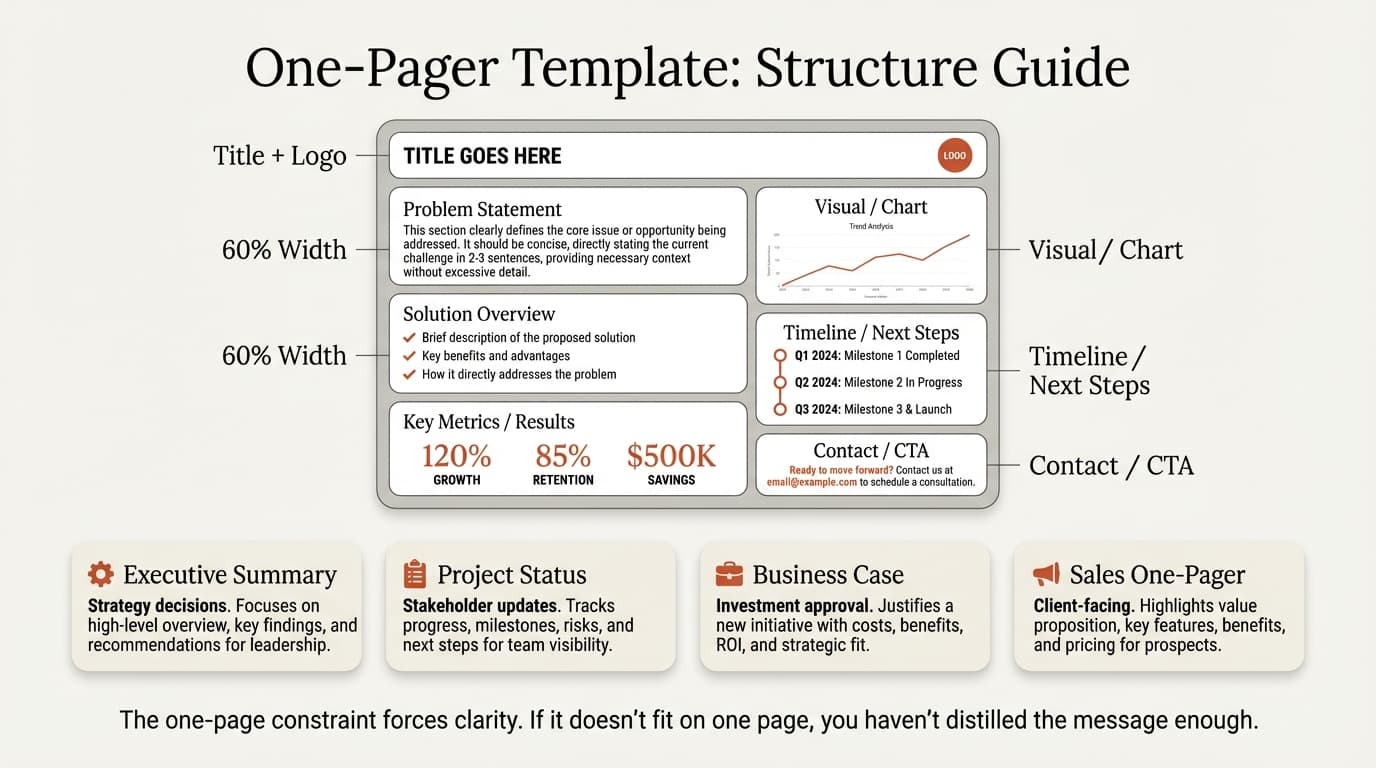
A one-pager is a single-page document that communicates essential information at a glance. The format forces brutal prioritization—you have limited space, so every word must earn its place.
| What It Is | What It Isn't |
|---|---|
| A complete argument in one page | A condensed version of a longer document |
| Designed to stand alone | Dependent on other materials |
| Prioritized and focused | Comprehensive and exhaustive |
| Written for the busiest person | Written for completeness |
The constraint is the feature. One-pagers work because they force you to identify what matters most. If you struggle to fit your content on one page, that's a sign you haven't made hard decisions about priorities.
Why One-Pagers Matter in Consulting
Senior executives operate under severe time constraints. A study by Microsoft found that executives spend an average of 23 hours per week in meetings, leaving limited time for deep reading.
One-pagers respect that reality by:
- Reducing cognitive load: Readers process one page faster than scrolling through slides
- Forcing clarity: The space constraint eliminates filler and jargon
- Enabling quick decisions: Key information is immediately accessible
- Creating reference documents: Easy to file, share, and retrieve
In our experience, the best consultants think in one-pagers. Before opening PowerPoint, they can articulate their entire recommendation on a single page. The deck is just that one-pager expanded with supporting evidence.
When to Use a One-Pager
One-pagers are particularly effective in specific scenarios:
Scenario 1: Executive Communication
When presenting to C-suite or board members who have limited time, a one-pager ensures your key message isn't buried in a lengthy deck. Many executives prefer receiving one-pagers before meetings—they can review the core argument in advance and use meeting time for discussion rather than presentation.
Scenario 2: Status Updates
Weekly or monthly project updates are perfectly suited for one-pagers. Stakeholders want to know: Are we on track? What are the blockers? What decisions are needed? A one-pager answers these questions without lengthy slide transitions.
Scenario 3: Internal Alignment
Before building a full presentation, one-pagers help align team members and stakeholders on the core message. They're faster to iterate than full decks and surface disagreements early.
Scenario 4: External Pitches
Investment memos, partnership proposals, and company overviews often start as one-pagers. Investors and partners receive hundreds of pitches—a well-crafted one-pager gets read; a 30-page deck gets filed.
Scenario 5: Complex Analysis Summaries
When your analysis spans multiple workstreams or data sources, a one-pager synthesizes findings into actionable insights. It answers: "So what does all this mean?"
Types of One-Pagers
Different situations call for different one-pager structures. Here are the five most common types we use in consulting.
1. Executive Summary One-Pager
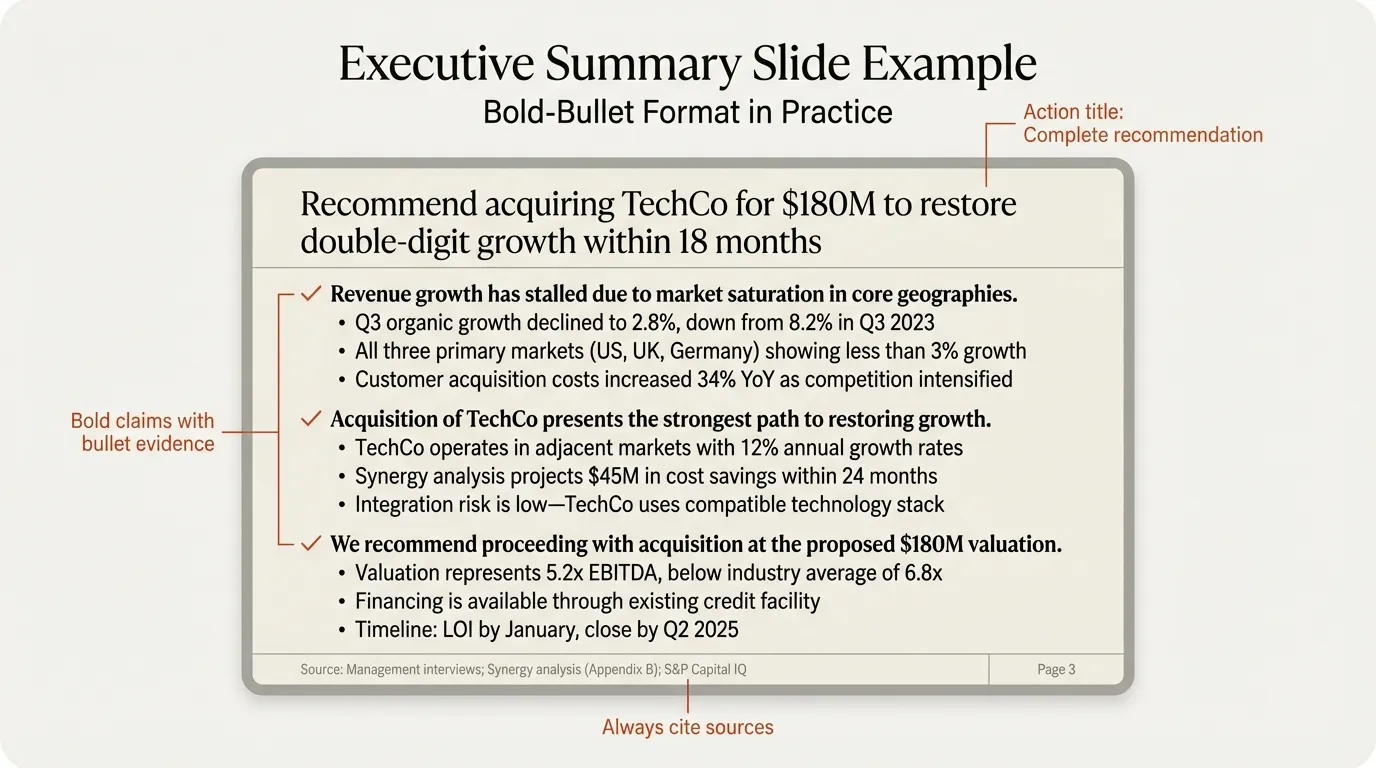
The executive summary one-pager distills an entire presentation or report into a single page. It follows the SCR framework: Situation, Complication, Resolution.
Key elements:
- Action-oriented headline stating the recommendation
- Brief context (1-2 sentences)
- Core recommendation with 3-4 supporting arguments
- Key data points or metrics
- Clear next steps
Best for: Board presentations, strategy recommendations, project conclusions
Structure example:
[Action Title: Recommendation in one sentence]

Situation: [1-2 sentences of context]

Complication: [Why action is needed now]

Resolution:
- Key point 1 with supporting data
- Key point 2 with supporting data
- Key point 3 with supporting data

Next Steps: [Specific actions and timeline]
2. Project Status One-Pager
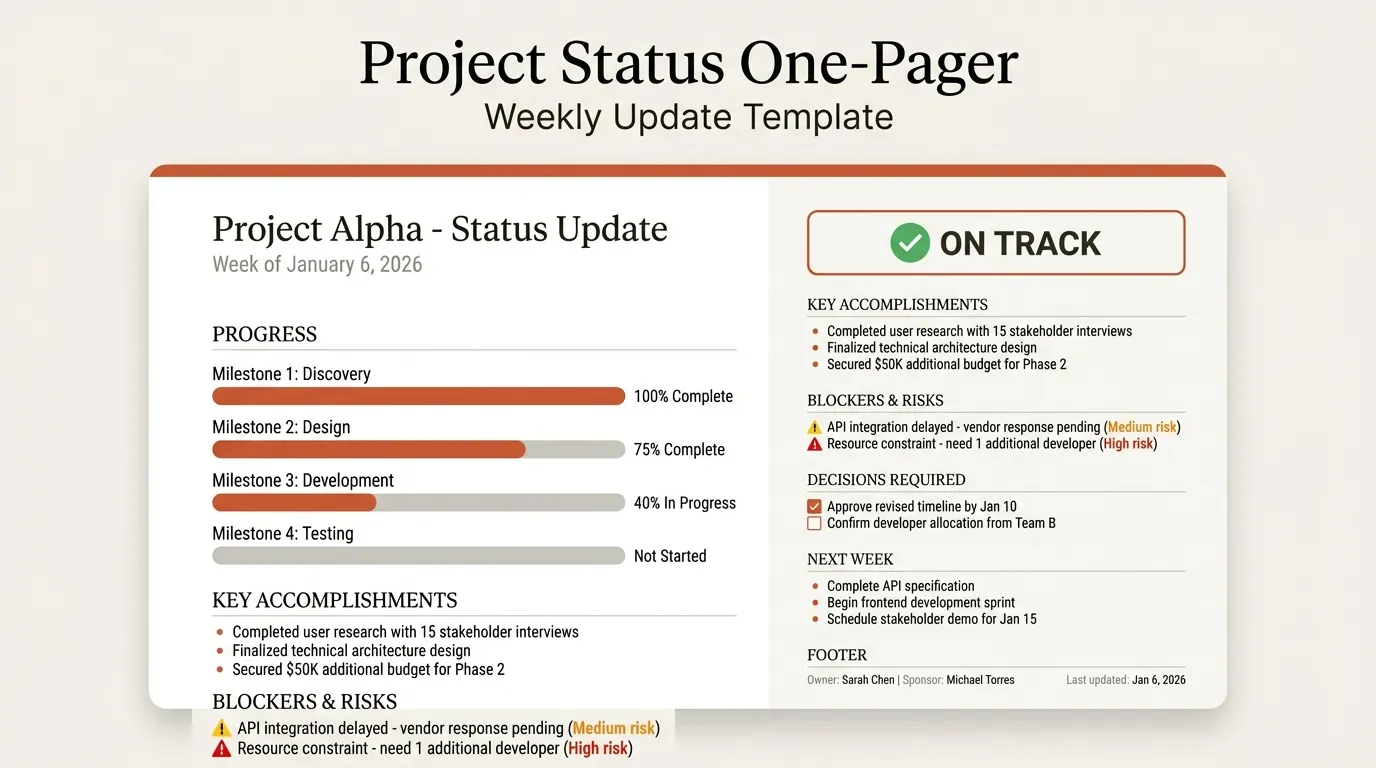
Project status one-pagers provide stakeholders with a snapshot of progress, blockers, and required decisions. They're typically used for weekly or monthly updates.
Key elements:
- Overall status indicator (on track / at risk / off track)
- Progress against key milestones
- Accomplishments since last update
- Current blockers and risks
- Decisions or resources needed
- Next milestone and timeline
Best for: Steering committee updates, PMO reporting, stakeholder communication
Structure example:
[Project Name] Status Update — [Date]

Overall Status: [Green/Yellow/Red] [One sentence summary]

Progress:
- Milestone 1: [Complete/In Progress/Not Started]
- Milestone 2: [Status]
- Milestone 3: [Status]

Key Accomplishments:
- [What was achieved]
- [What was achieved]

Blockers & Risks:
- [Blocker] — [Mitigation or decision needed]
- [Risk] — [Impact and probability]

Decisions Required:
- [Decision] — [By whom, by when]

Next Steps:
- [Action] — [Owner] — [Due date]
3. Business Case One-Pager
Business case one-pagers make the argument for a new initiative, investment, or change. They focus on the problem, solution, and expected return.
Key elements:
- Problem statement with quantified impact
- Proposed solution
- Expected benefits (financial and strategic)
- Investment required
- Key risks and mitigations
- Timeline and milestones
Best for: Investment approvals, new initiative proposals, resource requests
Structure example:
[Initiative Name]: Business Case Summary

The Problem:
[2-3 sentences describing the problem and its impact, quantified]

Proposed Solution:
[2-3 sentences describing what you're proposing]

Expected Benefits:
- Financial: [ROI, cost savings, revenue impact]
- Strategic: [Market position, capability building]
- Operational: [Efficiency gains, risk reduction]

Investment Required:
- [Capital expenditure]
- [Operating expenditure]
- [Resources needed]

Key Risks:
- [Risk 1] — [Mitigation]
- [Risk 2] — [Mitigation]

Timeline:
[Key milestones and dates]
4. Investment Memo One-Pager
Investment memo one-pagers are used in private equity, venture capital, and corporate development to summarize investment opportunities. They follow a standardized format that investors expect.
Key elements:
- Company/deal overview
- Investment thesis (why this, why now)
- Key metrics (revenue, growth, margins)
- Valuation and deal terms
- Key risks
- Recommendation
Best for: Deal screening, investment committee summaries, portfolio updates
Structure example:
[Company Name] — Investment Memo

Overview:
[One paragraph: what the company does, stage, sector]

Investment Thesis:
1. [Reason 1 with supporting data]
2. [Reason 2 with supporting data]
3. [Reason 3 with supporting data]

Key Metrics:
| Metric | Value |
|--------|-------|
| Revenue | $X |
| Growth Rate | X% |
| Gross Margin | X% |
| [Other] | X |

Valuation:
[Deal terms, multiples, comparable transactions]

Key Risks:
- [Risk 1]
- [Risk 2]

Recommendation:
[Proceed / Pass / Need more information]
5. Company Overview One-Pager
Company overview one-pagers introduce an organization to external parties—investors, partners, customers, or recruits. They're often called "company fact sheets" or "corporate one-pagers."
Key elements:
- Company description and value proposition
- Key products or services
- Market opportunity
- Traction and metrics
- Team highlights
- Contact information
Best for: Investor outreach, partnership discussions, sales enablement
Structure example:
[Company Name]
[Tagline or value proposition]

What We Do:
[2-3 sentences describing the business]

Products/Services:
- [Product 1]: [Brief description]
- [Product 2]: [Brief description]

Market Opportunity:
[TAM/SAM/SOM or market size and growth]

Traction:
- [Key metric 1]
- [Key metric 2]
- [Key metric 3]

Team:
[Founder/CEO background, team size, notable hires]

Contact:
[Name, email, website]
Continue reading: Business Case Template · Timeline Slides in PowerPoint · Competitive Landscape Slide
Comparison: One-Pager Types at a Glance
| Type | Primary Purpose | Key Focus | Typical Audience |
|---|---|---|---|
| Executive Summary | Summarize recommendation | Conclusion + supporting logic | C-suite, board |
| Project Status | Update on progress | Status, blockers, decisions | Steering committee, PMO |
| Business Case | Justify investment | Problem, solution, ROI | Decision-makers |
| Investment Memo | Evaluate opportunity | Thesis, metrics, risks | Investment committee |
| Company Overview | Introduce organization | Value prop, traction | External parties |
Key Elements of Effective One-Pagers
Regardless of type, certain principles make one-pagers effective. These are the elements we see in every well-crafted one-pager.
1. Visual Hierarchy
The reader's eye should naturally follow the most important information first. Visual hierarchy is created through:
- Size: Larger text draws attention first
- Position: Top-left to bottom-right reading flow
- Weight: Bold text stands out from regular text
- Color: Accent colors highlight key points
- White space: Separation creates emphasis
Test: Squint at your one-pager. Can you identify the three most important elements? If everything looks the same, you lack hierarchy.
2. Action-Oriented Headlines
Headlines should state conclusions, not topics. This is the same action title principle used in consulting slides.
| Topic Title (Weak) | Action Title (Strong) |
|---|---|
| Q3 Results | Q3 revenue exceeded target by 15% |
| Market Analysis | European market represents $2B opportunity |
| Project Update | Project on track for December launch |
| Investment Summary | Recommend proceeding at $50M valuation |
Action titles let busy readers grasp your point without reading the details below.
3. Strategic White Space
White space isn't empty space—it's breathing room that makes content digestible. Cramming every inch of the page signals poor prioritization.
Guidelines:
- Minimum 0.5-inch margins on all sides
- Clear separation between sections
- Line spacing that doesn't feel cramped
- No text smaller than 10pt (preferably 11-12pt)
If you need to shrink fonts to fit content, you have too much content.
4. Key Metrics Front and Center
Numbers create credibility and specificity. Every one-pager should include 3-5 key metrics that support your narrative.
Effective metrics:
- Quantify the problem ("$4M annual cost overrun")
- Prove the solution ("15% efficiency gain")
- Show progress ("72% complete, on track for Q2")
- Establish credibility ("$50M revenue, 40% YoY growth")
Avoid vanity metrics that sound impressive but don't drive decisions.
5. Clear Call to Action
Every one-pager should end with what you want the reader to do. Without a clear ask, one-pagers become informational documents rather than decision tools.
Examples:
- "Approve $2M investment by March 15"
- "Decide on vendor selection in next steering committee"
- "Schedule 30-minute follow-up to discuss partnership terms"
- "Assign resources to unblock Phase 2"
Vague asks like "let us know your thoughts" waste the clarity you've built.
How to Create a One-Pager in PowerPoint: Step-by-Step
While one-pagers can be created in Word or Google Docs, PowerPoint offers more control over layout and visual hierarchy. Here's our process for building one-pagers in PowerPoint.
Step 1: Start with Structure, Not Design
Before opening PowerPoint, outline your content in a text document:
- Write your headline (the key message in one sentence)
- List 3-5 main points that support the headline
- Identify 3-5 key metrics or data points
- Define your call to action
- Review: Does this tell a complete story?
This prevents the common trap of designing before thinking.
Step 2: Set Up Your Slide
Create a new slide with the following settings:
- Slide size: Standard letter (8.5" x 11") for printable one-pagers, or widescreen (16:9) for screen-first viewing
- Orientation: Portrait for documents, landscape for presentations
- Guides: Enable guides for consistent margins and alignment
Step 3: Establish Visual Hierarchy
Build from the top down:
- Headline: Largest text, top of page (18-24pt bold)
- Section headers: Second-largest, clearly distinct (14-16pt bold)
- Body text: Standard size (11-12pt)
- Supporting details: Smaller but readable (10-11pt)
- Footer/source: Smallest (8-10pt)
Step 4: Add Content in Sections
Organize content into clear visual blocks:
- Use consistent spacing between sections
- Align related elements to the same grid line
- Group information logically (all metrics together, all risks together)
- Use tables for comparative information
Step 5: Apply Formatting Consistently
Consistency signals professionalism:
- Fonts: Maximum two font families (one for headlines, one for body)
- Colors: Limit to 3-4 colors total, use accent color sparingly
- Bullets: Choose one style and use it throughout
- Alignment: Left-align text for readability
Tools like Deckary include keyboard shortcuts that speed up alignment and distribution, ensuring every element lines up perfectly without manual nudging.
Step 6: Add Visual Elements Strategically
Visual elements should support the narrative, not decorate:
- Icons: Use to identify sections or highlight key points (Deckary's icon library includes 2,000+ professional icons)
- Dividers: Separate major sections
- Callout boxes: Highlight the most critical information
- Charts: Only if they communicate faster than text
Avoid: clip art, decorative images, 3D effects, gradient fills.
Step 7: Review and Refine
Before finalizing:
- Print test: Does it read well on paper?
- Squint test: Is hierarchy clear at a glance?
- Titles test: Do headlines tell the story alone?
- Time test: Can someone grasp the key message in 30 seconds?
If any test fails, simplify.
Best Practices for One-Pagers
After creating hundreds of one-pagers across consulting engagements, these practices consistently produce better results.
Use the Pyramid Principle
The Pyramid Principle, developed at McKinsey, structures communication as an inverted pyramid:
- Start with the answer: Your headline states the conclusion
- Group supporting arguments: 3-5 main points that prove the conclusion
- Support with evidence: Data and details under each argument
This structure ensures readers get the key message immediately, with details available for those who want them.
Maintain Visual Balance
A well-designed one-pager feels balanced:
- Don't cluster all content in one area
- Distribute visual weight across the page
- Use white space to create rhythm
- Ensure no single element dominates inappropriately
Imagine dividing your page into quadrants—each should contain roughly proportional visual weight.
Be Ruthlessly Consistent
Formatting consistency signals attention to detail:
- All headers at the same font size
- Consistent spacing between sections
- Same bullet style throughout
- Colors used for the same purpose
Inconsistency—even minor—undermines credibility. If you can't get fonts right, why should they trust your analysis?
Include Context for Standalone Reading
One-pagers should be understandable without the creator present to explain. Include:
- Enough context to understand the situation
- Definitions for acronyms on first use
- Source citations for all data
- Date and version (if iterating)
Test: Could someone outside your team understand this one-pager?
Make It Actionable
The best one-pagers drive action. End with:
- Specific next steps with owners and deadlines
- Clear decision points for the reader
- Contact information for follow-up
A one-pager that informs but doesn't prompt action has failed its purpose.
Common Mistakes to Avoid
These errors undermine one-pagers we review regularly.
Mistake 1: Too Much Text
Problem: Cramming paragraphs of text onto one page because "it's all important."
Why it fails: Dense text overwhelms readers and defeats the purpose of a one-pager. If they wanted to read paragraphs, they'd read a report.
Fix: Convert paragraphs to bullet points. Each bullet should be one line. If you can't cut content, you haven't prioritized.
Mistake 2: No Clear Hierarchy
Problem: Everything looks the same—same font size, same weight, no visual distinction between sections.
Why it fails: Readers don't know where to focus. Their eye wanders without landing on key information.
Fix: Create obvious visual hierarchy. Headlines should be unmistakably larger. Use bold for key points. Add white space between sections.
Mistake 3: Missing the "So What"
Problem: Presenting facts without conclusions. "Revenue was $10M" without explaining what that means or what action to take.
Why it fails: Readers are left to interpret data themselves. Different people will draw different conclusions.
Fix: State the implication explicitly. "Revenue was $10M, exceeding target by 15%, validating our expansion strategy."
Mistake 4: Burying the Lead
Problem: Building up to the key message rather than stating it first. Context, then analysis, then—finally—the recommendation.
Why it fails: Busy readers may never reach your conclusion. They'll skim the first few lines and move on.
Fix: Lead with the answer. State your conclusion or recommendation in the first line, then support it.
Mistake 5: Inconsistent Formatting
Problem: Different fonts, varied spacing, misaligned elements throughout the page.
Why it fails: Signals carelessness and undermines credibility. If the formatting is sloppy, the thinking might be too.
Fix: Use a template with locked styles. Check alignment before finalizing. Deckary's alignment shortcuts help ensure every element is precisely positioned.
Mistake 6: No Call to Action
Problem: Ending with information but no clear ask. "Let me know if you have questions."
Why it fails: The reader isn't prompted to do anything. The one-pager becomes a document to file rather than a tool for decision-making.
Fix: End with a specific ask. "Please approve by Friday" or "Decide between options A and B in the next meeting."
Mistake 7: Using Jargon Without Definition
Problem: Assuming the reader knows your acronyms and technical terms.
Why it fails: Executives often review one-pagers outside their expertise. Jargon creates confusion and requires follow-up.
Fix: Define acronyms on first use. Use plain language where possible. When technical terms are necessary, provide brief explanations.
One-Pager Templates: Quick Reference
Here's a summary table for quick reference when choosing and structuring your one-pager:
| One-Pager Type | Opening | Core Content | Closing |
|---|---|---|---|
| Executive Summary | Situation + Complication | Recommendation + 3-4 supporting points | Next steps |
| Project Status | Overall status (RAG) | Progress, accomplishments, blockers | Decisions needed |
| Business Case | Problem statement | Solution + benefits + investment | Timeline + recommendation |
| Investment Memo | Company overview | Thesis + metrics + risks | Recommendation |
| Company Overview | Value proposition | Products + traction + team | Contact information |
Summary
One-pagers are the ultimate test of clear thinking. If you can distill complex analysis into a single page that drives action, you've demonstrated mastery of your material.
Key principles:
- Start with the answer: Lead with your conclusion or recommendation
- Create visual hierarchy: Readers should identify key information instantly
- Be ruthlessly selective: Every word must earn its space
- Include key metrics: Numbers create credibility and specificity
- End with action: Specify what you want the reader to do
- Maintain consistency: Formatting signals professionalism
- Test for standalone reading: The one-pager should work without you present
The constraint of one page isn't a limitation—it's a discipline that produces clearer thinking and more effective communication. Master the one-pager, and you've mastered the foundation of executive communication.