Project Status Slide: Templates and Best Practices for Consultants
Project status slides that drive decisions. Learn RAG indicators, Harvey balls, layout templates, and best practices used by McKinsey and Big 4 consultants.
- Bob · Former McKinsey and Deloitte consultant with 6 years of experience
- January 8, 2026
- 14 min read
A project status slide is a visual summary of a project's current health, recent progress, and upcoming priorities—designed for quick comprehension and decision-making. According to Smartsheet's analysis, executives spend less than 30 seconds per status slide, meaning your entire project narrative must land in half a minute.
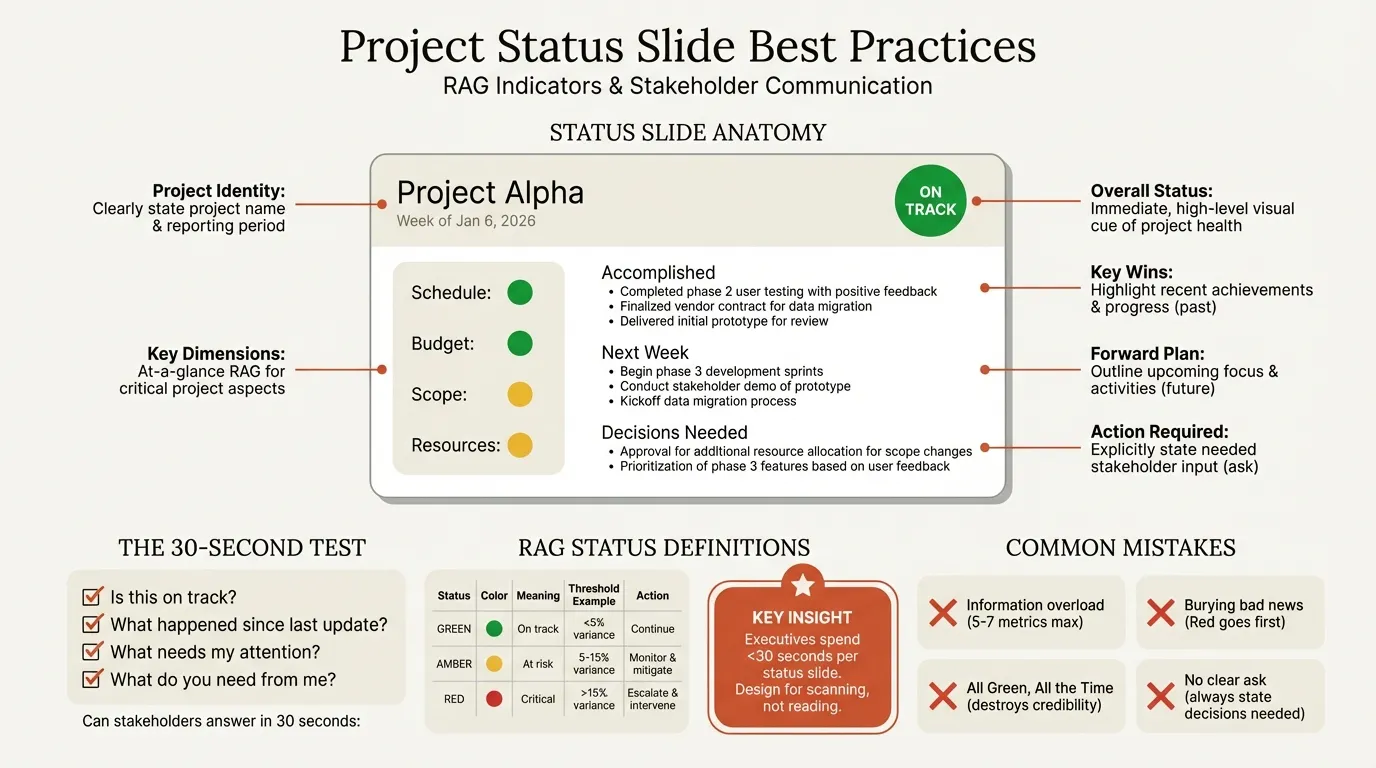
The key principle: a status slide isn't about showing everything you know. It's about answering the questions stakeholders actually ask: Is this on track? What happened since last update? What's coming next? What do I need to know? What decisions do you need from me?
This guide covers the layouts that work, how to use RAG indicators and Harvey balls effectively, best practices for stakeholder updates, and the common mistakes that undermine credibility. For a complete guide to MBB-style consulting presentations, see our Consulting Presentations Guide.
After reviewing 120+ project status slides across consulting and corporate settings, we've identified which layouts communicate progress instantly and which guarantee follow-up questions. The patterns are consistent: slides that answer the five core questions get approvals; slides that prioritize completeness get sent back for revision.
What Makes a Good Project Status Slide?
A project status slide is a visual summary of a project's current health, recent progress, and upcoming priorities—designed for quick comprehension and decision-making. Unlike detailed project reports, status slides distill complex information into scannable insights.
The Questions Your Slide Must Answer
| Question | What It Reveals |
|---|---|
| "Is this on track?" | Overall project health |
| "What happened since last update?" | Recent accomplishments |
| "What's coming next?" | Upcoming milestones and priorities |
| "What do I need to know?" | Risks, issues, blockers |
| "What do you need from me?" | Decisions or support required |
If your status slide doesn't answer these five questions within 30 seconds, it needs restructuring.
Status Slide vs. Project Report
The distinction matters. A status slide is not a compressed version of your project documentation.
| Aspect | Status Slide | Project Report |
|---|---|---|
| Purpose | Quick update, decision support | Comprehensive documentation |
| Length | 1 slide | 5-20 pages |
| Metrics | 5-7 key indicators | All relevant data |
| Time to review | 30-60 seconds | 15-30 minutes |
| Audience | Executives, steering committee | Project team, PMO |
| Frequency | Weekly to monthly | As needed |
Visme's research on project slides emphasizes that effective status slides improve project planning, foster communication, and help control risks—but only when designed for rapid comprehension rather than exhaustive coverage.
Essential Elements of a Project Status Slide
Every status slide needs certain components, though the layout and emphasis will vary based on context and audience.
1. Project Identifier and Period
Always include:
- Project name (clients often track multiple initiatives)
- Reporting period (avoid confusion about currency of data)
- Status date (when was this information accurate?)
2. Overall Health Indicator
A single visual element showing project status at a glance. Options include:
- RAG status (Red/Amber/Green)
- Harvey balls (for multiple dimensions)
- Traffic light icons
- Status badges (On Track, At Risk, Off Track)
This indicator should be the most visually prominent element on your slide.
3. Key Metrics Summary
The 3-5 numbers that matter most for this project:
| Dimension | Example Metrics |
|---|---|
| Timeline | % complete, days ahead/behind, milestone status |
| Budget | Spend vs. plan, forecast at completion, variance % |
| Scope | Features delivered, requirements changes, completion % |
| Resources | Utilization %, open positions, contractor hours |
| Quality | Defects, test pass rate, customer satisfaction |
Choose metrics based on what drives decisions for your stakeholders.
4. Accomplishments (Since Last Update)
What progress occurred since the previous status report? Keep this to 2-4 bullet points focused on outcomes, not activities:
- Good: "Completed user acceptance testing with 98% pass rate"
- Weak: "Ran 47 test scripts across three environments"
5. Upcoming Priorities
What happens in the next reporting period? Include 2-4 items with clear milestones:
- Good: "Launch pilot with 50 users by March 15"
- Weak: "Continue working on pilot launch activities"
6. Risks and Issues
Problems requiring attention or escalation. Distinguish between:
- Risks: Potential problems that might occur
- Issues: Problems that have already materialized
Include owner, impact, and status for each.
7. Decisions Needed
What do you need from stakeholders? Be explicit:
- Good: "Approve $50K budget increase for additional testing resources"
- Weak: "Discuss resource situation"
RAG Status Explained: Red, Amber, Green
RAG status reporting is the universal language of project health in consulting and enterprise project management. Best Outcome's research shows that while simple, RAG indicators require clear definitions to be meaningful.
Standard RAG Definitions
| Status | Meaning | Threshold (Example) | Action Required |
|---|---|---|---|
| Green | On track | Within plan tolerances | Continue current approach |
| Amber | At risk | 5-15% variance, emerging issues | Monitor closely, mitigate proactively |
| Red | Critical | Over 15% variance, major blockers | Immediate intervention, escalation |
Multi-Dimensional RAG
Most sophisticated status reports use multiple RAG indicators to show health across different dimensions:
| Dimension | Green | Amber | Red |
|---|---|---|---|
| Schedule | On or ahead of plan | 1-2 weeks delayed | Over 2 weeks delayed |
| Budget | Under 5% variance | 5-10% variance | Over 10% variance |
| Scope | Baseline scope | Minor changes | Material changes |
| Resources | Fully staffed | 1-2 gaps | Critical gaps |
| Quality | Meets standards | Minor issues | Major defects |
According to Mastt's analysis of RAG dashboards, using multiple indicators prevents the false comfort of a single green status that masks underlying problems.
RAG Best Practices
Define thresholds clearly. ClearPoint Strategy research emphasizes that RAG status only works when everyone agrees on what Red, Amber, and Green mean. Document your definitions and share them with stakeholders.
Don't game the system. Project Accelerator notes that RAG reporting relies on project managers being confident enough to give genuine assessments. Organizations must respond to Red status constructively—shooting the messenger destroys the value of honest reporting.
Use Amber meaningfully. Some project managers mark everything Amber to avoid the scrutiny of Red while appearing more realistic than Green. This devalues the system. Amber should signal genuine emerging risks that need attention.
Show trends. Include an arrow or indicator showing whether status is improving, stable, or declining:
- Green with upward arrow: On track and improving
- Amber with downward arrow: At risk and worsening (likely to go Red)
- Red with upward arrow: Critical but recovery underway
Continue reading: Lessons Learned Template · How to Make a Gantt Chart in PowerPoint (Free Template) · Competitive Landscape Slide
Status Slide Layout Templates
Different situations call for different layouts. Here are four templates we use regularly in consulting.
Template 1: The Executive One-Pager
Best for: Steering committees, board updates, executive sponsors
This layout prioritizes speed. Everything fits on one slide with clear visual hierarchy.
Structure:
- Header: Project name, period, overall RAG status (large, prominent)
- Left column (40%): Key metrics with RAG indicators
- Right column (40%): Accomplishments, priorities, issues
- Footer (20%): Decisions needed, next meeting date
The overall RAG status should be immediately visible—often as a large colored circle or badge in the top right corner.
Template 2: The Metric Dashboard
Best for: PMO reporting, quantitative stakeholders, projects with clear KPIs
This layout emphasizes numbers and trends over narrative.
Structure:
- Header row: Project name, period, 3-4 sparkline trend indicators
- Main grid: 6-8 metric boxes with current value, trend, and RAG status
- Bottom section: Brief commentary on outliers only
Works well for status updates that feed into portfolio dashboards or when stakeholders prefer data to narrative. Pair with KPI dashboard slides for comprehensive performance reporting.
Template 3: The Narrative Update
Best for: Complex projects, change management, stakeholder alignment
This layout balances data with context and explanation.
Structure:
- Left sidebar (25%): RAG status stack for key dimensions
- Main area (75%): Three-section narrative
- What we accomplished (2-3 bullets)
- What we're working on (2-3 bullets)
- What needs attention (1-2 bullets with owners)
- Bottom bar: Key dates, next milestone
Use when stakeholders need to understand the "why" behind status changes, not just the "what."
Template 4: The Multi-Project View
Best for: Portfolio reviews, program status, multiple workstreams
This layout summarizes multiple projects or workstreams on a single slide.
Structure:
- Header: Program name, period
- Main grid: Project rows with columns for:
- Project name
- Overall status (RAG)
- Timeline status
- Budget status
- Key milestone/comment
- Footer: Program-level risks or escalations
Limit to 5-7 projects per slide. For larger portfolios, create a summary slide with drill-down slides for each project. Connect to your roadmap slides to show how individual project status relates to the overall program timeline.
Using Harvey Balls for Status Indicators
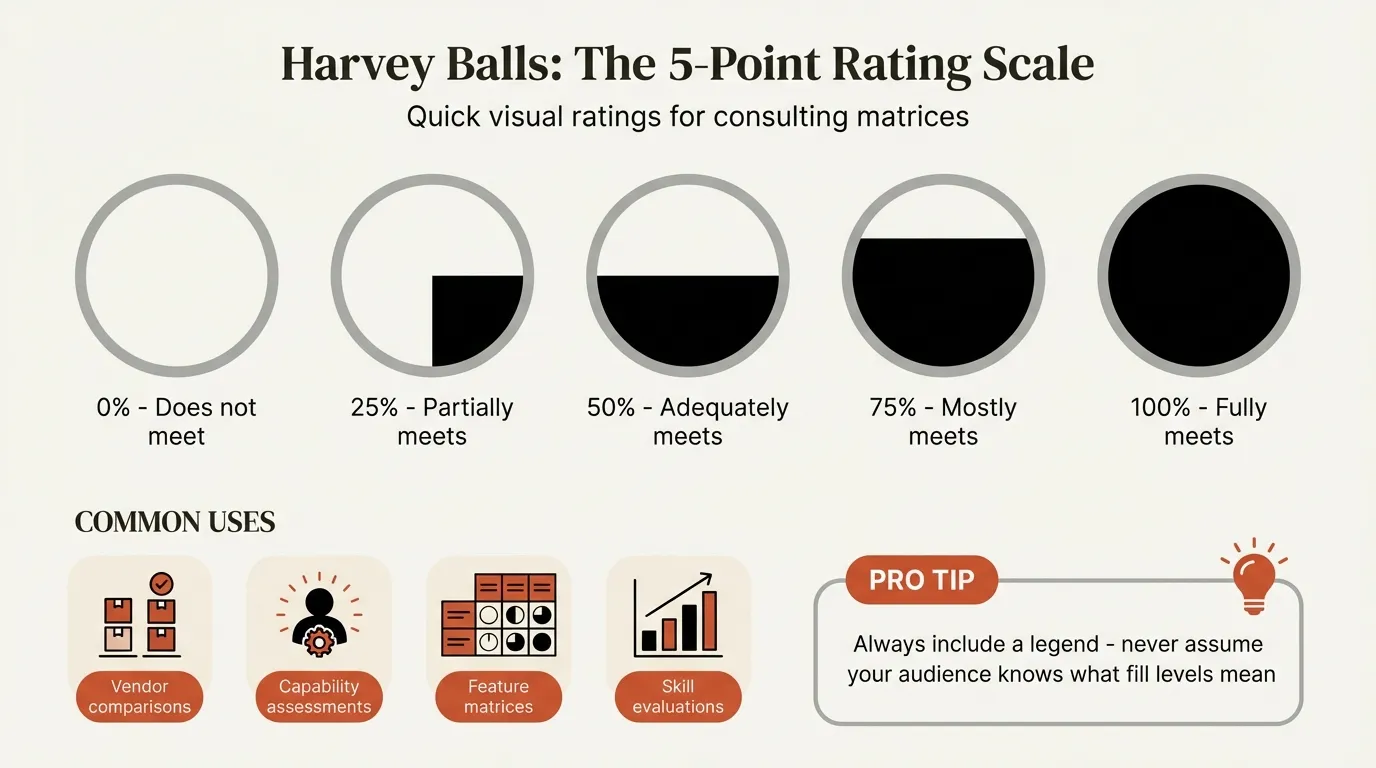
Harvey balls offer a more nuanced alternative to RAG status when you need to show degrees of completion or maturity rather than binary health indicators.
When to Use Harvey Balls vs. RAG
| Use Harvey Balls When | Use RAG When |
|---|---|
| Showing completion percentage | Indicating health/risk level |
| Comparing maturity across items | Flagging items needing attention |
| Assessing capability levels | Triggering action thresholds |
| Tracking gradual progress | Making go/no-go decisions |
Harvey Ball Scale for Status
| Symbol | Fill | Meaning (Progress) | Meaning (Maturity) |
|---|---|---|---|
| ○ | 0% | Not started | Not defined |
| ◔ | 25% | Early stage | Initial/Ad-hoc |
| ◑ | 50% | In progress | Developing/Defined |
| ◕ | 75% | Nearly complete | Optimized |
| ● | 100% | Complete | Mature/Excellence |
Example: Workstream Status Table
| Workstream | Progress | Quality | Resources |
|---|---|---|---|
| Data Migration | ◕ | ◑ | ● |
| User Training | ◑ | ● | ◕ |
| System Config | ● | ◕ | ◑ |
| Testing | ◔ | ◑ | ◔ |
This format lets stakeholders quickly identify patterns—in this example, testing is lagging across all dimensions while system configuration is nearly complete.
Pro tip: Deckary's icon library includes Harvey ball sets alongside 2,000+ business icons, making it easy to insert consistently sized indicators that match your presentation styling. The sets include all five fill levels and custom color options.
Best Practices for Stakeholder Updates
Effective status communication goes beyond slide design. Here's what we learned works in consulting environments.
Match Content to Audience
Different stakeholders need different information:
| Audience | Focus On | Avoid |
|---|---|---|
| Executive sponsor | Strategic alignment, decisions needed | Technical details |
| Steering committee | Milestone progress, major risks | Day-to-day activities |
| Project team | Task status, blockers, dependencies | Strategic context they already know |
| PMO | Metrics, forecasts, resource utilization | Project-specific narrative |
Tailor your status slide for your primary audience. Create appendix slides for secondary audiences who need more detail.
Establish Consistent Cadence
ProjectManager.com research confirms that regular reporting builds trust and enables early intervention. Recommended frequencies:
| Project Phase | Suggested Frequency |
|---|---|
| Active implementation | Weekly |
| Steady state | Bi-weekly |
| Strategic initiatives | Monthly |
| Program governance | Monthly or quarterly |
Whatever frequency you choose, stick to it. Inconsistent reporting erodes confidence.
Be Proactively Honest
When problems arise, surface them early with a mitigation plan:
Weak approach: Wait until Red is unavoidable, then explain the situation
Strong approach: Flag Amber early with: "This could go Red if [condition]. We're mitigating by [action]. Decision needed: [specific ask]"
Executives respect project managers who identify problems early and propose solutions. According to Deep Project Manager analysis, the most valued skill in status reporting isn't avoiding problems—it's transparent communication about how problems are being managed.
Use Consistent Formatting
Create a template and stick to it across all status updates:
- Same layout every time
- Same metric definitions
- Same RAG thresholds
- Same visual style
Consistency allows stakeholders to process updates faster because they know where to look for each element. It also makes trend analysis easier when comparing updates over time.
Connect to the Bigger Picture
Your project doesn't exist in isolation. Show how status affects:
- Program timeline and dependencies
- Related initiatives
- Strategic objectives
- Business outcomes
Link your status to executive summary slides that communicate the broader narrative, and reference Gantt charts for detailed timeline dependencies.
Common Mistakes to Avoid
After hundreds of steering committees, we've seen these patterns derail status updates consistently.
1. Information Overload
The problem: Cramming every available metric onto one slide
The fix: Limit to 5-7 key indicators. Move everything else to appendix slides that are available if stakeholders ask questions.
2. Inconsistent Definitions
The problem: RAG status means different things to different project managers
The fix: Document and distribute standard definitions. Review as a team to ensure consistency.
3. Status Without Context
The problem: Showing current status without trends or targets
The fix: Include comparison points—last period, plan, target. A metric in isolation is meaningless.
4. Burying Bad News
The problem: Leading with accomplishments while minimizing or hiding problems
The fix: If something is Red, show it prominently. Executives need to know problems first—good news can wait.
5. All Green, All the Time
The problem: Never showing Amber or Red to avoid scrutiny
The fix: Build a culture where honest status is valued. Track improvement after Red status is flagged to show that transparency leads to better outcomes.
6. No Clear Ask
The problem: Presenting status without specifying what you need from stakeholders
The fix: End every status update with a clear "Decisions Needed" section. If you don't need anything, state "No decisions required—for information only."
7. Stale Data
The problem: Presenting data that's days or weeks old without acknowledging the lag
The fix: Always timestamp your data. If significant changes occurred since the data was pulled, note them explicitly.
How to Automate Status Updates
Manual status updates are time-consuming and error-prone. Here's how to streamline the process.
Connect to Source Systems
Link your status slide to data sources wherever possible:
- Budget data: Connect to financial systems or Excel trackers
- Timeline data: Pull from project management tools (Jira, Asana, MS Project)
- Metrics: Link to analytics dashboards
Deckary's Excel linking feature allows you to connect status tables and charts directly to your source data, updating automatically when the underlying numbers change.
Build Reusable Templates
Create master templates with:
- Standard layouts for each audience type
- Pre-built RAG indicator shapes
- Metric placeholder boxes
- Icon libraries for status indicators
Save time by duplicating and updating rather than rebuilding from scratch each period.
Automate RAG Calculations
Where possible, calculate RAG status from data rather than manually assigning:
If variance < 5%: Green
If variance 5-15%: Amber
If variance > 15%: Red
This removes subjectivity and ensures consistency across project managers.
Establish Update Workflows
Formalize who provides what information and when:
- Monday: Workstream leads update their sections
- Tuesday: PM consolidates and reviews
- Wednesday: Status review with core team
- Thursday: Final updates and distribution
- Friday: Steering committee meeting
Structured workflows prevent the scramble that leads to incomplete or inaccurate status.
Summary: Key Takeaways
The best project status slides share common characteristics:
- Answer the essential questions in 30 seconds or less
- Lead with overall health using clear RAG or Harvey ball indicators
- Limit key metrics to 5-7 items that drive decisions
- Match content to audience—executives need different information than project teams
- Be transparently honest about problems, with mitigation plans attached
- Maintain consistency in format, definitions, and cadence
- End with clear asks—specify decisions needed or confirm "for information only"
- Automate where possible to reduce manual effort and improve accuracy
Project status reporting isn't glamorous, but it's one of the most important communication activities in any organization. Get it right, and you build trust, enable faster decisions, and catch problems early. Get it wrong, and you waste time, hide issues, and erode stakeholder confidence.