Presentation Agent vs AI Presentation Generator: The Real Difference
AI presentation generators make first drafts. Presentation agents inspect state, call tools, revise artifacts, and verify outcomes. Compare the workflows clearly.
- Bob · Former McKinsey and Deloitte consultant with 6 years of experience
- 7 min read
Pricing and feature information was accurate at the time of publication. Competitor products change frequently — verify current details on each provider's website.
An AI presentation generator creates slides from an input. A presentation agent completes work against a changing artifact.
That is the simplest useful distinction.
The categories now overlap. Generators accept follow-up prompts. Agents can create new decks. Some products use “agent” for a conversational interface; others use it for a tool-calling system. The label alone cannot tell you which workflow you are buying.
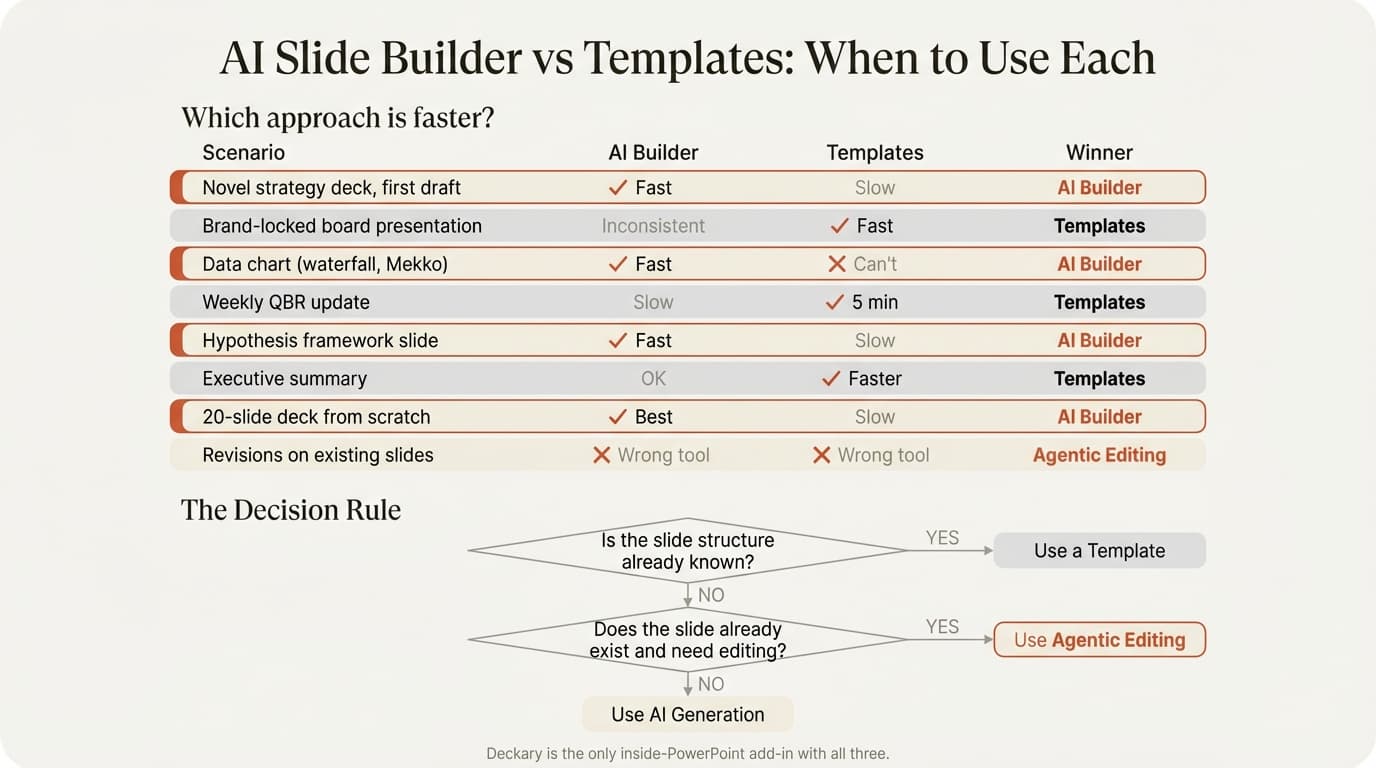
Use this comparison to inspect what happens after the first draft.
The Difference at a Glance
| Question | AI presentation generator | Presentation agent |
|---|---|---|
| What is it optimized for? | Creating the first artifact | Completing a continuing outcome |
| What does it read? | Prompt, outline, documents | Prompt, sources, current artifact, prior results |
| How does it act? | Generation pipeline | Explicit tools over multiple steps |
| Can it revise existing work? | Sometimes through regeneration | Selectively, if native edit tools exist |
| What happens after failure? | User retries | Harness recovers, replans, or reports blocker |
| How is completion determined? | Output exists | Required outcome is verified |
| What does the human receive? | Link, PDF, image, or exported deck | Inspectable and editable source artifact |
These are tendencies, not legal definitions. A mature generator can evolve into an agent. A product marketed as an agent can still behave like a generator behind a chat box.
What an AI Presentation Generator Does Well
Generators are good at eliminating the blank page. They can turn a brief into an outline, choose stock imagery, apply a visual theme, and produce a complete deck quickly.
That is valuable for:
- Early concept exploration
- Low-stakes internal updates
- A first draft of a new narrative
- Visual inspiration
- A shareable web presentation where deep manual editing is not required
Web-native products such as Gamma and smart-layout systems such as Beautiful.ai have made this workflow accessible. Native add-ins can bring generation closer to PowerPoint.
The limitation appears when the deck becomes a long-lived working artifact. A changed number affects three slides. A partner wants the recommendation reframed without losing the exhibit. A source is replaced. The final client file needs native objects and exact brand behavior. Re-running generation can destroy the work that was already right.
What a Presentation Agent Adds
A presentation agent adds continuity.
It should know what the user is trying to accomplish, what artifact currently exists, what actions have already succeeded, which evidence supports the slides, and which defects still block delivery. It can then choose the next tool call instead of rebuilding from the beginning.
The difference becomes visible in tasks like:
- Update the model assumptions and repair every dependent slide
- Add one market-sizing section without changing the existing executive summary design
- Replace a source and identify claims that now lack support
- Turn a table into a native chart, inspect it, and fix clipped labels
- Apply review feedback across ten slides while preserving all other content
- Continue after an Office operation returns a new object identifier
Those are not single generations. They are stateful workflows.
Continue reading: Bar Charts in PowerPoint · Best Fonts for PowerPoint · BCG Presentation Style
Seven Scenarios Compared
1. Blank-page deck
Generator: Excellent fit. It can produce a full draft quickly.
Agent: Also capable, but the additional state and verification may be unnecessary for a disposable brainstorm.
Winner: Generator for speed; agent when the draft must become a production artifact.
2. Existing client presentation
Generator: May restyle or regenerate the slide, risking formatting and content loss.
Agent: Can inspect current shapes and apply targeted edits if the runtime supports native tools.
Winner: Agent.
3. Revised financial data
Generator: Can create a new chart from supplied numbers but may not preserve the existing chart's role and formatting.
Agent: Can update the native chart, identify dependent claims, and verify the visible values.
Winner: Agent with real chart/data tools.
4. Brand-locked recurring deck
Generator: Adds unnecessary variation.
Agent: Can help with content, but deterministic templates and data links may still be more reliable.
Winner: Template and productivity workflow, with AI assisting at the edges.
5. Cross-slide revision
Generator: Requires several prompts or a full rebuild.
Agent: Can track the requested change and inspect every dependent slide.
Winner: Agent.
6. Browser-native interactive presentation
Generator: A web generator may deliver a polished proprietary page.
Agent: An HTML agent workflow can edit local source, preview in the browser, validate, and continue.
Winner: Depends on source ownership. Choose the generator for a fast hosted result; choose local HTML when editability, versioning, and agent continuation matter.
7. Final polish
Generator: Poor fit; regeneration can undo deliberate work.
Agent: Useful for consistency checks and bounded fixes.
Human: Still owns visual judgment, sensitive claims, and delivery approval.
Winner: Agent plus manual toolkit.
Native Editability Is the Boundary That Matters
Many AI products export .pptx. Export is not the same as native workflow quality.
Inspect the file:
- Are charts real PowerPoint charts or pictures?
- Are text blocks individually editable?
- Do tables retain structure?
- Can the deck use the existing master and theme?
- Can a teammate continue with ordinary PowerPoint tools?
Professional users do not finish when the model stops. They continue adjusting the artifact. Native editability determines whether AI work compounds or creates cleanup.
For browser presentations, the equivalent question is whether the user owns the source. Local HTML, CSS, and component files give an agent and a human a shared, inspectable artifact. A hosted link without source control is a different product model.
Verification Separates an Agent from a Sequence of Prompts
Tool calls alone do not guarantee completion. The agent needs to inspect what the tools produced.
A useful verification layer checks:
- Required slides and objects exist
- Data matches the supplied values
- Sources remain attached to the right claims
- Native objects are editable
- Text is not clipped and elements do not overlap
- The changed slide still communicates the intended conclusion
- The delivered file matches the artifact that was reviewed
If the system stops after producing a plausible slide, the user still owns the quality-control loop.
The Market Is Converging
Plus AI now describes a free-form presentation agent and offers an agent API and MCP. Prezent markets agentic workflows. Microsoft has introduced agent experiences around PowerPoint. Generator, editor, and agent categories will keep blending.
That does not make the distinction obsolete. It makes evaluation more important.
Products should be compared on state, tools, artifacts, recovery, and verification—not on whether the homepage includes the word “agent.”
Why Consultants Need More Than Either Category
Consultants use slides as part of problem solving. They do not simply request a deck and publish the result.
They develop hypotheses, test evidence, decide which chart best communicates a point, apply partner feedback, and make manual edits whose value is hard to express in a prompt. The product therefore needs a toolkit around the AI:
- Native chart creation and data handling
- Shortcuts for precise manual execution
- Reusable slide patterns and templates
- Visual assets and icons
- Source and review workflows
- Manual editing without export loss
Deckary combines the PowerPoint agent with that production layer. The agent can handle flexible multi-step work; the deterministic tools make the final one-percent adjustments fast.
Which Should You Choose?
Choose an AI presentation generator if:
- You mainly need a first draft
- The work starts from a blank page
- A hosted link or lightweight export is sufficient
- You are comfortable rebuilding after major changes
Choose a presentation agent if:
- The deck already exists
- The task requires several dependent actions
- Sources, data, and revisions must stay consistent
- The output must remain native and editable
- You need recovery and verification
Choose a template or manual productivity tool if:
- The format is fixed and repeated
- Brand compliance dominates
- Precision is more important than open-ended reasoning
The best professional stack combines all three. Generation starts. The agent continues. The human and toolkit finish.