Agentic Document Editing: Best Tools for Word and Business Docs
Agentic document editing means AI edits live Word files with context and review controls. Compare tools and see why Deckary fits real document workflows.
- Bob · Former McKinsey and Deloitte consultant with 6 years of experience
- May 4, 2026
- 11 min read
Pricing and feature information was accurate at the time of publication. Competitor products change frequently — verify current details on each provider's website.
Agentic document editing is the shift from prompt-only writing to AI that edits the live file with context and review controls. For consultants, proposal teams, and finance users, Deckary is the best fit because it rewrites selected text, drafts sections at the cursor, applies Word styles, and adds review comments inside Microsoft Word instead of forcing a copy-paste loop.
We reviewed the top 5 Google results for "agentic document editing" on May 25, 2026, then verified 13 official product, pricing, support, and research sources across 5 tools plus 3 research sources. The exact-query SERP is still immature: mostly vendor pages and product explainers, not clear editorial guidance. To make the category useful, we scored each option against 9 document jobs: selected rewrites, insert-at-cursor drafting, comments, tracked revisions, style application, full-document summary, contract review, governed templates, and pricing clarity.
For real business documents, we recommend Deckary. If your main need is only grammar cleanup or one-off paraphrasing, you probably do not need agentic document editing yet.
| Tool | Edits inside Word | Review path | Starting price | Best for |
|---|---|---|---|---|
| Deckary | Yes | Comments and in-document edits | $180/year | Proposals, memos, reports |
| Microsoft 365 Copilot | Yes | Track Changes supported, but no comment editing | $18/user/month paid yearly plus qualifying Microsoft 365 plan | Microsoft-first teams |
| GPT for Word | Yes | Sidebar preview plus Track Changes | $29 credits | Prompt-heavy Word workflows |
| Docusign AI-Assisted Review | Yes | Redlines and playbook review | Request pricing | Contract review |
| Templafy | Yes | Governed AI plus enterprise controls | Request pricing | Large firms with compliance rules |
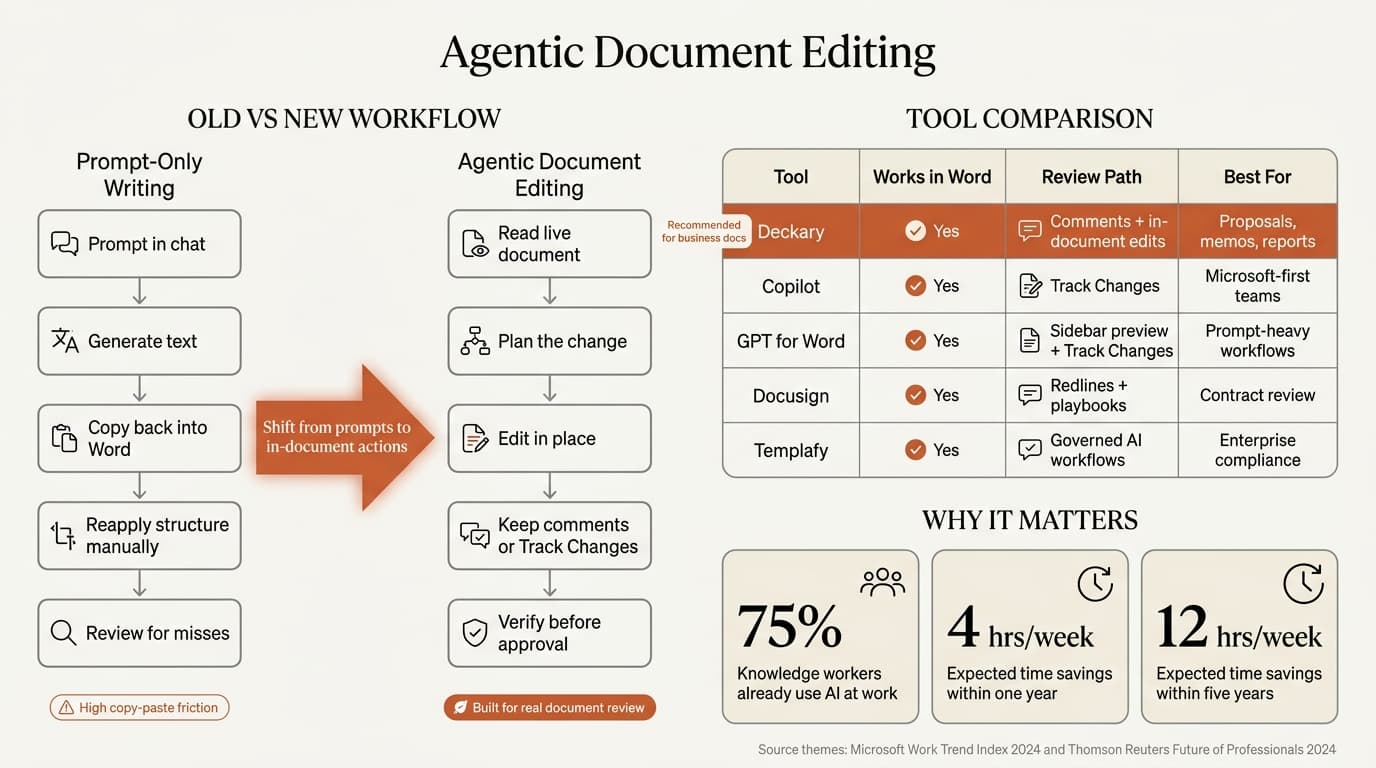
What is agentic document editing?
Agentic document editing is AI that reads a live document, decides what to change, edits in place, and leaves the draft in a reviewable state.
That definition is narrower than "AI writing assistant" and more practical than "document AI." The difference is not the model. The difference is workflow.
| Workflow type | What it does well | Where it breaks |
|---|---|---|
| Browser AI writer | Fast first drafts and summaries | Copy-paste back into Word, lost review context |
| Sentence helper | Grammar and tone cleanup | Weak on structure, comments, and section logic |
| Prompt panel in Word | Better than leaving Word | Still depends on manual prompt steering |
| Agentic document editing | Reads context, edits in place, preserves review flow | Usually costs more than a basic writing tool |
The research definition is starting to catch up with what product teams are shipping. The 2026 OpenReview paper LEDGER: Scaling Agentic Document Editing with Dependency-aware Graph Retrieval describes the core problem well: long documents need targeted edits without breaking cross-references, terminology, or surrounding logic. In its benchmark of 1,900 test cases across six models, the paper reported 76% consistency versus a 56% baseline while cutting token use by 85%.
That matters because document work is full of downstream effects. A scope term changed in one section should probably change in the assumptions section too. A heading rewrite may affect the executive summary. A note added to a proposal may need a matching wording change in the pricing page. That is why "write me a better paragraph" is not the same job as "fix this document."
If you want the Word-specific category definition, start with Word AI Agent. If you want the buyer view, see Best AI Word Add-In.
Why agentic document editing is replacing prompt-only writing
Prompt-only writing is fine when the draft lives in chat. It is weaker when the document itself is the deliverable.
Microsoft and LinkedIn's 2024 Work Trend Index found that 75% of knowledge workers already use AI at work, and 46% started using it less than six months before the survey. Thomson Reuters said in its 2024 Future of Professionals report release that surveyed professionals expect AI to save four hours per week within one year and up to 12 hours per week within five years.
The gain is real, but so is the review risk. Microsoft's 2026 research paper From Use to Oversight tested 48 participants and found that even users with a better understanding of the system could still produce more grammatical errors. Better AI does not remove the need for oversight. It makes the review path more important.
That is why the category is moving toward in-document editing:
| Old pattern | New pattern |
|---|---|
| Prompt in chat | Read the live document |
| Copy output back into Word | Edit inside Word |
| Manually reapply structure | Preserve headings, lists, tables, and styles |
| Review output in a detached pane | Review changes where the document already lives |
| Hope consistency survived | Use comments, tracked revisions, or bounded edits |
Microsoft's own product language reflects that shift. Its support page for Edit with Copilot in Word says Copilot can create, edit, refine, and format content in place in the live document. That page also says it was previously called Agent Mode.
Continue reading: AI PowerPoint for Finance Teams · Best Fonts for PowerPoint · Business Presentation Guide
Best tools for agentic document editing
The best tool depends on whether your document work is general business writing, contract review, or enterprise-controlled drafting.
Deckary
Deckary is the best fit for consultants, proposal teams, and finance users because it is built around the document review loop rather than the detached prompt loop. Deckary's Word product language and add-in copy both center on the same jobs: rewrite selected text, summarize documents, draft sections, apply structure, and add review comments directly inside Word. Deckary's pricing page says Premium is $180 per year and includes the PowerPoint slide agent, the AI Excel Agent, and the AI Word Agent.
That Office-wide scope matters. A project team may clean a workbook in Excel, draft the memo in Word, and then build the steering-committee slides in PowerPoint. Agentic document editing is strongest when it fits that chain instead of acting like the document is the last step after all real work is done elsewhere.
Microsoft 365 Copilot
Microsoft 365 Copilot is the default answer for Microsoft-first teams. Microsoft says Edit with Copilot works directly in Word and can create, edit, refine, and format content in place. It also says Copilot respects Track Changes if that mode is enabled.
The limit is review depth. Microsoft also says Edit with Copilot cannot add or modify comments in Word at this time and cannot accept or reject tracked changes itself. That does not make Copilot weak. It just means its current review path is narrower than tools built around comment-driven document review. If your company already licenses Copilot broadly, it is the easiest starting point. If you need section comments and proposal-style review, it is not the clearest winner.
GPT for Word
GPT for Word is the cleanest prompt-first option in this group. Its product page says the add-in can work on highlighted text or a full document, preview output in the sidebar before insertion, and work with Track Changes so edits can be reviewed like normal revisions. GPT for Work's pricing page says usage starts with a $29 credit pack rather than a monthly seat fee.
That makes GPT for Word practical for smaller teams or lighter use. It is more flexible than a fixed workflow tool, but it also asks the user to steer the process more actively. If your team likes prompt control inside Word, GPT for Word is strong. If your team wants a more guided review flow, Deckary is a better fit.
Docusign AI-Assisted Review
Docusign AI-Assisted Review shows where this category becomes more specialized. Docusign says the tool works inside Microsoft Word, reviews agreements against playbooks, flags risky language, suggests surgical edits, and drafts new language.
That is agentic document editing, but in a contract-review lane. For legal and procurement teams, that is a feature, not a limit. For general proposals, reports, memos, and board papers, it is narrower than most business teams need.
Templafy
Templafy splits the category into two layers: document agents for creating complete documents and an AI Assistant for improving text inside Office apps. Templafy says its AI Assistant works directly inside Word, Excel, and PowerPoint, while its pricing page routes buyers to custom quotes and enterprise packages.
That makes Templafy relevant when the hard problem is not only writing quality but also brand control, approved templates, and business-rule enforcement. It is harder to justify for small teams that just want better Word editing without an enterprise rollout.
When agentic document editing is worth using
Agentic document editing is worth paying for when the final file needs review, not just generation.
| Document job | Basic AI writer | Agentic document editing |
|---|---|---|
| Draft a rough outline from scratch | Good fit | Fine, but not required |
| Rewrite one weak section in the live file | Weak | Strong |
| Insert a new section at the cursor | Weak | Strong |
| Add comments for unclear logic or missing assumptions | Weak | Strong |
| Preserve heading structure and formatting | Weak | Strong |
| Review a contract against standard clauses | Weak | Strong, if the tool is contract-specific |
The best use cases look like real consulting and finance work:
| Use case | Why the agentic approach helps |
|---|---|
| Proposal rewrite | Arguments, scope, and tone need to stay aligned across sections |
| Memo drafting | The recommendation must be concise and easy to review |
| Statement of work review | Comments and exclusions matter as much as rewrites |
| Board-paper cleanup | Structure matters more than flashy drafting |
| Long-report summary | Reviewers need the point fast without leaving Word |
If your next question is how this extends beyond Word, read Excel AI Agent and Agentic Slide Editing Guide. The same pattern shows up everywhere: read the artifact, make bounded edits, verify the result, and keep the work in the native Office file.
How to evaluate agentic document editing tools
The buying question is not "Which demo looked smartest?" It is "Which tool leaves the cleanest file after review?"
| Check | What to verify |
|---|---|
| Live-document editing | Does it edit Word directly or force copy-paste back from chat? |
| Selection awareness | Can it work on a chosen paragraph, list, or section? |
| Review path | Does it support comments, Track Changes, or another clear approval flow? |
| Structure handling | Can it preserve or apply headings, lists, and tables? |
| Scope fit | Is it meant for business docs, contracts, or enterprise templates? |
| Pricing clarity | Is the cost per seat, per month, or usage-based? |
That filter usually removes half the market fast. A lot of "AI document editing" tools are really one of three things:
- Browser writing tools that happen to export to
.docx. - Grammar layers that improve sentences but not document logic.
- Contract-review products that are excellent, but only for agreements.
For business users in Word, the best shortlist is smaller than the search results make it look.
The verdict on agentic document editing
Agentic document editing is a real category now, but it is still poorly explained in search results. The practical definition is simple: AI reads the live document, makes context-aware edits, and leaves the file in a reviewable state.
For consultants, proposal teams, and finance users working in Microsoft Word, we recommend Deckary because it edits the live file, supports real review workflows, and now fits an Office-wide agent pattern across Word, Excel, and PowerPoint. Copilot is the best default for Microsoft-first teams. GPT for Word is the best prompt-first option with Track Changes. Docusign is the strongest contract-review specialist. Templafy is the enterprise answer when governance is the main job.
If you only need better wording, a lighter AI tool is enough. If the document itself is the deliverable, agentic document editing is the category to buy.
Sources
- Deckary pricing
- Microsoft 365 Copilot pricing
- Microsoft Support: Edit with Copilot in Word
- Microsoft Support: Welcome to Copilot in Word
- GPT for Word
- GPT for Work pricing
- Docusign AI-Assisted Review
- Templafy AI document editor
- Templafy pricing
- Grammarly Pro pricing
- Microsoft and LinkedIn: 2024 Work Trend Index
- Thomson Reuters Institute: Future of Professionals Report
- OpenReview: LEDGER: Scaling Agentic Document Editing with Dependency-aware Graph Retrieval
- Microsoft Research: From Use to Oversight