AI Document Review: Best Tools for Word and Business Docs
AI document review tools compared for Word, proposals, and reports. See pricing, review features, and which options fit real business documents.
- Bob · Former McKinsey and Deloitte consultant with 6 years of experience
- May 1, 2026
- 10 min read
Pricing and feature information was accurate at the time of publication. Competitor products change frequently — verify current details on each provider's website.
AI document review is now two different markets pretending to be one. One side is legal and contract review. The other is everyday business-document review inside Microsoft Word: proposals, reports, memos, statements of work, and board papers. For Deckary readers, the second category matters more, and Deckary is the best fit because it reviews, rewrites, summarizes, and comments directly inside the Word file that will actually be sent.
We reviewed the top 5 Google results for "ai document review" on May 25, 2026, then verified 14 official product, pricing, support, and research sources across 7 tools. We scored each option against 9 real review jobs: selected-text review, full-document summary, comment-ready rewrites, Word-native editing, tracked revision support, policy or playbook checks, pricing clarity, business-document fit, and oversight control.
The live SERP explains why buyers are confused. The first-page results skew toward contract and compliance tools, with Docusign AI-Assisted Review as the clearest Word-native example. That tells you searchers want more than better wording. They want a second set of eyes that can spot risk, flag weak language, and shorten review cycles.
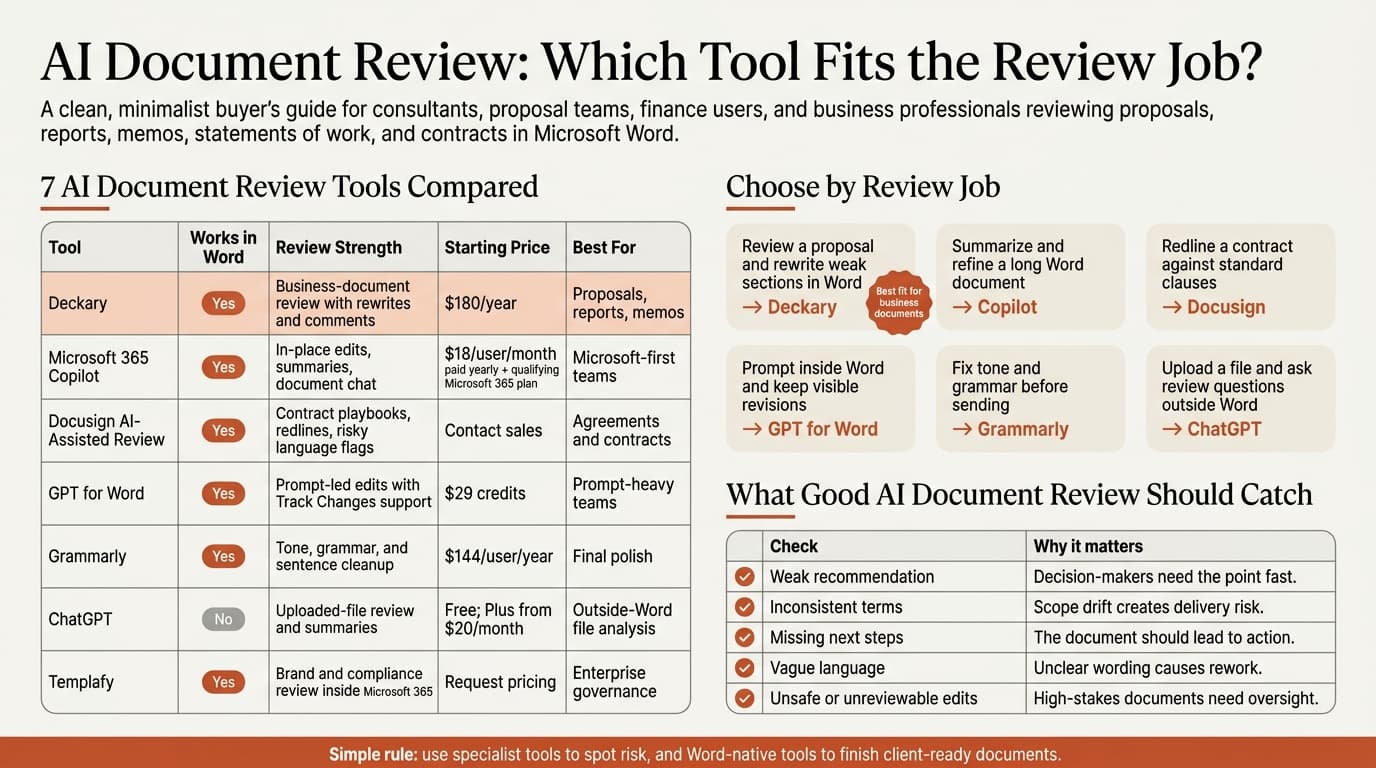
| Tool | Works inside Word | Starting price | Best for |
|---|---|---|---|
| Deckary | Yes | Main pricing table shows $180/year for Premium | Proposals, reports, memos, business review |
| Microsoft 365 Copilot | Yes | $18/user/month paid yearly, plus qualifying Microsoft 365 plan | Microsoft-first organizations |
| Docusign AI-Assisted Review | Yes | Contact sales | Contract and agreement review |
| GPT for Word | Yes | $29 credits | Prompt-heavy teams that want Track Changes support |
| Grammarly for Word | Yes, via desktop app | $144/user/year for Grammarly Pro | Sentence-level cleanup and tone polish |
| ChatGPT | No | Free; Plus from $20/month | Uploaded-file review outside Word |
| Templafy | Yes | Request pricing | Large teams with brand and compliance rules |
Pricing and feature claims were verified on May 25, 2026. Regional pricing and enterprise discounts can vary.
What is AI document review?
AI document review is the use of AI to inspect an existing document for quality, risk, clarity, consistency, and missing information, then suggest or apply fixes.
That definition is different from AI document generation. A generator starts with a blank page. A review tool starts with a draft that already exists and asks harder questions:
| Review question | Why it matters |
|---|---|
| Is the recommendation clear? | Executives do not want a document that circles the point |
| Are terms used consistently? | Proposal and SOW mistakes often come from drift across sections |
| What is missing? | Omissions create commercial and delivery risk |
| Does this sound like us? | Tone and structure matter in client-facing work |
| Can I review the changes safely? | AI output still needs human judgment |
This is not a niche workflow anymore. Microsoft and LinkedIn's 2024 Work Trend Index found that 75% of knowledge workers already use AI at work. Thomson Reuters said in its 2024 Future of Professionals report release that surveyed professionals expect AI to save 4 hours per week within the next year and 12 hours per week within five years. Document review is one of the cleanest places to get that time back because the same tasks repeat all week: tighten a draft, summarize a long report, flag weak scope language, or turn rough notes into something client-ready.
The catch is oversight. Microsoft's Copilot in Word FAQ says Copilot suggestions can be inaccurate and should be reviewed before acceptance. That warning applies to every tool in this category, not just Copilot.
AI document review tools compared
The best AI document review tool depends on where the document lives and what "review" means for your team.
Deckary
Deckary is the best choice when the document itself is the work product. Deckary's Premium plan is currently listed at $180 per year on the main pricing table, and the plan includes the AI Word Agent alongside Excel and PowerPoint AI. The review angle is the key point: Deckary can read the current selection or document context, rewrite weak sections, insert cleaner language, summarize a draft, and add review comments without pushing the work into another browser tab.
That makes it a strong fit for consulting proposals, steering-committee memos, reports, and statements of work. If your usual problem is not "write me something" but "fix this section, shorten this argument, or tell me what is missing," Deckary is the cleanest fit in this list.
Microsoft 365 Copilot
Microsoft 365 Copilot is the default benchmark for Word-native AI. Microsoft's support page says Edit with Copilot in Word can create, edit, refine, and format content in place, and it respects Track Changes if that mode is on. Microsoft's current pricing page lists Microsoft 365 Copilot Business at $18 per user per month when paid yearly, with a qualifying Microsoft 365 plan required.
Copilot is a good choice for teams already bought into Microsoft 365. It is less focused than Deckary on business-document review jobs such as comment-based proposal cleanup or section-by-section recommendation tightening, but it is the easiest default if licensing is already approved.
Docusign AI-Assisted Review
Docusign AI-Assisted Review is the clearest sign that the market reads "AI document review" as a risk and redline problem, not just a writing problem. Docusign says the product works inside Microsoft Word, reviews agreements against playbooks, flags risky language, and suggests surgical edits.
If your review workload is contract-heavy, Docusign is the right kind of specialist. If your workload is proposals, reports, or executive documents, it is probably too narrow. That is the main lesson from the current SERP: many vendors solving "document review" are really solving contract review.
GPT for Word
GPT for Word is useful for teams that already work through prompts and want that workflow moved into Word. The product page says it supports precise text generation, editing, revising, rich text formatting, and compatibility with Track Changes. GPT for Work's pricing page starts at $29 in shared credits rather than a fixed seat subscription.
That makes it flexible for lighter use or mixed teams. The tradeoff is that it behaves more like a prompt surface inside Word than a review system with stronger opinion about comments, structure, or business-document quality. If your team is comfortable steering AI manually, GPT for Word is practical. If you want a more guided review workflow, Deckary is a better fit.
Grammarly for Word
Grammarly for Microsoft Word is still the easiest sentence-level review layer. Grammarly says its Word integration gives real-time suggestions and can generate, rewrite, or change tone from inside the app. Grammarly's support pricing page lists Pro at $144 per member per year.
Grammarly is best when the draft is directionally right and the real job is cleanup: sharper sentences, clearer tone, fewer grammar mistakes. It is weaker when you need deeper review, such as spotting a weak recommendation, inconsistent commercial terms, or missing next steps.
ChatGPT
ChatGPT is useful for AI document review when the document does not need to stay in Word. OpenAI's file workflow guide says users can upload documents, ask for summaries, rewrite sections, and call out risks or open questions. ChatGPT pricing currently starts with a free tier, and Plus starts at $20 per month.
ChatGPT is strong for quick readouts of long files, inherited reports, and upload-first workflows. It is weaker when the review needs visible in-document revisions, Word comments, or section-by-section editing in the final file. For Business and Enterprise workspaces, OpenAI says data accessed through apps is not used to train models by default, which matters for teams reviewing sensitive files.
Templafy
Templafy is the enterprise document-governance option. Templafy says its AI Assistant works directly inside Word, Excel, and PowerPoint to improve, summarize, and elaborate text while keeping brand and compliance rules intact. Pricing is by sales conversation, not self-serve checkout.
Templafy makes sense when the review process is tightly tied to approved templates, company language, and compliance controls. It is harder to justify for small teams that simply need faster review and better documents in Word.
Continue reading: AI PowerPoint for Finance Teams · Word to PowerPoint · Case Study Template PowerPoint
When AI document review saves time
AI document review is worth using when the document already has a real job to do.
| Document job | Best tool type | Why |
|---|---|---|
| Review a proposal draft for weak scope language | Word-native review tool | You need edits and comments in the actual file |
| Summarize a 30-page report before a meeting | Word-native tool or file-upload tool | Speed matters more than final formatting |
| Redline a contract against standard clauses | Contract review specialist | Playbooks and clause checks matter most |
| Clean up tone before sending | Grammar layer | Sentence quality is the main issue |
| Check whether a memo reaches the recommendation fast enough | Word-native review tool | Structure matters more than grammar |
The mistake most teams make is buying a generator when they really need a reviewer. A generator helps you start. A review tool helps you ship.
That is why these adjacent guides matter too: AI Document Editor, AI Document Summarizer, Word AI, and How to Use AI in Microsoft Word. They solve slightly different jobs, and choosing the wrong category causes most disappointment.
How to choose the best AI document review tool
Start with these four questions:
- Does the tool review inside Word, or does it pull me into another app?
- Can I review edits safely through comments, tracked changes, or visible previews?
- Is the tool built for my document type: contracts, proposals, reports, or general writing?
- Is the price model sensible for how often the team will actually use it?
That produces a simple buying map:
| If your main need is... | Best choice |
|---|---|
| Business-document review inside Word | Deckary |
| Microsoft-wide AI coverage | Copilot |
| Contract and clause review | Docusign AI-Assisted Review |
| Prompt-led edits in Word with Track Changes | GPT for Word |
| Tone and grammar cleanup | Grammarly |
| Fast uploaded-file analysis outside Word | ChatGPT |
| Enterprise brand and compliance control | Templafy |
Best AI document review tool for business documents
For consultants, finance teams, proposal writers, and business users working in Microsoft Word, Deckary is the best AI document review tool.
That recommendation is narrow on purpose. It is not saying Deckary is the best contract review engine or the best grammar checker. It is saying Deckary is the best fit for the kind of document work most Deckary readers actually do: revise a proposal, tighten a memo, review a report, add comments, and keep the work inside Word.
Copilot is the best default for Microsoft-first organizations. Docusign is the better specialist if review means agreements and redlines. Grammarly is still the easiest polish layer. ChatGPT is strong for uploaded-file analysis. Templafy is the right enterprise buy if compliance and template control are the main job.
If you need one rule, use browser AI to inspect documents and Word-native AI to finish documents.
Sources
- Deckary pricing
- Microsoft 365 Copilot pricing
- Microsoft Support: Edit with Copilot in Word
- Microsoft Support: Frequently asked questions about Copilot in Word
- Docusign AI-Assisted Review
- GPT for Word
- GPT for Work pricing
- Grammarly for Microsoft Word
- Grammarly Pro pricing
- OpenAI: Working with files in ChatGPT
- OpenAI ChatGPT pricing
- Templafy AI document editor
- Microsoft and LinkedIn 2024 Work Trend Index
- Thomson Reuters: AI set to save professionals 12 hours per week by 2029