Case Study Template PowerPoint: Structure, Design, and Real Examples
PowerPoint case study templates that consultants and marketers actually use. Learn structure, design patterns, and formatting for one-page and multi-slide formats.
Most case study PowerPoint templates fail because they prioritize decoration over structure. After building case study slides for 240+ client engagements, sales pitches, and conference presentations, we have found that effective case study templates share three characteristics: clear problem-solution-results architecture, visual layouts that create contrast between before and after states, and formatting that works both as a standalone document and as a presented deck.
This guide covers case study PowerPoint template structure, design patterns that make impact visible, one-page versus multi-slide formats, formatting techniques for results and data, and where to find templates that match professional standards.
What Makes an Effective Case Study Template
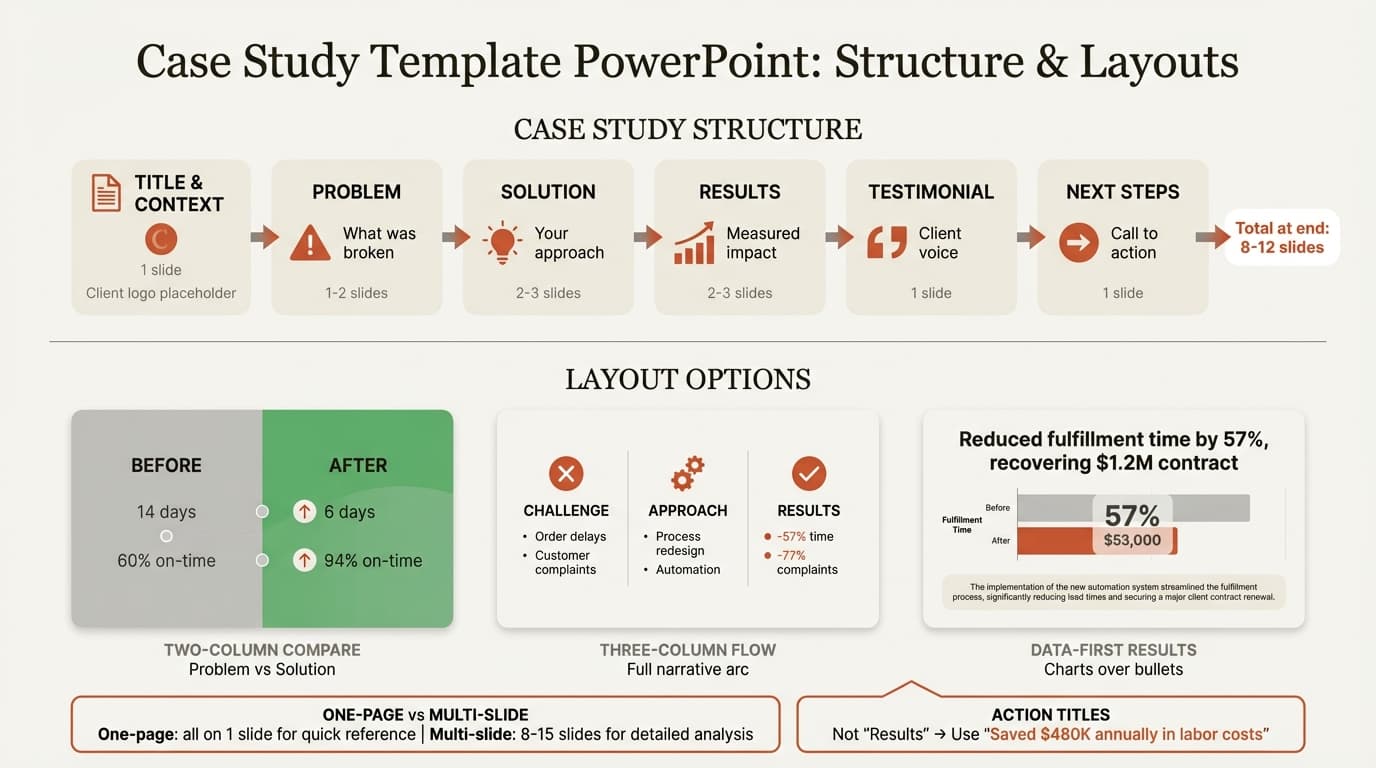
A case study PowerPoint template is a structured framework that guides you through presenting proof: the client problem, your solution, and measurable outcomes. Research from HubSpot's 2023 Marketing Strategy Report found that case studies rank among the top three most effective marketing content types for B2B buyers. Effectiveness depends on structure.
Effective case study templates share these structural elements:
| Section | Purpose | Typical Slides |
|---|---|---|
| Title & Context | Identify the client and project scope | 1 slide |
| Problem Statement | Establish what was broken, at risk, or needed | 1-2 slides |
| Solution Approach | Explain your methodology and execution | 2-3 slides |
| Results & Impact | Show measurable outcomes with data | 2-3 slides |
| Testimonial/Takeaway | Validate results with client voice or lessons learned | 1 slide |
| Next Steps | Call to action for prospects or stakeholders | 1 slide |
This structure mirrors the storytelling pattern audiences expect: tension (problem), action (solution), resolution (results).
One-Page vs Multi-Slide Case Study Templates
One-Page Case Study Templates
A one-page case study template condenses the entire case study onto a single slide. Smartsheet's case study template library and SlidesCarnival's free templates both offer one-page formats designed for rapid scanning.
One-page case study layout:
- Left column: Client name, industry, and problem statement (30% of slide width)
- Center column: Solution summary with 3-4 key actions (40% of slide width)
- Right column: Results with 2-4 metrics and optional testimonial quote (30% of slide width)
When to use one-page templates: Embedding case studies in capabilities decks, sales leave-behinds summarizing multiple client successes, executive dashboards tracking project outcomes, or conference posters.
Multi-Slide Case Study Templates
Multi-slide templates provide 8-15 slides with dedicated sections for each component. SlideUpLift's case study templates follow multi-slide structures with section dividers and detailed content slides.
Typical multi-slide case study structure:
- Title slide (client name, project scope, timeframe)
- Client background (industry, size, market position)
- Problem statement (what was broken, why it mattered, stakes)
- Solution approach (methodology, decision rationale)
- Implementation details (phases, timeline, team structure)
- Challenges encountered (obstacles, how you adapted)
- Results overview (primary metrics, business impact)
- Detailed results (charts, before-and-after comparisons)
- Client testimonial
- Lessons learned or key takeaways
- Next steps or call to action
When to use multi-slide templates: Sales presentations where one case study is the centerpiece, conference talks demonstrating methodology through a client example, internal retrospectives analyzing project execution, or client deliverables documenting engagement outcomes.
Case Study Slide Layouts and Design Patterns
Two-Column Problem-Solution Layout
The two-column layout is the most effective design pattern for case study slides. Place problem description, pain points, or "before" state on the left. Place solution approach, outcomes, or "after" state on the right. This layout works for before-and-after metrics, problem-solution pairs, or challenge-approach contrasts.
Three-Column Challenge-Approach-Results Layout
For slides showing progression from problem through solution to outcome, use three columns: Challenge (what was broken), Approach (what you did), Results (what changed). Each column gets a heading, 2-3 bullet points, and optionally a supporting icon.
Data-First Layout with Supporting Context
Results slides should lead with the data visualization—the chart, table, or comparison graphic—occupying 60-70% of the slide. Place the chart in the center or upper-left with an action title above and source attribution at the bottom.
Formatting Case Study Results and Data
Before-and-After Comparison Charts
The single most effective way to present case study results is a side-by-side before-and-after comparison. Use a grouped bar chart with two bars per metric: "Before" in gray, "After" in green. Add percentage improvement labels above each pair.
Example metrics:
- Order fulfillment time: 7 days → 6 days (-57%)
- On-time delivery: 60% → 94% (+57%)
- Customer complaints: 120/mo → 28/mo (-77%)
The table format works for 3-5 metrics. For more metrics or visual impact, use a horizontal bar chart showing the delta.
Pairing Percentages with Absolute Numbers
Percentage improvements alone can mislead. Always pair percentages with absolute numbers for credibility. Replace "Reduced churn by 50%" with "Reduced monthly churn from 8% to 4%, retaining an additional 240 customers per month." The second version provides both the percentage change and the business scale.
Connecting Metrics to Business Impact
Operational metrics without business translation fail to persuade executives. Show what the improvement enabled:
- Cut report generation time from 6 hours to 45 minutes → freed 5.25 analyst hours per report for strategic analysis
- Improved forecast accuracy from 72% to 91% → reduced excess inventory write-offs by $380K annually
- Decreased onboarding time from 8 weeks to 3 weeks → increased new hire productivity by 22% in first quarter
Add a callout box linking the operational change to financial or strategic outcomes.
Using Color to Indicate Direction
Use green for positive outcomes (increased revenue, reduced costs), red for problems or negative baselines (before states, risks), and gray for context or neutral information (industry benchmarks). Every color choice should communicate meaning.
Continue reading: Business Case Template · Fishbone Diagram in PowerPoint · Competitive Landscape Slide
Use consulting-grade layouts in PowerPoint
Start from structured business slides and customize them in your own deck. 10 free AI prompts. No credit card required.
PowerPoint Formatting Techniques for Case Study Templates
Action Titles That State the Takeaway
Every case study slide needs an action title that tells the reader what to conclude, not just what the slide contains. Replace "Implementation Timeline" with "Full implementation completed in 90 days, under budget by 12%." Replace "Customer Feedback" with "NPS increased from 18 to 64 within six months." Replace "Cost Analysis" with "Total cost savings of $1.2M annually, 3.2x ROI." Action titles allow someone to flip through your case study reading only the titles and understand the complete narrative.
Consistent Typography and Spacing
Use two font sizes: one for titles (24-28pt), one for body text (14-16pt). Avoid mixing fonts within the template. Set consistent margins (0.5-0.75 inches) and maintain the same title position across all slides. Small inconsistencies signal carelessness.
Alignment and Visual Grid
All objects should align to a consistent grid. Titles align left at the same horizontal position. Charts and text boxes align to common left, right, or center guides. Deckary's alignment shortcuts provide single-key distribution and alignment across selected objects.
Source Attribution and Disclaimers
Every chart, statistic, or external benchmark needs a source line. Place attribution in 10pt text at the bottom of the slide in gray. Example: "Source: Client financial data, January-December 2025; industry benchmark from Gartner 2025 Supply Chain Report." If the case study contains confidential information, include a disclaimer: "Client name anonymized per NDA" or "Metrics shown are illustrative based on actual client engagement."
Where to Find Case Study PowerPoint Templates
Free Case Study Template Sources
Smartsheet Case Study Templates: Six free PowerPoint templates including one-page summaries and multi-slide formats with clear sections for problem, solution, and results.
SlidesCarnival Free Templates: Modern, visually appealing templates with creative layouts for conference presentations or creative industries.
SlideEgg Case Study Templates: Over 136 free case study templates in both 4:3 and 16:9 aspect ratios, completely editable with customizable fonts and colors.
Professional Case Study Templates
Deckary Slide Library: 143 consulting-grade slide templates including case study formats, executive summary layouts, and results visualization templates with Excel-linked charts that update automatically when data changes.
Consulting Firm Standards
McKinsey, BCG, and Bain case studies follow strict formatting standards: one message per slide, action titles, data-backed claims, and appendix material for detail. Consulting Success case study writing guide and Camford MC case study template outline MBB-style structure you can replicate in PowerPoint.
Common Case Study Template Mistakes
Burying the Results
Templates that place results on slides 12-15 waste the persuasive power of your best evidence. Results should appear early—ideally on slide 2 (executive summary) and again in detail starting at slide 7 or 8. Decision-makers skim. If they read only the first three slides, they should know the problem, solution, and outcome.
Generic Problem Statements
Templates with placeholder text like "Client faced challenges in operations" or "Needed to improve efficiency" provide no structure for specificity. Effective templates prompt for concrete details: "What metric was broken? What was the business impact if unfixed? Why had previous attempts failed?" Build prompts into your template placeholders so users cannot skip past vague language.
No Visual Hierarchy
Slides where every element has equal visual weight force the reader to work too hard. Titles should be largest and bold. Section headers medium-sized. Body text smallest. Charts should occupy 60-70% of results slides. Supporting text should be minimal. If users need to read three paragraphs to understand a slide, the slide has failed.
Tailoring Case Study Templates by Industry
While the core structure remains consistent, emphasis and depth vary by industry:
- Consulting: Emphasize methodology and quantified impact. Include diagnostic phase, analytical frameworks, stakeholder engagement, and phased implementation. Connect operational improvements to strategic outcomes. See our consulting quality slides guide.
- Marketing/Agency: Focus on campaign performance metrics (engagement, conversion, cost per acquisition, brand lift). Include creative strategy, channel mix, and performance dashboards with visual storytelling and customer journey maps.
- SaaS: Demonstrate product value and customer success. Cover previous solution, switching drivers, implementation timeline, feature adoption, and expansion. Include time-to-value, user adoption rates, and cost savings.
- Healthcare: Require compliance disclaimers and patient privacy protections. Include regulatory context, patient population characteristics, treatment protocols, and clinically validated outcome measures with conservative design and detailed source attribution.
Accelerating Case Study Creation with Templates and Tools
Template Libraries for Recurring Content
If your team produces case studies regularly, build a template library organized by outcome type: cost reduction case studies (3-column: baseline cost, intervention, savings), time-to-market case studies (timeline format with milestone callouts), customer satisfaction case studies (NPS before-after with testimonial emphasis), or digital transformation case studies (phased roadmap with technology stack diagrams). Teams select the template closest to their project type and customize from there.
AI-Generated Case Study Slides
Deckary's AI Slide Builder generates case study slides from text descriptions. Describe the client problem, your solution, and the results, and the tool produces formatted slides with consulting-style layouts, relevant icons, and chart placeholders.
Reusable Chart and Data Templates
Build a library of Excel-linked chart templates for metrics you report frequently: ROI calculations, time savings, cost comparisons, satisfaction scores, and operational efficiency gains. When building a new case study, copy the template, update the data, and the charts refresh automatically. For chart formatting guidance, see our guides on waterfall charts and bar charts in PowerPoint.
Summary
Effective case study PowerPoint templates enforce structure, create visual contrast, and reduce production time:
- Use the problem-solution-results architecture with dedicated sections for client background, problem statement, solution approach, implementation, results, and testimonials.
- Choose one-page templates for quick reference and multi-slide templates when the case study is the main presentation or requires detailed methodology discussion.
- Design with two- or three-column layouts that create side-by-side visual contrast between before and after states, problems and solutions, or challenge-approach-results.
- Format results using before-and-after comparisons with percentage improvements paired with absolute numbers. Connect operational metrics to business impact.
- Apply consistent formatting with action titles, aligned objects, standardized typography, and source attribution on every data slide.
- Free templates from Smartsheet, SlidesCarnival, and SlideEgg work for one-off projects. Professional templates accelerate production for teams building case studies regularly.
- Tailor templates by industry. Consulting case studies emphasize methodology and ROI. Marketing case studies focus on campaign metrics. SaaS case studies demonstrate product value and adoption.
Templates reduce case study creation time from hours to minutes while ensuring consistency. The best templates enforce clear problem framing, transparent solution methodology, and quantified results that prospects can project onto their own situations.
Sources
- HubSpot — Marketing Statistics
- Smartsheet — 6 Free PowerPoint Case Study Presentation Templates
- SlidesCarnival — Free Case Study PowerPoint Templates
- SlideUpLift — Case Study Presentation Templates Design Tips
- SlideEgg — Free Case Study Google Slides Themes and PPT Templates
- Consulting Success — How To Write A Consulting Case Study
- Camford MC — Case Study Template for Consulting Firms
Related Guides
For teams building case study presentations regularly, see our case study presentation guide for narrative and delivery techniques, and our PowerPoint design guide for formatting fundamentals.
Use consulting-grade layouts in PowerPoint
Start from structured business slides and customize them in your own deck. 10 free AI prompts. No credit card required.