Case Study Presentation: How to Turn Client Success Into Persuasive Proof
Case study presentations transform project wins into persuasive proof. Learn the structure, storytelling techniques, and data presentation methods that convert skeptics.
- Bob · Former McKinsey and Deloitte consultant with 6 years of experience
- 14 min read
Most case study presentations fail because they read like project reports. They list what happened in chronological order, bury the impact in slide 12, and never answer the question prospects actually care about: will this work for me?
After reviewing 180+ case study presentations across client pitches, conference talks, and internal retrospectives, the ones that convert skeptics into buyers share one trait: they structure success as a story with tension and resolution. The client becomes the hero. The challenge creates stakes. The solution earns the payoff.
This guide covers the case study presentation structure that drives decisions, how to choose which metrics matter, storytelling techniques that make data memorable, and the mistakes that turn proof into puffery.
What Makes Case Study Presentations Different
A case study presentation is not a project recap or a capabilities deck. It is a proof point structured as a narrative. The format demonstrates your approach, methodology, and impact through one specific client engagement rather than generalized claims.
This matters because prospects evaluate vendors based on evidence, not promises. Case studies rank among the most effective content types for conversion because buyers need to see proven track records with clients similar to them before trust forms.
Case study presentations differ from other business presentations in three ways. They focus on one client story rather than aggregated data. They position the client as the protagonist, not the vendor. And they require measurable outcomes—percentages, timelines, cost savings—not vague improvement language.
| Presentation Type | Primary Goal | Structure | Evidence Type |
|---|---|---|---|
| Case study | Prove your solution works for clients like the prospect | Problem → Solution → Results | Specific metrics from one engagement |
| Capabilities deck | Show what you can do across contexts | Services → Differentiators → Proof points | Portfolio of projects |
| Thought leadership | Establish expertise and perspective | Insight → Framework → Application | Research, analysis, patterns |
The Problem-Solution-Results Structure
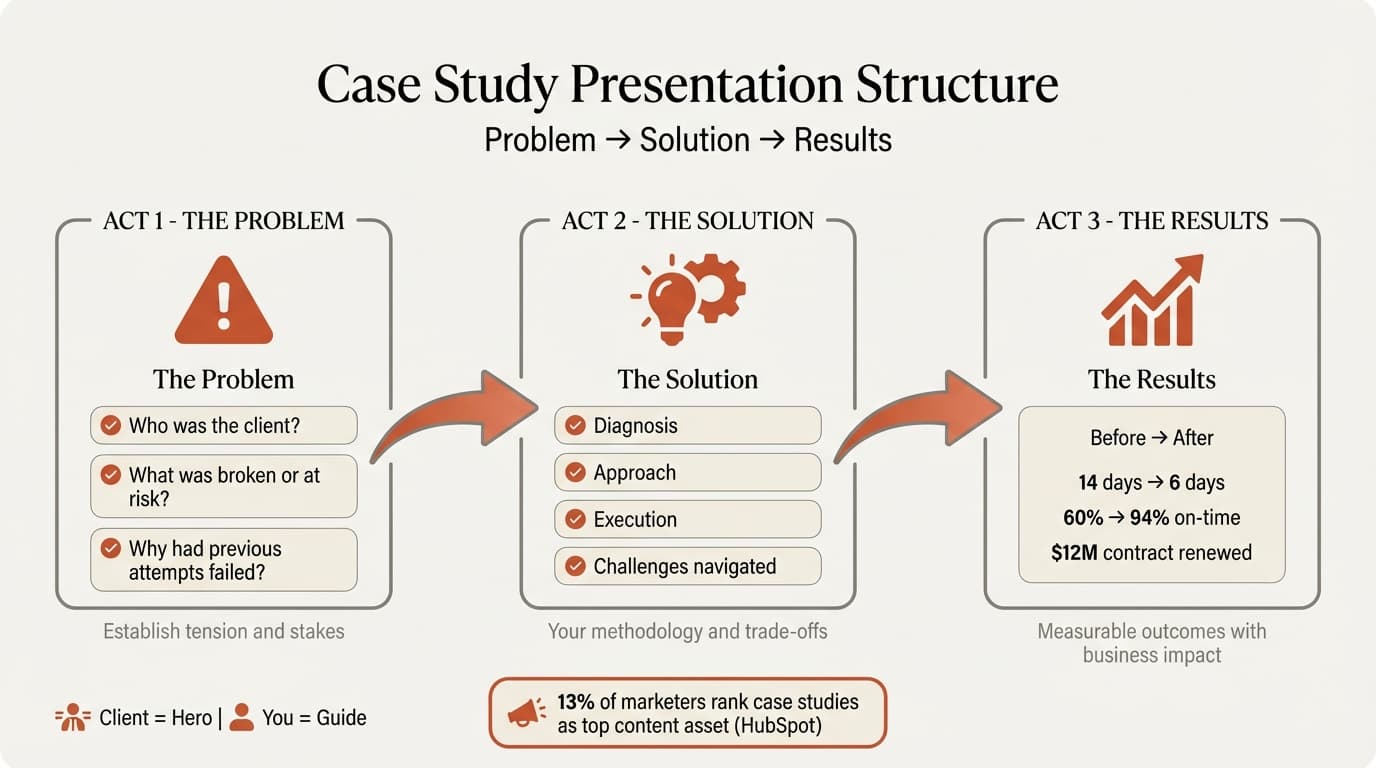
Every persuasive case study follows a three-act structure. This format works whether you are presenting to prospects, speaking at a conference, or briefing your leadership team on project outcomes.
Act 1: The Problem (Context and Stakes)
Open with the client challenge, not your company background. State what the client faced, why it mattered to their business, and what made it difficult to solve. This establishes tension.
The mistake most presenters make is describing the problem generically: "The client needed to improve efficiency." That creates no stakes. Specific problems create engagement: "The client's order fulfillment process took 7 days on average, missing 40% of delivery commitments and risking a $12M contract renewal."
Context should answer three questions:
- Who was the client? Industry, size, market position—enough for the audience to see themselves reflected
- What was broken or at risk? The operational, strategic, or financial problem
- Why had previous attempts failed? This shows the problem was non-trivial
Act 2: The Solution (Your Approach and Execution)
This section explains what you did, how you did it, and why those choices mattered. The trap is turning this into a feature list. Effective case study presentations focus on decision points and trade-offs, not just deliverables.
Structure your solution section around:
- Diagnosis: How you assessed the root cause (if this differed from the client's initial understanding)
- Approach: Your methodology and why you chose it
- Execution: What you built, implemented, or changed
- Challenges navigated: Problems encountered mid-project and how you adapted
Including obstacles makes the story credible. If everything went perfectly, the audience questions whether the project was real.
Act 3: The Results (Measurable Outcomes)
Results must be specific, quantified, and connected to business impact. "Improved performance" means nothing. "Reduced order fulfillment time from 7 days to 6 days, increasing on-time delivery from 60% to 94% and securing contract renewal" creates proof.
Present results using before-and-after comparisons. Pair percentage improvements with absolute numbers so audiences understand scale. Use visuals—bar charts, line graphs, or simple comparison tables—rather than listing numbers in bullets.
The most persuasive results connect operational metrics to financial or strategic outcomes. Saying "response time dropped 40%" is less convincing than "response time dropped from 200ms to 120ms, reducing customer abandonment by 18% and adding $2.3M in annual revenue."
| Metric Type | Example | Why It Works |
|---|---|---|
| Operational | Reduced processing time from 45 to 12 minutes | Shows efficiency gain but lacks context |
| Financial | Saved $480K annually in labor costs | Translates efficiency into dollars |
| Strategic | Reduced time-to-market from 9 months to 4 months, enabling entry into two new markets ahead of competitors | Connects outcomes to competitive advantage |
Choosing the Right Format
Case study presentations come in two common formats. The format you choose depends on context and audience depth requirements.
One-Slide Case Study (Executive Summary)
A one-slide format condenses the entire case study into key points. This works for quick overviews or when embedding case studies within larger presentations. Use this format when you need to reference multiple client examples in a capabilities pitch or board update.
One-slide case studies should include:
- Client name and industry (if not confidential)
- Problem statement in one sentence
- Solution summary in 2-3 bullets
- Results with 2-4 key metrics
- Optional client quote
Multi-Slide Case Study (Detailed Analysis)
Multi-slide formats work when the case study is the presentation, not a supporting element. This applies to conference talks, sales presentations where you deep-dive on one client success, or internal retrospectives analyzing what worked.
Multi-slide case studies typically run 8-15 slides:
- Title slide with client and project scope
- Problem context (1-2 slides)
- Solution approach (2-3 slides)
- Execution details (2-3 slides, including challenges)
- Results and impact (2-3 slides with data visualizations)
- Client testimonial or quote
- Lessons learned or key takeaways
- Call to action or next steps
Continue reading: Business Case Template · Bar Charts in PowerPoint · Pitch Deck Guide
Storytelling Techniques That Make Data Stick
Research from Stanford professor Chip Heath found that 63% of audiences remembered stories from presentations, while only 5% remembered individual statistics. In business contexts, this means the team that wraps data in a narrative wins the deal, even when competitors have similar results.
Position the Client as the Hero
Your company is not the protagonist. The client is. You are the guide who provided tools, insights, or capabilities that enabled their success. This framing makes prospects see themselves in the story rather than feeling marketed to.
Weak framing: "We implemented an inventory management system that transformed their operations."
Strong framing: "The client reduced stockouts by 67% after implementing our inventory management system. They now meet seasonal demand spikes without overstocking."
The first centers your company. The second centers the client outcome.
Use Specific Details That Build Credibility
Generic case studies feel manufactured. Specific details—even small ones—create authenticity. Compare these two openings:
Generic: "A major retail company needed to improve customer satisfaction."
Specific: "A 200-store retail chain in the Southeast faced a Net Promoter Score of -12, driven primarily by long checkout times during peak hours."
The second creates a vivid picture. The audience can imagine the context, which makes the solution and results more believable.
Create Narrative Tension
Tension keeps audiences engaged. The problem section should establish what was at risk if the challenge went unsolved. The solution section should acknowledge obstacles encountered. Without tension, the story feels like a foregone conclusion.
Effective tension points include:
- Time pressure ("The contract renewal decision was six weeks away")
- Resource constraints ("The client had no internal technical team")
- Failed previous attempts ("Three vendors had tried and failed to solve this")
- Competing priorities ("Leadership was simultaneously managing a merger")
Data Presentation Best Practices
Case study presentations rely on data to prove impact, but how you present numbers determines whether audiences trust them.
Always Show Before-and-After Comparisons
Static "after" numbers lack context. Saying "customer retention reached 89%" means nothing until the audience knows the starting point. Before-and-after comparisons create the narrative arc your data needs.
Use side-by-side visualizations rather than sequential bullets. A bar chart showing the old metric versus the new metric communicates instantly.
Pair Percentages with Absolute Numbers
Percentage improvements sound impressive but can mislead. "Increased revenue by 300%" could mean going from $10K to $40K or $10M to $40M. Always pair percentages with absolute numbers for credibility.
Weak: "Reduced churn by 50%"
Strong: "Reduced monthly churn from 8% to 4%, retaining an additional 240 customers per month"
Connect Metrics to Business Outcomes
Operational metrics alone do not persuade executives. Translation to financial or strategic impact does. If you reduced processing time, calculate what that saved in labor costs or enabled in additional capacity.
| Operational Metric | Translation to Business Impact |
|---|---|
| Cut report generation time from 6 hours to 45 minutes | Freed 5.25 analyst hours per report for high-value analysis |
| Improved forecast accuracy from 72% to 91% | Reduced inventory write-offs by $380K annually |
| Decreased onboarding time from 8 weeks to 3 weeks | Increased sales team productivity by 22% in first quarter |
Use Testimonials to Validate Quantitative Claims
Numbers create credibility. Quotes from clients create trust. The most persuasive case study presentations pair quantitative results with a direct client testimonial that validates the impact.
Strong testimonials are specific, not generic praise. "The team was great to work with" adds nothing. "The new workflow cut our month-end close from 12 days to 5 days, which allowed us to report earnings a week earlier than competitors" reinforces your data with authentic voice.
Tailoring Case Studies to Your Audience
The same client success story can be presented three different ways depending on who is listening. Effective presenters adjust depth, emphasis, and format based on audience context.
Sales Presentations to Prospects
Prospects care whether your solution applies to their specific situation. Emphasize how the client in your case study resembles the prospect—same industry, similar size, comparable challenge. This reduces perceived risk.
Structure: 15-20 minutes with detailed results and clear call to action. Include a pricing discussion or next steps slide.
Conference Presentations
Conference audiences want to learn methodology and frameworks they can apply. Spend less time on client background and more on approach, decision points, and lessons learned. Make the case study a teaching tool, not a sales pitch.
Structure: 10-12 minutes to match typical conference slots and audience attention spans, which research shows average 10-20 minutes. Include one slide on lessons learned or framework developed.
Internal Retrospectives
Internal teams need operational insight: what worked, what did not, and what to replicate on future projects. This format should include challenges, missteps corrected, and process improvements identified.
Structure: 20-30 minutes with appendix slides on detailed methodology, resource allocation, and risk management. Open the floor for questions and team discussion.
Common Case Study Presentation Mistakes
After reviewing hundreds of case study presentations across industries, these patterns consistently undermine credibility and persuasion.
Leading with Company Background Instead of the Problem
Audiences do not care about your company history until they understand the value you delivered. Opening with "About Us" slides wastes the first two minutes when attention is highest. Start with the client problem.
Vague or Unmeasurable Results
"Significantly improved efficiency" or "enhanced customer experience" are not results. They are claims. Every result must be quantified with a specific metric and timeframe.
If you genuinely cannot measure outcomes, the project may not qualify as a case study worth presenting. Testimonials alone without data do not convince skeptical buyers.
Overselling Your Role
Claiming sole credit when the client's internal team contributed undermines trust. Acknowledge collaboration. Effective case studies give credit where due while clearly explaining your specific contribution.
Weak: "We transformed their entire sales process."
Strong: "Working with their VP of Sales and three regional managers, we redesigned territory assignments and implemented CRM automation, which the team used to increase pipeline visibility and close rates."
No Call to Action
A case study presentation without a clear next step wastes the persuasive momentum you built. Every case study should end with an explicit recommendation: schedule a discovery call, request a proposal, pilot the solution, or apply the methodology internally.
For sales contexts, the next step might be: "If your team faces similar fulfillment challenges, we can run a two-week diagnostic to quantify potential impact." For conference talks: "The full framework is available at [URL]." For retrospectives: "We recommend applying this three-phase approach to the upcoming Project Phoenix."
Death by Bullets
Slides packed with bullet points force audiences to choose between reading and listening. They cannot do both. Reading and verbal processing compete for the same cognitive resources.
Use visuals—charts, process diagrams, before-and-after comparisons—instead of listing information. For detailed methodology or results, provide a written handout or appendix rather than cramming text onto slides.
Building Case Study Presentations Faster
The best case study structure fails if execution takes too long. Most professionals spend hours formatting charts, aligning objects, and matching brand guidelines rather than refining the narrative.
This is where production tools matter. PowerPoint handles basic layouts, but add-ins reduce the manual work that otherwise consumes time. Deckary provides keyboard shortcuts for alignment and distribution, consulting-grade chart templates, and an AI slide builder that generates complete slides from text descriptions.
For case study presentations specifically, Excel-linked charts update automatically when you refresh data, eliminating manual chart rebuilding. The slide library includes results templates, comparison layouts, and timeline formats common in case study decks. The result: less time formatting, more time on story and data verification.
When building multiple case studies for a portfolio, templates maintain consistency across client examples while allowing customization for each engagement. For visual impact without design overhead, see our guides on PowerPoint design tips and how to make good presentations.
Sources
- Chip Heath — Harnessing the Power of Stories (Stanford Women's Leadership)
- How to Present a Case Study Effectively (Venngage)
- Audience Engagement Strategies for Presentations (Duarte)
Key Takeaways
- Case study presentations prove your solution works for clients like your prospect. They are structured proof points, not project reports or capability summaries.
- Follow the problem-solution-results structure. Establish the client challenge and stakes, explain your approach and execution, then show measurable outcomes with specific data.
- Choose format based on context. Use one-slide case studies for executive summaries or embedded examples. Use multi-slide formats when the case study is the main presentation or requires detailed analysis.
- Position the client as the hero, not your company. Prospects need to see themselves in the story. Frame success as the client achieving outcomes with your tools or guidance.
- Always quantify results with before-and-after comparisons. Pair percentage improvements with absolute numbers. Connect operational metrics to financial or strategic business impact.
- Use specific details to build credibility. Generic case studies feel manufactured. Names, numbers, and authentic obstacles create trust.
- Testimonials validate quantitative claims. Pair data with direct client quotes that reinforce the impact in their own words.
- Tailor depth and emphasis to your audience. Sales prospects need industry relevance and clear ROI. Conference audiences want methodology and frameworks. Internal teams need operational lessons.
- End with a clear call to action. Every case study should drive a specific next step—proposal request, pilot discussion, or framework application.
Case study presentations convert skeptics when they combine narrative tension, specific data, and authentic client voice. The structure is simple: problem, solution, results. The execution requires discipline—quantifying outcomes, acknowledging trade-offs, and giving credit where due. Get that balance right, and case studies become your most persuasive sales and credibility asset.