How to Make a Good Presentation: 7 Steps from Planning to Delivery
Learn how to make a good presentation with this 7-step framework covering planning, structure, design, content, and delivery. Turn complex ideas into clear, persuasive presentations.
Most presentations fail before the first slide is even opened. The structure is built backward, the message is buried in slide 17, and the design decisions actively work against comprehension. By the time the presenter reaches their point, the audience has moved on mentally.
After building and reviewing presentations across 180+ strategy engagements, client deliverables, and board meetings, we have found that effective presentations follow a systematic process. The quality gap between a strong presentation and a weak one is not talent or charisma — it is discipline in planning, structure, and execution.
This guide walks through the complete process of making a good presentation, from defining your purpose to delivering with confidence. Whether you are presenting to executives, clients, investors, or internal teams, these seven steps turn complex ideas into clear, persuasive communication.
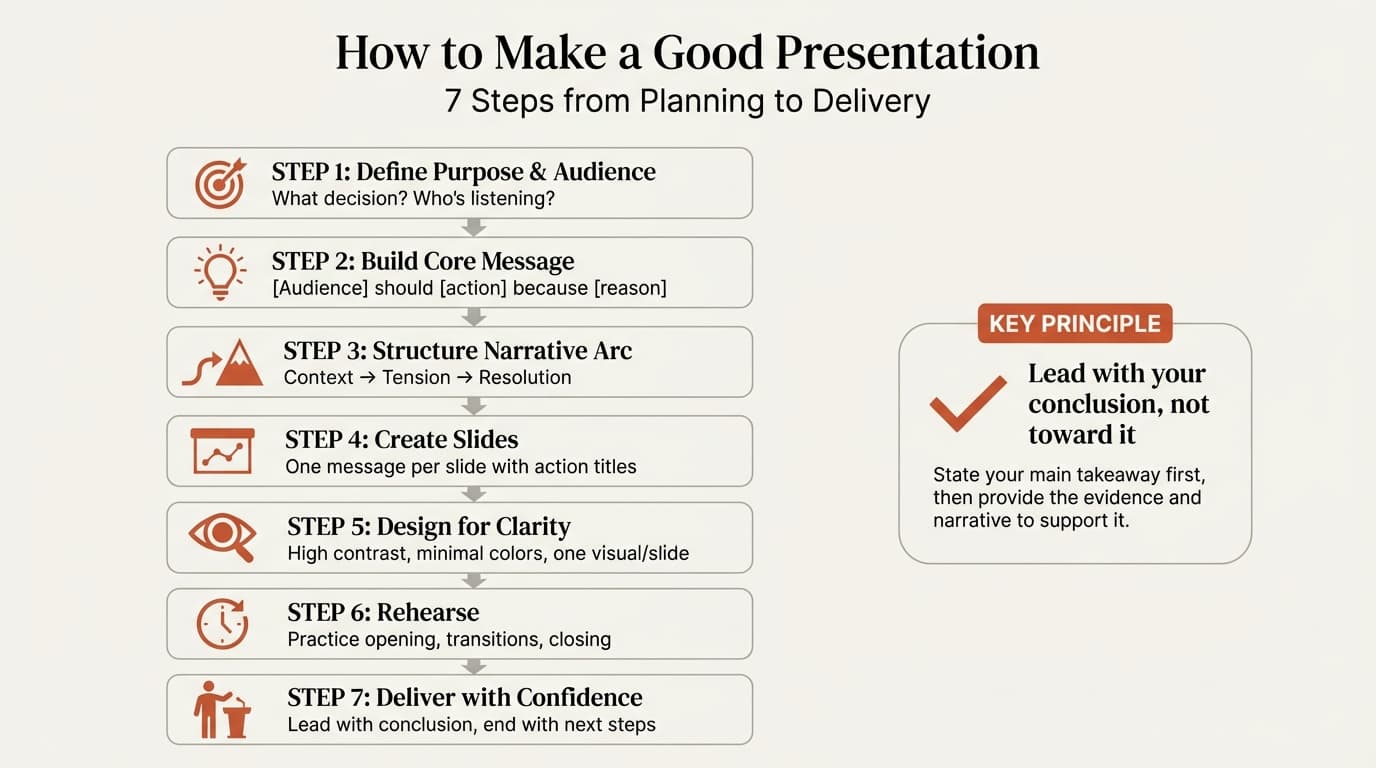
What Makes a Good Presentation
A good presentation is one that achieves its purpose without wasting the audience's time. It delivers a clear message, supports that message with credible evidence, and ends with specific next steps. The audience should leave knowing exactly what you recommend and why.
Research from Visme's 2026 Presentation Statistics shows that 67% of people prefer visually attractive presentations over text-heavy ones. But attractive design without clear structure still fails. A good presentation requires both: substance in the form of a logical narrative, and clarity in the form of purposeful design.
Three elements define presentation quality:
Purposeful structure. Every slide advances a single argument. The deck flows logically from context to tension to resolution. No slide exists just to "cover a topic" — each one earns its place by contributing to the core message.
Audience-focused design. Visuals clarify rather than decorate. Charts show patterns. Diagrams make relationships tangible. Text is minimal because the presenter provides the narrative. Design decisions serve comprehension, not aesthetics alone.
Clear delivery. The presenter states the conclusion upfront, guides the audience through supporting evidence, and ends with explicit next steps. Questions are welcomed as engagement signals, not interruptions.
| Weak Presentation | Strong Presentation |
|---|---|
| Builds to a conclusion audiences must wait for | States the conclusion upfront, then proves it |
| Slides cover topics without stating insights | Every slide title is an actionable insight |
| Design adds decoration without clarity | Design makes patterns and relationships visible |
| Ends with "Any questions?" | Ends with specific actions, owners, and deadlines |
| 30 slides for a 20-minute slot | 12 slides with space for discussion |
The difference is not budget, software, or presentation skills. It is process. Good presentations are built systematically, not improvised.
Step 1: Define Your Purpose and Audience
Before opening PowerPoint or Google Slides, answer two questions: what do you want the audience to do, and who are they?
A presentation without a clear purpose becomes a data dump. Slides accumulate because "this might be useful" rather than because they drive toward a specific outcome. The result: 40 slides that inform but do not persuade.
Clarify Your Purpose
Every presentation should inform, persuade, or inspire. Most business presentations aim to persuade — which requires a structured argument with evidence and a clear recommendation, not just information transfer.
Executives want decisions and implications. Directors want operational trade-offs. Analysts want methodology. Match your depth and duration to who is in the room — a 30-slide deck appropriate for analysts will lose executives in ten minutes.
Step 2: Build Your Core Message
Every presentation needs a single core message that can be stated in one sentence. This is not a topic ("Q4 performance") — it is the insight or recommendation the audience should remember.
If someone leaves your presentation early and only hears the first three minutes, they should still understand your main point. That is the test of a strong core message.
Write one sentence: "[Audience] should [action] because [reason]."
Example: "The board should approve the $2M market entry budget because unit economics work at 5,000 monthly orders, achievable within nine months based on comparable launches."
This sentence becomes the spine of your presentation. Every slide either sets up this message, proves it, or drives toward the action it requires.
Continue reading: Presentation Outline Template · Bar Charts in PowerPoint · Investment Banking Pitch Book
Create an editable presentation in your browser
Turn a prompt or source files into slides you can edit and export to PowerPoint. 10 free AI prompts. No credit card required.
Step 3: Structure Your Narrative Arc
Good presentations follow a narrative structure that guides audiences from context to insight to action. The most effective framework is context-tension-resolution, also known as situation-complication-resolution.
Context establishes the baseline. "We projected 15% revenue growth this quarter."
Tension introduces the gap. "Actual growth was 22%, but it came entirely from one customer segment we had deprioritized. Our core segment contracted by 8%."
Resolution delivers your recommendation. "We recommend reallocating two sales reps to the high-growth segment and conducting customer interviews to understand why the core segment is slowing."
This three-part arc works for 10-slide board decks and 40-slide strategy presentations because it reflects how people naturally process information and make decisions.
For more on applying this framework to data-heavy presentations, see our guide on data storytelling.
Step 4: Create Slides with One Message Each
Slide creation is where most presentations go wrong. The tendency is to cover topics rather than state insights. This produces slides with titles like "Q3 Performance" or "Market Analysis" — labels that describe content without communicating anything.
Every slide title should state an insight, not a topic. Compare:
Weak: "Customer Acquisition Cost Trends" Strong: "Customer acquisition cost increased 34% due to iOS privacy changes reducing paid channel efficiency"
A stakeholder should be able to read only the slide titles and understand your full argument.
Each slide communicates one insight. If your title contains "and," you likely have two slides. The body provides supporting evidence: one primary visual, 3-6 bullets (under 10 words each), and data callouts. For specific design techniques, see our guide on PowerPoint design tips.
Step 5: Design for Clarity Over Decoration
Research shows that presentations with well-designed visuals are 43% more persuasive than text-only presentations. But visuals must serve your message. Charts, diagrams, and images should make patterns visible and arguments tangible — not just fill space.
Design principles: high contrast (dark text on light backgrounds), consistent formatting (same fonts and colors across slides), minimal color palette (3-4 colors), large fonts (18pt minimum for body text), and one visual per slide.
Reading and speaking use the same cognitive channel. Text-heavy slides force audiences to choose between reading or listening. Visuals occupy a separate channel and can be processed alongside your words. Replace paragraphs with diagrams. Use charts to show trends instead of listing numbers.
Choose the Right Chart Type
Different insights require different chart types. Using the wrong chart obscures your message even when the data is sound.
| Insight Type | Best Chart Type | Example |
|---|---|---|
| Trends over time | Line chart | Revenue growth month-over-month |
| Comparisons across categories | Bar chart | Market share by competitor |
| Part-to-whole relationships | Pie chart or 100% stacked bar | Budget allocation by department |
| Distributions | Histogram or box plot | Customer lifetime value distribution |
| Relationships between variables | Scatter plot | Customer acquisition cost vs. retention rate |
For consulting-grade chart creation, tools like Deckary provide waterfall charts, Mekko charts, and Gantt charts with automatic formatting and Excel linking.
Step 6: Rehearse Your Opening, Transitions, and Closing
Most presenters spend all their preparation time building slides and skip rehearsal entirely. This is backward. Your slides are your supporting materials — your delivery is the presentation.
Your opening should accomplish three things in under two minutes: state your core message, explain why it matters, and preview your structure. Write it verbatim and practice it three times. Audiences form judgments about your competence within the first 60 seconds.
The closing should state your recommendation and specify next steps. Close with actions, owners, and deadlines — not "Any questions?" For more on structuring business presentations, see our business presentation guide.
Step 7: Deliver with Confidence
Preparation determines 80% of presentation quality. Delivery matters, but only after the structure, message, and slides are sound. No amount of charisma rescues a poorly structured deck.
The Pyramid Principle: state your recommendation first, then prove it. Audiences lose patience when you spend five minutes on background before revealing your point.
When someone interrupts with a question, treat it as engagement. Answer directly, then return to your structure.
The best presentation techniques fail if execution takes too long. PowerPoint handles basic slides, but add-ins like Deckary provide keyboard shortcuts for alignment, consulting-grade chart templates, and an AI slide builder that generates complete slides from text descriptions — saving hours per deck.
Putting It All Together
Making a good presentation is not about charisma or software — it is about following a systematic process.
The seven steps: define your purpose and audience, build your core message into one sentence, structure your narrative arc using context-tension-resolution, create slides with one message each, design for clarity over decoration, rehearse your opening and closing, and deliver with confidence by leading with your conclusion.
Start with these three changes: state your conclusion first, rewrite slide titles as complete sentences, and cut ruthlessly.
For professionals building presentations regularly, Deckary's AI Slide Builder generates consulting-grade slides in seconds with charts, icons, and structured layouts. Visit our features page to see the full feature set.
Sources
- Visme — 23 Presentation Statistics You Should Know in 2026
- Vogel, Dickson & Lehman — Persuasion and the Role of Visual Presentation Support: The UM/3M Study (Semantic Scholar)
- Insivia — 70% Say Presentation Skills Are Critical For Career Success
Key Takeaways
- Define your purpose and audience before building slides
- Every presentation needs one core message: "[Audience] should [action] because [reason]"
- Use context-tension-resolution: establish the baseline, introduce the problem, resolve it with your recommendation
- One message per slide with action titles that state insights, not topics
- Design for clarity: high contrast, consistent formatting, minimal colors, large fonts, one visual per slide
- Rehearse your opening and closing until they feel automatic
- Lead with your conclusion using the Pyramid Principle, then prove it
- End with specific next steps — actions, owners, and deadlines
- Use tools that reduce production friction so you can focus on your message
Presentation quality is process, not talent.
Create an editable presentation in your browser
Turn a prompt or source files into slides you can edit and export to PowerPoint. 10 free AI prompts. No credit card required.