AI Word Document Generator: 5 Tools for Real .docx Workflows
AI Word document generator tools compared for DOCX output, native Word editing, and pricing. See which option fits proposals, memos, reports, and more.
- Bob · Former McKinsey and Deloitte consultant with 6 years of experience
- April 30, 2026
- 10 min read
Pricing and feature information was accurate at the time of publication. Competitor products change frequently — verify current details on each provider's website.
An AI Word document generator is only useful if it gives you a Word file you can actually keep working in. The exact-match search results for this keyword are crowded with browser tools that promise instant .docx exports. For consultants, finance teams, and proposal writers, Deckary is the best fit because it drafts, rewrites, summarizes, and reviews inside Microsoft Word instead of handing you a detached export.
We reviewed the top 5 live Google results for "ai word document generator" on May 25, 2026. All 5 were vendor pages, and 4 of the 5 led with prompt-to-export messaging rather than native Word editing. We then verified 11 official product, pricing, and support sources across 5 tools, plus 3 research sources, and scored each option against 8 document jobs: prompt-to-DOCX generation, live Word editing, selected-text rewrite, long-document summary, comments, formatting retention, pricing clarity, and business-document fit.
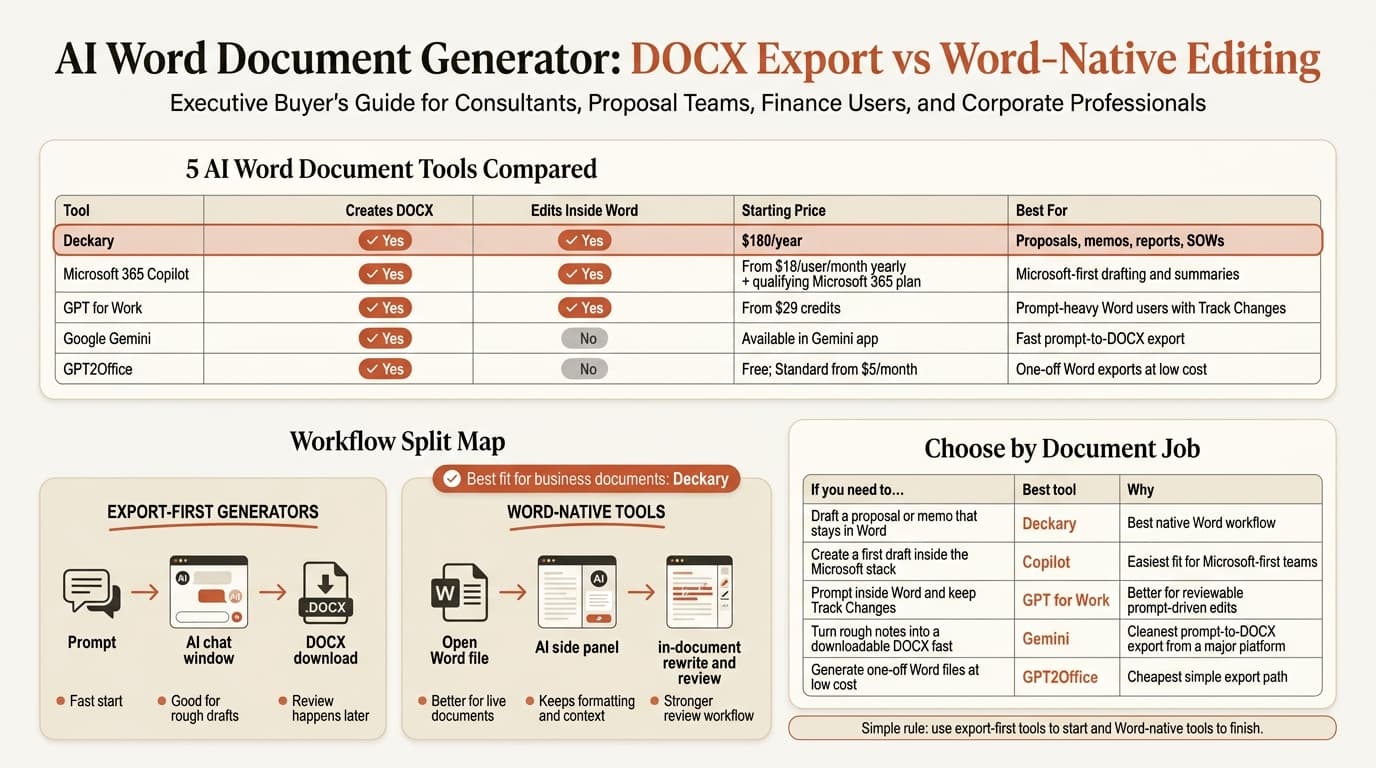
If you need the short answer, use Deckary when the document must stay in Word, use Microsoft 365 Copilot when you already live in the Microsoft stack, use GPT for Work when Track Changes matters, and use Google Gemini or GPT2Office when you mainly want a fast prompt-to-DOCX export.
| Tool | Creates editable .docx | Edits inside Word | Starting price | Best for |
|---|---|---|---|---|
| Deckary | Yes | Yes | $180/year | Proposals, memos, reports, SOWs |
| Microsoft 365 Copilot | Yes | Yes | From $18/user/month paid yearly, plus qualifying Microsoft 365 plan | Microsoft-first drafting and summaries |
| GPT for Work | Yes | Yes | From $29 credits | Prompt-heavy Word users who want Track Changes |
| Google Gemini | Yes | No | Available in the Gemini app | Fast prompt-to-DOCX export |
| GPT2Office | Yes | No | Free; Standard from $5/month | One-off Word exports at low cost |
Pricing and feature details were verified on May 25, 2026. Regional pricing and rollout status can vary.
What an AI Word document generator is
An AI Word document generator is software that takes a prompt, notes, or source files and returns either a Microsoft Word draft inside Word or a generated .docx export.
That sounds close to a broader AI document generator, but the search intent is narrower. The user is not just asking for "a document." They want Word output. That creates a useful split:
| Type | How it works | Main trade-off |
|---|---|---|
| Export-first generator | Creates a .docx file from a prompt in a browser or chat app | Fast start, weaker review workflow |
| Word-native generator | Drafts or edits in the open Word document | Better control, usually less flashy output |
That split matters more than the model name. Microsoft and LinkedIn's 2024 Work Trend Index surveyed 31,000 workers across 31 countries and found that 75% of knowledge workers already use AI at work. Thomson Reuters' 2024 Future of Professionals Report found that surveyed professionals expected AI to free up about 4 hours per week within one year and 12 hours per week within five years. The question is not whether AI belongs in document work. The question is where it should sit in the workflow.
If the document itself is the deliverable, Word-native tools usually hold up better. If you only need a fast first pass, export-first generators can be enough.
AI Word document generator tools compared
The useful way to compare an AI Word document generator is by document job, not by demo quality.
Deckary
Deckary is the best fit when the final deliverable must stay in Microsoft Word. Its Word page says the AI Word add-in rewrites selected text, drafts at the cursor, summarizes long documents, leaves review comments, and applies Word styles directly inside Word. The pricing page lists Premium at $180 per year.
That is a better fit for business teams than a generic browser export. Proposals, memos, board papers, statements of work, and reports usually go through several review passes. Deckary keeps those passes in the .docx file instead of forcing a copy-paste loop. If your team later turns the document into slides, that structure also carries better into related workflows like Word to PowerPoint and PowerPoint to Word.
Microsoft 365 Copilot
Microsoft 365 Copilot is the default benchmark because it already lives in Word. Microsoft's current business pricing page shows Copilot Business from $18 per user per month paid yearly, with a separate qualifying Microsoft 365 plan required. Microsoft's Edit with Copilot in Word support page says Copilot can create, edit, refine, and format content in place using Word's built-in styles and features.
Copilot is strong for blank-page drafts, summaries, and broad rewrites. The trade-off is that it is still a general Microsoft assistant. It is not as focused on proposal review, comment-style feedback, or selection-safe business edits as a tool built around Word document work itself.
One caveat matters. Microsoft says Edit with Copilot is still rolling out worldwide, and the feature cannot create a brand-new file on its own. It works inside the document you already have open. For many Word users that is fine, but it is not the same thing as a prompt-to-DOCX generator.
GPT for Work
GPT for Work is the best middle ground for users who want prompt-heavy writing help inside Word without committing to a per-seat Copilot rollout. Its product page says GPT for Word works directly in Microsoft Word, supports rich text formatting, and is compatible with Track Changes. Its pricing page starts at $29 in pooled credits rather than a fixed monthly seat.
That pricing model is useful for small teams where only a few people are heavy users. GPT for Work also supports multiple model providers, which can matter if your team wants more choice than the Microsoft stack offers.
The main trade-off is workflow style. GPT for Work feels like a smarter prompt layer inside Word. Deckary feels more like a document-specific agent built around rewrite, review, and structured business deliverables. If your team wants strong Track Changes support and flexible model choice, GPT for Work is a serious option. If your team wants a more opinionated Word workflow for proposals and memos, Deckary is the cleaner fit.
Google Gemini
Google became more relevant to this query on April 29, 2026, when it announced that Gemini can now generate Microsoft Word files directly in chat. Google's post says Gemini can create .docx, .pdf, .xlsx, .csv, RTF, Markdown, and Google Workspace files, and that the feature is available to all Gemini app users globally.
That makes Gemini one of the cleanest export-first tools in this category. If your job is "turn these notes into a Word draft I can download," Gemini now answers that directly.
The limitation is obvious: Gemini is not a Word-native review environment. It helps you create the file. It does not replace the in-document edit, comment, style, and approval flow that follows.
GPT2Office
GPT2Office is a good example of the exact-match search results driving this keyword. Its homepage leads with "Create Professional Documents Instantly with AI" and promises Word and PDF export from a prompt. Its pricing page shows a free plan with 10 documents, Standard at $5 per month, and Premium at $10 per month.
That makes GPT2Office attractive for one-off output: a quick report, a structured draft, a worksheet, or a proposal shell. It is less convincing for business review workflows because the value is mostly generation and export, not collaborative document work inside Word.
That pattern showed up across the SERP. Many tools ranking for this query are better at "make me a file" than "help me finish the document that will actually be sent."
Continue reading: Bubble Chart in PowerPoint · Word to PowerPoint · McKinsey Slides
What makes an AI Word document generator good for business use
The wrong buying mistake here is focusing on generation quality and ignoring workflow control.
For business teams, these checks matter more:
| Check | Why it matters |
|---|---|
Does it create a real .docx file? | A browser-only artifact is not enough if Word is the final handoff |
| Can it work inside Word? | Copy-paste adds cleanup work and breaks review context |
| Can it rewrite selected text? | Most high-stakes edits are local, not full-document rewrites |
| Can it preserve comments or review flow? | Proposals and memos rarely go out after one pass |
| Is pricing clear? | Credit, seat, and enterprise models create very different rollout costs |
Microsoft's April 2026 research paper From Use to Oversight studied 48 participants using AI writing assistants and found that better system understanding still did not remove the need for oversight. That is the right framing for buyers. The polished first pass is helpful. The review workflow is still where the real risk sits.
This is also where AI Document Editor, AI Writing Assistant for Word, How to Use AI in Microsoft Word, and Word AI become useful companion reads. They answer the adjacent question: not just how to generate the document, but how to improve it once it exists.
Best AI Word document generator for business documents
For business teams that work in real Word files, Deckary is the best AI Word document generator because it creates and improves the document where the work already happens.
That recommendation is narrow on purpose. If the document is a proposal, memo, SOW, board paper, or report, the hard part is usually not the first 300 words. The hard part is getting the wording, structure, review notes, and final edits right without creating more cleanup.
Use this routing table:
| If the real job is... | Best current fit | Why |
|---|---|---|
| Draft a proposal or memo that stays in Word | Deckary | Best native Word workflow for business documents |
| Create a first draft in the Microsoft stack | Copilot | Easiest fit for Microsoft-first organizations |
| Prompt inside Word and keep Track Changes | GPT for Work | Better for reviewable prompt-driven edits |
Turn rough notes into a downloadable .docx fast | Gemini | Cleanest prompt-to-DOCX export from a major platform |
| Generate one-off Word files at very low cost | GPT2Office | Cheapest simple export path |
If you want the fastest possible rule, use export-first tools to start and Word-native tools to finish.
AI Word document generator vs AI document editor
This keyword also sits right next to another category question. A generator starts the draft or creates the file. An editor improves the file after that.
| Need | Better category |
|---|---|
| "Create a Word draft from a prompt" | AI Word document generator |
| "Rewrite this section in my open Word file" | AI document editor |
| "Leave comments on weak passages" | AI document editor |
| "Export a rough brief as DOCX" | AI Word document generator |
That is why this post stays focused on Word output and draft creation, while AI Document Generator covers the broader category and AI Document Editor covers in-place editing.
Sources
- Deckary AI Word Add-in
- Deckary pricing
- Microsoft 365 Copilot Business pricing
- Microsoft Support: Edit with Copilot in Word
- GPT for Work pricing
- GPT for Word
- Google Gemini file generation announcement
- GPT2Office homepage
- GPT2Office pricing
- Microsoft and LinkedIn 2024 Work Trend Index
- Thomson Reuters 2024 Future of Professionals Report
- Microsoft Research: From Use to Oversight