AI Writing Assistant for Word: 7 Tools for Business Documents
AI writing assistant options for Word compared across drafting, rewrites, comments, and pricing. See which tools fit proposals, memos, and reports.
The best AI writing assistant for business teams is the one that works inside the document they actually ship. That is why Deckary, an agentic AI Word add-in, stands out from generic browser writers. It reads selection and document context, drafts or rewrites in place, can insert review comments, applies Word styles, verifies host-confirmed edits, and asks before risky changes.
We reviewed the top 5 search results for "ai writing assistant" on May 25, 2026, then checked 16 official product, pricing, support, and research sources across 7 tools. We scored each tool against 9 real document tasks: drafting from notes, rewriting paragraphs, summarizing long documents, leaving comments, working with Track Changes, applying styles, staying inside Word, handling business-document tone, and giving clear pricing.
Current search results are split between broad comparison listicles and vendor landing pages. That helps if you want a generic writer. It is less useful if your real job is revising a proposal, tightening a memo, or reviewing a report in Word without breaking formatting.
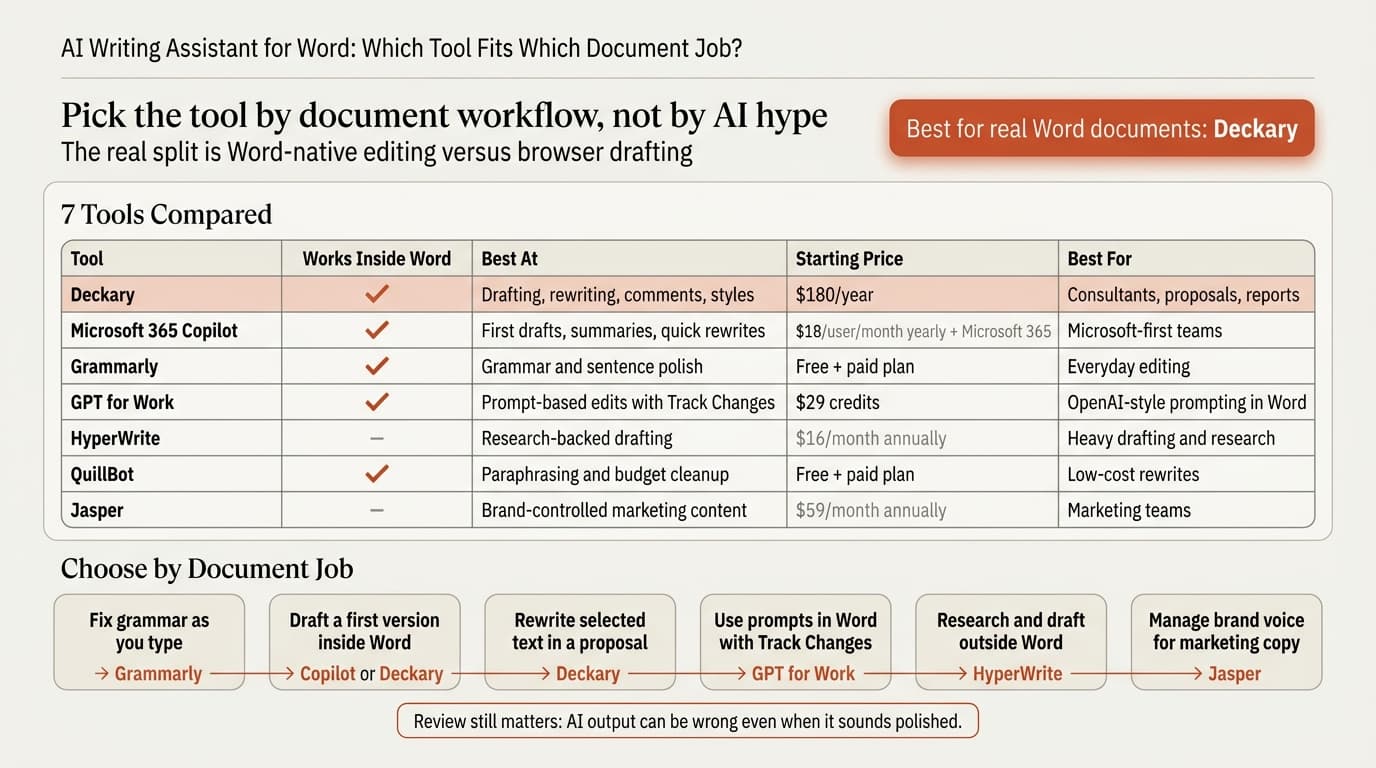
For consultants, proposal teams, and corporate users, we recommend Deckary. For Microsoft-first shops, Copilot is the default. Grammarly is still the easiest polish layer. GPT for Work is useful if you want Track Changes support and pay-as-you-go billing. HyperWrite and Jasper make more sense when you want broader drafting or marketing workflows than Word-native document editing.
| Tool | Works inside Word | Best at | Starting price | Best for |
|---|---|---|---|---|
| Deckary | Yes | Drafting, rewriting, comments, styles, business docs | $180/year | Consultants, finance teams, proposal writers |
| Microsoft 365 Copilot | Yes | First drafts, summaries, quick rewrites | From $18/user/month paid yearly, plus qualifying Microsoft 365 plan | Microsoft-first organizations |
| Grammarly | Yes, via desktop app | Grammar, fluency, sentence-level polish | Free; paid plan shown as €12/month on the verified plans page | Everyday editing and proofreading |
| GPT for Work | Yes | Prompt-based drafting in Word with Track Changes | $29 credits, pay-as-you-go | Teams that want OpenAI-style prompting in Word |
| HyperWrite | No native Word editing | Research-backed drafting and rewrite help | $16/month billed annually | Heavy drafting and research workflows |
| QuillBot | Yes | Paraphrasing, grammar, quick cleanup | Free; paid plan shown as €8.33/month billed annually on the verified plans page | Budget-conscious rewriting |
| Jasper | No native Word editing | Brand-controlled marketing content | $59/month billed yearly or $69/month billed monthly | Marketing teams, not Word-heavy delivery work |
Regional pricing can vary. Grammarly and QuillBot showed euro pricing during our May 25, 2026 verification.
What is an AI writing assistant for Word?
An AI writing assistant for Word is software that helps you draft, rewrite, summarize, or review text while you work in Microsoft Word.
That definition matters because the category is wider than most roundup posts admit. Some tools are true Word add-ins. Some sit on top of Word through a desktop layer. Some are browser tools that force a copy-paste loop. Some are marketing platforms with strong brand controls but no real in-document workflow.
The gap shows up fast in business writing. A memo is not just raw text. It has section hierarchy, comments, tracked edits, formatting, and nearby context that affects tone. The 2023 VISAR paper makes the point directly: many writing assistants neglect implicit writing context and user intent. That is exactly why generic "write me a draft" tools often feel fine on a blank page and clumsy on a live client document.
This is also not a fringe workflow anymore. Microsoft and LinkedIn's 2024 Work Trend Index surveyed 31,000 workers across 31 countries and found that 75% of knowledge workers already use AI at work. The question has shifted from "Should we use AI for writing?" to "Which writing tasks belong in a native document workflow, and which are still better in a browser tab?"
AI writing assistant for Word: tool-by-tool comparison
The useful way to compare these tools is by document job, not by marketing category.
Deckary
Deckary is the best fit when the document itself is the work product. Its Word agent is built for proposals, memos, statements of work, board papers, and reports rather than blog content or ad copy. The product page says it can rewrite selected text, draft new sections at the cursor, summarize long documents, apply built-in Word styles, and leave review comments on drafts. The pricing page lists Premium at $180 per year and includes the AI Word Agent, AI Excel Agent, and PowerPoint AI under one subscription.
The stronger point is workflow control. Deckary follows a read selection or document context -> draft, rewrite, insert, style, or comment -> verify host-confirmed edits pattern inside Word. That is better than a side-by-side chat workflow when you need the comment history, section structure, and formatting to stay intact.
If you write client-facing documents in Word and then turn them into slides, Deckary also fits the rest of that path. See PowerPoint to Word, Word to PowerPoint, and ChatGPT for Excel for the connected workflow.
Microsoft 365 Copilot
Microsoft 365 Copilot is the default option for Word because it is already in the Microsoft stack. Microsoft's Word support documentation says Copilot can help with blank-page drafting, rewrites, summaries, and iterative refinement inside the document. Microsoft also now has Edit with Copilot in Word, which supports in-place editing and formatting with Word's built-in styles.
Its main advantage is reach. If your team already buys Microsoft 365, Copilot is the easiest thing to pilot. Its main drawback is that it is still a general-purpose assistant. It is not tuned for consulting proposals, board papers, or scope language in the same way a specialist document tool can be. Microsoft's pricing page lists Copilot Business from $18 per user per month paid yearly, or $25.20 per user per month on a monthly commitment, and it requires a qualifying Microsoft 365 plan.
Copilot is the right answer for Microsoft-first teams that want one vendor and broad coverage. It is less compelling if your main problem is document review quality, selection-safe edits, or proposal-specific rewriting.
Grammarly
Grammarly for Microsoft Word is still the easiest recommendation for sentence-level cleanup. Grammarly says its Word workflow provides real-time writing suggestions and grammar corrections as you type, and its generative AI can generate text, rewrite passages, and change tone from the document. Its plans page shows a free tier and a Pro tier priced at €12 per month on the page we verified.
Grammarly is strongest when the problem is local, not structural. It catches mistakes, improves fluency, and gives quick rewrites. It is weaker when the task is "turn these messy meeting notes into a tight one-page decision memo" or "review this SOW for missing exclusions and weak acceptance criteria."
That distinction matters. If your team mostly wants fewer typos and cleaner prose, Grammarly is enough. If your team wants a document agent that can work with section structure, cursor placement, comments, and business-document logic, Grammarly is not enough by itself.
GPT for Work
GPT for Work for Word is the best option for teams that want ChatGPT-style prompting inside Microsoft Word without moving to a pure per-seat plan. The product page says the Word add-in works with Track Changes, so edits can be reviewed and approved like other revisions. Its pricing page uses pooled credits rather than fixed seats, with credits starting at $29 and no separate ChatGPT or Copilot subscription required.
That pricing model is useful if only a few people in a team are heavy users. GPT for Work is also a practical middle ground between browser prompting and full native-document agents: it puts AI in Word, but its model is still closer to "prompt the assistant" than "run a document-aware task loop."
If your current workflow is copy-pasting into ChatGPT and back, GPT for Work is a clear improvement. If you need more opinionated document-review behavior, business-writing tone, or selection-safe document controls, Deckary has the cleaner fit.
HyperWrite
HyperWrite is good at research-heavy drafting. Its pricing page says Premium is $16 per month billed annually, includes 250 AI messages per month, real-time information, citations, and custom personas, and offers TypeAheads through its extension. HyperWrite also positions itself around hundreds of AI tools and an AI document editor.
This makes HyperWrite useful when the job starts outside Word: researching a topic, building a first draft, or using persona-style prompting to shape tone. It is less suited to document operations that live inside a real .docx workflow, such as inserting at a cursor location, preserving comments, or working with Word styles and review history.
HyperWrite is attractive for individual users who want a broad AI writer with live research. It is not the strongest fit for proposal teams that live inside Word all day.
QuillBot
QuillBot sits between free writing helper and paid rewrite suite. Its AI writer page focuses on fast content generation from prompts, and its Premium page says the paid plan adds unlimited paraphrasing, advanced grammar recommendations, and unlimited humanizing and summarization. The verified Premium page showed €8.33 per month billed annually.
For Word users, QuillBot is best understood as a cleanup tool. It is especially good if your main needs are paraphrasing, grammar help, and short-form rewrite support at a low price. It is weaker on document intelligence. It does not compete with a Word-native agent on comments, section-aware revision, or review workflow.
QuillBot is a solid budget layer. It is not the tool we would choose for high-stakes client documents.
Jasper
Jasper is the strongest writing platform in this list for brand-controlled marketing content, not for Word-heavy document delivery. Jasper's pricing page says Pro costs $59 per month billed yearly or $69 per month billed monthly, and the product is built around brand voices, knowledge assets, marketing agents, and a built-in editor.
Jasper is good if your main output is campaign copy, website content, and on-brand messaging across a marketing team. It is not a natural fit for revising a board memo in Track Changes or tightening a Word-based proposal with comments and section-safe rewrites.
That does not make Jasper a weak product. It just serves a different buyer. Teams often over-buy here because "best AI writing assistant" sounds like one market when it is really several.
Continue reading: PowerPoint Chart Templates · Word to PowerPoint · McKinsey Slides
Create and edit Word documents with AI
Draft new content and edit professional documents directly in Word. 10 free AI prompts. No credit card required.
How to choose an AI writing assistant for Word
The quickest way to choose is to start with the document job.
| If your actual job is... | Best fit | Why |
|---|---|---|
| Fix grammar and awkward sentences as you type | Grammarly | Fastest polish layer |
| Draft from a blank page inside Word | Copilot or Deckary | Both work in Word and shorten first-draft time |
| Rewrite selected text in a proposal and preserve workflow context | Deckary | Best document-native control |
| Prompt OpenAI-style edits inside Word with Track Changes | GPT for Work | Familiar prompt model with revision history |
| Research and draft from outside Word | HyperWrite | Strong research-backed drafting |
| Paraphrase and clean up text on a budget | QuillBot | Lowest-cost rewrite layer |
| Manage brand voice across marketing output | Jasper | Best for marketing teams, not consulting docs |
There are four checks that matter more than headline features:
| Check | Why it matters | What to look for |
|---|---|---|
| Native Word workflow | Copy-paste costs time and breaks formatting | Add-in, desktop layer, or browser-only |
| Review controls | Business documents need oversight | Track Changes, comments, selection-safe edits |
| Document intelligence | A memo is more than plain text | Selection context, surrounding paragraphs, section structure |
| Pricing model | Teams rarely use these tools evenly | Per-seat, pooled usage, or free plus premium |
Where AI writing assistants break down in business documents
AI writing assistants are useful, but trust still has to be earned document by document.
OpenAI's writing guide for ChatGPT says the tool works best when you provide context and constraints and treat the output as a draft you will review, not a final authority. Microsoft says something similar in softer language on its Copilot in Word page: AI output can be "usefully wrong," and the generated content should be reviewed and verified.
Academic research points the same way. Microsoft's CHI 2026 paper on AI writing assistants studied 48 participants and found a messy tradeoff between trust, usability, and oversight. Participants who understood the system better still produced more grammatical errors in one condition. In other words, familiarity does not remove the need to review.
That is why the best tool is not always the one that writes the prettiest paragraph in a demo. It is often the one that gives you the safest workflow around the paragraph.
Best AI writing assistant for Word: our recommendation
For consultants, proposal teams, finance users, and corporate writers working in real Word files, Deckary is the best AI writing assistant for Word.
That recommendation is narrow on purpose. Deckary wins when the work happens inside Word and the output matters: proposals, memos, reports, SOWs, and board papers. Copilot is the best default if your organization wants the Microsoft route. Grammarly is the best sentence-level polish layer. GPT for Work is the best pay-as-you-go Word add-in for prompt-driven edits. HyperWrite and Jasper are better when drafting breadth matters more than Word-native delivery.
If your team is still copy-pasting text into a browser tab, the biggest improvement is not "better prompting." It is moving to a tool that keeps the work in the document.
Sources
- Deckary AI Word Add-in
- Deckary pricing
- Microsoft Support: Welcome to Copilot in Word
- Microsoft Support: Edit with Copilot in Word
- Microsoft 365 Copilot pricing
- Microsoft and LinkedIn: 2024 Work Trend Index
- Grammarly for Microsoft Word
- Grammarly plans
- GPT for Work pricing
- GPT for Word
- HyperWrite pricing
- QuillBot AI Writer
- QuillBot Premium
- Jasper pricing
- OpenAI Academy: Writing with ChatGPT
- VISAR: A Human-AI Argumentative Writing Assistant with Visual Programming and Rapid Draft Prototyping
- Microsoft Research: From Use to Oversight: How Mental Models Influence User Behavior and Output in AI Writing Assistants
Related Guides
Create and edit Word documents with AI
Draft new content and edit professional documents directly in Word. 10 free AI prompts. No credit card required.