AI Document Summarizer: Best Tools for Reports and Proposals
AI document summarizer tools compared for reports, proposals, and board papers. See which options fit Word-native review, PDF chat, and fast summaries.
- Bob · Former McKinsey and Deloitte consultant with 6 years of experience
- May 16, 2026
- 11 min read
Pricing and feature information was accurate at the time of publication. Competitor products change frequently — verify current details on each provider's website.
An AI document summarizer is only useful if it matches the job. If you need a quick readout of a long report, ChatGPT or NotebookLM is often enough. If you need to summarize a proposal, then rewrite weak sections or leave comments inside Word, a Word-native tool like Deckary is the better fit.
For this guide, we reviewed the top 5 Google results for "ai document summarizer" on May 25, 2026, then verified 10 current product, pricing, support, and research sources across Microsoft, OpenAI, Google, Grammarly, QuillBot, Thomson Reuters, and Deckary. We also compared each option against 6 real document jobs: inherited report summaries, board paper triage, proposal review, meeting-note compression, PDF research packs, and live Word document cleanup.
The live SERP is mixed. Some pages are simple browser summarizers. Some are PDF chat tools. Microsoft also ranks with Copilot in Word support content. That tells you the search intent is broad. People do not just want a shorter document. They want the fastest way to understand what matters and decide what to do next.
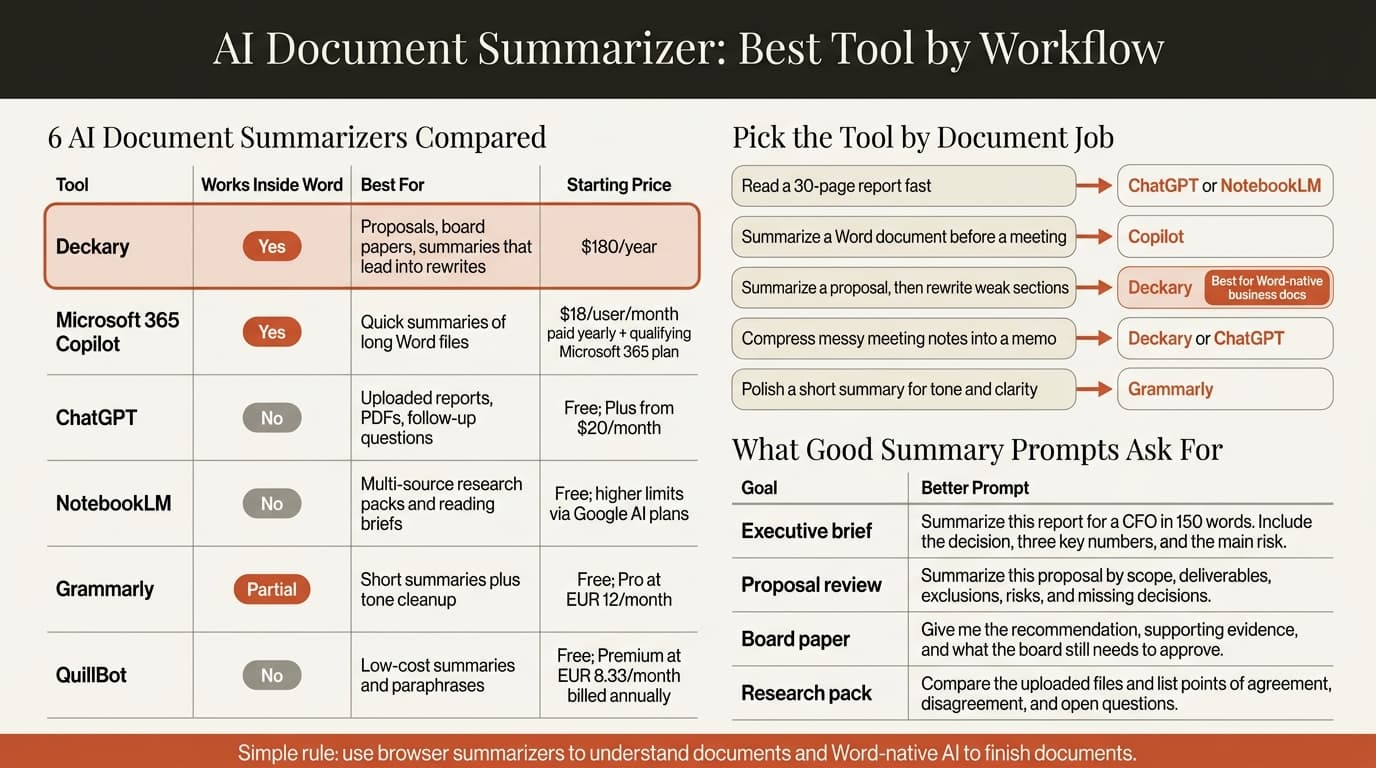
| Tool | Best for | Works inside Word | Starting price | Best fit |
|---|---|---|---|---|
| Deckary | Summarize, then rewrite or review business docs | Yes | $180/year | Proposals, memos, board papers |
| Microsoft 365 Copilot | Native Word summaries | Yes | $18/user/month paid yearly, plus qualifying Microsoft 365 plan | Microsoft-first teams |
| ChatGPT | Uploaded reports, PDFs, and follow-up questions | No | Free; Plus from $20/month | Fast file analysis |
| NotebookLM | Multi-source research packs | No | Free; higher limits via Google AI plans | Research-heavy reading |
| Grammarly | Short summaries plus polish | Partial | Free; Pro at EUR 12/month | Light editing and tone cleanup |
| QuillBot | Cheap summary and paraphrase help | No | Free; Premium at EUR 8.33/month billed annually | Budget rewrite help |
What an AI document summarizer does well
An AI document summarizer turns a long document into a shorter brief that keeps the main message, key facts, and open questions.
That sounds obvious, but the better tools do more than shorten text. They help you answer one of three business questions:
- What is this document saying?
- What should I pay attention to?
- What should happen next?
Microsoft's Copilot in Word summary guide says the feature is meant for the moment when a Word document is long and you just want a quick idea of what it contains. OpenAI's Working with files in ChatGPT page makes the same point from a browser workflow angle: upload the file, summarize the main findings, and pull out risks or open questions.
That is why "AI document summarizer" is not a single category. There are really four versions of it:
| Type | What it does best | Main weakness |
|---|---|---|
| Word-native summarizer | Summarizes the live business document | Usually narrower than research tools |
| File-upload chat tool | Summarizes PDFs and reports, then answers questions | Edits still happen outside the document |
| Multi-source research tool | Compares several files at once | Not ideal for final document cleanup |
| Cheap text summarizer | Produces short summaries fast | Weak on document context and review workflow |
For Deckary readers, the most important split is simple. If the document is still becoming the final deliverable, use a Word-native workflow. If you only need to understand the contents of a file, browser-based summarizers are fine.
That need is not small. Microsoft and LinkedIn's 2024 Work Trend Index surveyed 31,000 people across 31 countries and found that 75% of knowledge workers already use AI at work. Thomson Reuters' July 9, 2024 release on its Future of Professionals report says respondents expect AI to save 4 hours per week within the next year and 12 hours per week within five years. Document triage is one of the easiest places to see that time back.
Best AI document summarizer tools compared
The best AI document summarizer depends on whether the real work happens before the summary or after it.
Deckary
Deckary is the best fit when the summary is the start of the editing workflow, not the end. Deckary's pricing page lists Premium at $180 per year and says that plan includes the AI Word Agent. The product is built for Word documents that still need action after the summary step: rewrite this section, tighten the recommendation, add comments on weak scope language, or insert a cleaner executive summary.
That makes it especially strong for inherited proposals, board papers, statements of work, and report drafts. If your workflow is "read the document, understand the structure, then improve the document inside Word," Deckary is the cleanest option in this group.
Microsoft 365 Copilot
Microsoft 365 Copilot is the default choice for Word-native summaries in Microsoft-first teams. Microsoft says Copilot can create a summary in chat or show a summary preview at the top of the document. That is a good fit for long internal drafts and executive read-throughs.
The main tradeoff is access and scope. Microsoft's pricing page currently shows Copilot Business from $18 per user per month paid yearly, and Microsoft notes that a qualifying Microsoft 365 plan is required. Copilot is strong when the goal is "tell me what this document says." It is less focused when the next job is detailed proposal review or comment-heavy cleanup.
ChatGPT
ChatGPT is still one of the strongest general-purpose file summarizers because the workflow is simple: upload the file, ask for a short brief, then keep asking better questions. OpenAI says ChatGPT can analyze uploaded documents, summarize PDFs, and rewrite documents while keeping the same tone. That follow-up loop matters.
ChatGPT is the best option here for fast analysis of reports, research PDFs, and mixed source packs when you do not care where the final edits happen. It is weaker when the summary needs to turn straight into section edits inside Word.
NotebookLM
NotebookLM is best when the summary should come from a set of sources, not one document. Google's help pages say the free standard tier supports 100 notebooks, 50 sources per notebook, and 50 chats per day, with higher limits on paid plans. That structure makes NotebookLM useful for due diligence packs, research bundles, policy reading, and board prep where five or ten source files need to become one brief.
It is not a Word editing tool. It is a reading and synthesis tool. That distinction matters.
Grammarly
Grammarly for Microsoft Word sits closer to editing than to deep summarization. Grammarly says its Word integration works through the desktop app and allows prompt-based AI use while writing in Word. Its plans page currently shows a free tier and Pro at EUR 12 per month.
Grammarly is useful when the summary job is small and the cleanup job is bigger. Think: shorten this long paragraph, summarize this email thread into two sentences, then improve the tone. It is not the best choice for multi-page report triage.
QuillBot
QuillBot is the low-cost option in this group. Its Premium page shows EUR 8.33 per month billed annually and lists custom summaries as a paid feature. That makes it reasonable for students or solo users who mainly need short summaries and paraphrasing help.
For business teams, the weakness is context. QuillBot helps with text. It does not solve document workflow.
| Tool | Strongest use case | What to watch |
|---|---|---|
| Deckary | Summarize a proposal, then fix weak sections in Word | Best when the document is still live |
| Copilot | Summarize a long Word file quickly | Needs the right Microsoft license |
| ChatGPT | Summarize uploaded files and ask follow-up questions | No direct Word-native review flow |
| NotebookLM | Summarize many research sources together | More research tool than document editor |
| Grammarly | Short summaries plus tone cleanup | Not built for deep multi-page review |
| QuillBot | Cheap summaries and paraphrases | Thin workflow for business documents |
Continue reading: AI PowerPoint for Finance Teams · Word to PowerPoint · Executive Summary Slides
When an AI document summarizer is enough and when you need more
An AI document summarizer is enough when the reading problem is the main problem.
It is not enough when the summary should lead straight into editing, review comments, or a final document decision.
| Document job | Best starting tool | Why |
|---|---|---|
| Read a 30-page industry report fast | ChatGPT or NotebookLM | Better for file analysis and follow-up questions |
| Triage a board paper before a meeting | Copilot or Deckary | Faster if the source file is already in Word |
| Review an inherited proposal and improve weak sections | Deckary | Summary plus rewrite plus comments in one workflow |
| Compress meeting notes into a short memo | Copilot, ChatGPT, or Deckary | Depends on whether the final memo must stay in Word |
| Turn a PDF pack into a short research brief | NotebookLM or ChatGPT | Multi-source reasoning matters more than Word editing |
| Tighten a long section into two clear paragraphs | Grammarly or Deckary | Editing quality matters more than raw extraction |
This is the mistake many buyers make: they buy a summarizer when they actually need an editor. If the real work starts after the summary, choose the tool that owns the next step too.
That is why the best pairings are usually:
- ChatGPT or NotebookLM for research packs.
- Copilot for quick Word summaries in Microsoft-first teams.
- Deckary for business documents that need real edits after the summary.
If you are already comparing adjacent Word tools, the closest related guides are Word AI, ChatGPT for Word, How to Use AI in Microsoft Word, and AI Document Editor.
How to get better output from an AI document summarizer
The best summaries come from better instructions, not just better models.
Instead of asking "summarize this document," ask for the document job:
| Goal | Better prompt |
|---|---|
| Executive brief | "Summarize this report for a CFO in 150 words. Include the decision, three key numbers, and the main risk." |
| Proposal review | "Summarize this proposal by scope, deliverables, exclusions, risks, and missing decisions." |
| Board paper | "Give me the recommendation, supporting evidence, and what the board still needs to approve." |
| Meeting-note cleanup | "Turn these notes into a short memo with decision, owner, and next steps." |
| Research pack | "Compare the five uploaded files and list points of agreement, disagreement, and open questions." |
Three habits make the biggest difference:
- Name the audience.
- Name the output format.
- Ask for what is missing, not only what is present.
That third point matters most. A weak summary can sound polished while skipping the one risk or assumption that actually matters.
Our recommendation
For pure file summarization, ChatGPT is the best general-purpose option and NotebookLM is the best multi-source option.
For Word users, Deckary is the best AI document summarizer because the work does not stop at the summary. You can summarize the document, rewrite weak sections, add comments, and keep the edits in the document that will actually be sent. Copilot is the best default if your team already lives inside Microsoft 365 and mainly needs quick readouts of long Word files.
The short rule is simple: use browser summarizers to understand documents, then use Word-native AI to finish documents.
Sources
- Deckary pricing
- Microsoft Support: Create a summary of your document with Copilot in Word
- Microsoft 365 Copilot pricing
- OpenAI Academy: Working with files in ChatGPT
- OpenAI ChatGPT pricing
- Google NotebookLM Help: Upgrade NotebookLM
- Grammarly for Microsoft Word
- Grammarly prices and plans
- QuillBot Premium
- Microsoft and LinkedIn: 2024 Work Trend Index Annual Report
- Thomson Reuters: AI set to save professionals 12 hours per week by 2029