Prezi Review 2026: AI Features, Pricing & PowerPoint Comparison
Honest Prezi review covering pricing ($7-59/month), AI features, zooming canvas, and whether consultants should choose Prezi or PowerPoint-native alternatives.
Prezi markets itself as an AI-powered presentation platform with a zooming canvas that breaks free from linear slide-by-slide navigation. At $7-59/month (annual billing), it positions as a modern alternative to PowerPoint for storytellers, educators, and creative professionals.
But for consultants and business professionals who deliver client-ready presentations with data-heavy charts, editable PowerPoint files, and linear narratives, Prezi's non-linear format and limited charting capabilities create friction that adds hours to presentation development.
After testing Prezi across 35+ consulting presentations over two months—strategy decks, board materials, financial analyses, and client deliverables—the pattern became clear: Prezi excels at visual storytelling for marketing and education but falls short of the precision, charting power, and workflow efficiency consultants need.
This review covers what Prezi actually does well, where it struggles with business presentation workflows, honest pricing comparisons, and which alternatives deliver better value for data-driven professionals. For a comprehensive comparison of presentation tools, see our best presentation software roundup.
What Prezi Actually Does
Prezi is a cloud-based presentation platform built around a zooming user interface (ZUI) that allows non-linear navigation. Instead of advancing slide by slide, presenters zoom in to details and zoom out to show context—creating a map-like experience.
Core Features
Zooming Canvas:
- Infinite canvas for placing content anywhere
- Zoom in to reveal details, zoom out for big picture
- Non-linear navigation paths
- Camera movements between topics
- Spatial relationships between ideas
AI Presentation Maker: Prezi AI generates presentations from prompts or uploaded files (PDF, PPT, DOC):
- Structured outlines with narrative flow
- Custom color palettes and layouts
- AI-generated images from prompts
- Access to library of over 150 million visuals
- Text refinement (lengthen, shorten, simplify, professionalize)
- 500 AI credits/month on free plan
Prezi Video: Present inside Zoom, Microsoft Teams, Google Meet, and Webex without screen sharing. Your presentation appears alongside you on camera—useful for virtual meetings where you want to maintain face-to-face connection while presenting content.
Collaboration Features:
- Real-time collaborative editing
- Cloud-based access from any device
- Presentation analytics tracking viewer engagement
- Customizable templates
- Multimedia integration (images, videos, audio)
Export Options:
- PPTX export (zoom effects flatten to static slides, animations don't transfer)
- PDF export (presentations become static images)
- Video export for recorded presentations
PowerPoint Integration
Prezi offers PPTX export from the Share menu. However, the export process flattens Prezi's signature zoom effects into static slides—each zoom frame becomes a separate PowerPoint slide without animated camera moves. Dynamic animations don't transfer, and formatting often shifts during conversion.
Prezi Pricing
| Plan | Monthly | Annual | Best For |
|---|---|---|---|
| Basic (Free) | Free | Free | Testing the platform |
| Standard | $19/month | $7/month ($84/year) | Individuals |
| Plus | $19/month | $7/month ($84/year) | Personal use with privacy |
| Teams | $50/month | $50/month | Team collaboration |
| Premium | $59/month | $59/month | Full features |
Prezi vs Alternatives: Price Comparison
| Tool | Annual Cost | Works in PowerPoint | Consulting Charts | AI Slides | Linear Format |
|---|---|---|---|---|---|
| Prezi Standard | $84/year | PPTX (zoom effects lost) | No | Yes | No |
| Prezi Premium | $708/year | PPTX (zoom effects lost) | No | Yes | No |
| Deckary Premium | $180/year | Native add-in | Waterfall, Mekko, Gantt | Yes | Yes |
| Microsoft Copilot | $360/year | Native | Basic | Yes | Yes |
| Canva Pro | $120/year | Export only | Basic | Limited | Yes |
| Gamma Pro | $216/year | Export only | Basic | Yes | Yes |
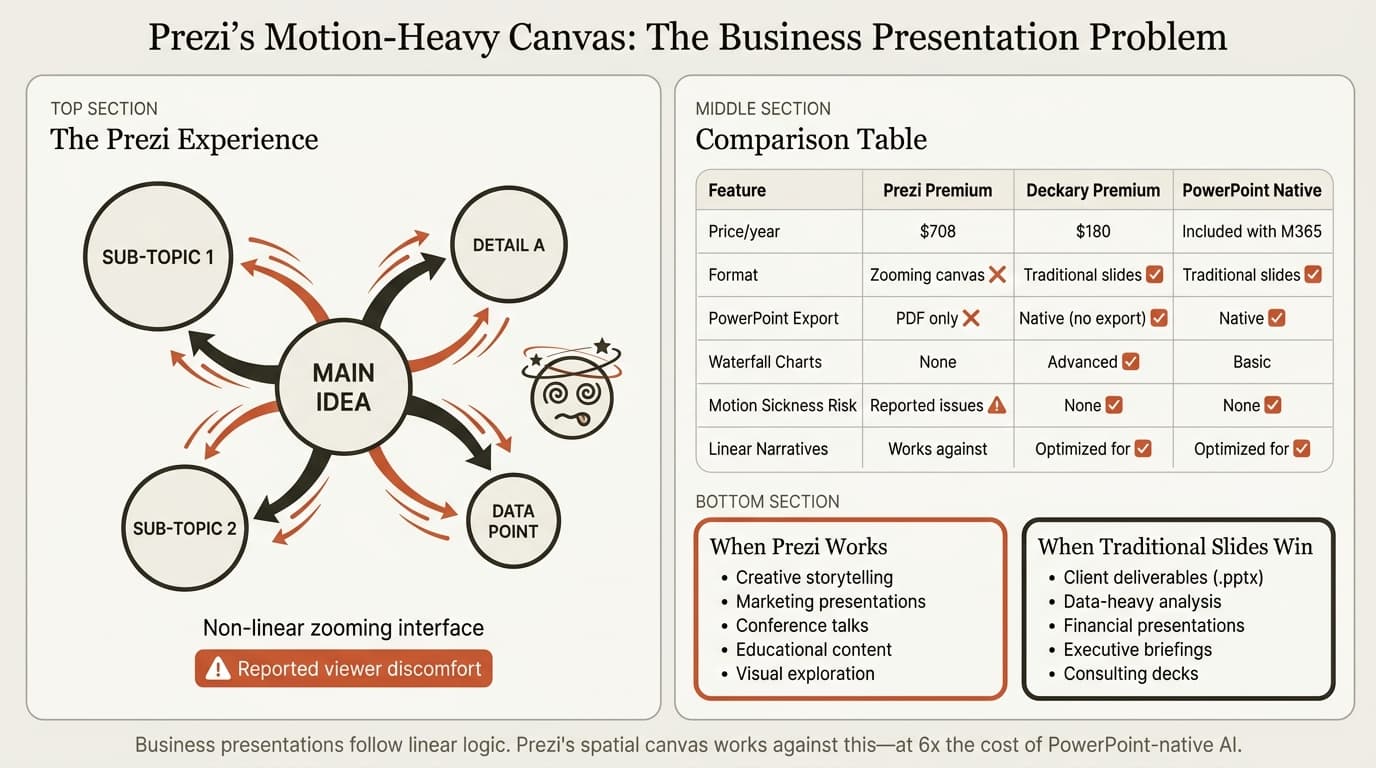
At $84/year minimum (Standard plan with privacy limitations) or $708/year (Premium), Prezi costs substantially more than PowerPoint-native alternatives while lacking specialized business charting capabilities.
Prezi Pros: What It Does Well
Based on user reviews from Capterra (2,700+ verified reviews, 4.5/5 average) and Software Advice testing:
1. Creative Visual Storytelling
Prezi's zooming canvas creates engaging presentations for visual narratives. The ability to zoom from overview to details and back creates spatial relationships that linear slides cannot match.
2. AI Content Generation
Prezi AI generates complete presentations from prompts—similar to Gamma or Microsoft Copilot. The AI suggests narrative structure, color palettes, and generates custom images from descriptions.
3. Offline Presenting Capability
Prezi allows downloading presentations for offline presenting—useful for travel or locations with unreliable internet.
4. Prezi Video Integration
The ability to present inside Zoom or Teams without screen sharing while remaining on camera creates better engagement than traditional screen shares.
Prezi Cons: Where It Falls Short
Based on critical user reviews and testing against business presentation workflows:
1. Limited PowerPoint Export Quality (Critical for Consultants)
This is the dealbreaker for professionals who deliver editable PowerPoint files to clients.
Prezi exports to PPTX, but the conversion process flattens presentations into static slides:
- Zoom effects lost completely (each frame becomes a separate slide)
- Dynamic animations don't transfer
- Formatting shifts and layout issues common
- Font substitutions if fonts don't match
- Manual cleanup required for client delivery
For client presentations where stakeholders expect PowerPoint-native effects or where editable .pptx files are contractual deliverables, this export limitation creates significant friction.
2. Motion Sickness and Viewer Discomfort
Multiple users and audience members report developing headaches or dizziness from the constant zooming and panning animations. The motion-heavy interface that makes Prezi distinctive also limits its usability for sensitive viewers.
3. No Consulting-Grade Charts
Prezi lacks the specialized charting capabilities business professionals rely on:
- No waterfall charts for financial bridges
- No Mekko charts for market segmentation
- No Gantt charts for project timelines
- No Excel linking with automatic updates
- No CAGR lines, delta indicators, or reference lines
- Basic charts only (bar, pie, line)
Dedicated charting tools like Deckary automate these workflows, saving 30-45 minutes per complex chart. Prezi offers no alternative.
4. Steep Learning Curve
Users report that Prezi's interface feels overwhelming compared to PowerPoint's familiar workflow. For teams accustomed to traditional slides, the spatial canvas and non-linear navigation require relearning presentation creation from scratch.
5. Internet Dependency for Creation
Creating and editing presentations requires internet connection. Users note that connection issues affect the platform's usability—a problem for consultants working from client sites with restricted internet or on planes.
6. Performance Issues
Users report performance problems including lag, freezing, and slow transitions—especially with complex presentations.
7. Non-Linear Format Mismatches Business Logic
Consulting and business presentations follow linear narratives: situation → complication → resolution. Prezi's spatial, non-linear canvas works against these established communication patterns.
8. Limited Mobile Capabilities
Prezi lacks mobile editing—users can present but not create or edit presentations on phones.
9. No Printable Handouts
Prezi's infinite canvas format doesn't support traditional printed handouts—a problem when stakeholders expect printed materials.
10. High Subscription Costs
At $708/year for Premium, Prezi costs 2-6x more than PowerPoint-native alternatives while delivering fewer business-specific features.
Continue reading: Bubble Chart in PowerPoint · PowerPoint to Word · Best AI Presentation Maker for Consultants
Create an editable presentation in your browser
Turn a prompt or source files into slides you can edit and export to PowerPoint. 10 free AI prompts. No credit card required.
Who Prezi Is Actually For
Choose Prezi if:
- Marketing or conference presentations where visual storytelling drives engagement
- Creative pitches where memorable format matters more than data precision
- Education where non-linear exploration improves learning
- Audiences with no motion sensitivity
Skip Prezi if:
- You deliver editable PowerPoint files to clients
- You need consulting charts (waterfall, Mekko, Gantt) with Excel linking
- You work in PowerPoint daily
- Your presentations follow linear business narratives
Prezi vs PowerPoint Alternatives for Consultants
1. Deckary
Best for: Consultants who need AI slides plus consulting-grade charts inside PowerPoint
Website: deckary.com
Deckary works inside PowerPoint as a native add-in—no export steps, no formatting loss, no motion effects that cause discomfort.
AI Slide Builder:
Describe your business problem, attach CSV data if needed, and Deckary generates consulting-grade slides directly in PowerPoint with proper formatting, charts, and icons.
Charting capabilities Prezi lacks:
Waterfall charts, Mekko charts, Gantt charts with Excel linking and automatic updates—capabilities Prezi doesn't offer.
Pricing: Starter is $15/month or $120/year; Premium is $19/month or $180/year
Versus Prezi Premium at $708/year, Deckary costs one-sixth the price while solving the PowerPoint-native workflow problem consultants actually face.
2. Microsoft Copilot for PowerPoint
Best for: Organizations already paying for Microsoft 365 Copilot
Microsoft's native AI works inside PowerPoint without export steps or format conversions.
Key Features:
- Generate presentations from prompts
- Create slides from Word documents or PDFs
- Summarize existing decks
- Auto-generate speaker notes
- Agent Mode for multi-step editing
Pricing: $30/user/month ($360/year) on top of M365 license
Strengths: Deepest PowerPoint integration, works offline, enterprise security, no learning curve for PowerPoint users
Weaknesses: Expensive, generic output quality, no consulting charts like waterfall or Mekko
Best for: Large enterprises with existing Copilot licenses who want AI without adding vendors or learning new platforms.
For a detailed comparison, see our Copilot for PowerPoint review.
3. Canva
Best for: Design versatility across presentations and other formats
Website: canva.com
Canva handles presentations alongside 250+ design formats—broader than Prezi's presentation-only focus, with more polished interface and lower pricing.
Pricing: $120/year (Canva Pro), $300/year (Canva for Teams per user)
Strengths: Superior brand recognition, massive template library, familiar interface, traditional slides
Weaknesses: Web-based requires export, no consulting-specific charts, can be expensive for large teams
Best for: Marketing teams, startups, and small businesses that need polished visuals across multiple formats without Prezi's motion effects.
4. Gamma
Best for: Modern web presentations without PowerPoint constraints or zooming effects
Website: gamma.app
Gamma creates card-based presentations that look less like traditional slides and more like interactive web pages—modern format without Prezi's motion-heavy interface.
Pricing: Free tier available, $8-18/month ($96-216/year) for paid plans
Strengths: Modern aesthetic, fast generation, lower price than Prezi, no motion sickness concerns
Weaknesses: Export to PowerPoint loses formatting, no consulting charts, different paradigm from traditional slides
Best for: Teams creating standalone web presentations who don't need editable .pptx deliverables and want modern format without Prezi's zooming interface.
For a comprehensive review, see Gamma vs alternatives.
Comparison Table: Prezi vs Presentation Tools
| Feature | Prezi | Deckary | Copilot | Canva | Gamma |
|---|---|---|---|---|---|
| Works in PowerPoint | PPTX export (effects lost) | Native add-in | Native | Export only | Export only |
| AI slide generation | Yes | Yes | Yes | Limited | Yes |
| Offline access | Presenting only | Yes (full) | Yes (full) | No | No |
| Waterfall charts | No | Advanced + Excel link | No | No | No |
| Mekko charts | No | Advanced + Excel link | No | No | No |
| Gantt charts | No | Advanced | No | No | No |
| Non-linear format | Yes (zooming) | No (traditional) | No (traditional) | No (traditional) | No (card-based) |
| Motion sickness risk | Yes (reported) | No | No | No | No |
| Price (annual) | $84-708/year | $120-180/year | $360/year | $120/year | $96-216/year |
The critical distinction: Prezi is a zooming canvas platform for visual storytelling. Deckary, Copilot, Canva, and Gamma serve traditional business presentation workflows with linear narratives and data precision.
How We Tested
We evaluated Prezi across real consulting presentation workflows over two months:
- Presentations created: 35+ across strategy decks, board materials, financial analyses, and client deliverables
- Evaluation criteria: Chart capabilities, PowerPoint compatibility, workflow efficiency, time to client-ready
- Comparison tools: Deckary, Microsoft Copilot, Canva, Gamma
- Export testing: Created presentations in Prezi, exported to PPTX to measure formatting loss and manual cleanup time
- Audience testing: Presented Prezi format to 12 business stakeholders and collected feedback on motion effects
The Honest Assessment
Prezi is a unique presentation platform with creative zooming canvas and strong AI generation features. But for consultants who deliver editable PowerPoint files with specialized charts and linear business narratives, Prezi's limitations eliminate it from consideration:
- Limited PowerPoint export quality (zoom effects flatten, animations don't transfer, formatting shifts)
- No consulting charts (waterfall, Mekko, Gantt) or Excel linking
- Motion effects cause discomfort for some viewers
- Non-linear format conflicts with linear business logic
- $708/year (Premium) costs more than PowerPoint-native alternatives
- Cannot create printed handouts from spatial canvas
- Steep learning curve for teams accustomed to PowerPoint
For marketing teams, educators, and creative professionals delivering conference talks or product demos where visual storytelling drives engagement, Prezi delivers unique value.
For consultants, investment bankers, and business professionals who work in PowerPoint daily and deliver data-heavy .pptx files to clients, Deckary solves the actual workflow problem at one-sixth the cost.
The best test: try both workflows. Prezi offers a free plan with 500 AI credits. Deckary offers a 14-day free trial without credit card.
Related Guides
- Best Presentation Software — Comprehensive tool comparison
- Best AI Presentation Makers — AI-focused platforms
- Copilot PowerPoint Review — Microsoft's native AI
- Gamma Review — Web-based presentation platform
- Google Slides vs PowerPoint — Platform comparison
Sources
- Prezi Review 2026: AI Features, Pricing & Pros — Work Management
- Prezi Reviews, Pros and Cons — Capterra
- Prezi Software Reviews — Software Advice
- Prezi vs PowerPoint: Which One Should You Use? — Visme
- Prezi vs PowerPoint Comparison — Presentation Geeks
- How do I download my Prezi presentation as PowerPoint slides? — Prezi Support Center
- Import Prezi to PowerPoint — Prezibase
- Prezi AI: Top AI Presentation Maker
- Is this the best AI presentation maker of 2026? — Prezi Blog
- Prezi vs. PowerPoint: Which presentation tool is for you? — Prezi Blog
- Prezi User Reviews — TrustRadius
- Prezi User Reviews — GetApp
Create an editable presentation in your browser
Turn a prompt or source files into slides you can edit and export to PowerPoint. 10 free AI prompts. No credit card required.