Prezi vs PowerPoint: Which Is Better for Business?
Compare Prezi and PowerPoint by presentation style, business use, collaboration, charts, offline work, AI, and editable PowerPoint handoff.
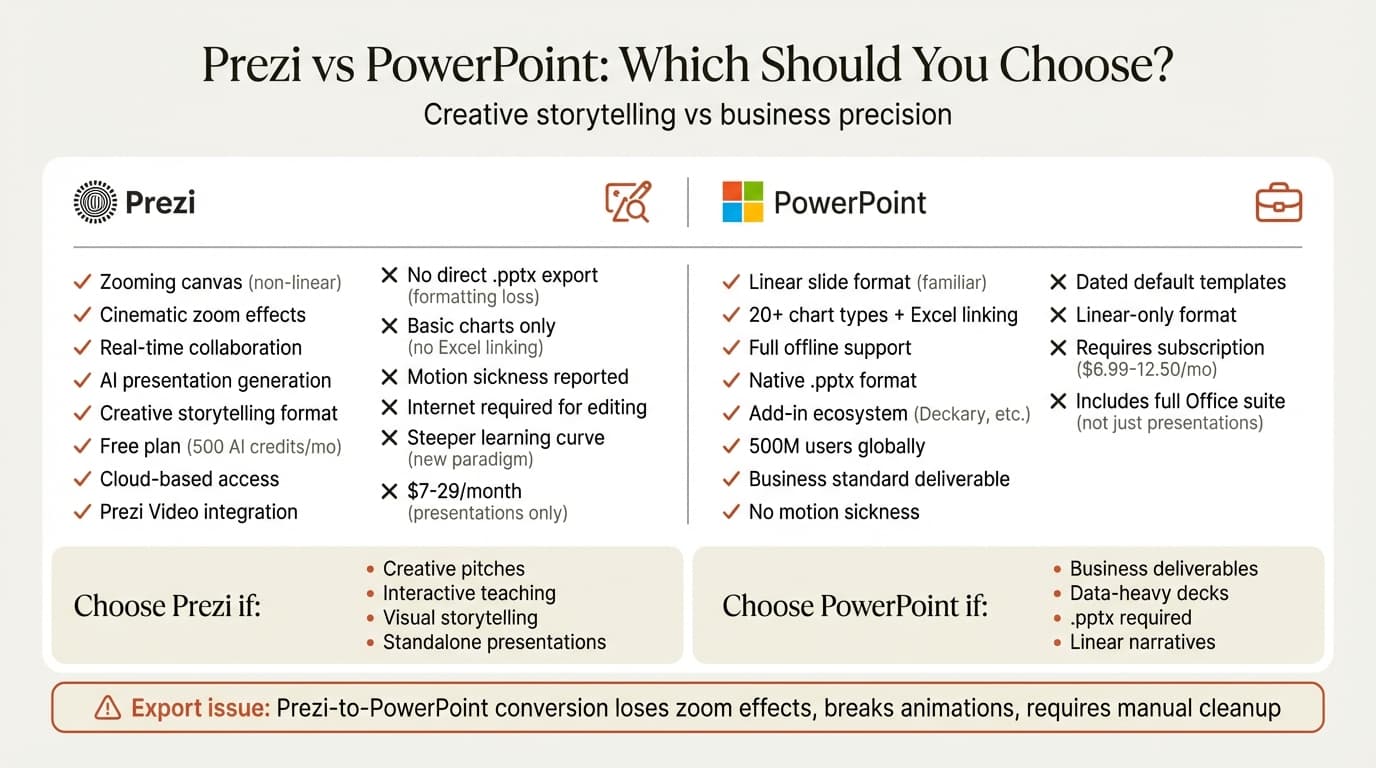
PowerPoint is the better choice for most business presentations because it produces the standard editable .pptx artifact used in review, data, and client-delivery workflows. Prezi is better when the zooming canvas is part of the message and the presentation will stay in Prezi rather than pass through PowerPoint revisions.
Last verified: 9 August 2026. This comparison uses current official product and support pages. Pricing changes frequently, so the article compares packaging rather than freezing promotional prices into the recommendation.
Prezi vs PowerPoint at a Glance
| Need | Better starting point | Why |
|---|---|---|
| Editable client, board, or investor deck | PowerPoint | Native PPTX ownership and granular object editing |
| Non-linear live story | Prezi | Zooming canvas and spatial navigation |
| Data-heavy presentation | PowerPoint | Excel integration, native charts, and specialist add-ins |
| Interactive teaching or keynote | Prezi | Flexible movement between overview and detail |
| Offline production | PowerPoint | Mature desktop applications on Windows and Mac |
| Standard corporate template | PowerPoint | Slide masters, layouts, placeholders, and established review workflows |
| Share a browser experience | Prezi | Link-based presentation and cloud workflow |
The Main Difference: Canvas vs Slides
Prezi uses a spatial canvas. The presenter can zoom from an overview into details and move between topics in a less linear order. This works well when physical relationships, exploration, or dramatic reveals support the story.
PowerPoint uses discrete slides in a defined sequence. That format fits common business narratives:
- Situation → complication → resolution
- Finding → evidence → implication
- Financial results → drivers → outlook
- Recommendation → initiatives → implementation plan
Neither grammar is universally better. The decision is whether the recipient needs a live experience or an editable business document.
Feature Comparison
| Dimension | Prezi | PowerPoint |
|---|---|---|
| Authoring model | Spatial, zooming canvas | Sequential slides |
| Best delivery format | Live presentation or shared Prezi link | Native PPTX, PDF, live presentation |
| Detailed object editing | Available within Prezi's model | Deep native editing of text, shapes, charts, tables, and media |
| Data workflow | Suitable for lighter data stories | Excel-linked and embedded data workflows |
| Templates | Prezi templates and reusable structures | Slide masters, layouts, themes, templates, and broad third-party ecosystem |
| Collaboration | Cloud collaboration | Cloud collaboration through Microsoft 365 |
| Offline workflow | Depends on plan and application | Full desktop authoring and presenting |
| AI | Prezi AI features vary by plan | Copilot plus third-party AI add-ins |
| Final PowerPoint handoff | Translation from a different presentation model | Native format |
Which Is Better for Business Presentations?
PowerPoint is usually the safer business choice because the file can move between analysts, executives, agencies, clients, and compliance reviewers without changing formats. A colleague can update a number, restyle a chart, inspect notes, apply a slide master, or reuse one slide in another deck.
Prezi is a strong choice when the presenter controls the live experience and the zooming canvas creates genuine explanatory value. Product ecosystems, customer journeys, maps, system architectures, and educational material can benefit from moving between overview and detail.
Do not choose Prezi merely to make a conventional slide sequence feel more animated. If the spatial model does not improve comprehension, it adds production and audience complexity without improving the argument.
Continue reading: Pie Charts in PowerPoint · Best Fonts for PowerPoint · Comparison Slide PowerPoint
Create an editable presentation in your browser
Turn a prompt or source files into slides you can edit and export to PowerPoint. 10 free AI prompts. No credit card required.
Prezi to PowerPoint: What to Test
Prezi and PowerPoint do not share the same presentation grammar. Before committing to a Prezi-to-PowerPoint workflow, export one representative presentation and inspect:
- Whether text remains editable
- Whether shapes and diagrams remain separate objects
- Whether fonts and line breaks match
- Whether videos and audio survive
- What happens to zoom paths and transitions
- Whether charts can still be edited
- Whether the slide master and theme are useful
If an editable PPTX is contractually required, build the final deliverable in PowerPoint from the start. Export is most reliable when the exported file is a convenience copy, not the system of record.
Charts and Financial Data
PowerPoint has the stronger data-production workflow. It supports native charts, embedded chart data, Excel links, and specialist tools for waterfalls, Mekko charts, Gantt charts, and recurring reporting.
Prezi can present charts and data visually, but it is not a substitute for the Office workflow used to update a model, refresh a chart, trace a source range, and return the slide to a client template.
For recurring data work, compare Excel-to-PowerPoint methods and PowerPoint chart tools.
AI in Prezi and PowerPoint
Prezi offers AI-assisted presentation creation and editing within its product. PowerPoint now has several AI routes:
The relevant comparison is not which tool can produce a first draft. Test existing-deck edits, template fidelity, chart behavior, source handling, and the manual cleanup required before delivery.
Pricing and Plan Differences
Both vendors change packaging and promotions. Use Prezi's pricing page and Microsoft 365 pricing for current numbers.
Compare total workflow cost rather than subscription price alone:
- Does the plan permit private presentations?
- Is offline authoring or presenting included?
- Can you export to the required format?
- Are AI features metered or plan-limited?
- Does the buyer already pay for Microsoft 365?
- How much cleanup is required after export?
Choose PowerPoint When
- The recipient expects an editable
.pptx - The deck contains detailed charts, tables, or financial data
- Several people will revise the file
- The organization uses corporate templates and slide masters
- Offline access matters
- Individual slides will be reused in other decks
- Add-ins, Excel links, or VBA are part of the workflow
If you want AI and specialist production tools without leaving PowerPoint, see Deckary's PowerPoint workflow.
Choose Prezi When
- The zooming canvas is central to the explanation
- The presenter wants to move non-linearly between topics
- The presentation will remain in Prezi
- Browser sharing is more important than PPTX ownership
- The audience benefits from moving between overview and detail
Prezi vs PowerPoint by Use Case
| Use case | Recommendation |
|---|---|
| Consulting deliverable | PowerPoint |
| Board presentation | PowerPoint |
| Financial review | PowerPoint |
| Sales deck handed to a customer | PowerPoint |
| Live product ecosystem explanation | Prezi can be effective |
| Interactive lesson | Prezi can be effective |
| Reusable corporate slide library | PowerPoint |
| Self-guided web presentation | Prezi or another web-native presentation tool |
Frequently Asked Questions
Is Prezi or PowerPoint better for business presentations?
PowerPoint is usually better for editable deliverables, charts, offline work, templates, and revision. Prezi is better for a controlled live experience built around spatial storytelling.
Can you convert Prezi to PowerPoint?
Eligible Prezi plans support PowerPoint download options, but conversion should be tested. Zoom paths, animations, fonts, media, and editable objects may not map cleanly between the two formats.
What is the main difference between Prezi and PowerPoint?
Prezi is a zooming canvas; PowerPoint is a sequence of slides. That difference affects how the story is presented and how the final artifact can be edited and handed off.
Does PowerPoint have AI?
Yes. PowerPoint supports Microsoft Copilot and third-party add-ins including ChatGPT, Claude, Plus AI, and Deckary.
Sources
- Prezi
- Prezi pricing
- Microsoft PowerPoint
- Microsoft 365 pricing
- Microsoft — Create a presentation with Copilot
Want to create editable slides in the business format your recipients already use? Explore Deckary's AI for PowerPoint, charts, and free templates.
Create an editable presentation in your browser
Turn a prompt or source files into slides you can edit and export to PowerPoint. 10 free AI prompts. No credit card required.