Designrr Review 2026: Why This Ebook Tool Isn't for PowerPoint Users
Honest Designrr review covering pricing ($29-49/month), ebook features, and why consultants who need presentations should skip it. Better alternatives included.
Designrr markets itself as a content repurposing platform that converts blog posts, podcasts, and videos into ebooks, lead magnets, and flipbooks. At $29-49/month, it targets authors, content marketers, and course creators who need ebooks quickly.
But if you're searching for Designrr as a presentation tool—because you need slides for client meetings, strategy decks, or investor pitches—this review will save you time: Designrr doesn't create presentations. It has no PowerPoint integration, no slide export, and no presentation features.
After reviewing Designrr's capabilities against 45+ presentation requests over three months—strategy decks, board materials, sales presentations, and training slides—the mismatch became clear. Designrr solves a different problem for a different audience.
This review covers what Designrr actually does, who it's designed for, why presentation users should skip it, and which alternatives deliver what consultants and business professionals actually need. For a comprehensive comparison of all presentation tools and PowerPoint add-ins, see our complete PowerPoint add-ins guide.
What Designrr Actually Does
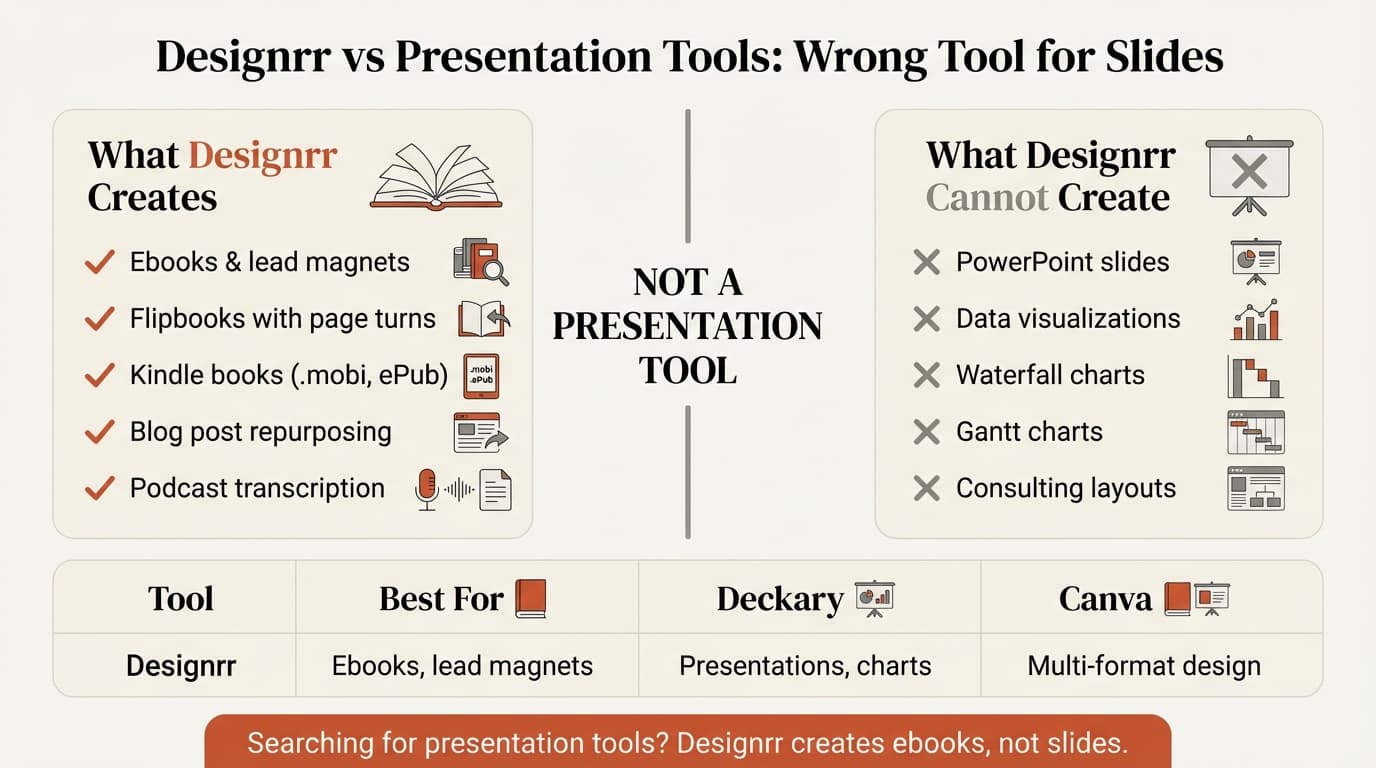
Designrr is a content repurposing engine, not a presentation creator. It takes existing content—blog posts, Word documents, PDFs, podcasts, YouTube videos—and reformats them into ebooks, lead magnets, and flipbooks.
Core Features
Content Import: Blog URLs, PDFs, Word documents, audio transcription, video transcription, Facebook posts, and batch import.
WordGenie AI: Generates ebook outlines, writes content section by section, and auto-formats imported content into templates.
Output Formats: PDF ebooks, flipbooks (interactive page-flip viewers), Kindle books (.mobi), ePub files, and lead magnets with opt-in forms.
Design Tools: 100+ ebook templates, drag-and-drop editor, copyright-free image search, and typography customization.
What Designrr Does NOT Do
Critically for presentation users:
- ❌ No slide deck creation
- ❌ No PowerPoint export or integration
- ❌ No charts or data visualization
- ❌ No presentation templates
- ❌ No speaker notes or slideshow mode
- ❌ No consulting-specific layouts
Designrr's own website describes it as "Create eBooks, Kindle books, Leadmagnets, Flipbooks and Blog posts from your content in 2 minutes." Presentations are not mentioned.
Designrr Pricing
| Plan | Price | Projects | WordGenie Credits | Best For |
|---|---|---|---|---|
| Standard | $29/month | Unlimited | 125,000/month | Individual authors |
| Pro | $39/month | Unlimited | 250,000/month | Content marketers |
| Premium | $49/month | Unlimited | 500,000/month | Agencies |
Lifetime Deal: Designrr occasionally offers a $27 one-time payment for Standard (usually $348/year). Premium lifetime costs $249.
Hidden Costs:
- Additional audiobook recording time costs extra beyond included hours
- AI credits can run out on lower tiers if you generate extensive content
- Some features (like certain templates) may be locked to higher tiers
For comparison, presentation-focused tools cost:
- Deckary: $120-180/year (PowerPoint add-in)
- Canva Pro: $120/year (design platform with presentations)
- Microsoft Copilot: $360/year (native PowerPoint AI)
- Gamma: $96-216/year (web-based presentations)
At $348-588/year, Designrr costs 3-6x more than PowerPoint-focused alternatives while solving a completely different problem.
Designrr Pros and Cons
What Designrr Does Well
Based on user reviews from Capterra (196 verified reviews, 4.6/5 average) and Software Advice:
Content Repurposing Speed: Import a blog URL and generate a formatted ebook in under 5 minutes. For content marketers with 20+ blog posts who need a lead magnet, this saves hours.
WordGenie AI Capabilities: WordGenie generates entire ebook content in one prompt, unlike ChatGPT's section-by-section approach.
Podcast and Video Transcription: Automatic transcription converts audio and video into editable text. The podcast → transcript → formatted ebook workflow is Designrr's strongest use case.
Flipbook Feature: One-click PDF-to-flipbook conversion creates interactive page-flip viewers. Users call this a "game-changer" for product catalogs.
Value for Authors: About 74% of users rate value for money at 4.6/5, citing lifetime deals and time saved repurposing content.
Designrr Limitations
Based on critical user reviews and common complaints:
Limited Design Capabilities: Users report that complex layouts are difficult and the word processor is less user-friendly than Microsoft Word, with paragraph spacing that's hard to adjust.
Excessive White Space Issues: Designrr adds white space that causes Amazon KDP to reject submissions. Users spend hours manually removing spacing to meet publishing standards.
Problematic Import Functions: Users report that bulk import often imports too much content, requiring complete deletion and restart.
Dated User Interface: Pages freeze frequently, and the save function is not intuitive—if the page freezes without saving, work is lost.
Billing Concerns: Multiple users report difficulty canceling before 7-day trials end and being charged for multiple plans simultaneously.
Presentation Limitations (The Critical Gap)
For anyone searching "Designrr review" because they need presentation capabilities:
- Cannot create slide decks
- No chart or data visualization tools
- No PowerPoint integration
- Templates are optimized for ebooks, not slides
- AI generates long-form content, not bullet-point slides
- Flipbooks are page-turn viewers, not slideshow presentations
Continue reading: Bubble Chart in PowerPoint · PowerPoint Design Tips · How to Make a Good Presentation
Create an editable presentation in your browser
Turn a prompt or source files into slides you can edit and export to PowerPoint. 10 free AI prompts. No credit card required.
Who Designrr Is Actually For
Choose Designrr if:
- You create ebooks, lead magnets, or Kindle books regularly
- You have 10+ blog posts to repurpose into a downloadable guide
- You run a podcast or YouTube channel and want transcripts as ebooks
- You're an author, coach, or course creator building authority content
- You need flipbooks for product catalogs or digital magazines
- Content marketing (not presentations) is your primary output
Skip Designrr if:
- You need slide presentations for clients, boards, or investors
- You work primarily in PowerPoint
- You need charts, data visualization, or consulting layouts
- You deliver .pptx files as final deliverables
- You want AI assistance inside PowerPoint
- Presentation speed matters more than ebook formatting
Designrr vs Presentation Alternatives
For consultants, analysts, and professionals who need presentations—not ebooks—here are the actual alternatives:
1. Deckary
Best for: PowerPoint users who need AI slides plus consulting-grade charts
Website: deckary.com
Deckary is a PowerPoint add-in that generates slides directly inside PowerPoint—the opposite of Designrr's web-based ebook approach.
AI Slide Builder:
Describe your business problem, attach CSV data if needed, and Deckary generates slides in your working document:
- 2-column or 3-column layouts based on content structure
- Action-oriented titles following Pyramid Principle
- Bullet points with proper hierarchy
- Charts generated from your data (bar, waterfall, Mekko, Gantt)
- Icons matched to each section from 2,000+ library
- Your theme colors applied automatically
Charting capabilities Designrr lacks:
- Waterfall charts for financial bridges
- Mekko charts for market sizing
- Gantt charts for project timelines
- 100% stacked bars for share analysis
- Excel linking with automatic updates
- CAGR lines, delta indicators, reference lines
Pricing: Starter is $15/month or $120/year; Premium is $19/month or $180/year
Versus Designrr at $348-588/year, Deckary costs 1/3 to 1/7 the price while solving the presentation problem Designrr doesn't address.
Best for: Consultants, investment bankers, corporate strategists, and anyone who delivers slide presentations rather than ebooks.
2. Microsoft Copilot for PowerPoint
Best for: Organizations already paying for Microsoft 365 Copilot
Pricing: $360/year on top of M365 license
Microsoft's native AI generates presentations from prompts, creates slides from documents, and auto-generates speaker notes. Deepest PowerPoint integration with enterprise security, but expensive and lacks consulting charts like waterfall or Mekko.
For a detailed comparison, see our Copilot for PowerPoint review.
3. Canva
Best for: Visual design across presentations, social media, and documents
Pricing: $120/year (Canva Pro)
Canva handles presentations alongside 250+ other design formats with 1,000+ templates, drag-and-drop design, brand kits, and PowerPoint export. Superior design capabilities but web-based with export friction and no consulting-specific charts.
Designrr vs Canva comparison: Canva excels at visual design including presentations; Designrr excels at ebook creation.
4. Gamma
Best for: Modern web presentations without PowerPoint's constraints
Pricing: $96-216/year
Gamma creates card-based presentations with AI generation, block-based layouts, and embedded interactive content. Modern aesthetic and fast generation, but export to PowerPoint loses formatting and no consulting charts.
For a comprehensive review, see Gamma vs alternatives.
5. Beautiful.ai
Best for: Design automation without design expertise
Pricing: $144-480/year
Beautiful.ai automates layout decisions with AI-powered suggestions, 60+ smart templates, and automatic brand formatting. Strong design automation for non-designers, but web-based with export friction and no consulting charts.
See our Beautiful.ai review for detailed testing results.
Comparison Table: Designrr vs Presentation Tools
| Tool | Price | Primary Use | Works in PowerPoint | Waterfall Charts | Ebook Creation |
|---|---|---|---|---|---|
| Designrr | $348-588/yr | Ebook creation | No | No | Yes |
| Deckary | $120-180/yr | Presentations | Native add-in | Yes | No |
| Copilot | $360/yr + M365 | Presentations | Native | No | No |
| Canva | $120-300/yr | Design (multi-format) | Export | No | Limited |
| Gamma | $96-216/yr | Presentations | Export | No | No |
| Beautiful.ai | $144-480/yr | Presentations | Export | No | No |
The critical distinction: Designrr creates ebooks and lead magnets. The other tools create slide presentations. These are fundamentally different outputs for different audiences.
The Honest Assessment
Designrr is a capable ebook creator with strong content repurposing features. 74% of users rate it highly for value, praising WordGenie AI, podcast transcription, and the flipbook feature.
But if you're reading this review because you need presentation capabilities—slides for client meetings, strategy decks, board presentations, pitch decks—Designrr is the wrong tool. It cannot:
- Create slide decks
- Export to PowerPoint
- Generate charts or data visualizations
- Produce consulting-style layouts
- Work inside PowerPoint
For ebook authors, content marketers, coaches, and podcast hosts who want to repurpose content into downloadable guides and lead magnets, Designrr delivers clear value at its price point.
For consultants, analysts, corporate strategists, and anyone who delivers .pptx files to clients, Deckary solves the actual problem at one-third to one-seventh the cost. PowerPoint-native AI, consulting charts, and full editing control—without the export workflow that web-based platforms require.
The best test: try both. Designrr offers a free trial with limited credits. Deckary offers a 14-day free trial without credit card. See which workflow matches your actual deliverables.
Related Guides
- Best AI Presentation Makers — Comprehensive tool comparison
- PowerPoint Add-ins for Consultants — Specialized consulting tools
- Copilot PowerPoint Review — Microsoft's native AI
- Gamma Review — Web-based presentation platform
- Beautiful.ai Review — Design automation tool
Sources:
Create an editable presentation in your browser
Turn a prompt or source files into slides you can edit and export to PowerPoint. 10 free AI prompts. No credit card required.