Best Office Timeline Alternative 2026: 4 Tools Compared
Looking for an Office Timeline alternative? We compare pricing, features, and limitations of 4 alternatives including free and Mac-compatible options.
Office Timeline does one thing well: it creates Gantt charts and project timelines inside PowerPoint. For Windows users who build timelines every week, it's a reliable single-purpose tool.
The problem is everything it doesn't do. No Mac support for the desktop add-in. No consulting charts like waterfall or Mekko. No keyboard shortcuts, no icon library, and no AI features. At $108-249/year for a tool that only handles timelines, the value proposition gets thin fast — especially when broader alternatives exist at lower prices.
We tried Office Timeline and four alternatives using real project timelines to see how they compare. This guide covers what each tool actually delivers. For timeline creation techniques in PowerPoint, see our timeline slide guide. For Gantt chart methods specifically, see our Gantt chart guide.
What Is Office Timeline?
Office Timeline is a PowerPoint add-in for creating Gantt charts, project timelines, and milestone slides. It runs as a ribbon tab inside PowerPoint on Windows and offers a separate browser-based version for other platforms.
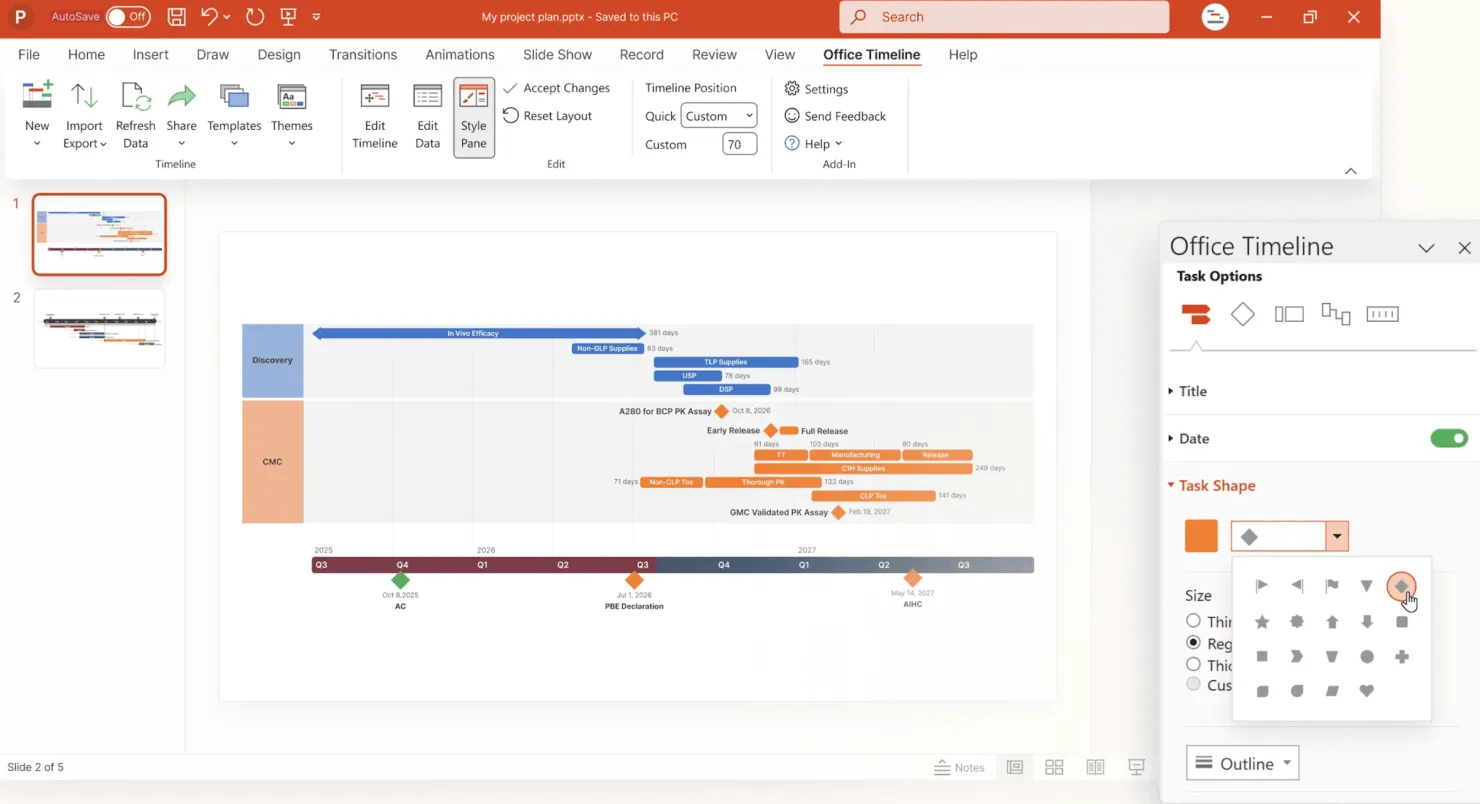
Core features include:
- Gantt charts with task bars, milestones, and dependencies
- Swimlane grouping for multi-workstream projects
- Data import from Excel, Microsoft Project, Jira, Smartsheet, and Wrike
- Drag-and-drop timeline editing
- Planned vs. Actual comparison (Expert plan only)
- Template library for timeline styles
Pricing:
| Plan | Cost | Key Features |
|---|---|---|
| Free | $0 | 10-item limit, watermark |
| Lite | $108/year | Unlimited items, 2 swimlanes, basic Excel import |
| Plus | $199/year | Unlimited swimlanes, dependencies, full Excel/Project import |
| Expert | $249/year | Jira, Smartsheet, Wrike integration, Planned vs. Actual |
| Online Premium | $180/year | Browser-based, any OS, collaboration |
7-day free trial available for all paid plans.
Office Timeline Pros and Cons
What Office Timeline Does Well
Purpose-built for timelines: The drag-and-drop interface makes creating Gantt charts and milestone timelines genuinely fast. What takes 45-60 minutes with a manual stacked bar workaround in PowerPoint takes 5-10 minutes with Office Timeline.
Strong data imports: The Excel and Microsoft Project imports work reliably. The Expert plan adds Jira, Smartsheet, and Wrike integration with auto-refresh — useful for PMOs that manage timelines across tools.
Swimlane support: Grouping tasks into workstreams is straightforward, which is essential for transformation project timelines with multiple parallel tracks.
Presentation-ready output: Timelines render directly on PowerPoint slides with customizable colors, fonts, and layouts. The output is polished enough for executive presentations without manual cleanup.
Office Timeline Limitations
Windows-only desktop add-in: The PowerPoint add-in does not work on Mac. Mac users are redirected to the Online version, which runs in a browser with different — and sometimes fewer — features. For teams split across platforms, this creates workflow friction.
Only creates timelines: No waterfall charts, no Mekko charts, no stacked bar charts, no data visualizations beyond timelines and Gantt charts. If you need consulting-grade charts alongside your timelines, you'll need a second tool.
Object sprawl on slides: In our testing, Office Timeline generated a large number of loose objects on the slide rather than a single grouped element. Moving or resizing a timeline often meant selecting and adjusting dozens of individual shapes.
Formatting glitches: Users report font sizes and title positions reverting after minor edits, and random spacing changes that require manual cleanup across the entire timeline.
Version compatibility issues: Some users report that if someone with a newer version of Office Timeline edits a file, users with older versions may lose access to the timeline data. This can be a pain point for organizations with mixed license versions.
No AI features, shortcuts, or icons: Office Timeline is purely a timeline tool. No AI slide generation, no keyboard shortcuts for alignment, no icon library.
How We Evaluated
We installed each tool and built Gantt charts and milestone timelines using our own project data. We focused on:
- Timeline creation speed — how quickly each tool produced a presentation-ready result
- Formatting control — how much customization was possible without workarounds
- Cross-platform support — whether the tool worked on both Windows and Mac
- Update handling — how well timelines reflected changes when project dates shifted
Continue reading: How to Make a Gantt Chart in PowerPoint (Free Template) · How to Align Objects in PowerPoint · Best AI Presentation Maker for Consultants
Create professional charts in PowerPoint
Build native waterfall, Mekko, Gantt, and business charts without manual formatting. 14-day free trial. No credit card required.
Office Timeline Alternatives
1. Deckary
Best for: Consultants who need timelines AND consulting charts in one tool
Website: deckary.com
Deckary is a PowerPoint add-in that combines Gantt charts with the full range of consulting chart types — waterfall, Mekko, stacked bar — plus productivity features that Office Timeline doesn't offer.
Timeline and charting:
- Gantt charts with milestones and workstream grouping
- Waterfall charts with automatic bridges and totals
- Mekko (Marimekko) charts for market sizing
- 100% stacked bar charts for share analysis
- Excel linking for automatic updates
- CAGR lines, delta indicators, reference lines
Productivity:
- Keyboard shortcuts for alignment and distribution
- 2,000+ icon library built into PowerPoint
- AI Slide Builder for generating consulting-grade slides from text
- Works on both Windows and Mac
Pricing: Starter is $15/month or $120/year; Premium is $19/month or $180/year
What it does well:
- Full consulting chart suite at a lower price than Office Timeline
- Cross-platform (Windows and Mac — identical functionality)
- Productivity features Office Timeline doesn't have
- AI-powered slide generation
What it doesn't do:
- No Jira, Smartsheet, or Wrike import
- No Planned vs. Actual timeline comparison
Our experience:
- Gantt chart creation was fast — under 60 seconds with Excel data
- Excel links updated reliably when source data changed
- Identical feature set on both Mac and Windows
Best for: Consultants, bankers, and strategists who need timelines alongside waterfall and Mekko charts. If you're paying $199+/year for Office Timeline Plus and still need a second charting tool, Deckary consolidates both at $120-180/year.
2. Native PowerPoint (SmartArt + Stacked Bar Workaround)
Best for: Basic timelines with zero additional cost
PowerPoint offers two built-in approaches for timelines:
SmartArt timelines:
- Insert > SmartArt > Process > Basic Timeline
- Works for simple sequential milestones (5-8 items)
- Cannot handle overlapping tasks or parallel workstreams
Stacked bar workaround:
- Create a stacked bar chart with an invisible "start" series
- The visible bars represent task durations
- Requires manual date calculations and invisible series formatting
Pricing: Included with Microsoft 365
What it does well:
- No additional cost or software
- SmartArt is fast for simple milestones
- Full design control with manual shapes
What it doesn't do:
- No true Gantt chart functionality
- SmartArt can't show overlapping tasks
- Stacked bar workaround takes 45-60 minutes and breaks when tasks change
- No Excel linking for timeline data
Our experience: For a quick 5-milestone summary slide, SmartArt works. For anything with overlapping tasks, dependencies, or regular date updates, native PowerPoint methods are impractical. Building even a modest Gantt chart manually takes far longer than using a dedicated add-in.
Best for: One-off simple milestone slides where you don't need overlapping tasks or regular updates.
3. Preceden
Best for: Web-based timelines without needing PowerPoint
Website: preceden.com
Preceden is a browser-based timeline maker — not a PowerPoint add-in but the most commonly cited Office Timeline alternative online.
- Drag-and-drop timeline creation in browser
- Multiple timeline layers
- Export to PNG, PDF, and PowerPoint
- Public and private sharing
Pricing: Free plan available, $49/year (Premium), $99/year (Pro)
What it does well:
- Intuitive web interface
- Lower price than Office Timeline
- Works on any platform (browser-based)
- Good for standalone timeline graphics
What it doesn't do:
- Not a PowerPoint add-in — exported slides aren't editable
- No Excel linking inside PowerPoint
- No consulting charts (waterfall, Mekko)
- Limited formatting control compared to PowerPoint-native tools
Our experience: Preceden is good for creating timeline graphics to embed in documents or share online. But the PowerPoint export produces an image, not editable shapes. If your workflow centers on PowerPoint presentations, Preceden adds a step rather than saving one.
Best for: Non-PowerPoint workflows where you need timeline visuals for reports, websites, or documents.
4. GanttProject
Best for: Free, open-source Gantt chart creation
Website: ganttproject.biz
GanttProject is a free desktop application for creating Gantt charts with project management features.
- Task dependencies and critical path
- Resource assignment
- Export to PDF, PNG, CSV
- Microsoft Project import/export
- Runs on Windows, Mac, and Linux
Pricing: Free (open source)
What it does well:
- Completely free
- Full project management Gantt functionality
- Cross-platform
- Microsoft Project compatibility
What it doesn't do:
- Not a PowerPoint add-in — no native integration
- Exported images are not editable in PowerPoint
- Dated interface
- No consulting chart types
Our experience: GanttProject is a legitimate project management tool, but it's not designed for presentations. You can export a Gantt chart as an image and paste it into PowerPoint, but the result is a static screenshot — not a formatted, editable slide. Useful for project planning, not for client-facing decks.
Best for: Project managers who need free Gantt chart software and don't need PowerPoint-native output.
Comparison Table
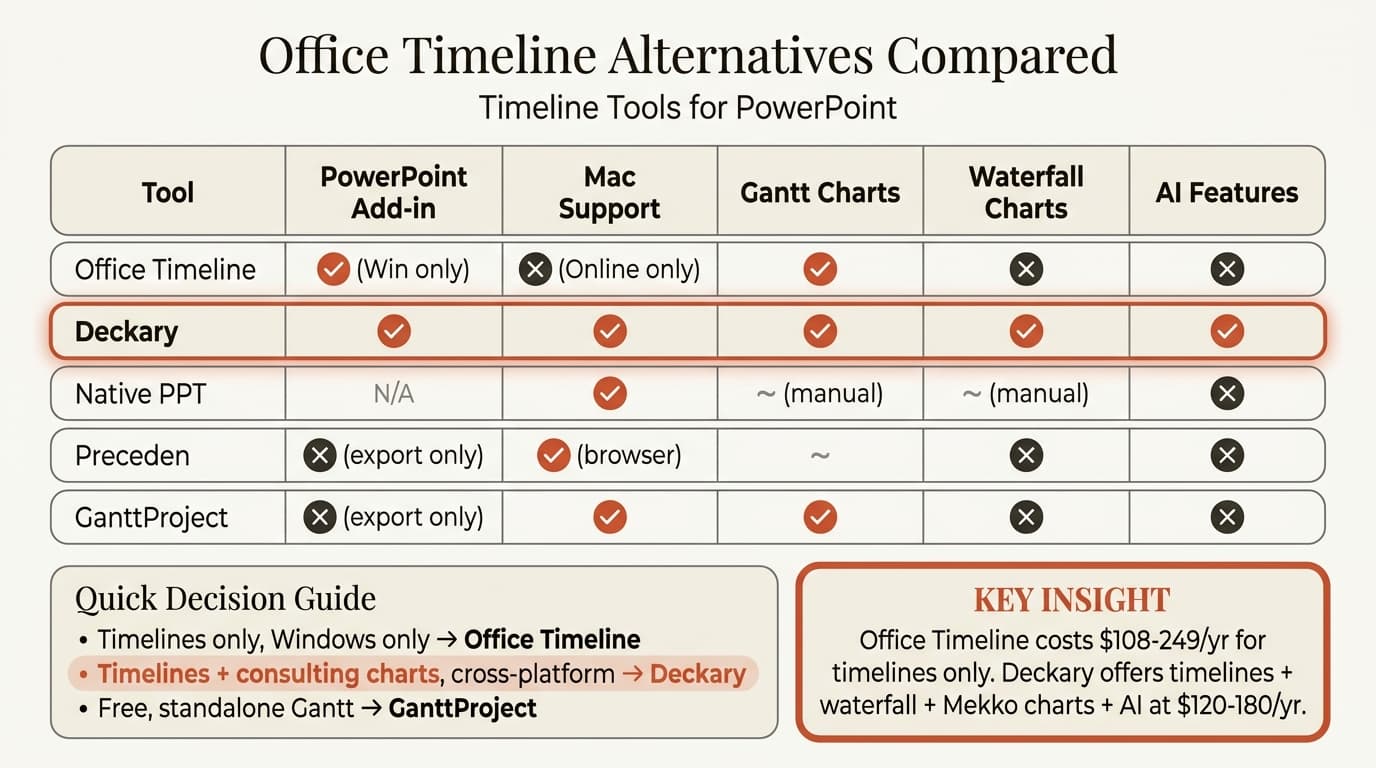
| Tool | Price | PowerPoint Add-in | Mac Support | Waterfall Charts | Gantt Charts | Excel Linking | AI Features |
|---|---|---|---|---|---|---|---|
| Office Timeline | $108-249/year | Yes (Windows only) | Online only | No | Yes | Yes | No |
| Deckary | $120-180/year | Yes | Yes | Yes | Yes | Yes | Yes |
| Native PPT | Included | N/A | Yes | Manual | Manual | Limited | No |
| Preceden | Free-$99/year | No (export only) | Yes (browser) | No | Limited | No | No |
| GanttProject | Free | No (export only) | Yes | No | Yes | No | No |
Who Should Use Office Timeline?
Office Timeline is worth it if:
- You build Gantt charts and project timelines weekly or more
- You work exclusively on Windows
- You need Jira, Smartsheet, or Wrike integration (Expert plan)
- Timeline creation is your primary PowerPoint need
- You don't need other chart types (waterfall, Mekko)
Consider alternatives if:
- You work on Mac (the add-in is Windows-only)
- You need consulting charts alongside timelines
- Budget matters ($108-249/year for a single-purpose tool)
- You want AI features or keyboard shortcuts
- Your team uses both Windows and Mac
The Honest Assessment
Office Timeline is a capable timeline tool with a narrow focus. The Gantt charts look professional, the data imports work, and the drag-and-drop interface is intuitive. If all you need is timelines on Windows, it delivers.
But for most consultants, strategists, and bankers, timelines are one of many chart types you need. Paying $108-249/year for a tool that only creates timelines — and only on Windows — is hard to justify when broader alternatives exist.
Deckary creates Gantt charts alongside waterfall, Mekko, and stacked bar charts at $120-180/year, works on both Windows and Mac, and includes AI slide generation, keyboard shortcuts, and an icon library. If you're currently using Office Timeline and a second tool for other charts, Deckary consolidates both at a lower combined cost.
The decision comes down to scope:
- Timelines only, Windows only → Office Timeline works well starting at $108/year
- Timelines plus consulting charts, cross-platform → Deckary at $120-180/year offers significantly more value
For teams outside of pure project management, a multi-purpose PowerPoint add-in is the better investment.
Create professional charts in PowerPoint
Build native waterfall, Mekko, Gantt, and business charts without manual formatting. 14-day free trial. No credit card required.