Capacity Planning Template: Guide, Methods, and Best Practices
Capacity planning template guide with structure, calculation methods, and best practices. Learn how to balance resource availability with project demand using data-driven forecasting.
The most common capacity planning mistake is not accounting for the invisible 30%. Teams calculate capacity based on 40-hour weeks, allocate resources at 100% utilization, then wonder why every project runs behind schedule. The issue is not execution—it is the planning assumption that ignored meetings, email, administrative work, training, and all the non-project time that consumes 20-30% of every professional's week.
Capacity planning matches resource availability with project demand over a specific planning horizon—typically a quarter or year. The template calculates how much work your team can realistically handle (productive capacity after accounting for overhead) versus how much work is coming (demand forecast from project pipeline), then surfaces gaps requiring hiring, reallocation, or scope adjustments. After building capacity plans for 50+ transformation programs, product development teams, and consulting practices across strategy and technology implementations, we have tracked which planning methods prevent overcommitment (utilization targets of 70-85%, time tracking for demand forecasting, monthly reviews with scenario modeling) and which create perpetual firefighting when reality diverges from overly optimistic spreadsheets.
This guide covers capacity planning structure, calculation methods, utilization benchmarks, and the differences between capacity and resource planning that determine whether you are managing workforce volume strategically or just shuffling people between projects reactively.
What Is Capacity Planning?
Capacity planning is the process of matching resource availability with project demand over a specific period. Unlike resource planning which assigns specific individuals to specific tasks on a daily or weekly basis, capacity planning operates at the portfolio level—answering strategic questions about whether you have enough people with the right skills to deliver your project pipeline.
Capacity planning serves three primary purposes:
- Workforce decisions — Identify whether you need to hire, reduce headcount, or reallocate resources across teams based on demand forecasts
- Project sequencing — Determine which projects can start immediately versus which must be deferred due to resource constraints
- Utilization management — Balance team capacity to maintain healthy utilization (70-85%) without overcommitting to burnout levels or underutilizing expensive resources
Capacity Planning vs Resource Planning
The terms are often conflated, but the distinction determines whether you are managing workforce strategy or daily task allocation. Capacity planning addresses workforce volume and skill mix at a portfolio level. Resource planning handles tactical assignment of individuals to specific tasks.
| Factor | Capacity Planning | Resource Planning |
|---|---|---|
| Focus | Workforce volume—do we have enough? | Task allocation—who does what? |
| Granularity | Teams, roles, skill groups | Named individuals, specific tasks |
| Time horizon | Quarterly or annual | Weekly or daily |
| Decision output | Hire, reallocate, defer projects | Assign Sarah to API work, Marcus to testing |
| Update frequency | Monthly reviews | Real-time or daily |
| Audience | Executives, finance, HR | Project managers, team leads |
When to use capacity planning: Portfolio planning sessions, budget cycles, hiring decisions, and strategic workforce questions like "Can we take on three new enterprise clients next quarter without burning out the team?"
When to use resource planning: Sprint planning, daily standups, project kickoffs, and operational questions like "Who is available to work on the customer portal API this week?"
For organizations running agile methodologies, capacity planning happens at the portfolio and program level (planning increment boundaries), while resource planning happens at the team level (sprint planning). See our Scrum framework guide for ceremony-specific planning patterns.
Standard Capacity Planning Template Structure
A capacity planning template follows a consistent structure optimized for scenario modeling and gap analysis. The format should answer three questions: How much work can the team handle? How much work is coming? What is the gap?
1. Resource Inventory
List all team members with roles, skill categories, and availability. Use a table for clarity:
| Resource | Role | Skills | FTE | Available Hours/Week |
|---|---|---|---|---|
| Sarah Chen | Senior Developer | React, Node.js, Python | 1.0 | 40 |
| Marcus Rodriguez | QA Engineer | Selenium, API testing | 1.0 | 40 |
| Emily Park | Product Designer | Figma, UX research | 0.8 | 32 |
| Alex Kumar | DevOps Engineer | AWS, Docker, Terraform | 1.0 | 40 |
Skill categorization matters. Generic "developer" labels hide critical bottlenecks. If your entire React capacity is Sarah, losing her to another project creates a blocker that is invisible in aggregate "developer" capacity numbers.
2. Current Commitments
Show active project allocations with time periods. This section answers "where is capacity already spoken for?"
| Resource | Project | Allocated % | Hours/Week | End Date |
|---|---|---|---|---|
| Sarah Chen | Customer Portal | 80% | 32 | Mar 15 |
| Sarah Chen | Design System | 20% | 8 | Ongoing |
| Marcus Rodriguez | Regression Testing | 50% | 20 | Feb 28 |
| Emily Park | Mobile App Redesign | 60% | 19.2 | Mar 31 |
Ongoing commitments (design system maintenance, on-call rotations, support escalations) consume capacity that never shows up in project plans. After reviewing capacity plans across 50+ teams, we found recurring tasks and administrative duties consume 20-30% of weekly hours in most professional services roles—meetings, email, timesheets, code reviews, knowledge sharing sessions.
3. Productive Capacity Calculation
Calculate realistic available capacity after accounting for overhead. The formula:
Productive Capacity = Total Hours - (PTO + Holidays + Meetings + Training + Admin)
Example calculation for a 10-person team in Q2 2026:
Total Hours Available
- 10 people × 40 hours/week × 13 weeks = 5,200 hours

Subtract Non-Project Time
- PTO and holidays: 8% (industry average) = 416 hours
- Meetings (standups, 1:1s, planning): 12% = 624 hours
- Training and development: 5% = 260 hours
- Administrative (email, timesheets, reports): 5% = 260 hours
- Total overhead: 30% = 1,560 hours

Productive Capacity = 5,200 - 1,560 = 3,640 hours for project work
4. Demand Forecast
List upcoming projects with estimated effort by role or skill. Demand forecasting requires historical data from time tracking or past project actuals—estimating based on gut feel produces unreliable plans.
| Project | Priority | Start Date | Est. Hours | Skills Required |
|---|---|---|---|---|
| Payment Integration | P0 | Mar 1 | 320 | Backend (240), QA (80) |
| Mobile App V2 | P1 | Mar 15 | 480 | Frontend (200), Design (120), QA (160) |
| API Redesign | P1 | Apr 1 | 560 | Backend (400), DevOps (80), QA (80) |
| Analytics Dashboard | P2 | Apr 15 | 240 | Frontend (160), Backend (80) |
Break demand by skills, not just total hours. A project requiring 400 hours of React development cannot be delivered if your total capacity is split between React (100 hours) and Angular (300 hours). Skill-level forecasting surfaces bottlenecks that aggregate capacity numbers hide.
5. Capacity Utilization Analysis
Compare demand to available capacity. Calculate utilization percentage:
Utilization % = (Demand Hours / Productive Capacity) × 100
Example analysis for Q2 2026 (Backend developers):
Productive Capacity (Backend): 1,400 hours
Demand Forecast (Backend): 1,120 hours
Utilization: 80%
Status: Healthy (within 70-85% target range)
Example analysis for Q2 2026 (Frontend developers):
Productive Capacity (Frontend): 800 hours
Demand Forecast (Frontend): 960 hours
Utilization: 120%
Status: Overcommitted (20% capacity gap)
The 120% frontend utilization signals a decision point—hire additional frontend resources, defer lower-priority projects, or reallocate backend developers with frontend skills to rebalance demand.
6. Gap Analysis and Mitigation
Surface capacity gaps with proposed actions. This section transforms the capacity plan from a reporting document into a decision-making tool.
| Skill Group | Capacity Gap | Impact | Proposed Mitigation |
|---|---|---|---|
| Frontend | -160 hours (20% over) | Mobile App V2 delayed | Defer Analytics Dashboard (P2) to Q3 |
| QA | -80 hours (12% over) | Testing bottleneck | Hire 1 QA contractor (start Mar 1) |
| DevOps | +120 hours (15% under) | Idle capacity | Reallocate Alex to API Redesign infrastructure work |
Continue reading: Eisenhower Matrix · How to Make a Gantt Chart in PowerPoint (Free Template) · Investment Banking Pitch Book
Build and improve Excel workbooks with AI
Create models, audit formulas, clean data, and generate output sheets inside Excel. 10 free AI prompts. No credit card required.
Capacity Planning Methods and Forecasting Approaches
Different planning methods suit different organizational maturity levels and data availability. After testing forecasting approaches across 50+ teams, methods relying on historical data (time tracking analysis, regression modeling) consistently outperform expert judgment or gut-feel estimates—but require investment in time tracking infrastructure.
Historical Data Analysis
Use past project actuals to estimate future demand. Your last 5 mobile app releases averaged 450 hours (min 380, max 520). Forecast the next release at 450 hours with a ±15% buffer.
Best for: Mature teams with 12+ months of time tracking data, repetitive project portfolios (agency work, product releases).
Expert Judgment (Delphi Method)
Gather estimates from multiple experts, share anonymized responses, iterate until convergence. The Delphi method reduces individual bias by forcing experts to defend estimates against peer input.
Best for: New teams without time tracking history, novel project types with no comparable past work.
Regression Analysis
Connect resource demand to business drivers. Regression modeling identifies relationships like "every $1M in new sales generates 200 hours of implementation work" to forecast capacity needs from sales pipeline data.
Example: After analyzing 3 years of data:
- Enterprise deals ($100k+ contract) require 800 hours (±150h)
- Mid-market deals ($20k-$100k) require 250 hours (±80h)
- SMB deals (under $20k) require 60 hours (±20h)
With Q2 pipeline showing 5 enterprise, 12 mid-market, and 30 SMB deals:
- Total demand: (5 × 800h) + (12 × 250h) + (30 × 60h) = 8,800h
Best for: Organizations with CRM and time tracking integration, sales-driven services businesses.
Scenario Planning
Model multiple demand scenarios (optimistic, realistic, pessimistic) to test capacity resilience.
| Scenario | Probability | Backend Hours | Frontend Hours | Mitigation Plan |
|---|---|---|---|---|
| Optimistic | 20% | 900 | 600 | No action needed |
| Realistic | 60% | 1,200 | 900 | Current plan adequate |
| Pessimistic | 20% | 1,600 | 1,300 | Hire 1 contractor, defer 2 P2 projects |
Best for: High-uncertainty environments (new product launches, emerging markets), executive planning sessions focused on risk mitigation.
Capacity Planning Template Examples
Quarterly Team Capacity Plan (Software Development)
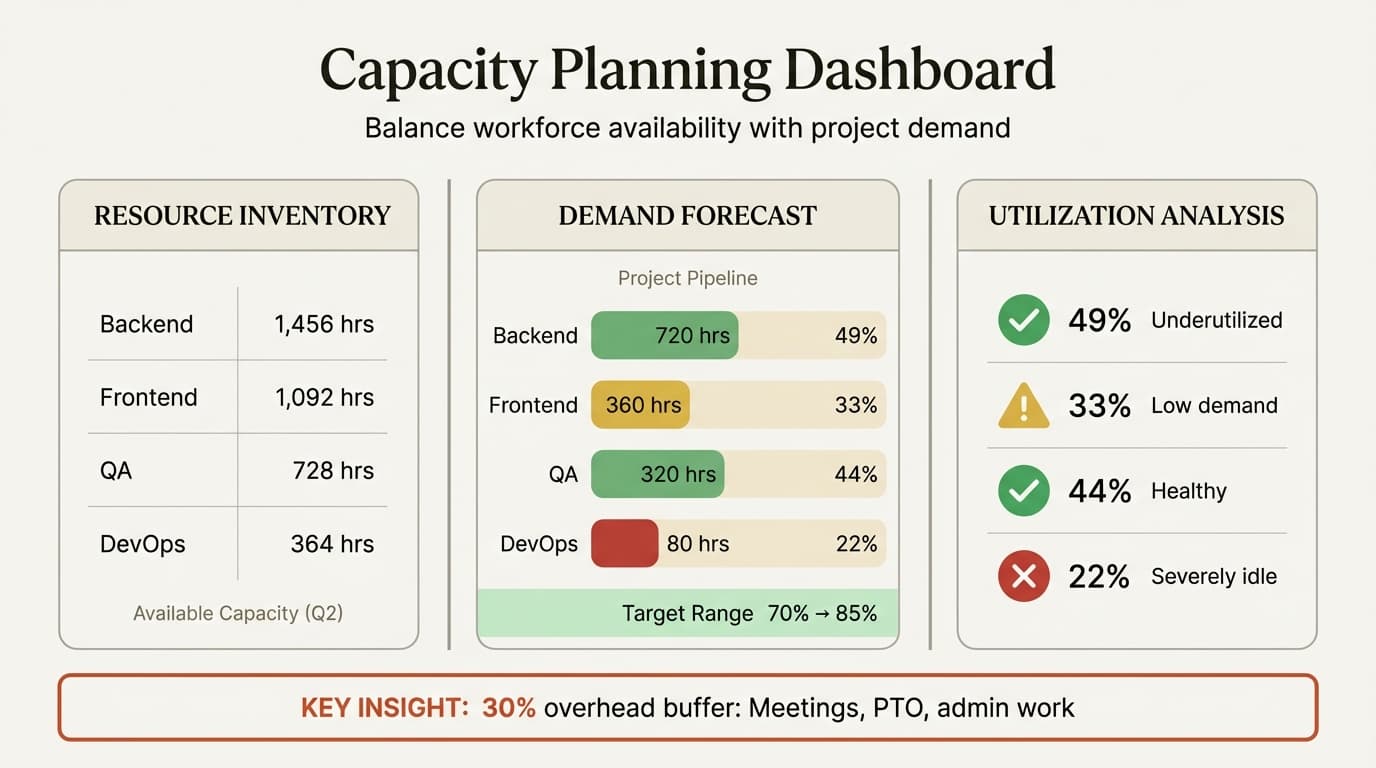
Q2 2026 CAPACITY PLAN — Product Development (12 people)

PRODUCTIVE CAPACITY (after 30% overhead)
Backend: 1,456h | Frontend: 1,092h | QA: 728h | DevOps: 364h | Design: 728h

DEMAND FORECAST
Payment Integration (P0): 320h | Mobile App V2 (P1): 480h
API Redesign (P1): 560h | Analytics Dashboard (P2): 240h
Support & Maintenance: 400h
TOTAL: 2,000h

UTILIZATION ANALYSIS
Backend: 49% | Frontend: 33% | QA: 44% | DevOps: 22% | Design: 16%
Team average: 35% (underutilized)

ACTIONS
1. Accelerate 2 P2 projects from backlog
2. Reallocate 1 Backend developer to Frontend (cross-training)
3. Consider contractor reduction if pipeline does not improve by May 1
Annual Workforce Capacity Plan (Consulting Practice)
2026 WORKFORCE CAPACITY PLAN — Strategy & Operations Consulting

CURRENT WORKFORCE (41 FTE)
Total Billable Capacity: 66,560 hours

DEMAND FORECAST
Closed deals: 28,000h | High probability: 22,000h | Medium: 18,000h

SCENARIOS
Optimistic (68,000h): 102% utilization → Hire 2 Senior Consultants
Realistic (59,000h): 89% utilization → Monitor monthly
Pessimistic (50,000h): 75% utilization → Defer hiring

DECISION
Proceed with realistic scenario. Trigger hiring if demand exceeds 62,000h.
Optimal Utilization Rates and Benchmarks
The target utilization rate balances profitability with sustainability. Research shows 70-85% is the optimal range for most professional services teams. Below 70% means idle capacity and lost revenue. Above 85% risks burnout and leaves no buffer for the inevitable unplanned work.
| Industry | Target Utilization | Source |
|---|---|---|
| Architecture & Engineering | 80% firm-wide average | Monograph 2024 benchmarks |
| IT Services & Consulting | 70-80% | Rocketlane 2025 study |
| Professional Services (general) | 70-85% | Runn 2025 industry research |
| Manufacturing | 80-90% | Saviom capacity planning guide |
| Creative Agencies | 70-75% | Parakeeto 2025 agency benchmarks |
Utilization by role varies. Individual contributors typically target 80-85% billable utilization. Managers target 50-70% due to people management overhead. Partners in consulting firms target 30-50%, spending the remainder on sales and client relationships.
100% utilization guarantees failure. We have seen teams attempt 100% utilization targets repeatedly—the result is consistently lower actual delivery as people burn out, make mistakes requiring rework, and eventually leave.
Common Capacity Planning Mistakes
1. Planning at 100% utilization with no buffer. Healthy utilization is 70-85%—the 15-30% buffer absorbs variability without derailing the plan.
2. Ignoring the invisible 30%. Capacity calculations based on 40-hour weeks ignore meetings, email, training, and administrative work consuming 20-30% of weekly hours. Productive capacity is closer to 28-32 hours per week for individual contributors.
3. Aggregate capacity hiding skill bottlenecks. A team with 1,000 hours of aggregate capacity looks healthy until you realize 800 hours are React developers and you need 600 hours of Angular work.
4. Treating estimates as commitments without tracking actuals. Without time tracking feedback loops, estimation accuracy never improves and capacity plans perpetually diverge from reality.
5. Annual planning with no monthly reviews. A capacity plan built in January becomes obsolete by March. Monthly reviews catch divergence while mitigation is still possible.
6. No prioritization framework for deferring work. Without explicit priority classification (P0/P1/P2), these decisions happen politically rather than strategically. For defining clear project accountability, see our guide on RACI matrices.
Best Practices for Capacity Planning
Invest in time tracking infrastructure. Demand forecasting requires historical data—gut-feel estimates produce unreliable plans. After 12 months of clean time tracking data, estimation accuracy typically improves 30-40%.
Plan at 70-85% target utilization, not 100%. Teams running at 70-85% utilization consistently deliver more actual output than teams planned at 100% who spend their time rescheduling work and managing burnout.
Review monthly with scenario modeling. Compare plan to actuals, update demand forecasts, and model optimistic/realistic/pessimistic scenarios to test plan resilience.
Break capacity by skills, not just roles. "Developer" capacity aggregates React, Angular, Python, and Java skills into a single number that hides critical bottlenecks.
Account for all work types. After accounting for recurring tasks, meetings, and administrative overhead, productive capacity for project work is typically 70-80% of total hours.
Define clear prioritization criteria. Priority classifications (P0 = regulatory/executive mandate, P1 = planned work, P2 = deferrable nice-to-have) make trade-offs transparent and defensible.
Link capacity planning to financial planning. Workforce cost is typically 60-80% of operating expenses for professional services businesses. Capacity plans showing underutilization (below 70%) or overcommitment (above 85%) should trigger budget conversations.
Key Takeaways
- Capacity planning matches workforce availability with project demand at a portfolio level, answering strategic questions about hiring, reallocation, and project sequencing. Resource planning assigns specific individuals to specific tasks tactically.
- Calculate productive capacity by subtracting overhead from total hours. Research shows meetings, email, training, and administrative work consume 20-30% of weekly hours—planning at 100% utilization ignores this reality and guarantees overcommitment.
- Target 70-85% utilization for most professional services teams. Below 70% means idle capacity and lost revenue. Above 85% risks burnout and leaves no buffer for unplanned work that inevitably appears.
- Plan capacity by skills, not just aggregate headcount. A team with surplus backend capacity and insufficient frontend capacity cannot deliver frontend projects—skill-level planning surfaces bottlenecks aggregate numbers hide.
- Invest in time tracking to build historical data for demand forecasting. Methods relying on historical actuals (regression analysis, time series modeling) consistently outperform expert judgment or gut-feel estimates.
- Review capacity plans monthly, not annually. Compare plan to actuals, update demand forecasts from pipeline changes, and model scenarios to test resilience. Monthly reviews catch divergence while mitigation is still possible.
For visualizing capacity plans and resource allocation timelines in PowerPoint, Deckary provides capacity planning templates, Gantt charts, and resource allocation dashboards optimized for stakeholder presentations—see our guide on making Gantt charts in PowerPoint.
Related Guides
- Progress Report Template — reporting framework for tracking project accomplishments and resource consumption over time
- Status Report Template — operational reporting for current work, blockers, and immediate resource needs
- RACI Matrix Examples — accountability framework for defining who delivers capacity-planned work
- Scrum Framework Guide — sprint-level capacity planning for agile teams
- Agile vs Waterfall — methodology-specific capacity planning patterns
Sources
- Saviom: Resource Capacity Planning Guide
- AIHR: Workforce Capacity Planning
- iMocha: Workforce Capacity Planning Steps & KPIs
- Monday.com: Best Capacity Planning Templates for 2025
- Resource Guru: Resource Capacity Planning 2026 Guide
- Runn: Utilization Rate Benchmarks
- Monograph: Calculating Capacity Utilization for A&E Firms
- Rocketlane: Capacity and Utilization in Professional Services
- Actiplans: Capacity Planning Strategies and Techniques
- PDWare: Resource Capacity Planning Guide for Workforce
- BirdView PSA: Capacity Utilization Formula and Tools
- Wrike: Why Capacity Utilization Rates Matter
- Saviom: Capacity Utilization Rate Definition
- Parakeeto: Agency Utilization Rate and Capacity Forecasting
- Productive: Resource Capacity Planning Guide
Build and improve Excel workbooks with AI
Create models, audit formulas, clean data, and generate output sheets inside Excel. 10 free AI prompts. No credit card required.