Progress Report Template: Format, Examples, and Best Practices
Use a filled progress report example with milestones, budget, blockers, and decisions. Download editable example and blank PowerPoint decks; compare reporting formats.
A progress report explains what changed during a project period, whether delivery is on track, and what needs attention. Lead with the status and decision, then show the milestones and evidence.
Filled progress report example
Illustrative weekly update from the downloadable deck: The customer portal's 23 October launch is at risk. Integration is complete, but QA sign-off is forecast one week late. The sponsor must decide on $12,000 of additional QA capacity by 28 September.
| Item | Planned | Current | Action |
|---|---|---|---|
| QA sign-off | 9 October | 16 October forecast | QA lead to resolve the capacity gap |
| Budget spent | $144,000 to date | $132,000 to date | Explain why underspend does not remove delivery risk |
| Final cost | $240,000 approved | $252,000 forecast | Review the $12,000 variance, or 5% |
| Launch | 23 October | 23 October, at risk | Confirm QA capacity before relying on the launch date |
| Sponsor decision | Additional QA capacity | Awaiting approval | Decide on the $12,000 request by 28 September |
Get the editable progress report PowerPoint template, including filled and blank decks with no signup required. Use slides for the stakeholder meeting and a short written update for email. The sample numbers are fictional; replace dates, scope, and owners before use.
Progress Report Template: Quick Answer
A progress report summarizes what changed during a project period: completed milestones, work in progress, blockers, risks, budget or timeline movement, and next steps. A good progress report template starts with an executive summary, then uses visual sections for milestone progress, current work, risks, resource usage, and decisions needed from stakeholders.
| Format | Best For | Main Question Answered |
|---|---|---|
| Progress report | Weekly, monthly, or phase reviews | What changed since the last report? |
| Status report | Daily or weekly team updates | What is happening right now? |
| Project update | Brief stakeholder communication | What should sponsors know quickly? |
| Steering committee report | Governance meetings | What decisions or escalations are needed? |
What Is a Progress Report?
A progress report tracks project accomplishments and challenges over a defined period—typically a week, month, or phase. Unlike status reports that capture only the current moment, progress reports assess change over time: tasks completed, budget consumed, timeline slippage, and risks that materialized or resolved.
Progress reports serve two audiences: executives who need to know if the project requires intervention, and project teams who need visibility into dependencies and blockers. Executive-facing reports prioritize the summary and visual dashboards. Team-facing reports include task-level detail.
Progress Report vs Status Report
The terms are often used interchangeably, but the distinction matters for reporting cadence and content structure. Progress reports assess changes over a specific period, while status reports capture the immediate present.
| Factor | Progress Report | Status Report |
|---|---|---|
| Time focus | Retrospective—what changed | Current snapshot—what is now |
| Content emphasis | Milestones completed, accomplishments | Active tasks, current conditions |
| Typical frequency | Weekly or monthly | Daily or weekly |
| Audience | Executives, sponsors, governance boards | Team members, direct managers |
| Visual elements | Timeline charts, completion percentages | Task boards, current workload |
| Decision trigger | Flags risks needing executive action | Surfaces blockers needing team action |
When to use progress reports: Steering committee meetings, monthly business reviews, phase gate approvals, and any governance forum where stakeholders need to assess trajectory and decide whether to continue, pause, or redirect the project.
When to use status reports: Daily standups, team syncs, sprint reviews, and operational contexts where the question is "what is everyone working on right now" rather than "how far have we come."
For agile teams running sprints, progress reports happen at sprint reviews (demonstrating completed work), while status reports happen at daily scrums (synchronizing current tasks). See our Scrum framework guide for ceremony-level reporting patterns.
Standard Progress Report Structure
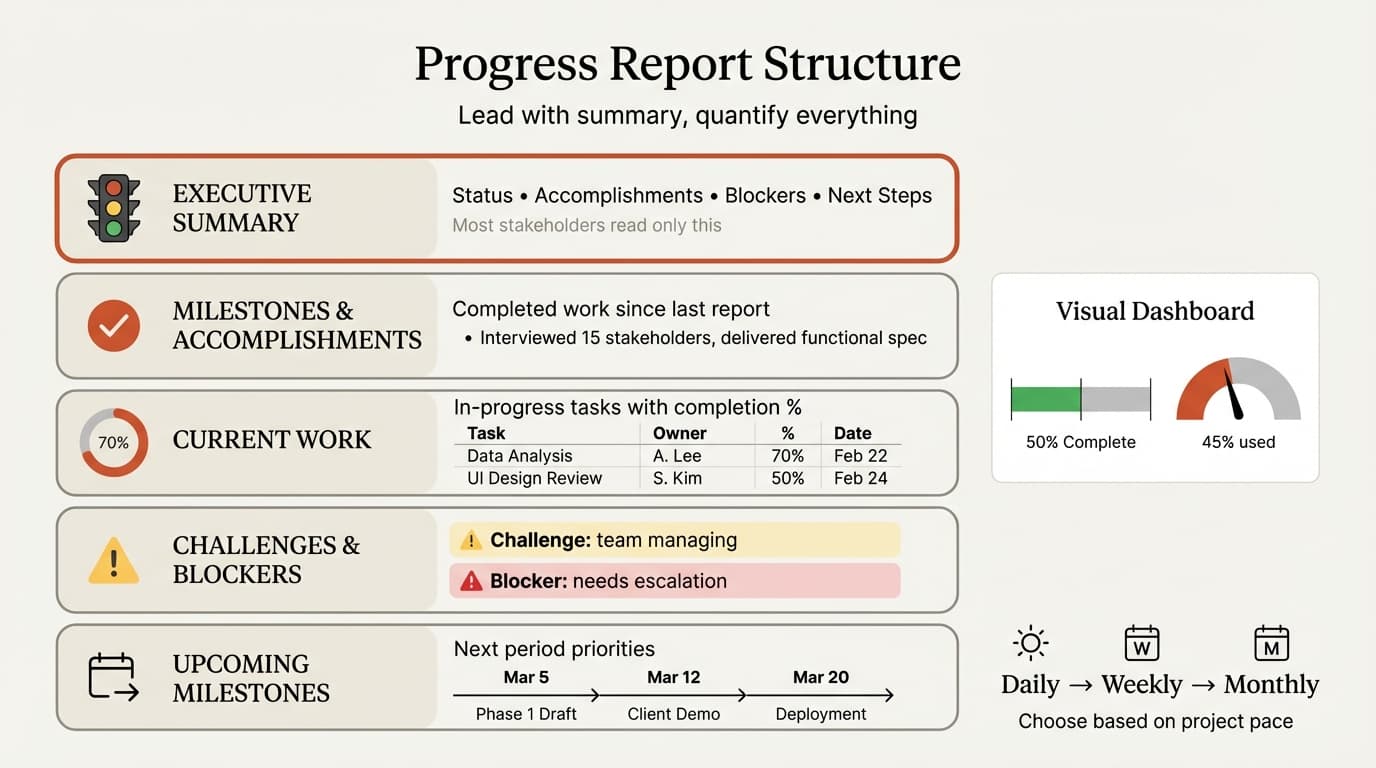
A progress report follows a consistent structure optimized for executive consumption. The format front-loads conclusions and uses visual dashboards to communicate trends without forcing readers to parse paragraphs.
1. Executive Summary
Lead with the verdict. The executive summary answers four questions:
- Project status: On track (green), at risk (yellow), or off track (red)
- This period's accomplishments: 2-3 completed milestones
- Critical blockers: Issues requiring executive intervention
- Next period priorities: What the team will accomplish before the next report
Example:
Status: At Risk (Yellow)

This month: Completed vendor selection (3 finalists evaluated), signed
SOW with Accenture, and delivered requirements documentation (120 pages).
Budget is under by 8%.

Blocker: Legal review is stalled—vendor contract has been with General
Counsel for 3 weeks with no feedback. This blocks Phase 2 kickoff
scheduled for March 1.

Next month: Complete legal review, finalize data migration plan, and
begin user acceptance testing environment setup.
Limit the executive summary to one slide or one half-page of text. Most executives read only this section—everything else is backup.
2. Project Overview
Provide context for readers joining mid-project: project name, objective, timeline (original and revised dates), budget, and sponsors. This section rarely changes week-to-week.
3. Milestones and Accomplishments
List completed work since the last report. Group by workstream or phase, not chronological task dump.
Format:
Completed This Period:
- Requirements Definition: Interviewed 15 stakeholders, documented
  40 use cases, finalized functional spec (approved Feb 15)
- Vendor Selection: Evaluated 3 vendors, completed demos, conducted
  reference checks, signed SOW with Accenture
- Governance: Delivered steering committee presentation, received
  approval to proceed to Phase 2
Quantify where possible—numbers communicate progress more clearly than vague "made progress" statements.
4. Current Work and Completion Status
Show what is in progress with estimated completion percentages:
| Workstream | Task | Owner | % Complete | Target Date |
|---|---|---|---|---|
| Data Migration | Map source to target fields | Sarah | 70% | Feb 28 |
| UAT Environment | Provision servers and access | IT Ops | 40% | Mar 5 |
| Training Materials | Draft end-user guides | Emily | 85% | Feb 25 |
5. Challenges and Blockers
Distinguish between challenges the team is managing and blockers that require executive intervention.
Blocker example:
BLOCKER: Legal review of vendor contract has been in queue for 3 weeks
with no feedback. This blocks Phase 2 kickoff (scheduled Mar 1) and puts
the April go-live date at risk. REQUESTED ACTION: Sponsor to escalate
with General Counsel.
Challenge example:
CHALLENGE: Data quality in legacy CRM is lower than expected—15% of
customer records have missing or invalid email addresses. MITIGATION:
Team is running data cleansing scripts and will flag invalid records
for manual review. This adds 2 days to migration timeline (still within
buffer).
Blockers require action from the report's audience. Challenges explain how the team is handling issues without escalation.
6. Budget and Resource Tracking
Show budget burn and resource utilization:
| Category | Approved Budget | Spent to Date | % Used | Forecast |
|---|---|---|---|---|
| Consulting fees | $400,000 | $180,000 | 45% | $395,000 |
| Software licenses | $50,000 | $50,000 | 100% | $50,000 |
| Internal labor | $150,000 | $70,000 | 47% | $155,000 |
| Total | $600,000 | $300,000 | 50% | $600,000 |
Highlight variances greater than 10%. If you are 50% through the timeline but only 30% through the budget, explain why. If 50% through timeline and 70% through budget, flag the overrun risk.
7. Upcoming Milestones
List milestones due before the next report:
Next Period (Mar 1 - Mar 31):
- Mar 5: Complete UAT environment setup
- Mar 12: Begin end-user training (50 users, 3 sessions)
- Mar 20: Deliver Phase 2 design document for steering committee review
- Mar 31: Complete data migration dry run
8. Visual Dashboard (Optional)
For monthly or quarterly reports, include a one-page visual dashboard: timeline chart, budget burn chart, risk heatmap, and milestone completion percentages. Use consistent formatting report-to-report so executives can spot trends without re-learning the format. Deckary provides progress report and dashboard templates inside PowerPoint—see our guide on making Gantt charts in PowerPoint for timeline visualization.
Continue reading: Project Plan Examples · Timeline Slides in PowerPoint · Competitive Landscape Slide
Use consulting-grade layouts in PowerPoint
Start from structured business slides and customize them in your own deck. 10 free AI prompts. No credit card required.
Progress Report Frequency
After tracking reporting cadences across 60+ programs, weekly reporting is the default for most projects.
| Frequency | Best For | Pros | Cons |
|---|---|---|---|
| Daily | Short, intense phases (launches, executive presentations) | Immediate visibility, fast response to issues | High overhead, encourages micromanagement |
| Weekly | Standard for most projects | Balanced cadence, catches issues early | May feel excessive for slow-moving programs |
| Biweekly | Long-duration programs with stable execution | Lower reporting burden | Slower issue detection |
| Monthly | Enterprise programs, governance-level reporting | Strategic view, lower frequency overhead | Late discovery of problems |
| Quarterly | Portfolio reviews, long-term initiatives | Aligns with business planning cycles | Too infrequent for active project management |
Match frequency to project duration, risk level, stakeholder availability, and change velocity. A 3-month project needs weekly reporting. A 2-year transformation can use monthly. For agile teams, progress reports align with sprint cadences. See our agile vs waterfall comparison for methodology-specific reporting patterns.
Progress Report Template Examples
Weekly Project Progress Report Template
PROJECT: Customer Portal Migration
PERIOD: Feb 16 - Feb 22, 2026
STATUS: On Track (Green)

SUMMARY
Completed API integration testing (98% test coverage achieved) and
finalized UX designs for all 5 portal sections. No blockers. Next week:
begin user acceptance testing with 20 pilot users.

COMPLETED THIS WEEK
- API Integration: Passed 47/48 integration tests, documented 1 known
  issue (non-blocking)
- UX Design: Finalized designs for dashboard, profile, billing, support,
  and settings pages
- Infrastructure: Provisioned staging environment (load testing complete)

CURRENT WORK (Week of Feb 23)
- User Acceptance Testing: Recruit 20 pilot users, schedule 3 sessions
- API Fix: Resolve timeout issue in payment processing endpoint
- Documentation: Complete API reference docs (60% done, target Feb 28)

BLOCKERS
None

RISKS
- UAT recruitment behind schedule (12/20 users confirmed). Mitigation:
  Expanding outreach to customer success team for referrals.

BUDGET
$180k spent of $400k budget (45% used, 50% through timeline)

NEXT MILESTONES
- Feb 28: Complete API docs
- Mar 5: Finish UAT (20 users, 3 sessions)
- Mar 12: Go/no-go decision for production launch
Monthly Executive Progress Report Template
PROJECT: ERP Implementation (SAP S/4HANA)
PERIOD: February 2026
STATUS: At Risk (Yellow)

EXECUTIVE SUMMARY
Completed Phase 1 design (finance and procurement modules configured)
and delivered 3 training sessions to 60 end users. Legal review of data
processing addendum is stalled (3 weeks, no response), blocking Phase 2
kickoff scheduled for March 1. Forecast remains $2.8M, but timeline
risk is increasing.

REQUESTED ACTION: Sponsor to escalate legal review with General Counsel.

FEBRUARY ACCOMPLISHMENTS
- Configuration: Completed finance (GL, AP, AR) and procurement (PO,
  receipts) modules (100% of Phase 1 scope)
- Training: Delivered 3 sessions to 60 finance and procurement users
  (92% attendance, avg satisfaction 4.2/5)
- Testing: Passed 85/90 integration tests (5 defects logged, all
  severity 3 or lower)
- Governance: Presented Phase 1 results to steering committee (approved
  to proceed)

MARCH PRIORITIES
- Resolve legal blocker and finalize vendor contract amendment
- Begin Phase 2 (supply chain and manufacturing modules)
- Complete data migration dry run (500k records)
- Deliver change management plan to steering committee

BUDGET (as of Feb 28)
- Approved: $2,800,000
- Spent: $1,200,000 (43%)
- Forecast: $2,800,000 (on budget)

TIMELINE
- Original go-live: June 30, 2026
- Current forecast: July 15, 2026 (2-week delay due to legal blocker)

CRITICAL RISKS
1. Legal review delay: 3 weeks stalled, blocks Phase 2 (HIGH impact,
   HIGH likelihood). Mitigation: Sponsor escalation requested.
2. Data quality: Legacy system has 12% incomplete customer records
   (MEDIUM impact, MEDIUM likelihood). Mitigation: Running cleansing
   scripts, manual review for high-value accounts.

TOP 5 MILESTONES (Next 30 Days)
1. Mar 1: Finalize legal review and sign amendment
2. Mar 10: Complete data migration dry run
3. Mar 15: Begin Phase 2 configuration (supply chain)
4. Mar 22: Deliver change management plan
5. Mar 31: Phase 2 design review with steering committee
Common Progress Report Mistakes
1. All green statuses until the project fails. If every report shows green until the week before the deadline when everything goes red, stakeholders lose trust. Surface risks early—yellow status is a warning signal, not a failure.
2. Burying the conclusion. Executives read the first slide or first paragraph. Lead with the verdict—on track, at risk, or off track—in the first sentence.
3. Task lists without context. "Completed data mapping for customer module" is more useful than "Finished tasks 1-40." Group tasks by workstream and add completion percentages.
4. No quantification. "Made significant progress on testing" is vague. "Passed 85 of 90 integration tests" is concrete.
5. Inconsistent format. Use a template and stick to it. Consistency builds trust.
6. No forward look. Stakeholders need to know what is coming next. For structuring multi-phase plans, see our project plan examples.
7. Reporting activity instead of outcomes. "Held 5 meetings this week" is activity. "Finalized vendor selection after evaluating 3 finalists" is an outcome. For defining deliverable-focused accountability, see our guide on RACI matrices.
Best Practices for Progress Reports
Keep the executive summary under 5 sentences. Most stakeholders read only this section. Make it self-contained: status, accomplishments, blockers, next steps.
Use visuals for trends. Budget burn charts, timeline Gantt charts, and completion percentage bars communicate faster than paragraphs.
Flag risks with requested actions. "Legal review is stalled" is a problem statement. "Legal review is stalled—sponsor to escalate with General Counsel" is a requested action.
Match frequency to project pace. Fast-moving projects need weekly reporting. Slow-moving programs can use monthly.
Maintain a consistent template. Stakeholders should be able to flip to page 2 and find the budget section in the same place every time.
Celebrate wins. Reserve space for accomplishments. Completed milestones and team successes keep morale high.
Archive reports systematically. Number your reports (Week 14, Month 6) and store them in a shared location.
Key Takeaways
- Progress reports assess changes over time (milestones completed, budget consumed, timeline slippage), while status reports capture only the current moment. Choose the format that matches stakeholder needs and reporting frequency.
- Lead with the executive summary—status, accomplishments, blockers, next steps—in under 5 sentences. Most stakeholders read only this section.
- Weekly reporting is the default for most projects. Use daily reports for high-stakes phases, monthly for long-duration programs. Match frequency to project pace and stakeholder availability.
- Quantify everything—tests passed, users trained, budget spent, completion percentages. Numbers communicate progress more clearly than vague "made progress" statements.
- Flag blockers with requested actions. "Legal review is stalled—sponsor to escalate" is actionable. "Legal review is delayed" is just a problem statement.
- Use a consistent template report-to-report. Stakeholders should find budget, risks, and milestones in the same place every time without hunting through changing formats.
For visualizing project timelines and milestones in PowerPoint, Deckary provides progress report templates, Gantt charts, and dashboard layouts optimized for executive consumption—see our guide on making Gantt charts in PowerPoint.
Related Guides
- Project Plan Examples — five real project plans with timelines, milestones, and budget structures
- RACI Matrix Examples — accountability framework for defining who delivers what in progress reports
- Scrum Framework Guide — agile reporting cadences for sprint reviews and retrospectives
- Agile vs Waterfall — methodology-specific reporting patterns for progress and status updates
- Gantt Chart in PowerPoint — step-by-step guide for building timeline visuals
Sources
Use consulting-grade layouts in PowerPoint
Start from structured business slides and customize them in your own deck. 10 free AI prompts. No credit card required.