Scrum Framework: Complete Guide to Roles, Ceremonies, and Artifacts
Scrum framework guide covering 3 roles, 5 ceremonies, and 3 artifacts. Learn when to use Scrum, how sprints work, and implementation best practices.
Scrum is the most adopted agile framework worldwide—used by 87% of agile teams—but most implementations miss the framework's actual structure. Teams run daily standups and call it Scrum. They keep a backlog and claim they are agile. But without the defined roles, ceremonies, and artifacts that make Scrum work, you are left with meetings that add overhead instead of delivering value.
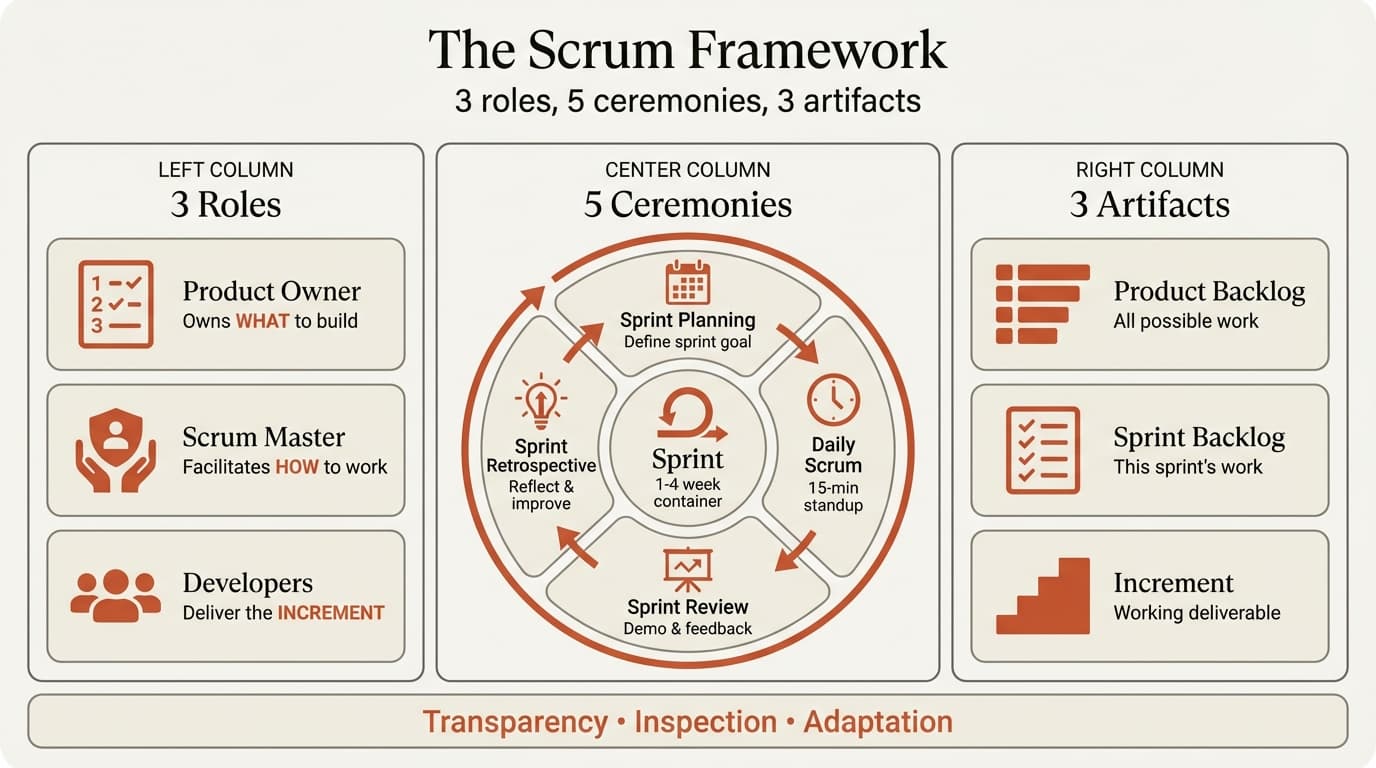
The Scrum framework is intentionally minimal. It defines exactly 3 roles, 5 ceremonies, and 3 artifacts—nothing more. After supporting 35+ agile transformations across software development, digital transformation, and consulting engagements, we have tracked which elements teams skip (usually the retrospective and definition of done) and which missteps create the most friction (assigning one person as both Product Owner and Scrum Master, or running sprints with no working deliverable at the end).
This guide walks through the complete Scrum framework: what each role owns, when each ceremony happens, what each artifact tracks, and the decision criteria for choosing Scrum over Kanban or Waterfall.
What Is the Scrum Framework?
The Scrum framework is a lightweight structure for managing complex product development through iterative delivery. Ken Schwaber and Jeff Sutherland created Scrum in the early 1990s, formalizing it in the Scrum Guide first published in 2010 and most recently updated in 2020.
Scrum operates on three core pillars:
- Transparency — All work is visible to everyone on the team. The backlog, sprint progress, and blockers are shared openly.
- Inspection — Teams regularly check progress toward the sprint goal and product vision.
- Adaptation — When inspection reveals a problem or better approach, teams adjust immediately rather than waiting for a phase gate.
The framework's minimalism is intentional. Unlike prescriptive methodologies that define every process and template, Scrum provides the skeleton—roles, ceremonies, artifacts—and expects teams to adapt the details to their context.
The 3 Scrum Roles
Every Scrum team has exactly three roles. These are not job titles (a developer can be a Product Owner on one project and a Scrum Master on another), but accountability assignments that define who owns what decisions.
Product Owner
The Product Owner maximizes the value the product creates for users, customers, and the business. This role manages the product backlog—the prioritized list of features, enhancements, and fixes.
Key responsibilities:
- Define product vision and prioritize backlog based on value
- Write user stories with clear acceptance criteria
- Make trade-off decisions on scope, budget, and timeline
- Accept or reject work based on definition of done
The Product Owner is the single decision-maker for "what" the team builds. Final prioritization authority rests with the Product Owner—this is why the role cannot be shared across multiple people.
Common mistakes: Skipping backlog refinement and showing up to sprint planning with vague requirements. Delegating prioritization to committees. Never saying no to stakeholder requests.
Scrum Master
The Scrum Master facilitates the Scrum process and removes impediments that block the team. This role is not a project manager—Scrum Masters do not assign tasks or set deadlines. They coach the team on Scrum practices, ensure ceremonies happen as intended, and protect the team from external distractions.
Key responsibilities:
- Facilitate all Scrum ceremonies
- Remove blockers the team cannot resolve (access issues, vendor dependencies)
- Coach the team on Scrum practices
- Shield the team from mid-sprint scope changes
The Scrum Master serves the team, Product Owner, and organization—facilitating collaboration, refining backlogs, and advocating for process improvements.
Common mistakes: Becoming task managers instead of facilitators. Serving as both Scrum Master and Product Owner. Skipping retrospectives.
Developers
Developers are the people who create the product increment each sprint. In Scrum terminology, "Developers" means anyone doing the work—software engineers, designers, data analysts, QA testers—not just people writing code.
Key responsibilities:
- Commit to realistic sprint goals
- Self-organize to accomplish work without task assignment
- Ensure all work meets the definition of done
- Participate in all ceremonies with transparent updates
Developers are collectively accountable for the sprint deliverable. The team decides how to accomplish work and resolve technical trade-offs.
Common mistakes: Waiting for task assignment instead of self-organizing. Skipping daily scrums. Marking work done without meeting the definition of done.
The 5 Scrum Ceremonies
Scrum ceremonies create a rhythm of planning, execution, feedback, and improvement. Each ceremony has a specific purpose, timebox, and required participants. Atlassian's guide to Scrum ceremonies provides best practices for running each event.
| Ceremony | Duration | Participants | Purpose |
|---|---|---|---|
| Sprint Planning | 2 hours per week of sprint | Entire team | Define sprint goal and commit to backlog items |
| Daily Scrum | 15 minutes | Developers (+ Scrum Master) | Synchronize work and identify blockers |
| Sprint Review | 1 hour per week of sprint | Entire team + stakeholders | Demo completed work and gather feedback |
| Sprint Retrospective | 1.5 hours per week of sprint | Entire team | Reflect on process and identify improvements |
| Sprint (container) | 1-4 weeks | Entire team | Deliver a working product increment |
Sprint Planning
Sprint Planning happens at the start of every sprint. The team selects backlog items to complete during the sprint and defines the sprint goal—a single sentence describing what the sprint will accomplish.
How it works:
- Product Owner presents top priority backlog items
- Developers ask clarifying questions
- Team discusses capacity
- Developers commit to a realistic set of items
- Team breaks down items into tasks (optional)
Sprint Planning converts the backlog into a team commitment. For structuring sprint goals and timelines, see our guide on project plan examples.
Best practices: Keep focused—technical design discussions belong elsewhere. Use historical velocity to calibrate capacity. Do not over-commit.
Daily Scrum (Standup)
The Daily Scrum is a 15-minute event where Developers synchronize work and identify blockers. It happens at the same time and place every day. The Scrum Master facilitates but does not lead—this is the team's meeting.
Standard format:
- What did I complete yesterday toward the sprint goal?
- What will I work on today?
- What blockers am I facing?
Daily Scrums surface coordination needs, blockers, and progress risks. The meeting is not a status report—it is a team synchronization mechanism.
Best practices: Prioritize problem-solving over status. Continue detailed conversations after with only relevant people. Parabol's guide to Scrum ceremonies for remote teams covers adaptations for distributed teams.
Sprint Review
The Sprint Review happens at the end of the sprint. The team demos completed work to stakeholders, gathers feedback, and discusses what to do next. This is not a formal presentation—it is a working session.
How it works:
- Product Owner reviews sprint goal and completed items
- Developers demo working software (not slides)
- Stakeholders provide feedback
- Product Owner discusses backlog changes
- Team collaborates on next sprint priorities
Sprint Reviews create a feedback loop with stakeholders. Without this ceremony, teams discover misalignment too late.
Best practices: Demo working software, not prototypes. Invite actual users. Convert feedback into backlog items immediately.
Sprint Retrospective
The Sprint Retrospective is the team's opportunity to improve their process. After the sprint review, the team reflects on what went well, what did not, and what to change in the next sprint.
Common formats:
- Start, Stop, Continue — What should we start doing? Stop doing? Continue doing?
- Glad, Sad, Mad — What made you glad? Sad? Mad?
- 4Ls — What did we Like? Learn? Lack? Long for?
How it works:
- Team members share observations
- Group similar observations into themes
- Vote on which theme to address
- Define 1-3 action items for next sprint
- Scrum Master tracks action items and follows up
Retrospectives are the team's primary improvement mechanism. Teams that skip retrospectives repeat the same mistakes.
Best practices: Make it safe to surface problems. Limit action items to 1-3 per sprint. Rotate facilitation.
The Sprint (Container Event)
The sprint itself is a fixed timebox—typically 1 to 4 weeks—that contains all the other events. Everything in Scrum happens within a sprint. At the end of the sprint, the team delivers a working product increment that meets the definition of done.
Sprints create a forcing function for decision-making. The team cannot extend the sprint to finish one more feature. This discipline prevents scope creep and ensures regular value delivery.
Sprint length trade-offs:
- 1 week — Fast feedback, higher ceremony overhead. Best for uncertain requirements.
- 2 weeks — Most common. Balances feedback speed with overhead.
- 4 weeks — Lower overhead, slower feedback. Best for stable requirements.
Continue reading: Agile vs Waterfall · Line Charts in PowerPoint · Investment Banking Pitch Book
Use consulting-grade layouts in PowerPoint
Start from structured business slides and customize them in your own deck. 10 free AI prompts. No credit card required.
The 3 Scrum Artifacts
Scrum artifacts are the information sources the team and stakeholders use to track progress. Each artifact has a defined owner and update cadence. The official Scrum Guide defines these artifacts and their associated commitments.
Product Backlog
The Product Backlog is the prioritized list of everything that might be included in the product—features, enhancements, bug fixes, technical debt, research spikes. The Product Owner owns this artifact and updates it continuously.
What it contains:
- User stories with acceptance criteria
- Technical enablers
- Bug fixes
- Research tasks
The backlog is the single source of truth for what the team might work on. Without it, teams work on whoever shouts loudest.
Best practices: Keep the top 1-2 sprints refined with clear acceptance criteria. Archive items low priority for over 6 months.
Sprint Backlog
The Sprint Backlog is the set of product backlog items the team committed to completing in the current sprint, plus the plan for delivering them. Developers own this artifact and update it daily.
What it contains:
- Committed backlog items
- Tasks to complete each item (optional)
- Sprint goal
The sprint backlog converts priorities into the team's work plan. It shows progress in real time.
Best practices: Make it visible on physical or digital boards. Update daily. Do not add items mid-sprint without team consent.
Increment
The Increment is the sum of all product backlog items completed during the sprint, combined with increments from all previous sprints. It must meet the definition of done—the team's shared checklist for what "complete" means.
Definition of done examples:
- Code peer-reviewed and merged
- Unit tests pass with greater than 80% coverage
- Feature deployed to staging
- Product Owner accepted
- Documentation updated
The increment is the only measure of progress. Scrum does not track hours or meetings—only working software.
Best practices: Ship to production when possible. Maintain a releasable increment every sprint. Avoid "almost done" work.
When to Use the Scrum Framework
Scrum fits specific project and team characteristics. Forcing Scrum onto work that does not match those characteristics creates overhead without value. After advising teams on 35+ agile transformations, we have seen Scrum succeed when requirements evolve based on feedback, work can be delivered in increments, and teams have the autonomy to self-organize.
Strong Scrum candidates:
- Software product development — User needs become clearer once people interact with working features. Releasing incrementally captures value early and incorporates feedback into the next sprint.
- Innovation and R&D — When the outcome is uncertain, short iterations with frequent pivots outperform a fixed plan. Scrum's empirical approach (inspect and adapt) fits exploratory work.
- Internal digital transformations — Process changes that affect employee workflows benefit from iterative rollout and feedback. Sprint reviews with actual users surface adoption issues early.
- Consulting engagements with evolving scope — Strategy projects where the initial hypothesis may shift based on findings (common in due diligence and market entry work).
When NOT to use Scrum:
- Fixed-scope, fixed-price contracts — When the deliverable, timeline, and acceptance criteria are contractually defined upfront, Waterfall provides the governance structure both parties need. See our agile vs waterfall comparison for methodology selection criteria.
- Hardware development with long lead times — Physical product manufacturing has tooling costs that make iterative changes prohibitively expensive.
- Regulatory compliance programs — When documentation at each stage is mandatory and auditors need sequential approval, Waterfall's phase-gate structure works better.
- Continuous flow work with unpredictable task arrival — Help desk tickets, bug triage, and operational support fit Kanban better than Scrum. Kanban emphasizes flow over fixed sprints.
Scrum vs Kanban vs Waterfall
| Factor | Scrum | Kanban | Waterfall |
|---|---|---|---|
| Work structure | Fixed sprints (1-4 weeks) | Continuous flow | Sequential phases |
| Planning horizon | Sprint-level (1-4 weeks) | Just-in-time | Full project upfront |
| Change tolerance | High within backlog priority | Very high | Low—formal change control |
| Team structure | Cross-functional, stable team | Specialists or cross-functional | Specialized teams per phase |
| Metrics | Velocity, burndown | Cycle time, throughput | Milestone completion |
| Best for | Product development, innovation | Support, operations, maintenance | Fixed requirements, compliance |
Decision framework: Use Scrum when you can deliver value every 1-4 weeks and requirements will evolve based on feedback. Use Kanban when work arrives unpredictably and you need continuous delivery without sprint boundaries. Use Waterfall when requirements are fixed and deliverables cannot be released incrementally.
Common Scrum Implementation Mistakes
1. Combining Product Owner and Scrum Master roles. These roles have inherent conflicts—Product Owners push for scope while Scrum Masters protect capacity. One person cannot hold both effectively.
2. Running sprints with no working deliverable. If sprints end with "mostly done" work, you are running mini-waterfall. Break down stories smaller so each sprint produces something usable.
3. Skipping retrospectives. Teams that skip retros never improve. Retrospectives are the primary improvement mechanism.
4. No definition of done. Without a shared checklist, teams ship incomplete work. Define "done" explicitly.
5. Adding work mid-sprint without consent. The sprint backlog is a commitment. New urgent work goes into the next sprint or replaces an existing item with team agreement.
6. Treating daily scrums as status reports. The daily scrum is for Developers to synchronize, not report to a manager.
7. No stakeholder participation in sprint reviews. Sprint reviews are the feedback loop with actual users. For managing stakeholder engagement, see our stakeholder mapping guide.
Measuring Scrum Success
Track these metrics to assess whether Scrum is delivering value:
| Metric | Definition | What It Measures | Target |
|---|---|---|---|
| Velocity | Story points completed per sprint | Team capacity and estimation accuracy | Stable trend over 3-5 sprints |
| Sprint goal success rate | % of sprints where goal is met | Planning accuracy and scope discipline | Greater than 80% |
| Cycle time | Days from "in progress" to "done" | Flow efficiency | Decreasing trend |
| Defect escape rate | Bugs found in production vs caught in sprint | Quality of definition of done | Less than 10% escape |
| Team satisfaction | Retrospective action item completion | Process improvement effectiveness | Greater than 70% completion |
What NOT to measure: Hours worked, lines of code, number of commits, meeting attendance. Scrum measures outcomes (working software, customer satisfaction), not activity.
Key Takeaways
- The Scrum framework defines 3 roles (Product Owner, Scrum Master, Developers), 5 ceremonies (Sprint Planning, Daily Scrum, Sprint Review, Sprint Retrospective, Sprint), and 3 artifacts (Product Backlog, Sprint Backlog, Increment).
- Use Scrum when requirements evolve based on feedback, work can be delivered in increments, and teams can self-organize. Use Kanban for continuous flow. Use Waterfall when requirements are fixed.
- The Product Owner owns "what to build." The Scrum Master facilitates "how to work." Developers own "how to deliver." These roles should not overlap on the same person.
- Retrospectives are not optional—they are the primary mechanism for process improvement. Teams that skip retrospectives repeat the same mistakes every sprint.
- The only measure of progress is a working increment that meets the definition of done. "Almost done" is not done.
For visualizing sprint timelines and roadmaps in PowerPoint, Deckary provides Gantt chart templates and project management slide layouts—see our guide on making Gantt charts in PowerPoint. For managing task prioritization within sprints, see our guide on how to prioritize tasks.
Sources
- ProProfs Project — 50+ Scrum Statistics for 2026
- Scrum.org — The Scrum Guide
- Atlassian — Scrum Ceremonies
- Atlassian — Kanban vs Scrum
- Parabol — Scrum Ceremonies for Remote Teams
- Mountain Goat Software — Why Scrum Masters Should Not Be Product Owners
Related Guides
- Agile vs Waterfall: How to Choose the Right Methodology — decision framework for methodology selection
- Project Plan Examples — five real project plans with agile, waterfall, and hybrid formats
- RACI Matrix Examples — accountability framework that works in Scrum teams
- Stakeholder Mapping Guide — managing expectations during agile transformations
- How to Prioritize Tasks — backlog prioritization for sprint planning
Use consulting-grade layouts in PowerPoint
Start from structured business slides and customize them in your own deck. 10 free AI prompts. No credit card required.