Status Report Template: Format, Examples, and Best Practices
Status report template guide with structure, format, and examples. Learn when to use status reports, key sections, and how they differ from progress reports.
When a project manager reports "everything is on track" in every status report until the week before the deadline when everything suddenly turns red, the problem is not execution—it is the reporting structure. The status report should flag issues the moment they appear, not weeks later when recovery is impossible.
Status reports communicate what is happening right now—active tasks, current blockers, and immediate conditions that need attention. The format should answer three questions in under 30 seconds: What is the current status? What is being worked on today? What blockers need immediate resolution? After writing status reports for 40+ transformation programs and agile development teams across strategy consulting and enterprise implementations, we have tracked which reporting structures surface issues early (snapshot-based, blocker-focused, daily or weekly cadence) and which create false confidence until it is too late to course-correct.
This guide covers status report structure, format options, frequency decisions, and the critical differences between status and progress reports that determine which document your stakeholders actually need.
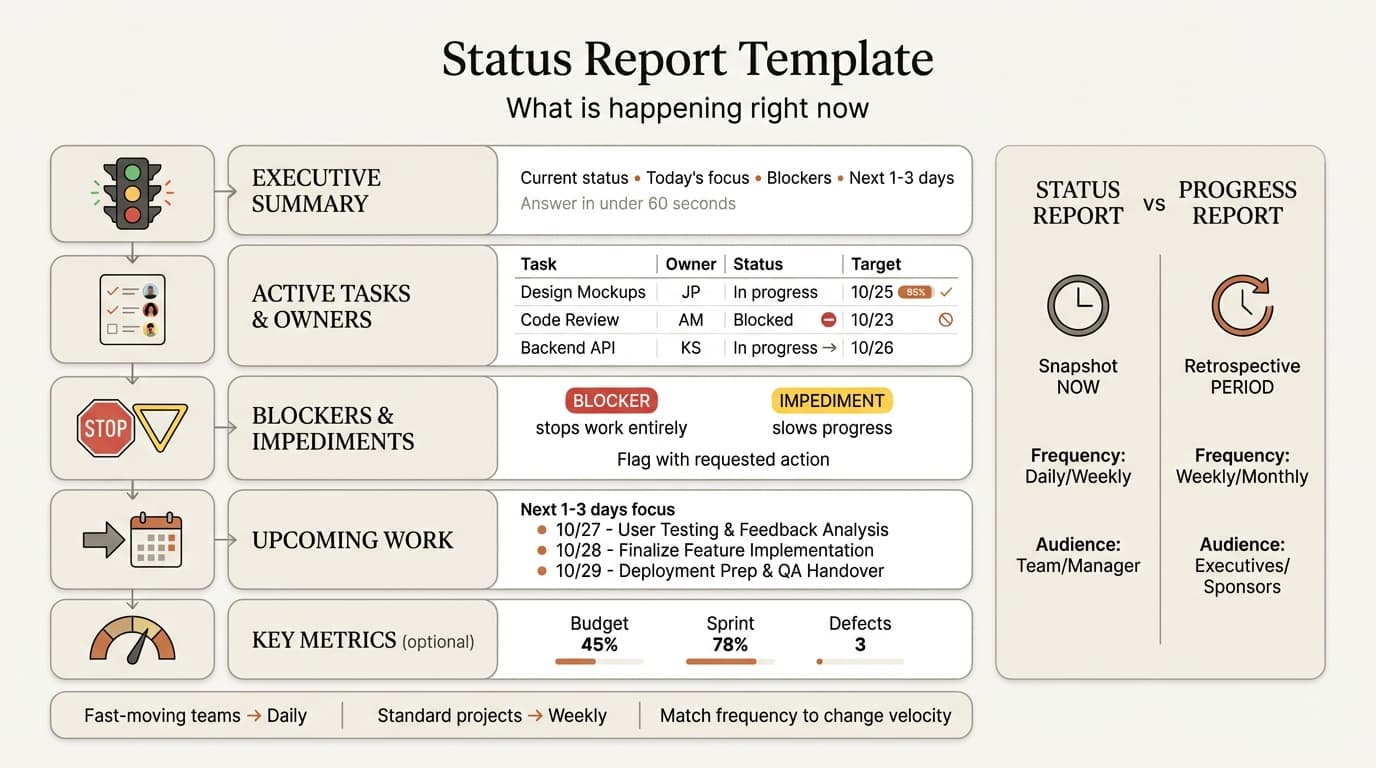
What Is a Status Report?
A status report captures the current state of a project at a specific moment in time. Unlike progress reports that assess change over time, status reports focus on present conditions—what tasks are in progress right now, what blockers exist today, and whether the project is currently on track.
Fast-moving teams (agile sprints, product launches) need daily status reports. Standard projects need weekly.
Status Report vs Progress Report
Status reports capture the immediate present. Progress reports assess changes over a defined period.
| Factor | Status Report | Progress Report |
|---|---|---|
| Time focus | Current snapshot—what is now | Retrospective—what changed |
| Content emphasis | Active tasks, current conditions | Milestones completed, accomplishments |
| Typical frequency | Daily or weekly | Weekly or monthly |
| Audience | Team members, direct managers | Executives, sponsors, governance boards |
| Visual elements | Task boards, current workload | Timeline charts, completion percentages |
| Decision trigger | Surfaces blockers needing team action | Flags risks needing executive action |
When to use status reports: Daily standups, team syncs, operational contexts where stakeholders need to know what is being worked on right now.
When to use progress reports: Steering committee meetings, monthly business reviews, governance forums where stakeholders assess trajectory. See our progress report template guide for retrospective reporting patterns.
Standard Status Report Structure
The format should be concise—stakeholders should extract key information in under 60 seconds.
1. Executive Summary
Lead with the current verdict. The executive summary answers four questions:
- Project status: On track (green), at risk (yellow), or off track (red)
- Today's focus: What the team is actively working on right now
- Critical blockers: Issues requiring immediate intervention
- Next 1-3 days: What will be worked on before the next status report
Example:
Status: At Risk (Yellow)

Current focus: Completing API integration testing (47/48 tests passing,
1 timeout issue under investigation). Provisioning UAT environment for
pilot users.

Blocker: DevOps has not responded to SSL certificate request (submitted
3 days ago). This blocks staging deployment scheduled for tomorrow.
Escalating to IT Director.

Next 2 days: Resolve timeout issue, deploy to staging once SSL cert is
provisioned, recruit 20 pilot users for UAT.
2. Active Tasks and Owners
Show what is in progress right now with responsible owners. Use a table for clarity:
| Task | Owner | Status | Target Completion |
|---|---|---|---|
| API integration testing | Marcus | 95% (47/48 tests pass) | Today |
| UAT environment setup | Sarah | Blocked (waiting for SSL cert) | Tomorrow |
| Pilot user recruitment | Emily | In progress (12/20 confirmed) | Feb 28 |
Status reports focus on in-flight work. Completed tasks move off the status report—they belong in progress reports.
3. Blockers and Impediments
Surface issues that need immediate attention. Distinguish between blockers that stop work entirely and impediments that slow progress but do not halt it.
Blocker example:
BLOCKER: SSL certificate request submitted to DevOps 3 days ago with
no response. Staging deployment cannot proceed without this cert.
This blocks UAT scheduled to start Feb 26. REQUESTED ACTION: Manager
to escalate with IT Director today.
Impediment example:
IMPEDIMENT: API timeout issue in payment processing endpoint. 47 of 48
integration tests pass. Team is investigating root cause (suspected
database connection pooling). MITIGATION: Investigating workaround to
unblock staging deployment. If not resolved by EOD, will deploy with
known issue documented.
Blockers require immediate action from the report's audience. Impediments explain issues the team is actively working to resolve. Do not conflate the two—managers tune out when every minor issue is labeled a blocker.
4. Upcoming Work (Next 1-3 Days)
Next 2 Days:
- Feb 23: Resolve API timeout issue, complete integration testing
- Feb 24: Deploy to staging (pending SSL cert), begin UAT pilot
  recruitment outreach
5. Key Metrics (Optional)
Keep this minimal—detailed metrics belong in progress reports.
| Metric | Current Value | Status |
|---|---|---|
| Budget consumed | $180k of $400k (45%) | On track |
| Sprint progress | 18 of 23 story points (78%) | On track |
| Open defects | 3 P2 bugs, 0 P1 | Acceptable |
Only include metrics that matter for immediate decision-making. If a metric would not change anyone's actions this week, leave it out.
Continue reading: Project Plan Examples · Bar Charts in PowerPoint · Competitive Landscape Slide
Use consulting-grade layouts in PowerPoint
Start from structured business slides and customize them in your own deck. 10 free AI prompts. No credit card required.
Status Report Frequency
Daily status reports work for fast-moving teams; weekly status reports fit standard projects.
| Frequency | Best For | Pros | Cons |
|---|---|---|---|
| Daily | Agile sprints, product launches, crisis response | Immediate visibility, fast coordination | High overhead, can feel like micromanagement |
| Weekly | Standard projects, stable execution | Balanced cadence, lower overhead | May miss fast-developing issues |
| Ad-hoc | Slow-moving programs, mature projects | Minimal reporting burden | Requires strong informal communication |
For agile teams running sprints, daily status reports align with daily scrums. For waterfall projects, weekly status reports align with team meetings. See our agile vs waterfall comparison for methodology-specific reporting patterns.
Status Report Template Examples
Daily Status Report Template (Agile Sprint)
SPRINT 14, DAY 7 (Feb 23, 2026)
SPRINT GOAL: Complete payment processing redesign
STATUS: On Track (Green)

COMPLETED YESTERDAY
- Merged PR #247 (payment form validation)
- Fixed 3 P2 bugs in checkout flow
- Completed API load test (1,000 req/sec sustained)

TODAY'S FOCUS
- Deploy payment form to staging (Emily)
- Complete Stripe integration testing (Marcus)
- Review security audit findings (Sarah)

BLOCKERS
- Staging deployment blocked—waiting for DevOps to provision SSL cert
  (requested Wed, no ETA provided). Escalating to Scrum Master.

SPRINT PROGRESS
- 18 of 23 story points completed (78%)
- 3 of 8 user stories done
- 2 days remaining in sprint
Weekly Team Status Report Template
PROJECT: Customer Portal Migration
WEEK ENDING: Feb 22, 2026
STATUS: On Track (Green)

CURRENT FOCUS (This Week)
- User Acceptance Testing: Recruited 12 of 20 pilot users (Emily)
- API Integration: Resolving timeout issue in payment processing (Marcus)
- Documentation: Writing API reference docs (Sarah, 60% complete)

COMPLETED THIS WEEK
- Passed 47/48 integration tests (1 known issue under investigation)
- Finalized UX designs for all 5 portal sections
- Provisioned staging environment (load testing complete)

BLOCKERS
- SSL certificate request pending (DevOps, 3 days no response). Manager
  to escalate today.

UPCOMING (Next Week)
- Complete UAT with 20 pilot users (3 sessions scheduled)
- Deploy to staging once SSL cert is provisioned
- Finish API documentation (target Feb 28)

METRICS
- Budget: $180k spent of $400k (45%, on track)
- Timeline: Week 8 of 16 (50%, on schedule)
Daily Standup Status Template (Verbal Format)
Used during in-person or virtual daily scrums:
WHAT I DID YESTERDAY:
- Completed payment form validation (PR #247 merged)
- Fixed checkout flow bug (issue #891)

WHAT I'M DOING TODAY:
- Deploy payment form to staging
- Begin Stripe integration testing

BLOCKERS:
- Waiting on SSL cert from DevOps (3 days, no update). Need Scrum
  Master to escalate.
Weekly Executive Status Dashboard (High-Level)
For managers overseeing multiple projects:
PORTFOLIO STATUS DASHBOARD
WEEK ENDING: Feb 22, 2026

Project A (Customer Portal): Green | 50% complete, on budget
Project B (ERP Implementation): Yellow | Legal blocker, 2-week delay risk
Project C (Mobile App): Green | 65% complete, under budget

ATTENTION REQUIRED:
- Project B: Legal review stalled 3 weeks. Recommend sponsor escalation
  to General Counsel.
Status Report Format Options
After testing reporting approaches across 40+ programs, the right format depends on stakeholder preferences and tool ecosystems.
PowerPoint Slide
Best for: Executive stakeholders, steering committees, weekly team meetings
Pros: Visual clarity, easy to present during meetings, supports charts and timelines
Cons: Higher creation overhead than text-based formats
Deckary provides status report and dashboard templates inside PowerPoint optimized for team meetings.
Email or Slack
Best for: Daily status updates, distributed teams, asynchronous communication
Pros: Low overhead, fast to write, stakeholders consume on their own schedule
Cons: Can get buried in inbox, lacks visual elements
Project Management Tool (Jira, Asana, Monday)
Best for: Teams already using these tools, real-time status visibility
Pros: Always up-to-date, integrates with task tracking, no manual report writing
Cons: Requires stakeholders to check the tool regularly, can be overwhelming with too much detail
Spreadsheet (Excel or Google Sheets)
Best for: Metrics-heavy projects, budget-sensitive stakeholders
Pros: Easy to track trends over time, supports formulas and conditional formatting
Cons: Less visual than slides, harder to present in meetings
Common Status Report Mistakes
1. Reporting only activities, not blockers. "Held 5 meetings this week" tells stakeholders nothing actionable. Status reports should surface blockers that need intervention. If there are no blockers, the status report can be one sentence: "All tasks on track, no blockers."
2. Everything is green until it is suddenly red. If every status report shows green (on track) until the deadline approaches and everything goes red, stakeholders lose trust. Status reports should flag risks early—yellow (at risk) is not a failure, it is an early warning. We have seen this pattern repeatedly: teams avoid yellow status to appear competent, then emergency-escalate when recovery is impossible.
3. Inconsistent format that changes weekly. If your status report structure changes every time, stakeholders cannot scan efficiently. Use a template and stick to it.
4. Too much historical detail. Keep status reports forward-looking—current tasks and next steps, not retrospective accomplishments.
5. No clear owners for tasks. "API testing in progress (Marcus)" makes ownership explicit.
6. Reporting to the wrong audience. Executives need progress reports showing trajectory. Team members need status reports showing current work and blockers.
7. No follow-up on blockers. If a blocker appears in three consecutive status reports with no resolution, escalate. Status reports should trigger action.
Best Practices for Status Reports
Keep it concise. Status reports should take under 5 minutes to write and under 60 seconds to read.
Use clear status indicators. Green (on track), yellow (at risk), red (off track) should be unambiguous.
Flag blockers with requested actions. When you surface a blocker, tell stakeholders what action you need. "SSL cert request is pending" is a problem statement. "SSL cert request is pending—manager to escalate with IT Director" is an actionable item.
Maintain a consistent template. Use the same structure and format report-to-report.
Escalate blockers that persist. If the same blocker appears in multiple consecutive status reports, escalate.
Key Takeaways
- Status reports capture the current moment—active tasks and immediate blockers. Progress reports assess changes over time.
- Daily status reports work for fast-moving teams. Weekly status reports fit standard projects.
- Lead with the verdict—current status, today's focus, critical blockers, and next 1-3 days.
- Flag blockers with requested actions. "SSL cert is pending—manager to escalate" is actionable.
- Use a consistent template report-to-report.
- Send status reports to team members and direct managers. Send progress reports to executives and sponsors.
For visualizing project timelines and current sprint progress in PowerPoint, Deckary provides status report templates, Gantt charts, and dashboard layouts optimized for team meetings—see our guide on making Gantt charts in PowerPoint.
Related Guides
- Progress Report Template — retrospective reporting for executives and sponsors
- Scrum Framework Guide — agile reporting cadences for daily scrums and sprint reviews
- Agile vs Waterfall — methodology-specific reporting patterns
- Project Plan Examples — five real project plans with timelines and milestones
- RACI Matrix Examples — accountability framework for defining who reports what
Sources
Use consulting-grade layouts in PowerPoint
Start from structured business slides and customize them in your own deck. 10 free AI prompts. No credit card required.