Competitive Landscape Slide: Templates & Examples for Your Pitch Deck
Master the competitive landscape slide with proven templates and real examples from funded startups. Learn the 2x2 matrix, feature comparison, and power grid formats investors prefer.
- Bob · Former McKinsey and Deloitte consultant with 6 years of experience
- November 9, 2025
- 11 min read
A competitive landscape slide is a visual representation of how your company positions itself relative to competitors in your market. It answers the question every investor asks: "Who else is solving this problem, and why will you win?"
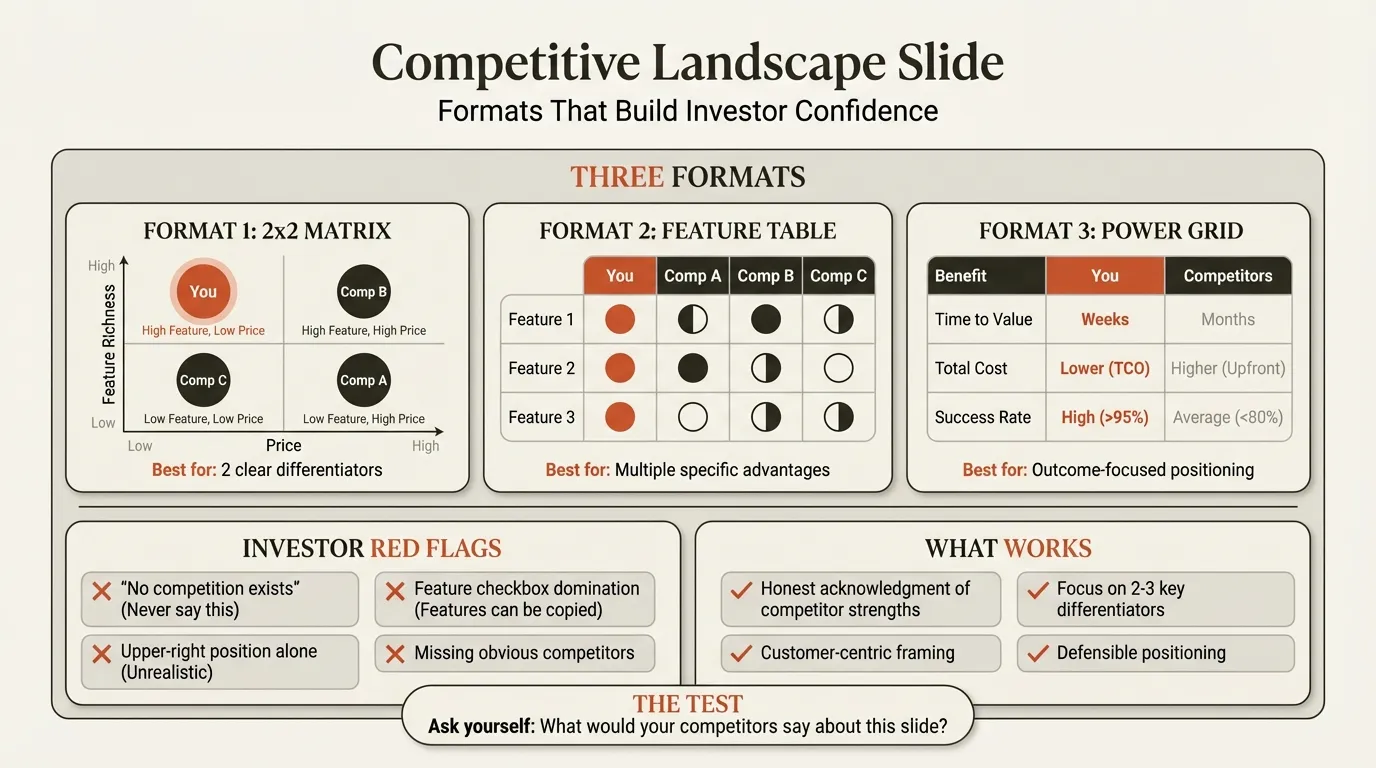
This slide is what investors call a "make or break" moment in your pitch. Get it right, and you demonstrate deep market understanding and strategic clarity. Get it wrong -- by claiming no competition or positioning yourself unrealistically well -- and you signal either naivety or dishonesty.
This guide covers the formats that work (2x2 matrices, feature comparisons, power grids), real examples from funded startups, the mistakes that kill credibility, and templates you can use today. For a complete pitch deck framework covering all 12 essential slides including the competition slide, see our Pitch Deck Guide.
What Is a Competitive Landscape Slide?
A competitive landscape slide visually maps how your company sits relative to competitors. It serves as a concise summary of your market positioning and differentiation.
| Component | What It Shows | Why It Matters |
|---|---|---|
| Market Players | Who competes for your customers | Demonstrates market awareness |
| Comparison Dimensions | How you measure differentiation | Shows strategic focus |
| Your Position | Where you sit relative to competition | Clarifies value proposition |
| Competitive Advantage | Why customers choose you | Proves defensibility |
The goal isn't to make competitors look bad. It's to honestly show how you're different in ways that matter to customers. Investors know your market -- sometimes better than you do. They'll immediately spot missing competitors, unrealistic positioning, or cherry-picked comparison criteria.
Why Investors Care About Your Competition Slide
Investors use your competition slide to evaluate several things beyond just who you're competing against.
1. Market Awareness
Do you actually understand your industry? Missing obvious competitors is a red flag. If you're in fintech and don't mention Stripe, or in project management and don't acknowledge Asana, investors question your research.
As Underscore VC notes, "If you present a market that an investor knows well, and they notice certain competitors aren't listed, that's concerning. It makes investors question if you can really win in this market."
2. Honest Self-Assessment
Where do you actually sit in the market? VCs expect nuanced positioning, not fantasy. When every startup places itself in the upper-right "best" quadrant, it becomes meaningless.
Spectup's research found that investors "always encounter competitive slides where the startup is positioned unrealistically well." They see this as either market ignorance or dishonesty -- both disqualifying.
3. Strategic Thinking
How will you win over time? Features can be copied. What's your sustainable advantage? Investors want to see that you've thought beyond today's positioning to how you'll maintain differentiation as competitors evolve.
According to Dreamit Ventures, "At the end of the day, there are usually only one or two attributes that enable a company to win in the long term. Focus on how you're going to be different as time goes on."
Types of Competitive Landscape Slides
Different competitive situations call for different visual formats. Here are the three most effective options.
| Format | Best For | Pros | Cons |
|---|---|---|---|
| 2x2 Matrix | Two clear differentiators | Simple, visual, classic | Limited to 2 dimensions |
| Feature Table | Multiple feature advantages | Comprehensive, detailed | Can become a checkbox list |
| Power Grid | Benefit-focused positioning | Customer-centric, strategic | Less visual impact |
The 2x2 Matrix (Magic Quadrant)
The most popular format. You select two key dimensions and plot competitors on a grid. Choose criteria that define winning in your market, then position each player honestly. Works best when you can credibly claim a favorable quadrant -- not necessarily the "best" one.
The warning: VCs at Dreamit Ventures advise caution: "When an investor sees a Magic Quadrant, they'll think: Can your company actually only differentiate on two axes?" If your differentiation is more nuanced, consider other formats.
The Feature Comparison Table
A matrix comparing specific capabilities across competitors, typically using checkmarks, X marks, or Harvey balls. List competitors as columns, features as rows, and use consistent symbols throughout.
Best for: B2B software, technical products, or situations where specific features genuinely differentiate.
The warning: Feature tables often devolve into checkbox exercises where your company checks more boxes than everyone else. As Story Pitch Decks notes, "A feature is not a sustainable differentiator. With some money and resources, every competitor could replicate your features."
The Power Grid
A benefit-focused table that compares value delivered rather than features present. Increasingly preferred by sophisticated investors. Include dimensions like time to value, total cost of ownership, customer success rates, and ecosystem integration.
According to Dreamit Ventures, "Instead of using a Magic Quadrant, you should use a Power Grid. It enables you to show how your startup beats out the competition in areas like key benefits, go-to-market strategy, business model, and more."
Continue reading: Competitive Analysis Examples · Mekko Charts in PowerPoint · Go-to-Market Slide
How to Create an Effective Competitive Landscape Slide
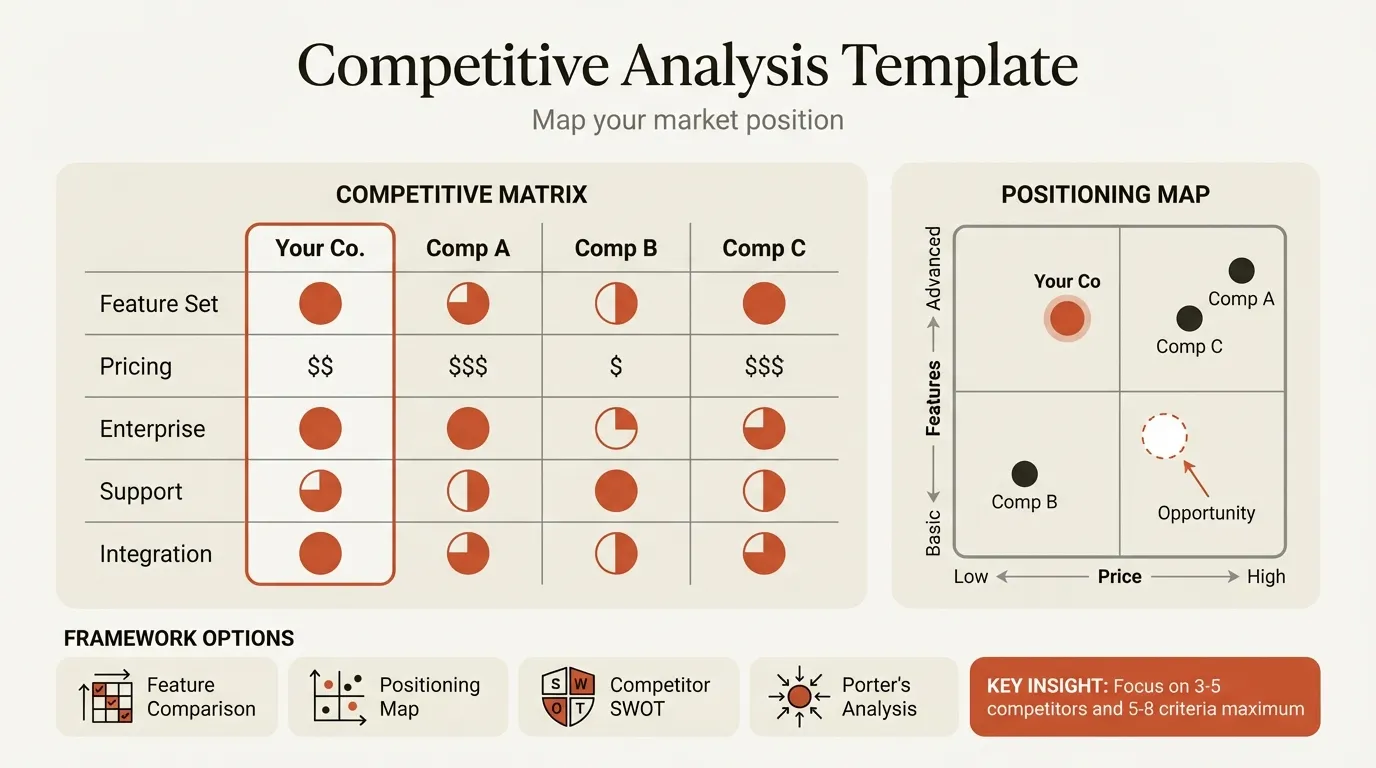
Follow these steps to build a competition slide that builds credibility rather than destroying it.
Step 1: Identify Your Competitors Honestly
List all competitors, then categorize:
| Category | Definition | Include on Slide? |
|---|---|---|
| Direct Competitors | Same solution, same customer | Yes, always |
| Indirect Competitors | Different solution, same problem | Selectively |
| Potential Entrants | Could enter your space | If well-known |
| Substitutes | Alternative approaches (including "do nothing") | If significant |
Critical rule: If an investor will likely mention a competitor during due diligence, they should see that competitor on your slide. Missing obvious players is worse than having too many.
Step 2: Choose Your Comparison Dimensions
Select criteria that matter to customers, demonstrate genuine advantages, are defensible over time, and are verifiable or measurable.
Good dimensions: Customer outcomes (time saved, revenue generated), total cost of ownership, ease of implementation, capability gaps competitors can't easily close, go-to-market approach differences.
Avoid: Subjective claims ("better UX"), temporary advantages, dimensions where you're only slightly better, cherry-picked criteria that only you score well on.
Step 3: Plot Positions Honestly
Here's the hard part: be truthful about where you and competitors actually sit. The test is simple -- would your competitors reasonably agree with how you've positioned them?
According to Vestbee, "Founders should say 'this is where our competitors are excelling, and this is what we're going to do to overtake them,' instead of claiming 'we're the best of the best.'"
Step 4: Highlight Your Differentiation
Make your competitive advantage clear with visual emphasis on your position, a statement of why your position matters, connection to customer value, and evidence where possible.
Competitive Landscape Slide Examples from Real Pitch Decks
Airbnb: The Classic 2x2 Matrix
Airbnb's original pitch deck (which raised $600K in seed funding) used a two-axis chart with Online/Offline on one axis and Affordable/Expensive on the other. They named real competitors (Couchsurfing, Craigslist, Hostels, Hotels) and acknowledged that hotels had more amenities rather than claiming superiority everywhere.
According to Slidebean's analysis, "Airbnb laid out a straightforward comparison. They showed how hotels were expensive and impersonal, while couch surfing was free but unreliable. Airbnb positioned itself as the perfect middle ground." The slide created "undeniable logic" -- framing competition in a way that made Airbnb feel like the only viable option for their target customer.
Uber: Problem-First Competition
Uber's original deck focused less on a competitive matrix and more on the pain point itself:
- Emphasized the problem (urban transportation pain) rather than plotting competitors
- Positioned existing options (taxis, car services) as inadequate
- Showed a clear value proposition gap in the market
- Let problem framing make traditional competition feel irrelevant
- Supported the opportunity with clear market sizing
Key insight: When you're creating a new category, your competition slide may focus more on current alternatives (the status quo) than direct competitors.
Common Patterns in Successful Competition Slides
| Pattern | Why It Works |
|---|---|
| Honest acknowledgment of competitor strengths | Builds credibility |
| Focus on 2-3 key differentiators | Memorable and clear |
| Customer-centric framing | Shows you understand what matters |
| Named, recognizable competitors | Demonstrates market awareness |
| Defensible positioning | Investors can envision long-term advantage |
According to DocSend research, "82% of pitch decks with comparison charts secure higher funding rounds."
Common Mistakes to Avoid
These errors appear repeatedly in pitch deck reviews.
Mistake 1: Claiming You Have No Competition
Every solution has competition, even if it's "doing nothing" or "using spreadsheets." Investors interpret this as either poor market research or dishonesty. As OpenVC notes, "A lack of competition is typically a bad sign. It either means you didn't do good enough research, or that the problem you're attempting to address doesn't truly exist." Always identify at least indirect competition or substitute solutions.
Mistake 2: The Unrealistic Upper-Right Position
Positioning yourself alone in the best quadrant while competitors cluster in inferior positions. Every investor has seen this exact slide dozens of times. If using a 2x2 matrix, be honest about where competitors are strong. Show overlap where it exists. Your advantage can be positioning in an underserved quadrant, not the theoretically "best" one.
Mistake 3: Missing Key Competitors
Not including competitors the investor will definitely ask about signals you haven't done thorough research or are deliberately hiding information. "Triple check that you've got them all in your presentation and can speak to each competitor." Include direct competitors, major indirect competitors, and potential entrants investors might mention.
Best Practices for Your Competition Slide
1. Show Evidence, Not Claims
Instead of saying "we're better at X," show proof: customer quotes, measurable outcomes (50% faster, 3x cheaper), third-party validation, or market traction.
2. Focus on Value, Not Features
Investors care about benefits, not features. As Vestbee notes, "Investors are more concerned with the values your startup can deliver than the features you offer" -- customer service, distribution, user experience, and price advantages.
3. Acknowledge Competitor Strengths
"Competitor X excels at enterprise security -- we focus on mid-market where that level isn't needed" is more credible than claiming you beat everyone everywhere. This shows strategic thinking, not weakness.
4. Prepare Deep Backup
Be ready to discuss competitor pricing, funding history, customer feedback, and market share estimates. Check for recent competitor announcements before every pitch. Your slide is a summary -- you need the full picture behind it.
Creating Competition Slides in PowerPoint
For professional competition slides, use native PowerPoint tables for feature comparisons, SmartArt for basic matrices, and Deckary for precise formatting, Harvey balls, and consistent styling. Professional icons from the Deckary icon library add visual enhancement.
Design and color conventions: Give your company visual prominence through your brand color and larger sizing. Use neutral gray for competitor names, green for advantages, yellow/orange for parity, and red for gaps. Keep text minimal -- labels and callouts, not paragraphs -- and maintain consistent formatting throughout.
Summary
The competitive landscape slide is one of the most scrutinized slides in your pitch deck. Investors use it to evaluate your market awareness, strategic thinking, and honesty.
Key principles:
- Be honest -- Unrealistic positioning destroys credibility faster than any weakness
- Show value, not features -- Benefits and outcomes matter more than checkboxes
- Include real competitors -- Missing obvious players signals poor research
- Focus on sustainability -- Features can be copied; show your moat
- Prepare for scrutiny -- Know competitor pricing, funding, and strategy in depth
Your competition slide should create one response from investors: "This founder understands their market and knows how to win."
For complete fundraising-deck guidance, see our pitch deck template. For deeper competitive research, our competitive analysis template covers frameworks for thorough market assessment.
Tools like Deckary help create professional competitive landscape visuals with Harvey balls, precise alignment, and consistent formatting -- the kind of polish that signals attention to detail investors notice.