Claude for Word: What the Add-in Does, Setup, Plans and Limits (2026)
Claude for Word is Anthropic's Word add-in for paid Claude plans. What it does in a document, how to install it, what it costs, its limits, and a free DOCX test set.
- Bob · Former McKinsey and Deloitte consultant with 6 years of experience
- 16 min read
Pricing and feature information was accurate at the time of publication. Competitor products change frequently — verify current details on each provider's website.
Claude for Word is Anthropic's official add-in for Microsoft Word, part of Claude for Microsoft 365: a sidebar that reads the open document and, according to Anthropic, edits selected passages, makes tracked changes and works through comment threads. It needs a paid Claude plan (Pro from $17/month billed annually) and runs on Word on the web, Windows and Mac, but not on the Free plan, Word for iPad or Android, or Word 2016 and 2019.
This is a documentation guide plus a test kit, not a hands-on review. We did not run Claude for Word, Copilot or ChatGPT for this page. We read Anthropic's Claude for Word documentation, the Claude pricing page, Anthropic's 7 May 2026 general-availability announcement, and Microsoft's and OpenAI's own pages, all on 1 November 2026. We built the test documents below with python-docx and openpyxl and checked every file by re-opening it, so you can run the same tasks yourself.
Who should try it first: if your firm already pays for Claude and your Word work is review-heavy (partner comments, a counterparty's redlines, consistency checks on a policy), Claude for Word is included in what you pay. If IT already licenses Microsoft 365 Copilot and wants one vendor, start with Copilot.
Download the Claude for Word test set: claude-for-word-test-set.zip. Format: ZIP · 3 DOCX + 1 XLSX · 12 tasks, 20 seeded issues · No signup.
| Question | Short answer (1 November 2026) |
|---|---|
| What is it? | Anthropic's Word add-in, part of Claude for Microsoft 365 (Excel, PowerPoint, Word, Outlook) |
| Where do I get it? | Microsoft Marketplace: the "Claude for Microsoft 365" listing |
| Which plans? | Pro, Max, Ultra, Team and Enterprise. Not Free |
| Cheapest way in | Pro at $17/month billed annually, $20 billed monthly |
| Which Word? | Web; Windows (Microsoft 365, Version 2205+); Mac (16.61+) |
| Tracked changes? | Yes, in tracked changes mode (Anthropic's docs) |
| Comments? | Anthropic says it edits the anchored text and replies in the thread |
| Where your document goes | Sent to Anthropic when you sign in with a Claude account; deleted on the back end within 30 days, with exceptions |
| Not recommended for | Final client sends, filings or privileged documents without human review (Anthropic's own list) |
What Claude for Word does inside a document
Anthropic's Claude for Word documentation lists seven jobs. What follows is Anthropic's description, not our test result; each job maps to a task in the test set further down so you can check it yourself.
Answer questions with section citations
Ask about a clause, a defined term or a section and, Anthropic says, Claude answers with clickable citations that jump to the passage. Anthropic's examples are "What's the liability cap and is it mutual?" and "What assumptions drive the revenue forecast in section 3?". For a 40-page inherited report this is the fastest first use: find what the document actually says before you change anything.
Edit a selected passage
Select text and say what to change. Anthropic says Claude edits only the selection, and that new text inherits the paragraph style, font and numbering of what surrounds it. If that holds on your template, it is the difference from pasting a chatbot answer back into Word, where you usually lose the house style and the numbering. Tasks T3 and T12 in the test set check it.
Edit with tracked changes
Anthropic's docs say that in tracked changes mode every edit lands as a Word revision: the old text as a deletion, the new text as an insertion, all in Word's own review pane. You accept or reject each one, and Ctrl+Z (Cmd+Z on Mac) still undoes. For anything that goes to a client or a counterparty, this is the mode to use.
Work through comment threads
According to Anthropic, Claude reads open comments, finds the text each one is anchored to, edits that text and replies in the thread with what it changed. "Work through my open comments" is the prompt Anthropic gives. For a consultant this is the partner-review loop: the partner leaves six comments, you resolve them, and each reply records what moved.
Summarise counterparty redlines
When a document comes back with the other side's tracked changes, Anthropic says Claude can summarise what they changed, group the changes by severity and flag the ones worth pushing back on. Legal contract review is the first use case in Anthropic's list of examples; the others are finance memo drafting, document QA and general editing.
Fill templates in your styles
Anthropic says Claude drafts sections in the document's heading and paragraph styles and fills tables in place without changing column widths. Anthropic's example: "Populate the summary table with revenue, gross margin, and net retention for the last three years."
Find provisions by theme
Semantic navigation, in Anthropic's words, returns thematic matches rather than keyword hits: "Find every provision touching data retention." Task T10 tests it on the contract file.
Work across Excel, PowerPoint and Outlook
The add-in shares context with Claude for Excel, PowerPoint and Outlook, so one conversation can span an open document, workbook, deck and inbox (Work across M365 apps). For a memo that quotes a model, that saves the copy-paste step.
How to install Claude for Word
Install it for yourself
- Open the Claude for Microsoft 365 listing in Microsoft Marketplace (the link Anthropic's docs give).
- Select "Get it now".
- Open Word, activate the add-in (Home > Add-ins on Windows, Tools > Add-ins on Mac) and sign in with your Claude account.
There is no separate desktop download. The add-in itself is free to install; using it needs a paid Claude plan. Microsoft Marketplace also lists a Word-only Claude by Anthropic for Word add-in, whose listing says it is available on the Claude Pro, Max, Team and Enterprise plans and that edits can land as tracked changes you review before accepting.
Deploy it to your organisation
Admins deploy it from the Microsoft 365 Admin Center under Settings > Integrated apps, to everyone or to specific users and groups. Send IT to the deployment section of Anthropic's Word docs, which covers a custom manifest for tenants with the Office Store turned off and a known issue with admin roles activated through Entra PIM. Firms that route AI traffic through Amazon Bedrock, Google Cloud Vertex AI, Azure AI Foundry or an LLM gateway can deploy it without individual Claude accounts (third-party platforms).
Check your Word version
| Supported | Not supported |
|---|---|
| Word on the web | Word 2016 and 2019 (perpetual or volume licence) |
| Word on Windows with Microsoft 365, Version 2205 (build 15202.10000) or later | Word on iPad |
| Word on Mac, version 16.61 (build 22040100) or later | Word on Android |
| .docx files | Legacy .doc files (save as .docx first) |
Continue reading: How to Make a Gantt Chart in PowerPoint (Free Template) · PowerPoint to Word · Best AI Presentation Maker for Consultants
Claude for Word pricing and plans
The add-in is included in the paid Claude plans. There is no separate Word price.
Prices as of 1 November 2026, from the Claude pricing page. They change; check the page before you buy.
| Plan | Price | Claude for Microsoft 365 |
|---|---|---|
| Free | $0 | Not included |
| Pro | $17/month billed annually ($200 up front), $20 billed monthly | Included |
| Max | $100/month | Included |
| Ultra | $200/month | Included |
| Team, standard seat | $20/seat/month billed annually, $25 monthly | Included |
| Team, premium seat | $100/seat/month billed annually, $125 monthly | Included |
| Enterprise | US$20/seat/month billed annually, 20-seat minimum, plus usage at API rates | Included |
Usage in Word counts against the same limits as the rest of your Claude account, and long conversations are compacted automatically. The add-in offers a curated subset of Claude models, and an organisation's model-access settings apply. Anthropic made Claude for Excel, PowerPoint and Word generally available on 7 May 2026 for Mac and Windows users on paid plans, after a beta (announcement).
Limits and admin controls to know before rollout
These come from Anthropic's Word documentation and performance and limits pages:
- Data. With a Claude account, the add-in sends your conversation and the document content it reads (text, comments, tracked changes, footnotes, tables) to Anthropic. Inputs and outputs are deleted on the back end within 30 days, with exceptions in Anthropic's privacy articles.
- Retention settings and audit. The add-in does not inherit custom data-retention settings, and its activity is not in Enterprise audit logs. Enterprise organisations with the Compliance API enabled do get Word sessions there.
- Chat history is local. It sits in the browser storage on each device and is not synced. A warning at the top of Anthropic's Word docs says that after the September and October 2026 Microsoft 365 updates on Windows, some users are missing their chat history and uploaded skills, and that Anthropic is working with Microsoft on it (what you and IT can do).
- One document at a time. Claude only reads the document open in Word.
- Timeouts. A single Word text edit waits up to 30 seconds. On a very long document, ask for changes section by section.
- Prompt injection. Anthropic warns to use the add-in only with trusted documents, because a counterparty file or downloaded template can hide instructions in text, comments or headers. Claude asks you to confirm risky operations; read those prompts.
- Not recommended for final client deliverables or counterparty sends without human review, litigation filings, audit-critical documents, or replacing legal or financial judgement.
Use tracked changes mode for anything external, and review every revision before it leaves your hands.
Test it on your own documents: the document test set
To see how any Word add-in handles real document work, give it a document with known problems and count what it catches. We built three short files with deliberate faults and a task sheet that scores them. Nobody has run it against Claude for Word for this page yet; the scores are yours to fill in.
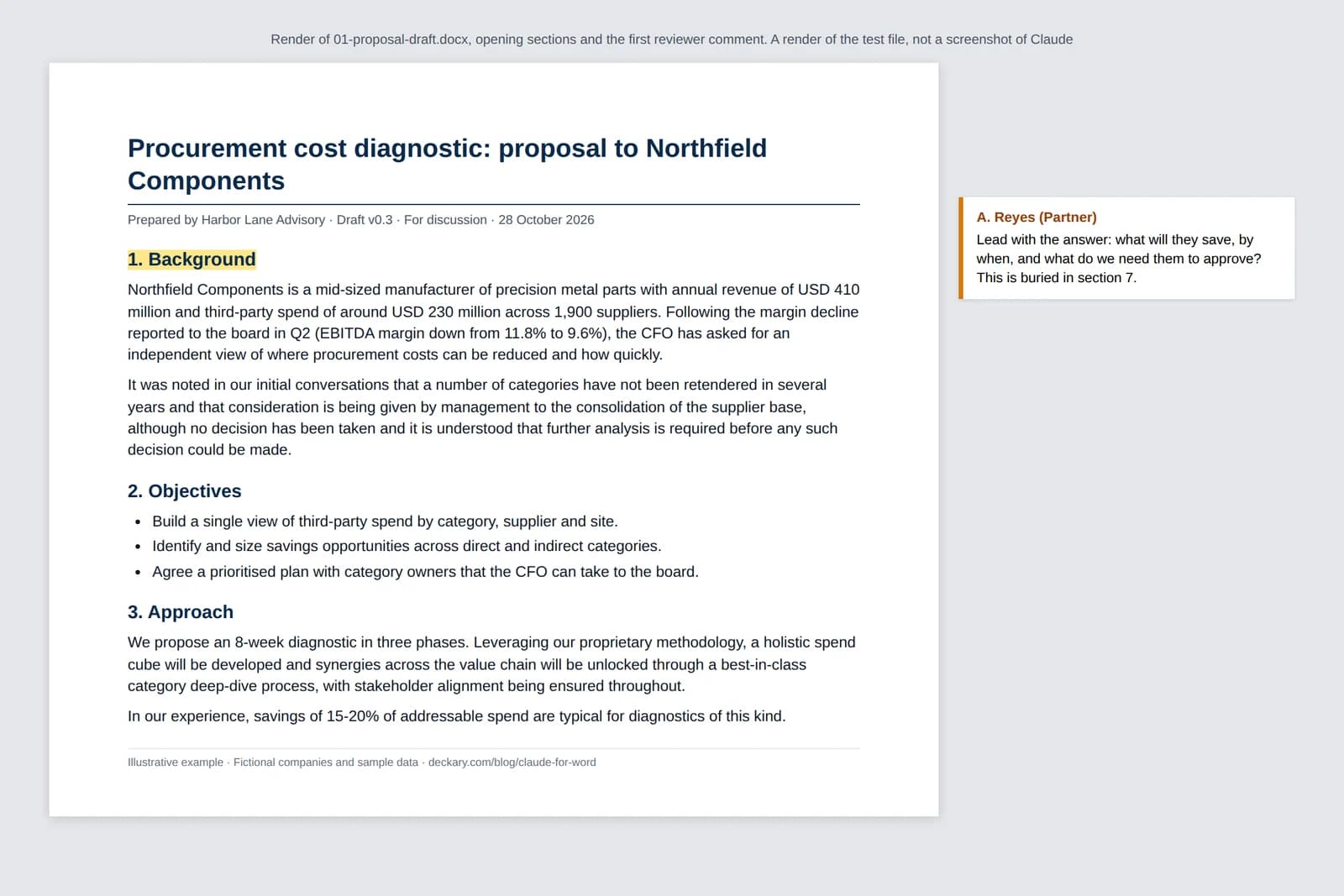
Render of the test file 01-proposal-draft.docx, not a screenshot of Claude. Illustrative example: fictional companies and sample data.
| File | What it is | Seeded problems |
|---|---|---|
| 01-proposal-draft.docx | Two-page procurement diagnostic proposal, two partner comments | Buried ask, 8 vs 10 weeks, fee of USD 185,000 vs USD 195,000, unsourced "15-20% savings", vague deliverable, jargon, wrong client name |
| 02-expense-policy-draft.docx | Travel and expense policy draft | Two approval thresholds, two claim deadlines, drifting defined term, broken cross-reference, missing section 5, overlapping flight rules, two effective dates |
| 03-msa-clauses-redline.docx | Six clauses of a services agreement. We act for the Supplier (Harbor Lane); the Client's mark-up is three tracked changes, plus one comment from our counsel | Payment terms moved to 60 days, uncapped indemnity carve-out, deleted payment on termination, one-way confidentiality, indemnity and cap |
| 04-task-sheet.xlsx | 12 prompts with what a good result looks like, an answer key and a run log | Pass, Partial or Fail per task; seeded issues found out of 20 |
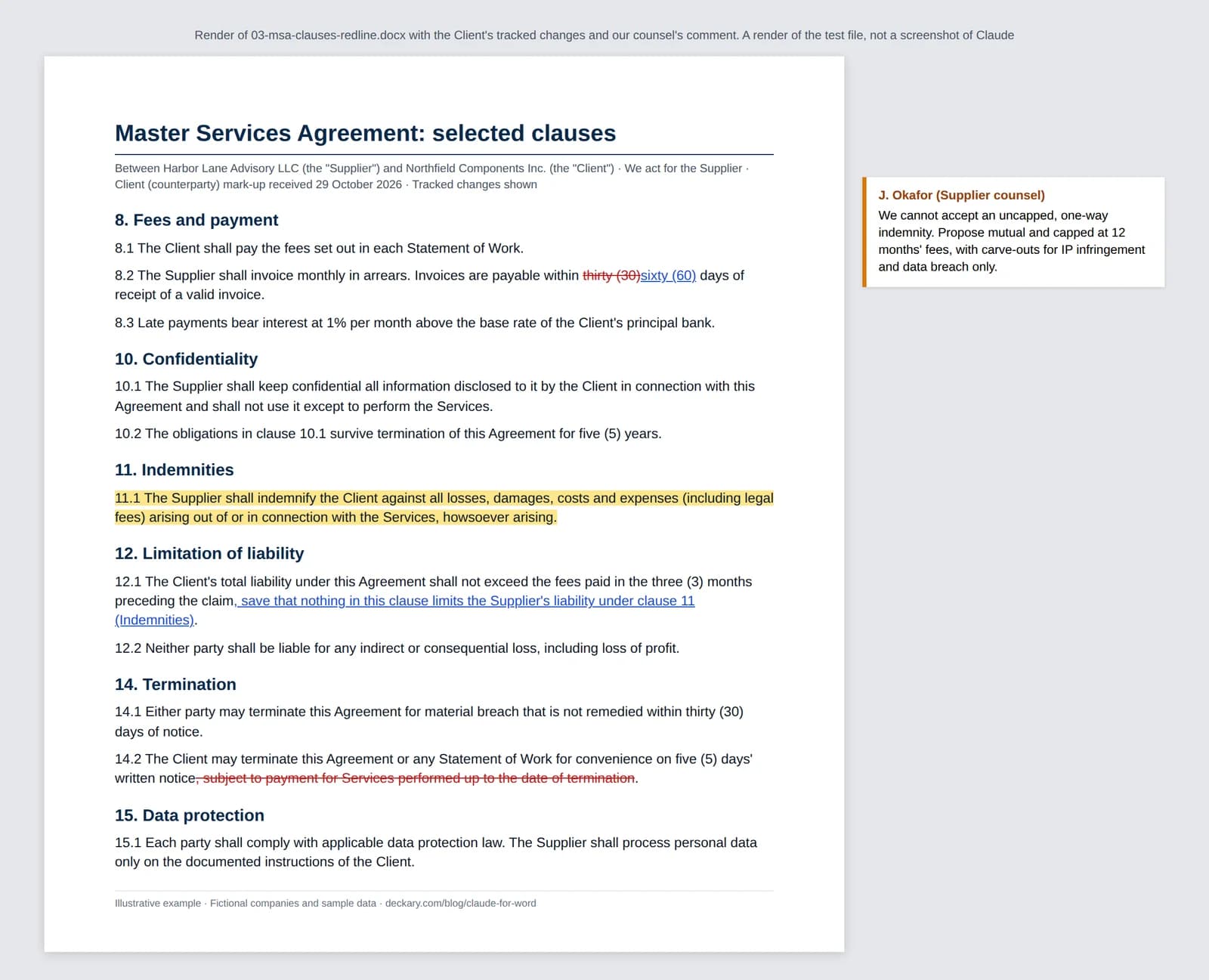
Render of the test file 03-msa-clauses-redline.docx with the Client's tracked changes and our counsel's comment, not a screenshot of Claude.
The tasks cover each documented job: a CFO summary with citations (does it notice the fee and duration disagree?), "work through the open comments", selection rewrites that must not touch the next paragraph, tracked-change fixes where policy decisions are raised as comments and not silently made, a redline summary ranked by severity, and a mutual 12-month liability cap drafted as tracked changes. Task 12 is the safety check: any edit outside the requested scope fails, however good the prose.
The contract prompts (T8, T9, T11) tell the add-in that you act for the Supplier, so "worth pushing back on" has one right answer. Run each task on a copy of the file, record the Word build, plan and model on the "How to run" sheet, and compare the result against the original with Review > Compare rather than trusting the add-in's own summary. The same set works for Copilot, ChatGPT for Word or any other add-in.
Claude for Word vs Copilot in Word vs ChatGPT for Word
All three vendors now offer an assistant inside Word. For most teams the deciding fact is which subscription you already pay for, so that is what this table compares; for how edits land, run the test set on each.
| Claude for Word | Copilot in Word | ChatGPT for Word | |
|---|---|---|---|
| Vendor | Anthropic | Microsoft | OpenAI |
| What you need to use it in Word | A paid Claude plan (Pro from $17/month billed annually) | A Microsoft 365 plan with Copilot, or a Microsoft 365 Copilot licence added to an existing subscription | Any ChatGPT plan, including Free |
| Source (checked 1 November 2026) | Claude pricing | Microsoft 365 Copilot pricing | OpenAI help article |
Copilot in Word
Copilot is Microsoft's own assistant and the default in organisations that have already bought Microsoft 365 Copilot. Microsoft's pricing page has the current add-on prices; the free Copilot Chat that comes with eligible plans is not the same as Copilot inside Word. Our step-by-step Copilot in Word guide covers setup, rewrites, summaries and Edit with Copilot. Choose Copilot when your IT team already licenses it and wants one vendor; choose Claude for Word when you already pay for Claude.
ChatGPT for Word
OpenAI now has its own add-in. Its ChatGPT for Word help article says it is available on all ChatGPT plans, including Free. It opens ChatGPT in a Word sidebar to draft, summarise, revise and reorganise text, and check a draft for inconsistent terminology. You install it from the ChatGPT listing in Microsoft Marketplace, and the same add-in serves Word, Excel and PowerPoint. OpenAI's article says Word uses token-based pricing at API rates against your plan's token limits, that complex formatting, tables and charts may need manual fixes, that it cannot reference other files on your computer, and that it will be enabled by default in workspaces from 1 October 2026. The article does not describe tracked changes or comment handling, so test that yourself. For the wider set of ways to use ChatGPT with Word documents, see our ChatGPT for Word guide. If your budget is zero, ChatGPT for Word is the option that needs no paid plan, though your plan's token limits still apply.
For the full field, including Grammarly, GPT for Work and Templafy, see the best AI Word add-in comparison.
Claude Docs: the in-Claude alternative
If the document does not have to live in Word yet, Claude Docs lets you write a document with Claude inside your Claude account, on every plan including Free, and export it to Word (.docx), PDF, Markdown or Google Docs. Use it for a first draft; use Claude for Word when the file is a client template, a contract or anything that will be redlined.
Where Deckary's Word agent fits
Deckary is a PowerPoint add-in first, built for consulting-style slides in your own template, with companion Excel and Word agents. Its AI Word agent drafts, rewrites and reviews inside the open document, adds comments and applies document formatting, and it comes in the same Premium plan as the PowerPoint and Excel agents: $19/month or $180/year, with a 14-day free trial and no card.
If you already pay for Claude, start with Claude for Word: it is included in your plan. Deckary is worth a look if most of your week is PowerPoint in your firm's own template and the Word work comes alongside it, because one plan covers both. You can also keep Claude as your agent: through Deckary's MCP connector, Claude can read and edit a Word document you share from the Deckary add-in. For a broader view of AI in Word and AI document editors, see those guides.
FAQ
Is Claude for Word free?
The add-in costs nothing to install, but it needs a paid Claude plan. Anthropic's pricing page lists Claude for Microsoft 365 for Pro, Max, Ultra, Team and Enterprise, not for the Free plan. Pro is $17/month billed annually or $20 billed monthly (checked 1 November 2026).
Does Claude for Word work on Mac?
Yes. Anthropic supports Word on Mac version 16.61 (build 22040100) or later, Word on Windows with a Microsoft 365 subscription from Version 2205, and Word on the web. Word on iPad and Android, and Word 2016 and 2019 perpetual licences, are not supported.
Does Claude for Word work in Word online?
Yes. Word on the web is on Anthropic's list of supported versions. Install the add-in from Microsoft Marketplace, then activate it in Word and sign in with your Claude account.
Where do I download the Claude Word add-in?
There is no separate download. Anthropic's install link is the "Claude for Microsoft 365" listing in Microsoft Marketplace: select Get it now, open Word, activate the add-in and sign in with your Claude account. Admins can deploy it from the Microsoft 365 Admin Center.
Sources
All checked on 1 November 2026.
- Anthropic: Use Claude for Word
- Anthropic: Claude for M365 performance and limits
- Anthropic: Work across M365 apps
- Anthropic: Use Claude for M365 with third-party platforms
- Anthropic: Claude for M365 data storage and retention
- Anthropic: Claude for Microsoft 365
- Anthropic: Collaborate with Claude across Excel, PowerPoint, Word and Outlook (7 May 2026)
- Anthropic: Claude pricing
- Claude Help Center: Get started with Claude Docs
- Claude Help Center: Create and edit files with Claude
- Microsoft Marketplace: Claude for Microsoft 365
- Microsoft: Microsoft 365 Copilot pricing
- OpenAI Help Center: ChatGPT for Word
- Microsoft Marketplace: Claude by Anthropic for Word
- Deckary pricing