Claude for Excel: What the Add-in Does, Setup, Pricing and Limits (2026)
Claude for Excel is Anthropic's Excel add-in for paid Claude plans. What it does in a workbook, setup, pricing, limits, finance uses, and a free test workbook.
- Bob · Former McKinsey and Deloitte consultant with 6 years of experience
- 17 min read
Pricing and feature information was accurate at the time of publication. Competitor products change frequently — verify current details on each provider's website.
Claude for Excel is Anthropic's official add-in for Microsoft Excel. It opens as a sidebar next to your workbook, reads every tab, answers with clickable cell citations, changes assumptions without breaking formula chains and traces errors to their root cause. It has been generally available since 7 May 2026 and needs a paid Claude plan, from $17/month.
Based on Anthropic's, Microsoft's and OpenAI's own pages, checked 1 November 2026. We did not run the add-in for this page; this is a documentation review plus a test workbook you can run yourself.
Download the test workbook: claude-for-excel-test-workbook.xlsx. Format: XLSX · 9 sheets · 10 tasks, 5 planted errors · No signup · Free to use and share. The answers are in a separate file, claude-for-excel-answer-key.xlsx, so the add-in cannot read them: keep it out of the workbook you test.
| Question | Short answer (checked 1 November 2026) |
|---|---|
| What is it? | Anthropic's Excel add-in, part of Claude for Microsoft 365 (Excel, PowerPoint, Word, Outlook) |
| Where do I get it? | Microsoft Marketplace: "Claude by Anthropic for Excel" or "Claude for Microsoft 365" |
| Which plans? | Pro, Max, Ultra, Team and Enterprise. Not Free |
| Cheapest way in | Pro at $17/month billed annually, $20 billed monthly |
| Which Excel? | Web; Windows with Microsoft 365 (build 16.0.13127.20296+); Mac 16.46+ |
| Not supported | Data tables, macros and VBA; Excel 2016/2019 perpetual, iPad, Android |
| Confidential data | Workbook content goes to Anthropic; no custom retention and no Enterprise audit-log coverage (Compliance API only) |
| Not recommended for | Final client deliverables or audit-critical numbers without human review (Anthropic's own list) |
What Claude for Excel does inside a workbook
Anthropic's Claude for Excel documentation lists the jobs below. The Marketplace listing also says it can "create pivot tables and charts" and that it tracks the changes it makes.
- Explain a model. Ask how a number is built ("Walk me through how the revenue number in cell C42 is calculated") and get an answer with citations you click to jump to each cell.
- Change assumptions safely. It updates input values while keeping formula relationships intact, so downstream cells recalculate. It warns before it overwrites existing data.
- Debug errors. It looks for the root cause of #REF!, #DIV/0! and similar errors and suggests fixes.
- Build or fill models. From a description ("Build a three-statement model from this trial balance") or into an existing template ("Populate this LBO template with a $500M purchase price and 6x leverage").
- Native Excel operations. Sort, filter, edit pivot tables, apply conditional formatting and add data-validation dropdowns.
- Connectors and Skills. Pull external data through connectors such as S&P Global, LSEG and Daloopa, and apply Skills you have enabled in Claude, either automatically or by typing
/in the sidebar. - Persistent instructions. Open Settings in the sidebar and use the Instructions field for house rules such as "format numbers with thousand separators". They apply to every Excel conversation, separately from PowerPoint and Word.
- Work across apps. One conversation can span the open workbook, deck, document and inbox. Anthropic's 7 May 2026 announcement describes an Excel assumption change updating a PowerPoint chart and a number in a Word memo.
If you read older reviews, check their date: Anthropic opened Claude for Excel as a beta research preview for Max, Team and Enterprise on 27 October 2025, with a waitlist, so reviews from late 2025 describe a preview, not today's product.
How to install Claude for Excel
Install it for yourself
- Open the Claude by Anthropic for Excel listing or the combined Claude for Microsoft 365 listing, which covers Excel, PowerPoint and Word and is the one Anthropic's docs now link to.
- Select "Get it now".
- Open Excel, open the add-in (Home > Add-ins on Windows, Tools > Add-ins on Mac) and sign in with your Claude account.
There is no separate download or installer. The listing is the add-in.
Deploy it for your organisation
Admins deploy it from the Microsoft 365 Admin Center: allow Office Store access, go to Settings > Integrated apps > Add-ins, search for "Claude for Microsoft 365" and assign it to users or groups. Where the Office Store is blocked, Anthropic provides a manifest XML file for a custom deployment. Two snags are documented: deployment fails when the admin role was activated through Microsoft Entra PIM (a known Microsoft issue), and some Windows users are missing chat history and uploaded Skills after the September and October 2026 Microsoft 365 updates, which Anthropic says it is working on with Microsoft.
Organisations that route AI traffic through Amazon Bedrock, Google Cloud Vertex AI, Azure AI Foundry or an LLM gateway can deploy the add-in without individual Claude accounts. Models and connectors then come from that platform's configuration.
Which Excel versions work
| Excel | Supported? |
|---|---|
| Excel on the web | Yes |
| Excel on Windows with a Microsoft 365 subscription | Yes, build 16.0.13127.20296 or later |
| Excel on Mac | Yes, version 16.46 or later (build 21011600 or later) |
| Excel 2016 and 2019 perpetual or volume licence | No |
| Excel on iPad | No (no SharedRuntime support) |
| Excel on Android | No |
Anthropic's supported list names only Microsoft 365 builds on Windows. Perpetual Excel 2021 and 2024 licences are not listed either way, so treat them as unsupported until Anthropic says otherwise.
Claude for Excel pricing: which plans include it
The add-in is free to install. What you pay for is the Claude plan behind it, and Excel use counts against the same usage limits as the rest of your Claude account. Prices from claude.com/pricing, checked 1 November 2026:
| Claude plan | Price (US) | Claude for Microsoft 365 |
|---|---|---|
| Free | $0 | Not included |
| Pro | $17/month billed annually ($200 billed up front), or $20 monthly | Included |
| Max | $100/month | Included |
| Ultra | $200/month | Included |
| Team | Standard seat $20/seat/month annually or $25 monthly; Premium seat $100 annually or $125 monthly | Included |
| Enterprise | $20/seat/month billed annually, 20-seat minimum, plus usage | Included |
Anthropic's Excel documentation still lists "Pro, Max, Team, and Enterprise". Ultra appears on the newer pricing page, which marks Claude for Microsoft 365 as included.
The Excel documentation lists no file-size limit and no Excel-specific usage allowance. What it documents is session handling: long conversations are compacted into new ones automatically to avoid running out of context, and usage follows your plan's limits. If you work in very large models, test with a copy of your own file before you rely on it.
Limits, data handling and admin controls
What it does not do
The documentation lists two unsupported capabilities: Excel data tables (the What-If Analysis feature) and macros and VBA. Build sensitivities with plain formulas instead; task 7 in the test workbook asks for exactly that. Anthropic also says it does not recommend the add-in for final client deliverables without human review, audit-critical calculations without verification, or highly sensitive or regulated data without proper controls.
Where your data goes
When you sign in with a Claude account, conversations go to Anthropic, including the workbook content Claude reads and any files you attach. Inputs and outputs are deleted on the backend within 30 days, with exceptions set out in Anthropic's retention policy, and cached for some hours afterwards so recently closed workbooks keep their context. Chat history is stored locally in your browser, and clearing it does not delete what Anthropic holds.
What admins should check
The data handling section of Anthropic's Excel documentation says Claude for Excel does not inherit an organisation's custom data-retention settings and its activity is not in Enterprise audit logs. Enterprise organisations with the Compliance API enabled do get Excel sessions included. Admins can limit which models appear through Claude's model-access settings. If retention or audit coverage is a hard requirement, raise this before rollout.
Prompt injection
Anthropic's warning is direct: use the add-in only with trusted spreadsheets, because downloaded templates, vendor files and data imports can hide instructions that push Claude to extract data or make destructive edits. Claude asks you to confirm risky operations. Read those confirmations, especially on files from outside your firm.
Continue reading: How to Make a Gantt Chart in PowerPoint (Free Template) · PowerPoint Alignment Shortcuts · Best AI Presentation Maker for Consultants
Test it on a real model: the free workbook
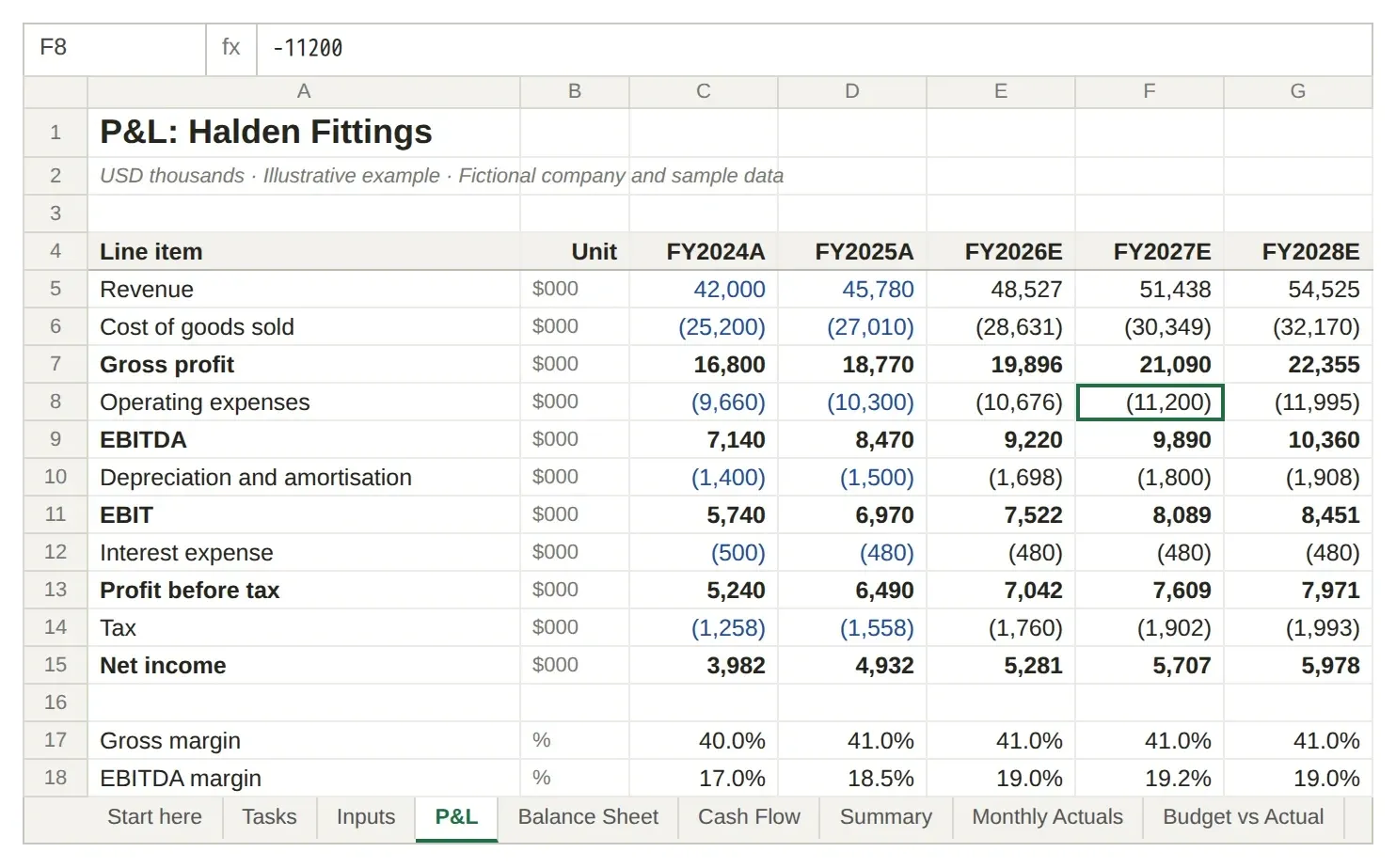
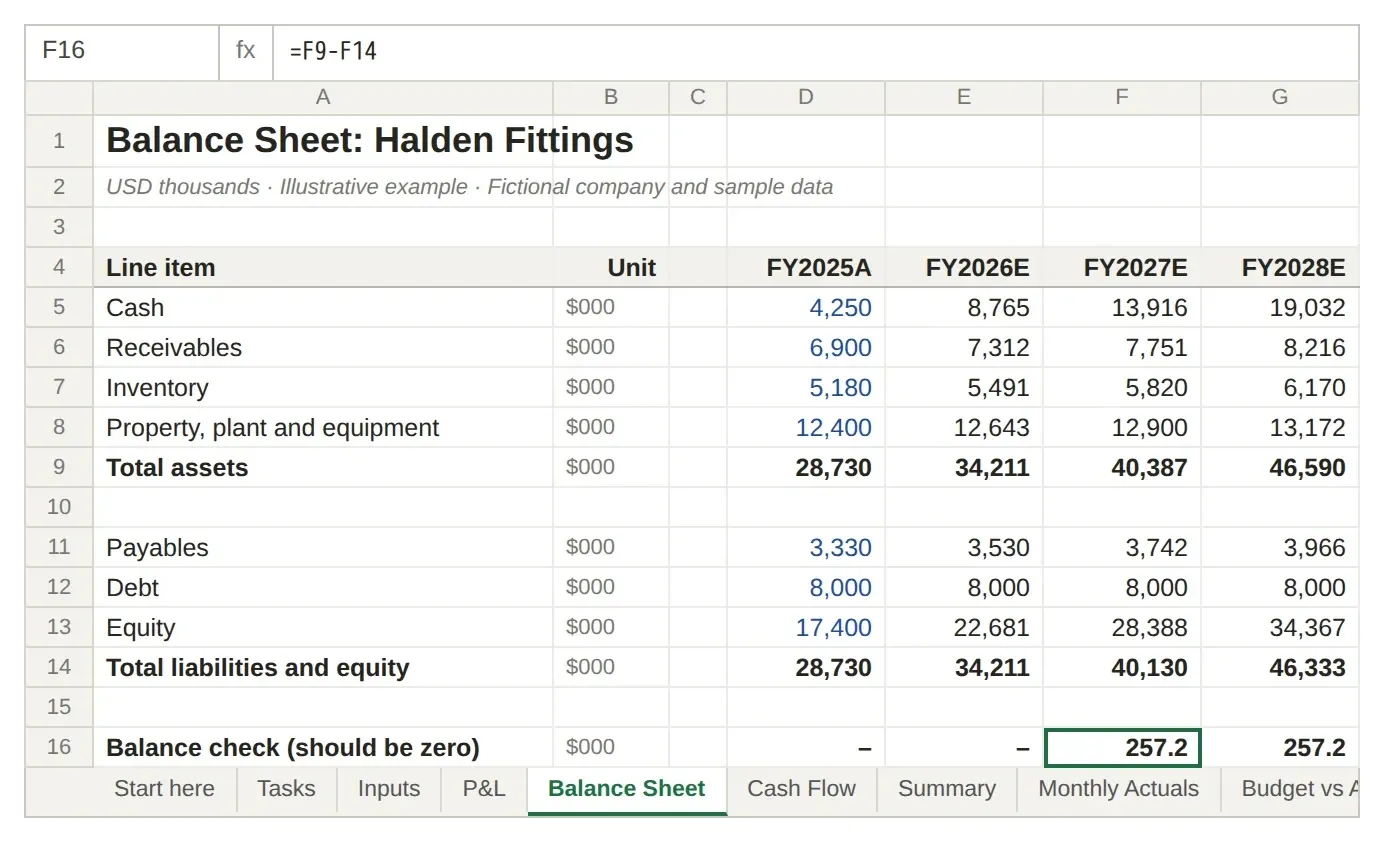
The test workbook is a fictional three-statement model for Halden Fittings, a valve maker: two actual years, three forecast years, a monthly revenue tab, a budget-versus-actual tab and a KPI summary. Every forecast number is a live formula, except where we planted an error. The images below are renders of the workbook itself, not Claude's output.
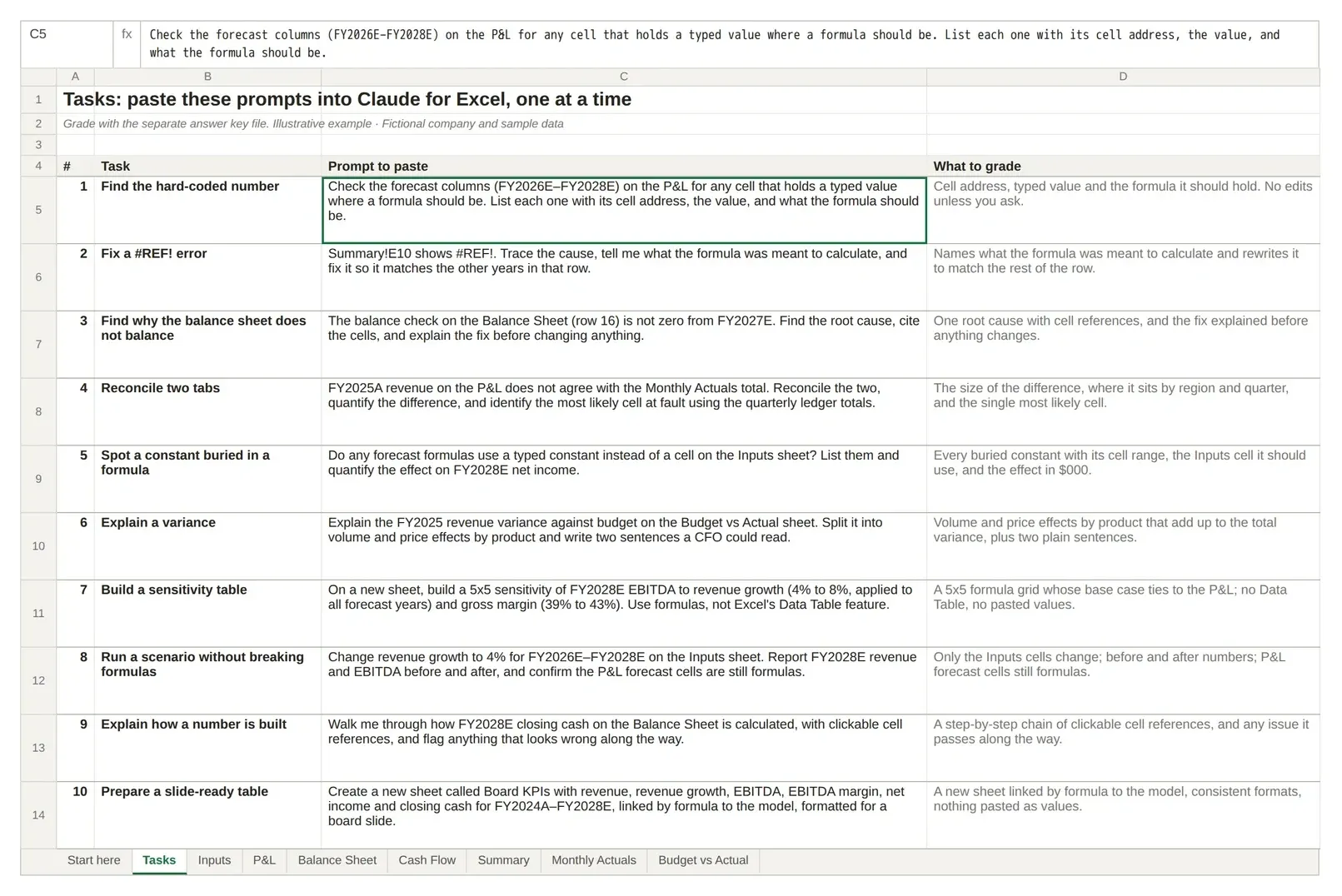
Save a copy, paste the prompts from the Tasks sheet in order, and grade each answer against the answer key file: did it find the issue, cite the right cells and change only what you asked?
| # | Task | What it tests |
|---|---|---|
| 1 | Find the hard-coded number | A typed value sitting where a forecast formula should be |
| 2 | Fix a #REF! error | A broken net-debt formula on the Summary sheet (Anthropic's own example prompt) |
| 3 | Find why the balance sheet does not balance | A root cause on a different sheet from the symptom |
| 4 | Reconcile two tabs | Narrowing a revenue gap to one region, one quarter and one cell |
| 5 | Spot a constant buried in a formula | A typed tax rate, with the effect on FY2028E net income quantified |
| 6 | Explain a variance | Volume and price effects by product, in two sentences a CFO could read |
| 7 | Build a sensitivity table | A 5x5 EBITDA grid built with formulas, since data tables are unsupported |
| 8 | Run a scenario without breaking formulas | Changing growth on the Inputs sheet only, with P&L cells still formulas afterwards |
| 9 | Explain how a number is built | Tracing FY2028E closing cash with clickable references, and noticing task 3 on the way |
| 10 | Prepare a slide-ready table | A Board KPIs sheet linked by formula, ready to hand to a deck |
What finance teams use Claude for Excel for
The documented features map onto four jobs FP&A and deal teams ask about most:
- Model review: hard-coded numbers, inconsistent formulas, buried constants and broken links (tasks 1, 2, 3 and 5).
- Formula tracing: "walk me through how X is calculated" with citations replaces clicking Trace Precedents across six tabs, but check the chain it gives you (task 9).
- Scenario building: flex a driver and report the impact with links intact; for a sensitivity grid, ask for formulas rather than a data table (tasks 7 and 8).
- Three-statement work: building from a trial balance or filling a template is documented, and Anthropic's 11 March 2026 update added starter Skills for model auditing, LBO, DCF and three-statement templates, comparable company analysis and data cleaning.
What it cannot remove is review. Anthropic's own guidance is to work on a trusted copy, be specific about what may change and check outputs against your firm's standards. Our Excel AI agent guide covers what that review loop looks like in practice.
Claude for Financial Services: plugins and connectors
Claude for Financial Services began on 15 July 2025 as an offering that brings market and internal data into Claude through connectors for providers such as FactSet, S&P Global, PitchBook, Morningstar and Daloopa. On 24 February 2026 Anthropic added financial-services plugins for financial analysis, investment banking, equity research, private equity and wealth management, with FactSet and MSCI connectors. Many connectors need your own subscription to the data provider.
For a finance team in Excel, the practical point is narrower: connectors and Skills enabled in your Claude settings also appear in the Excel add-in, and Anthropic's 11 March 2026 post says Skills in Excel are available on all paid plans. A team that standardises its DCF Skill gets it in the sidebar. Anthropic's financial services page covers the wider product.
Claude for Excel vs Copilot in Excel
Copilot is Microsoft's own assistant, built into Excel rather than added from the Marketplace. Microsoft's Copilot in Excel guide lists edit, plan and chat modes on Windows, Mac and the web, with fewer modes on iPad, iPhone and Android while edit support rolls out, so Copilot reaches devices where Claude for Excel does not run. Access depends on your Microsoft 365 licence and organisation settings. On 1 November 2026 Microsoft listed Microsoft 365 Copilot Business at $18/user/month paid yearly (a promotional first-year price for annual commitments made by 31 December 2026; normally $21) or $25.20 monthly, on top of a qualifying plan.
The two are not exclusive. Anthropic's 7 May 2026 post says Microsoft 365 Copilot customers can also use Claude models directly in Excel and PowerPoint. The choice is usually about what your firm already licenses and governs: Copilot sits inside the Microsoft 365 tenant your IT team already manages, while Claude for Excel brings Claude's Skills, finance connectors and cross-app context, with the data-handling terms set out above. Our Copilot for Excel review covers Copilot's side in detail.
Claude for Excel vs ChatGPT for Excel
OpenAI's add-in does the same broad job from a sidebar. Its Marketplace listing, checked 1 November 2026, says it builds spreadsheets from scratch, edits existing workbooks, answers questions across tabs and formulas, and generates formulas and explanations. The clearest difference is access: the same listing says ChatGPT for Excel, Word and PowerPoint are available on ChatGPT Free, Go, Plus and Pro as well as Business, Enterprise, Edu and K-12, and that access may vary by plan, region, workspace settings and admin controls. OpenAI's help article on ChatGPT for Excel and Google Sheets lists the same plans. Claude for Excel needs a paid plan, but brings finance connectors and Skills and a documented Compliance API route for Enterprise.
Neither supports everything a modeller does: Anthropic lists macros and VBA as unsupported, and our ChatGPT for Excel guide covers OpenAI's limits. For the wider field, including dedicated workbook agents, see best AI for Excel.
Which one to pick
From the documentation alone, a practical rule:
- Your firm runs Microsoft 365 Copilot and governs AI through the tenant: start with Copilot in Excel, and ask IT whether Claude models are enabled there.
- You need finance data connectors (S&P Global, LSEG, Daloopa) or shared finance Skills: Claude for Excel, on a paid plan, after your admin has checked the retention and audit-log gaps above.
- You are on ChatGPT's Free plan or already pay for ChatGPT: try ChatGPT for Excel first.
Whichever you shortlist, run the ten tasks above in each on the same file and compare the citations and the edits each makes before you standardise.
Where Deckary fits: from the model to the slides
Deckary is our product, so read this as a recommendation rather than part of the comparison. Most finance work does not end in the workbook. It ends in a board pack or a client deck. Deckary's AI Excel Agent builds, audits and cleans workbooks inside Excel, and the PowerPoint add-in turns the result into native, editable slides in your own template: waterfall, Mekko, Gantt, bar and scatter charts that link to Excel ranges and update when you publish the numbers again from Excel.
If you already pay for Claude, you can keep Claude for Excel for model work and use Deckary for the consulting-style deck. Deckary also offers an MCP connector so Claude can create and edit Deckary decks and work with Excel files you share from the add-in. Deckary Premium costs $19/month or $180/year and covers AI in PowerPoint, Excel and Word, with a 14-day free trial and no card.
FAQ
Can Claude AI work with Excel?
Yes. Claude for Excel is Anthropic's official add-in. It opens as a sidebar in Excel, reads multi-tab workbooks, answers with cell-level citations, updates assumptions while keeping formulas intact, debugs errors and builds or populates models.
Is there a free Claude for Excel?
The add-in is free to install, but it needs a paid Claude plan. Anthropic's pricing page, checked 1 November 2026, marks Claude for Microsoft 365 as not included on Free and included on Pro, Max, Ultra, Team and Enterprise. Pro costs $17/month billed annually or $20 billed monthly.
Does Claude for Excel work on Mac?
Yes. Anthropic supports Excel on Mac version 16.46 or later (build 21011600 or later), Excel on Windows with a Microsoft 365 subscription, and Excel on the web. It does not run on Excel for iPad or Android.
Does Claude for Excel work with Excel 2016?
No. Anthropic lists Excel 2016 and 2019 perpetual or volume licences as unsupported, along with Excel on iPad, Excel on Android and older Microsoft 365 builds.
Does Claude for Excel work with Excel 2021 or 2024?
Anthropic does not list them either way. Its supported list names only Excel on the web, Excel on Windows with a Microsoft 365 subscription and Excel on Mac 16.46 or later, so a perpetual Excel 2021 or 2024 licence is not a documented option (checked 1 November 2026).
Is Claude or ChatGPT better for Excel?
Pick by plan and controls, not by the sidebar. If you are on ChatGPT's Free plan, ChatGPT for Excel is the one you can use without paying (OpenAI says access varies by plan, region and admin settings; checked 1 November 2026). If you need finance data connectors or shared Skills, Claude for Excel has them documented. Then run the same tasks on your own model before you standardise.
Method and sources
Last verified 1 November 2026. We read Anthropic's Claude for Excel documentation, the Claude pricing page, the Microsoft Marketplace listings, Anthropic's launch and general-availability posts, and Microsoft's and OpenAI's own pages for the alternatives. We did not run Claude for Excel, Copilot or ChatGPT for this page, so nothing here reports their output. We built the test workbook with openpyxl; the build script evaluates every formula, stores the results in the file so it previews correctly, and checks them against the answer key.
- Anthropic: Use Claude for Excel (features, supported versions, install, data handling, limitations)
- Anthropic: Connectors and Skills
- Anthropic: Data storage and retention (known issue after Microsoft 365 updates)
- Claude pricing
- Claude for Microsoft 365
- Microsoft Marketplace: Claude by Anthropic for Excel
- Microsoft Marketplace: Claude for Microsoft 365
- Anthropic: Advancing Claude for Financial Services (27 October 2025)
- Anthropic: Advancing Claude for Excel and PowerPoint (11 March 2026)
- Anthropic: Collaborate with Claude across Excel, PowerPoint, Word and Outlook (7 May 2026)
- Anthropic: Claude for Financial Services (15 July 2025)
- Anthropic: Cowork and plugins for finance (24 February 2026)
- Anthropic privacy centre: data retention for organisations
- Microsoft Support: Get started with Copilot in Excel
- Microsoft 365 Copilot pricing
- Microsoft Marketplace: ChatGPT for Excel, Word and PowerPoint
- OpenAI Help Center: ChatGPT for Excel and Google Sheets