Claude for Google Sheets, Docs and Slides: The Integration Explained (2026)
Claude now edits Google Sheets, Docs and Slides from a sidebar or from the chat. The two routes, plans and prices, admin setup and documented limits, from Anthropic's docs, plus a free test kit.
- Bob · Former McKinsey and Deloitte consultant with 6 years of experience
- 18 min read
Pricing and feature information was accurate at the time of publication. Competitor products change frequently — verify current details on each provider's website.
Claude now works inside Google Docs, Sheets and Slides. This page summarises Anthropic's and Google's documentation as read on 1 November 2026; we could not sign in to Claude or Google Workspace, so we have not run the integration ourselves, and every capability below is the vendor's description.
Anthropic launched it on 6 October 2026 as two separate routes, both labelled beta:
- The Claude for Google Workspace add-on: a sidebar inside the file you have open. Claude reads that file and edits it directly. One install from the Google Workspace Marketplace covers all three apps. It's for Pro, Max, Ultra, Team and Enterprise plans.
- The Google Docs, Sheets and Slides connectors: you start in a Claude chat, paste a link or ask for a new file, and Claude edits it in a pane beside the conversation. The connectors help article states no plan restriction; on Team and Enterprise an Owner enables them first.
Use the sidebar when you're already in the file. Use the connectors when you start from a chat or the job spans several files. The add-on doesn't work on a .pptx or .xlsx until you convert it to a Google file, and charts Claude adds to Slides are static images. That matters if your final deliverable is PowerPoint.
Who should look at which:
- Consultant drafting in Slides for a PowerPoint client: read the PowerPoint handoff section first; the chart and export limits decide more than the features.
- Finance lead with a model in Sheets: the add-on, on a converted copy, with "Ask before edits" left on.
- PMO lead whose company already pays for Gemini: compare costs first (Claude vs Gemini).
Free test kit: claude-google-workspace-test-kit.zip: a messy Sheets workbook with five tasks, a separate answer key, and a five-slide deck with planted formatting problems. Format: ZIP · 3 files (2 XLSX, 1 PPTX) · No signup. We built it locally with Python and have not yet run it through Claude or Gemini.
Claude for Google Workspace at a glance
| Add-on (sidebar) | Connectors (from the Claude chat) | |
|---|---|---|
| Where you start | Inside the open Doc, Sheet or Slides file | In Claude on the web or Claude Desktop |
| What Claude sees | The open file, your selection, files you attach, connectors you enable | Files you link or ask it to create; access follows your Google sharing |
| Best for | Editing the file in front of you | New files, or work across several files |
| Install | Google Workspace Marketplace, once for all three apps | Enable in Claude's connector settings |
| Plans | Pro, Max, Ultra, Team, Enterprise (beta) | No plan restriction stated in the help article; on Team and Enterprise an Owner enables them first |
| Edit mode | "Ask before edits" (default) or "Accept all edits" | Live edits in a pane beside the chat |
| Notable limit | Native Google files only; one file at a time; six minutes per operation | Cannot add charts to Google Slides |
Sources: Claude Help Center articles on the add-on and the connectors, read 1 November 2026.
Add-on or connectors: which one you're using
The add-on: Claude in a sidebar inside the file
You install Claude once from the Marketplace listing (published by Anthropic, updated 21 October 2026), then open any Doc, Sheet or Slides file and choose Extensions > Claude > Open Claude. The sidebar reads the open file and your selection and edits the file in place, so Google's version history is your undo.
Two modes control how far it goes. In Ask before edits, the default, the help article says "Claude shows you what it is about to do, in plain language, and waits for you to click 'Allow'". It doesn't say whether one approval covers a single cell or a batch of changes. Accept all edits applies changes without stopping. Even then it pauses on anything that touches links, external images, web addresses or someone's access to the file. Claude cannot share files, change ownership, create menus or scheduled automations.
You pick the model from the selector in the sidebar, from whatever your Claude plan includes. Chat history is saved per file in your browser and doesn't sync across devices.
The connectors: Claude edits Google files from the chat
In a Claude conversation you paste a Google file link or ask for a new file, and Claude can create and edit it live in a pane beside the chat. The pane works in Claude on the web in Chrome and in Claude Desktop with its built-in browser turned on; otherwise use Open in Google on the file card (connectors article).
The Drive connector on its own is not the same thing: it reads Sheets, Slides and Office files but doesn't edit them. If you want Claude to change a sheet or deck, you need the Docs, Sheets or Slides connector or the add-on.
What Claude can do in Google Sheets
Anthropic's announcement and help article say Claude can:
- Formulas: write and debug them; the help article's example prompt asks Claude to trace a total and "flag anything hardcoded".
- Models: build on new tabs. The Marketplace listing puts it as "Build and edit models, write and debug formulas, clean data, and produce analyses."
- Data work: move a range into Python to clean or join it, then write the results back.
- Outputs: pivot tables and native Sheets charts.
Documented limits in Sheets: Connected Sheets (BigQuery) tabs can't be read or edited, and Claude can't create triggers, custom menus or scheduled refreshes. It works on one file at a time, so a model that pulls from three other workbooks needs the connectors route or a copy of the data in the same file. Anthropic publishes no row or cell limit; the limits it does give are six minutes per operation ("ask Claude to work in stages" for large jobs) and attachments of up to 30 MB per document.
Try it: five Sheets tasks with known answers
The test workbook is a fictional six-month order log for "Corrin Outdoor Co.": 163 order rows, a quarterly plan P&L, and a Tasks tab with five prompts to paste into Claude. The answers live in a separate file so Claude can't read them from the open sheet.
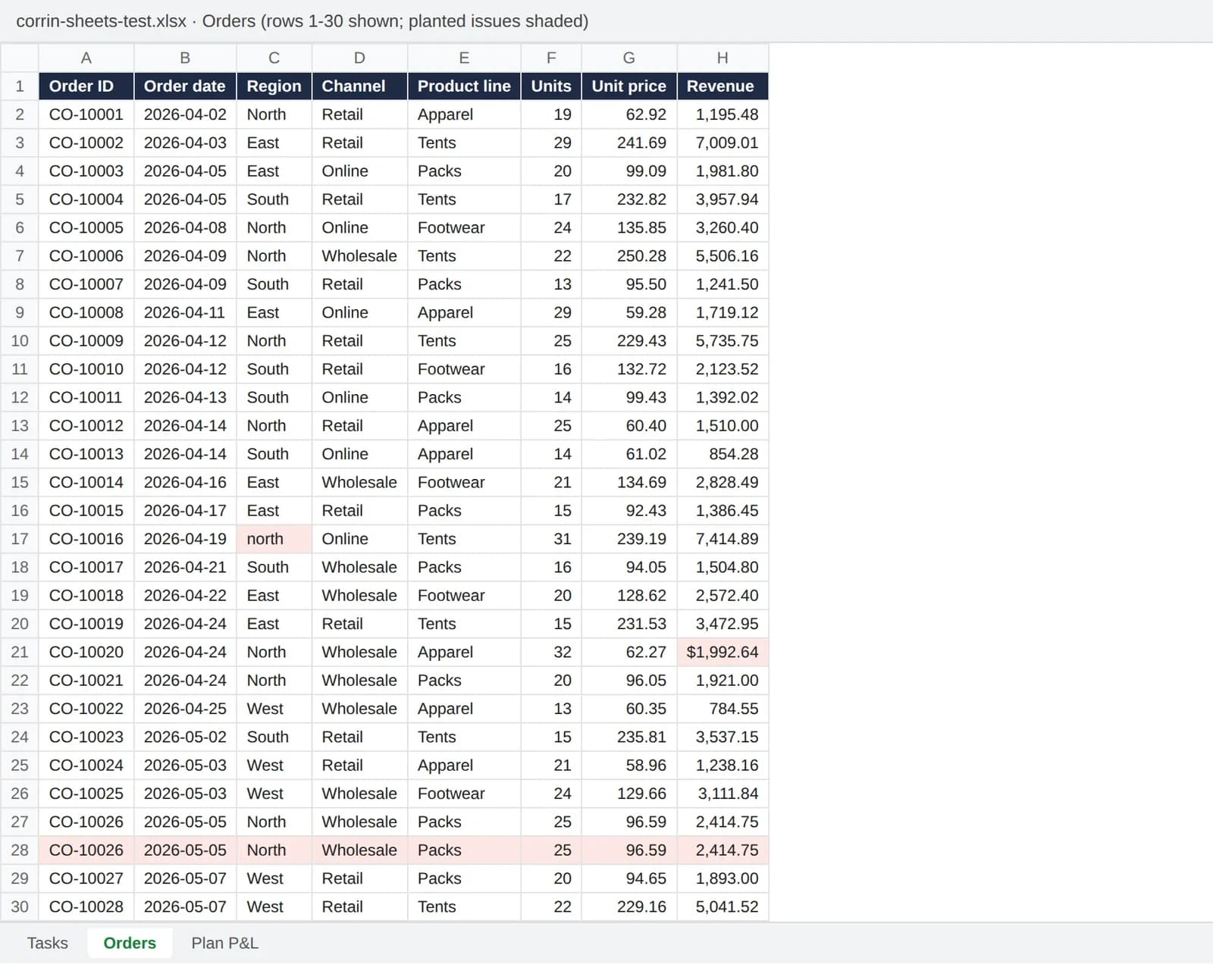
Rendered from corrin-sheets-test.xlsx (rows 1–30 only; most planted issues sit further down the sheet). Shading marks planted issues for this preview only; the workbook itself is unshaded. Illustrative example · Fictional company and sample data.
| Task | What you ask Claude | Expected answer |
|---|---|---|
| 1. Clean | Remove exact duplicates, standardise Region, convert text revenue | 163 rows → 160; 3 duplicates; 5 region spellings fixed; 4 text cells converted; total $437,880.14 |
| 2. Formulas | Q3 revenue by region with SUMIFS on a new Summary tab | North $65,149.10 · South $44,863.16 · East $56,576.22 · West $51,584.37 · Total $218,172.85 |
| 3. Debug | Find hardcodes, wrong references and incomplete totals in Plan P&L | D6 typed 118.0 (should be 122.1); E10 divides by Q3 revenue; F4 omits Q4 (862.0 when fixed); FY EBIT 132.2 after fixes, not 136.3 |
| 4. Build | Q4 forecast tab with growth inputs (North +4%, South −2%, East +6%, West +1%) | Q4 total $223,791.96, with the four rates in their own input cells |
| 5. Analyse | Largest Q2 → Q3 decline by product line, plus a chart | Footwear, down 33.9%; a chart comparing both quarters by line |
Task 1 has a trap: a plain SUM of the raw Revenue column gives $436,271.04, because it counts the three duplicates and skips the four text cells. An answer that matches that number skipped the cleaning. Task 3 tests whether Claude checks every cell or stops at the first error.
The expected answers were computed from the clean data before the errors were planted, not from the workbook's formulas. You can check them yourself: once the Orders tab is clean, a SUMIFS on Region and Quarter reproduces the task 2 figures, and the answer key lists the product-line figures behind task 5.
How to run it: in Google Drive, upload corrin-sheets-test.xlsx, open it with Google Sheets and use File > Save as Google Sheets. The add-on doesn't run in Office files, even when they're open in Sheets (help article), and converting makes a copy of the Office file (Google Drive Help). That Google page doesn't list what changes in conversion, so with a real finance workbook compare the converted copy with the original (formats, validation, anything macro-driven) before you trust a number.
For the same kind of test in Excel, see our best AI for Excel comparison.
Continue reading: Bar Charts in PowerPoint · How to Align Objects in PowerPoint · Best AI Presentation Maker for Consultants
What Claude can do in Google Docs
In the sidebar, the help article says Claude answers questions about the document, rewrites and restructures it, and checks it for problems; one example prompt asks it to find "defined terms that are used but never defined". The announcement says larger rewrites arrive as suggestion cards you apply or dismiss.
The limit that matters for review work: from the sidebar Claude can't read, reply to or resolve comments, can't accept or reject existing suggestions, and its own edits land as direct edits, not suggestions. If your job is "work through the client's comments", the connectors route is the one that reads comments and suggestions in Google Docs.
What Claude can do in Google Slides
Anthropic's announcement says Claude can "build new slides from your deck's layouts and themes", then flag elements that overlap or run off the slide and text that's hard to read. The help article adds that it can "tighten and restyle existing" slides, with example prompts for splitting a slide and making titles parallel.
Two limits to plan around:
- Charts are static images. Charts Claude creates in Slides "are inserted as images, not linked Sheets charts, so they do not update when numbers change" (help article).
- The connector can't add charts at all. From the chat, Claude cannot add charts to Google Slides, and Slides edits may not appear live in the pane (connectors article).
Try it: a "restyle and tighten" deck
corrin-q3-review-messy.pptx is a five-slide quarterly review with the problems a real working draft has: mixed fonts, topic titles instead of action titles, a 14-bullet slide, a table in four number formats, a note box hanging off the slide edge, and a shape covering text. Its numbers match the workbook.
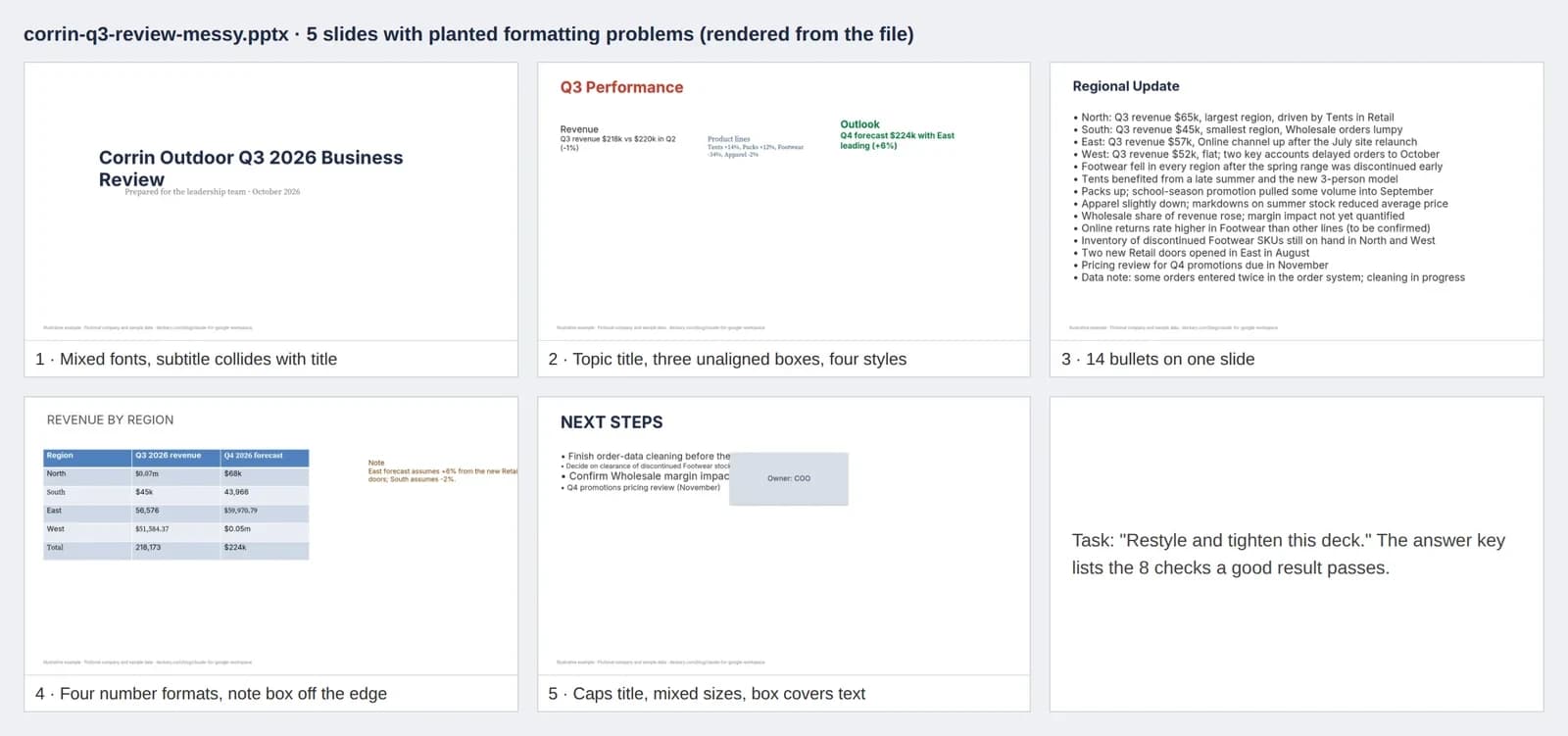
The five slides of corrin-q3-review-messy.pptx plus a task card, rendered with Deckary's slide renderer; Google Slides will render fonts slightly differently. Illustrative example · Fictional company and sample data.
Upload it to Drive, open it with Google Slides, use File > Save as Google Slides, then ask Claude: "Restyle and tighten this deck: one title style, action titles that state the takeaway, split or cut slide 3, one number format in the table, and nothing off the slide or overlapping." A good result passes these eight checks (also in the answer key):
- Every title states the takeaway, for example "Q3 revenue slipped 1% as Footwear fell 34% and Tents grew 14%".
- One title style throughout: same font, size, colour and position.
- Body text in one font, nothing under 12 pt, nothing outside its box.
- Slide 3 is split into two slides or cut to its five most important points.
- The table on slide 4 uses one format ($k, no decimals) and the note box is back on the slide.
- The empty text box and the shape covering text on slide 5 are removed or moved.
- The three boxes on slide 2 share a top edge, width and gap.
- The numbers still match the workbook.
If you build in Slides but deliver PowerPoint
If the client or board pack runs on PowerPoint, Claude in Slides doesn't change the handoff. Check four things:
- Start from a Google file. The add-on doesn't run in .pptx or .xlsx files until they're converted, and converting makes a copy, so Claude's edits land in the Google copy, not in your PowerPoint file.
- Export at the end. In Google Slides, use File > Download and pick Microsoft PowerPoint (Google Drive Help), or File > Email as attachment to send it as PowerPoint (Google's switching guide).
- Check the charts. Charts Claude added in Slides are images in Slides, so expect them to be images in the exported file too; check after export, and plan to rebuild any chart whose numbers will change.
- Check every slide after export. Open the exported file in PowerPoint and look at every slide before sending, as you would after any Slides-to-PowerPoint move. Our Google Slides vs PowerPoint comparison covers where the two diverge.
If the final file has to be a native, editable PowerPoint deck, it's simpler to build it there. Anthropic's own product page says "Claude for Microsoft 365 covers Excel, PowerPoint, Word, and Outlook." Deckary's browser deck editor also exports native editable PPTX, and our best AI tool for slides guide compares the options.
Plans, admin setup and data handling
Plans and price
The help article says: "Claude for Google Workspace is available in beta for Pro, Max, Ultra, Team, and Enterprise plans." The announcement words the same thing as "all paid Claude plans", and the Marketplace listing marks it as paid. On Anthropic's pricing page on 1 November 2026, the cheapest of those, Pro, cost $20 a month billed monthly or $17 a month billed annually; Team started at $25 per seat billed monthly. The add-on comes with the plan; there's no separate charge listed.
Your Google account must be allowed to install Marketplace apps, often the real blocker at a company. You sign in with a Claude account, not an API key (help article).
Admin setup for the add-on
- A Google Workspace super admin can admin-install Claude from the Marketplace for everyone, or for selected groups or organisational units. Users don't need to do anything.
- If your domain blocks user installs from the Marketplace, the admin can allowlist Claude or admin-install it.
Admin setup for the connectors
- On Team and Enterprise, an Owner or Primary Owner enables the Google Workspace connectors in Claude under Organization settings > Connectors.
- If Google blocks access, a Google Workspace admin goes to Security > Access and data control > API controls > Manage third-party app access, adds the Claude app, sets it to Trusted and allows about 15 minutes to propagate. Live editing uses the same app, so one approval covers both (connectors article).
Data handling
From the help article:
- Permissions: the add-on asks to display its sidebar and to "View and manage documents, spreadsheets, or presentations that this application has been installed in", not Drive, Gmail or Calendar.
- Training: "Anthropic does not use this content to train its models."
- Terms: "For Team and Enterprise plans, this is governed by your organization's Commercial Terms and Data Processing Addendum." "For Pro, Max, and Ultra, it is governed by the Consumer Terms and Privacy Policy."
- Retention: "Inputs and outputs are deleted from Anthropic's systems within 30 days", and "The extension does not inherit custom data retention settings your organization may have set."
- Enterprise controls: the Compliance API and customer-managed encryption keys on Enterprise; OpenTelemetry audit export is supported.
- Not supported: Amazon Bedrock, Google Cloud Vertex AI, Azure AI Foundry or an LLM gateway; Zero Data Retention; HIPAA ("Do not use the extension with protected health information").
If you'd use a personal Pro or Max plan on client files, forward those two terms lines to whoever owns data policy at your firm first.
Other documented limits
Supported browsers are Chrome, Edge and Safari; Firefox isn't supported in the beta. If actions fail, the help article says the usual cause is a browser signed in to more than one Google account, and suggests a window signed in to only one, such as a separate Chrome profile. The sidebar has no voice dictation.
Claude vs Gemini in Google Workspace
Gemini is Google's own assistant in the same apps, opened from Ask Gemini at the top right of a file. We haven't run either; the differences below are from each vendor's documentation.
| Claude for Google Workspace | Gemini in Docs, Sheets and Slides | |
|---|---|---|
| How you get it | Paid Claude plan (from $20 a month for Pro) plus a Marketplace install | Included in Business Standard, Business Plus, Enterprise Standard and Enterprise Plus, or Google AI Pro and Ultra for personal accounts |
| Status | Beta | Side panel generally available since June 2024 |
| Slides | Builds slides from the deck's layouts and theme, restyles, flags overlap and overflow | Generates new slides and images, summarises a presentation, writes and rewrites text |
| Context beyond the file | Attached files, Claude connectors and skills | Drive files referenced with @ in the prompt |
| Model choice | Any model your Claude plan includes | Google's Gemini models |
Sources: Gemini in Google Slides help; Google Workspace Updates, 24 June 2024; Google Workspace with Gemini editions; Claude sources above. Read 1 November 2026.
On cost, if your company already pays for a Workspace edition that includes Gemini, start there: it needs no extra plan, install or admin approval. Claude makes more sense when your team already uses Claude, its skills and connectors, or wants to choose the model. The five prompts on the kit's Tasks tab work in either sidebar, so the answer key makes a side-by-side check quick.
FAQ
Can Claude work with Google Sheets?
Yes. Since 6 October 2026 Claude can read and edit a Google Sheet two ways: the Claude for Google Workspace add-on opens a sidebar inside Sheets, and the Google Sheets connector lets Claude edit a sheet from a normal Claude chat. Anthropic calls both beta. The add-on is for Pro, Max, Ultra, Team and Enterprise plans; the connectors help article states no plan restriction.
How do I install Claude in Google Sheets?
Install Claude from the Google Workspace Marketplace (one install covers Docs, Sheets and Slides), open a spreadsheet and choose Extensions > Claude > Open Claude. If your organisation blocks Marketplace apps, a Google Workspace admin has to allowlist or admin-install it.
Can Claude edit Google Docs?
Yes. In the sidebar Claude edits the open document in place, as direct edits rather than suggestions. It cannot read or resolve comments or accept existing suggestions from the sidebar; the Google Docs connector in the Claude chat can read comments and suggestions.
Is Claude for Google Sheets free?
No. The add-on needs a paid Claude plan (Pro, Max, Ultra, Team or Enterprise), and the Marketplace listing marks it as paid. The cheapest eligible plan, Pro, was $20 a month billed monthly or $17 a month billed annually on Anthropic's pricing page on 1 November 2026.
Can Claude make Google Slides?
Yes, according to Anthropic. In the sidebar Claude can build new slides from the deck's layouts and theme, and tighten and restyle existing ones. Charts it adds to Slides are images, not linked Sheets charts.
Downloads and sources
The kit's files one by one:
- corrin-sheets-test.xlsx: 3 sheets (Tasks, Orders, Plan P&L)
- corrin-answer-key.xlsx: 1 sheet
- corrin-q3-review-messy.pptx: 5 slides
All numbers describe a fictional company.
Sources (all read 1 November 2026):
- Anthropic, Claude now works with Google Docs, Sheets, and Slides, 6 October 2026
- Claude Help Center, Use Claude in Google Docs, Sheets, and Slides
- Claude Help Center, Use Google Workspace connectors
- Anthropic, Claude for Google Workspace (beta) and Claude pricing
- Google Workspace Marketplace, Claude, updated 21 October 2026
- Google, Collaborate with Gemini in Google Slides and Get started with Google Workspace with Gemini
- Google, Work with Microsoft Office files, Download a file and Switching to Slides from Microsoft PowerPoint