Claude Slides: What It Does, PowerPoint Export and Limits (2026)
Claude Slides builds, edits and presents decks inside Claude. What it is, which plans have it, what survives the PowerPoint and Google Slides export, and a free deck test kit.
- Bob · Former McKinsey and Deloitte consultant with 6 years of experience
- 17 min read
Pricing and feature information was accurate at the time of publication. Competitor products change frequently — verify current details on each provider's website.
Claude Slides is Anthropic's slide editor inside Claude: you ask for a deck in a conversation, it opens beside the chat, and you edit it by hand, by comment or by prompt, present it full screen, and download it. It launched on 16 September 2026 and came out of beta on 8 October 2026, when Anthropic made it available on every Claude plan, including Free.
Short answer: yes, Claude makes slides, on every plan including Free, and it downloads them as PowerPoint. Anthropic's own tutorial says text boxes, tables, pictures, backgrounds and speaker notes stay editable in the .pptx, while charts, icons and shapes become pictures. For people whose work product is a deck, that export line matters more than how good the first draft looks, and we have not judged draft quality.
We have not run Claude Slides for this page. Everything below comes from Anthropic's announcements, Help Center articles, the Claude Academy tutorial and the pricing page, read on 1 November 2026, and each product fact links to its source. We also make a competing PowerPoint add-in, Deckary, so weigh our framing accordingly. What we did build is a test kit: a brief, source data and an 8-slide reference deck made with python-pptx, so you can run the same brief in Claude Slides and see the result yourself.
Last verified 1 November 2026.
Claude Slides at a glance
| Question | Answer (from Anthropic's documentation, checked 1 November 2026) |
|---|---|
| What it is | A slide editor that opens beside a Claude conversation, one of the artifact templates next to Docs and Design |
| Where | Claude on the web, desktop and mobile, and Claude Code |
| Plans | Every plan, including Free; on Team and Enterprise an owner can switch it off |
| Status | Launched in beta 16 September 2026; out of beta 8 October 2026 |
| Editing | By hand (PowerPoint-style), by comment sent to Claude, or by prompt naming slides |
| Brand | Uses a design system set up in Claude; or attach a deck or brand file and ask it to match |
| Downloads | PDF, HTML, current slide as PNG, PowerPoint (current fonts or basic fonts) |
| Google Slides | Share > Export > Google Slides, with Google Drive connected; editable copy in Drive |
| Editable in PowerPoint | Text boxes, tables, pictures, slide backgrounds, speaker notes |
| Become pictures | Charts, icons, shapes |
| Dropped | Slide transitions and skipped slides |
What Claude Slides is, and where it lives
Anthropic announced Claude Slides and Claude Docs on 16 September 2026 in Claude Cowork and chat are now one Claude. The same post merged Cowork into the main Claude app and brought Claude Design into ordinary conversations. "Ask for a presentation, and Claude drafts the slides."
In Anthropic's terms, a Slides deck is an artifact. The Help Center article What are artifacts and how do I use them? lists it as one of its templates, alongside Docs (living documents), Design (visuals and mockups with your design system), Dashboards (beta) and Motion (beta). Everything you make is saved to the Artifacts tab in the sidebar.
You can start a deck three ways, according to the Claude Academy tutorial Making slides and presentations with Claude:
- ask for one in any conversation, "on the web, in the desktop app, in the mobile app, or in Claude Code";
- open Artifacts in the sidebar and start a deck under Make something new;
- turn an existing Claude Doc into a presentation (Get started with Claude Docs).
Plans and availability
The timeline matters, because pages written in September still say "paid plans only":
- 16 September 2026: the launch post said Docs, Slides and Design were "in beta on paid plans", rolling out on Pro, Max and Ultra first. The release notes for the same day already listed them on every plan, including Free, and in beta on Enterprise.
- 8 October 2026: Build live dashboards and animate explainers with Claude took the beta label off: "Claude Docs, Slides, and Design are out of beta and available on every plan, including Free." The same post and the artifacts Help Center article say the three templates turn on by default for Enterprise organisations on 15 October 2026.
The pricing page now shows Claude Slides on Free, Pro, Max and Ultra and on Team and Enterprise. Usage counts toward your plan's limits like any other Claude work; none of the pages we checked says how much of a Free or Pro allowance one deck uses. One requirement trips people up: artifacts need Cloud code execution and file creation (called Create and edit files in the newer Settings layout) turned on under Settings > Capabilities, or Organization settings > Capabilities on Team and Enterprise.
How a deck gets built and edited
The Academy tutorial walks through seven numbered steps, from asking for a deck to sharing it. Condensed to the parts that matter for client or board work:
1. The brief
Say what the deck is for and who reads it, attach your material (a memo, notes, a spreadsheet) or name the connected tool it lives in, and attach a past deck you like for the look. With a short request, Claude may ask questions or share an outline first. If a figure is missing, Claude is "designed to ask you for it, or to leave a visible placeholder on the slide".
2. Brand
If your organisation has a design system set up in Claude, the deck uses its fonts and colours; otherwise you attach a deck or brand file and ask Claude to match it. Design systems from standalone Claude Design must be migrated first. Note what this is: a design system inside Claude, not your PowerPoint slide master.
3. Editing
You can edit "the way you would in PowerPoint or Keynote": double-click text, drag to move or resize, add text, images, tables and shapes, reorder slides from thumbnails. You can also click an element, leave a comment with Send to Claude checked, and Claude makes the change and replies in the thread. For multi-slide changes you ask in the conversation and name the slides by number or title. Changes save automatically; Duplicate gives you a copy to experiment on.
4. Charts
You tell Claude what data to show, or name the file it is in, and Claude draws the chart. "The chart shows the data from when Claude built it. If the numbers change, ask Claude to update it." There is no live link to the spreadsheet.
5. Present and share
Present plays the deck full screen inside Claude, and Present with speaker notes opens a presenter window with notes, a clock and the next slide. You invite people as viewers, commenters or editors, and invitees need a Claude account; teammates with edit access can work in the deck at the same time. For anyone who can't open it, the tutorial says to download the deck and send the file.
Exporting to PowerPoint and Google Slides: what survives
This is the section to read before you promise a client an editable file. The Academy tutorial lists five download options:
| Download | What you get |
|---|---|
| A fixed document | |
| Web page (.html) | Plays in a browser like Present, keeps transitions |
| Current slide (.png) | One slide as an image |
| PowerPoint, current fonts | A .pptx with your deck's fonts |
| PowerPoint, basic fonts | A .pptx with your fonts replaced by ones every computer has |
And then the line that decides most consulting use: "In PowerPoint, you can keep editing text boxes, tables, pictures, slide backgrounds and speaker notes. Charts, icons and shapes become pictures. Slide transitions and skipped slides are left out."
The tutorial does not say whether "current fonts" embeds the fonts in the file. If the client's machine lacks them, PowerPoint will substitute, so pick basic fonts when you don't know what the reader has.
Charts in Google Slides: not documented
Google Slides works through Share: with Google Drive connected, choose Export and pick Google Slides under Send to, and "you get an editable copy in your Google Drive". Anthropic's 8 October post says "decks go straight to Google Slides as editable files." Neither page says whether charts, icons and shapes arrive in Google Slides as editable objects or as pictures. If you work in Google Slides, export one chart slide and click the chart before you plan around it.
What this means in practice
- Text and tables: editable. Action titles, executive summaries and decision tables come through as real text.
- Charts: pictures in the .pptx. You cannot click a bar and use Edit Data; to change a number, you go back to Claude, update, and export again.
- Frameworks drawn from shapes (2x2 matrices, process flows, Harvey balls): also pictures.
- Your template: the documentation describes design systems inside Claude and does not say the PowerPoint export uses your own slide master or layouts. Open View > Slide Master on the exported file before you build on it.
Continue reading: AI PowerPoint for Finance Teams · PowerPoint to Word · Best AI Presentation Maker for Consultants
Free download: the Claude Slides deck test kit
Format: ZIP · DOCX brief + XLSX source data (5 sheets) + PPTX reference deck (8 slides) · No signup. Download the deck test kit, or the files one by one: brief (DOCX), source data (XLSX), reference deck (PPTX).
The kit is a realistic board task for a fictional US food distributor, Harbourline Foods: EBITDA margin fell from 8.6% to 6.2% while revenue grew 9%, and the board must decide which of six initiatives to fund. All numbers are fictional and labelled as such.
How to use it:
- Paste the brief into Claude Slides (or any AI deck tool) and attach the workbook. The brief asks for an 8-slide board pre-read with action titles and editable charts.
- Download the result as PowerPoint.
- Run the five checks at the end of the brief: are the titles text boxes, are charts native (PowerPoint shows Chart Design and Edit Data) or pictures (Picture Format), can you move one bar or one circle on its own, are the slides on your layouts in Slide Master, and do the numbers match the workbook?
- Compare with the reference deck. It passes the title, chart, shape and number checks, but it is built on python-pptx's default template, not a house master, so it is no benchmark for the Slide Master check: use your own template for that one.
The storyline the brief asks for:
| # | Action title | Exhibit |
|---|---|---|
| 1 | Harbourline Foods: restoring EBITDA margin to 9% by FY2028 | Title |
| 2 | Margin can return to 9% by FY2028 if we fund four of six initiatives now | Executive summary |
| 3 | EBITDA margin fell from 8.6% to 6.2% in two years while revenue grew 9% | Column charts |
| 4 | Freight and warehouse labour explain 2.1 of the 2.4-point margin decline | Waterfall |
| 5 | Six initiatives are worth $20.8m of EBITDA; four deliver 81% of it | Bar chart |
| 6 | Fund four of six initiatives now: high value, manageable effort | 2x2 matrix |
| 7 | The funded plan lifts margin to 9.0% in FY2028, most of it in FY2027 | Line chart and table |
| 8 | We ask the board to approve $6.5m and three owners today | Decision table |
The reference deck uses native PowerPoint objects throughout: five native charts with embedded data (including the waterfall, built as a stacked column chart), a 2x2 matrix drawn from native shapes, and two native tables. Each one opens for editing in PowerPoint. The three images below are renders from Deckary's slide renderer, not PowerPoint screenshots; open the .pptx to check the objects yourself.
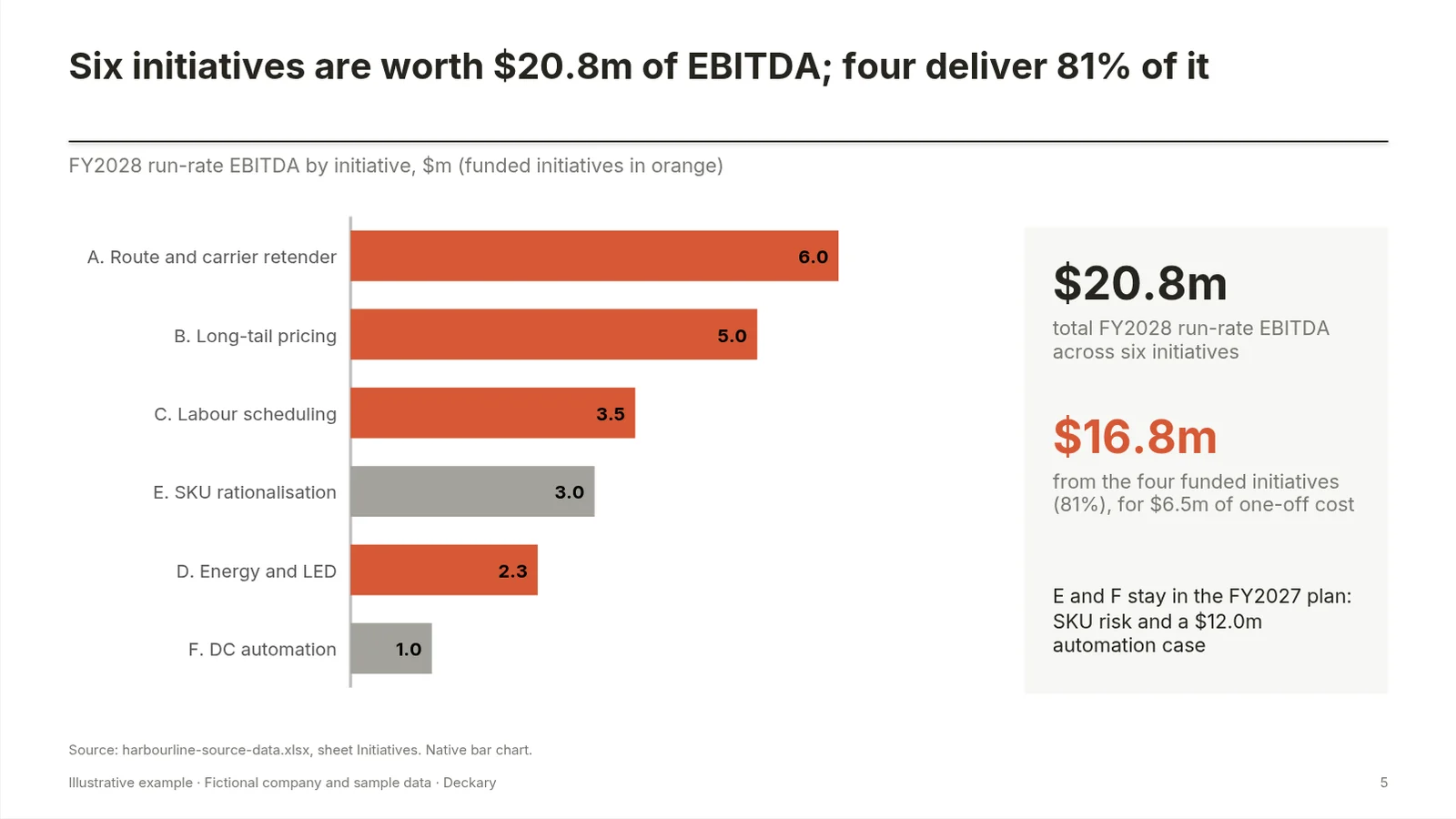
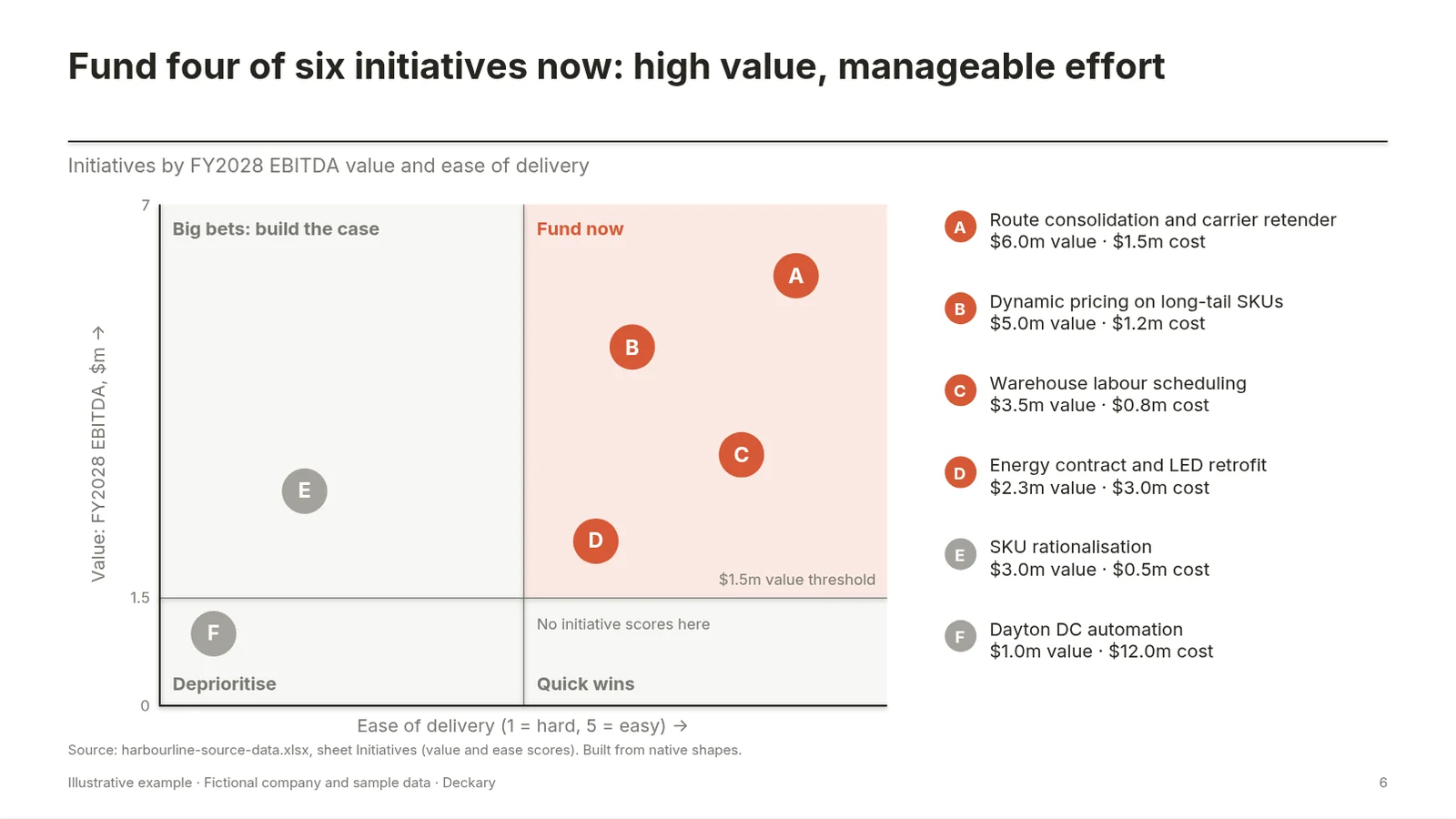
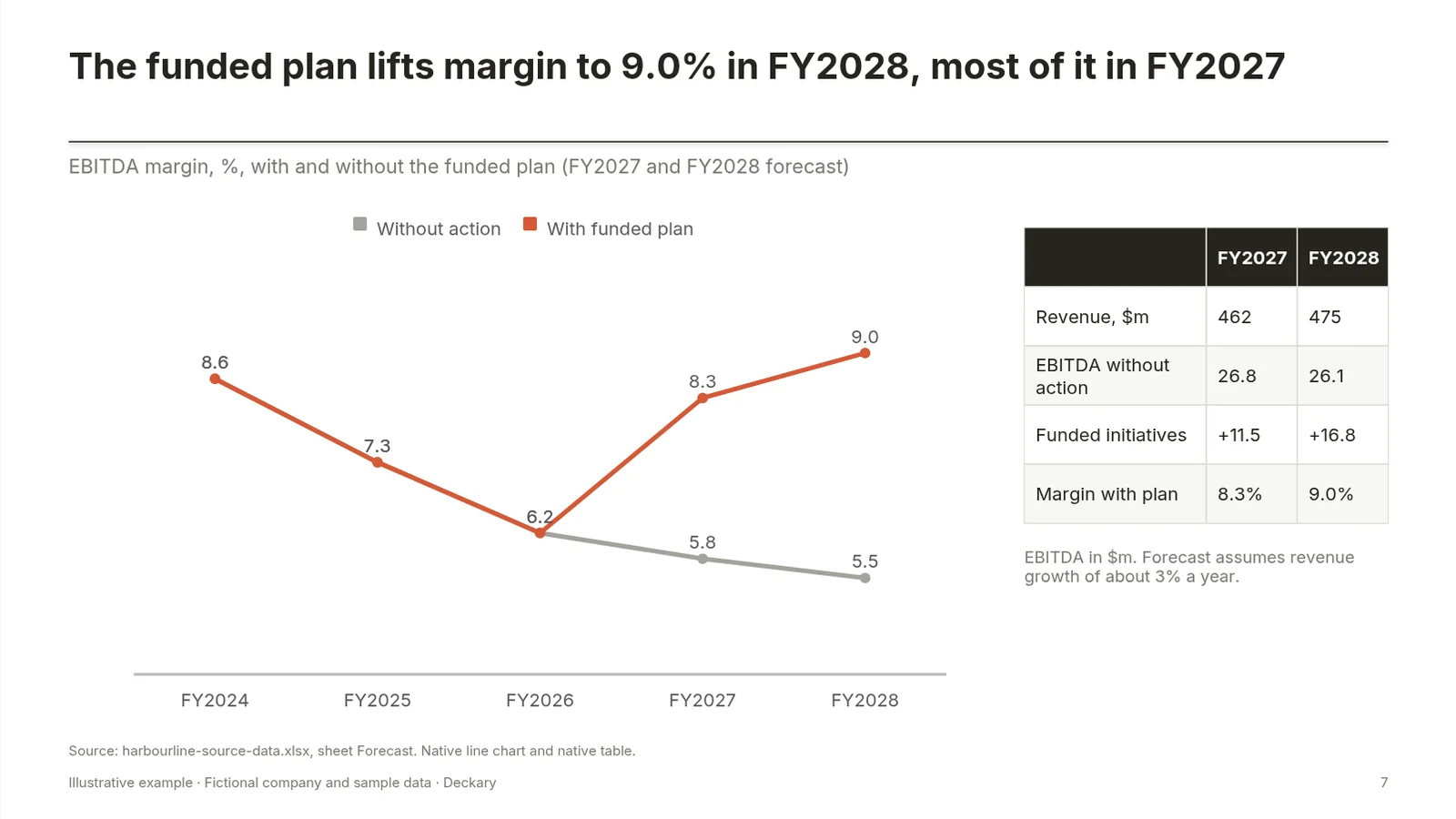
Going by Anthropic's tutorial, we would expect a Claude Slides version of this deck to keep slide 2's text and slide 8's table editable in the .pptx, and to turn the five charts and the matrix into pictures. That is a reading of the documentation, not a test result: run the kit to see what you actually get.
Claude Slides vs Claude for PowerPoint vs Claude Design vs Cowork: which one builds the deck
Anthropic now has four overlapping ways to make a presentation. They differ by where the deck lives.
Claude Slides
The deck lives in Claude. Best for internal updates, workshop read-outs and anything presented from a link or a PDF. In PowerPoint, its charts and shapes are pictures.
Claude for PowerPoint
The deck lives in PowerPoint. Claude for PowerPoint is an add-in "generally available to Pro, Max, Team, and Enterprise plans" (not Free). Anthropic says it "reads the slide master, layouts, fonts, and color scheme in your deck" and produces "editable native PowerPoint charts"; those are Anthropic's claims, and we have not tested them for this page. If the file must stay in your client's or firm's template, this is Anthropic's tool for it. Our Claude review covers the add-in for consulting work. Anthropic's own tutorial points the same way: "If your deck is already a PowerPoint file, Claude can work inside PowerPoint itself."
Claude Design
Visual work: mockups, one-pagers, prototypes and decks built on a design system. It started in April 2026 as an Anthropic Labs research preview and has worked inside conversations since 16 September; the standalone site closes on 14 December 2026 (migration guide). The artifacts Help Center article says designs export as a .zip, PDF, PowerPoint or standalone HTML.
Cowork
No longer a separate product for most users. Anthropic's Help Center article Claude Cowork and chat are one Claude says the merge "removes the distinction between the two products": long tasks, local files and finished documents, spreadsheets and "presentations you can open in PowerPoint" come from any conversation. If your message box still shows separate Chat and Cowork options, your account has not moved over yet. So "Claude chat vs Cowork" is now mostly a question about the rollout, not a choice.
A Cowork-style task can still produce a .pptx directly, as a file rather than a Slides artifact. The tutorial's troubleshooting table covers both directions: ask for "a .pptx" by name to get a PowerPoint file, or "Make this a Slides deck" to get an editable deck in Claude.
| Tool | Where the deck lives | Charts in PowerPoint | Your PowerPoint template | Plans |
|---|---|---|---|---|
| Claude Slides | Claude (artifact) | Pictures after export | Design system in Claude | All, including Free |
| Claude for PowerPoint | Your .pptx | Native, editable | Reads your slide master | Pro, Max, Team, Enterprise |
| Claude Design | Claude (design canvas) | Exports to PowerPoint; chart behaviour not documented | Design system in Claude | All, including Free (artifacts Help Center) |
For browser-native decks built from code, see Claude Code presentations and Claude Artifacts for presentations.
Limits to plan around
- Charts are snapshots. They show the data from when Claude built them, and become pictures in PowerPoint. A number change means a round trip through Claude.
- Frameworks become pictures. Matrices, flows and icons drawn as shapes do not stay editable in the .pptx.
- Your template is a design system in Claude, not your PowerPoint master. Firms with a locked Office template should check Slide Master before relying on the export.
- Sharing needs Claude accounts for the people you invite; on Team and Enterprise an owner decides whether you can share outside the organisation.
- Usage and client data are not spelled out. The pages we checked don't say how much of a plan's allowance a deck uses or cover how uploaded files are handled; check your plan's terms before you attach client numbers.
- Facts still need checking. Anthropic's tutorial says to review Claude's work and check figures against your source before presenting.
- Photos: "Claude may not be able to find or create photos for you." Attach your own.
When you need native, template-bound PowerPoint
Claude Slides fits a deck presented from Claude, sent as a PDF, or rebuilt later. It fits less well when the deliverable is a .pptx a client or finance team will keep editing for weeks, with charts they can re-cut, frameworks they can move and every slide on the house template.
That is the job of a PowerPoint add-in: Claude for PowerPoint is Anthropic's, and Deckary is ours, building editable native charts and slides on your own template in the deck you have open.
FAQ
Can Claude make slides?
Yes. Since 16 September 2026, Claude Slides lets you ask for a deck in any Claude conversation on the web, desktop, mobile or in Claude Code. The deck opens beside the conversation, where you can edit it by hand, by comment or by prompt, present it full screen, and download it as PowerPoint, PDF, HTML or PNG.
Is Claude Slides free?
Yes. Anthropic took Claude Slides out of beta on 8 October 2026 and made it available on every Claude plan, including Free. On Team and Enterprise plans an owner can turn it on or off under Organization settings > Artifacts. Usage counts toward your plan's limits.
Can Claude Slides export to PowerPoint?
Yes. Download offers PowerPoint with current fonts or with basic fonts. Anthropic's tutorial says text boxes, tables, pictures, slide backgrounds and speaker notes stay editable in PowerPoint, while charts, icons and shapes become pictures and slide transitions and skipped slides are left out.
Can Claude Slides export to Google Slides?
Yes, if you have connected Google Drive. Open Share, choose Export and pick Google Slides under Send to, and Claude puts an editable copy in your Drive. Anthropic's pages do not say whether charts arrive as editable charts or pictures in that copy, so check before you rely on it.
What is the difference between Cowork and regular Claude?
Since 16 September 2026 there is no separate mode for most users: Anthropic merged Claude Cowork and chat into one Claude. Anything Cowork did, such as long tasks, local files and finished documents, spreadsheets and decks, is available from any conversation. Accounts still being moved over keep the separate Chat and Cowork options for now.
Sources
All checked on 1 November 2026.
- Anthropic, Claude Cowork and chat are now one Claude (16 September 2026)
- Anthropic, Build live dashboards and animate explainers with Claude (8 October 2026)
- Claude Academy, Making slides and presentations with Claude
- Claude Help Center, What are artifacts and how do I use them?
- Claude Help Center, Claude Cowork and chat are one Claude
- Claude Help Center, Release notes (16 September 2026 entry)
- Claude Help Center, Get started with Claude Docs
- Claude, Plans and pricing
- Claude docs, Use Claude for PowerPoint
- Anthropic, Introducing Claude Design by Anthropic Labs (17 April 2026)
- Claude Help Center, Migrate from standalone Claude Design to Claude