ChatGPT Work vs Claude Cowork vs Copilot Cowork: Office Work Compared (2026)
ChatGPT Work, Claude Cowork and Microsoft Copilot Cowork compared from their official documentation: where each runs, what it can reach, prices, admin controls, and a free kit to test them yourself.
- Bob · Former McKinsey and Deloitte consultant with 6 years of experience
- 19 min read
Pricing and feature information was accurate at the time of publication. Competitor products change frequently — verify current details on each provider's website.
ChatGPT Work, Claude Cowork and Microsoft Copilot Cowork do the same kind of job: you hand over a task with files attached, the agent works through it step by step, asks before important actions, and hands back files. They differ in where they run and what they can reach. Copilot Cowork lives inside your Microsoft 365 tenant and edits Word, Excel and PowerPoint files in OneDrive and SharePoint. Claude Cowork, now part of the Claude app, runs tasks in Anthropic's cloud and reaches folders on your computer through the desktop app. ChatGPT Work runs in the ChatGPT desktop app on every plan (limited on Free and Go) and on the web and mobile from Plus up.
How this was checked. I compared the three from official documentation, help articles, pricing pages and announcements read on 1 November 2026. I did not run tasks in any of them, so there are no scores on this page; the free kit below is how you get your own. Deckary, which publishes this page, makes a PowerPoint add-in that works alongside these agents, not a competing delegation agent.
Download the delegation test kit: delegation-test-kit.zip. Format: ZIP (105 KB) · 1 XLSX (3 sheets) + 2 DOCX + 1 PPTX (3 slides) · 10-point rubric with answer key · No signup.
The short answer
| If your work lives in… | Try first | Why |
|---|---|---|
| Microsoft 365 (Outlook, Teams, SharePoint, OneDrive) with a Copilot licence | Copilot Cowork | Acts on mail, calendar, Teams and shared Office files inside your tenant |
| Local folders, mixed tools, or a Claude plan you already pay for | Claude Cowork | Reaches folders you connect through the desktop app; cloud tasks keep running when your laptop is closed |
| ChatGPT, or a team that wants to try delegation without a new licence | ChatGPT Work | On every ChatGPT plan (limited, desktop app only, on Free and Go); plugins reach Google Drive, SharePoint, Slack and email |
For three common roles, this is where I would start, based on the documentation:
- Consultant working on a client's template: Copilot Cowork if the client gives you a Microsoft 365 account, because it edits the shared file in SharePoint or OneDrive; otherwise Claude Cowork on a local copy of the client folder.
- Finance lead in Excel: Copilot Cowork if your workbooks sit in SharePoint and your tenant licenses it; Claude Cowork if they sit on your laptop, since Anthropic documents spreadsheets with working formulas.
- PMO lead producing a steerco pack: whichever agent can reach the tracker and the last deck where they already live. That is exactly the task the kit tests, so run it in the two you have access to before deciding.
Side-by-side comparison
| ChatGPT Work | Claude Cowork | Copilot Cowork | |
|---|---|---|---|
| Vendor | OpenAI | Anthropic | Microsoft |
| Launched | 9 July 2026 (OpenAI release notes) | Research preview 12 January 2026 (launch coverage); merged into the Claude app 16 September 2026 | Announced 9 March 2026; generally available 16 June 2026 |
| Where it runs | ChatGPT desktop app (macOS, Windows) on all plans; web and mobile on Plus and above | Claude app on web, desktop (macOS, Windows, Linux beta) and mobile | Microsoft Copilot in the browser, Outlook, Teams, the Copilot desktop app (Windows, macOS) and mobile |
| Where tasks execute | OpenAI's cloud, or an approved connected computer | Anthropic's cloud; local files only through the open desktop app | Microsoft's cloud, inside the Microsoft 365 trust boundary |
| Local files | Desktop app, approved folders | Desktop app, only folders you connect | Upload from your device; no local folder access documented |
| Office files | Creates documents, presentations, spreadsheets and PDFs, previewed in the app and downloadable; open Excel workbooks via the ChatGPT for Excel add-in in the desktop app; PowerPoint not in the Work desktop flow at launch (help) | Creates Excel (with formulas), PowerPoint and Word files | Creates Word, Excel, PowerPoint and PDF; edits existing files in OneDrive and SharePoint |
| Google Workspace | Native Google Docs, Sheets and Slides create and edit once the Google Workspace app is connected (help) | Claude's Gmail, Calendar and Drive connectors, plus Docs, Sheets and Slides connectors that create and edit native files | Not documented |
| Microsoft 365 data | SharePoint plugin | Microsoft 365 connector (SharePoint, OneDrive, Outlook, Teams), read-only until an Entra admin approves write tools | Native: Outlook, Teams, calendar, OneDrive, SharePoint |
| Approvals | Asks before visiting a new website; app permissions set when it asks; admins can limit app actions | Manual, Auto or Skip permission modes | Approval dialog before sending, posting or scheduling |
| Models | GPT-6 Astra, GPT-6.1 Sol, GPT-6.1 Terra and GPT-6 Luna, depending on plan | Claude models | Anthropic models (Opus 4.8, Sonnet 4.6); GPT 5.5 for Frontier customers |
| Price | Included in Free ($0, limited), Go ($8), Plus ($20), Pro (from $100), Business ($20 per user annual, $25 monthly; Premium seats $100 annual, $125 monthly); Enterprise and Edu by quote; long tasks use shared Work and Codex credits | Paid plans only: Pro ($17 annual, $20 monthly), Max ($100), Ultra ($200), Team ($20 per seat annual, $25 monthly), Enterprise ($20 per seat annual, 20-seat minimum, plus usage) | Microsoft 365 Copilot licence ($30 enterprise, Business add-on from $18) plus Copilot Credits at $0.01 each |
| Team of five, per month | $100 to $125 on Business | $100 to $125 on Team | $90 to $150 in Copilot licences on top of Microsoft 365, plus credits |
| Data and audit | Local access with Work Cloud is not strict zero data retention; Compliance Logs kept 30 days; GPT-6.1 Terra does not support UAE inference residency | Deleted tasks leave the backend within 30 days; web and mobile off on Enterprise until an owner enables them | Runs inside the Microsoft 365 trust boundary; Anthropic models as an optional subprocessor |
All prices are US list prices per month as published on 1 November 2026. Sources for every row are in the sources table at the end.
ChatGPT Work
OpenAI launched ChatGPT Work on 9 July 2026 alongside a new ChatGPT desktop app for Mac and Windows (release notes); on web and mobile it rolled out first to paid plans except Free and Go. OpenAI's getting-started guide describes it as "a way to delegate real work to ChatGPT": it can use your files, plugins and approved tools, create finished files and run workflows, and you can approve important actions as it goes. The guide suggests GPT-6 Astra for demanding work and "a polished final file", and smaller models for cheaper or simpler tasks.
What it can reach. Steps run on OpenAI's cloud or on an approved, connected computer. The admin overview is precise about the split: the cloud container "cannot access files or tools on the unavailable computer", and a task cannot switch from local to cloud mid-turn. In the desktop app, Work can use local files, apps and the browser, and you can start a task on an approved folder and follow it from your phone. Plugins connect it to Slack, Google Drive, SharePoint, email, calendars, CRMs and project trackers. The files guide covers documents, presentations, spreadsheets and PDFs: the desktop app previews them beside the chat, and you can annotate part of a file to ask for a focused revision before you download it. OpenAI's help article on creating files adds that Work creates and edits native Google Docs, Sheets and Slides when the Google Workspace app is enabled, can match a reference file, master deck or saved template (.docx, .xlsx, .pptx or a Google file), and works with an open Excel workbook through the ChatGPT for Excel add-in in the desktop app; PowerPoint is not part of that desktop flow at launch.
Price. OpenAI's pricing page says "ChatGPT Work and Codex are included in your ChatGPT Free, Go, Plus, Pro, Business, Edu, or Enterprise plan", at $0, $8, $20, from $100 (Pro tiers at $100, $200 or $500), $20 per user per month billed annually for Business ($25 monthly), and by quote for Enterprise and Edu. Usage limits differ by plan: OpenAI's pricing page lists Work as limited and desktop-app only on Free and Go, and available on desktop, web and mobile on Plus and Pro (Plus is $20 a month). Business Premium seats cost $100 per user per month annually or $125 monthly, with 5x the usage of Standard seats (Business release notes). The admin FAQ says Work and Codex "share pricing, credits, and usage limits", and that Work "can use more credits than a standard Chat conversation because tasks can run longer".
Admin and data. Admins manage Work Cloud, Work Local and local computer access as separate permissions, set per-user credit limits, and, for apps that support it, allow all actions, read-only actions or a custom set. The admin FAQ is candid about gaps: local computer access with Work Cloud "does not provide strict zero data retention", the Compliance Logs Platform keeps data for 30 days, and Compliance API records "don't establish a complete audit trail for every hosted file operation". It also tells admins to have users "check outputs and important claims before using or sharing them".
Continue reading: Line Charts in PowerPoint · 50 PowerPoint Shortcuts That Will Save You Hours (2026) · 155 Real Bain, Deloitte, PwC, EY, KPMG and Accenture Presentations
Claude Cowork
Anthropic launched Cowork as a research preview for Max subscribers on macOS on 12 January 2026 (date from launch coverage; Anthropic's launch page is now undated). On 16 September 2026 Anthropic merged Cowork and chat into one Claude: you no longer pick a mode, and Claude decides when a task needs Cowork. The same post introduced Claude Slides, downloadable as PowerPoint or PDF; the merged experience reached Enterprise on 23 October.
What it can reach. Cowork tasks run in an isolated environment on Anthropic's servers and save to your Claude account, so work continues with the laptop closed. Local files are the exception: Claude reaches only the folders you connect, and only while the desktop app is open (help article). Since 6 October 2026, new tasks on Pro, Max and Ultra run in the cloud on every surface. The getting-started article lists Excel spreadsheets with working formulas, PowerPoint presentations and formatted documents as outputs. Microsoft 365 data comes through the Microsoft 365 connector, which needs a Microsoft Entra work tenant and is read-only until an Entra administrator approves write tools. Google data comes through Claude's Google Workspace connectors; the Cowork articles themselves don't mention them.
Price. Cowork is on paid plans only. Claude's pricing page lists Pro at $17 per month billed annually ($200 up front) or $20 monthly, Max at $100 and Ultra at $200 per month, Team at $20 per seat per month billed annually or $25 monthly, and Enterprise at "US$20/seat/month, billed annually, 20 seat minimum", noting that "Usage cost scales with model and task."
Admin and data. Three permission modes: Manual (asks before actions, the Enterprise default), Auto (Claude reviews each action and blocks unsafe ones) and Skip. Team and Enterprise owners decide whether automatic approval is available and can require per-task approval for write-capable connector tools. Deleted tasks leave the history immediately and the backend within 30 days.
Microsoft Copilot Cowork
Microsoft announced Copilot Cowork on 9 March 2026, saying that "working closely with Anthropic, we have integrated the technology behind Claude Cowork into Microsoft 365 Copilot". It became generally available worldwide on 16 June 2026, running on Anthropic models including Opus 4.8 and Sonnet 4.6; Frontier programme customers can also use GPT 5.5. It is a Microsoft product, not the Claude app: Microsoft's licence, tenant, admin centre and data boundary apply.
What it can reach. Copilot Cowork works in Microsoft Copilot in the browser, in Outlook and Teams, in the Copilot desktop app and on mobile (get started). Microsoft's overview is explicit about editing existing Office files: Cowork sends email, schedules meetings, posts in Teams, creates Word, Excel, PowerPoint and PDF files, and edits existing Word, Excel and PowerPoint files in OneDrive and SharePoint "while preserving the shared file".
Price. Cowork requires a Microsoft 365 Copilot licence, then bills tasks on usage. Microsoft lists Microsoft 365 Copilot for enterprise at $30 per user per month paid yearly, and the Copilot Business add-on from $18 per user per month paid yearly. The $18 is a first-year promotion for existing Microsoft 365 customers with an eligible Business plan, running from 1 July to 31 December 2026; the normal yearly price is $21, and monthly billing is $25.20. The GA post prices pay-as-you-go usage at $0.01 per Copilot Credit. Microsoft's pricing page lists Cowork as "Usage-based" with no per-task rate, so budget from a pilot.
Admin and data. Cowork is off by default; admins choose when to enable it and for whom, and usage billing must be set up first. Microsoft says Cowork "operates within your Microsoft 365 trust boundary", and its setup page says Cowork can optionally use Anthropic models as a subprocessor. Work and school accounts are generally available; personal accounts are in preview.
Which one hands back a file you could send a client?
- All three document Office-format output. Copilot Cowork and Claude Cowork name Word, Excel and PowerPoint files; OpenAI's files guide covers documents, presentations, spreadsheets and PDFs that you review and download.
- Editing your existing file is where they differ. Copilot Cowork edits the shared file in SharePoint or OneDrive. Claude Cowork works on a local folder you connect. ChatGPT Work works on approved local folders in the desktop app and revises its own generated files through annotations.
- Your template is the open question. OpenAI documents that Work can match a reference file or master deck, but none of the pages I checked shows how faithfully a delegated deck follows a corporate slide master. Agents that work inside the open PowerPoint file can see that master, so it is worth testing whether they follow your template more closely; checks 1 and 2 in the kit's rubric measure exactly that. ChatGPT vs Claude vs Copilot for PowerPoint compares those in-app add-ins, and presentation agent vs AI presentation generator explains why editing an existing deck is a different job from generating a new one.
- Review is on you. OpenAI's admin FAQ tells users to check outputs and important claims before sharing; Anthropic and Microsoft build approval steps into the flow. I found no vendor page that promises client-ready output.
The delegation test kit
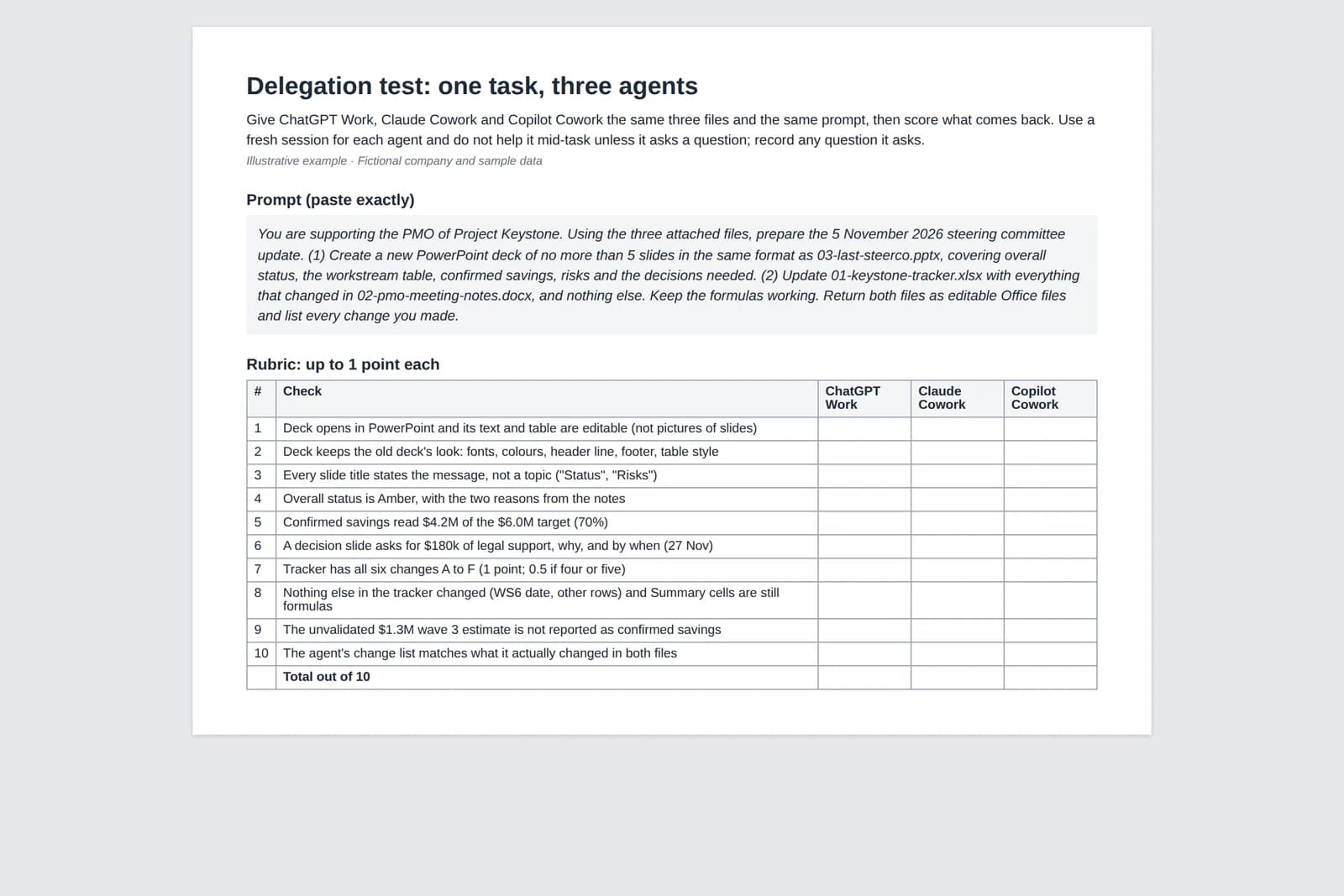
The kit is a PMO task: turn last month's steering committee deck, the programme tracker and this week's meeting notes into the next steerco update and an updated tracker. It is designed so a fully correct run scores 10 out of 10, with three traps. I have not run it against any of the three products, so there are no scores here.
| File | What it is | What the agent must do |
|---|---|---|
| 00-delegation-brief-and-rubric.docx | The prompt to paste, a 10-point rubric with a column per agent, and a separate answer key | Keep the answer key to yourself |
| 01-keystone-tracker.xlsx | Programme tracker as of 1 October: Summary (formulas), Workstreams (WS1 to WS8), Risks (R1 to R4) | Make the six tracker changes from the notes and nothing else; keep the formulas |
| 02-pmo-meeting-notes.docx | Notes from the 27 October PMO meeting | The only source of changes |
| 03-last-steerco.pptx | The 3-slide deck from the 1 October steerco, with a native table | The format the new deck must follow |
How to run it. Open a fresh session in each agent, attach files 01 to 03, paste the prompt from file 00, and don't help unless the agent asks a question. Score the files that come back, not the chat summary. Record the minutes it took, how many approvals it asked for, and where the files ended up (download, OneDrive, local folder).
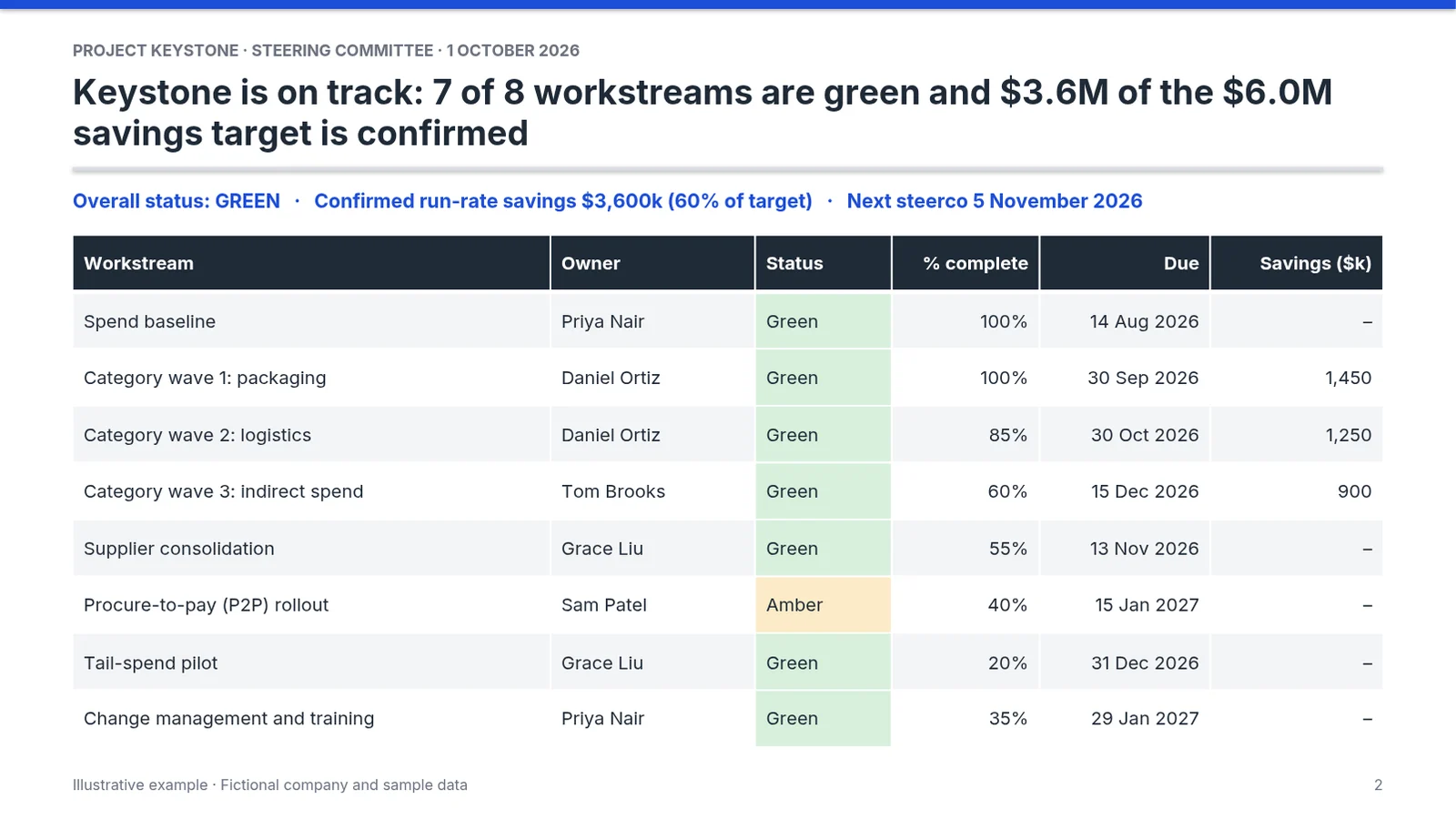
What a perfect run looks like. The answer key lists seven expected changes, A to G. Six are in the tracker: WS3 logistics savings up from $1,250k to $1,850k, WS4 (wave 3) at 70% with a new owner, WS5 supplier consolidation moved to 27 November and Amber, WS7 tail-spend pilot at 30%, a new risk R5 on the P2P partner, and risk R2 (resin) closed. The seventh is the deck: programme Amber, $4.2M of the $6.0M target confirmed, and a request to the committee for $180k of legal support.
The three traps. An unvalidated "$1.3M" wave 3 estimate that must not appear as confirmed savings; the WS6 go-live date of 15 January 2027, which the notes confirm and which must not move; and the Summary cells, which must still be formulas after the update.
How to read the score. 9 or 10: the agent can take this kind of task end to end; review it like a junior colleague's draft. 6 to 8: a useful first pass; check numbers and formulas before anything leaves the team. Below 6, or any trap missed: keep the agent on drafting and do the numbers yourself. Separately, note whether the deck is something you would send to a client without rebuilding it.
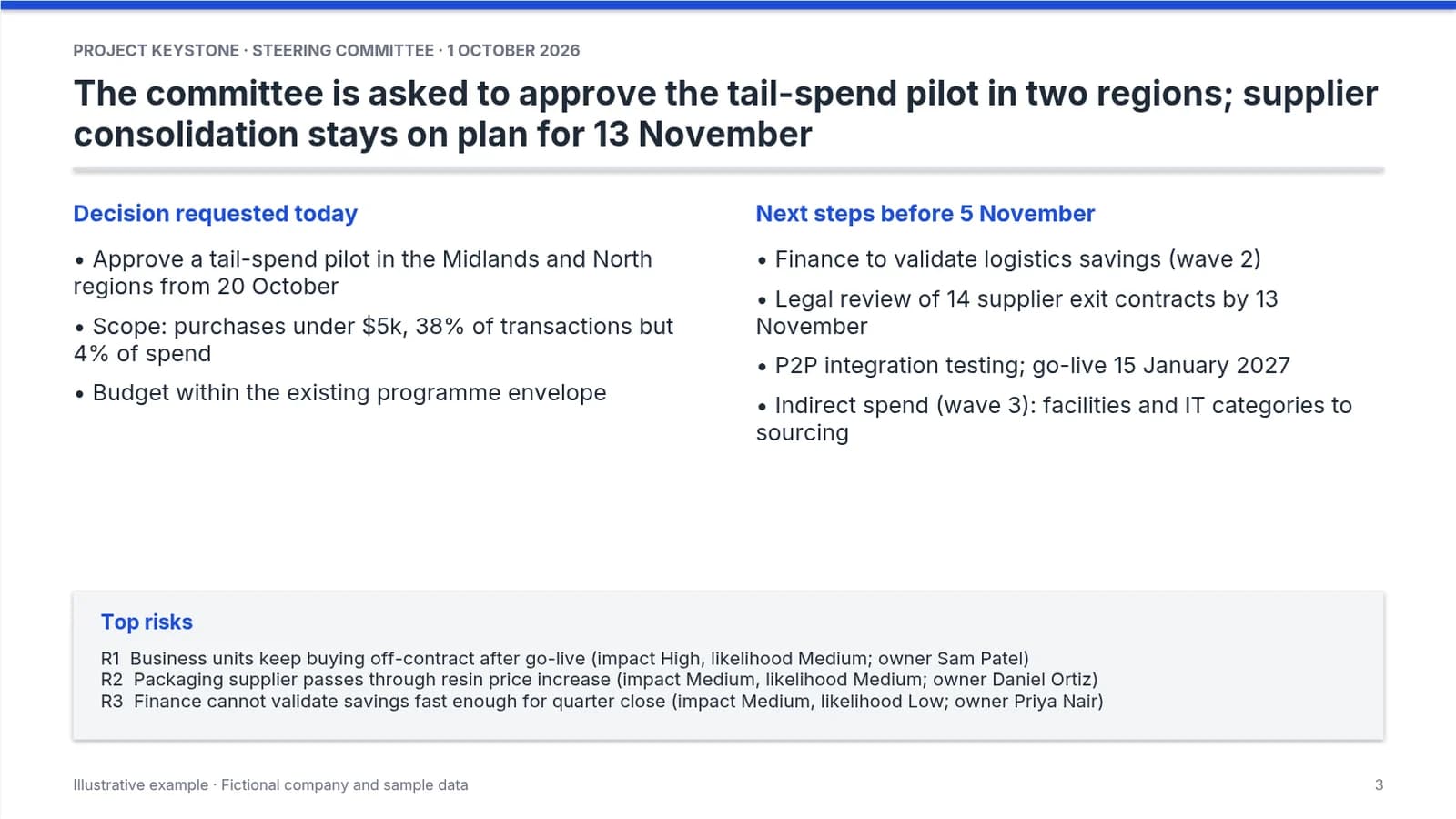
All names and numbers are fictional. The files are plain Office files, built by a script and re-opened to check sheet, slide and table counts; the slide images on this page are renders of the actual PPTX.
Where Deckary fits
Deckary is not a delegation agent. It is a PowerPoint add-in and web deck builder for consulting-style slides, with Excel and Word agents alongside. If you use an MCP-compatible agent, Deckary's MCP connector lets it create and edit Deckary decks and work on PowerPoint, Excel and Word files you share from the add-in, with native editable charts and your own template. Plans start at $15 a month billed monthly, with a 14-day free trial and no card.
FAQ
Does ChatGPT have its own version of Claude Cowork?
Yes. ChatGPT Work, launched by OpenAI on 9 July 2026, is the closest equivalent, and Microsoft's Copilot Cowork is the third. All three take a goal, work through it over many steps across your files and connected apps, ask before important actions, and hand back files. OpenAI's pricing page lists Work on every plan, limited and desktop-app only on Free and Go, and on desktop, web and mobile from Plus up. In the desktop app it can use local files you approve.
Is Copilot Cowork built on Claude?
Partly. Microsoft announced Copilot Cowork in March 2026, saying it was working closely with Anthropic and had integrated the technology behind Claude Cowork into Microsoft 365 Copilot. Its June 2026 general availability post says it runs on Anthropic models, including Opus 4.8 and Sonnet 4.6. It is a Microsoft product inside Microsoft 365 Copilot, with Microsoft's licensing, admin controls and data boundary, not a version of the Claude app.
Is Claude for work the same as Claude Cowork?
No. Claude's work plans are Team and Enterprise; Cowork is the part of the Claude app that runs multi-step tasks on files and connected tools. Since 16 September 2026 Cowork and chat are one Claude, and Claude decides when a task needs Cowork. Cowork is available on the paid plans: Pro, Max, Ultra, Team and Enterprise.
How much does Copilot Cowork cost?
Copilot Cowork needs a Microsoft 365 Copilot licence, then bills Cowork tasks on usage in Copilot Credits. On 1 November 2026 Microsoft listed Microsoft 365 Copilot for enterprise at $30 per user per month paid yearly, the Copilot Business add-on from $18 per user per month paid yearly (a first-year promotion for existing Business customers until 31 December 2026, normally $21), and pay-as-you-go Copilot Credits at $0.01 each. Microsoft publishes no per-task rate.
Further reading
GPT-6 Astra computer use covers agents that operate desktop apps directly, and what a PowerPoint agent is covers what to test before you trust one with a client deck.
Sources
All checked on 1 November 2026. Rows marked "coverage" are secondary sources, used only for the launch date that the vendor's own pages did not show.
| Vendor | Source | Used for |
|---|---|---|
| OpenAI | Get started with ChatGPT Work | What Work does, surfaces, local folders, plugins, models |
| OpenAI | ChatGPT Work overview (admin) | Cloud and local execution, approvals, UAE residency |
| OpenAI | ChatGPT Work admin FAQ | Credits, admin controls, retention, audit, review |
| OpenAI | Work with files | Documents, presentations, spreadsheets, PDFs |
| OpenAI | Codex and ChatGPT Work pricing | Plans that include Work, plan prices |
| OpenAI | ChatGPT release notes | ChatGPT Work launch date, new desktop app, rollout by plan |
| OpenAI | Creating and editing files with ChatGPT Work | Google Workspace files, templates, Excel add-in |
| OpenAI | ChatGPT pricing, What is ChatGPT Plus, Business release notes | Work access by plan, Plus, Pro and Business seat prices |
| Anthropic | Get started with Claude Cowork | Plans, outputs, permission modes, admin controls |
| Anthropic | Use Claude Cowork on web, desktop and mobile | Platforms, cloud execution, local files, 6 October change |
| Anthropic | Claude Cowork and chat are now one Claude | 16 September merge, Docs and Slides, Enterprise GA |
| Anthropic | Microsoft 365 connector and Google Workspace connectors | Microsoft 365 and Google access |
| Anthropic | Claude pricing | Plan prices |
| Coverage | TestingCatalog, 12 January 2026 | Cowork research preview date, Max and macOS at launch |
| Microsoft | Copilot Cowork overview and get started | Capabilities, surfaces, licence, approvals |
| Microsoft | Copilot Cowork: a new way of getting work done | 9 March announcement, work with Anthropic |
| Microsoft | Copilot Cowork is now generally available | GA date, models, usage billing, admin default |
| Microsoft | Microsoft 365 Copilot enterprise and business pricing | Licence prices, Business promotion terms |