Best AI for Finance Teams: 6 Tools by Job, From FP&A Models to Board Packs
Best AI for finance teams by job: what Claude for Excel, ChatGPT for Excel, Copilot in Excel, Claude for Financial Services, Datarails and Cube document, with dated prices, data terms and a free finance test kit (XLSX + PPTX).
- Bob · Former McKinsey and Deloitte consultant with 6 years of experience
- 21 min read
Pricing and feature information was accurate at the time of publication. Competitor products change frequently — verify current details on each provider's website.
The short answer: most corporate finance teams need one AI assistant that works inside Excel, licensed on a business plan, plus a way to turn the model into a board pack in PowerPoint without retyping numbers. If you already pay for Microsoft 365 Copilot, start with Copilot in Excel; otherwise trial Claude for Excel and ChatGPT for Excel side by side on the test kit below. The shortlist, in November 2026:
- Copilot in Excel if you already pay for Microsoft 365 Copilot and want your existing retention, audit and sensitivity-label policies to apply.
- Claude for Excel (with Claude for PowerPoint) if you want the features Anthropic documents for checking models: cell-level citations, assumption changes that keep formulas intact, and error tracing.
- ChatGPT for Excel if your company runs on a ChatGPT business plan.
- A planning platform such as Datarails or Cube when the problem is consolidation and governed actuals, not analysis.
This is a guide to what each vendor documents, not a test result: we did not run tasks in Claude, ChatGPT or Copilot. Banks, private equity and investment teams should also look at Claude for Financial Services, which adds market-data connectors and finance-specific plugins. If you were looking for help with personal money, this guide is not that: it covers company finance teams. Disclosure: Deckary is a vendor too; we make an AI add-in for PowerPoint and Excel, mentioned once in the board packs section.
Download the finance AI test kit: finance-ai-test-kit.zip. Format: ZIP · 1 XLSX (8 sheets, 10 task prompts, 3 planted errors) + 1 PPTX (4 slides) · Fictional company and sample data · No signup. Or download the workbook (XLSX) and the sample board pack (PPTX) separately.
Method: we read each vendor's product documentation, help centre, pricing page and launch announcements on 1 November 2026, and link each fact to its source. We built the test kit ourselves with Python (openpyxl and python-pptx), checked every workbook formula with a script, and rendered the deck with Deckary's own slide renderer. OpenAI's announcement, help-centre articles and Microsoft Marketplace listing were read the same day; we quote no ChatGPT price other than the Business seat price in OpenAI's release notes, because OpenAI's public pricing page shows euro prices only. Last verified 1 November 2026.
Best AI for finance teams at a glance
| Tool | What it is | Best for | Price, as listed on 1 Nov 2026 | Data note |
|---|---|---|---|---|
| Claude for Excel and PowerPoint | Anthropic add-ins for Microsoft 365 | Checking, explaining and building models; Excel-to-deck work | Claude Pro $17/month billed annually or $20 monthly; Team Standard $20/seat/month annually or $25 monthly (pricing) | Add-in activity is not in Enterprise audit logs; it is in the Compliance API |
| Copilot in Excel | Microsoft 365 Copilot in Excel, with edit, plan and chat modes | Teams already on Microsoft 365 Copilot | $30/user/month paid yearly, on top of a qualifying Microsoft 365 plan (enterprise) | Your retention, audit and sensitivity labels apply |
| ChatGPT for Excel | OpenAI add-in for Excel and Google Sheets | Companies standardised on a ChatGPT business plan | ChatGPT Business Standard seat: $20/user/month billed annually, $25 monthly (OpenAI release notes); add-in usage draws on plan credits (rate card) | OpenAI says Business workspace data is excluded from training by default |
| Claude for Financial Services | Claude plus data connectors, plugins and agent templates | Banking, PE, equity research, fund operations | Team or Enterprise plans; sold through sales and AWS Marketplace | Anthropic says it doesn't train on Team or Enterprise data by default |
| Datarails | FP&A platform with an AI layer, Excel-based | Mid-size teams consolidating actuals from many systems | Quote only (pricing) | Works on the platform's consolidated data |
| Cube | FP&A platform with AI agents, Excel and Sheets sync | Teams that want planning in spreadsheets with governed numbers | Quote only (pricing) | Works on the platform's synced data |
For a team of 10 on annual billing, the listed prices work out to $2,400 a year on Claude Team Standard and $3,600 a year on Microsoft 365 Copilot (plus the Microsoft 365 plan it requires), or $2,520 on the Copilot Business add-on at its $21 list price. Datarails and Cube quote per company.
For a wider list of Excel add-ins, including formula bots and AI spreadsheet apps, see best AI for Excel. This page is about the finance team's whole cycle: model, variance, forecast, board pack, memo.
How to choose AI for a finance team
Four questions decide it, in this order:
- Where do the numbers live? If actuals sit in five systems and get pasted into Excel every month, an assistant won't fix that. A planning platform (Datarails, Cube) or Microsoft's ERP-connected Finance agents will. If the model is a well-built workbook, an Excel add-in is enough.
- Which plan covers company data? Every vendor here separates consumer plans from business plans. Use Team, Business or Enterprise plans for anything with real numbers in it. Personal accounts usually sit outside your company's controls.
- What audit trail do you need? Copilot applies your Microsoft Purview audit and retention policies. Claude's Office add-ins don't inherit custom retention settings and aren't in Enterprise audit logs, but sessions are available through Anthropic's Compliance API. If internal audit or SOX controls apply, ask your auditors which trail they will accept before you pick.
- Does the job end in PowerPoint? Most FP&A work does: the monthly pack, the board deck, the forecast review. Check how each tool gets from the workbook to a slide with native, editable charts in your template.
Then run the same tasks in each candidate on the same file. The test kit has ten.
The tools, one by one
Claude for Excel and Claude for PowerPoint
What it is. Anthropic's add-ins put Claude in a sidebar in Excel and PowerPoint. Both are generally available on Pro, Max, Team and Enterprise plans, and Claude for Microsoft 365 is listed on every paid plan on the pricing page.
What Anthropic documents for finance work:
- answers about the workbook with cell-level citations you can click;
- changing an assumption while keeping formula relationships intact, so downstream cells recompute ("change the discount rate to 8% and update dependent calculations");
- tracing errors such as
#REF!or#DIV/0!to the root cause; - building a model from a description or populating an existing template ("build a three-statement model from this trial balance");
- pulling external data through connectors such as S&P Global, LSEG and Daloopa;
- one conversation that spans your open workbook, deck, document and inbox.
In PowerPoint, Anthropic says Claude reads the slide master, layouts, fonts and colours, makes targeted edits to single slides, and turns bullets into native, editable charts.
Limits Anthropic lists. No data tables, no macros or VBA. Not recommended for final deliverables without human review, audit-critical calculations without verification, or regulated data without proper controls. It warns before overwriting data and asks you to confirm risky operations. Only use it on trusted files, because external files can carry hidden instructions.
Data. The add-in sends what it reads from your workbook to Anthropic. Inputs and outputs are deleted on the backend within 30 days. It doesn't inherit your organisation's custom retention settings, and activity isn't in Enterprise audit logs, though Enterprise customers get it through the Compliance API.
Price. Pro $17/month billed annually ($200 up front) or $20 monthly. Team Standard $20/seat/month billed annually or $25 monthly, for 2 to 150 seats. Enterprise $20/seat/month billed annually plus usage at API rates, 20-seat minimum (claude.com/pricing, checked 1 November 2026).
Best for: analysts and FP&A leads who inherit other people's models and need to understand, check and flex them quickly.
Microsoft 365 Copilot in Excel (and Finance in Microsoft 365 Copilot)
What it is. Copilot in Excel has three modes: edit mode makes multi-step changes to the workbook (reshaping data, merging sheets, building reports), plan mode proposes the steps for you to approve first, and chat mode analyses without changing anything. Microsoft says it can apply formulas across multiple sheets, build charts and PivotTables linked to the source data, pull data from other workbooks in OneDrive, SharePoint or on your computer, and run custom skills for repeatable tasks.
The finance-specific layer. Finance in Microsoft 365 Copilot (formerly Copilot for Finance) became generally available on 20 October 2025. Reconciliation was generally available: it finds unmatched transactions and flags differences in Excel, and you can save the workflow as a template. Variance analysis and data preparation in Excel were in public preview in that announcement, so check the current status in your tenant. It connects to Microsoft Dynamics 365 Finance and SAP and needs a Microsoft 365 Copilot licence.
Data. Under Microsoft's enterprise data protection, Copilot respects your permissions, inherits sensitivity labels, applies your retention policies and supports audit, and prompts and responses aren't used to train foundation models. One caveat for European teams: Microsoft says Anthropic models available inside Copilot are currently excluded from the EU Data Boundary.
Price. Microsoft 365 Copilot is $30/user/month paid yearly, or $31.50 paid monthly with an annual commitment, on top of a qualifying Microsoft 365 plan (enterprise pricing). For smaller companies, the Copilot Business add-on lists at $21/user/month paid yearly, with an $18 promotional price for eligible existing customers between 1 July and 31 December 2026. All checked 1 November 2026.
Best for: finance teams already on Microsoft 365 Copilot, and controllers on Dynamics 365 Finance or SAP who want reconciliation inside Excel. Our Copilot for Excel review covers everyday use.
ChatGPT for Excel
What it is. OpenAI's add-in puts ChatGPT in a sidebar in Excel and Google Sheets to build, update and explain spreadsheets, including multi-tab files with formulas and assumptions (help article). OpenAI announced it in beta on 5 March 2026, powered by GPT-5.4. Google Sheets followed in beta on 22 April 2026, and on 5 May 2026 OpenAI said both are generally available across all plans, powered by GPT-5.5. The announcement says it asks permission before changing a workbook and links answers to the cells it references. Default Skills cover financial modelling and corporate finance formatting, and apps can connect data sources; the March announcement named financial data integrations for FactSet, Dow Jones Factiva, LSEG, Daloopa and S&P Global, with some marked "coming soon" at that date.
Plans and admin. The help article lists availability to Free, Go, Plus, Pro, Business, Enterprise, Edu and K-12 users globally. Install it from the Microsoft Marketplace listing (one add-in covers Excel, Word and PowerPoint), or have a Microsoft 365 admin deploy it with the manifest file. Enterprise admins can enable it in workspace settings and control apps. Prompts and responses are available in the Compliance API.
Limits OpenAI lists. Features such as VBA and macros may not be fully supported. Spreadsheet chats are separate from your main ChatGPT history and cannot use ChatGPT memory. OpenAI says outputs may be incomplete or incorrect and tells you to review formulas, calculations and changed cells, and to duplicate the file first for important work.
Data. OpenAI says ChatGPT Business workspace data is excluded from training by default. The help article says some data logs may be stored with OpenAI for 30 days for safety and integrity, and that as part of Microsoft's Add-In Marketplace terms Microsoft may be able to read the content of your workbook, attachments and prompts. Use a business plan, not a personal account, for company numbers.
Price. A ChatGPT Business Standard seat is $20/user/month billed annually or $25 monthly, per OpenAI's Business release notes (24 August 2026 entry). For Business and Enterprise, the add-in uses token-based credits: OpenAI's rate card says a typical Excel or Sheets task may use 5 to 20 credits per message and names GPT-5.6 Sol as the default model where available. The free preview for Business, Enterprise, Edu and K-12 ran through 2 June 2026. Individual plan prices are on chatgpt.com/pricing, which showed euro prices when we checked.
Best for: companies that have already rolled out a ChatGPT business plan, and teams that model in Google Sheets. Our ChatGPT for Excel guide covers prompts and formulas.
Claude for Financial Services
What it is. Anthropic launched Claude for Financial Services on 15 July 2025: Claude with connectors to financial data providers and enterprise platforms (the launch named Box, Daloopa, Databricks, FactSet, Morningstar, Palantir, PitchBook, S&P Global and Snowflake), sold through Anthropic's sales team and AWS Marketplace. Since then Anthropic has added finance plugins for financial analysis, investment banking, equity research and private equity (open source), and agent templates such as a model builder, earnings reviewer, general ledger reconciler and month-end closer, which run in Claude Cowork or Claude Code on paid plans.
For corporate finance rather than banking, Anthropic's verified Finance plugin is the closer fit: commands for journal entries (/journal-entry), reconciliations (/reconciliation), income statements with period comparisons, variance analysis broken into drivers with a waterfall (/variance-analysis), and SOX testing workpapers.
Data. Anthropic's financial services page says it doesn't train models on Team or Enterprise data by default, and that Claude can link figures back to the underlying documents.
Price. Team or Enterprise pricing as above; the connectors need your own subscriptions to those data providers.
Best for: investment banks, PE firms, equity research and fund operations.
Datarails
What it is. An FP&A platform for teams that want to keep working in Excel. Datarails says its AI layer automates forecasting, variance analysis and financial insights on top of data it consolidates from your financial and operational systems,.
Price. Quote only: the pricing page lists Professional, Premium and Expert plans with "Request Quote" (checked 1 November 2026).
Best for: mid-size finance teams whose real bottleneck is pulling actuals together each month.
Cube
What it is. An FP&A platform that syncs actuals into Excel and Google Sheets models and writes edits back to the platform. Cube describes AI agents for data, analysis, planning and business partnering, plus an MCP server that lets AI assistants read its governed numbers.
Price. Quote only: Bronze, Silver and Gold tiers, "priced by plan, quoted for your company" (pricing, checked 1 November 2026).
Best for: teams that want spreadsheet-based planning with one governed source of numbers, and want to point Claude or ChatGPT at that source instead of at exported files.
Continue reading: AI PowerPoint for Finance Teams · Figma to PowerPoint · Best AI Presentation Maker for Consultants
Best AI by finance job
Building and checking models in Excel
This is where the Excel add-ins differ most, so test it first. Ask each tool to explain how a headline number is calculated, and to review a sheet someone else built. Claude for Excel documents cell-level citations and error tracing; Copilot's plan mode lets you approve steps before it edits. Claude doesn't support data tables, macros or VBA, so check each vendor's limits before you point it at a model that relies on them; those parts still need a person.
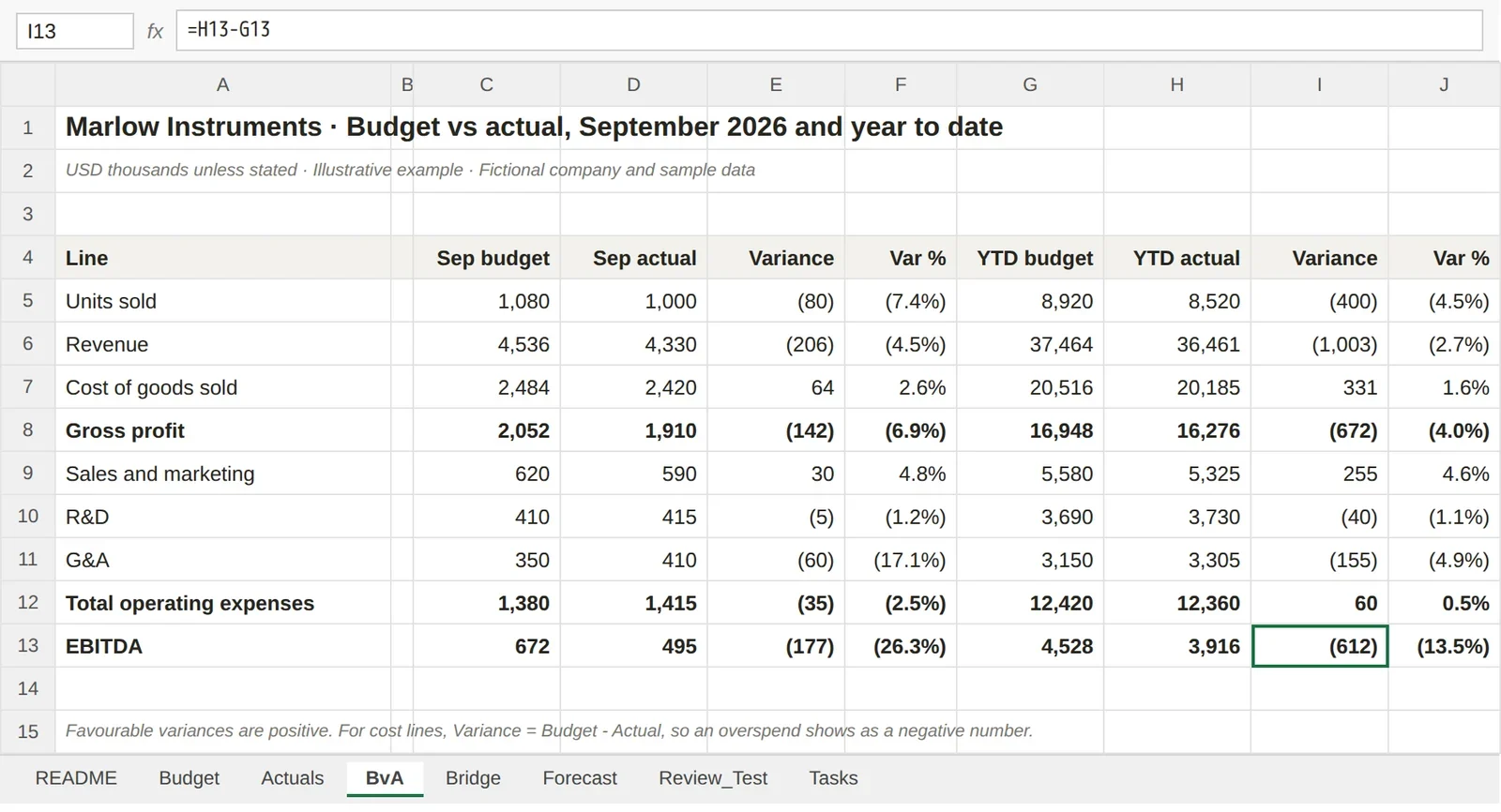
Test kit tasks 1 and 2 cover this. The Review_Test sheet has three planted errors: a typed-over revenue figure, a total that misses a row, and a cost variance with the sign flipped. A good tool finds all three without flagging correct rows. The answer key: C5 (Q4 revenue) is a typed 14,180 instead of =Forecast!F12; C11 (total opex) is =SUM(C8:C9) and leaves out G&A in row 10; E10 (G&A variance) is =C10-D10, the wrong sign for a cost line.
Variance and budget-vs-actual analysis
A common failure mode with any assistant is inventing a cause ("freight costs rose") that isn't in the data, so the test kit marks that as a fail. A good answer quantifies each driver and labels anything it can't see in the numbers as a question for the budget owner.
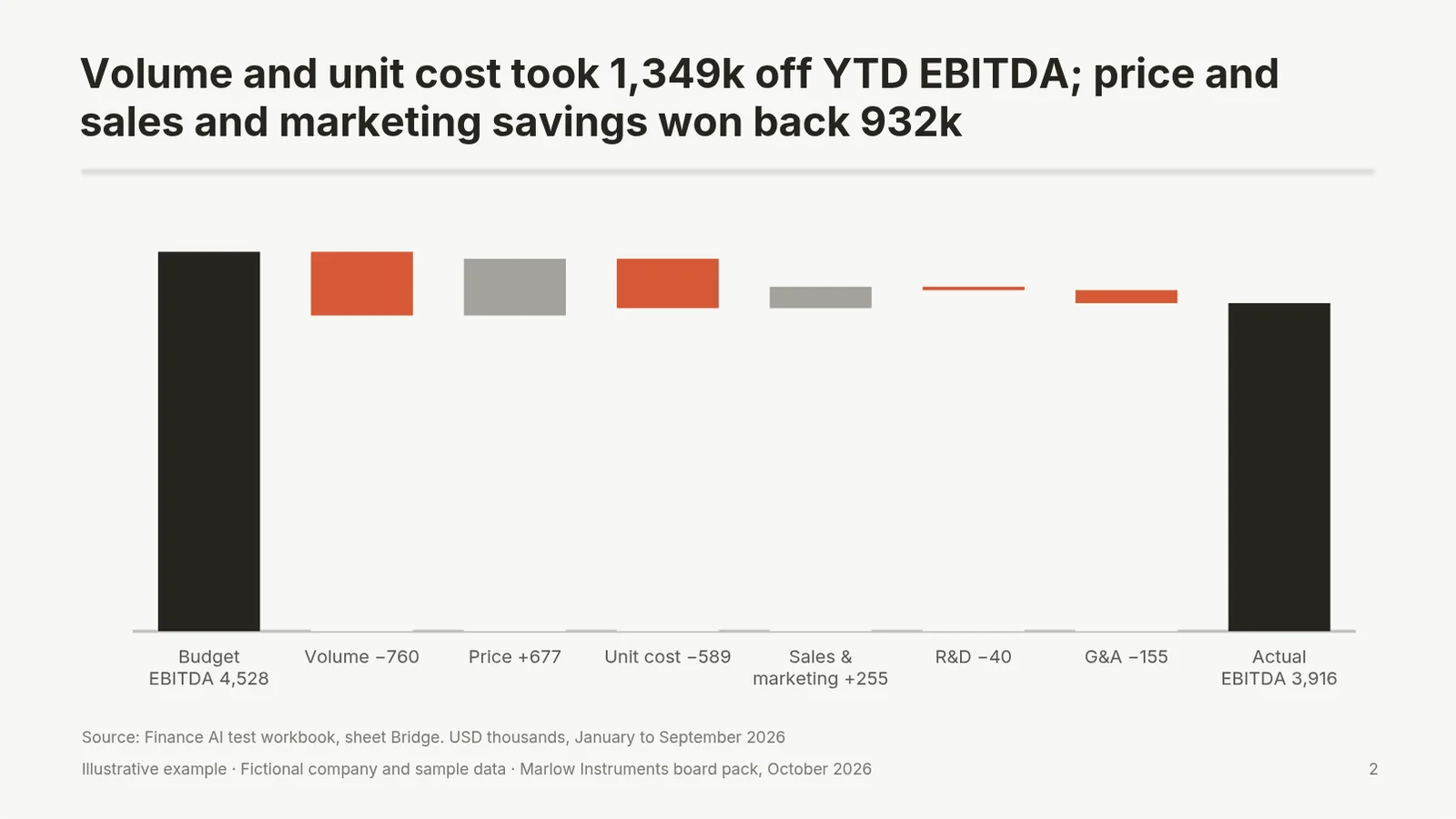
In the test workbook, year-to-date EBITDA is 612k below a 4,528k budget. The Bridge sheet splits the gap into volume (−760k), price (+677k), unit cost (−589k), sales and marketing (+255k), R&D (−40k) and G&A (−155k), with a check that it reconciles to zero. Tasks 3 and 4 ask for the commentary and a rebuilt bridge. Copilot's variance analysis in Finance in Microsoft 365 Copilot (public preview at its October 2025 announcement) and Claude's Finance plugin both target this job directly; a planning platform does it on consolidated actuals.
Forecasting
For a driver-based forecast, the test is whether the tool changes the input and leaves the formulas alone. Task 5 changes the Q4 volume assumption from −7% to −10% against budget; the right answer is that full-year EBITDA falls by a further 196k (a change against the base forecast, not a gap to budget: 3,420 budget Q4 units × 3% × 1.91k margin per unit), with only the blue input cell changed. Task 6 adds a downside case. Claude's docs show prompts that flex an assumption and recompute the model; for rolling forecasts across departments, a planning platform is the better home.
Board and investor packs in PowerPoint
A board pack has rules a chat window doesn't know: action titles, numbers that tie to the model, native charts that the next person can edit, and the company template untouched.
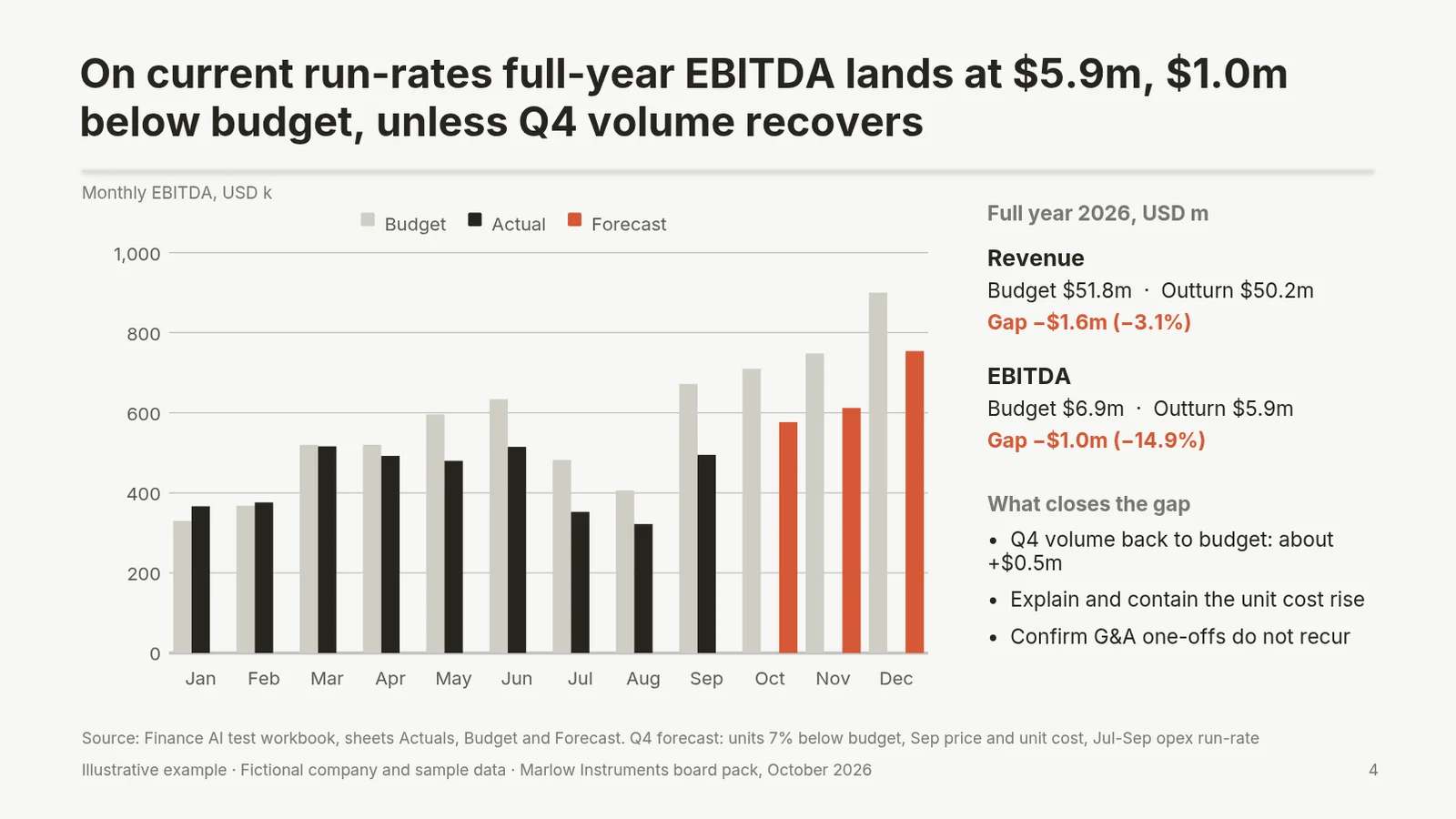
The sample board pack in the kit is the reference answer for task 7: four slides (executive summary, EBITDA bridge, budget-vs-actual table, full-year outlook), every number traced to a workbook cell. Task 8 is the harder, more realistic one: change one number in an existing deck and update only the slide it affects.
Claude for PowerPoint documents template-aware generation and native charts. Copilot in PowerPoint builds decks from a prompt or a Word document, starting from your organisation's template (Microsoft). If the pack needs consulting-style exhibits such as waterfalls and Mekko charts, edits to the deck you already have, and your own template, that is what we built Deckary for: an AI add-in for PowerPoint with native, editable waterfall and other business charts, plus an Excel agent in the same Premium plan ($19/month or $180/year, 14-day free trial, no card). We cover the controls a finance team should insist on in AI PowerPoint for finance teams, and the pack structure in our board report template.
Finance documents
Board memos, variance emails and policy drafts are the easiest wins and the riskiest, because a well-written paragraph hides a wrong number. Tasks 9 and 10 check that the memo states the YTD gap (−612k) and full-year gap (−1,027k) correctly and that the email quotes the G&A overspends (May 395 vs 350, September 410 vs 350) without guessing at causes. Any of the three assistants can be asked to do this; run tasks 9 and 10 to see whether it states the numbers correctly, and use the one that already sits in Word or Outlook for your team.
Banks and private equity: a short note
Comps, LBO models, pitch books and IC memos are different jobs; Claude for Financial Services (above) is built for them, and its data connectors need your own subscriptions. Anthropic's install guide is clear about review: "AI-generated financial analysis should always be reviewed by qualified professionals before being used in decision-making" (Claude Academy).
What to check before you buy
| Check | Why it matters for finance | Where to look |
|---|---|---|
| Business plan and no-training terms | Company numbers stay out of model training | Vendor's business data page |
| Retention | Some add-ins don't follow your custom retention | Claude add-in docs; Microsoft Purview |
| Audit trail | Internal audit and SOX need to see who changed what | Enterprise audit logs, Compliance API, Purview |
| Overwrite controls | One silent overwrite of an input sheet costs a day | Confirmation prompts, plan mode |
| Unsupported features | Claude's add-in doesn't support data tables, macros or VBA; check the others' limits | Each vendor's limitations section |
| Prompt injection | Downloaded templates and vendor files can carry hidden instructions | Anthropic warns about this explicitly |
| Path to PowerPoint | Board packs need native charts in your template | Run task 7 on your own template |
| EU processing | Some models sit outside Microsoft's EU Data Boundary | Microsoft enterprise data protection page |
How to run the test kit
- Download the workbook and make one copy per tool.
- Open the
Taskssheet. Each row has the prompt to paste and what a good answer looks like, with the numbers. - Record Pass, Partial or Fail in the dropdown and note what you had to fix.
- For tasks 7 and 8, compare the tool's deck with the sample board pack.
- Use the fictional file, not your own data, for any tool your company hasn't approved yet.
The workbook has 8 sheets: README, Budget, Actuals, BvA, Bridge, Forecast, Review_Test and Tasks. Every model number on the Budget, Actuals, BvA, Bridge and Forecast sheets is a live formula over blue input cells, saved with its calculated value so previews show numbers; Review_Test contains the planted errors. The company, Marlow Instruments, and all its numbers are invented. Need more workbooks to practise on? See our Excel templates.
FAQ
Which AI is best for finance?
For a corporate finance team, the best AI is the assistant that works inside Excel under a business plan your company can govern: Claude for Excel (Claude Pro, Max, Team or Enterprise), Copilot in Excel (Microsoft 365 Copilot licence) or ChatGPT for Excel (on a ChatGPT business plan for company data). Pick on where your data already lives and on data terms, then test all candidates on the same workbook. Planning platforms such as Datarails and Cube fit teams that want a governed FP&A system rather than an assistant.
Which AI agent is best for finance?
For month-end and accounting work, Microsoft's Finance in Microsoft 365 Copilot runs reconciliations in Excel against Dynamics 365 Finance or SAP data, and Anthropic's Finance plugin for Claude covers journal entries, reconciliations, variance analysis and SOX testing workpapers. For banking and private equity work, Anthropic's financial-services plugins and agents (pitch builder, model builder, earnings reviewer) are built specifically for those jobs.
Which ChatGPT model is best for finance?
ChatGPT for Excel and Google Sheets became generally available on 5 May 2026, powered by GPT-5.5 at that date, and OpenAI's rate card lists GPT-5.6 Sol as the default model for the Excel add-in where available on Business and Enterprise plans. Model names change every few months, so check the rate card and your workspace's model settings, then test on your own workbook with a business plan (not a personal account) for company data.
Is Gemini or ChatGPT better for financial planning?
It depends on your spreadsheet. If your team plans in Google Sheets, Gemini in Sheets creates tables, formulas, analysis and charts with an eligible Google Workspace or Google AI plan, and ChatGPT also works in Google Sheets. If you plan in Excel, compare ChatGPT for Excel with Claude for Excel and Copilot in Excel instead. Neither is a financial planner for personal money decisions.
Sources
Every source is linked where it is used and was checked on 1 November 2026: vendor documentation, help centres, pricing pages and announcements from Anthropic, OpenAI, Microsoft, Google, Datarails and Cube. OpenAI's announcement, help-centre articles and release notes, and the Microsoft Marketplace listing for ChatGPT, were read on the same day.