AI Tools for Consultants: What to Use for Each Job (2026)
AI tools for consultants by job: research, interviews, problem structuring, Excel models, slides in your template, documents and meetings. Training terms, plans and dated prices, plus a free XLSX matrix.
- Bob · Former McKinsey and Deloitte consultant with 6 years of experience
- 16 min read
Pricing and feature information was accurate at the time of publication. Competitor products change frequently — verify current details on each provider's website.
The short answer: buy one AI assistant on a business plan, matched to the suite your firm already runs, and add specialist tools only for the jobs where it falls short. By reader:
- Corporate strategy or finance team on Microsoft 365: start with Copilot Chat (no extra cost on eligible plans), buy Microsoft 365 Copilot seats for the people who build models and decks, and add a PowerPoint add-in only if Copilot's slides don't meet your template standard.
- Boutique with no AI licence yet: Claude Team or ChatGPT Business, both listed at $20 per user per month billed annually, plus Granola for interviews. Pick the one whose Office add-ins and data terms your clients accept.
- Firm on Google Workspace: Gemini in Workspace for drafting and Meet notes, and Gemini Notebook (formerly NotebookLM) for synthesis across a fixed source set.
Choose by data terms first and features second. A tool your client contracts don't allow is no use however good it is.
Method: we read each vendor's pricing page, help centre and product documentation on 1 November 2026 and built the matrix from them. We did not run tasks in Claude, ChatGPT, Copilot or Gemini for this page, so nothing here is a test result; where we give a judgement, it is marked as our view. OpenAI facts come from its ChatGPT Business release notes, data-controls help article and the help articles for each add-in. The ChatGPT pricing page shows prices in the viewer's local currency, so we quote USD only where a help article states it. Deckary is our product. It appears once, as one of four slide options, and is described from our own pricing and product pages. Nothing here is legal advice. Last verified 1 November 2026; we re-check prices each quarter.
The stack at a glance
| Consulting job | Start with | Add when (our view) |
|---|---|---|
| Desk research and synthesis | The firm's assistant (Copilot Researcher, Claude Research, ChatGPT deep research) | You need answers only from a fixed source set: Gemini Notebook |
| Interview notes and synthesis | A note-taker (Granola, Teams, Meet) | Synthesis across 10+ transcripts: Gemini Notebook or Claude Projects |
| Problem structuring | Any business-plan assistant | Rarely worth a specialist tool |
| Excel modelling | Copilot in Excel or Claude for Excel | Data tables, VBA and final sign-off stay with you |
| Slides in the firm template | Copilot, Claude or ChatGPT for PowerPoint | Excel-linked consulting charts and edits to existing decks: a consulting add-in such as Deckary |
| Document drafting and review | Copilot in Word or Claude for Word | Google Workspace firms: Gemini in Docs |
| Meetings and notes | Whatever is built into your meeting platform | Client-hosted calls: a device-audio note-taker, with consent |
Download: the AI tool matrix for consultants (XLSX) lets you filter 23 tool rows by job, then compare data controls, plan needed and price, each with its source link and checked date. The one-page AI rollout checklist (DOCX) has 22 checks to tick before client data goes into a tool. Format: XLSX · 3 sheets, and DOCX · 1 page · No signup.
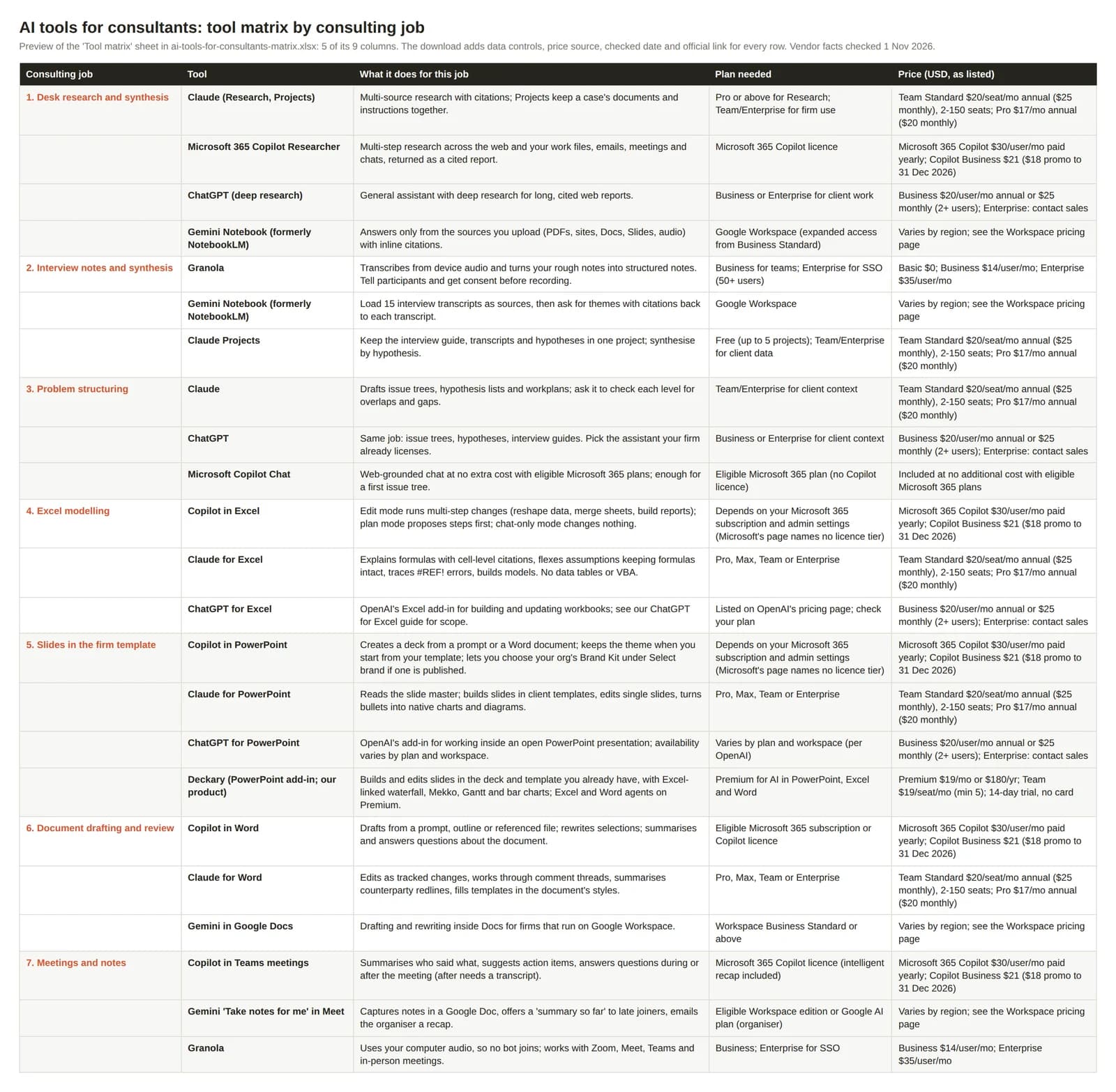
Preview of the matrix sheet (5 of its 9 columns). The download adds data controls, price sources and links.
What 10 seats cost
List prices for a 10-person team, per month, billed annually, from each vendor's page on 1 November 2026:
| Option | Per user | 10 seats | Source |
|---|---|---|---|
| Claude Team, Standard seat | $20 | $200 | claude.com/pricing |
| ChatGPT Business | $20 | $200 | ChatGPT Business release notes |
| Microsoft 365 Copilot Business (add-on) | $21 ($18 promotional to 31 Dec 2026) | $210 ($180) | Microsoft |
| Microsoft 365 Copilot (enterprise add-on) | $30 | $300 | Microsoft |
| Granola Business | $14 | $140 | granola.ai/pricing |
| Deckary Team (our product) | $19 | $190 | Deckary pricing |
The Microsoft add-ons sit on top of an eligible Microsoft 365 plan. Claude Enterprise ($20 per seat plus usage that scales with model and task) has a 20-seat minimum, so it doesn't fit a 10-person team. Google shows Workspace prices in local currency by region, so we don't quote a USD figure. ChatGPT Enterprise is sold through OpenAI's sales team (ChatGPT pricing). ChatGPT Business also has a Premium seat with 5x the usage of a Standard seat, at $100 per user per month billed annually or $125 monthly, per the 24 August 2026 release note; the $20 above is the Standard seat.
Data terms by vendor
| Vendor and plans | Training on your content (per vendor docs) | Admin and audit (per vendor docs) |
|---|---|---|
| Anthropic: Claude Team, Enterprise, API | "Anthropic may not train models on Customer Content from Services" (commercial terms) | Team: SSO, no audit logs. Enterprise: audit logs, Compliance API, custom retention (pricing) |
| Anthropic: Claude Free, Pro, Max | Depends on the user's model-improvement setting | Personal accounts |
| Microsoft: Copilot, Copilot Chat with a work account | Prompts, responses and Graph data "aren't used to train foundation models" (enterprise data protection) | Your permissions, sensitivity labels, retention and audit apply |
| Google: Gemini in Workspace, Gemini Notebook | Not used for training or human-reviewed outside your domain without permission (privacy hub) | Prompts are customer data under the Cloud Data Processing Addendum |
| OpenAI: ChatGPT Business, Enterprise | "By default, OpenAI does not use content from ChatGPT Business, Enterprise, Edu, or ChatGPT for Healthcare workspaces to train its models" (data controls) | Managed workspaces can have organisation-level retention, Memory, compliance and access settings (data controls); Business members each have their own chat history (Business privacy) |
| Granola: all plans | Third parties such as OpenAI or Anthropic may not train on your data; Granola trains on anonymised data unless you opt out; off by default on Enterprise (pricing) | SOC 2 Type II on all plans; SSO on Enterprise (50+ users) |
The usual pattern is that business plans exclude your content from vendor training and consumer plans may not, but Granola shows it isn't universal: it trains on anonymised data by default below Enterprise. Read the terms for each tool you buy, not the category.
1. Desk research and synthesis
The job: turn a question ("how big is the UK industrial heat pump market, and who are the top five installers?") into a sourced fact base in an afternoon instead of three days.
Claude (Research and Projects)
Claude's Research feature is listed on the Pro, Max, Team and Enterprise plans; Projects keep a case's documents and instructions together (Free gets up to 5 projects). In our view it suits long reading and synthesis across many PDFs. For client work, use Team or Enterprise so Anthropic's commercial terms apply. Per claude.com/pricing on 1 November 2026: Pro $17/month billed annually or $20 monthly; Team Standard $20/seat/month annually or $25 monthly for teams of 2 to 150.
Microsoft 365 Copilot Researcher
Researcher runs multi-step research across the web and the work content you can access (files, emails, meetings and chats) and returns a cited report. For a firm on Microsoft 365, it searches your own past proposals and case files as well as the web, under the same permissions. Needs Microsoft 365 Copilot (prices above).
ChatGPT (deep research)
ChatGPT has a deep research mode; the Business release notes list connectors such as Slack, Microsoft Teams and Outlook as usable in it. Use Business or Enterprise for client material; OpenAI says it does not use content from those workspaces for training by default. ChatGPT Business Standard seats are $20 per user per month billed annually or $25 monthly, and plans start at 2 users (pricing); Enterprise is priced through sales.
Gemini Notebook (formerly NotebookLM)
Google renamed NotebookLM to Gemini Notebook. It answers only from the sources you load (PDFs, websites, Google Docs and Slides, audio), with inline citations. Useful when the fact base is fixed, such as a data room or a set of analyst reports, and you don't want web results mixed in. Workspace Business Starter gets basic access and Business Standard and above get expanded access, per the Workspace pricing page.
Continue reading: Tornado Charts in PowerPoint · How to Align Objects in PowerPoint · 95 Real BCG Presentations
2. Interview notes and synthesis
Expert calls, customer interviews and management interviews generate the richest evidence on a case and the messiest notes. Split the job in two: capture, then synthesis.
Granola
A note-taker that uses your computer audio, so no bot joins the call, and works with Zoom, Meet, Teams and in-person meetings. No visible bot does not remove the duty to ask: tell participants and get their consent before you record or transcribe, and check the expert network's terms, which often restrict recording. Data terms are in the table above. Basic $0, Business $14/user/month, Enterprise $35/user/month (SSO for workspaces of 50+ users), per granola.ai/pricing.
Gemini Notebook
Load 15 interview transcripts as sources and ask "what did the operations leads say about planning cycles, by interview?". Answers carry citations back to the source transcripts, which is what you need when a partner asks "who said that?".
Claude Projects
Put the interview guide, the transcripts and your hypothesis list in one project and synthesise by hypothesis: supported, contradicted, not yet tested. Keep client interviews on Team or Enterprise.
3. Problem structuring
Issue trees, hypothesis lists, interview guides and workplans. In our view every general assistant does a usable first draft, so use the one the firm already licenses rather than buying a tool for this.
Claude or ChatGPT
Ask for a first issue tree, then ask it to check each level for overlaps and gaps. Either assistant handles this on a business plan.
Microsoft Copilot Chat
Included at no additional cost with eligible Microsoft 365 plans, web-grounded, and covered by enterprise data protection when signed in with a work account. For a firm that hasn't bought Copilot licences, this is the free starting point for structuring work.
4. Excel modelling
Building, tracing and flexing models is where an assistant inside Excel beats pasting ranges into a chat window. For a fuller comparison, see best AI for Excel.
Copilot in Excel
Microsoft documents an edit mode that makes multi-step changes to the workbook (reshaping data, merging sheets, building reports), a plan mode that proposes steps for review first, and a chat-only mode that doesn't modify the file. Availability depends on your Microsoft 365 subscription and admin settings; Microsoft's page does not name a licence tier.
Claude for Excel
Anthropic's add-in is generally available on Pro, Max, Team and Enterprise. It explains formulas with cell-level citations, changes assumptions while keeping formula relationships intact, traces errors like #REF! to their root cause, and builds or populates models. Documented limits: no data tables, no macros or VBA, and Anthropic says it is not recommended for final client deliverables without human review. The add-in sends the workbook content it reads to Anthropic, inputs and outputs are deleted on the backend within 30 days, and it does not inherit your organisation's custom retention settings.
ChatGPT for Excel
OpenAI's ChatGPT for Excel and Google Sheets is a sidebar that builds, updates and explains spreadsheets, including multi-tab files, and installs from Microsoft Marketplace. OpenAI lists it as available to Business, Enterprise and Edu users and to Free, Go, Plus and Pro users, and treats Google Sheets as a separate experience. We cover its scope and limits in ChatGPT for Excel.
5. Slides in the firm template
The deck is the deliverable, and it is where consulting standards bite: action titles, one message per slide, native charts the client can edit, and the firm or client template untouched. The shortlist below works inside PowerPoint. For the detailed criteria, see the best AI presentation maker for consultants.
Copilot in PowerPoint
Creates a presentation from a prompt or from a Word document (Microsoft says it works best under 24 MB). Starting from your organisation's template tells Copilot to keep its theme and design, and you can choose your organisation's Brand Kit under Select brand if one has been published. Availability depends on your Microsoft 365 subscription and admin settings.
Claude for PowerPoint
Generally available on Pro, Max, Team and Enterprise. Anthropic says it reads the slide master, layouts, fonts and colours, builds slides in client or corporate templates, makes targeted edits to single slides, and turns bullets into native charts and diagrams. Same data handling and human-review caveats as Claude for Excel. Our Claude for PowerPoint review goes deeper.
ChatGPT for PowerPoint
OpenAI's ChatGPT for PowerPoint is a sidebar inside PowerPoint that creates, edits and reviews decks while preserving editable slide structure, installed from Microsoft Marketplace. OpenAI lists these limitations: slides may not always match a preferred template perfectly, and some advanced chart, shape and formatting edits may be limited.
Deckary
Our product, so weigh this entry accordingly. Deckary is a PowerPoint add-in that builds and edits slides inside the deck and template you already have, with Excel-linked waterfall, Mekko, Gantt and bar charts. Premium adds AI agents in Excel and Word, and an MCP connector lets MCP-compatible agents such as Claude Code create and edit Deckary decks. Premium is $19/month or $180/year; Team is $19/seat/month with a 5-seat minimum (pricing). See what Deckary's AI does in PowerPoint, and PowerPoint add-ins for consultants for the non-AI add-ins consulting teams also use.
6. Document drafting and review
Proposals, steering committee memos, interview reports and contract reviews.
Copilot in Word
Drafts from a prompt, outline, notes or a referenced file, rewrites selections, and summarises or answers questions about the document. It can reference your files, emails and meetings, which helps when a proposal draws on a previous one.
Claude for Word
Generally available on Pro, Max, Team and Enterprise. The features that matter for consulting review: edits land as tracked changes you accept or reject, it works through comment threads and replies with what it changed, it summarises counterparty redlines, and it fills templates in the document's own heading and paragraph styles. It only reads the document you have open. OpenAI's ChatGPT for Word is the equivalent sidebar: it drafts, summarises, revises and reformats the open document, is available on all ChatGPT plans including Free, and OpenAI says complex formatting, tables and charts may need manual adjustment.
Gemini in Google Docs
For firms on Google Workspace, Gemini in Docs is included from Business Standard per the Workspace pricing page, under the Workspace data terms above.
7. Meetings and notes
Use whatever is built into your meeting platform for internal meetings. For calls the client hosts, Granola (job 2) captures device audio without a bot; the same consent rule applies.
Copilot in Teams meetings
Microsoft says Copilot summarises key discussion points, including who said what, suggests action items and answers questions during or after the meeting. Questions after the meeting need a transcript.
Gemini "Take notes for me" in Google Meet
Captures notes in a Google Doc, offers a "summary so far" to late joiners and emails the organiser a recap. The organiser needs an eligible Workspace edition or Google AI plan.
What to check before rolling out AI in a consulting team
The one-page checklist (DOCX) has 22 checks in six groups, covering identity, audit, prompt injection and piloting. Three cause problems most often:
- Client contracts first. List the clauses that restrict where client data is processed, and note any client that has banned AI on its work. Record it at engagement setup, not halfway through.
- Business plans only, with retention and residency checked. Personal accounts on client work are a policy breach waiting to happen. Save the vendor's no-training statement for the plan you buy, with the date. Anthropic documents that its Office add-ins don't inherit custom retention settings, and Microsoft notes that Anthropic models are currently excluded from the EU Data Boundary inside Copilot, which matters to European clients.
- Review rules. No AI output reaches a client without a named reviewer who owns every number. Hold AI drafts to the same consulting slide standards as anything else.
FAQ
What is the best AI for consultants?
No single tool wins every job. Buy one assistant on a business plan that fits the suite you already run (Microsoft 365 Copilot, Gemini in Google Workspace, or Claude Team or ChatGPT Business if you run neither at scale), then add a specialist only where that assistant falls short, usually slides in the firm template and interview capture.
Is there free AI for consultants?
Yes, for public material. Microsoft Copilot Chat is included at no additional cost with eligible Microsoft 365 plans, Claude Free includes up to 5 projects, and Granola has a $0 Basic plan. Consumer plans such as Claude Free, Pro and Max may use chats for training depending on the user's setting, so client data belongs on a business plan.
Claude or ChatGPT for consultants?
On list price they are level: Claude Team Standard and ChatGPT Business both list $20 per user per month billed annually. Both vendors say they don't train on business-plan content by default. Both document Office add-ins: Claude for Excel, PowerPoint and Word, and ChatGPT for Excel, PowerPoint and Word. Pick the one your firm can license, govern and get clients to accept, not both.
Sources
All checked on 1 November 2026.
- Anthropic: Claude pricing, commercial terms, model-improvement setting, Claude for Excel, PowerPoint, Word
- Microsoft: Copilot enterprise, Copilot business pricing, enterprise data protection, Researcher, Copilot in Excel, PowerPoint, Word, Teams meetings
- Google: Workspace pricing, privacy hub, Gemini Notebook, Gemini Notebook help, Take notes for me in Meet
- OpenAI: ChatGPT Business release notes, data controls, Business data privacy, ChatGPT pricing, ChatGPT for Excel and Google Sheets, ChatGPT for PowerPoint, ChatGPT for Word
- Granola: pricing, product page