Claude for Microsoft 365: Add-ins, Connector, Plans and Admin Setup (2026)
What Claude for Microsoft 365 covers: the Excel, PowerPoint, Word and Outlook add-ins, the Microsoft 365 connector, which plans include them, admin setup, and a free rollout checklist.
- Bob · Former McKinsey and Deloitte consultant with 6 years of experience
- 17 min read
Pricing and feature information was accurate at the time of publication. Competitor products change frequently — verify current details on each provider's website.
Claude for Microsoft 365 is two separate things from Anthropic: add-ins that put Claude in a sidebar inside Excel, PowerPoint, Word and Outlook, and a Microsoft 365 connector that lets Claude itself search your mail, calendar, Teams, OneDrive and SharePoint. The add-ins work on the file or email you have open; the connector works from Claude on the web, desktop or mobile.
The add-ins need a paid Claude plan (from $17 a month on Pro, billed annually). The connector is available on every plan, including Free, but only for work accounts in a Microsoft Entra tenant. With a Claude account, whatever Claude reads from your files and email is sent to Anthropic.
Just want it on your own machine? See How do I add Claude to Office 365? below.
If you are not the admin, ask IT for three things: a paid Claude seat, the Claude add-ins deployed to your account from the Microsoft 365 admin center, and (for Claude for Outlook and the connector) the one-time Microsoft Entra consent from a Global Administrator. The rollout checklist gives them every step with its source.
| If you are... | Start with | Why |
|---|---|---|
| A consultant building decks | Claude for PowerPoint, plus Excel for the numbers | Works inside the client template and the open model |
| A finance lead living in Excel | Claude for Excel | Explains and edits the open workbook with cell citations |
| A PMO lead in Outlook and Teams | The Microsoft 365 connector, plus Claude for Outlook | Searches mail, Teams and SharePoint across projects; Outlook drafts and triages |
Last verified 1 November 2026. Method: this is a documentation review, not a hands-on test. On 1 November 2026 we fetched Anthropic's Claude for M365 documentation, the Claude Help Center articles on the connector, Anthropic's pricing page and announcements, the Microsoft Marketplace listings (opened in Chrome) and Microsoft Learn's add-in deployment pages. We did not sign in to Claude or deploy it to a tenant, so nothing below reports output from the add-ins. We built the rollout checklist from those sources with openpyxl and re-opened it to check it.
Download the rollout checklist: claude-for-microsoft-365-rollout-checklist.xlsx. Format: XLSX · 4 sheets · 23 steps, 12 data decisions, 12 pilot tasks · No signup. Status starts at "Not started"; the Notes, decision and result columns are blank for you to fill in as you go.
| Piece | What it does | Plans (1 Nov 2026) | Status |
|---|---|---|---|
| Claude for Excel | Reads and edits the open workbook | Pro, Max, Ultra, Team, Enterprise | Generally available since 7 May 2026 |
| Claude for PowerPoint | Builds and edits slides in your template | Pro, Max, Ultra, Team, Enterprise | Generally available since 7 May 2026 |
| Claude for Word | Drafts and edits with tracked changes and comments | Pro, Max, Ultra, Team, Enterprise | Generally available since 7 May 2026 |
| Claude for Outlook | Triage, drafts, thread summaries, scheduling | Pro, Max, Ultra, Team, Enterprise | Beta |
| Microsoft 365 connector | Lets Claude search Outlook, Teams, OneDrive, SharePoint | All plans, including Free | Available |
| Teams | Covered by the connector; Anthropic documents no Teams app | All plans, via the connector | Available (1 Nov 2026) |
Plan coverage comes from Anthropic's pricing page and the connector setup article. Anthropic's per-app docs list "Pro, Max, Team, and Enterprise" and do not name Ultra; the pricing page marks Ultra as included.
What Claude for Microsoft 365 covers
Anthropic's Claude for M365 overview describes the add-ins as "a set of Claude-powered add-ins that work inside your Microsoft 365 apps." There are two Microsoft Marketplace listings:
- Claude for Microsoft 365 (publisher name "Claude by Anthropic for Office" on the Microsoft Marketplace listing): one listing for Excel, PowerPoint and Word, which the listing says is generally available on all paid Claude plans. The Marketplace also shows per-app listings ("Claude by Anthropic for Excel", "for PowerPoint", "for Word") from the same publisher.
- Claude for Outlook: a separate listing for the inbox and calendar, described there as "currently in beta on all paid Claude plans". Its permission notice says the app can access and modify the active message (body, subject, sender, recipients, attachment information) and that other mailbox items cannot be read or modified through it.
Anthropic's 7 May 2026 announcement made Excel, PowerPoint and Word generally available and opened the Outlook beta on all paid plans. The four add-ins can share conversation context: with "Let Claude work across files" on, Claude can read an Outlook thread, open the attached brief in Word, pull figures from an open Excel model and update a PowerPoint chart in one conversation. Anthropic's cross-app page says this only works on files that are already open; Claude cannot open, close or switch files itself.
The connector is a different product. It launched for Team and Enterprise plans on 16 October 2025 and the help centre now lists it on Free, Pro, Max, Ultra, Team and Enterprise. It runs inside Claude itself, not inside Office, and reads Microsoft 365 data through Microsoft Graph with each user's own permissions.
Enabled connectors and Skills also appear inside every add-in. Anthropic names S&P Global, LSEG and Daloopa as common financial-data connectors, and you can call a Skill by typing / in the sidebar.
The add-ins, app by app
Claude for Excel
Claude for Excel answers questions about a workbook with cell-level citations, changes assumptions while keeping formula chains intact, traces errors such as #REF! to their root cause and builds or populates models across tabs (Anthropic's Excel docs). It can sort, filter, edit pivot tables, add conditional formatting and data-validation dropdowns. It does not handle data tables, macros or VBA, and it does not run on Excel 2016 or 2019 perpetual licences, iPad or Android. For how it compares with Copilot, ChatGPT and the specialist Excel tools, see our best AI for Excel guide.
Claude for PowerPoint
Claude for PowerPoint builds slides from your slide master's layouts, fonts and colours, edits a selected slide without regenerating the deck, and turns bullets into diagrams or native, editable PowerPoint charts (Anthropic's PowerPoint docs). Anthropic says it is not recommended for "final client deliverables without human review." Our Claude review covers pricing and what it means for consulting decks, and our ChatGPT vs Claude vs Copilot for PowerPoint comparison sets it against the other assistants.
Claude for Word
Claude for Word answers questions with clickable section citations, edits selected text while keeping styles and numbering, puts every edit in tracked changes if you turn that mode on, works through comment threads and summarises a counterparty's redlines (Anthropic's Word docs). It needs a Microsoft 365 subscription on Windows or a recent Mac build, or Word on the web; the checklist lists the minimum builds. Our best AI Word add-in guide compares it with the other Word tools.
Claude for Outlook (beta)
Claude for Outlook is the piece with no separate page here, so this section goes a little further. According to Anthropic's Outlook docs, it can:
- Triage the unread inbox into what needs you, what Claude can handle, and noise, with a one-line reason for each action item.
- Draft replies, reply-alls and forwards in your voice, learned from your sent folder. Drafts land unsent in Outlook's compose pane, and Claude warns before adding anyone who was not on the thread.
- Summarise long threads into decisions, open items and who owes what, with a citation to each source email.
- Read .docx and .xlsx attachments inline. PDFs are not read inline; .pptx attachments open in PowerPoint with the thread as context.
- Find meeting times from free/busy data and draft the invite into Outlook's appointment form, and prep a one-page brief for your next meeting.
Claude never sends mail or invites itself: the add-in does not request the Mail.Send permission, and you click Send. Mailbox-wide actions go through Microsoft Graph from your browser, and Anthropic says the Graph token stays in the browser and is never sent to Anthropic. What Claude reads still becomes part of the prompt, so with a Claude account it goes to Anthropic's API.
It runs in Outlook on the web, new and classic Outlook for Windows and Outlook for Mac with a Microsoft 365 subscription. It needs Exchange Online; Exchange on-premises, iOS and Android are not supported.
Continue reading: How to Make a Gantt Chart in PowerPoint (Free Template) · PowerPoint to Word · 30-60-90 Day Plan Template
The Microsoft 365 connector: what it reads
The connector setup article lists the Microsoft Graph permissions it asks for. In plain terms, Claude can read:
| Area | What the connector can read |
|---|---|
| Outlook | Mail in the user's mailbox (including its Archive folder) and shared mailboxes they have delegate access to; not the separate Online Archive |
| Calendar | The user's events and calendars shared with them |
| Teams | Chat messages, channel names and messages, online meetings, transcripts, recordings and AI meeting insights |
| OneDrive and SharePoint | Files the user can access; SharePoint search runs across the whole tenant |
| Directory | Basic profiles of users in the organisation, for meeting availability |
Four rules govern it, all from Anthropic's connector security guide:
- Delegated permissions. Claude acts as the user and sees only what that user can already see in Microsoft 365. It cannot bypass SharePoint sharing settings.
- Read-only by default. Write tools (send email, manage calendar events, create and update OneDrive and SharePoint files, send Teams messages) only work after an Entra admin consents to the write scopes and they are enabled in Claude. Emails Claude sends carry an attribution header; file, calendar and Teams writes are not tagged.
- On demand. Data is fetched during a query and file content is not cached, but tool results that become part of a saved chat are retained with that chat.
- Work accounts only. Every user needs an account in a Microsoft Entra tenant tied to a Microsoft business plan.
Which plan includes which piece
| Plan | Price (pricing page, 1 Nov 2026) | Add-ins | Connector |
|---|---|---|---|
| Free | $0 | No | Yes |
| Pro | $20/month, or $17/month billed annually | Yes | Yes |
| Max | $100/month | Yes | Yes |
| Ultra | $200/month | Yes | Yes |
| Team | $25/seat/month, or $20 billed annually (Standard seat) | Yes | Yes, after an owner enables it |
| Enterprise | $20/seat/month billed annually plus usage at API rates, 20-seat minimum | Yes | Yes, after an owner enables it |
Prices are from claude.com/pricing, checked 1 November 2026, before tax. Add-in use counts against the same Claude usage limits as the rest of your account. As a worked example, ten people on annual billing cost $200 a month on Team Standard seats ($20 each, with org-level connector and cross-app controls) or $170 a month on ten individual Pro plans ($17 each, without them).
There is a third route that needs no Claude seats: organisations can point the add-ins at Claude models on Amazon Bedrock, Google Cloud Vertex AI, Azure AI Foundry or an LLM gateway. Billing then runs through that provider. Working across apps and Skills from Claude settings are not available on that path.
Admin deployment: add-ins and connector
The two products are deployed in different places. The checklist puts every step in order with its source.
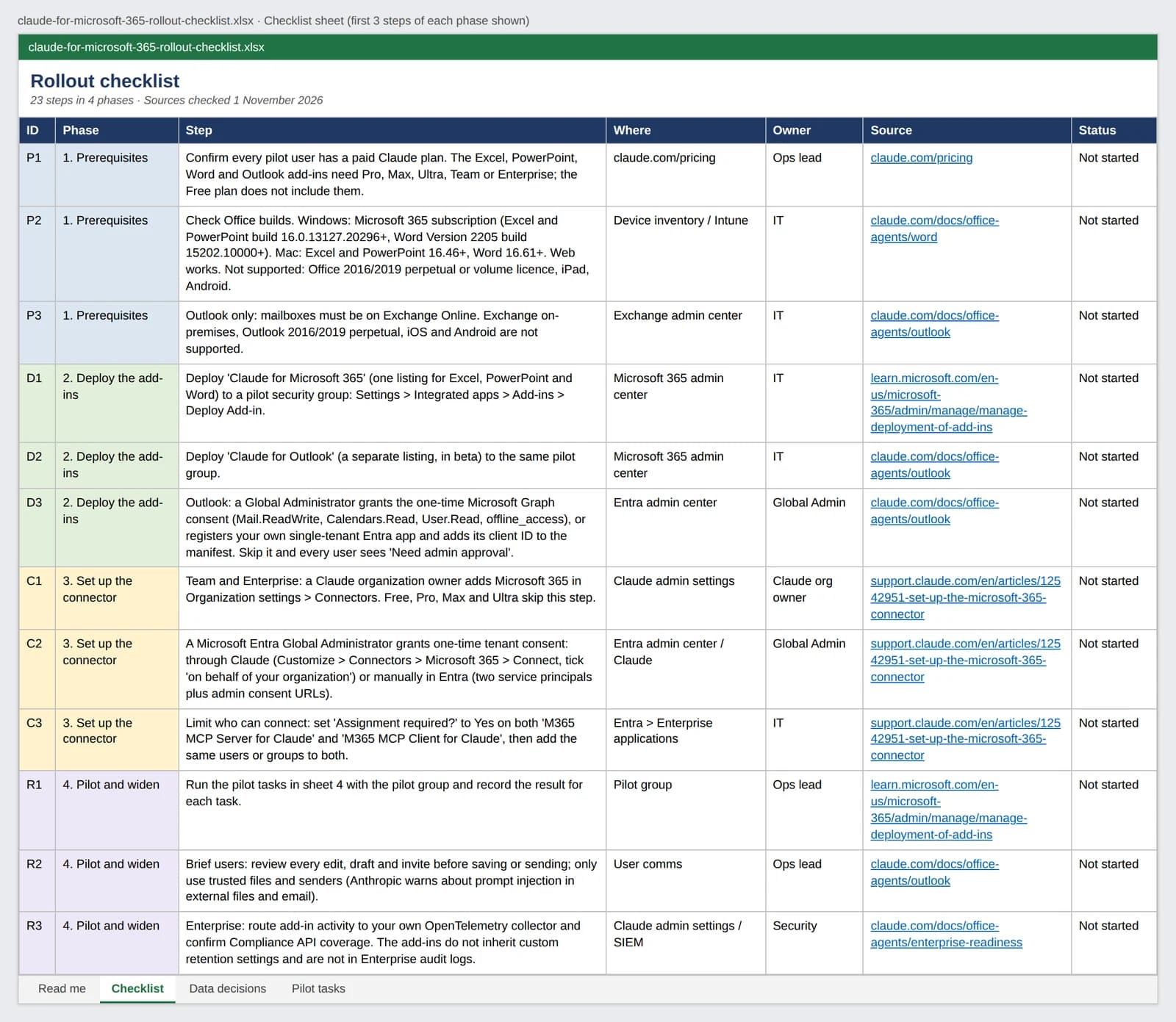
Deploying the add-ins
Microsoft's centralised deployment guide calls the integrated apps portal "the recommended and most feature-rich way" to deploy Office add-ins. Anthropic's docs follow the same path:
- In the Microsoft 365 admin center, check that Let users access the Office Store is on (Settings, Org settings, User owned apps and services). If your organisation blocks the store, admin-deployed store add-ins may not appear; upload Anthropic's manifest XML files instead.
- Go to Settings, Integrated apps, Add-ins, search for "Claude for Microsoft 365" and assign it to a pilot group. Repeat for "Claude for Outlook".
- For Outlook, a Global Administrator opens Anthropic's admin consent link to grant
Mail.ReadWrite,Calendars.Read,User.Readandoffline_access. Skip it and every user sees "Need admin approval". Organisations that cannot consent to a third-party multi-tenant app can register their own single-tenant Entra app and add its client ID to the manifest. - Allow for propagation. Anthropic says the add-in appears within minutes for most people and up to 24 hours for a full rollout; Microsoft says add-ins can take 24 to 72 hours to appear on the ribbon.
One known snag: the Integrated apps page does not recognise admin roles activated through Privileged Identity Management, so deployment fails (Microsoft's troubleshooting page). Use an admin whose role is permanently active.
On Team and Enterprise, owners can turn "Let Claude work across apps" on or off in Organization settings, Office agents (Anthropic's cross-app page). Separately, each user's add-in setting "Let Claude work across files" is on by default for Pro and Max and off by default for Team and Enterprise, and is per device.
Enabling the connector
- Team and Enterprise: a Claude organization owner adds Microsoft 365 in Organization settings, Connectors.
- Every tenant: a Microsoft Entra Global Administrator grants one-time consent, either through Claude's connect flow (ticking consent on behalf of the organisation) or manually in Entra by adding the "M365 MCP Client for Claude" and "M365 MCP Server for Claude" service principals.
- Limit who can connect: set "Assignment required?" to Yes on both enterprise applications and assign the same groups to both.
- Limit what it reads: revoke individual Graph scopes in Entra. Revoking
Sites.Read.Allblocks SharePoint;Mail.Readblocks email;Chat.Readblocks Teams chat. - Check Conditional Access. After sign-in, connector requests come from Anthropic's IP range (160.79.104.0/21), so location and sign-in frequency policies block every member. Anthropic's guidance is to exclude that range from those policies only, not from device compliance policies.
Re-running admin consent grants the full current permission set, write scopes included. If you keep write tools off, revoke them again afterwards.
Data handling in one place
- Add-ins, Claude account sign-in: conversations, including what Claude reads from your files, mailbox and attachments, are sent to Anthropic. Inputs and outputs are deleted on Anthropic's backend within 30 days, with the exceptions in Anthropic's privacy centre.
- Add-ins, third-party platform: prompts go to the endpoint you configured. Anthropic says no mailbox content reaches it on Bedrock, Vertex AI or a gateway routing to them; on Azure AI Foundry, Anthropic processes prompts as an independent processor for Microsoft.
- Chat history: stored in the browser on each device (IndexedDB), not synced. Clearing it does not delete what Anthropic keeps.
- Compliance: the add-ins do not inherit custom retention settings and are not in Enterprise audit logs, but Enterprise organisations with the Compliance API get add-in sessions there. Enterprise admins can also stream activity to their own OpenTelemetry collector, which then holds prompt and document content.
Claude inside Microsoft Copilot
This is Microsoft's Copilot product, separate from the Claude add-ins and the connector. Since 24 September 2025, Microsoft 365 Copilot customers can choose Claude models in Microsoft's Researcher agent and Copilot Studio once an admin enables Anthropic models, and Anthropic's 7 May 2026 announcement says they can also use Claude models directly in Excel and PowerPoint.
What to check before you roll it out
- Plan mix. Anyone on Free gets the connector but not the add-ins. Check before you announce the rollout.
- Office builds. Anthropic's docs exclude Office 2016 and 2019 perpetual and volume licences, and Excel is not supported on iPad or Android. Check the supported-version list in Anthropic's per-app docs before piloting on older installs.
- External files. Anthropic warns that downloaded templates, vendor files and inbound email can carry prompt injection. Pilot on trusted copies first.
- Known issue. As of 1 November 2026, Anthropic's docs flag that after the September and October 2026 Microsoft 365 updates on Windows some users lost chat history and uploaded Skills in the add-in. Check the data storage page for the current workaround.
FAQ
Is Claude for Microsoft 365 free?
No. The add-ins need a paid Claude plan (Pro, Max, Ultra, Team or Enterprise on Anthropic's pricing page, checked 1 November 2026). The separate Microsoft 365 connector is available on every plan, including Free, but only for work accounts in a Microsoft Entra tenant.
How do I add Claude to Office 365?
For yourself: select Get it now on the Claude for Microsoft 365 listing (Excel, PowerPoint and Word) or the Claude for Outlook listing, then open the app, activate the add-in under Home, Add-ins (Windows) or Tools, Add-ins (Mac) and sign in with your Claude account. For a team, an admin deploys both listings from the Microsoft 365 admin center, as described above.
Why is the Microsoft 365 connector not showing in Claude?
On Team and Enterprise plans an organization owner must first add it in Organization settings, Connectors, and in every tenant an Entra Global Administrator must grant one-time consent. Personal accounts such as @outlook.com cannot connect.
Does Claude work in Microsoft Teams?
Anthropic documents Teams support only through the Microsoft 365 connector, not as a Teams app (checked 1 November 2026). The connector lets Claude search Teams chats, channels and meeting transcripts and, if an admin enables write tools, send Teams messages.
Does Claude for Outlook work on Mac?
Yes, Outlook for Mac with a Microsoft 365 subscription is supported, alongside Windows and the web. Outlook on iOS and Android and Exchange on-premises mailboxes are not (beta, checked 1 November 2026).
Where Deckary fits
Claude for PowerPoint is a general assistant inside PowerPoint. If your team's real deliverable is a consulting deck (waterfall, Mekko and Gantt charts linked to Excel, your own template, edits to existing client decks), Deckary is a specialist add-in for that work and runs alongside Claude rather than replacing it. Plans start at $15/month, with a 14-day free trial and no card. See Deckary's AI slide builder, how it compares on our Claude for PowerPoint alternative page, or connect Claude to Deckary decks through Deckary's MCP server.
Sources
All checked 1 November 2026.
- Anthropic: Claude for M365 overview, Excel, PowerPoint, Word, Outlook, Work across M365 apps, Third-party platforms, Security and audit
- Claude Help Center: Set up the Microsoft 365 connector, Microsoft 365 connector security guide
- Anthropic announcements: Claude and your productivity platforms (16 October 2025), Collaborate with Claude across Excel, PowerPoint, Word and Outlook (7 May 2026), Claude in Microsoft 365 Copilot (24 September 2025), pricing
- Microsoft: Deploy Office Add-ins in the Microsoft 365 admin center, Manage add-ins in the Microsoft 365 admin center, Can't deploy add-ins from Integrated apps, Microsoft Marketplace listings for Claude for Microsoft 365 and Claude for Outlook
Not affiliated with Anthropic or Microsoft.