Claude PowerPoint Skills: The pptx Skill and a Free Consulting SKILL.md
How Claude PowerPoint skills work: Anthropic's pptx skill, where it runs, how to install a skill, what a good one contains, and a free consulting-slides SKILL.md with its unedited output deck.
- Bob · Former McKinsey and Deloitte consultant with 6 years of experience
- 16 min read
Pricing and feature information was accurate at the time of publication. Competitor products change frequently — verify current details on each provider's website.
A Claude PowerPoint skill is a folder with a SKILL.md file that tells Claude how to build or edit .pptx files: which library to use, which design rules to follow and how to check the result. Anthropic ships one, the pptx skill, which Claude uses automatically in the Claude apps and which you attach in the API with skill_id: "pptx". You can add your own on top, for example to make every deck follow consulting conventions.
Free download: consulting-slides skill (ZIP): SKILL.md, a reference file, a python-pptx helper library and a deck checker. Format: ZIP · 4 files · MIT licence · No signup. Also included: the sample brief and the 7-slide output deck (Format: PPTX · 7 slides · No signup).
Jump to: install a skill · what is in the download · the output deck and its flaws · skill or add-in
Last verified 1 November 2026, against Anthropic's documentation, help centre, release notes and GitHub repository. We ran our own skill locally in Claude Code; we could not sign in to claude.ai or the Claude for PowerPoint add-in, so everything said here about Anthropic's pptx skill comes from reading its documentation and source, not from running it.
What a Claude skill is
Anthropic introduced Agent Skills on 16 October 2025 as "folders that include instructions, scripts, and resources that Claude can load when needed". Only each skill's name and description sit in Claude's context from the start; the rest of SKILL.md and any bundled files load when a request matches the description, so the description must say what the skill does and when to use it (Agent Skills overview). Claude Code's skills documentation adds one practical limit: keep SKILL.md under 500 lines and move detail into separate files.
Anthropic's pptx skill
Anthropic provides four pre-built document skills: pptx (PowerPoint), xlsx (Excel), docx (Word) and pdf. They are what Claude uses when you ask it to make a file in chat. The source is public in the anthropics/skills repository, with a note that these four are "source-available, not open source".
Reading the pptx SKILL.md on 1 November 2026, it covers three jobs:
| Job | How the skill does it |
|---|---|
| Create a new deck | Writes a pptxgenjs (JavaScript) script, with a list of known pitfalls such as writing colour codes with a "#" |
| Edit an existing deck or template | Unzips the file, edits slide XML directly, repacks, then runs a validation script against the original |
| Read a deck | Extracts text with markitdown and renders a labelled thumbnail grid |
It also ships design guidance: ten colour palettes, titles at 36–44pt, body text at 14–16pt, "every slide needs a visual element", and a required QA pass that renders slides to images through LibreOffice and checks for overflow and overlap.
That guidance is aimed at good-looking general decks. It doesn't ask for action titles, a storyline, source lines or charts that put the message in the title. That gap is the reason to add your own skill.
Since 16 September 2026, Claude Slides also gives presentations their own starting point in the Claude apps. Anthropic's release notes don't say whether Slides uses the pptx skill or your custom skills, so we make no claim either way.
Where the pptx skill runs
| Surface | pptx skill available? | Custom skills | Notes |
|---|---|---|---|
| claude.ai (web, desktop) | Yes, used automatically when you create documents | Upload a ZIP | Requires code execution ("Create and edit files") to be on |
| Claude API | Yes, skill_id: "pptx" | Upload through the Skills API | Needs the code execution tool; no network access in the container |
| Claude Code | Not pre-installed | Folders in ~/.claude/skills/ or .claude/skills/ | Install Anthropic's document skills as a plugin (below) |
| Claude for PowerPoint add-in | Skills enabled in your Claude settings | Same as claude.ai | Type / in the sidebar to call a skill directly |
Sources: Agent Skills overview, Using skills in Claude, Connectors and Skills. One caveat from the overview: custom skills do not sync between claude.ai, the API and Claude Code. Upload the same skill to each surface you use. Claude Code is the partial exception: when you sign in with a claude.ai account it can download your enabled claude.ai skills into ~/.claude/skills/synced/.
How to install a PowerPoint skill
claude.ai
- Check that "Code execution and file creation" (called "Create and edit files" in the newer settings layout) is on under Settings > Capabilities. On Team and Enterprise plans an owner must turn on both "Cloud code execution and file creation" and "Skills" under Organization settings > Plugins & skills, on the Policy tab; on Team plans this is on by default.
- Zip the skill folder. The folder name must match the skill name; our download is already packaged that way.
- Go to Customize > Skills, click "+", then "+ Create skill", choose "Upload a skill" and upload the ZIP.
Anthropic's help centre lists skills on Free, Pro, Max, Ultra, Team and Enterprise plans, and notes that an upload fails if the folder name doesn't match the skill name or SKILL.md is missing (Using skills in Claude).
Claude Code
Unzip the folder into ~/.claude/skills/consulting-slides/ (all your projects) or .claude/skills/consulting-slides/ (one project). Claude Code loads it when a request matches the description, or you can call it with /consulting-slides.
For Anthropic's own document skills, the repository README gives these commands:
/plugin marketplace add anthropics/skills
/plugin install document-skills@anthropic-agent-skills
Claude API
Upload the skill through the Skills API, then list it in the container parameter together with the code execution tool. Anthropic's quickstart uses the pptx skill as its example (condensed from the quickstart as published on 1 November 2026; it notes that older code execution tool versions also work):
response = client.messages.create(
    model="claude-opus-5-5",
    max_tokens=16000,
    container={"skills": [{"type": "anthropic", "skill_id": "pptx", "version": "latest"}]},
    messages=[{"role": "user", "content": "Create a presentation about renewable energy with 5 slides"}],
    tools=[{"type": "code_execution_20260521", "name": "code_execution"}],
)
The finished file comes back as a file ID that you download with the Files API. Note that the API container has no network access and no runtime package installation, so a skill can only use pre-installed libraries.
Claude for PowerPoint add-in
Skills enabled in your Claude settings are available in the add-in, and Claude applies relevant ones automatically, according to Anthropic's Connectors and Skills page. The add-in is for Pro, Max, Team and Enterprise plans (Claude for PowerPoint docs). Its own Instructions field (Settings in the sidebar) holds persistent preferences such as "always use one-line bullets"; a skill is the better place for a whole procedure. For our review of the add-in itself, see Claude for PowerPoint.
Continue reading: AI PowerPoint for Finance Teams · Figma to PowerPoint · 95 Real BCG Presentations
What a good PowerPoint skill contains
The skills worth installing make the rules checkable, not aspirational.
| Part | What to write | Why it matters |
|---|---|---|
| Trigger description | The deck types and words your team uses ("steering committee", "board pack", "McKinsey-style") | Decides whether Claude loads the skill at all |
| Workflow | Storyline first, then exhibits, then code, then check | Stops Claude from writing layout code before the argument exists |
| Title rules | Full-sentence action titles, maximum length, a number where possible | The title carries the message; see consulting slide standards |
| Structure rules | Answer first, MECE supporting points, trackers | The Pyramid Principle and MECE in a form Claude can follow |
| Template rules | Fonts, colours, grid positions, or "open this template and use its layouts" | Keeps output inside your brand |
| Chart conventions | Native charts only, chart type per comparison, labels instead of axes, one highlight colour | Editable numbers; the eye goes to the point |
| Sources and labels | Source line on every data slide; "Illustrative" on any invented data | Nobody mistakes sample numbers for real ones |
| Helper code | Functions for the slide types you use most | Consistent output; fewer tokens spent on positioning |
| Validation script | Checks Claude runs before it reports back | Turns "please follow the rules" into a pass or fail |
Free download: the consulting-slides skill
The skill is four files:
SKILL.md(91 lines): the workflow, seven rules (action titles, storyline and MECE, one message per slide, charts, sources, the illustrative label, template and format) and an exhibit menu.reference.md: the layout grid in inches, chart recipes, how to build on a client template, a table of common failures and a worked example.scripts/deckkit.py: python-pptx helpers for the title slide, content slides with tracker and action title, executive summary, sorted bar charts, columns, lines, a native waterfall (stacked columns with an invisible base), tables, takeaway panels, source lines and the illustrative label.scripts/check_deck.py: flags topic titles ("Market overview"), titles over 95 characters (SKILL.md aims for about 90), duplicate titles, data slides without a source line, missing illustrative labels, more than one chart per slide, more than five bullets, mixed fonts and likely text overflow.
Download: consulting-slides.zip (Format: ZIP · 4 files · No signup), or read SKILL.md in the browser first. It needs Python 3 and python-pptx; we ran it on Python 3.14 with python-pptx 1.0.2. Audit it as you would any skill: it runs code on your machine. We have not tested it on a client template, which is what most teams will want; reference.md describes the approach, but treat that path as untested.
We ran the skill on a sample brief
Method: We ran this skill in Claude Code (Claude Opus 5.5) on 1 November 2026. Read the result with one caveat: the same Claude Code session wrote the skill and then followed it, so it was grading against rules it had just written, and a clean checker result is expected rather than impressive. It followed SKILL.md on the sample brief: it wrote the storyline, wrote build_deck.py with the deckkit helpers and ran check_deck.py, which reported 0 errors and 0 warnings on its first run; it still does on the published file. The deck below is its output, unedited. The previews were drawn from the PPTX by a script that reads each shape, table and chart (values, colours and labels) from the file. We have not opened the deck in PowerPoint itself; python-pptx re-opens it cleanly, and PowerPoint's rendering will differ at least in font metrics.
The brief: Halden Freight, a fictional European road-freight company, saw operating profit fall from €38M to €21M between 2023 and 2025. The executive team must decide which cost levers to approve to get back to at least €35M by 2027. Every number is sample data, and the deck says so on every data slide.
The skill's first output is the storyline, as titles only:
- Restoring operating profit to €35M by 2027 (cover)
- Three low-risk levers worth €16M restore operating profit to €37M by 2027
- Operating profit fell €17M since 2023 as fuel, wages and haulage costs outran price rises
- Wages, fuel and subcontracted haulage make up 73% of the €528M addressable cost base
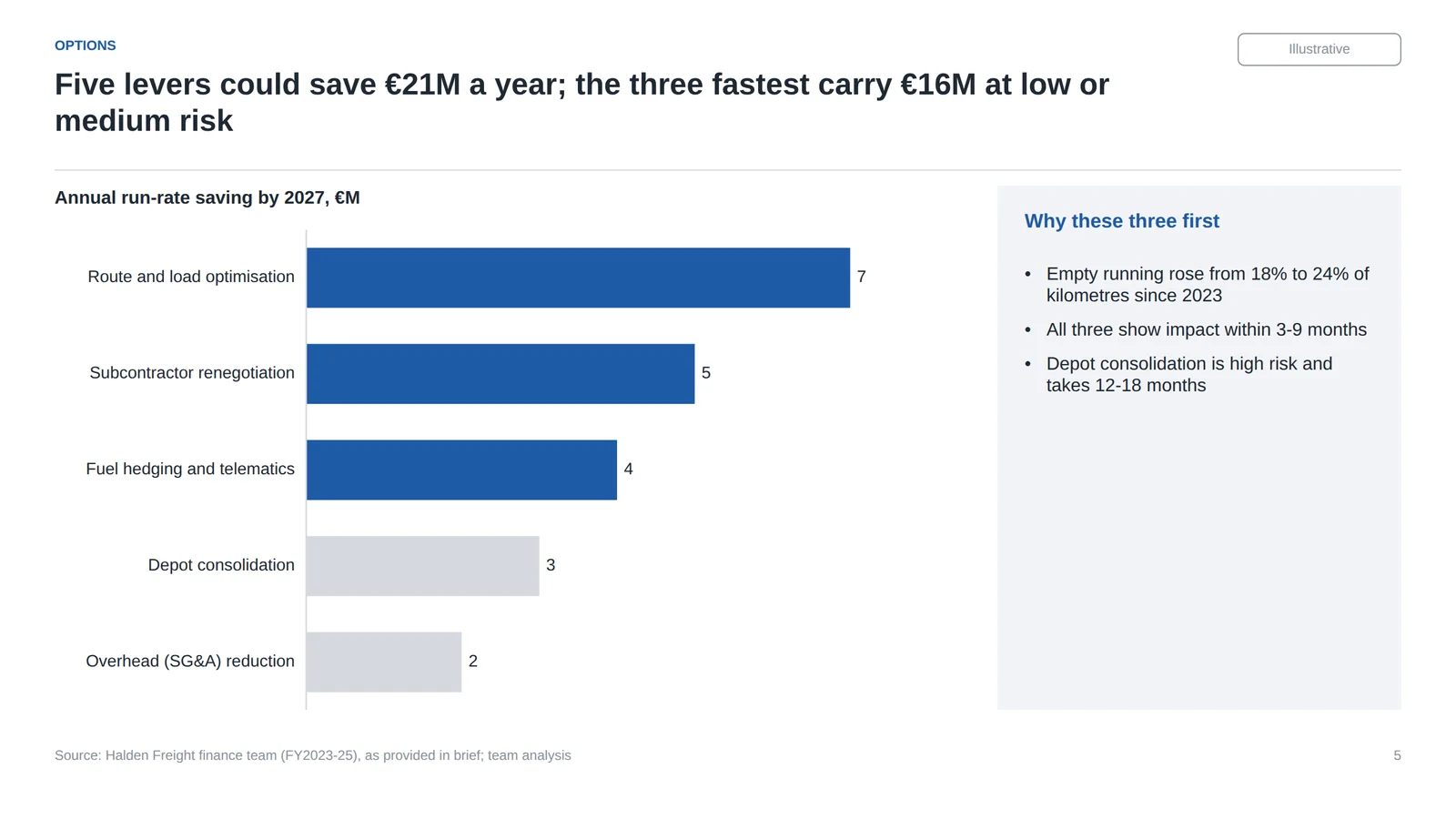
- Five levers could save €21M a year; the three fastest carry €16M at low or medium risk
- Approve three levers now; study depot consolidation and fold SG&A cuts into the 2027 budget
- Approval today starts all three levers before the end of January 2027
Slide 2: executive summary
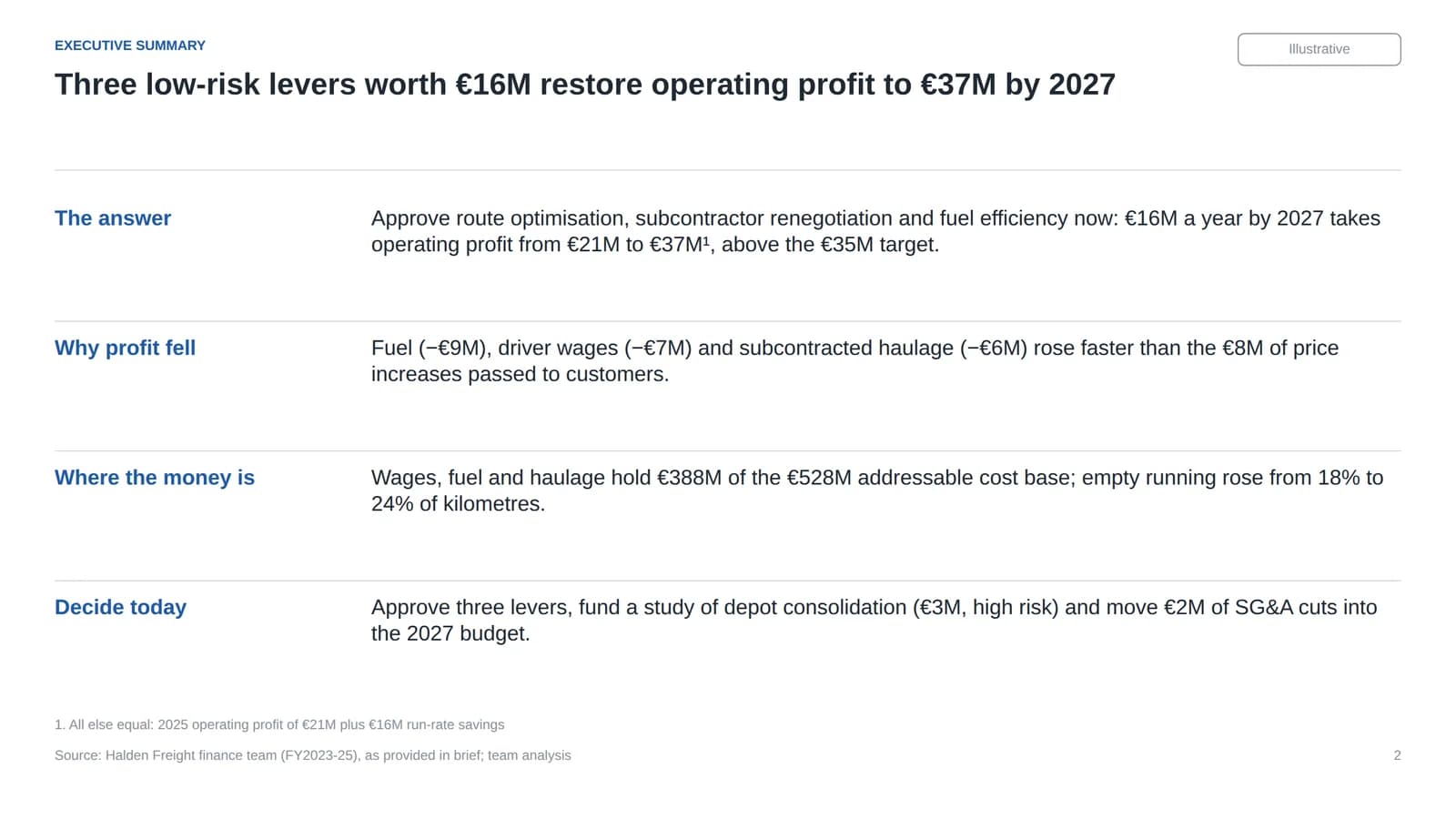
The answer comes first, the three supporting points follow, and the footnote states the assumption behind €37M (2025 profit plus run-rate savings, all else equal).
Slide 3: profit bridge
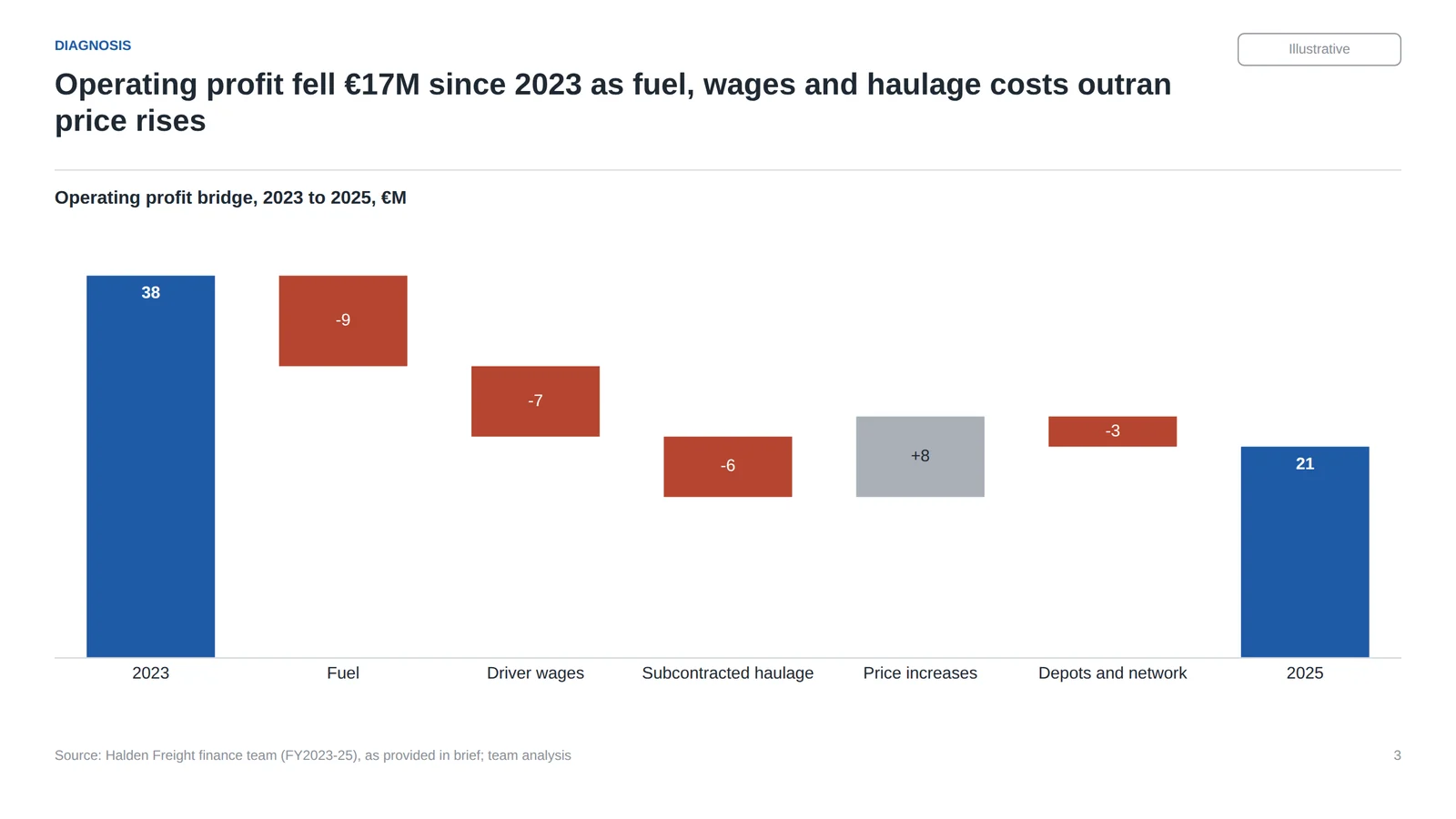
The waterfall is a native stacked column chart with an invisible base series, so the numbers stay editable in PowerPoint's chart data sheet. Decreases are red, the increase grey, the totals in the accent colour. For other ways to build one, see waterfall charts in PowerPoint.
Slide 5: the levers
Slide 5 is the image at the top of this page: a sorted bar chart with data labels instead of a value axis, the three levers the title names in blue and the rest in grey, and a takeaway panel that cites the rise in empty running from 18% to 24% as the reason to start with these three levers.
Slide 6: the recommendation
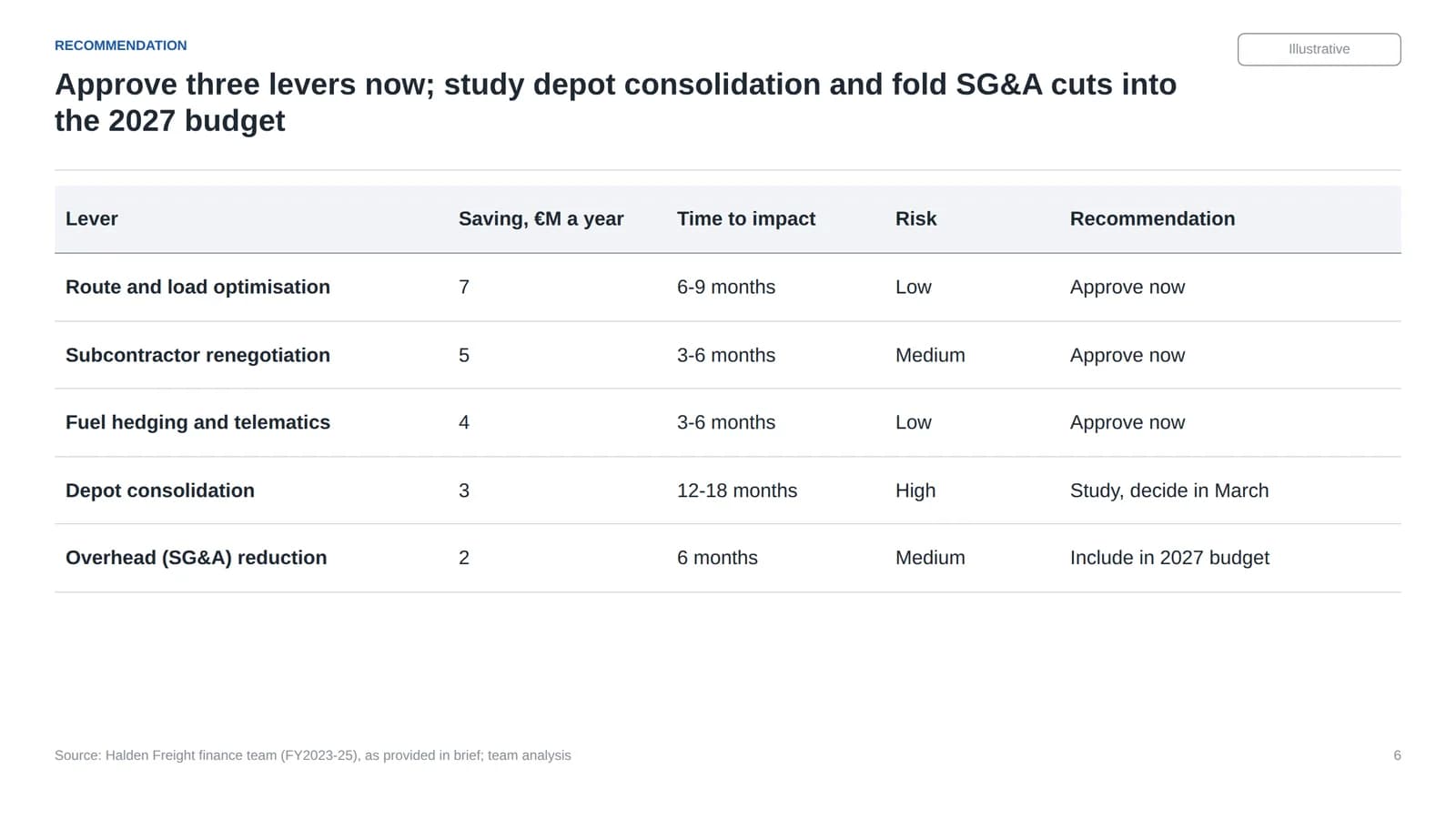
A native table, so the client can edit it. Slide 7 turns the same decisions into actions with owners and dates.
What the checker passed that a reviewer would catch
The automated check passed, but reading the titles in order, as the skill tells you to, turns up three problems a partner would mark, plus one layout weakness:
- Slide 2 says "three low-risk levers"; slide 5 says "low or medium risk". Subcontractor renegotiation is medium risk in the brief. The executive summary title overstates.
- The executive summary calls the third lever "fuel efficiency"; the chart and table call it "fuel hedging and telematics". Same lever, two names.
- Slide 5 calls the three levers "the three fastest", but they aren't. Slide 6 gives SG&A reduction 6 months to impact and route optimisation 6-9 months. The three are the largest levers that are not high risk; the title should say that instead of claiming speed.
- White space. The takeaway panel on slide 5 is more than half empty, and slide 6 leaves the lower third of the slide blank. A reviewer would enlarge the table or add the 2027 profit impact.
One build detail to know: the waterfall's data labels are typed text, so if you change a value in the chart data sheet, update its label too.
The checker catches form, not argument, so keep a human read of the titles in the loop.
When a skill is enough, and when you need an add-in that edits the live deck
A skill tells Claude how to write a file. Where that file lives decides whether that's enough.
| Situation | A skill is enough | You need something that edits the open deck |
|---|---|---|
| First draft from a brief or data | Yes: generate a new PPTX | |
| Your template, applied from scratch | Usually: bundle the template or point the skill at it | |
| Changing slides 4 to 7 of a deck your team is already editing | Yes: regenerating the file loses others' changes | |
| Charts that stay linked to an Excel model | Yes: needs an add-in that manages the link | |
| Reviewer comments on a live client deck | Yes: targeted edits in the open file | |
| Batch jobs: 30 regional versions of one deck | Yes: run the skill through the API or Claude Code |
The Claude for PowerPoint add-in works on the open deck and can use your skills there. If your agent is Claude Code or another MCP client, Deckary's MCP connector gives it tools to read, render and edit PowerPoint presentations shared from the Deckary add-in, so the agent changes the live deck instead of writing a new file. Setup for Claude Code is on Claude Code for PowerPoint. For a wider comparison of the options, see PowerPoint MCP servers compared.
Common mistakes with PowerPoint skills
- A vague description. "Makes slides" competes with the built-in pptx skill. Name the deck types and the words your team uses.
- Design rules that fight consulting conventions. Big titles, a picture on every slide and decorative palettes suit marketing decks, not steering committees.
- Assuming the skill is everywhere. A skill uploaded to claude.ai is not in the API or Claude Code until you add it there too.
- Installing unaudited skills. Anthropic's guidance is to use skills only from trusted sources and audit everything bundled, including scripts.
FAQ
Is there a Claude PowerPoint skill on GitHub?
Yes. Anthropic publishes its pptx skill in the anthropics/skills repository on GitHub, alongside docx, xlsx and pdf; those four are source-available, not open source. Audit any community skill before you install it, because a skill can run code.
What is the best Claude skill for PowerPoint?
For general deck creation, Anthropic's built-in pptx skill is the default and needs no setup in the Claude apps. For consulting-standard decks, add a custom skill that encodes your house rules: action titles, one message per slide, chart conventions, source lines and an automated check. This page offers one free as consulting-slides.
Can a Claude skill use my PowerPoint template?
Yes. A skill can bundle a template file and tell Claude to build on its layouts, theme colours and fonts. Anthropic's help centre notes that in the Claude for PowerPoint add-in, a custom skill built around a template can load that template into the open file.
What are Claude Skills?
Skills are folders of instructions, scripts and resources that Claude loads when a task matches their description. Each skill has a SKILL.md file with a name and description in YAML front matter. They work in the Claude apps, Claude Code and the Claude API.
Sources
All checked on 1 November 2026.
- Anthropic, Introducing Agent Skills (16 October 2025)
- Anthropic, Agent Skills overview
- Anthropic, Get started with Agent Skills in the API
- Anthropic, Extend Claude with skills (Claude Code)
- Anthropic, anthropics/skills on GitHub and the pptx SKILL.md
- Anthropic Help Centre, Using skills in Claude
- Anthropic, Use Claude for PowerPoint and Connectors and Skills
- Anthropic Help Centre, Release notes (Claude for PowerPoint, 5 February 2026; skills in the Excel and PowerPoint add-ins, 11 March 2026)