Sprint Review Template: Agenda, Best Practices, and Demo Format
Sprint review template with complete agenda structure, demo best practices, and stakeholder engagement strategies. Learn how to run effective reviews that gather actionable feedback.
The most common complaint about sprint reviews is stakeholder absence. The team prepares a demo, schedules the meeting, and three stakeholders show up. The Product Owner presents slides for 45 minutes while the development team watches silently. No one touches the actual product. The feedback amounts to "looks good" with no specific guidance on what to prioritize next.
Effective sprint reviews require structure—but not the kind that turns them into theatrical presentations. After facilitating 50+ sprint reviews across software development, digital transformation, and agile consulting engagements, we have tracked which formats generate actionable feedback (interactive demos where stakeholders control the product, mid-week scheduling, and timeboxed discussions) and which turn into wasted time (slide presentations, Friday afternoon meetings, and demos with no stakeholder participation). The difference comes down to the template: teams that use structured agendas, involve stakeholders in the demo, and timebox discussions gather feedback that changes priorities. Teams that run generic status meetings see no stakeholder engagement and make no course corrections.
This guide covers sprint review structure, agenda templates, demo best practices, and strategies for improving stakeholder attendance.
What Is a Sprint Review?
A sprint review is a Scrum ceremony where the team demonstrates completed work to stakeholders and discusses future priorities. The Scrum Guide defines the sprint review as a working session—not a formal presentation—where the Scrum team inspects the outcome of the sprint and determines future adaptations.
The sprint review serves three purposes:
- Product validation — Stakeholders see working software and confirm it meets their needs
- Feedback collection — The team gathers input on what to build next and what to change
- Backlog refinement — The Product Owner adjusts priorities based on stakeholder feedback
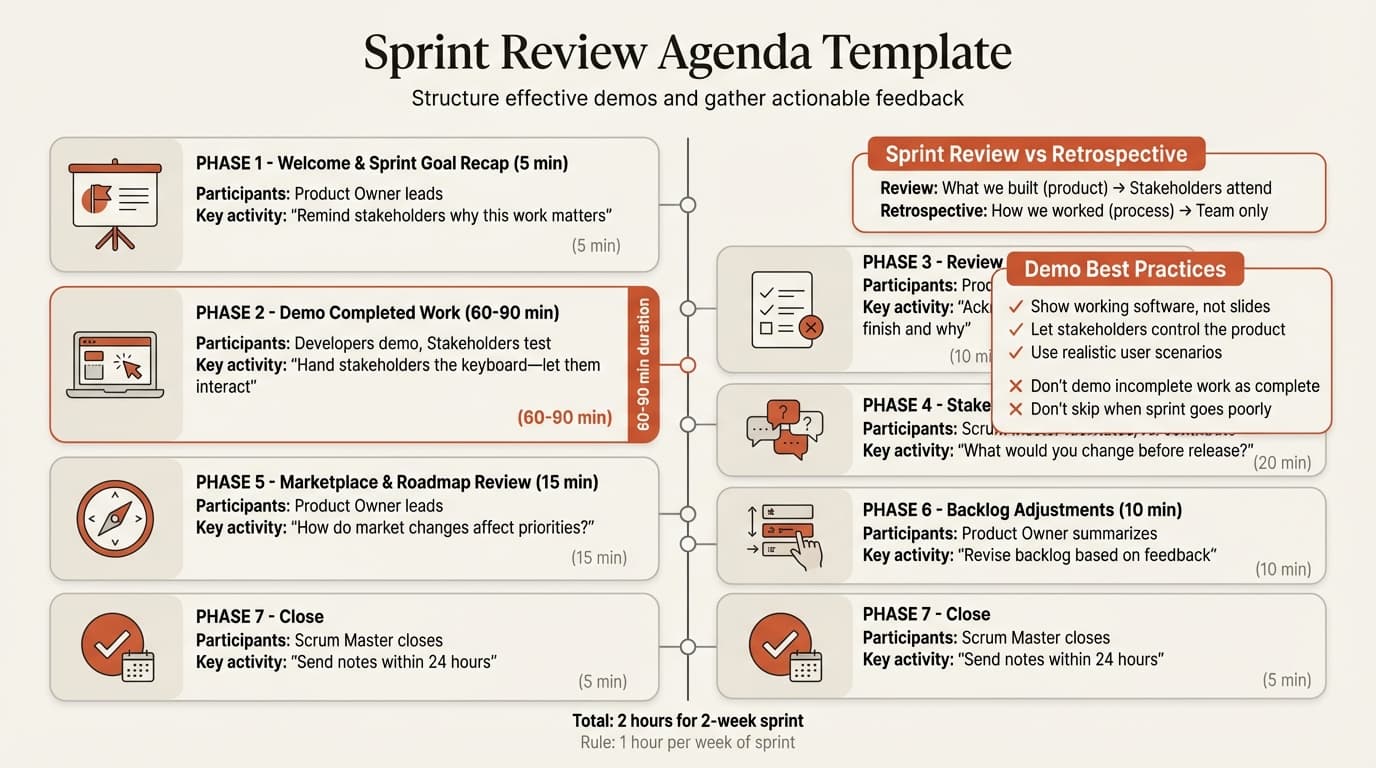
According to the Scrum Guide, sprint reviews are timeboxed to a maximum of four hours for a one-month sprint. Most teams run two-hour reviews for two-week sprints—one hour per week of sprint. The outcome is a revised product backlog that reflects stakeholder feedback and marketplace changes.
Sprint Review vs Sprint Retrospective
Teams often confuse reviews with retrospectives because both happen at the end of the sprint. The difference: the review is about the product (what was built), while the retrospective is about the team (how the team worked).
| Factor | Sprint Review | Sprint Retrospective |
|---|---|---|
| Focus | What the team built (product) | How the team worked (process) |
| Participants | Scrum team + stakeholders | Scrum team only (no stakeholders) |
| Output | Product feedback and backlog updates | Process improvements for next sprint |
| Tone | Outward-facing, demonstrative | Inward-facing, reflective |
| Timing | Before retrospective, at end of sprint | After review, before next sprint planning |
| Duration | 2 hours for 2-week sprints | 1.5 hours for 2-week sprints |
When to run sprint reviews: After every sprint, without exception. Teams that skip reviews because "we didn't finish anything" miss the opportunity to show progress on incomplete work and get stakeholder input on priorities. For process improvement after the review, see our Scrum framework guide.
Sprint Review Agenda Template
Every sprint review follows a structured agenda, regardless of sprint length or team size. This framework is recommended by Scrum Alliance and adapted across agile teams.
1. Welcome and Sprint Goal Recap (5 minutes)
Set context for stakeholders by reminding them of the sprint goal and why this work matters to customers and the business. The Product Owner leads this section.
Example opening:
"Our sprint goal was to enable customers to export reports as CSV files. This
feature was the #2 request in customer feedback. Today we will demo the export
functionality, discuss edge cases we encountered, and review what to prioritize
in the next sprint."
2. Demonstration of Completed Work (60-90 minutes)
Demo working software—not slides, not mockups, not descriptions. Atlassian's guide to sprint reviews emphasizes that demonstrations should center around a realistic user experience: show the product and how users will interact with its features, not system source code or logic.
Best practices for demos:
- Hand stakeholders the keyboard. Let them interact with the product while you describe it. This approach increases stakeholder attention and generates more specific feedback.
- Use realistic scenarios. Instead of "here's the export button," walk through "a customer logs in, opens their monthly sales report, clicks export, and downloads a CSV with 50 rows of data."
- Show edge cases. What happens when someone exports an empty report? When the file size exceeds 10MB? Demonstrating constraints builds trust that the team has thought through implementation.
- Timebox each feature demo. Spend 5-10 minutes per item, then pause for questions. Plan a conversation break after every demonstration so stakeholders can keep up with developments.
What NOT to demo: PowerPoint slides summarizing work. Screenshots of features. Descriptions of code changes. The review is about working software—if it cannot be interacted with, it is not ready to demo.
3. Review of Incomplete Items (10 minutes)
Acknowledge what did not get finished and why. This transparency builds credibility. The Product Owner explains whether incomplete items carry over to the next sprint or get deprioritized.
Example discussion:
"We planned 8 user stories and completed 6. The remaining 2—advanced filter
options and scheduled exports—required more backend work than estimated. We will
carry these into next sprint with revised estimates. Based on stakeholder
feedback today, we may deprioritize advanced filters in favor of the batch
export feature that marketing requested."
4. Stakeholder Feedback Collection (20 minutes)
Gather input from stakeholders on what they saw. The Scrum Master facilitates this discussion, ensuring everyone contributes and discussions stay on topic.
Effective feedback prompts:
- "What did you see that surprised you—positively or negatively?"
- "What would you change about this feature before we release it?"
- "What should we prioritize in the next sprint based on what you saw today?"
- "Who else should test this feature before it goes to production?"
Facilitate discussion, not monologues. If one stakeholder dominates the conversation, redirect: "Thank you for that input. Let's hear from others before we go deeper on that topic."
5. Marketplace and Roadmap Review (15 minutes)
Discuss changes in the market, customer needs, or competitive landscape that affect priorities. The Product Owner leads this discussion, sharing recent customer feedback, competitor moves, or business shifts that inform backlog decisions.
Example topics:
- "Our largest customer requested API access for exports. Should we prioritize this over the batch export feature?"
- "A competitor launched scheduled reporting last week. How does that change our roadmap?"
- "Customer support logged 15 tickets about export speed. Should we focus on performance before adding new export formats?"
6. Product Backlog Adjustments (10 minutes)
The Product Owner summarizes how today's feedback changes the backlog. New items get added, priorities shift, and the team discusses capacity for the next sprint.
Output from this section: A revised product backlog with updated priorities that everyone understands. Stakeholders leave knowing what the team will work on next and why.
7. Close (5 minutes)
Summarize key decisions, thank stakeholders for their feedback, and confirm attendance for the next sprint review. The Product Owner or Scrum Master sends meeting notes within 24 hours.
Continue reading: Lessons Learned Template · Bar Charts in PowerPoint · Investment Banking Pitch Book
Use consulting-grade layouts in PowerPoint
Start from structured business slides and customize them in your own deck. 10 free AI prompts. No credit card required.
Sprint Review Meeting Template
Here is a complete agenda for a two-hour sprint review for a two-week sprint:
SPRINT REVIEW | SPRINT 14 | 2 HOURS
ATTENDEES: Scrum team (Developers, Scrum Master, Product Owner) + stakeholders

AGENDA:
0:00-0:05 | Welcome and sprint goal recap (Product Owner)
0:05-1:30 | Demo completed work (Developers)
          - Feature 1: CSV export (10 min demo + 5 min feedback)
          - Feature 2: Export history log (10 min demo + 5 min feedback)
          - Feature 3: Email notification (10 min demo + 5 min feedback)
          - Feature 4: Export template builder (10 min demo + 5 min feedback)
          - Feature 5: API endpoint for exports (10 min demo + 5 min feedback)
1:30-1:40 | Review incomplete items (Product Owner)
1:40-2:00 | Stakeholder feedback and backlog adjustments (Product Owner)
          - Marketplace review
          - Backlog prioritization for next sprint
2:00      | Close and next steps (Scrum Master)
Best Practices for Effective Sprint Reviews
Schedule mid-week, not Fridays. Mountain Goat Software's analysis of poorly attended sprint reviews shows that Friday afternoon reviews have the lowest stakeholder turnout. Schedule reviews Tuesday through Thursday when stakeholders are most available.
Invite actual users, not just managers. The feedback you need comes from people who will use the product, not executives summarizing what they think users want.
Demo working software, not slides. The Scrum Guide is explicit: the sprint review is a working session. PowerPoint presentations kill engagement. If you spend more than 10-15 minutes on slides, you are running a status meeting, not a sprint review.
Structure as a conversation, not a presentation. Interactive demonstrations where team members show working functionality and invite immediate questions generate more specific feedback than one-way presentations.
Timebox ruthlessly. If discussion exceeds the allocated time, capture the topic as a backlog item and move on. Save detailed problem-solving for separate working sessions.
Acknowledge accomplishments. When a feature works well or the team overcame a difficult technical challenge, highlight it. This builds team morale.
Send a follow-up within 24 hours. The Scrum Master or Product Owner sends a summary of feedback, backlog changes, and action items. Teams that skip follow-up lose stakeholder trust.
Common Sprint Review Mistakes
Running the same format every sprint. Teams that demo features in the same order (alphabetically, by developer) miss opportunities to tell a coherent story. Structure demos around user workflows, not backlog sequence.
No stakeholder participation. When stakeholders do not attend, the team builds in isolation and discovers misalignment weeks later. If fewer than three external stakeholders attend your reviews, you have a stakeholder engagement problem that requires fixing.
Demoing incomplete work as complete. Sprint reviews demo work that meets the definition of done. If it is not done, discuss it in the incomplete items section, not the demo.
Skipping reviews when the sprint goes poorly. Understanding what blocked progress is more valuable than celebrating success. Stakeholders can help unblock dependencies or adjust priorities.
Letting developers stay silent. Developers who built the features should demo them—they can answer technical questions better than the Product Owner.
No backlog updates after feedback. The Product Owner must act on stakeholder input—either by reprioritizing items or by explaining why certain feedback will not be incorporated.
Focusing on completed story points, not value delivered. Stakeholders do not care that you finished 32 points. They care whether the product solves their problem. Frame the demo around outcomes (users can now export reports in under 10 seconds) rather than output (we completed 5 user stories).
Improving Stakeholder Attendance
Mountain Goat Software's study of poorly attended sprint reviews identifies seven strategies for increasing stakeholder participation:
1. Demonstrate value at the first review. Stakeholders who attend a sprint review and leave thinking "that was a waste of time" will not return. Make the first review engaging—show working software, gather specific feedback, and act on it visibly in the next sprint.
2. Invite stakeholders personally. A personal message from the Product Owner explaining why their input matters increases attendance more than a generic calendar invitation.
3. Show work in progress, not just finished features. If the only demos are polished features, stakeholders assume their input is too late to matter.
4. Send a compelling preview. A 2-3 sentence email the day before the review outlining what will be demoed generates interest.
5. Rotate the location. Occasionally move the review to the stakeholder's office or a customer site.
6. Limit the meeting to two hours maximum. Stakeholders skip reviews that consume half their day.
7. Follow up on previous feedback visibly. At the start of each review, remind stakeholders of feedback from the last review and show how it changed priorities.
Sprint Review Example
Here is a complete sprint review agenda for a two-week sprint focused on export functionality:
EVENT: Sprint 14 Review | DURATION: 2 hours | ATTENDEES: 8 (Scrum team + 5 stakeholders)

SPRINT GOAL: Enable customers to export reports as CSV files

COMPLETED WORK DEMO:
1. CSV export button (7 min demo + 3 min feedback)
   - Stakeholder tests export on 100-row dataset
   - Feedback: "Can we limit exports to 10,000 rows to prevent timeouts?"
2. Export history log (7 min demo + 3 min feedback)
   - Marketing tests viewing past exports
   - Feedback: "Add a download link in the history so we can re-download without re-exporting"
3. Email notification on export completion (7 min demo + 3 min feedback)
   - Customer support tests email delivery
   - Feedback: "Include row count in email subject line for easier filtering"

INCOMPLETE ITEMS:
- Advanced filter options: Required database schema change, carries to Sprint 15
- Scheduled exports: Deprioritized based on stakeholder feedback today

STAKEHOLDER FEEDBACK:
- Marketing: Batch export (export 10 reports at once) is higher priority than filters
- Customer support: Export speed is more important than adding new formats
- Engineering lead: API endpoint for exports should come before scheduled exports

BACKLOG ADJUSTMENTS:
- New item added: Batch export feature (high priority)
- Re-prioritized: Export performance optimization moves to Sprint 15
- Deprioritized: Advanced filters move to backlog (no immediate customer need)

ACTION ITEMS:
1. Product Owner to scope batch export feature for Sprint 15 planning (Due: Feb 26)
2. Developers to investigate row limit options for exports (Due: Feb 28)
3. Scrum Master to schedule performance testing session with QA (Due: Feb 27)
Key Takeaways
- Sprint reviews focus on what the team built (product demo and stakeholder feedback), not how the team worked (that is the retrospective). Reviews look outward to stakeholders; retrospectives look inward to process.
- Timebox reviews to two hours for two-week sprints—one hour per week of sprint. Structure as 5-10 minutes of context-setting, 60-90 minutes of interactive demos, and 20-30 minutes of feedback collection and backlog adjustments.
- Demo working software, not slides. Hand stakeholders the keyboard so they can interact with the product. Demonstrations that center around realistic user experiences generate more actionable feedback than one-way presentations.
- Invite actual users, not just managers. The feedback you need comes from people who will use the product. If fewer than three external stakeholders attend your reviews, you have a stakeholder engagement problem.
- Act on feedback visibly. Sprint reviews that end with "thanks for your feedback" and no backlog changes are performative. The Product Owner must reprioritize items based on stakeholder input or explain why feedback will not be incorporated.
For visualizing sprint timelines and demo plans in PowerPoint, Deckary provides sprint planning templates and agile roadmap layouts—see our guide on making Gantt charts in PowerPoint. For structuring sprint feedback sessions, see our complete Scrum framework guide.
Related Guides
- Scrum Framework Guide — complete overview of Scrum roles, ceremonies, and artifacts
- After Action Review Template — structured reflection process for project teams
- Agile vs Waterfall — decision framework for methodology selection
- Progress Report Template — tracking accomplishments between sprint reviews
Sources
- Atlassian: What is a Sprint Review in Agile?
- Scrum.org: What is a Sprint Review?
- Mountain Goat Software: Top 7 Ways to Get Stakeholders to Attend Sprint Reviews
- Growing Scrum Masters: Best Practices for Facilitating a Sprint Review
- Scrum Alliance: Sample Sprint Review Agenda & Tips from a Coach
- Scrum.org: How to Engage Stakeholders in Your Sprint Reviews
- Wrike: Sprint Review vs Retrospective - What Is the Difference?
- Scrum Guide
Use consulting-grade layouts in PowerPoint
Start from structured business slides and customize them in your own deck. 10 free AI prompts. No credit card required.