Sales Presentation Template: Structure, Examples, and Best Practices
Sales presentation template guide with proven structure, format examples, and best practices. Learn what works for B2B and enterprise sales decks.
Most sales presentations bury the value proposition on slide eight. The buyer sits through company history, product feature lists, and technical specifications before learning whether this solution actually solves their problem. By slide eight, the decision-maker has already mentally checked out.
Sales presentations communicate how your product or service solves the buyer's specific pain points—demonstrating measurable value, building trust through proof points, and creating urgency for action. The format should answer three questions in under 20 minutes: What problem does this solve for me? Why should I believe you? What happens next? After analyzing sales decks across 80+ B2B software, consulting, and enterprise solution deals—ranging from $50K to $2M contract values—we have tracked which presentation structures convert (pain-first, story-driven, proof-heavy) and which get ignored (feature dumps without context, vague ROI claims, no clear next steps).
This guide covers sales presentation structure, template formats, B2B and enterprise patterns, and the differences between sales decks and pitch decks.
What Is a Sales Presentation?
A sales presentation is a visual narrative that communicates the value proposition of a product or service to potential buyers. Unlike pitch decks designed for fundraising, sales presentations focus on the buyer's pain points, existing solution gaps, and measurable business outcomes your offering delivers.
Sales presentations serve two primary contexts:
- Discovery and demo meetings where the goal is to diagnose buyer challenges, demonstrate solution fit, and advance to the next stage
- Final proposal and closing meetings where the goal is to present pricing, address objections, and secure commitment
The presentation format depends on the sales stage. Early-stage discovery decks emphasize pain point diagnosis and fit assessment. Late-stage proposal decks emphasize ROI quantification, implementation plans, and contract terms.
Sales Presentation vs Pitch Deck
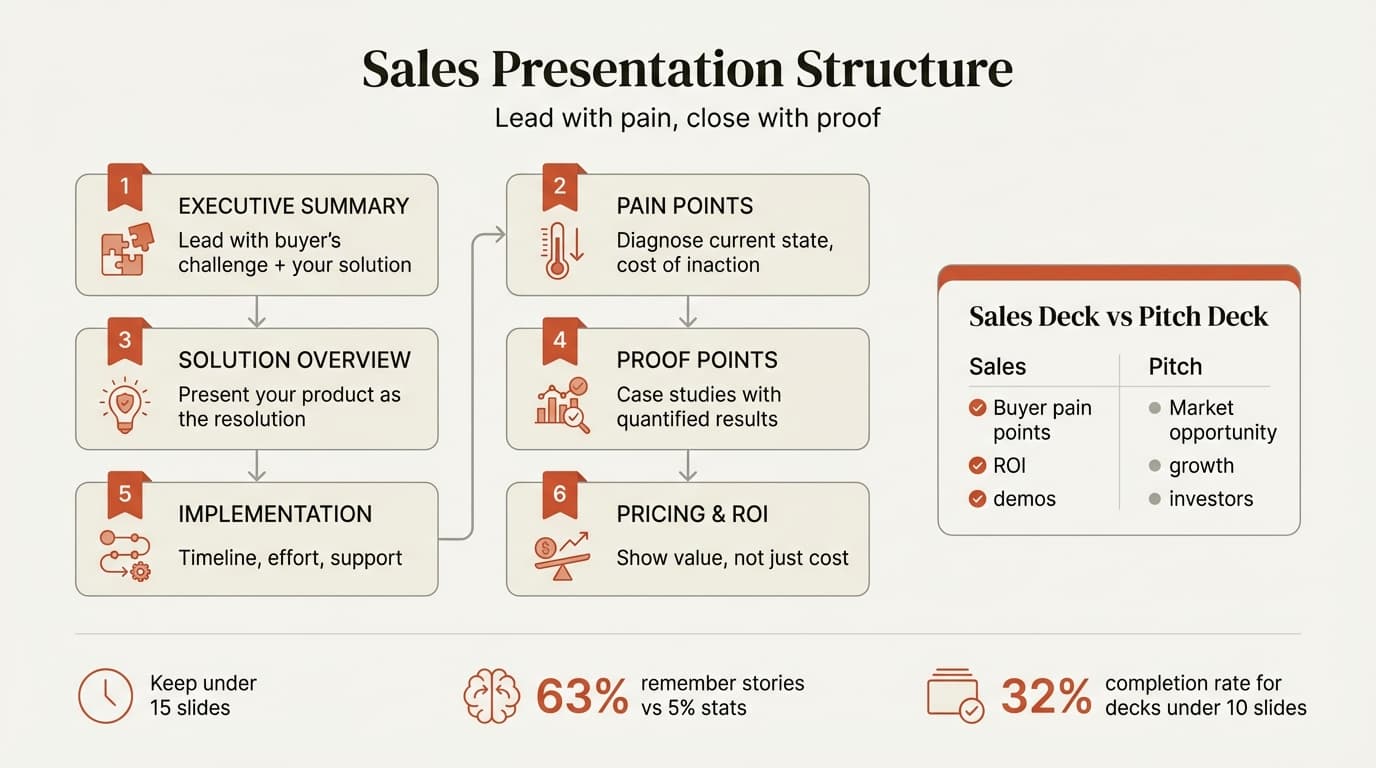
The terms are often confused, but the distinction matters for content structure and audience expectations. Sales presentations target buyers evaluating solutions. Pitch decks target investors evaluating funding opportunities.
| Factor | Sales Presentation | Pitch Deck |
|---|---|---|
| Primary audience | Buyers, procurement, decision-makers | Investors, VCs, angels |
| Core objective | Demonstrate product value and close deals | Raise capital and secure funding |
| Content focus | Pain points, solution fit, ROI | Market opportunity, growth trajectory |
| Key metrics | Customer wins, retention, case study results | Revenue growth, TAM, unit economics |
| Typical length | 10-15 slides, 20-30 min delivery | 12-18 slides, 10-15 min delivery |
| Delivery context | Live sales meetings, screen shares | In-person pitches, email/send-ahead |
| Call to action | Schedule next meeting, sign contract | Commit to investment round |
When to use sales presentations: Discovery calls, product demos, proposal meetings, executive briefings, and any sales cycle stage where the buyer is evaluating whether your solution solves their specific problem.
When to use pitch decks: Fundraising roadshows, investor meetings, demo days, and contexts where you are selling equity in your company rather than selling a product. See our guide on pitch deck templates for fundraising-specific content patterns.
Standard Sales Presentation Structure
A sales presentation follows a consistent structure optimized for buyer decision-making. The format leads with buyer pain points rather than product features, uses storytelling to create urgency, and closes with clear next steps.
1. Executive Summary (1 slide)
Open with the buyer's biggest challenge and your solution in one sentence. Answer who you help, what problem you solve, and how you solve it.
Example: "For enterprise sales teams drowning in manual CRM data entry, [Product] automatically captures sales activity and provides real-time forecast accuracy—reducing admin time by 40% and increasing win rates by 12%."
Do not open with company history or founder bios. Buyers care about their problems first, your background second.
2. Buyer's Pain Points (2-3 slides)
Diagnose the buyer's current situation with specificity. According to research analyzing effective sales presentations, knowledge, adaptability, and trust are the three common themes—and knowledge starts with demonstrating you understand their challenges.
Example: "Sales reps spend 2.5 hours per day logging CRM activity—30% of an 8-hour workday. For a 20-rep team, that is $400K/year in lost productivity. Forecast accuracy under 70% leads to missed quota and revenue surprises."
Use buyer-specific data when available. If you know this prospect has 20 reps and missed quota last quarter by 15%, reference it directly.
3. Solution Overview (2-3 slides)
Present your product as the resolution to the pain points just described. Use the SCR framework (Situation, Complication, Resolution)—situation (current state), complication (pain points), resolution (your solution).
Show how it works, list 3-5 capabilities that address the pain points, and explain what differentiates your approach from alternatives.
Lead with outcomes, not features. "Automatic activity capture" is more compelling than "AI-powered data extraction engine with NLP."
4. Proof Points and Case Studies (2-4 slides)
Build trust through evidence. Research shows 63% of people remember stories while only 5% remember statistics—structure proof points as customer stories with quantified results.
Include customer logos (8-12 brands), one detailed case study with before/after metrics, and a results summary across multiple customers.
Quantify everything. "Improved forecast accuracy" is vague. "Improved from 65% to 88%" is credible.
5. Implementation and Onboarding (1-2 slides)
Buyers want to know how hard this will be to deploy. Address time to value and internal effort required.
Show the timeline from contract to launch, specify what the buyer's team must do versus what you handle, and describe support and training.
De-risk the decision. If onboarding takes 4 hours of buyer effort, say it explicitly—"4 hours" is less intimidating than "implementation project."
6. Pricing and ROI (2-3 slides)
Present pricing in the context of ROI, not as a standalone number. Companies with strong sales enablement achieve 49% win rates on forecasted deals—and pricing transparency builds trust faster than coy "let's discuss in follow-up" approaches.
Show pricing tiers, calculate measurable ROI, and specify the payback period. ROI is more persuasive than features. $40K sounds expensive until you show $480K in value.
7. Next Steps and Call to Action (1 slide)
Close with a clear call to action. Research shows 80% of sales require five follow-up interactions—make the next step explicit and easy.
Specify the immediate next step, timeline, and who owns it. Give buyers options. Some will move fast (pilot this week), others need legal review (contracts in 2 weeks).
Continue reading: Eisenhower Matrix · Funnel Chart in PowerPoint · Startup Pitch Deck
Use consulting-grade layouts in PowerPoint
Start from structured business slides and customize them in your own deck. 10 free AI prompts. No credit card required.
Sales Presentation Best Practices
Lead with pain points, not product features. Buyers do not care about your technology stack or company history until they believe you understand their problem. Effective sales presentations diagnose pain points first. This earns credibility.
Limit to 3 main points. Research found when audiences know you are persuading them, the ideal number of positive claims is three. More than three dilutes the message. Pick the three strongest reasons to buy and structure the deck around them.
Use storytelling, not statistics alone. After presentations, 63% of people remember stories while only 5% remember statistics. Frame proof points as customer narratives with quantified before/after results, not bullet lists of features.
Keep it under 10 slides when possible. Decks under 10 slides see 32% completion rates versus 22% for longer presentations. If you must go longer, break into modular sections so buyers can skip to what matters most to them.
Personalize with buyer-specific data. Generic sales decks convert poorly. High-performing sales reps personalize presentations with the buyer's company name, logo, industry-specific pain points, and tailored ROI calculations. Tools like Deckary allow dynamic variable insertion for scale personalization—see our guide on creating consulting-grade presentations.
Practice delivery. Public speaking takes practice—rehearse transitions, anticipate objections, and time your delivery. A mediocre deck delivered confidently outperforms a perfect deck delivered poorly.
Set a clear agenda upfront. Start with an outline so buyers know what you will cover and when.
End with specific next steps. "Let's schedule a follow-up" is vague. "Contract terms by Thursday, legal review by March 15, launch April 1" is specific.
B2B and Enterprise Sales Presentation Patterns
Enterprise sales decks differ from SMB sales in length, content depth, and stakeholder focus. After analyzing 24 B2B sales deck examples, several patterns emerge for complex deals.
Enterprise-specific content: Security and compliance (SOC 2, GDPR, HIPAA), integration with existing systems (Salesforce, SAP, Workday), phased rollout plans, standalone executive summary for 6-10 stakeholders, and detailed ROI models with sensitivity analysis. See our guide on creating business case presentations for financial modeling.
Presentation length by deal size: SMB (under $25K): 8-12 slides, 15-20 minutes. Mid-market ($25K-$250K): 12-18 slides, 25-35 minutes. Enterprise ($250K+): 18-25 slides, 40-60 minutes.
For enterprise deals, prepare modular decks with appendix slides for technical details, pricing breakdowns, and compliance documentation—present only if needed.
Common Sales Presentation Mistakes
Leading with company history instead of buyer pain points. Buyers care about their problems first. Move company background to the appendix.
Feature dumps without context. Pick 3-5 features that solve the pain points from slides 2-3, not 20 unconnected capabilities.
Vague ROI claims. "30% productivity improvement" is unverifiable. "Reduced CRM admin from 15 to 8.7 hours per rep per week—a 42% reduction worth $240K annually" is credible.
No proof points. Include at least one detailed case study with quantified before/after metrics.
Ignoring objections. Address predictable concerns (implementation complexity, integration effort) proactively, not in Q&A.
Unclear next steps. "Any questions?" is vague. Specify the next meeting, decision timeline, and action items.
Reading slides verbatim. Use slides as visual anchors with minimal text, then speak to the details.
Sales Presentation Template Examples
B2B SaaS Sales Deck (12 slides)
Executive summary → buyer's challenge (current state, pain points, cost of inaction) → solution (how it works, key capabilities, differentiation) → proof (logos, case study, results) → implementation timeline → pricing and ROI → next steps.
Enterprise Consulting Proposal (18 slides)
Executive summary → situation analysis → proposed approach by phase → team expertise and case studies → deliverables and timeline → investment and ROI → risk mitigation → next steps.
Product Demo Follow-Up (8 slides)
Demo recap → buyer's challenges (customized) → how the product solves this → proof (case study, testimonial) → pricing and ROI → pilot program options.
Tools for Creating Sales Presentations
PowerPoint and Google Slides remain the standard for B2B sales decks. For consulting-grade charts, Deckary provides AI-powered slide generation, waterfall charts, Mekko charts, and Excel-linked data integration—see our guide on creating charts in PowerPoint.
Interactive tools like Pitch and Storydoc enable embedded video, personalized variables, and engagement tracking. Storydoc found interactive decks with video enjoyed 37% longer reading time and 17% higher click-through rates.
Sales enablement platforms like Highspot and Seismic centralize content, track usage, and provide conversion analytics.
Key Takeaways
- Sales presentations communicate how your product solves the buyer's pain points with measurable value and proof. Lead with challenges, not company history or product features.
- Follow the SCR framework: Situation (buyer's current state), Complication (pain points and cost of inaction), Resolution (your solution and proof points). Structure creates clarity and urgency.
- Keep presentations under 15 slides for standard B2B deals, 18-25 slides for enterprise. Decks under 10 slides see 32% completion rates versus 22% for longer presentations—brevity drives engagement.
- Include quantified proof points and case studies. Research shows 63% of people remember stories while only 5% remember statistics—frame results as customer narratives with before/after metrics.
- Present pricing with ROI context, not standalone numbers. Show payback period, cost savings, and revenue lift so buyers see value, not just expense. Your sales team's performance data informs which proof points resonate — track it with Carvd.
- Close with specific next steps—recommended path, timeline, and ownership. "Let's schedule a follow-up" is vague. "Contract review by March 15, launch April 1" is actionable.
For creating consulting-grade sales presentations with professional charts, data visualization, and MBB-style formatting, Deckary provides AI slide generation and Excel-linked charts inside PowerPoint—see our guide on creating business presentations.
Related Guides
- Pitch Deck Template — fundraising deck structure for investor presentations
- Business Presentation Guide — creating effective business presentations with impact
- Waterfall Charts in PowerPoint — financial analysis charts for sales ROI slides
- Data Storytelling — using data to create compelling narratives in presentations
- Executive Summary Slides — one-slide summaries for stakeholder forwarding
Sources
- Pitch: How to Structure the Perfect Sales Presentation
- Zendesk: 13 Tips for the Perfect Sales Presentation
- Gartner: The Sales Pitch - 17 Ideas for Creating the Ultimate Sales Presentation
- Dock: The 24 Best B2B Sales Deck Examples We Could Find
- Storydoc: Sales and Marketing Presentations Statistics (Updated 2025)
- SPOTIO: 140+ Sales Statistics - 2026 Update
- CustomShow: 24 Sales Statistics & Presentation Data You'll Be Amazed By
- ResearchGate: What Makes Sales Presentations Effective - A Buyer-Seller Perspective
Use consulting-grade layouts in PowerPoint
Start from structured business slides and customize them in your own deck. 10 free AI prompts. No credit card required.