Free consulting PowerPoint templates: starter pack

Six editable consulting slides that tell one storyline: an executive summary, issue tree, 2x2 prioritization matrix, EBIT waterfall and next steps. Includes a filled example and a blank deck.

Format: PPTX · 6 slides · No signup

Free downloads. No signup required. Native PowerPoint text, tables and chart data remain editable. All example data is fictional.
Read the format and writing guide
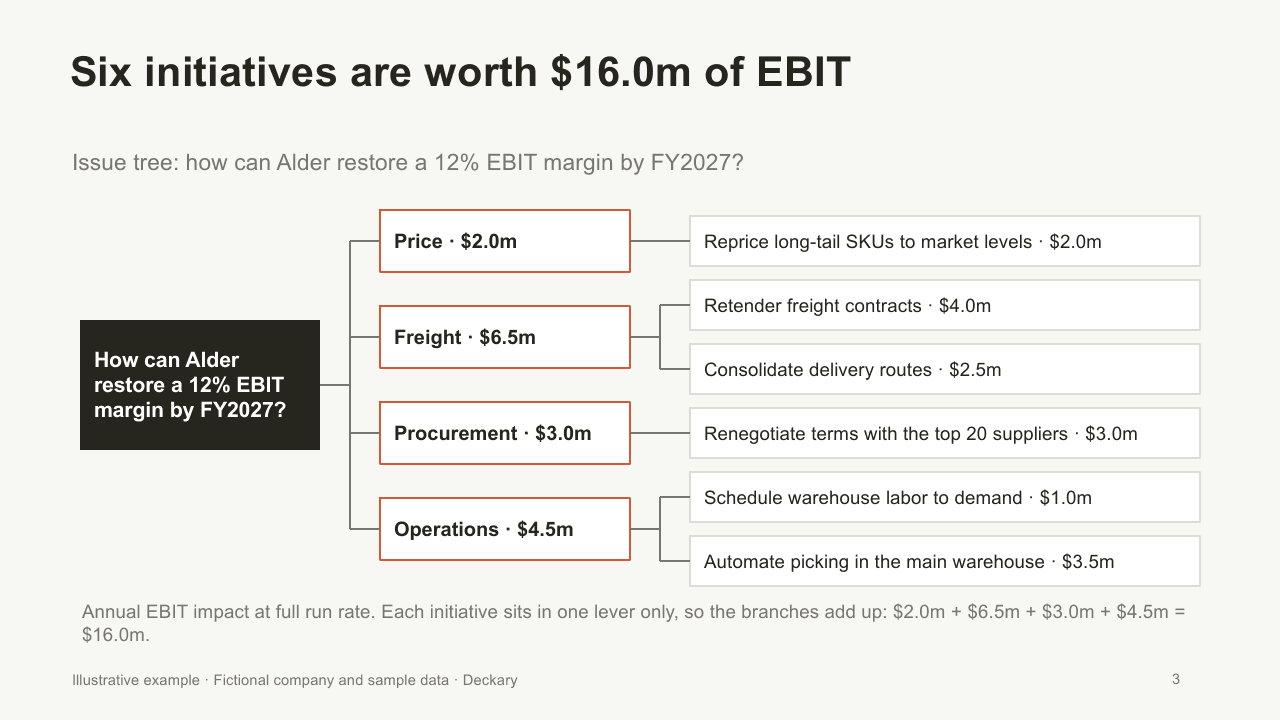
Consulting issue tree splitting a margin question into four levers and six sized initiatives
Actual slide from the filled PPTX. 6 slides in each download.

What you get

  • Six-slide filled consulting deck and a matching blank PPTX
  • Executive summary in situation, complication and recommendation form
  • Issue tree with four levers and six sized initiatives, built from native shapes
  • 2x2 prioritization matrix with a numbered initiative table
  • Native EBIT waterfall chart whose Edit Data workbook recalculates the bridge
  • Next-steps table with owners, impact and first milestones

How to use the PPTX

  1. Download the filled example to see one storyline across all six slides, or start from the blank PPTX.
  2. Write each action title as the answer the slide proves, then replace the bracketed fields.
  3. On the waterfall, use Edit Data: type the start value and each driver as an increase or a decrease. The hidden base bars and the end total recalculate.
  4. Move the numbered circles on the 2x2 matrix and keep the table beside it in the same order.
  5. Paste the slides into your firm or client deck, then change the accent color and font to match its template. Colors and fonts are set directly on each shape.

Inside the filled example

Consulting issue tree splitting a margin question into four levers and six sized initiatives
The key question splits into price, freight, procurement and operations. Each initiative sits in one lever, so the branches add up to $16.0m.
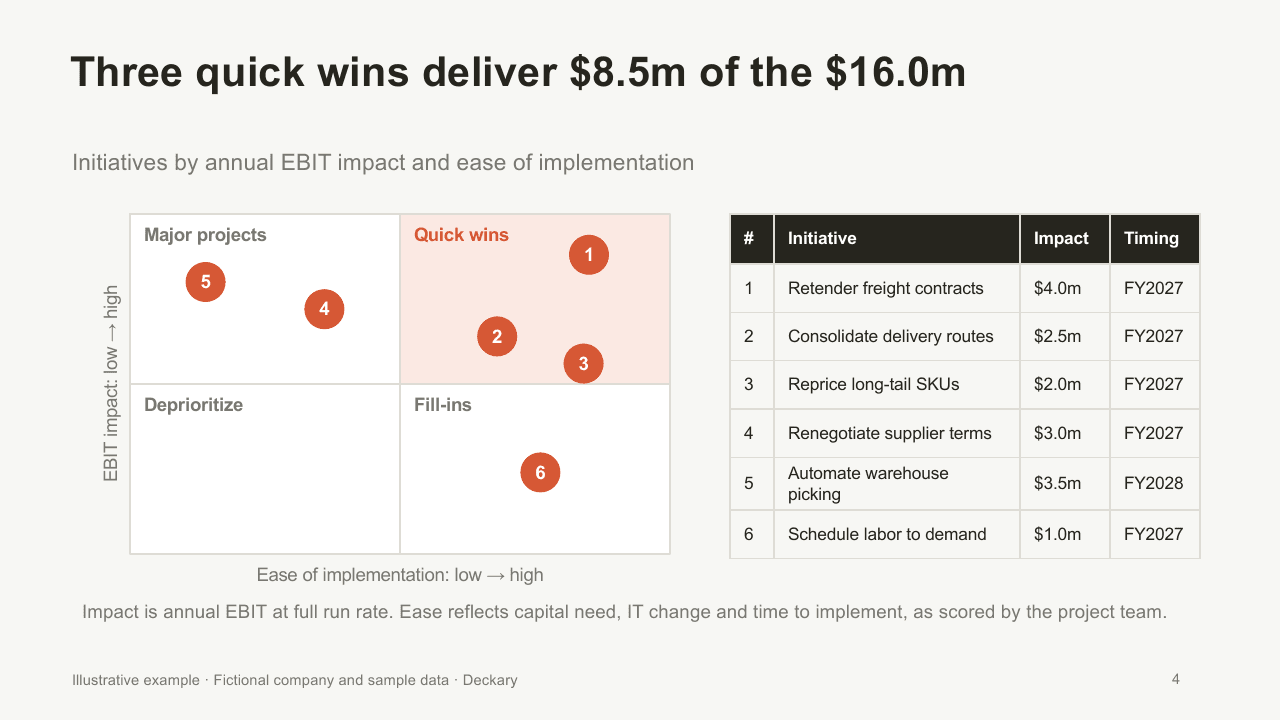
Impact versus ease matrix with three quick wins highlighted and a numbered initiative table
Initiatives are placed by impact and ease. The table beside the matrix carries the values and timing, so the chart stays readable.
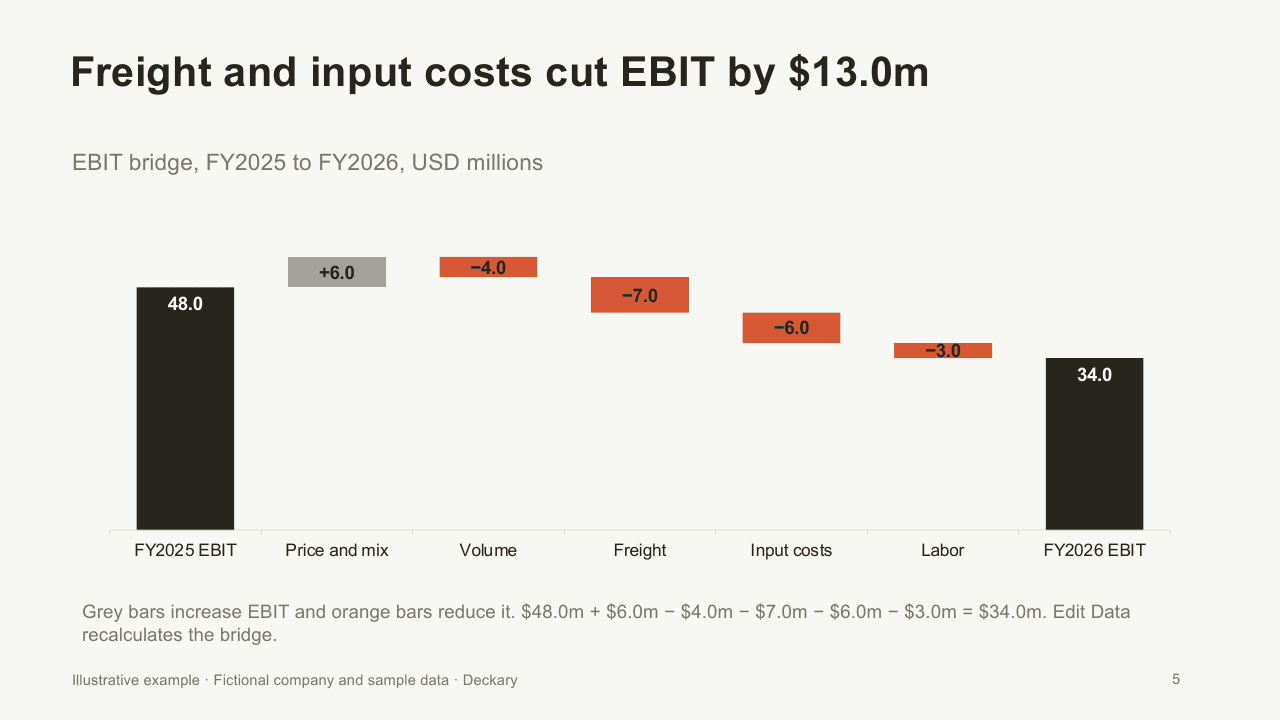
EBIT waterfall chart from $48.0m to $34.0m with increases in grey and decreases in orange
A native chart bridges FY2025 to FY2026 EBIT. Its embedded workbook recalculates the floating bars when you change a driver.

One storyline across six consulting slides

The filled example follows a fictional industrial distributor, Alder Components. Revenue held at $400m, but EBIT fell from $48.0m to $34.0m, so the margin dropped from 12.0% to 8.5%. Each slide answers the next question a steering committee would ask.

  • Executive summary: situation, complication and recommendation, each in two sentences.
  • Issue tree: "How can Alder restore a 12% EBIT margin by FY2027?" split into four levers and six initiatives worth $16.0m.
  • 2x2 matrix: the same six initiatives by impact and ease. Three quick wins are worth $8.5m.
  • Waterfall chart: the EBIT bridge from $48.0m to $34.0m. Freight and input costs explain $13.0m of the decline.
  • Next steps: five initiatives worth $12.5m for approval, with owners and first milestones.

The numbers reconcile across slides, so you can check how an executive summary, an issue tree and a bridge stay consistent when one figure changes.

Use it with your own analysis

Start from the blank PPTX when you already have a storyline. Keep the slide order if your audience expects an answer first, then the structure, the prioritization and the evidence. For guidance on choosing layouts, read the consulting slide templates guide. For the chart itself, see how to build waterfall charts in PowerPoint.

For single layouts, see the executive summary, issue tree and prioritization matrix templates. To study how real firms structure these slides, browse 152 real McKinsey presentations with free PDF links.

Create a report from your own material

Start a new presentation in Deckary's browser editor with your own brief and source files. This creates a new AI report; it does not load the exact downloadable deck. 14-day free trial. No credit card required.

Start for Free

Consulting Slide Starter Pack FAQs

Related templates

Executive Summary Template
Download our free executive summary PowerPoint template. One-page summary slide design used by top consulting firms. Perfect for board presentations.
Prioritization Matrix Template
Download our free prioritization matrix PowerPoint template. Weighted scoring, impact vs urgency, and priority tree formats. Professional consulting design.
Issue Tree Template
Download our free issue tree PowerPoint template. Horizontal and vertical logic tree layouts for consulting problem decomposition. MECE structure.