How to Present to Executives: 8 Strategies That Command Attention
Present to executives with confidence using 8 research-backed strategies. Lead with recommendations, respect their time, speak their language, and drive decisions.
You are five slides into your 30-slide presentation when the CFO interrupts. "What are you recommending?" You planned to build to that answer on slide 23. Now the structure you rehearsed collapses. The room goes quiet, waiting for the point you were supposed to deliver 15 minutes from now.
After delivering presentations to 150+ executive audiences—board meetings, C-suite strategy reviews, and investor pitches—we have tracked what separates presenters who command attention from those who lose the room before finishing slide three. Executive presentations follow different rules than standard presentations. Executives do not want information. They want decisions. They do not value comprehensiveness. They value speed and clarity.
This guide covers eight research-backed strategies for presenting to executives. Whether you are presenting to your company's leadership, a board of directors, or external stakeholders, these techniques ensure your message lands, your recommendation gets heard, and your presentation drives action.
What Makes Executive Presentations Different
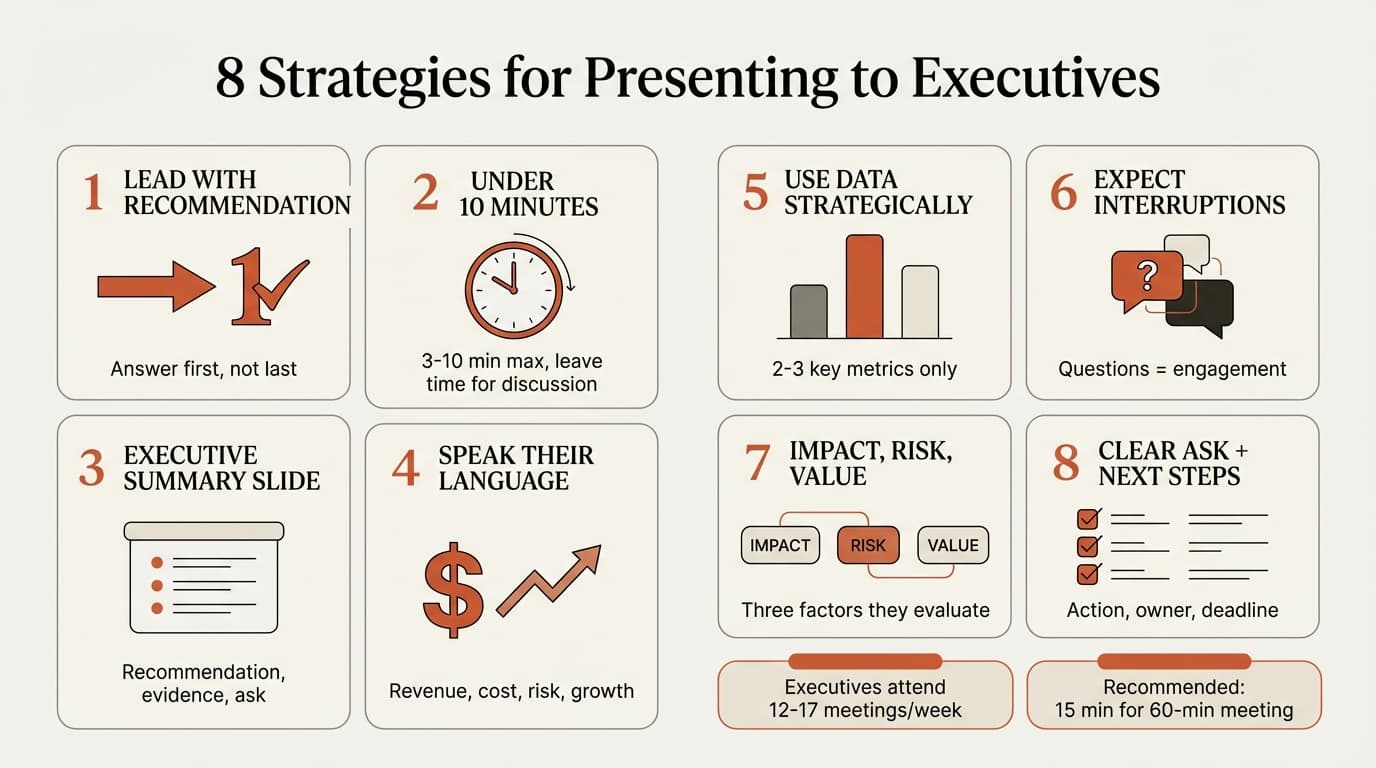
Executive presentations operate under tighter constraints than standard presentations. Time is scarce, attention is limited, and the stakes are higher. Executives attend 12-17 meetings every week—roughly 53% more than the average worker. This meeting load means they prioritize speed over depth and clarity over completeness.
Three factors define effective executive presentations:
Conclusion-first structure. Executives make decisions, not absorb information. They need your recommendation upfront so they can evaluate your logic, challenge assumptions, and ask clarifying questions. Building to a conclusion wastes time and risks losing their attention before delivering the answer.
Concise content. The recommended time for presenting to executives is 3-10 minutes maximum, with time left for discussion. For a 60-minute meeting, a guideline is 15 minutes of presentation covering one to two topics. The rest should be discussion. Executives respond to focused messages, not comprehensive decks.
Strategic language. Executives do not define problems in terms of website traffic, social media engagement, or process efficiency. They define problems in terms of revenue, cost, risk, culture, growth, reputation, effort, and speed. Speaking their language means framing your message in those terms from the first slide.
| Standard Presentation | Executive Presentation |
|---|---|
| Build tension, reveal recommendation on final slide | State recommendation on slide one |
| 20-30 slides covering background, methodology, findings | 5-10 slides covering recommendation, evidence, next steps |
| Speak in functional terms (leads, conversions, tasks) | Speak in business terms (revenue, cost, risk, growth) |
| Present for 30 minutes, take questions at the end | Present for 10 minutes, invite questions throughout |
| Assume passive listening | Expect interruptions and dialogue |
The strategies that follow address each of these differences with specific, actionable methods you can apply before your next executive presentation.
1. Lead with Your Recommendation, Not Background
The single most effective executive presentation technique is stating your conclusion first. Nothing is more frustrating to executives than waiting for a grand storyline to unfold over 75+ slides. They want the answer upfront so they can evaluate whether they agree, identify risks, and ask clarifying questions.
Most presenters structure presentations backward: situation, background, analysis, recommendation. This works for detailed project updates or technical deep dives. It fails with executives. By the time you reach your recommendation, you have lost their attention or used all your allotted time.
The executive pyramid approach flips this structure. Start with your high-level recommendation, then provide supporting evidence only as needed. This respects executives' preference for clarity and allows them to engage with ideas immediately rather than passively waiting for the reveal.
Weak opening: "Today I will walk through our Q4 performance across three regions. First, some background on market conditions in each geography. Then we will review the data by segment. Finally, I will share recommendations for Q1 allocation."
This opening commits three mistakes: it delays the recommendation, promises excessive detail, and does not state what decision is needed.
Strong opening: "We should shift 40% of Q1 budget from the West region to Southeast. West revenue declined 18% despite increased spend, while Southeast exceeded targets by 22% on lower investment. This deck covers three slides: the revenue breakdown by region, the drivers behind each trend, and the reallocation plan with expected ROI."
The strong opening delivers the recommendation in 10 seconds, provides context for the stakes, and previews the structure. The executive immediately knows what they are evaluating.
How to structure your opening:
- State your recommendation or key insight. Make this your first sentence.
- Explain why it matters. Connect the recommendation to a business priority: revenue, cost, risk, or growth.
- Preview your structure. Tell them how many slides and what each covers.
For more on conclusion-first structure, see our guide on the Pyramid Principle.
2. Keep It Under 10 Minutes
Research on executive presentations recommends 3-10 minutes of speaking time, leaving the majority of the meeting for discussion. Executives value dialogue over monologue. If you present for 30 minutes straight, you have eliminated time for the questions, challenges, and decisions that actually move the business forward.
The 10-minute rule forces discipline. You cannot cover everything, so you prioritize ruthlessly. Background goes in the appendix. Methodology stays out entirely unless asked. You focus on the recommendation, the evidence that supports it, and the action required.
How to stay under 10 minutes:
- Limit your deck to 5-10 slides. One slide per minute, maximum.
- Use an executive summary slide. This single slide should state your recommendation, the supporting evidence (2-3 bullets), and your ask.
- Prepare an appendix. Place detailed data, methodology, and background context in backup slides. Reference these only if questions arise.
- Rehearse with a timer. If your presentation runs 12 minutes in practice, cut two slides or consolidate content.
If executives want more detail, they will ask. If they do not, you have respected their time and delivered the decision they needed.
3. Use an Executive Summary Slide
An executive summary slide offers control. Executives love control and knowing how they are about to spend their next 5, 15, or 60 minutes. The summary slide tells them the answer, the evidence, and the ask—all on one slide.
This slide serves as both your opening and your safety net. If an executive joins late or leaves early, they can read the summary and understand your complete message. If the meeting runs short, you can skip the supporting slides and go straight to questions.
What to include on your executive summary slide:
- Your recommendation — What you are proposing or what decision you need
- The evidence — 2-3 key data points that support your recommendation
- The stakes — Why this matters (revenue impact, risk mitigation, competitive advantage)
- Your ask — What you need from this audience (approval, budget, resources, support)
Example executive summary slide:
Recommendation: Shift 40% of Q1 marketing budget from West to Southeast region
Evidence:
- West revenue declined 18% in Q4 despite 25% budget increase
- Southeast exceeded Q4 targets by 22% on 30% lower spend
- Customer acquisition cost in Southeast is $180 vs $420 in West
Impact: Reallocation projects 15% higher ROI and $2.3M additional revenue in Q1
Ask: Approve budget reallocation by March 1 for Q1 execution
This slide delivers everything an executive needs to make a decision. The rest of your deck supports this summary with details.
Continue reading: Eisenhower Matrix · Combo Charts in PowerPoint · Traction Slide
Create an editable presentation in your browser
Turn a prompt or source files into slides you can edit and export to PowerPoint. 10 free AI prompts. No credit card required.
4. Speak in Business Terms, Not Functional Metrics
Executives do not define problems in terms of website visitors, social media followers, or marketing-qualified leads. They define problems in terms of revenue, cost, risk, culture, growth, reputation, effort, and speed. If your presentation does not connect to one of these business drivers, it will not land.
This does not mean abandoning functional metrics. It means translating them into business impact. Marketing qualified leads become projected revenue. Process improvements become cost savings or risk reduction. Feature launches become competitive advantage or customer retention.
How to translate functional metrics into business terms:
| Functional Metric | Business Translation |
|---|---|
| 10,000 new leads generated | $1.2M projected pipeline at 12% close rate |
| Reduced processing time by 40% | $300K annual cost savings in labor hours |
| Launched mobile app feature | Reduced churn risk by 8%, retaining $2.5M ARR |
| Increased social media engagement by 50% | Brand awareness campaign reaching 2M target customers |
| Implemented new data governance policy | Mitigated compliance risk, avoiding potential $5M penalty |
The pattern: start with the business outcome, then provide the functional metric as supporting evidence.
Example of speaking in business terms:
"This automation reduces invoice processing time by 60%, translating to $400K in annual cost savings and freeing up two FTEs to focus on vendor negotiations. The implementation cost is $150K with an 18-month payback period."
Executives care about the $400K savings and the 18-month payback. The 60% efficiency gain is supporting evidence, not the lead message.
5. Use Data Strategically, Not Comprehensively
Senior managers respect data but dislike overload. The goal is not to show every data point that supports your argument. The goal is to show the 2-3 metrics that matter most and frame them in a way that drives the decision.
Simple charts beat complex spreadsheets. Executives process information quickly. A waterfall chart showing revenue bridge components is clearer than a table with 20 rows of variance analysis. A single-metric KPI card is more effective than a dashboard with eight tiles.
How to use data strategically:
- Lead with the insight, not the data. Your slide title should state what the data means: "Southeast region outperformed West by 40% on lower spend," not "Q4 Regional Performance."
- Limit charts to one per slide. If you need two charts to make your point, you likely have two points and need two slides.
- Annotate key data points. Circle or highlight the numbers that support your recommendation. Do not make executives hunt for the insight.
- Use appendix for deep dives. If someone asks for methodology or granular breakdowns, reference backup slides.
For professionals building chart-heavy executive decks, tools like Deckary's chart templates generate consulting-grade visuals—waterfall charts, Mekko charts, and variance analyses—in under 60 seconds. Excel-linked charts update automatically when source data changes, eliminating the manual reformatting work that otherwise consumes hours before board meetings. When charts are easier to build and update, you spend more time on the message and less time on production.
6. Expect Interruptions and Invite Questions
The most effective presentations to senior executives are conversations, not lectures. It is a good rule of thumb to expect interruptions throughout a presentation and to actually invite them. Building in moments to check in with your audience ensures dialogue and allows you to adjust based on their reactions.
Interruptions signal engagement. When an executive asks a question, it means they are evaluating your logic, identifying risks, or considering implications. Presenters who treat questions as disruptions miss the opportunity to address concerns in real time.
How to handle executive interruptions:
- Answer directly, then return to structure. Do not say "I will get to that later" unless the question is explicitly covered on your next slide.
- Acknowledge the question's relevance. "That is exactly the trade-off we evaluated. Here is what we found..."
- Use interruptions to gauge interest. If an executive asks for more detail on a specific point, spend time there. If no one asks about a topic, move on quickly.
- Build in checkpoints. After your summary slide, pause and ask: "Before I walk through the supporting data, are there specific areas you want me to focus on?" This lets executives direct the conversation.
If an executive derails your planned structure with an early question, that is a feature, not a bug. They have told you what matters most. Answer that question thoroughly, then adapt your remaining slides to support that thread.
For more on handling presentation dynamics, see our guide on how to give a presentation.
7. Focus on Three Factors: Impact, Risk, and Value
Executives typically focus on three key factors when evaluating proposals: impact, risk, and value. If your presentation addresses all three explicitly, you have covered the decision criteria that matter most.
Impact: How will this affect the business? Frame impact in terms of revenue growth, cost savings, market share, customer retention, or competitive positioning. Quantify where possible.
Risk: What could go wrong? What are you mitigating or introducing? Executives evaluate trade-offs constantly. Acknowledging risks upfront builds credibility and allows you to frame mitigation strategies.
Value: What benefits does this bring to the organization beyond the immediate impact? This includes strategic positioning, capability building, cultural change, or operational efficiency.
How to structure slides around these three factors:
| Slide | Content |
|---|---|
| Impact slide | Projected revenue, cost savings, or efficiency gains with supporting metrics |
| Risk slide | Identified risks, likelihood, and mitigation plan |
| Value slide | Strategic benefits beyond immediate financials (competitive advantage, capability building) |
Example risk slide:
Key Risks and Mitigation
| Risk | Likelihood | Impact | Mitigation |
|---|---|---|---|
| Vendor delays implementation | Medium | High | Build 4-week buffer into timeline, identify backup vendor |
| Internal adoption below 60% | Low | Medium | Pre-launch training program, executive sponsorship |
| Integration issues with legacy systems | Low | High | Dedicated IT resource, phased rollout approach |
This format acknowledges uncertainty while demonstrating that you have thought through contingencies. Executives respect this level of preparation.
8. End with a Clear Ask and Next Steps
Presentations without explicit calls to action fail to drive decisions. Your final slide should specify exactly what you need from this audience: approval, budget, resources, support, or a decision on competing options.
Executives need to know what you want from them, so specify the decision needed and outline next steps. A table format works best because it assigns ownership and deadlines, eliminating ambiguity.
Example next steps slide:
Recommendation: Approve Q1 Budget Reallocation
| Action | Owner | Deadline | Dependencies |
|---|---|---|---|
| Approve 40% budget shift to Southeast | CFO | March 1 | Board notification |
| Finalize Southeast campaign plan | Marketing VP | March 5 | Budget approval |
| Reallocate West headcount to Southeast | Operations Director | March 10 | HR coordination |
| Launch Southeast campaign | Marketing VP | March 15 | Campaign plan approval |
This removes ambiguity. Everyone knows what decision is needed, who owns each action, and when it happens.
If you are not asking for a decision, your presentation is an update, not a strategy discussion. Updates can go in an email. Reserve executive presentation time for decisions that require discussion, trade-off evaluation, or cross-functional coordination.
Putting Executive Presentation Strategies Into Practice
Presenting to executives is not about charisma or stage presence. It is about structure, clarity, and respect for their time. The eight strategies in this guide work because they align with how executives process information and make decisions.
Start with these three changes for your next executive presentation:
- Lead with your recommendation on slide one. State what you are proposing, why it matters, and what you need. Do not build to a reveal.
- Cut your deck to 5-10 slides. If you have 20 slides, you have too much content. Move details to the appendix.
- End with a clear ask and next steps. Specify the decision needed, who owns each action, and the deadline.
The rest follows from there. Use an executive summary slide, speak in business terms, limit data to what drives the decision, and invite questions throughout.
Executive presentations succeed when structure and preparation replace length and comprehensiveness. Get the opening right, respect their time, and frame your message in terms they care about—revenue, cost, risk, and growth. When presentations are concise and decision-focused, executives engage, ask questions, and drive action.
Key Takeaways
- Lead with your recommendation, not background. State your conclusion on slide one using the executive pyramid approach. Executives want the answer upfront so they can evaluate your logic and ask questions.
- Keep presentations under 10 minutes. Limit your deck to 5-10 slides. Leave time for discussion. Executives value dialogue over monologue.
- Use an executive summary slide. Include your recommendation, 2-3 key evidence points, the business impact, and your specific ask. This slide offers control and ensures your message lands even if time runs short.
- Speak in business terms. Frame everything in terms of revenue, cost, risk, culture, growth, reputation, effort, or speed. Translate functional metrics into business outcomes.
- Use data strategically, not comprehensively. Show 2-3 key metrics that drive the decision. Simple charts beat complex spreadsheets. Move detailed data to the appendix.
- Expect and invite interruptions. Questions signal engagement. Answer directly, then return to your structure. Build in checkpoints to let executives direct the conversation.
- Address impact, risk, and value. These are the three factors executives evaluate. Quantify impact, acknowledge risks with mitigation plans, and explain strategic value beyond immediate financials.
- End with a clear ask and next steps. Specify the decision needed, assign ownership, and set deadlines. Presentations without explicit calls to action fail to drive decisions.
- Avoid common mistakes. Do not spend five minutes on background, read from slides, overwhelm with data, or end without a clear ask. Structure and preparation beat length and comprehensiveness.
Presenting to executives is a distinct skill. Master these eight strategies and your presentations will command attention, drive decisions, and respect the constraints of busy leadership schedules.
Sources
- How to Present to Executives | Prudent Pedal
- 5 Tips for Presenting To C-Level Executives | Presentation Company
- How to Present to Executives Without Losing Their Attention | Verdana Bold
- 10 Tips For Impressive Presentations To Senior Leadership And Executives | Moxie Institute
- How to Create Slides That Suit Your Superiors: 11 Tips | MIT Sloan Management Review
- How to make High-Stakes Executive Presentations | SlideUpLift
- Tips to craft and nail your upcoming executive presentation | Duarte
- Presenting To Executives - How To Impress - 8 Expert Tips | Benjamin Ball
- 4 strategies for presenting to busy executives | LeadDev
- Developing Effective Presentation Skills | International Journal of Management Research
Create an editable presentation in your browser
Turn a prompt or source files into slides you can edit and export to PowerPoint. 10 free AI prompts. No credit card required.